
| Tested on | RHEL 10.2 (Coughlan) |
|---|---|
| Package | Wireshark 4.4.2OpenSSL 3.5.5curl 8.12.1tcpdump 4.99.4 |
| Applies to | Any TLS 1.2 or TLS 1.3 capture opened in Wireshark 4.x on Linux, Windows, or macOS |
| Privilege | Root or sudo to capture packets. A normal user can open the PCAP and load the key log. |
| Scope | How a normal TLS 1.3 handshake differs from mutual TLS in Wireshark, which messages prove the client authenticated, and why CertificateRequest, the client certificate, and CertificateVerify disappear after ServerHello until the handshake is decrypted. Includes capturing that handshake with a matching key log. Does not cover RSA private-key decryption or alert-by-alert failure diagnosis. |
| Related guides | Decrypt HTTPS traffic in Wireshark Troubleshoot TLS failures in Wireshark Mutual TLS authentication Create a client and server certificate Wireshark tutorial |
Use Wireshark to tell a normal TLS handshake from mutual TLS. In this article, normal TLS means the common certificate-based case: the server authenticates to the client, and the client does not send a certificate. In mutual TLS the server also asks for a client certificate and checks that the client holds the matching private key.
TLS 1.3 encrypts every handshake message after ServerHello. A capture with no session secrets still shows ClientHello and ServerHello, then Application Data. Load a key log file when you need to read the certificate exchange. An RSA server private key does not decrypt this TLS 1.3 traffic.
Key takeaways
- To identify mTLS in Wireshark, look for the server's
CertificateRequest, followed by the client'sCertificateandCertificateVerify. That sequence shows that the server requested client authentication and the client responded with a certificate and proved possession of its private key. - If you only see
ClientHello,ServerHello, andApplication Datain TLS 1.3, that does not mean mTLS was not used. TLS 1.3 encryptsCertificateRequest, certificates, andCertificateVerifyafterServerHello. - Load the TLS session key log in Wireshark before deciding that the client certificate is missing. After decryption, filter with
tls.handshake.type == 13forCertificateRequest,11forCertificate, and15forCertificateVerify. - In normal certificate-based TLS, only the server authenticates with a certificate. In mTLS, both sides authenticate with certificates.
CertificateRequestalone proves only that the server asked for a client certificate. A successful client-authentication exchange also includes the client'sCertificateVerifyand completion of the handshake.
Capture environment
The screenshots in this article use a local OpenSSL setup so the TLS and mTLS handshakes are easy to compare.
| Component | Details |
|---|---|
| Wireshark | 4.4.2 |
| TLS library | OpenSSL 3.5.5 |
| Server name | localhost |
| Normal TLS | Server certificate authentication only |
| mTLS | Server certificate + client certificate |
| Client certificate | CN=lab-client, issued by Lab CA |
| TLS versions compared | TLS 1.3 and TLS 1.2 |
The exact IP addresses, certificate names, and ports in your environment will differ. Focus on the handshake messages and their direction: CertificateRequest from the server, then the client's Certificate and CertificateVerify.
How an mTLS handshake differs from normal TLS
At the packet level, mTLS is a regular TLS handshake in which both sides authenticate with certificates. The server still sends its certificate, but it also sends CertificateRequest, asking the client to authenticate. Certificate setup and which CA the server trusts are covered in mutual TLS authentication. In TLS 1.3, everything after ServerHello is encrypted on the wire.
Client                                          Server

ClientHello                      ────────────>
                                 <────────────  ServerHello
                                 <────────────  EncryptedExtensions
                                 <────────────  CertificateRequest
                                 <────────────  Certificate (server)
                                 <────────────  CertificateVerify (server)
                                 <────────────  Finished

Certificate (client)             ────────────>
CertificateVerify (client)       ────────────>
Finished ────────────>ClientHelloandServerHellonegotiate the TLS version, cipher suite, and other connection settings.CertificateRequestmeans the server is asking the client to authenticate with a certificate.Certificate (server)andCertificateVerify (server)authenticate the server.Certificate (client)sends the client's certificate, whileCertificateVerify (client)proves the client holds the matching private key.Finishedconfirms that each side has the expected handshake state and completes the handshake.
CertificateRequest only shows that the server asked for client authentication. The client Certificate followed by CertificateVerify is what shows that the client authenticated. In normal TLS, CertificateRequest is absent and the client sends Finished without a certificate.
Wireshark filters for TLS and mTLS
Type these in the display filter bar under the toolbar, then press Enter. A green bar means the expression is valid, and a red bar means the syntax is wrong. Each handshake message has a type number, and the filters use that number.
| What you want to see | Display filter |
|---|---|
| Any TLS record | tls |
| ClientHello or ServerHello | tls.handshake.type == 1 || tls.handshake.type == 2 |
| Certificate | tls.handshake.type == 11 |
| CertificateRequest | tls.handshake.type == 13 |
| CertificateVerify | tls.handshake.type == 15 |
| Certificate Required alert | tls.alert_message.desc == 116 |
On TLS 1.3, every filter except the first two matches only after Wireshark can decrypt the handshake. Without a key log they match nothing, even when mutual TLS succeeded. Some OpenSSL 3 clients send the client certificate as handshake type 25 (Compressed Certificate) instead of type 11, so check type 25 as well when type 11 shows only the server certificate.
If your capture holds many connections, right-click a Client Hello packet and choose Conversation Filter, then TCP. Wireshark then shows only that one connection.
Capture the packets and key log together
TLS 1.3 certificate messages can be decrypted only when Wireshark has the session secrets for that connection. If you need to create a new capture, start key logging before making the connection and capture that same connection. A key log from an unrelated TLS session will not decrypt the packets.
Create the TLS key log
For Chrome or Firefox, set SSLKEYLOGFILE before starting the browser:
export SSLKEYLOGFILE="$HOME/tls.keys"Completely close an already running browser, then start it from the same environment. The browser must know about SSLKEYLOGFILE when it creates the TLS connection.
In the OpenSSL 3.5 environment used for this article, curl can create the key log for a single connection:
SSLKEYLOGFILE="$HOME/tls.keys" curl -sS --noproxy '*' \
  -o /dev/null https://example.com/
If an HTTPS proxy is configured, --noproxy '*' makes curl connect directly to the target server rather than creating the TLS session with the proxy.
If you need to test a client-certificate connection, openssl s_client can write the key log directly:
openssl s_client -connect example.com:443 -servername example.com \
  -keylogfile "$HOME/tls.keys" \
  -cert client.crt -key client.key </dev/null
Omit -cert and -key when the connection does not use a client certificate. </dev/null ends the session after the handshake instead of waiting for input.
Capture the same connection
Start Wireshark on the interface that carries traffic to the server, then make one new connection from the client. Stop and save the capture after the connection completes.
You can also capture with tcpdump:
sudo tcpdump -i enp0s3 -U -w "$HOME/tls.pcap" host example.com and port 443Replace enp0s3 and example.com with your interface and server. Start the capture first, then run the curl or s_client command above.
To confirm that the key log contains TLS 1.3 handshake secrets:
grep -c SERVER_HANDSHAKE_TRAFFIC_SECRET "$HOME/tls.keys"A value of 1 or more means the file contains TLS 1.3 handshake secrets. It does not prove that they belong to the connection in your PCAP. Another session's key log can contain the same label. Load the file in Wireshark. If it belongs to the captured connection, Wireshark decodes messages such as CertificateRequest, Certificate, and CertificateVerify.
Keep the key log private: anyone with both the key log and the corresponding capture can decrypt those TLS sessions.
Load the key log for a TLS 1.3 capture
Open $HOME/tls.pcap, or any capture whose key log was written during that same handshake.
To load it in Wireshark:
- Open your capture with File, then Open.
- Choose Edit, then Preferences, expand Protocols, and select TLS. On macOS the menu is Wireshark, then Preferences.
- Next to (Pre)-Master-Secret log filename, click Browse, select the key log file, and click OK.
Wireshark redraws the packet list, and the encrypted handshake messages appear by name. To go back to the encrypted view, clear that field and click OK. The tshark commands below set the same preference with -o tls.keylog_file:<file>. The capture and key log names in them are from my captures, so replace them with your own. Decrypt HTTPS traffic in Wireshark covers other ways to get session secrets, for example from servers.
Analyze a normal TLS 1.3 handshake
Start with a connection where the client does not authenticate. List the hello messages:
tshark -r tls13-normal.pcap -o tls.keylog_file:tls13-normal.keys \
  -Y 'tls.handshake.type == 1 || tls.handshake.type == 2' \
-T fields -e frame.number -e tls.handshake.type -e _ws.col.Info4 1 Client Hello (SNI=localhost)
6 2,8,11,15,20 Server Hello, Change Cipher Spec, Encrypted Extensions, Certificate, Certificate Verify, FinishedFrame 4 is only ClientHello (handshake type 1). Frame 6 is the server's first flight: ServerHello (2), EncryptedExtensions (8), Certificate (11), CertificateVerify (15), and Finished (20). There is no type 13. This connection did not ask the client for a certificate. The Change Cipher Spec shown in this capture is a TLS 1.3 compatibility message for older middleboxes. It does not change the negotiated cipher, so you can ignore it when identifying TLS versus mTLS.
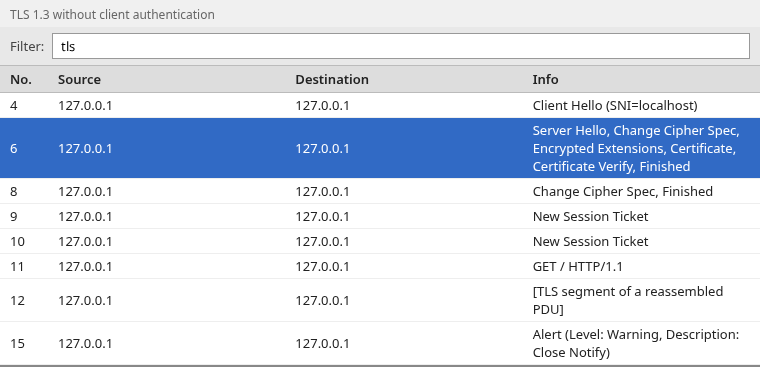
The client answer in frame 8 is Change Cipher Spec, Finished, with no client certificate.
ClientHello
The supported_versions extension in ClientHello lists the TLS versions the client can use. In Wireshark, select frame 4 and expand Transport Layer Security, then Handshake Protocol: Client Hello, then Extension: supported_versions. The same value from tshark:
tshark -r tls13-normal.pcap -Y 'frame.number==4' -T fields -e tls.handshake.extensions.supported_version0x0304,0x03030x0304 is TLS 1.3 and 0x0303 is TLS 1.2. The client offered both. The server picks one in its ServerHello.
ServerHello
The negotiated version is the supported_versions extension inside ServerHello, not the version field in the record header. In TLS 1.3 that header still says TLS 1.2 (0x0303), so older firewalls and proxies do not drop the packet. Read the real version and the cipher suite from frame 6:
tshark -r tls13-normal.pcap -o tls.keylog_file:tls13-normal.keys \
  -Y 'frame.number==6' -T fields -e tls.handshake.extensions.supported_version \
-e tls.handshake.ciphersuite0x0304 0x1302The server selected TLS 1.3 (0x0304) and cipher suite 0x1302, which is TLS_AES_256_GCM_SHA384.
Server authentication
Still on frame 6, handshake type 11 is the server certificate and type 15 is the server's CertificateVerify. The server certificate names localhost. CertificateVerify is the server's signature over the handshake, so the client can check that this server holds the private key for that certificate. The same two messages appear later from the client only when the server sent CertificateRequest.
Analyze an mTLS handshake
Now open the mutual TLS capture and load its own key log. The server flight is longer than in the normal TLS capture because it includes CertificateRequest.
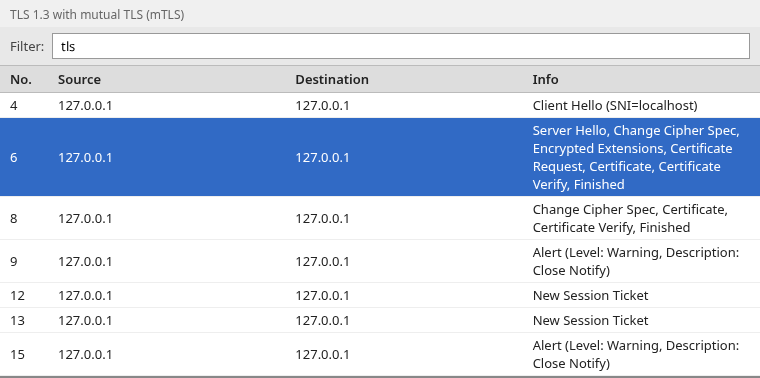
Frame 6 now lists Certificate Request between Encrypted Extensions and the server Certificate. Frame 8 is the client flight: Certificate, Certificate Verify, and Finished.
CertificateRequest: server asks for client identity
CertificateRequest (handshake type 13) is how you know the server asked for a client certificate. It does not, by itself, prove the client authenticated. Filter for it after the key log is loaded:
tshark -r tls13-mtls.pcap -o tls.keylog_file:tls13-mtls.keys \
-Y 'tls.handshake.type == 13' -T fields -e frame.number -e _ws.col.Info6 Server Hello, Change Cipher Spec, Encrypted Extensions, Certificate Request, Certificate, Certificate Verify, FinishedOne frame matches, and its Info column includes Certificate Request. The same filter on the normal TLS capture matches nothing.
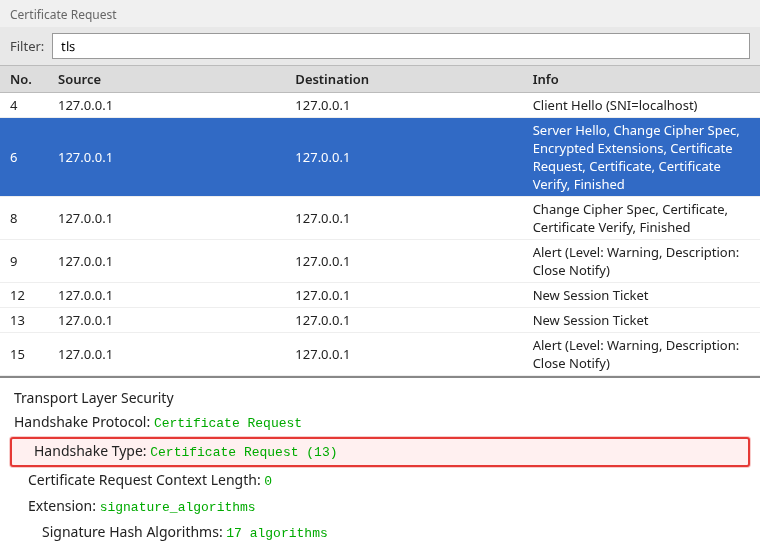
Select frame 6, expand Transport Layer Security, then Handshake Protocol: Certificate Request. Handshake Type is Certificate Request (13). The signature_algorithms extension lists the signature types the server will accept on the client's CertificateVerify.
Client Certificate: client sends its certificate
The client's certificate is the Certificate handshake inside the client flight, frame 8. The server certificate is the earlier Certificate in frame 6, so check which side sent the packet. Select frame 8, expand Transport Layer Security, then Handshake Protocol: Certificate. Under it, expand Certificates, the Certificate line below it, signedCertificate, and subject.
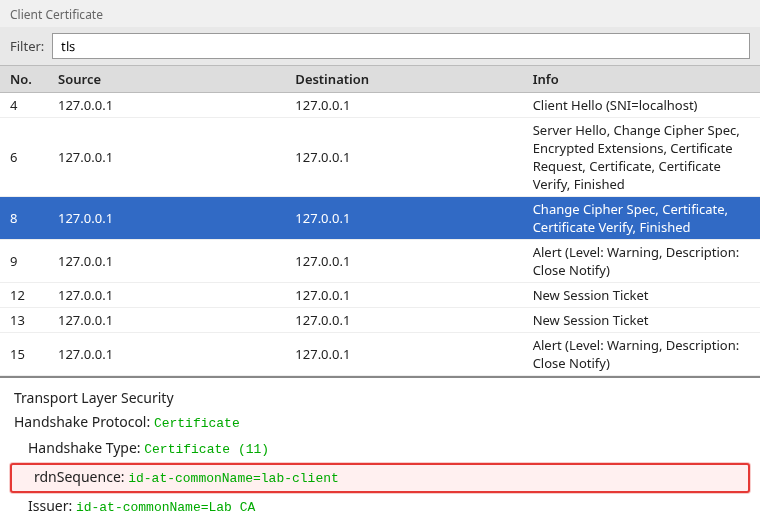
The subject is id-at-commonName=lab-client, the name the certificate belongs to. The issuer is Lab CA, the CA the server trusts for client certificates.
CertificateVerify: client proves private-key possession
A certificate names a subject, and anyone can copy a certificate. CertificateVerify proves the client also holds the private key for it. The client signs a hash of the handshake messages so far, and the server checks that signature against the public key in the client certificate.
tshark -r tls13-mtls.pcap -o tls.keylog_file:tls13-mtls.keys \
-Y 'tls.handshake.type == 15' -T fields -e frame.number -e _ws.col.Info6 Server Hello, Change Cipher Spec, Encrypted Extensions, Certificate Request, Certificate, Certificate Verify, Finished
8 Change Cipher Spec, Certificate, Certificate Verify, FinishedFrame 6 is the server's CertificateVerify. Frame 8 is the client's. Select frame 8, expand Transport Layer Security, then Handshake Protocol: Certificate Verify.
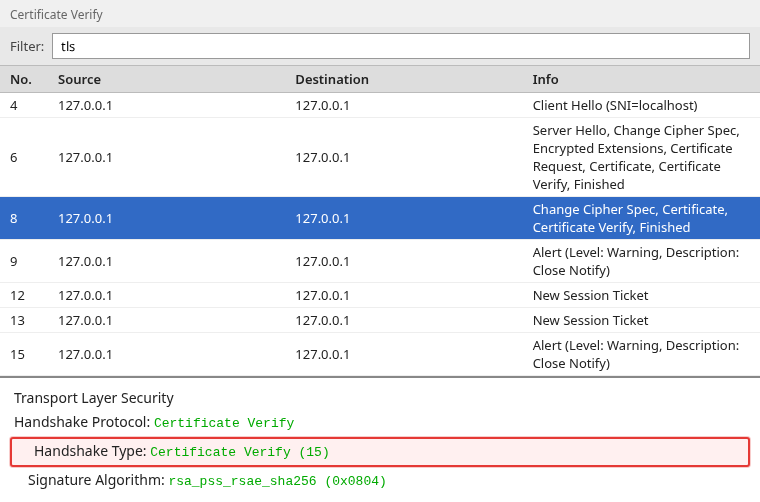
Handshake Type is Certificate Verify (15). Signature Algorithm is rsa_pss_rsae_sha256 (0x0804), which matches the RSA client key used in this capture. In a complete TLS 1.3 client-authentication exchange, a non-empty client Certificate is followed by CertificateVerify. If you see the certificate but no client CertificateVerify, client authentication has not finished, or the capture is not fully decrypted.
How to tell TLS and mTLS apart in Wireshark
Decrypt the handshake first. Then compare the server's first flight and the client's answer.
| Check | Normal TLS | Mutual TLS |
|---|---|---|
tls.handshake.type == 13 |
No packets | CertificateRequest in the server flight |
| Client flight after ServerHello | Finished only |
Certificate, then CertificateVerify, then Finished |
| Client certificate subject | Absent | Present, here CN=lab-client |
The server certificate appears in both captures. Call the session mutual TLS when the server's CertificateRequest is followed by a client Certificate and the client's CertificateVerify. CertificateRequest alone only means the server asked.
Why the client certificate is missing in TLS 1.3 captures
This is the same mutual TLS capture with the key log field cleared. The handshake is still in the file. Wireshark can no longer read it.
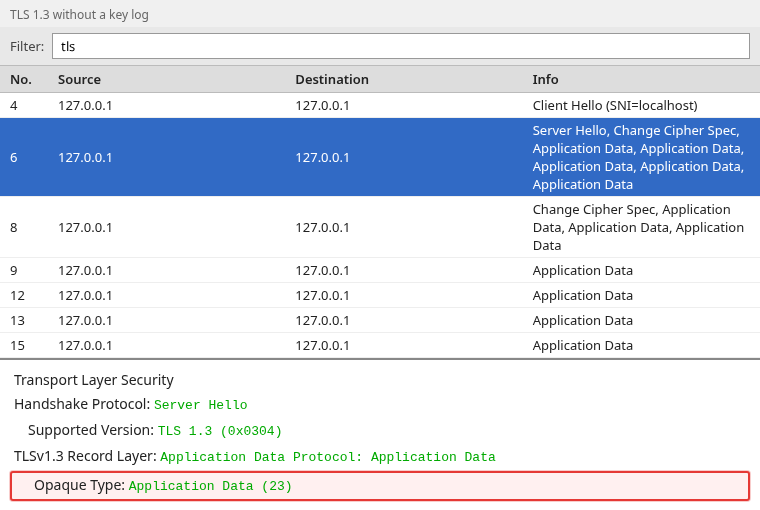
Frame 4 is still Client Hello. Frame 6 still shows Server Hello, then several Application Data records. Certificate Request is gone from the Info column because those records are encrypted. The CertificateRequest filter without a key log:
tshark -r tls13-mtls.pcap -Y 'tls.handshake.type == 13' -T fields -e frame.number -e _ws.col.Infotshark prints no lines. The filter is valid, but the messages it looks for are encrypted, so there is nothing to match. The same happens for types 11 and 15. A successful mutual TLS connection can look like an ordinary TLS 1.3 session until you decrypt it.
TLS 1.3 encrypts EncryptedExtensions, CertificateRequest, both Certificate messages, both CertificateVerify messages, and Finished. ClientHello and ServerHello stay readable, including the server name (SNI) and the selected version. In the detail pane, the encrypted records show Opaque Type Application Data (23). TLS 1.3 gives every encrypted record that outer type, which is why the Info column says Application Data even for handshake messages.
Load the key log again and frame 6 switches back to Certificate Request, Certificate, Certificate Verify, Finished. An RSA server private key cannot do this for TLS 1.3. In TLS 1.3 both sides derive the session secret with a Diffie-Hellman key exchange, and the secret itself never crosses the wire.
TLS 1.2 vs TLS 1.3 in Wireshark
Older captures may still use TLS 1.2. This mutual TLS capture was forced to TLS 1.2 and opened with no key log.
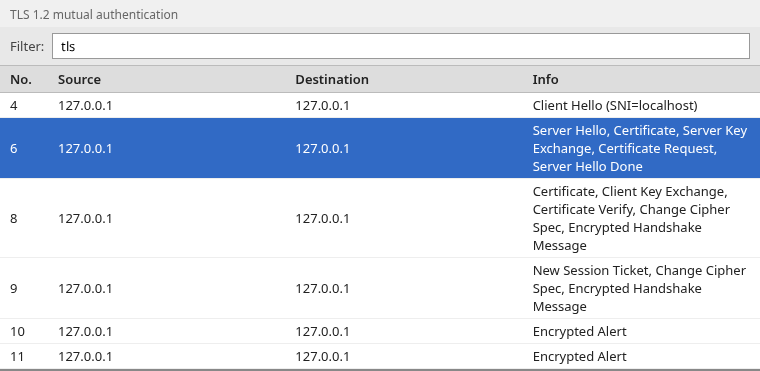
Frame 6 shows Certificate, Server Key Exchange, Certificate Request, and Server Hello Done without decryption. Frame 8 shows the client Certificate, Client Key Exchange, and Certificate Verify. Only Finished is encrypted, which Wireshark labels Encrypted Handshake Message.
tshark -r tls12-mtls.pcap -Y 'tls.handshake.type == 13 || tls.handshake.type == 11' \
-T fields -e frame.number -e tls.handshake.type -e _ws.col.Info6 2,11,12,13,14 Server Hello, Certificate, Server Key Exchange, Certificate Request, Server Hello Done
8 11,16,15 Certificate, Client Key Exchange, Certificate Verify, Change Cipher Spec, Encrypted Handshake MessageTypes 13 and 11 are visible with no key log. On TLS 1.3 the same messages stay encrypted until you load session secrets.
| TLS 1.2 | TLS 1.3 | |
|---|---|---|
| Visible before decryption | Most handshake messages, including certificates | ClientHello, ServerHello, and then encrypted records |
| Key exchange messages | ServerKeyExchange and ClientKeyExchange |
Carried inside the hello messages |
| End of the server hello flight | ServerHelloDone |
Removed |
| Certificate messages | Usually readable on the wire | Encrypted after ServerHello |
What it looks like when the client sends no certificate
If the server requires a client certificate and the client has none, the handshake fails. On the client side, curl reported (56) ... tlsv13 alert certificate required. In this decrypted TLS 1.3 capture of that failure, the client answers CertificateRequest with an empty Certificate and no CertificateVerify:
tshark -r tls13-nocert.pcap -o tls.keylog_file:tls13-nocert.keys \
-Y tls -T fields -e frame.number -e _ws.col.Info4 Client Hello (SNI=localhost)
6 Server Hello, Change Cipher Spec, Encrypted Extensions, Certificate Request, Certificate, Certificate Verify, Finished
8 Change Cipher Spec, Certificate, Finished
9 GET / HTTP/1.1
10 Alert (Level: Fatal, Description: Certificate Required)Frame 8 is the client flight. Its Certificate message has a Certificates Length of 0, so the client sent no certificate. Frame 10 is the server's fatal Certificate Required alert, and tls.alert_message.desc == 116 finds it directly. Without the key log, frames 8 to 10 show Application Data in place of these messages, because TLS 1.3 encrypts the alert too.
Some servers only request a client certificate and continue without one. In that case you see the same empty Certificate, but no alert, and the connection carries on. An empty client Certificate means the client did not authenticate, even when the handshake completes. Alert codes and other failed handshakes are covered in troubleshoot TLS failures in Wireshark.
Troubleshooting
| Symptom | Likely cause | Fix |
|---|---|---|
Mutual TLS worked, but CertificateRequest is missing |
TLS 1.3 handshake is still encrypted | Load the key log from that client, then use tls.handshake.type == 13 |
| Type 11 shows only the server certificate | You opened the server flight, or the client sent a compressed certificate | Open the client flight and check handshake type 25 as well as type 11 |
Key log is set and the handshake stays Application Data |
The file is from a different session, or it has no SERVER_HANDSHAKE_TRAFFIC_SECRET lines |
Capture again while the client writes its key log |
Client Certificate is present but empty |
The client had no certificate to send | Check the client certificate configuration, then look for a Certificate Required alert |
Summary
A normal TLS 1.3 handshake authenticates the server. Mutual TLS adds CertificateRequest from the server and a client Certificate plus CertificateVerify. Those three messages show that the server asked for a client identity and that the client proved it holds the private key.
On TLS 1.3 they are encrypted as soon as ServerHello finishes. An undecrypted capture can look like a plain TLS session with only ClientHello, ServerHello, and Application Data. Load the client's key log before you decide the client certificate is missing. TLS 1.2 still shows those messages in the clear. When the client sends an empty Certificate, it did not authenticate, and a server that requires a certificate ends the handshake with Certificate Required.
References
- RFC 9846: The Transport Layer Security (TLS) Protocol Version 1.3 — current TLS 1.3 specification; handshake messages after ServerHello are encrypted
- Wireshark TLS wiki — key log decryption for TLS 1.3
- openssl-s_server —
-Verify,-CAfile, and-tls1_3 - openssl-s_client —
-cert,-keylogfile, and-no_tx_cert_comp
Frequently Asked Questions
How do I confirm that mTLS actually succeeded in Wireshark?
After you decrypt a TLS 1.3 handshake, look for the server's CertificateRequest, a non-empty client Certificate, the client's CertificateVerify, and a completed Finished exchange. CertificateRequest alone only proves that the server asked for a client certificate. It does not prove that the client authenticated.
Why can't I see the server or client certificate in a TLS 1.3 capture?
TLS 1.3 encrypts handshake messages after ServerHello. Certificate, CertificateRequest, and CertificateVerify are inside those encrypted records. Wireshark shows Application Data until you load a key log from the client that made the connection.
Why is CertificateRequest missing when mutual TLS succeeded?
The server sent it, and TLS 1.3 protected it. After the key log is loaded, filter with tls.handshake.type == 13. If that still matches nothing, the server did not request a client certificate on that connection.
Is mutual TLS a different protocol from TLS?
No. Mutual TLS is TLS with certificate authentication turned on for both ends. You identify it by CertificateRequest and by the client's CertificateVerify, not by a separate protocol name in the packet list.
Does the RSA server private key decrypt a TLS 1.3 handshake?
No. TLS 1.3 does not use RSA key transport. Wireshark needs session secrets from a key log file. A server private key can only decrypt older RSA key-exchange handshakes, and only when that cipher was actually used.
What does tls.handshake.type 13 mean?
Handshake type 13 is CertificateRequest. The server is asking the client to send a certificate. Type 11 is Certificate, and type 15 is CertificateVerify.
The record version says TLS 1.2. Is the session TLS 1.2?
Not by itself. TLS 1.3 keeps the record version at 0x0303 so older devices will forward the packet. Read the supported_versions extension in ServerHello. 0x0304 means the peers negotiated TLS 1.3.
