
| Tested on | RHEL 10.2 (Coughlan) |
|---|---|
| Package | Wireshark 4.4.2tcpdump 4.99.5 |
| Applies to | Any host with Wireshark for offline PCAP analysis |
| Privilege | Normal user for PCAP analysis; sudo to capture live ARP on an interface |
| Scope | Finding duplicate IPv4 addresses from ARP in Wireshark. Does not cover full DHCP server administration. |
| Related guides | Wireshark tutorial Detect rogue DHCP server with Wireshark Wireshark IP filters cheat sheet TTL in Wireshark — TCP RST source |
Two independently configured hosts on the same LAN normally should not claim the same IPv4 address. When they do unexpectedly, ARP traffic exposes the conflict and Wireshark can flag it.
Start with the filters below, identify both MAC addresses, then trace each MAC to a switch port or DHCP lease. Wireshark proves that conflicting IP-to-MAC mappings appeared in the capture; your switch, DHCP, and address-management tools help determine whether that mapping change is an actual duplicate-IP misconfiguration or expected behavior.
Wireshark duplicate IP filters
| Goal | Filter or menu |
|---|---|
| Frames where Wireshark detected a duplicate | arp.duplicate-address-detected |
| Earlier frame tied to the conflicting mapping | arp.duplicate-address-frame |
| All ARP from the conflicted IP | arp.src.proto_ipv4 == <ip> |
| Fast GUI check | Analyze → Expert Information — look for Duplicate IP address configured |
Wireshark flags an address when ARP associates the same IPv4 with different MAC addresses.
Method 1 — Expert Information
Open the capture with File → Open, then choose Analyze → Expert Information. You can also click the small coloured circle at the bottom-left corner of the Wireshark window.
The Expert Information window groups everything Wireshark noticed by severity: Error, Warning, Note, and Chat. Look in the Warning group for an entry such as:
Warning | ARP | Duplicate IP address configured (192.168.50.10)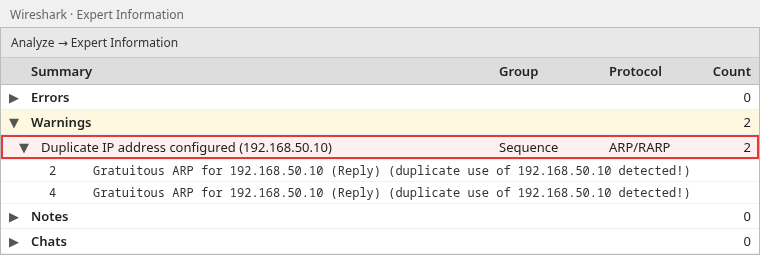
Click the arrow next to that entry to expand it and list the packets involved. In this capture the warning comes from frames 2 and 4. Click a packet number, and the main window jumps to that frame.
This helps when you do not know the filter name yet.
Method 2 — Filter duplicate address frames
Click in the display filter bar above the packet list, the box that says Apply a display filter. Type the filter below and press Enter. The bar turns green when the filter is valid:
arp.duplicate-address-detected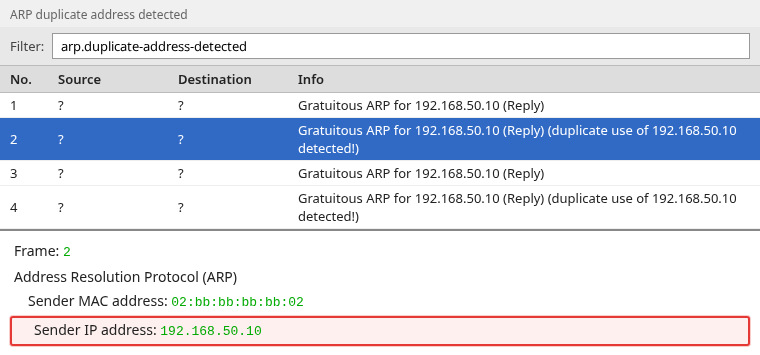
The Info column shows which IP triggered the warning.
arp.duplicate-address-detected vs arp.duplicate-address-frame
arp.duplicate-address-detected— marks the frame where Wireshark detected that the IP was now being used by a different MAC address.arp.duplicate-address-frame— references the earlier frame where Wireshark previously saw that same IP associated with another MAC address.
Use both when you need to compare the two MAC addresses side by side.
Identify both devices claiming the IP
Filter all ARP announcements for the conflicted address. Replace 192.168.50.10 with the IP address from your own warning:
arp.src.proto_ipv4 == 192.168.50.10To make the conflict easier to compare, expand the ARP header in one packet, right-click Sender IP address and Sender MAC address, and choose Apply as Column for each field.
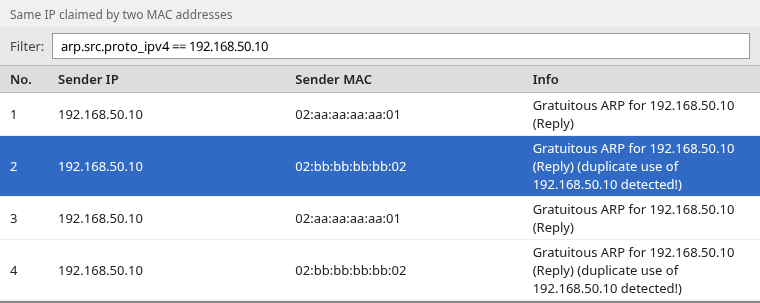
In the lab capture, 192.168.50.10 appears with two different source MAC addresses. That is the evidence you need before touching switch or DHCP configuration.
These packets are gratuitous ARP announcements: a host advertises its own IP-to-MAC mapping without waiting for another host to ask. In this lab, two different MAC addresses advertise the same IP, which is why Wireshark detects a conflict.
What to do after you find two MACs
      Duplicate IP detected
                ↓
     Two MAC addresses found
                ↓
   Map each MAC (OUI, DHCP lease, CAM table)
                ↓
   Decide static vs DHCP assignment
                ↓
        Remove the duplicate
                ↓
   Capture again — only one MAC should remain
Practical next steps:
- Check the MAC OUI — the first part of a MAC address can often indicate the network-interface manufacturer.
- Check the DHCP lease table to see whether either MAC was assigned the conflicted IP by DHCP.
- Check the switch CAM/forwarding table — this maps learned MAC addresses to switch ports and can help locate the connected device.
- Fix the static entry or reservation that caused the clash.
Lab overview
The screenshots come from a short ARP trace where two hosts advertised the same IP with different MAC addresses, followed by a fixed capture where only one MAC remains.
| Host | MAC | IP in conflict capture |
|---|---|---|
| Host A | 02:aa:aa:aa:aa:01 |
192.168.50.10 |
| Host B | 02:bb:bb:bb:bb:02 |
192.168.50.10 (conflicting advertisement) |
After fixing Host B to 192.168.50.11, a new capture shows each IP mapped to one MAC:
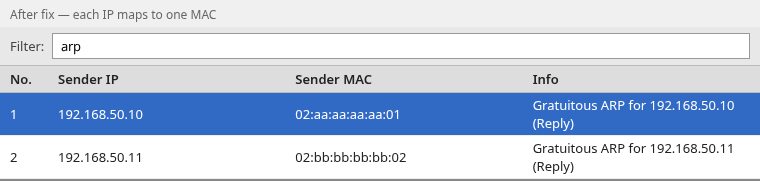
Re-run arp.duplicate-address-detected on the fixed capture — it should return no packets:

The empty result confirms that Wireshark did not detect a conflicting mapping in this verification capture. It does not prove that the entire network is free of duplicate IPs — Wireshark can only evaluate ARP traffic that it actually captures.
Why Wireshark may not show a duplicate address
Wireshark only analyzes ARP frames present in the capture:
- No ARP occurred while you were capturing — the segment was idle.
- Wrong capture point — a switched port may not see other hosts' traffic.
- Capture started too late — the clash happened before recording began.
- Duplicate detection disabled — it is on by default, but a shared or older profile may have turned it off. Choose Edit → Preferences (on macOS, Wireshark → Preferences), expand Protocols, select ARP/RARP, and make sure Detect duplicate IP address configuration is ticked. You can also right-click the Address Resolution Protocol line in the details pane and use Protocol Preferences.
To record only ARP during a new capture, type arp in the capture filter box on the Wireshark start screen (labelled …using this filter) before you double-click the interface. Let it run while the conflict is happening, then click Stop.
If the LAN is quiet, you can generate local traffic in a lab or approved network so your host performs ARP resolution. For example:
for i in $(seq 1 254); do ping -c 1 -W 1 192.168.1.$i >/dev/null; doneOn Windows:
for /L %i in (1,1,254) do @ping -n 1 -w 50 192.168.1.%i >nulDuplicate IP vs ARP spoofing vs high-availability (HA) failover
A duplicate warning means Wireshark saw conflicting IP-to-MAC mappings. That is not always a misconfigured static address.
It can also indicate:
- NIC teaming/bonding — multiple network interfaces acting together for redundancy or throughput
- Failover moving an IP between interfaces
- Virtual machine or cluster mobility
- ARP spoofing or poisoning — a host deliberately advertising another device's IP with a different MAC address, producing the same conflicting mapping Wireshark uses for duplicate-address detection
- Expected HA behavior you already recognize
Confirm both MAC addresses and whether the change is expected before renumbering a production host.
DHCP can also detect conflicts automatically. Some clients perform IPv4 Address Conflict Detection before accepting an address and may send a DHCPDECLINE message to tell the DHCP server that the offered address already appears to be in use.
How duplicate IP detection works (short ARP primer)
ARP maps an IPv4 address to a MAC address on the local segment.
ARP Request:  Who has 192.168.50.10?
ARP Reply:    192.168.50.10 is at 02:aa:aa:aa:aa:01
A conflict becomes visible when the same IP is later advertised by a different MAC. Wireshark tracks mappings and raises Duplicate IP address configured when a later ARP disagrees with an earlier one.
Summary
Find duplicate IPv4 addresses in Wireshark with arp.duplicate-address-detected or Analyze → Expert Information. Filter arp.src.proto_ipv4 == <ip> to list every MAC claiming that address.
Wireshark proves that conflicting IP-to-MAC mappings appeared in the capture; switch CAM tables and DHCP leases help you determine which physical or virtual host caused the change. A warning does not always mean two static misconfigurations — verify whether failover, teaming, or spoofing explains the change. For related capture work, see the Wireshark tutorial and rogue DHCP detection.
References
- RFC 5227 — IPv4 Address Conflict Detection
- Wireshark display filter reference — ARP
- Wireshark Q&A — arp.duplicate-address-frame
Frequently Asked Questions
What Wireshark filter finds duplicate IP addresses?
Use arp.duplicate-address-detected or open Analyze → Expert Information and look for Duplicate IP address configured.
What is the difference between arp.duplicate-address-detected and arp.duplicate-address-frame?
arp.duplicate-address-detected marks the frame where Wireshark detected that the IP was now being used by a different MAC address. arp.duplicate-address-frame references the earlier frame where Wireshark previously saw that same IP associated with another MAC address.
Does a duplicate IP warning always mean two static misconfigurations?
No. It means conflicting IP-to-MAC mappings appeared in the capture. Confirm both MAC addresses and investigate teaming, failover, virtualization, or spoofing before changing addresses.
