
| Tested on | Red Hat Enterprise Linux 10.2 (Coughlan) |
|---|---|
| Package | quay.io/keycloak/keycloak:26.7.3python3 (optional lab ACS listener) |
| Applies to | Any Linux host with Podman or Docker |
| Privilege | Normal user (rootless Podman). Realm setup uses the Keycloak bootstrap admin |
| Lab environment | Keycloak IdP from Configure Keycloak as a SAML IdP on http://127.0.0.1:18120/ |
| Scope | Configure a service provider as a Keycloak SAML client, including its Client ID/entity ID, ACS URL, redirect URI, NameID format, and signing options. The final test verifies one SP-initiated login. Does not cover attribute mappers, encryption, single logout, metadata import walkthroughs, or Keycloak as SAML service provider/broker (Keycloak SAML SSO). |
| Related guides | Configure Keycloak as a SAML IdP Keycloak SAML metadata Keycloak SAML NameID Keycloak SAML attribute mapper Keycloak SAML SSO |
When Keycloak is your SAML identity provider, register each service provider application as a SAML client. SAML is a browser-based single sign-on protocol where an identity provider authenticates the user and sends a signed authentication response to the application.
When the application sends an AuthnRequest—the SAML login request asking Keycloak to authenticate a user—Keycloak uses that client record to identify the SP and decide where the SAML response may be returned.
This example configures saml-notes-sp in the existing corp realm from Configure Keycloak as a SAML IdP. An optional test at the end verifies the flow without requiring another SAML application.
Quick answer
To configure a SAML service provider in Keycloak:
- Create a client with Client type = SAML.
- Set Client ID to the SP's entity ID.
- Add the SP's ACS URL to Valid redirect URIs and configure Master SAML Processing URL or the appropriate binding-specific ACS endpoint, depending on the SP configuration.
- Choose the Name ID Format required by the SP.
- Configure Sign documents, Sign assertions, and Client signature required according to the SP's requirements.
- Save the client and start an SP-initiated login to verify the SAML response reaches the ACS endpoint.
The exact values normally come from the service provider's SAML configuration page or SP metadata XML.
SAML client vs SAML identity provider in Keycloak
Keycloak uses Clients for two different SAML ideas:
- SAML client (this article): Keycloak is the IdP. The client represents an external service provider application.
- SAML identity provider under Identity providers: Keycloak acts as the service provider/broker and sends the user to another identity provider for authentication.
| Console object | Keycloak role toward the application |
|---|---|
| SAML client | Identity provider |
| SAML identity provider | Service provider / broker |
You are configuring the first case in realm corp.
How the Keycloak SAML client fits into the login flow
In this setup, Keycloak is the identity provider (IdP) and the application is the service provider (SP).
          User
            |
            | 1. Opens application
            v
  Service Provider (SP)
            |
            | 2. AuthnRequest
            |    Issuer = saml-notes-sp
            v
      Keycloak (IdP)
            |
            | 3. User signs in
            |
            | 4. SAMLResponse
            |    (SAML assertion inside)
            v
ACS URL on the Service Provider
Issuer is simply the identifier that tells Keycloak which service provider sent the login request.
These three values answer three different questions during login:
- Client ID identifies the service provider to Keycloak and must match the
Issuerin the SP'sAuthnRequest. In SP metadata, that identifier is normally the SP entity ID. - ACS URL is the service provider endpoint where the browser delivers the SAML response. Keycloak can obtain it from the incoming
AuthnRequestor from the SAML client endpoint configuration. - Valid redirect URIs limit which ACS destinations Keycloak will accept when the incoming request supplies its own
AssertionConsumerServiceURL. Despite the name, Keycloak uses Valid redirect URIs here as an allowlist for ACS destinations supplied by the SAML request.
Prerequisites
Complete Configure Keycloak as a SAML IdP so these values are already in place:
| Item | Value |
|---|---|
| Admin Console | http://127.0.0.1:18120/admin/ |
| Realm | corp |
| Test user | sam / Sam!2026 |
| IdP SSO URL | http://127.0.0.1:18120/realms/corp/protocol/saml |
Where the Client ID and ACS URL come from
In a real integration, these values normally come from the service provider rather than being chosen on the Keycloak side. Your application or SaaS provider normally gives you:
- its SAML configuration screen (entity ID, ACS URL, signature expectations), or
- an SP metadata XML file, which packages values such as the entity ID and SAML endpoints in a machine-readable format.
For this lab, we use loopback (127.0.0.1) URLs, which keep both Keycloak and the test SP on the same machine, so you can see what each Admin Console field means without installing another product.
Keycloak SAML client settings used in this example
| Keycloak field | Value in this lab | What it represents |
|---|---|---|
| Client type | SAML | Tells Keycloak this application authenticates using SAML |
| Client ID | saml-notes-sp |
SP entity ID / request Issuer |
| Valid redirect URIs | http://127.0.0.1:18721/saml/acs |
Allowlist for ACS URLs supplied by the SP |
| Master SAML Processing URL | http://127.0.0.1:18721/saml/acs |
Default SAML endpoint Keycloak can use for this client |
| Name ID Format | username |
User identifier sent to the SP |
| Sign documents | On | Sign the SAML response document |
| Sign assertions | Off | Assertion itself is not separately signed |
| Client signature required | Off | Unsigned SP requests accepted in this lab |
Create the SAML client
Select realm corp. Open Clients → Create client.
Set Client type to SAML and enter saml-notes-sp as the Client ID.
For a Keycloak SAML client, this value identifies the service provider. Your SP must send the same value in the <Issuer> element of its SAML AuthnRequest. In SP metadata, that identifier is normally the SP entity ID.
Optionally set Name to Notes SAML SP. Click Save. Keycloak creates the client and opens its Settings page.
Do not look for Standard flow or Client authentication on this path—those belong to OpenID Connect clients, not SAML.
Configure the ACS URL
On the client Settings tab, open Access settings and set:
- Valid redirect URIs:
http://127.0.0.1:18721/saml/acs - Master SAML Processing URL:
http://127.0.0.1:18721/saml/acs
You can leave Root URL empty for this lab because the ACS-related URLs above are absolute. Keycloak uses Root URL as a base when other client URLs are relative.
Click Save.
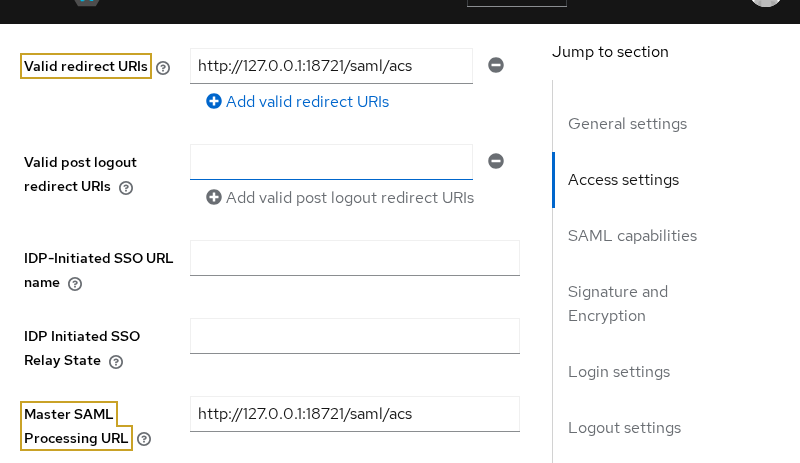
Figure: The SP's ACS endpoint is registered as both an allowed redirect destination and the client's master SAML processing URL in this lab.
The ACS (Assertion Consumer Service) URL is the endpoint on the service provider that receives the SAMLResponse after authentication.
Master SAML Processing URL is the general SAML processing endpoint for this client. When an AuthnRequest includes its own AssertionConsumerServiceURL, Keycloak validates that destination against Valid redirect URIs before sending the response there.
A SAML binding describes how a SAML message travels between systems, for example through an HTTP POST form or a browser redirect.
You do not need to configure a separate POST ACS field for this test because the test AuthnRequest supplies its own AssertionConsumerServiceURL, which is allowed by Valid redirect URIs. If the SP does not send an AssertionConsumerServiceURL, or if it publishes different ACS endpoints for POST and Redirect bindings, configure the relevant endpoint under Advanced → Fine Grain SAML Endpoint Configuration.
Configure NameID and SAML signing
Choose the NameID format
Still on Settings, scroll to SAML capabilities (or Signature and Encryption, depending on console grouping).
Set Name ID Format to username for this lab.
The NameID is the identifier Keycloak places in the SAML assertion so the service provider knows which user signed in. With username, user sam appears as sam rather than an email address or another generated identifier such as a transient or persistent NameID.
SP documentation may describe this as the NameID, subject identifier, or login identifier. Do not confuse it with separate SAML attributes such as username or email, which are normally added through mappers.
A real application may require email, persistent, transient, or another format—use what the SP documents, not an arbitrary default. An SP can request a specific NameID format inside its AuthnRequest. When Force name ID format is disabled, Keycloak can honor that request instead of forcing the format selected on the client.
Leave Force POST Binding at its default for this lab. The test AuthnRequest already asks Keycloak to return the response using HTTP-POST, so forcing the binding is unnecessary.
If your application needs a different NameID policy, see Keycloak SAML NameID.
Sign the SAML response
On Settings → Signature and Encryption, use:
- Sign documents: On
- Sign assertions: Off
With Sign documents enabled, Keycloak signs the SAML response document using the realm signing key. A digital signature lets the SP verify that the SAML response came from Keycloak and was not modified in transit. The realm signing key is Keycloak's private key used to sign SAML messages for that realm; the SP verifies the signature using the corresponding public certificate.
Some service providers additionally require the <Assertion> element itself to be signed; enable Sign assertions when the SP requires that behavior.
Leave Signature algorithm at RSA_SHA256 for this lab. In a real integration, change it only if the SP explicitly requires another supported algorithm.
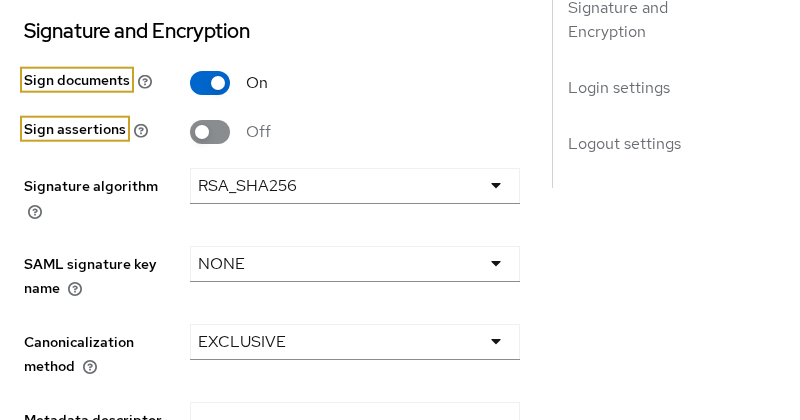
Figure: Keycloak signs the response document; assertion signing remains off because the test SP does not require a separately signed assertion.
SP  ---------------- AuthnRequest ----------------> Keycloak
          Keycloak verifies SP signature
          if Client signature required = On

SP  <--------------- SAMLResponse ---------------- Keycloak
                Keycloak signs the response
                with Sign documents / assertions
Save the client after you change signing options.
Client signature required
Open the Keys tab and leave Client signature required disabled for this lab.
Client signature required applies to the opposite direction: when enabled, Keycloak expects the service provider to sign its AuthnRequest and validates that signature. It is not the same control as Sign documents or Sign assertions on the response.
For a real application, use the signing settings required by that SP. Troubleshooting is covered in Fix Keycloak SAML invalid signature.
Optional: Test the SAML client
The Keycloak configuration is now complete. You can skip this section if you already have a real SAML-enabled application to test with.
Because there is no real SP in this lab, two small Python scripts simulate the parts needed for the login test—you do not need them for a normal product integration.
 build-authnrequest.py
         |
         | AuthnRequest (redirect to Keycloak)
         v
      Keycloak
         |
         | SAMLResponse (browser POST)
         v
    acs-server.py
build-authnrequest.py pretends to be the part of the application that starts login, while acs-server.py pretends to be the endpoint that receives Keycloak's response.
Save both scripts in your lab directory. Start the ACS listener in one terminal, print the login URL in another, then open that URL in a browser.
Run a minimal ACS endpoint
#!/usr/bin/env python3
"""Minimal SAML ACS listener — lab only."""
import sys
from http.server import BaseHTTPRequestHandler, HTTPServer

class Handler(BaseHTTPRequestHandler):
    def do_POST(self):
        length = int(self.headers.get("Content-Length", 0))
        body = self.rfile.read(length)
        print("ACS received POST", self.path, "bytes", len(body))
        if b"SAMLResponse=" in body:
            print("SAMLResponse parameter present in POST body")
        self.send_response(200)
        self.send_header("Content-Type", "text/html; charset=utf-8")
        self.end_headers()
        self.wfile.write(b"<html><body><h1>SAML ACS OK</h1></body></html>")
    def log_message(self, fmt, *args):
        pass

port = int(sys.argv[1]) if len(sys.argv) > 1 else 18721
server = HTTPServer(("127.0.0.1", port), Handler)
print(f"ACS listening on http://127.0.0.1:{port}/saml/acs")
server.serve_forever()
Run it:
python3 acs-server.py 18721SAMLResponse parameter; it does not decode the assertion, validate XML signatures, check audience restrictions, or create an application session.
Build the SP-initiated AuthnRequest
A real SAML service provider normally creates this request for you. The next script creates the small AuthnRequest needed to start this test login. Before running it, notice how these values map back to the client you configured:
- Issuer identifies the SP and must match the Keycloak Client ID.
- AssertionConsumerServiceURL tells Keycloak where the browser should deliver the SAML response.
- Destination tells the SP which Keycloak SAML endpoint should receive the authentication request.
<saml:Issuer>saml-notes-sp</saml:Issuer>
AssertionConsumerServiceURL="http://127.0.0.1:18721/saml/acs"
Destination="http://127.0.0.1:18120/realms/corp/protocol/saml"#!/usr/bin/env python3
import base64, datetime, uuid, urllib.parse, zlib
KC = "http://127.0.0.1:18120/realms/corp/protocol/saml"
ACS = "http://127.0.0.1:18721/saml/acs"
CLIENT = "saml-notes-sp"
def redirect_url():
rid = f"_{uuid.uuid4()}"
instant = datetime.datetime.now(datetime.timezone.utc).strftime("%Y-%m-%dT%H:%M:%SZ")
xml = (
f'<samlp:AuthnRequest xmlns:samlp="urn:oasis:names:tc:SAML:2.0:protocol" '
f'xmlns:saml="urn:oasis:names:tc:SAML:2.0:assertion" ID="{rid}" Version="2.0" '
f'IssueInstant="{instant}" Destination="{KC}" '
f'AssertionConsumerServiceURL="{ACS}" '
f'ProtocolBinding="urn:oasis:names:tc:SAML:2.0:bindings:HTTP-POST">'
f"<saml:Issuer>{CLIENT}</saml:Issuer></samlp:AuthnRequest>"
)
enc = base64.b64encode(zlib.compress(xml.encode())[2:-4]).decode()
return f"{KC}?SAMLRequest={urllib.parse.quote_plus(enc)}"
if __name__ == "__main__":
print(redirect_url())Print the login URL:
python3 build-authnrequest.pyOpen the full URL in a browser and sign in as sam / Sam!2026. After authentication, the browser should land on http://127.0.0.1:18721/saml/acs with SAML ACS OK. The ACS terminal should report SAMLResponse parameter present in POST body, which confirms the browser delivered Keycloak's SAML response to the configured ACS—not that the assertion was validated. It is not a full service provider.
Troubleshooting
| Symptom | Likely cause | Fix |
|---|---|---|
Invalid redirect uri |
Requested ACS not in Valid redirect URIs | Add the exact AssertionConsumerServiceURL from the request |
Client not found |
Issuer does not match Client ID |
Align SP entity ID / issuer with saml-notes-sp |
| Browser never reaches ACS | Wrong ACS URL or redirect URI | Check the request's AssertionConsumerServiceURL, Valid redirect URIs, and Master SAML Processing URL |
| Invalid requester / request rejected | Client signature required does not match SP | On Keys, match Client signature required to whether the SP signs AuthnRequest |
| SP rejects signature | Response signing mismatch | Match Sign documents / Sign assertions to SP policy; refresh metadata |
| User signs in but the SP cannot identify the account | Wrong Name ID Format or missing attribute mapper | Match the SP's required NameID first; if it expects an attribute, add the required SAML mapper |
| Connection refused on ACS | Test listener not running | Start acs-server.py on port 18721 before login |
Summary
When Keycloak acts as the SAML IdP, each service provider is a SAML client whose Client ID matches the SP issuer, whose Access settings define where responses may be posted, and whose Signature and Encryption options control how Keycloak signs the SAML response.
You configured saml-notes-sp with a loopback ACS URL, set Name ID Format to username, enabled Sign documents, and optionally verified the flow with a minimal test ACS. That test confirms the browser delivered Keycloak's SAML response to the configured ACS; it is not a full service provider.
For metadata exchange see Keycloak SAML metadata. To configure the NameID and attributes the application requires, use Keycloak SAML NameID and Keycloak SAML attribute mapper. When Keycloak is the SP toward another IdP, follow Keycloak SAML SSO instead of creating a SAML client in the application realm.
References
- Keycloak 26.7.3 Server Administration: SAML clients
- OASIS SAML 2.0 bindings (HTTP-POST and redirect)
Frequently Asked Questions
What should I enter as the SAML Client ID in Keycloak?
Enter the service provider's SAML entity ID. Keycloak compares this Client ID with the <Issuer> value in incoming AuthnRequest messages, so the values must match exactly.
Where do I configure the ACS URL in Keycloak?
If the SP sends AssertionConsumerServiceURL in its AuthnRequest, add that exact endpoint to Valid redirect URIs. Master SAML Processing URL provides the general client SAML endpoint, while binding-specific ACS URLs can be configured under Advanced → Fine Grain SAML Endpoint Configuration.
Why configure Valid redirect URIs and Master SAML Processing URL?
Valid redirect URIs act as an allowlist when an incoming AuthnRequest supplies its own AssertionConsumerServiceURL. Master SAML Processing URL provides the client's general SAML processing endpoint when Keycloak does not have a more specific ACS endpoint to use.
Where do SAML attributes come from?
Default client scopes and mappers attach attributes to assertions. This article keeps a NameID-only login; add mappers per Keycloak SAML attribute mapper.
