
| Tested on | Red Hat Enterprise Linux 10.2 (Coughlan) |
|---|---|
| Package | quay.io/keycloak/keycloak:26.7.3 |
| Applies to | Any Linux host with Podman or Docker |
| Privilege | Normal user (rootless Podman). Realm setup uses the Keycloak bootstrap admin |
| Lab environment | Dedicated container keycloak-saml-idp-lab on http://127.0.0.1:18120/ (realm corp). Use this port for SAML IdP labs only—do not reuse 8080 or AD federation labs if another session is testing those. |
| Scope | Prepare a Keycloak realm as a SAML 2.0 IdP: hostname, realm Frontend URL, test user, signing keys, and IdP metadata. Does not register a service provider (see Keycloak SAML client) or cover Keycloak as SAML SP/broker (Keycloak SAML SSO). |
| Related guides | Keycloak SAML client Keycloak SAML metadata Keycloak SAML NameID Keycloak SAML attribute mapper Keycloak SAML SSO |
A Keycloak realm can act as a SAML IdP as soon as it exists, but its public URL must be stable so service providers receive consistent entity IDs and SSO endpoints. This guide prepares realm corp as the IdP, exports its SAML metadata, and identifies the values your service provider needs before you register that SP as a SAML client in Keycloak.
Keycloak as a SAML IdP: Quick Answer
Every Keycloak realm can act as a SAML 2.0 identity provider; there is no separate SAML IdP switch to enable.
To use a realm as an IdP:
- Give Keycloak a stable external hostname.
- Create or choose the realm and its users.
- Verify the realm signing key.
- Download the realm's SAML IdP metadata from
/realms/<realm>/protocol/saml/descriptor. - Give that metadata to the service provider.
- Register the service provider in Keycloak as a SAML client using its entity ID and ACS URL.
The IdP metadata provides Keycloak's entity ID, SSO endpoints, and public signing certificate.
Keycloak UI terminology can be confusing here: do not use Identity providers → SAML v2.0 for this setup. That screen is used when another SAML IdP authenticates users for Keycloak. When Keycloak itself is the IdP, create a SAML client for each service provider instead.
How Keycloak Works as a SAML Identity Provider
Keycloak IdP vs service provider
When Keycloak is the SAML identity provider, it authenticates users and issues SAML assertions to applications that trust the realm. Those applications are service providers (SPs). If the IdP/SP terminology is new, see Keycloak SAML SSO for how the roles fit together.
Application / SP
      |
      | AuthnRequest
      v
Browser
      |
      v
Keycloak IdP
      |
      | authenticate user
      |
      | SAMLResponse
      v
Browser
      |
      v
SP / ACS endpoint
The authentication request travels SP → browser → IdP. The SAML response returns IdP → browser → SP assertion consumer service (ACS).
What "configure Keycloak as a SAML IdP" actually means
A Keycloak realm can publish SAML IdP metadata as soon as the realm exists. You do not enable a separate SAML IdP service.
To make that IdP usable by an application, however, two sides must know about each other:
Keycloak IdP
    |
    | IdP metadata
    | - Entity ID
    | - SSO URL
    | - Signing certificate
    v
Service Provider


Service Provider
    |
    | SP configuration
    | - SP Entity ID
    | - ACS URL
    v
Keycloak SAML client
The IdP metadata gives the service provider Keycloak's entity ID, SSO endpoints, and public certificate for verifying signed SAML messages.
The SAML client tells Keycloak which service provider it is communicating with and where the browser may send the SAML response.
SAML entity ID, SSO URL, ACS URL, and metadata
| Term | Meaning in this article |
|---|---|
| IdP | Keycloak; authenticates the user |
| SP | The application that trusts Keycloak |
| Entity ID | Unique identifier for the IdP or SP |
| SAML SSO endpoint | Keycloak URL that receives SAML authentication requests |
| ACS URL | SP endpoint where Keycloak sends the SAML response |
| Metadata | XML with entity IDs, endpoints, certificates, and supported SAML details |
| Assertion | XML statement inside the SAML response that carries the authenticated user's identity and attributes; it can be signed depending on the SAML client configuration |
| Signing key | Realm key pair used when SAML client settings require signed responses or assertions |
Lab layout
| Item | Value |
|---|---|
| Admin URL | http://127.0.0.1:18120/admin/ |
| Bootstrap admin | admin / ChangeMe!2026 |
| Realm | corp |
| Test user | sam / Sam!2026 |
| Container name | keycloak-saml-idp-lab (isolated from other Keycloak article labs) |
127.0.0.1 works only because this lab accesses Keycloak from the same machine. If the service provider runs on another host, use a DNS name or IP address reachable from both the browser and the SP instead.
This lab uses HTTP on loopback only. For a remotely accessible or production SAML IdP, use HTTPS and a stable hostname.
This article assumes Keycloak is already running at the lab URL. If you need a disposable instance on this host, use the optional start command below.
Optional: start the lab instance
The command below binds port 18120 on loopback and sets --hostname to match the URLs used in this article.
podman run -d --name keycloak-saml-idp-lab \
  -p 127.0.0.1:18120:8080 \
  -e KC_BOOTSTRAP_ADMIN_USERNAME=admin \
  -e KC_BOOTSTRAP_ADMIN_PASSWORD='ChangeMe!2026' \
  quay.io/keycloak/keycloak:26.7.3 \
  start-dev --hostname=http://127.0.0.1:18120
Wait until curl -sI http://127.0.0.1:18120/ returns HTTP/1.1 302 (or 200). Sign in to the Admin Console, create realm corp, and create user sam with a non-temporary password if you are building the lab from scratch.
Create one test user now so the IdP has an account available when you connect the first SAML service provider in Keycloak SAML client.
Configure the Keycloak SAML IdP realm
Set the Keycloak hostname and Frontend URL
--hostname defines the external URL Keycloak should use when generating public URLs. The realm-level Frontend URL can override the frontend address for that realm. In this lab both values are deliberately the same so SAML metadata consistently advertises http://127.0.0.1:18120.
- Open Realm settings → General for realm
corp. - Set Frontend URL to
http://127.0.0.1:18120if it is empty. - Save.
You do not need a separate Frontend URL on every deployment when hostname configuration already produces the correct public URLs.
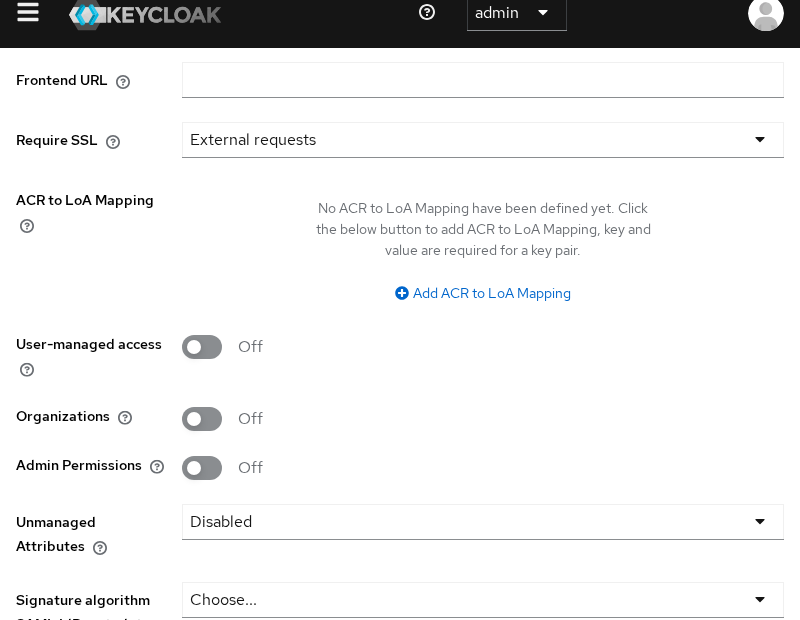
Under Endpoints, note SAML 2.0 Identity Provider Metadata. That path is the same descriptor you can fetch over HTTP (next section).
Create a test user
- Users → Create user → username
sam. - Credentials → set password
Sam!2026, turn off Temporary.
Find the Keycloak SAML IdP metadata URL
Descriptor URL for realm corp:
http://127.0.0.1:18120/realms/corp/protocol/saml/descriptorDownload or open it in a browser:
curl -fsS http://127.0.0.1:18120/realms/corp/protocol/saml/descriptor \
  -o corp-idp-metadata.xml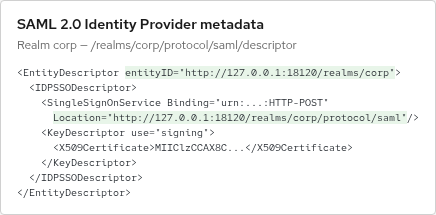
Most service providers either accept the whole metadata XML or ask for these values individually:
- IdP Entity ID:
http://127.0.0.1:18120/realms/corp - SAML SSO endpoint:
http://127.0.0.1:18120/realms/corp/protocol/saml - Signing certificate: the
X509Certificateelement published in the metadata
Keycloak metadata can advertise the SSO service with multiple SAML bindings, commonly HTTP-POST and HTTP-Redirect. In this lab they use the same /protocol/saml endpoint URL; the binding identifies how the SAML message is transported.
If your service provider asks for the metadata values individually, see Keycloak SAML metadata for a field-by-field walkthrough.
Check the Keycloak SAML signing key
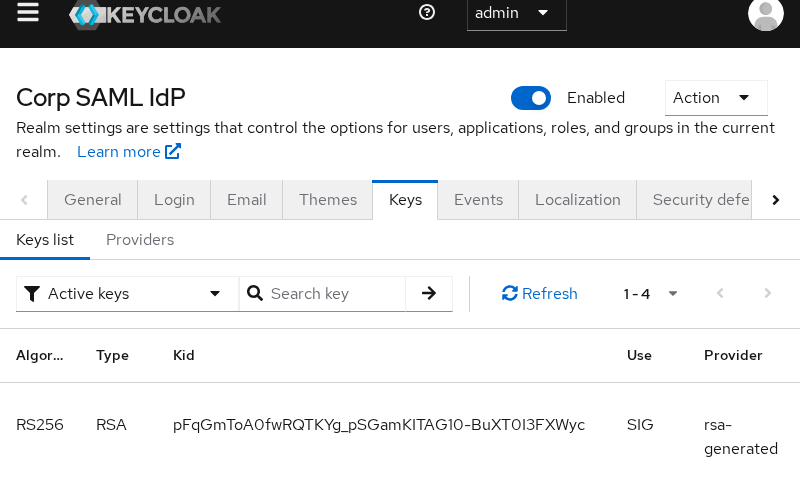
- Realm settings → Keys.
- Confirm an active RSA key with Use
SIG(signing).
The SIG use means this realm key is available for signing. When a SAML client is configured to sign documents or assertions, Keycloak uses the active signing key and publishes its public certificate in the IdP metadata so the service provider can verify the signature. Exactly what gets signed depends on the SAML client's Sign Documents and Sign Assertions settings in Keycloak SAML client—not every response is signed by default. Service providers import that certificate from metadata; the private key never leaves Keycloak.
Verify the SAML entity ID and SSO endpoint
Extract the entity ID and SSO location from the descriptor:
grep -oE 'entityID="[^"]+"' corp-idp-metadata.xml
grep -oE 'Location="[^"]+/protocol/saml"' corp-idp-metadata.xml | head -1
Example output on this lab:
entityID="http://127.0.0.1:18120/realms/corp"
Location="http://127.0.0.1:18120/realms/corp/protocol/saml"
The main requirement is that Keycloak advertise the same URLs the browser and service provider can actually reach.
Connect a service provider to the Keycloak IdP
Each registered service provider becomes a SAML client in realm corp. Keycloak's SAML client represents that application. Do not confuse this with Identity providers in the menu—that entry is for external IdPs Keycloak uses when Keycloak itself acts as a broker/SP.
Do not create this under Identity providers. When Keycloak is the SAML IdP, the application/SP is registered under Clients with client type SAML.
Follow Keycloak SAML client to register the SP entity ID, ACS URL, and complete one SP-initiated login with user sam.
Troubleshoot Keycloak SAML IdP configuration
| Symptom | Likely cause | What to check |
|---|---|---|
Metadata shows localhost:8080 or wrong host |
Hostname / Frontend URL mismatch | Align --hostname, realm Frontend URL, and the URL browsers use |
| SP cannot reach IdP URLs | Loopback-only URL | Replace 127.0.0.1 with a reachable hostname for SP and browser |
| Signature validation fails on SP | Wrong certificate or signing disabled | Import cert from current metadata; enable Sign Documents or Sign Assertions on the SAML client if the SP requires signatures |
| Confusion in Admin Console | Wrong menu | Use Clients → SAML, not Identity providers → SAML |
Summary
A Keycloak realm is already a SAML IdP once it exists: publish stable URLs, confirm the SIG signing key, and export /realms/<realm>/protocol/saml/descriptor. Give that metadata (or entity ID, SSO endpoint, and certificate) to the service provider, then register the SP as a SAML client so Keycloak can send assertions to the ACS URL.
Frequently Asked Questions
Is Keycloak a SAML identity provider?
Yes. Every Keycloak realm exposes SAML IdP metadata and an SSO endpoint. You register each service provider as a SAML client in that realm.
Where is the Keycloak SAML IdP metadata URL?
For realm corp, it is:
http://127.0.0.1:18120/realms/corp/protocol/saml/descriptor
Replace the host and realm with your deployment.
Should I configure Identity providers or Clients when Keycloak is the SAML IdP?
Use Clients. Identity providers → SAML v2.0 is for the opposite setup, where Keycloak consumes authentication from an external SAML IdP.
References
- Keycloak SAML client configuration
- Keycloak realm keys
- SAML IdP metadata descriptor —
<root>/realms/{realm-name}/protocol/saml/descriptor
