
| Tested on | Red Hat Enterprise Linux 10.2 (Coughlan) |
|---|---|
| Package | podman-5.8.2-5.el10_2.x86_64quay.io/keycloak/keycloak:26.8.0libxml2-2.12.5-10.el10_2.2.x86_64 |
| Applies to | Any Linux host with Podman or Docker |
| Privilege | Normal user (rootless Podman). Realm setup uses the Keycloak bootstrap admin |
| Scope | Why a service provider rejects a Keycloak SAML assertion when AudienceRestriction does not contain the expected entity ID, how that value differs from the ACS URL and Destination, and when a SAML audience mapper should add a second audience. Does not cover OpenID Connect access-token audience or ACS and destination mismatches. |
| Related guides | Keycloak SAML metadata Keycloak SP-Initiated vs IdP-Initiated SAML SSO Keycloak SAML NameID Keycloak SAML attribute mapper Map Keycloak roles and groups into SAML assertions |
A service provider rejects a Keycloak assertion when AudienceRestriction does not contain the service provider entity ID it expects. Keep these three values separate:
- SAML client ID: normally the service provider entity ID on the Keycloak identity provider
- ACS URL: where the browser delivers the response
- OIDC
aud: an access-token claim outside this SAML article
The test uses the two-realm login from Keycloak SAML SSO:
- Realm
companyon127.0.0.1:18109signs the assertion - Realm
appson127.0.0.1:18110is the broker that checks it - The client ID must match the service provider entity ID before an audience mapper can help
A mapper adds an audience. It does not repair a client ID that the identity provider cannot find.
Quick Answer
In a normal Keycloak SAML setup:
- The assertion's
Audienceshould contain the service provider entity ID. On the Keycloak identity provider, that normally means the SAML client ID must match the service provider entity ID.
An Entity ID is the SAML identifier for the service provider. It often looks like a URL, but it is primarily an identifier, not necessarily a page you open in a browser.
- Do not replace that value with the ACS URL just because both look like URLs. The ACS is where the response is delivered. The audience identifies which service provider the assertion is meant for.
- Use an Audience mapper only when the assertion needs an additional audience after the main service provider entity ID is already correct.
What the SAML Audience Means
AudienceRestriction limits which service provider is allowed to accept the assertion. Inside it, each Audience value is an identifier for an intended receiver.
Assertion
└── Conditions
    └── AudienceRestriction
        └── Audience = SP Entity ID
In this Keycloak SAML client configuration, the identity provider uses the client's Client ID as the primary SAML audience.
On a matching login the audience was the apps realm URL:
<saml:Conditions NotBefore="2026-10-03T20:12:17.566Z" NotOnOrAfter="2026-10-03T20:13:17.566Z">
  <saml:AudienceRestriction>
    <saml:Audience>http://127.0.0.1:18110/realms/apps</saml:Audience>
  </saml:AudienceRestriction>
</saml:Conditions>
That string is the client ID and the service provider entity ID. The assertion consumer service URL is a different string, shown in the next section. The assertion can contain additional audiences alongside the main service provider entity ID. For portable SAML interoperability, keep the service provider entity ID in the audience list. In this Keycloak 26.8.0 broker test, the validator also accepted the response Destination, but other service providers may not.
Audience vs Entity ID vs ACS vs Destination
These four fields are easy to paste into the wrong box. In the login above they had two values, not four.
| Field | Where you see or configure it in this lab | Value in the matching login |
|---|---|---|
| Audience | Audience inside the assertion |
http://127.0.0.1:18110/realms/apps |
| Service provider entity ID | apps realm, Identity Providers, company-idp, Service Provider Entity ID. Empty means the apps realm URL, which is also the AuthnRequest Issuer | http://127.0.0.1:18110/realms/apps |
| ACS URL | Broker endpoint, and the SAML client's redirect and ACS settings | http://127.0.0.1:18110/realms/apps/broker/company-idp/endpoint |
| Destination | Destination attribute on the SAML Response |
http://127.0.0.1:18110/realms/apps/broker/company-idp/endpoint |
The audience identifies the service provider, also called the relying party, that the assertion is intended for. The ACS URL is where the browser posts the response.
The Keycloak 26.8.0 broker test showed three important details:
- The validator's allowed-audience list contained the configured service provider entity ID and the response Destination
- That result is Keycloak broker behavior observed in this test, not a reason to publish the ACS URL as the audience for other service providers
- Copying the ACS URL into the client ID is not the fix for an audience error
An ACS URL mismatch is a different failure from this page.
Inspect AudienceRestriction in the Assertion
Save the POST binding response as response.xml and the AuthnRequest as request.xml. Read the audience from the assertion first:
xmllint --xpath 'string(//*[local-name()="Audience"])' response.xmlhttp://127.0.0.1:18110/realms/appsThat is the client ID. The response destination is the broker endpoint, not that client ID:
xmllint --xpath 'string(//*[local-name()="Response"]/@Destination)' response.xmlhttp://127.0.0.1:18110/realms/apps/broker/company-idp/endpointThe AuthnRequest issuer is what the identity provider looks up as a client. It matched the audience:
xmllint --xpath 'string(//*[local-name()="Issuer"])' request.xmlhttp://127.0.0.1:18110/realms/appsThe ACS URL on that request is the destination you already saw, not the audience:
xmllint --xpath 'string(//*[local-name()="AuthnRequest"]/@AssertionConsumerServiceURL)' request.xmlhttp://127.0.0.1:18110/realms/apps/broker/company-idp/endpointIf the assertion does not contain the service provider entity ID that matches the AuthnRequest Issuer and the client registration, fix that client and entity-ID relationship before adding another audience mapper. Extra audiences can sit beside that entity ID. If the entity ID is already present and the service provider still rejects the assertion, the receiver expects some other string.
Make the SAML Client ID Match the SP Entity ID
Service Provider Entity ID is the issuer of the AuthnRequest. The company realm accepts the request only when a SAML client exists with that exact client ID.
         apps broker
              ↓
  Service Provider Entity ID
              ↓
appears as AuthnRequest Issuer
              ↓
         company IdP
              ↓
        SAML Client ID
For the identity provider to recognize the request, the service provider entity ID must equal the identity-provider-side SAML client ID. These three places should describe the same SAML service provider. If one uses a different identifier, Keycloak may fail before it creates an assertion. The normal assertion then contains Audience equal to that same service provider entity ID.
I set Service Provider Entity ID to https://sp.example.com/apps and left the client ID as http://127.0.0.1:18110/realms/apps.
On the apps realm, that value is Service provider entity ID on the company-idp provider. Identity provider entity ID stays the company realm URL:
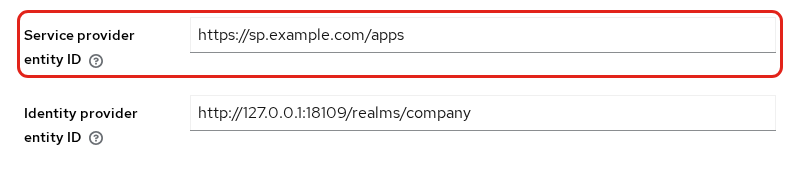
The company realm still has one SAML client, and its client ID is the apps realm URL:

Compare the two values on those screens:
- AuthnRequest Issuer:
https://sp.example.com/apps - IdP-side client ID:
http://127.0.0.1:18110/realms/apps
Those strings do not match, so the company page stopped before a login form:
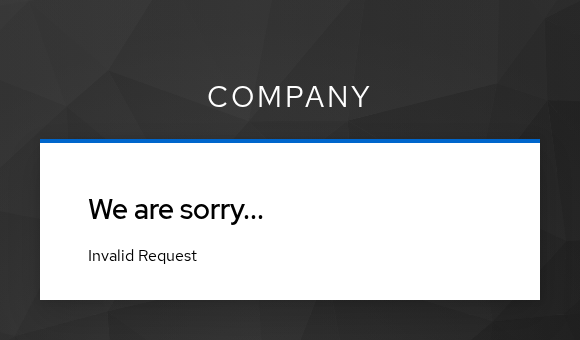
This is not yet an audience-validation failure. The identity provider first has to map the AuthnRequest Issuer to a SAML client. Because no client had ID https://sp.example.com/apps, Keycloak stopped with client_not_found before creating a SAML assertion at all. The company realm log shows that it could not find a SAML client matching the incoming Issuer. Filter that moment:
podman logs keycloak-saml-aud-idp 2>&1 | grep '2026-10-03 20:13:53'2026-10-03 20:13:53,367 WARN [org.keycloak.events] (executor-thread-13) type="LOGIN_ERROR", realmId="8cc42ce3-5e12-48fa-9192-c70f97465eab", realmName="company", clientId="null", userId="null", ipAddress="10.88.0.1", error="client_not_found", reason="Cannot_match_source_hash"client_not_found means the issuer https://sp.example.com/apps was not a client ID. I set the client ID to that same URI and left the ACS URL on the client. The next response carried the new audience:
xmllint --xpath 'string(//*[local-name()="Audience"])' response-aligned.xmlhttps://sp.example.com/appsThe corrected login proves that the fields have separate jobs:
- The broker accepted the assertion and continued to its first-login profile step
- The ACS URL remained the broker endpoint
- Changing the client ID changed the audience, not where the browser posts the response
Add a SAML Audience Mapper When Required
Add an Audience mapper only when the integration explicitly requires an additional audience beyond the main service provider entity ID. Keycloak presents two similarly named mapper types:
- Audience,
saml-audience-mapper: explicitly adds the client or custom audience configured below - Audience Resolve: can add audiences automatically from client-role relationships. That is a different workflow and is not used here.
The two audience fields on that mapper do different jobs:
- Included Client Audience lets you select an existing Keycloak client. Keycloak adds that client's Client ID string as the extra audience. It does not add the client's internal database UUID.
- Use Included Custom Audience when the receiving system expects a literal audience value that is not represented by an existing Keycloak client.
- If both fields are filled, Included Client Audience wins. Keycloak adds that selected client's Client ID and ignores the custom audience value for this mapper.
I left the client ID at https://sp.example.com/apps and set only Included Custom Audience to https://billing.example.com. Leave Included Client Audience empty. Otherwise it takes precedence over the custom value:
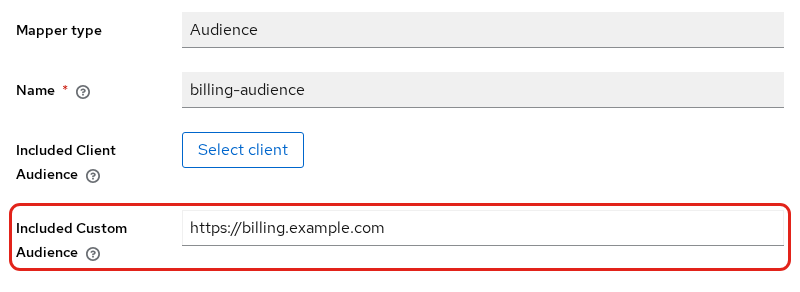
The following assertion contains both:
xmllint --xpath '//*[local-name()="Audience"]/text()' response-audiences.xmlhttps://sp.example.com/apps
https://billing.example.comThe result confirms three points:
- The assertion passed audience validation, and the broker continued the login
- One audience remained the service provider entity ID
https://billing.example.comwas additional; it did not replace the main service provider entity ID
Custom Audience vs Client Audience
I then set Included Client Audience to a second SAML client, https://reports.example.com, and left the custom billing URI in place:
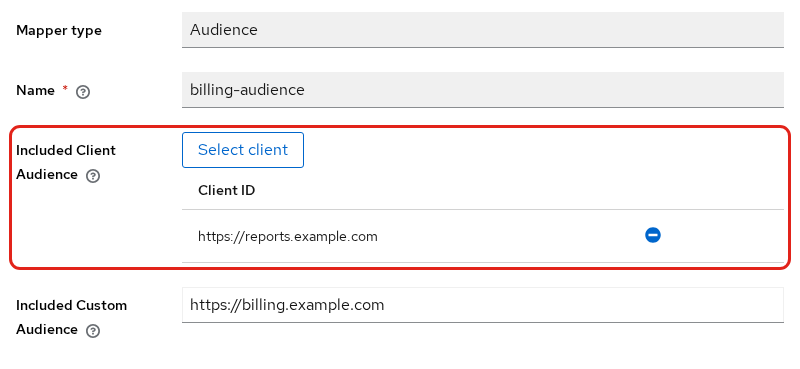
Keycloak kept the service provider audience and added the client, not the custom URI:
xmllint --xpath '//*[local-name()="Audience"]/text()' response-client.xmlhttps://sp.example.com/apps
https://reports.example.comChoose the mapper field from the value the receiver expects:
- Use Included Client Audience when the extra audience is the Client ID of a client that already exists in the realm
- Use Included Custom Audience for a literal value that is not one of those clients
- Clear Included Client Audience when you want Keycloak to write the custom value
- Neither setting removes the primary audience that comes from the service provider's SAML client ID
Verify the Correct Audience
After the client ID matches the service provider entity ID, sign in again and check the new response:
Audiencecontains the documented service provider entity ID- Extra mapper values appear beside that primary audience, not instead of it
- The first-login profile step on the apps realm means this broker accepted the assertion
Other service providers may not accept the ACS or Destination value that this Keycloak broker accepted. A successful Keycloak broker login does not prove that an outside product will accept the ACS URL as the audience.
Common Audience Misconfigurations
The next test isolates audience validation in the local lab:
- It modifies the
Audiencein a captured response - It disables signature validation so the edited response reaches the audience check
- Local lab only: this test disables signature validation so the audience check can be isolated. Do not use that configuration in a real deployment.
I posted a copy of a valid response after changing only Audience to https://other.example.com/sp. Signature validation was off on the broker, so this was not the invalid signature failure. The browser error is misleading here. The assertion had not expired. The server-side validator rejected its audience. When the page says Login timeout, check the Keycloak logs before assuming the clock or the assertion lifetime is the cause.
The apps realm showed this page:
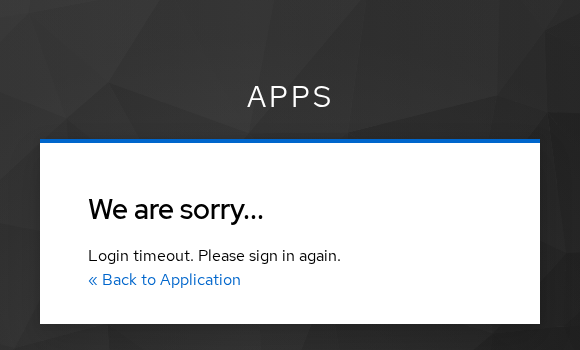
The assertion was still inside its allowed time window. NotOnOrAfter was later than the log line:
xmllint --xpath 'string(//*[local-name()="Conditions"]/@NotOnOrAfter)' response-window.xml2026-10-03T20:13:53.756ZThe apps container, started with ConditionsValidator at DEBUG, recorded the real reason. The log contains both the specific audience failure and the broader Assertion expired error emitted by the conditions-validation path:
podman logs keycloak-saml-aud-sp 2>&1 \
| grep -E 'not addressed to this SP|Allowed audiences are|Assertion expired'2026-10-03 20:12:56,242 INFO [org.keycloak.saml.validators.ConditionsValidator] (executor-thread-13) Assertion ID_c0e2e4ab-21c8-4231-a571-242959fd8809 is not addressed to this SP.
2026-10-03 20:12:56,242 DEBUG [org.keycloak.saml.validators.ConditionsValidator] (executor-thread-13) Allowed audiences are: [http://127.0.0.1:18110/realms/apps, http://127.0.0.1:18110/realms/apps/broker/company-idp/endpoint]
2026-10-03 20:12:56,242 ERROR [org.keycloak.broker.saml.SAMLEndpoint] (executor-thread-13) Assertion expired.The log entry is at 20:12:56, while NotOnOrAfter is 20:13:53. The assertion was therefore still valid by time, so Assertion expired is not the useful diagnosis here. The earlier "not addressed to this SP" line identifies the audience failure. The allowed list in this 26.8.0 broker test is the service provider entity ID and the ACS URL. https://other.example.com/sp is in neither. Putting the ACS URL into Audience was accepted on this broker, because that URL was the second allowed value in this test. That is not a reason to publish the ACS URL as the audience for other service providers.
The failure happens at one of these stages:
       AuthnRequest
            ↓
    IdP client lookup
            ↓
    assertion created
            ↓
broker audience validation| Symptom | Stage | Meaning | What to change |
|---|---|---|---|
Invalid Request and client_not_found |
IdP processing AuthnRequest | The AuthnRequest Issuer does not match an IdP-side SAML client ID | Set the SAML client ID to that entity ID |
Login timeout, log says not addressed to this SP |
Broker validating assertion | Audience does not match what this broker accepts |
Put the entity ID in the client ID. Add a mapper only for an extra audience |
| Login works in Keycloak, another product still rejects the audience | Broker validating assertion | That product does not accept the ACS or Destination value this broker allowed | Set the audience to the service provider entity ID |
| Custom audience never appears | Mapper configuration | Included Client Audience is also set, so it wins | Clear the client audience, or keep the client value Keycloak writes |
Summary
In this Keycloak SAML client configuration, the identity provider uses the client's Client ID as the primary Audience. In the 26.8.0 broker test, the allowed list also contained the response Destination. Use the service provider entity ID as the audience you publish. The ACS URL and the entity ID were different on this login, and the audience matched the entity ID.
Setting Service Provider Entity ID to https://sp.example.com/apps without a client of that ID stopped the company realm with Invalid Request and client_not_found, before any assertion existed. Setting the client ID to the same URI made the next audience https://sp.example.com/apps, and the broker continued to the first-login profile step. An audience of https://other.example.com/sp produced Login timeout even though NotOnOrAfter had not passed. The relevant log line was not addressed to this SP, which identifies the audience mismatch.
An audience mapper is for an additional audience, not a replacement for the entity ID. With only Included Custom Audience set, the assertion contained the entity ID and https://billing.example.com. Filling Included Client Audience as well replaced the billing URI with https://reports.example.com and left the entity ID in place. Match the client ID first, then add a mapper only when the integration requires another audience.
References
- Keycloak 26.8.0 Server Administration: SAML clients documents the SAML client ID that Keycloak writes into the assertion audience.
- Keycloak 26.8.0 Server Administration: SAML v2.0 identity providers documents Service Provider Entity ID.
- SAML V2.0 Core defines
Conditions,AudienceRestriction, andAudience.
Frequently Asked Questions
What should the SAML audience contain?
The service provider entity ID. On Keycloak that is normally the SAML client ID, and it is the issuer of the AuthnRequest when Service Provider Entity ID is set. In this 26.8.0 broker test the allowed list also contained the response Destination, which is usually the ACS URL. Other products may require only their documented entity ID, so keep that value in the assertion even if you add more audiences.
Is Audience the same as ACS URL?
No. In the matching login the audience was http://127.0.0.1:18110/realms/apps. The ACS URL and the response destination were http://127.0.0.1:18110/realms/apps/broker/company-idp/endpoint. The audience identifies the service provider the assertion is intended for. The ACS URL is where the browser posts it.
How do I add a custom SAML audience in Keycloak?
On the SAML client, add a protocol mapper of type Audience. Set Included Custom Audience to the URI, and leave Included Client Audience empty. Keycloak still writes the service provider client ID as an audience. The custom URI is added beside it. If Included Client Audience is set, Keycloak uses that client ID and does not write the custom URI.
Why does an SP reject Keycloak AudienceRestriction?
The audience list does not contain the identifier that service provider expects. On this broker the page said Login timeout. Please sign in again. and the server log said the assertion is not addressed to this SP. That happened while the assertion time window was still open. Put the service provider entity ID in the SAML client ID, or add it with an audience mapper without removing the entity ID that is already required.
Can one assertion contain multiple audiences?
Yes. One response contained https://sp.example.com/apps and https://billing.example.com, and the broker accepted it because the service provider entity ID was still present. An additional audience can be named with an audience mapper. Keep the service provider's documented Entity ID in the audience list unless that service provider explicitly documents another requirement. Additional audiences can be added beside it.
