
| Lab groups | Group 1 — VirtualBox local lab Group 2 — Proxmox GOAD-Light Group 3 — Cloud-native on one Linux VM (Kubernetes Goat, LocalStack) Group 4 — Hosted cloud (flaws.cloud, CloudGoat) |
|---|---|
| Cert prep | CompTIA PenTest+ PT0-003 — lab planning for Domains 2 through 5 |
| Scope | Choosing which lab group you need, then sizing host RAM, disk, and private networking for it. Covers when a laptop is enough, when dedicated hardware helps, and exam-domain mapping. Does not cover installing VMs or tool-specific setup. |
This article maps the CompTIA PenTest+ course to four lab groups and shows the RAM, disk, and networking each group needs on your existing computer.
Most students can start without renting anything. Build Group 1 on the hardware you already own, add the Active Directory lab when those lessons begin, and reserve cloud accounts or extra hardware only when a chapter requires them. The sections below answer whether your laptop is big enough and whether you need a dedicated server.
Pentest lab requirements at a glance
- Minimum practical starting point: 16 GiB host RAM and about 50–60 GiB free disk for Group 1 (Kali, Metasploitable 2, and DVWA on VirtualBox).
- Comfortable local configuration: 32 GiB RAM and around 300 GiB free disk on the host. That leaves headroom for Group 1, snapshots, and other single-VM local labs.
- Optional Android emulator (pick one): Free Android Studio AVD lab on a host with nested virtualization, or Genymotion Desktop on the physical host (not inside Kali) when you want an easier rooted guest for MobSF from a Kali VM. Budget extra host RAM; shut down unused Group 1 targets while the emulator runs.
- Most students can start without renting anything. Group 1 covers most Domains 2 through 4 work on an ordinary PC or laptop.
- Build Group 1 first. Add Groups 2, 3, and 4 only when a lesson in the PenTest+ course requires Active Directory, cloud-native containers, or a real cloud control plane.
The course uses four separate lab groups. You do not run all four at once. Pick the group that matches your current lesson, size hardware for that group alone, and follow the linked setup guide when you are ready to install.
| # | Group | Platform | What runs in it | PenTest+ coverage |
|---|---|---|---|---|
| 1 | Local lab | VirtualBox on your PC | Kali (with DVWA inside it), Metasploitable 2 | Recon, scanning, web apps, service exploitation |
| 2 | Active Directory | VirtualBox/VMware Workstation locally; Proxmox is the course reference | GOAD-Light (3 Windows Server nodes) + Kali | Kerberos and NTLM abuse, lateral movement, AD post-exploitation |
| 3 | Cloud-native | One Linux VM on Proxmox or your PC | Kubernetes Goat, LocalStack, MinIO, infrastructure-as-code (IaC) scanners | Container escape, Kubernetes RBAC, metadata-service concepts, IaC review |
| 4 | Hosted cloud | No hypervisor | flaws.cloud, flaws2.cloud, CloudGoat in your account | Real IAM enumeration and privilege escalation |
Keep two RAM terms separate while you read the sizing sections:
- Host RAM — physical memory in your PC or server.
- VM RAM — what you allocate inside the hypervisor. The hypervisor backs VM RAM with host RAM, so you cannot assign 30 GiB of VM memory on a 16 GiB host and expect it to run well.
Can I run the PenTest+ lab on my laptop?
For most of this course, yes. You do not need a dedicated server before you start.
A laptop or desktop with around 32 GiB RAM and 300 GiB of free disk space on the host is a comfortable configuration for Group 1 and the other single-VM local labs. It leaves enough headroom for Kali Linux, Metasploitable 2, DVWA, Burp Suite, browser workloads, snapshots, and most scanning or exploitation exercises without constantly running into resource limits.
You do not need 300 GiB of host free space for every lesson. For most of the course, around 50–60 GiB of free disk on the host is sufficient when old snapshots, downloaded images, scan data, and temporary lab files are cleaned up after each exercise.
The main disk-heavy exception is the OpenVAS / Greenbone tutorial. Greenbone runs inside Kali and downloads large vulnerability feed datasets into Kali's filesystem. Host free space alone does not help if Kali's virtual disk is still capped at 30 GiB. For normal Group 1 lessons, that 30 GiB Kali disk is enough. Before the Greenbone lesson, enlarge the Kali virtual disk in VirtualBox, extend the root filesystem inside Kali, then meet the in-VM sizing in the Greenbone install prerequisites (about 80–100 GiB for Kali's root volume). The extend a non-LVM partition guide covers growing the virtual disk and root filesystem when unallocated space follows the partition.
| Your computer | Recommendation |
|---|---|
| 16 GiB RAM + 50–60 GiB free disk | Enough to start and complete most Kali, Metasploitable, DVWA, recon, web, and network labs. Keep unnecessary applications and VMs closed while testing. |
| 16 GiB RAM + 100–150 GiB free disk on the host | Suitable for most of the course if Kali's virtual disk is expanded before Greenbone (see above). |
| 32 GiB RAM + around 300 GiB free disk | Recommended comfortable configuration for Group 1 and single-VM local labs. |
| Less than 16 GiB RAM | Some smaller labs may still work with reduced VM allocations, but resource pressure will be noticeable. Upgrade RAM if the system supports it rather than renting infrastructure only for the early course. |
| Limited disk space | Increasing or replacing the SSD is usually simpler and cheaper than moving the basic lab to a cloud server. |
What about the Active Directory lab?
The main exception is the Active Directory lab based on GOAD-Light.
GOAD-Light runs three Windows Server VMs and therefore needs more simultaneous CPU, RAM, and disk I/O than the normal Kali and Metasploitable lab. The official GOAD documentation lists a relatively modest overall memory requirement, so a system with 32 GiB RAM and sufficient disk space is still worth trying before spending money on additional hardware.
While preparing this course, GOAD-Light was first tested on a Windows 11 laptop with 32 GiB RAM using VirtualBox. Some Windows Server guests became unreliable during startup and provisioning even after increasing the memory assigned to individual VMs. Moving the same environment to a bare-metal Proxmox server provided much more consistent results during course testing.
For that reason, this course uses GOAD-Light on Proxmox as the reference Active Directory environment.
This does not mean that GOAD-Light requires a dedicated server. GOAD officially supports VirtualBox and VMware Workstation as local providers. If your hardware has enough RAM, CPU capacity, and disk space, try GOAD-Light locally first using the upstream provider instructions before you rent infrastructure.
Only consider additional hardware or a rented server if the Active Directory lab does not run reliably on your existing system.
Recommended approach: start the course with the computer you already own. Do not purchase or rent a server before reaching the Active Directory lessons.
Do I need a dedicated server?
For most students, no.
A dedicated server becomes useful mainly if the GOAD-Light Active Directory environment does not run reliably on your laptop or desktop, or if you prefer to keep several Windows Server VMs separate from your everyday computer.
If additional infrastructure becomes necessary, several options are available. The terminology can be confusing because a dedicated server, a VPS, and an AWS or GCP virtual machine are not the same thing.
| Option | What it means | Suitable for this course? | What to check |
|---|---|---|---|
| Existing desktop or spare server | Physical hardware you already own | Best option if available | x86-64 CPU with Intel VT-x or AMD-V, sufficient RAM, and enough SSD space for Windows VMs and snapshots |
| Dedicated / bare-metal server | The provider assigns an entire physical server to you | Best rental option for Proxmox + GOAD | x86 CPU, hardware virtualization, sufficient RAM and SSD/NVMe storage |
| Public-cloud VM | A virtual machine running inside AWS, Google Cloud, Oracle Cloud, Azure, or another provider | Possible, but not the preferred GOAD option | The selected instance must support nested virtualization if Proxmox, KVM, or other VMs will run inside it |
| Normal VPS | A smaller shared virtual server, often without exposed virtualization extensions | Usually avoid for GOAD | Nested virtualization support, CPU limits, and disk I/O performance |
| Public cloud used as the attack target | AWS, GCP, Azure, or OCI resources are themselves part of the lab | Yes, when the course reaches cloud-security topics | Separate training account, budget alerts, and cleanup after every exercise |
Dedicated server vs public cloud
A dedicated or bare-metal server gives you the complete physical machine. Proxmox can run directly on the hardware, so there is no additional virtualization layer between Proxmox and the Windows VMs.
Providers such as Hetzner and OVHcloud offer dedicated servers.
AWS, Google Cloud, Oracle Cloud, and Azure primarily provide public-cloud virtual machines. These can also be used, but running Proxmox or another hypervisor inside them requires nested virtualization.
Do not choose a cloud VM based only on its RAM and vCPU count. A large instance may still be unsuitable if the provider or selected instance family does not expose virtualization extensions to the guest.
Before purchasing or launching a cloud instance, check the provider's nested-virtualization documentation:
Nested-virtualization verification commands belong in the server or cloud guide you follow after you pick a provider. This planning page stops at the requirement: confirm that the provider, selected instance type, region, and hypervisor combination support nested virtualization before you pay for a cloud VM to host Proxmox. AWS exposes nesting only on selected instance families and officially supports KVM and Hyper-V as L1 hypervisors; Google Compute Engine restricts nesting to Linux KVM and excludes several VM and processor families.
How to keep the cost under control
Do not keep external infrastructure running for the entire certification course.
The Active Directory lab is required only for specific lessons, so rent or launch additional infrastructure when you reach that part of the course, then shut it down when the lab work is complete.
Dedicated servers are generally billed for a longer rental period such as a month, while public-cloud compute is commonly billed according to usage. Large cloud VMs can become expensive if left running continuously, and storage or other resources may continue to generate charges even after compute instances are stopped.
Check the provider's current pricing before creating the lab:
- AWS EC2 pricing
- Google Compute Engine pricing
- Oracle Cloud pricing
- Hetzner dedicated server pricing
- OVHcloud India dedicated server pricing
For the cloud-security lessons later in this course, a real public-cloud account may be required for some lessons because the cloud control plane itself is part of the attack surface. The specific provider depends on the lesson. That is different from renting a large cloud VM only to host GOAD.
Recommended order: existing hardware → dedicated bare metal if local GOAD is unreliable → public cloud only when a lesson specifically requires it.
Group 1: Local VirtualBox lab
Build this group first. It is the starting lab for most PenTest+ hands-on lessons.
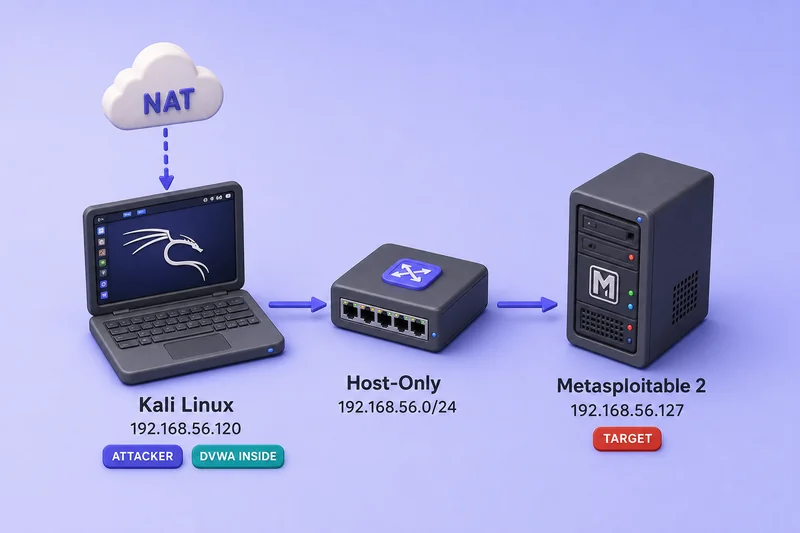
What runs in Group 1:
- Kali Linux — attacker workstation; Burp, Metasploit, and DVWA run inside the same VM (not a third guest).
- Metasploitable 2 — network target for scanning, SMB, and service exploitation.
Host sizing:
- RAM: 16 GiB minimum on the host, 32 GiB comfortable. The two VMs allocate about 9 GiB combined (8 GiB Kali, 1 GiB Metasploitable).
- CPU: a modern quad-core host is enough for routine scans; assign 4 vCPUs to Kali and 1 to Metasploitable.
- Disk: about 50–60 GiB free on the host for images and snapshots. Group 1 ships Kali with a 30 GiB dynamic virtual disk, which is enough for most lessons. Before the OpenVAS / Greenbone lab, expand Kali's virtual disk and root filesystem (see the laptop section above).
Network: host-only on both VMs (192.168.56.0/24 in the VirtualBox walkthrough). Add NAT on Kali only so you can update packages without exposing Metasploitable to the Internet.
| VM | vCPU | RAM | Disk | Network |
|---|---|---|---|---|
| Kali Linux | 4 | 8 GiB | 30 GiB dynamic | Host-only + NAT |
| Metasploitable 2 | 1 | 1 GiB | ~8 GiB (VMDK) | Host-only only |
Tight host RAM: On a 16 GiB laptop, close other apps and keep only these two VMs running. If you must shrink allocations temporarily, try 4 GiB for Kali and 512 MiB–1 GiB for Metasploitable for light ping-and-scan exercises — Burp, a browser, and Metasploit together expect the 8 GiB / 1 GiB table values. Snapshot before you lower VM RAM and restore the recommended sizes before heavier lessons.
Course IP addresses (copy into later lessons as export TARGET=):
| Lab track | Kali (attacker) | Primary target | Network |
|---|---|---|---|
| VirtualBox Group 1 | 192.168.56.120 |
Metasploitable 192.168.56.127 |
Host-only 192.168.56.0/24 (host at .1) |
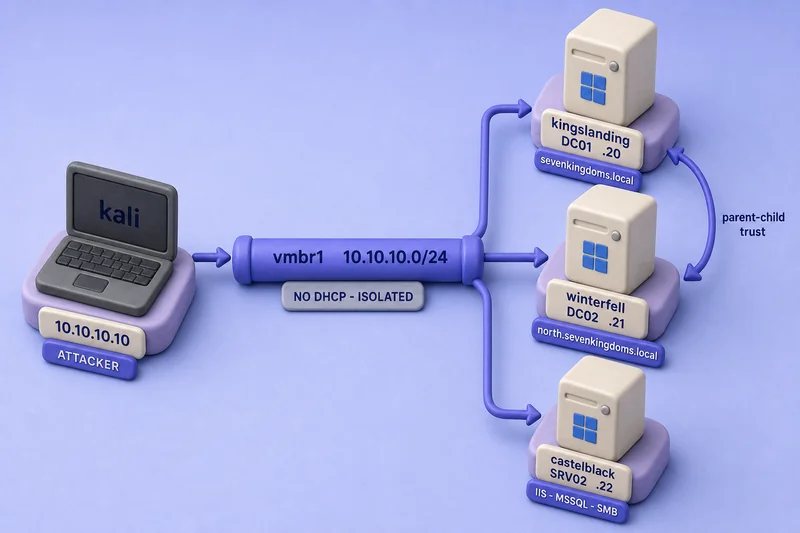
| Proxmox Group 2 | 10.10.10.10 on vmbr1 |
Metasploitable 10.10.10.30; GOAD .20–.22 |
Isolated 10.10.10.0/24; mgmt NIC 192.168.100.50 |
This is the lab you will use for reconnaissance, scanning, web application testing, and most network exploitation lessons. Follow Build the VirtualBox pentest lab when you are ready to install it.
Group 2: Active Directory lab
Build Group 2 when Active Directory lessons begin, not at course start. Try GOAD-Light locally with VirtualBox or VMware Workstation first; this course documents GOAD-Light on Proxmox as the reference path when local provisioning is unreliable.
GOAD-Light vs GOAD-Full
Both labs come from the GOAD project. GOAD-Light is the same core environment with the essos.local forest removed, which drops the meereen domain controller and the braavos MSSQL server.
| Topic | GOAD-Light (3 VMs) | GOAD-Full (5 VMs) |
|---|---|---|
Child domain (north.sevenkingdoms.local) |
Yes | Yes |
| Kerberoasting, AS-REP roasting | Yes | Yes |
| NTLM relay and Responder | Yes | Yes |
| MSSQL abuse on castelblack | Yes | Yes |
| ACL, GPO, and password-spray chains | Yes | Yes |
| Cross-forest exploitation | No | Yes, via essos.local |
| MSSQL trusted link to a remote forest | No | Yes, castelblack to braavos |
| Legacy paths such as Zerologon and PetitPotam | No | Partially |
| AD CS ESC2, ESC3, and ESC4 style paths | No | Yes |
| Official minimum RAM (GOAD docs) | ~20 GiB | ~24 GiB |
GOAD documentation recommends roughly 115 GB of total available disk space for the lab and downloaded VM images, with additional space required for snapshots. The lab files themselves take about 77 GB before Vagrant images and snapshots add more.
Kerberos and NTLM abuse, pass-the-hash, lateral movement, and Windows post-exploitation are all in GOAD-Light. Deploy GOAD-Full later only if you want cross-forest paths or advanced AD CS scenarios.
Course recommendation (Proxmox reference build)
This course places Kali at 10.10.10.10 and GOAD nodes at .20–.22 on isolated bridge vmbr1 (10.10.10.0/24 — no physical port, static addresses only). Upstream GOAD defaults collide with .10/.11; the deploy guide documents the course IP plan.
| VM | Hostname | vCPU | RAM | Disk | IP on vmbr1 |
|---|---|---|---|---|---|
| Kali attacker | kali | 4 | 8 GiB | 60 GiB | 10.10.10.10 |
| DC01 (root domain) | kingslanding | 2 | 4 GiB | 60 GiB | 10.10.10.20 |
| DC02 (child domain) | winterfell | 2 | 4 GiB | 60 GiB | 10.10.10.21 |
| Member server (IIS, MSSQL) | castelblack | 2 | 6 GiB | 80 GiB | 10.10.10.22 |
Give each Windows node 4 vCPUs during the initial Ansible provisioning, then dial back afterward. Snapshot each VM at a clean state before your first exploit; Windows snapshots consume real disk space, so budget well above the virtual disk sizes in the table.
Set up the hypervisor foundation with Proxmox pentest lab foundation, then deploy the lab with Deploy GOAD-Light on Proxmox.
Group 3: Local cloud-native lab
Group 3 covers the container and Kubernetes slice of cloud objectives on one Linux VM. IAM privilege escalation still needs a real cloud control plane (Group 4), but you can practise container escape, metadata-service attack concepts, Kubernetes abuse, and IaC review locally.
| Component | What it gives you | Cost |
|---|---|---|
| Kubernetes Goat on k3s or kind | Container escape, Docker-in-Docker escape, SSRF into the metadata service, RBAC abuse, secrets in environment variables | Free |
| LocalStack | AWS CLI, boto3, and Terraform fluency against an emulated AWS API | Free for non-commercial use; account required |
| MinIO | S3-compatible bucket and policy misconfiguration | Free |
| TerraGoat with Checkov or Trivy | Infrastructure-as-code misconfiguration review | Free |
| kube-bench and kubescape | Posture and CIS benchmark baselines for the cluster you just attacked | Free |
What LocalStack does not emulate: it exposes an AWS-shaped API, not AWS enforcement. You can attach a Deny policy in LocalStack and the action may still succeed. Use LocalStack for CLI, SDK, Terraform, and scanner practice; use Group 4 when you need to test whether a policy actually blocks something.
Linux VM sizing for Group 3:
| Requirement | Value |
|---|---|
| VMs | One Debian or Ubuntu VM |
| vCPU | 4 (minimum 2) |
| VM RAM | 8 GiB (minimum 4 GiB) |
| Disk | ~40 GiB |
| Network | Isolated bridge or host-only segment with outbound access during setup to pull images |
Shut down Group 1 or Group 2 before you dedicate an 8 GiB VM to this stack on a laptop. You cannot realistically emulate a full multi-account cloud control plane on one Linux VM; treat Group 3 as container, Kubernetes, and API-emulation practice only.
Group 4: Hosted and real cloud labs
Nothing in Group 4 runs on your hypervisor. This group exists because IAM enumeration and privilege escalation only behave realistically against a real cloud control plane.
| Target | Account needed | Cost | What it covers |
|---|---|---|---|
| flaws.cloud | None | Free | S3 bucket enumeration, IAM key misuse, metadata service, real AWS responses |
| flaws2.cloud | None | Free | Attacker and defender tracks, Lambda, ECS, container escape into AWS |
| CloudGoat | Your own AWS account | Variable AWS charges; depends on scenario and runtime | Scripted IAM privilege escalation chains, RCE to credential theft |
| AWSGoat, AzureGoat | Your own cloud account | Variable cloud charges; depends on scenario and runtime | Multi-stage attack paths on AWS or Azure |
Start with flaws.cloud and flaws2.cloud when you need hosted targets with no account setup. They run on real AWS infrastructure and cost nothing to the reader, but they do not replace every cloud lesson in the course.
Move to CloudGoat or similar ranges when you need full privilege-escalation chains in an account you control:
- Create a separate cloud account, never one that holds production data.
- Set a budget alert at a low threshold before you deploy.
- Run destroy or teardown commands when you finish a scenario. Idle resources accrue hourly charges, and not every hosted exercise is free.
Which lab group does each PenTest+ domain use?
The table maps each PT0-003 domain to the lab group you need for hands-on lessons. It is a planning guide, not a one-to-one objective checklist.
| PenTest+ PT0-003 domain | Group you need |
|---|---|
| 2. Reconnaissance and Enumeration (~21%) | Group 1 mainly; Group 2 when lessons enumerate Active Directory on GOAD |
| 3. Vulnerability Discovery and Analysis (~17%) | Group 1 for network and web scanning; Group 2 for BloodHound and AD path analysis; Groups 3 and 4 for container and cloud finding validation |
| 4. Attacks and Exploits (~35%) | Group 1 for network and web; Group 2 for Active Directory; Groups 3 and 4 for containers and cloud IAM; some subtopics still have no full home lab (wireless, mobile, OT, and similar) |
| 5. Post-Exploitation and Lateral Movement (~14%) | Group 2 mainly; Group 1 for single-host Linux escalation on Metasploitable |
Read that as a build order: Group 1 first, Group 2 when AD lessons start, Groups 3 and 4 for cloud topics. You do not deploy GOAD months before you need it, and you do not keep a cloud account lab running for the entire course.
Virtualization and isolated networking requirements
Hardware virtualization (Intel VT-x or AMD-V) must be enabled in firmware before you install VirtualBox, VMware Workstation, or Proxmox. Without it, 64-bit guests refuse to start.
On the Linux machine that will host your hypervisor, ask the kernel what the CPU exposes:
lscpu | grep -i virtualizationVirtualization type: VT-xA line naming VT-x or AMD-V means firmware is exposing the feature. An empty result usually means the option is disabled in BIOS or UEFI rather than absent from the CPU.
On Windows, systeminfo reports whether virtualization is available and enabled:
systeminfo | findstr /i "Virtualization"Task Manager offers the same check under Performance → CPU → Virtualization: Enabled if you prefer the GUI.
Isolated lab networking: you do not need a second physical NIC. Every hypervisor can create a private segment with no WAN attachment:
- VirtualBox or VMware Workstation: host-only or internal network (often
192.168.56.0/24by default). - Proxmox: internal bridge such as
vmbr1with no bridge ports (this course uses10.10.10.0/24).
Attach vulnerable targets only to that private segment. Kali may use a second adapter on NAT so you can run apt upgrade and pull wordlists without bridging Metasploitable or GOAD nodes to your home LAN or the Internet.
Pick one subnet per lab group and stay with it. Detailed adapter layout lives in pentest lab setup for VirtualBox and Proxmox pentest lab setup for vmbr1.
Optional hardware for specific lessons
Several PenTest+ objectives mention gear that no VM can fully replace. None of this is required to start the course or complete most hands-on labs on Groups 1 and 2.
| Hardware | Typical lesson use |
|---|---|
| Real Wi-Fi adapter (monitor mode) | Wireless capture, deauthentication, and evil-twin labs |
| Software-defined radio (SDR) | RF reconnaissance and signal analysis |
| NFC / RFID reader or writable tag | Physical access and badge-cloning demos |
| Mobile device or emulator beyond basic static analysis | On-device rooting, jailbreak, or Frida on hardware |
| Android Studio AVD (optional free path) | Free official emulator for Frida/MobSF practice when nested virt works |
| Genymotion Desktop (optional add-on) | Host-side rooted guest for MobSF dynamic analysis and other runtime Android labs — install on the host, not inside Kali |
| OT / ICS kit or simulator | Industrial protocol and PLC scenarios |
Treat these topics as theory, partial demos, or optional add-ons unless a specific lesson in the course calls for hardware you already own.
Summary
Start with Group 1 on the computer you already have. That covers most PenTest+ hands-on work through reconnaissance, scanning, web applications, and network exploitation.
Try GOAD-Light locally before renting anything. Use the official VirtualBox or VMware Workstation provider if your hardware can provision three Windows Server nodes reliably; move to bare-metal Proxmox only when local Active Directory guests stall during boot or provisioning.
Add cloud-native, hosted, or optional hardware labs only when a lesson explicitly requires them. Groups 3 and 4 belong to container and real-cloud modules; Wi-Fi adapters, SDR kits, and similar gear are add-ons, not course prerequisites.
References
- GOAD VirtualBox provider
- GOAD VMware Workstation provider
- GOAD-Light lab description
- GOAD full lab description
- Kubernetes Goat project
- Oracle VirtualBox networking modes
- Proxmox VE network configuration
- CompTIA PenTest+ exam objectives
Frequently Asked Questions
How much RAM does a penetration testing lab need?
It depends on which group you are building. Group 1 allocates about 9 GiB of VM RAM (8 GiB Kali, 1 GiB Metasploitable), so 16 GiB of host RAM is a workable minimum and 32 GiB is comfortable when Burp and a browser stay open on the host. Group 3 needs an 8 GiB Linux VM when other groups are shut down. GOAD-Light lists at least 20 GiB of VM memory in official docs; try it on a 32 GiB host before you rent a server. You never need all four groups running at once.
Can I build a pentest lab on a laptop with 16 GB of RAM?
Yes, for Group 1 reconnaissance, scanning, and web application testing. Allocate 8 GiB to Kali and 1 GiB to Metasploitable, close heavy host applications during long scans, and expect swapping if you keep a full desktop open on exactly 16 GiB. Thirty-two GiB is more comfortable when Burp, a browser, and host tools stay open alongside both VMs.
Can I run GOAD-Light on VirtualBox on my laptop?
You can try. During testing for this course, GOAD-Light was unreliable on a 32 GiB Windows 11 laptop in VirtualBox even after raising guest RAM. Bare-metal Proxmox is the course reference environment, but VirtualBox and VMware Workstation remain valid if your hardware provisions the three Windows nodes consistently. Upstream documents VirtualBox and VMware Workstation providers.
Do I need two physical network cards for a pentest lab?
No. Every hypervisor can create a virtual private network with no physical port attached. Attach vulnerable targets only to that segment. Kali may use a second NAT adapter for updates while targets stay on host-only or internal networking.
How much disk space does a pentest lab need?
About 50 to 60 GiB free on the host for most Group 1 work with cleanup between exercises. Greenbone runs inside Kali, so expand Kali's virtual disk to about 80 to 100 GiB and grow the root filesystem before that lesson, not just free space on the Windows or Linux host. About 40 GiB for the cloud-native Linux VM, and well above the sum of GOAD virtual disk sizes when Windows snapshots accumulate on disk.
Is there a free self-hosted lab for cloud penetration testing?
Partly. Kubernetes Goat, MinIO, and LocalStack on one Linux VM cover containers, Kubernetes abuse, and AWS API familiarity. IAM privilege escalation needs a real cloud control plane, which is what flaws.cloud, flaws2.cloud, and scoped CloudGoat accounts provide. LocalStack does not enforce AWS policy the way production does.
Is GOAD-Light enough or do I need GOAD-Full?
GOAD-Light is enough for most study tracks. It covers Kerberoasting, AS-REP roasting, NTLM relay, MSSQL abuse, child-domain paths, and lateral movement on three Windows Server nodes. GOAD-Full adds a second forest, cross-forest attacks, and extra AD CS scenarios that are optional depth rather than a required tier.
Can I run Proxmox inside VirtualBox for the lab?
That is a poor fit for Group 2. Nested Proxmox on a laptop adds performance and networking friction on top of the Windows domain-controller boot issues seen during course testing in flat VirtualBox GOAD runs. Prefer bare metal or a dedicated root server when Proxmox is the hypervisor for GOAD.
Is it legal to run these vulnerable VMs?
Yes on systems you own in an isolated network. GOAD, Metasploitable 2, Kubernetes Goat, and DVWA are intentionally vulnerable training images published for that purpose. Never aim lab tools at hosts you do not own or are not explicitly authorized to test.
