
| Tested on | Kali GNU/Linux Rolling 2026.2 (kali-rolling) |
|---|---|
| Package | bloodhound-ce-python (Kali package)BloodHound CE via bloodhound-cli (Docker)netexec 1.5.1 |
| Lab environment | Proxmox lab |
| Cert prep | CompTIA PenTest+ PT0-003 — Domain 3 (Vulnerability Discovery) and Domain 4b (Authentication and AD attacks) |
| Privilege | Domain user credentials for LDAP collection; sudo on Kali for DNS, Docker, and package installs on the management NIC |
| Scope | BloodHound CE install with bloodhound-cli, LDAP collection with bloodhound-ce-python from eth1 against GOAD-Light, ZIP ingest in the CE web UI, owned-node pathfinding, and pre-built analysis queries. Legacy 4.2/Neo4j steps are appendix-only for a specially staged offline lab. Does not execute Kerberoasting, pass-the-hash, ACL exploitation, or lateral movement — those are separate lessons. |
| Related guides | Penetration testing rules of engagement |
netexec and ldapsearch tell you what exists right now. BloodHound stores users, groups, computers, ACLs, and trusts as a graph, then runs shortest-path math. It shows whether an account you already own has a route toward higher-value principals — and when it does not, which other exposed accounts or ACL relationships deserve attention. That is the difference between a flat user list and an attack plan.
This walkthrough runs entirely from Kali against GOAD-Light on eth1: collect with bloodhound-ce-python, ingest into BloodHound Community Edition (CE) on the same VM, and read Kerberoastable accounts plus the privilege relationships you would exploit in later lessons. Your Windows PC is only a download staging box or SSH tunnel endpoint when you need to reach the CE web UI from outside Kali — it does not run BloodHound or attack GOAD. Exploitation stays out of scope here — you map paths, prioritize targets, and hand the graph to your reporting workflow.
BloodHound has two parts, and it helps to keep them straight from the start:
- Collector (
bloodhound-ce-pythonon Kali, or SharpHound CE on Windows) — logs into the domain and pulls the raw data. - Analyzer (BloodHound CE web UI in Docker) — stores the graph and runs pathfinding queries.
Here is the path this lesson follows, end to end:
- Install BloodHound CE on Kali with
bloodhound-cli(Docker on the management NIC). - Point the CE collector at a GOAD domain controller and save the data as a ZIP.
- Upload the ZIP in the CE web UI at
http://127.0.0.1:8080. - Mark the account you already control as Owned.
- Run built-in queries to find weak accounts and the shortest routes to Domain Admins.
What BloodHound adds beyond LDAP enumeration
Active Directory hides privilege in nested group memberships, discretionary ACLs, GPO links, and cross-domain trusts. A spreadsheet of netexec ldap --users output does not show that samwell.tarly can edit a GPO that pushes rights to castelblack, or that jon.snow carries a Kerberoastable SPN.
BloodHound models those relationships as nodes and edges:
| Node type | Examples in GOAD-Light |
|---|---|
| User | brandon.stark, jon.snow, eddard.stark |
| Group | Domain Admins, Starks, Night Watch |
| Computer | WINTERFELL, CASTELBLACK, KINGSLANDING |
| GPO | STARKWALLPAPER and other linked policies |
| Edge (relationship) | What it means for attackers |
|---|---|
MemberOf |
Group nesting and role inheritance |
GenericAll / GenericWrite / WriteDACL |
ACL abuse targets |
HasSession |
Lateral movement if you can reach the host |
AdminTo |
Local admin rights on a computer |
GetChanges / GetChangesAll |
DCSync-style replication abuse |
A few terms show up throughout this lesson. If any are new to you, keep this table handy:
| Term | Plain meaning |
|---|---|
| SPN | A label that ties a Kerberos service to an account. User or service accounts with a usable SPN can become Kerberoasting targets, because any authenticated domain user can request a ticket encrypted with that account's key. |
| Kerberoastable | An account you can request an encrypted service ticket for and crack its password offline. |
| AS-REP roastable | An account with pre-authentication turned off — you can grab a crackable hash with no password. |
| ACL | The permission list on an AD object. A misconfigured ACL lets a low user edit a high one. |
| Neo4j | The graph database BloodHound Legacy used locally. CE runs its own database inside Docker — you do not install Neo4j by hand. |
The CE collector (bloodhound-ce-python on Kali) writes JSON into a ZIP. BloodHound CE loads that ZIP and answers pathfinding questions such as “shortest route from this owned user to Domain Admins.”
GOAD DC (eth1)  →  bloodhound-ce-python on Kali  →  *.zip in ~/bh-lab/
                                                      ↓
                                            BloodHound CE (Docker on Kali)
                                                      ↓
                                   Analysis queries (Kerberoastable, paths to DA)
Everything in that chain runs on the Kali attacker VM. Collection uses eth1; CE install and Docker image pulls use the management NIC when Internet access is available.
BloodHound CE versus Legacy — match the collector to the analyzer
BloodHound ships in two generations, and the collector must match the analyzer:
| Stack | Collector | Analyzer | When to use |
|---|---|---|---|
| BloodHound CE | bloodhound-ce-python or SharpHound CE |
Dockerized CE web UI (bloodhound-cli install) |
Default for this tutorial and any new Kali Rolling lab |
| BloodHound Legacy | bloodhound-python 1.9 or SharpHound 1.x |
Electron app + local Neo4j 4.4 | Offline appendix only when Legacy bundles are already staged |
Legacy and CE collectors generate different BloodHound data schemas. Match the collector generation to the analyzer you run — upstream BloodHound.py states the master/Legacy branch is compatible only with BloodHound 4.2/4.3 and points CE users to the CE branch. Import a Legacy ZIP into CE and ingest fails or the graph looks empty.
Kali Rolling 2026.2 ships CE tooling (bloodhound-ce-python, SharpHound CE, AzureHound) alongside the Legacy bloodhound-python package. Keep these three points straight:
- CE tooling —
bloodhound-ce-pythonpairs with BloodHound CE. Kali explicitly warns not to confuse it with Legacybloodhound-python. - Legacy tooling —
bloodhound-pythonpairs with BloodHound 4.2/4.3 and Neo4j. Use it only in the Legacy/offline appendix when Docker or CE images are unavailable. - This tutorial uses CE — install, collection, ingest, and analysis all follow the current Kali default.
Lab roles — Kali attacks, GOAD is the target
| Machine | Role in this lesson |
|---|---|
Kali (10.10.10.10 on eth1, 192.168.100.50 on vmbr0) |
Attacker — collect LDAP data on eth1, run BloodHound CE on the management NIC |
GOAD-Light (.20–.22) |
Target — domain controllers and member server only |
| Windows PC | Optional file staging — download offline bundles when Kali cannot reach the Internet, then scp through the jump host |
| Jump host | SSH and scp only — never run Responder, BloodHound, or scans here |
Nothing in this lesson installs BloodHound on Windows or runs attacks from Windows.
GOAD-Light layout for BloodHound collection
BloodHound needs LDAP reachability to a domain controller and valid domain credentials. Point collection at the child domain first — most GOAD-Light attack paths start in north.sevenkingdoms.local.
| Role | Hostname | IP on vmbr1 |
DNS domain |
|---|---|---|---|
| Kali attacker | kali |
10.10.10.10 |
— |
| Root DC | kingslanding |
10.10.10.20 |
sevenkingdoms.local |
| Child DC | winterfell |
10.10.10.21 |
north.sevenkingdoms.local |
| Member server | castelblack |
10.10.10.22 |
north.sevenkingdoms.local |
Set lab variables once per shell session on Kali:
LAB_IF=eth1
LAB_DC_CHILD=10.10.10.21
LAB_DC_ROOT=10.10.10.20
DOMAIN_CHILD=north.sevenkingdoms.local
DOMAIN_ROOT=sevenkingdoms.local
DC_CHILD_FQDN=winterfell.north.sevenkingdoms.local
DC_ROOT_FQDN=kingslanding.sevenkingdoms.local
export LAB_IF LAB_DC_CHILD LAB_DC_ROOT DOMAIN_CHILD DOMAIN_ROOT DC_CHILD_FQDN DC_ROOT_FQDN
Confirm the lab NIC is up before you touch LDAP:
ip -br a show "$LAB_IF"eth1 UP 10.10.10.10/24Point DNS at the child DC so Kerberos and LDAP names resolve the way BloodHound expects. This overwrites the whole resolver file, so back it up first — and note that NetworkManager or systemd-resolved may rewrite it on the next network event:
sudo cp /etc/resolv.conf /etc/resolv.conf.bak
echo "nameserver $LAB_DC_CHILD" | sudo tee /etc/resolv.conf
If the Kali VM also needs normal Internet DNS, set the DC as a per-interface nameserver through NetworkManager instead of replacing the global file. Restore with sudo cp /etc/resolv.conf.bak /etc/resolv.conf when you are done collecting.
Ping the child DC across the isolated bridge:
ping -c 2 "$LAB_DC_CHILD"PING 10.10.10.21 (10.10.10.21) 56(84) bytes of data.
64 bytes from 10.10.10.21: icmp_seq=1 ttl=128 time=0.449 ms
64 bytes from 10.10.10.21: icmp_seq=2 ttl=128 time=0.266 ms
--- 10.10.10.21 ping statistics ---
2 packets transmitted, 2 received, 0% packet loss, time 1001msA TTL near 128 is normal for Windows Server on the local segment.
Install BloodHound CE on Kali
BloodHound CE runs in Docker. Install it on Kali's management NIC (eth0 / vmbr0) where apt and Docker can reach the Internet. GOAD collection still happens on eth1 later — only the analyzer stack lives here.
Greenbone recommends at least 8 GiB RAM for CE. The GOAD Kali VM from Install Kali Linux on Proxmox already meets that.
Install Docker and the CE collector package:
sudo apt update
sudo apt install -y docker.io bloodhound-ce-python
sudo systemctl enable --now docker
Confirm the CE collector is available:
bloodhound-ce-python --help | head -3usage: bloodhound-ce-python [-h] [-c COLLECTIONMETHOD] [-d DOMAIN] [-v]
[-u USERNAME] [-p PASSWORD] ...Download and run BloodHound CLI — the supported CE installer on Kali:
mkdir -p ~/bloodhound-ce && cd ~/bloodhound-ce
wget -q https://github.com/SpecterOps/bloodhound-cli/releases/latest/download/bloodhound-cli-linux-amd64.tar.gz
tar -xzf bloodhound-cli-linux-amd64.tar.gz
./bloodhound-cli install
Wait until the installer prints the randomly generated admin password and save it immediately:
[+] BloodHound is ready to go!
[+] You can log in as `admin` with this password: <save-this-password>
If you lose the password later, reset it from the same directory:
./bloodhound-cli resetpwdOpen the CE web UI in a browser on Kali, or tunnel port 8080 from your workstation through SSH to the Kali management address (192.168.100.50 in the course plan):
http://127.0.0.1:8080/ui/loginLog in as admin with the password from bloodhound-cli install, then set a new password when prompted.
To reach the UI from Windows without the Proxmox console:
ssh -L 8080:127.0.0.1:8080 kali@192.168.100.50Browse http://127.0.0.1:8080/ui/login on your PC while that tunnel stays open.
Check container health if the page does not load:
./bloodhound-cli containers status
sudo systemctl status docker
Bootstrap domain credentials for collection
BloodHound collection requires a domain username and password (or hash). You can arrive at those credentials through SMTP and SMB enumeration, Responder, or password spraying — this lesson uses a GOAD entry path you will meet again in the Kerberoasting and AS-REP article.
List domain users with NetExec over LDAP:
nxc ldap "$LAB_DC_CHILD" -u brandon.stark -p iseedeadpeople -d "$DOMAIN_CHILD" --usersLDAP 10.10.10.21 389 WINTERFELL [*] Windows 10 / Server 2019 Build 17763 (name:WINTERFELL) (domain:north.sevenkingdoms.local) (signing:None) (channel binding:Never)
LDAP 10.10.10.21 389 WINTERFELL [+] north.sevenkingdoms.local\brandon.stark:iseedeadpeople
LDAP 10.10.10.21 389 WINTERFELL [*] Enumerated 17 domain users: north.sevenkingdoms.local
LDAP 10.10.10.21 389 WINTERFELL -Username- -Last PW Set- -BadPW- -Description-
LDAP 10.10.10.21 389 WINTERFELL brandon.stark 2026-08-28 15:02:28 0 Brandon Stark
LDAP 10.10.10.21 389 WINTERFELL jon.snow 2026-08-28 15:02:40 0 Jon Snow
LDAP 10.10.10.21 389 WINTERFELL samwell.tarly 2026-08-28 15:02:43 0 Samwell Tarly (Password : Heartsbane)The description field on samwell.tarly is a separate finding — BloodHound will still help you see GPO and ACL paths once data is ingested.
Confirm brandon.stark is AS-REP roastable (no pre-authentication required):
impacket-GetNPUsers "$DOMAIN_CHILD/brandon.stark" -no-pass -dc-ip "$LAB_DC_CHILD"Impacket v0.14.0.dev0 - Copyright Fortra, LLC and its affiliated companies
[*] Getting TGT for brandon.stark
$krb5asrep$23$brandon.stark@NORTH.SEVENKINGDOMS.LOCAL:...A hash line means the account is AS-REP roastable. For collection you can use the known lab password directly:
COLLECT_USER=brandon.stark
COLLECT_PASS=iseedeadpeople
export COLLECT_USER COLLECT_PASS
Collect Active Directory data with bloodhound-ce-python
Create a working directory on Kali:
mkdir -p ~/bh-lab && cd ~/bh-labChoose a collection method
-c flag |
Collects | Host interaction | When to use |
|---|---|---|---|
DCOnly |
All LDAP-only methods — users, groups, trusts, ACLs, object properties, containers, GPO links | LDAP-only, no SMB session/local-admin probing | Building the initial domain graph |
All |
Everything in DCOnly plus sessions, local admins, and certificates |
Adds per-host SMB/LDAP probing (louder) | Full assessment when you need session and local-admin edges |
DCOnly is the key one to understand: it already runs the ACL, Group, Trusts, and ObjectProps methods, so a single DCOnly run gives you everything you need for pathfinding in this lesson. There is no need for a separate ACL collection — that is a common misconception. All only adds the noisier host-by-host session and local-admin data.
Run DCOnly on the child domain. Pass the FQDN of the DC to -dc, not the raw IP — the ingestor uses that hostname for LDAP and Kerberos:
bloodhound-ce-python -d "$DOMAIN_CHILD" -u "$COLLECT_USER" -p "$COLLECT_PASS" -dc "$DC_CHILD_FQDN" -c DCOnly --zip -ns "$LAB_DC_CHILD" -op goad-northINFO: BloodHound.py for BloodHound CE
INFO: Found AD domain: north.sevenkingdoms.local
INFO: Getting TGT for user
INFO: Connecting to LDAP server: winterfell.north.sevenkingdoms.local
WARNING: Kerberos auth to LDAP failed, trying NTLM
INFO: Found 18 users
INFO: Found 51 groups
INFO: Found 3 gpos
INFO: Found 1 ous
INFO: Found 19 containers
INFO: Found 2 computers
INFO: Found 1 trusts
INFO: Done in 00M 03S
INFO: Compressing output into 20260831032704_bloodhound.zipNTLM fallback after a Kerberos warning is normal in this lab when DNS and SPN setup are minimal. The run still returned users, groups, GPOs, and trust data.
List the ZIP BloodHound produced:
ls -lh ~/bh-lab/*bloodhound.zip-rw-r--r-- 1 root root 173K Aug 31 03:27 goad-north_20260831032704_bloodhound.zipThat single archive already carries the ACL edges pathfinding needs. Keep the ZIP on Kali — ingestion happens in the BloodHound CE web UI, not on Windows.
Ingest data into BloodHound CE
With BloodHound CE running (./bloodhound-cli containers status should show healthy containers):
- Log in at
http://127.0.0.1:8080/ui/loginasadmin. - Open Administration → Data Collection → File Ingest (or Quick Upload from the left menu).
- Upload
~/bh-lab/goad-north_*_bloodhound.zipand wait until processing finishes. - Confirm node counts look reasonable in the database summary.
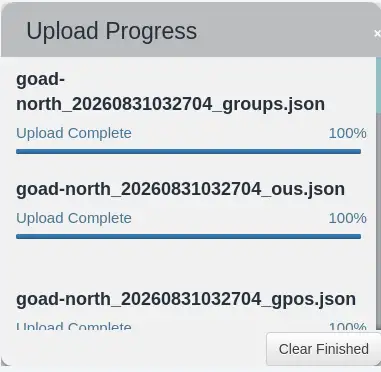
The screenshot above shows the same ingest completion pattern in an older Legacy window layout. CE uses the web UI, but the idea is identical: wait for 100% upload and post-processing before you run Analysis queries.
Confirm the collector ZIP came from bloodhound-ce-python on Kali, not from Legacy bloodhound-python. Mixing generations is the most common ingest failure.
Explore the graph and mark owned principals
Clear pinned nodes in the search bar before each analysis query. Pinned nodes cause empty query results even when the graph is populated.
Mark your foothold as Owned
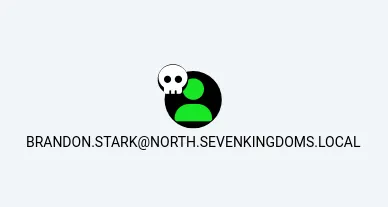
- Search for
brandon.starkand select the user node. - Right-click the node and choose Mark User as Owned.
List Kerberoastable accounts
- Open the Analysis tab.
- Under Kerberos Interaction, click List all Kerberoastable Accounts.
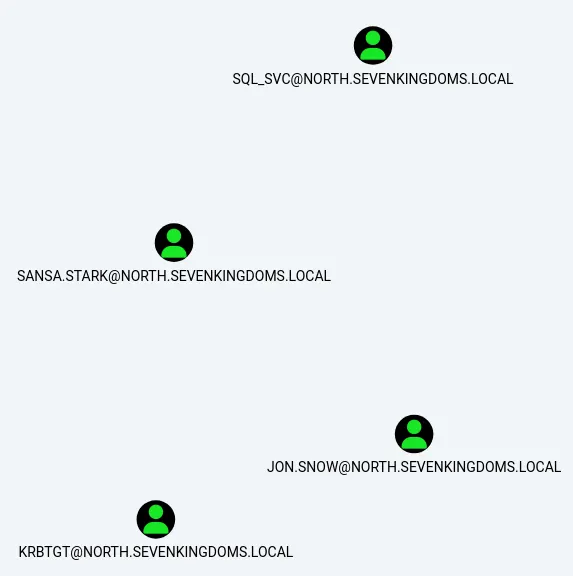
jon.snow should appear — he carries HTTP and CIFS SPNs in GOAD-Light.
Find paths to Domain Admins
- Clear the search bar and refresh the graph again.
- Under Shortest Paths, click Find Shortest Paths to Domain Admins.
- If a popup asks you to pick a group, double-click
DOMAIN ADMINS@NORTH.SEVENKINGDOMS.LOCAL.
In the graph generated during this lab, this query surfaced eddard.stark and ADMINISTRATOR with direct MemberOf links to Domain Admins. A path from brandon.stark to Domain Admins returned empty — that is expected here. Owning brandon.stark does not mean you have compromised any other account; the graph simply shows that Brandon has no edge toward Domain Admins.
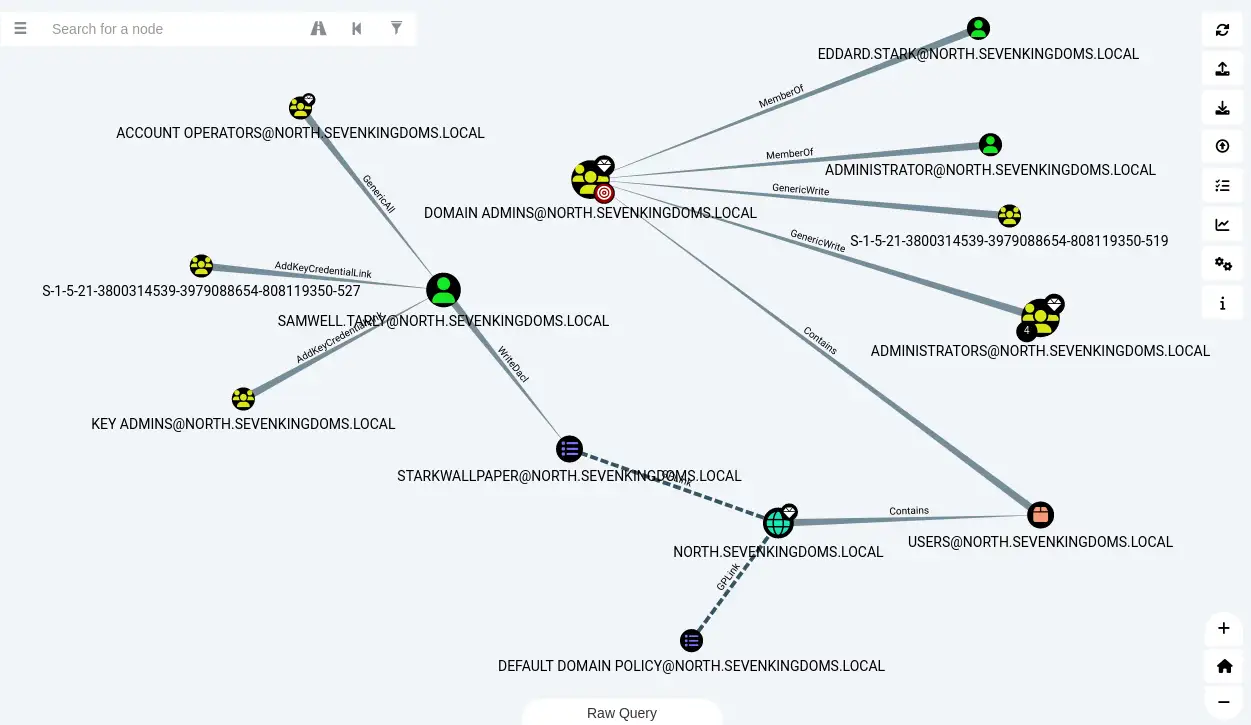
That is where the Kerberoastable jon.snow account becomes interesting. BloodHound shows what extra privilege becomes reachable if that account were compromised — so it is a high-value candidate for the next authorized credential-recovery lesson, not a path you already control.
Optional: under Kerberos Interaction, run Find AS-REP Roastable Users (DontReqPreAuth) to confirm brandon.stark.
| Query | What this lab run showed |
|---|---|
| List all Kerberoastable Accounts | jon.snow, sansa.stark, sql_svc |
| Find AS-REP Roastable Users | brandon.stark |
| Find Shortest Paths to Domain Admins | eddard.stark, ADMINISTRATOR → Domain Admins |
| Shortest Paths to Domain Admins from Kerberoastable Users | jon.snow, via a multi-hop path through WINTERFELL |
Exact nodes and hop counts depend on the GOAD version, collection methods, and lab state, so read your own graph rather than treating these as fixed GOAD-Light invariants. Record the usernames and edge types in your notes — you are building the attack narrative for your report, not exploiting the path yet.
Read several GOAD attack-path findings without exploiting them
BloodHound surfaces several independent findings in this forest. These are separate opportunities, not one continuous chain from your foothold:
brandon.stark(owned) is AS-REP roastable but has no direct path to Domain Admins.jon.snowis Kerberoastable and, in this lab's graph, sits on a multi-hop path toward Domain Admins throughWINTERFELL.samwell.tarlyhas a weak password in its LDAP description and GPO edit rights onSTARKWALLPAPER.eddard.starkis Domain Admin for the child domain — BloodHound shows the directMemberOfedge.
Each finding is a candidate for a different technique. Your job in this lesson is to decide which is cheapest to pursue — AS-REP roast, Kerberoast, GPO abuse, or credential reuse — and schedule the matching article:
| BloodHound signal | Next lesson |
|---|---|
GenericWrite / WriteDACL edges |
Pass-the-hash and ACL abuse lessons |
HasSession / AdminTo on CASTELBLACK |
Lateral movement on Windows |
Restore the goad-clean snapshot on Proxmox when a later lesson changes group membership or passwords and you need a fresh graph.
Optional: collect the parent domain
GOAD-Light trusts the parent sevenkingdoms.local forest. Collecting the parent needs credentials the parent domain accepts — the child-domain brandon.stark account does not automatically authenticate there. Use a valid parent-domain principal (or a trusted account the parent honors):
PARENT_USER=<parent-domain-user>
PARENT_PASS=<parent-domain-password>
bloodhound-ce-python -d "$DOMAIN_ROOT" -u "$PARENT_USER" -p "$PARENT_PASS" -dc "$DC_ROOT_FQDN" -c DCOnly --zip -ns "$LAB_DC_ROOT" -op goad-root
Re-ingest that ZIP into BloodHound CE. Pathfinding can then include enterprise paths toward sevenkingdoms.local Domain Admins such as cersei.lannister and robert.baratheon.
Legacy/offline BloodHound setup
Use this appendix only when Kali cannot pull Docker images for BloodHound CE — for example a specially staged offline GOAD environment where Legacy bundles were already copied to the VM. The main tutorial above uses BloodHound CE.
Kali without Internet on eth0 cannot run ./bloodhound-cli install until you stage files from a connected machine. Download these bundles on any connected host, then copy them to Kali through your jump host:
| File | Purpose |
|---|---|
neo4j-community-4.4.28-unix.tar.gz |
Graph database for BloodHound Legacy |
OpenJDK11U-jre_x64_linux_hotspot_*.tar.gz |
Java 11 — Neo4j 4.4 does not run on Kali's default Java 25 |
BloodHound-linux-x64.zip (4.2.0 release) |
BloodHound Legacy GUI on Kali |
From your Windows PC (substitute your jump-host user and Kali management IP):
scp -J <user>@<jump-host> neo4j-community-4.4.28-unix.tar.gz OpenJDK11U-jre_x64_linux_hotspot_11.0.26_4.tar.gz BloodHound-linux-x64-42.zip kali@192.168.100.50:/opt/bloodhound-offline/On Kali, unpack Neo4j and Java 11:
sudo mkdir -p /opt/bloodhound-offline
cd /opt/bloodhound-offline
sudo tar -xzf neo4j-community-4.4.28-unix.tar.gz
sudo tar -xzf OpenJDK11U-jre_x64_linux_hotspot_11.0.26_4.tar.gz
sudo ln -sfn neo4j-community-4.4.28 neo4j
export JAVA_HOME=/opt/bloodhound-offline/jdk-11.0.26+4-jre
export PATH="$JAVA_HOME/bin:$PATH"
Set Neo4j to listen on the Kali loopback and set the BloodHound default password:
sudo sed -i 's/#dbms.default_listen_address=0.0.0.0/dbms.default_listen_address=127.0.0.1/' /opt/bloodhound-offline/neo4j/conf/neo4j.conf
neo4j/bin/neo4j-admin set-initial-password bloodhound
Start Neo4j with Java 11:
neo4j/bin/neo4j startConfirm Bolt and HTTP are listening before you open BloodHound Legacy:
ss -tlnp | grep -E '7474|7687'Unpack the BloodHound Legacy application and confirm the Legacy collector:
cd /opt/bloodhound-offline
unzip -q BloodHound-linux-x64-42.zip -d bloodhound-legacy
bloodhound-python --help | head -3
The help banner should say BloodHound LEGACY, which pairs with BloodHound 4.2 — not bloodhound-ce-python.
Stage a desktop launcher for the Legacy Electron app:
sudo chmod -R a+rx /opt/bloodhound-offline
mkdir -p ~/bh-lab
cat > ~/start-bloodhound.sh << 'EOF'
#!/bin/bash
export DISPLAY=:0
export JAVA_HOME=/opt/bloodhound-offline/jdk-11.0.26+4-jre
cd /opt/bloodhound-offline/bloodhound-legacy/BloodHound-linux-x64
exec ./BloodHound --no-sandbox --disable-gpu --disable-dev-shm-usage
EOF
chmod +x ~/start-bloodhound.sh
Set the Neo4j password before the first neo4j start. If BloodHound later rejects neo4j / bloodhound and you have not ingested any data yet, reset the empty database:
neo4j/bin/neo4j stop
rm -rf neo4j/data/* neo4j/logs/*
neo4j/bin/neo4j-admin set-initial-password bloodhound
neo4j/bin/neo4j start
Launch Legacy from the Kali desktop (noVNC), not plain SSH, and run as your desktop user — not root:
~/start-bloodhound.shLog in at bolt://localhost:7687 with username neo4j and password bloodhound.
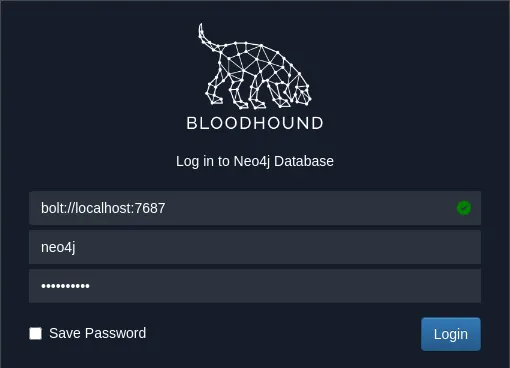
Collect with bloodhound-python (not bloodhound-ce-python), ingest through the Legacy upload icon, then follow the same Owned and Analysis query steps as the CE section above.
Troubleshooting
| Symptom | Likely cause | Fix |
|---|---|---|
| CE web UI does not load | Docker stopped or install incomplete | sudo systemctl start docker; rerun ./bloodhound-cli install from ~/bloodhound-ce |
Forgot CE admin password |
Lost install output | ./bloodhound-cli resetpwd |
requires a hostname (FQDN) on -dc |
IP passed to -dc |
Use winterfell.north.sevenkingdoms.local, keep -ns 10.10.10.21 |
| Ingest fails or empty graph in CE | Legacy collector ZIP | Use bloodhound-ce-python, not Legacy bloodhound-python |
NO DATA RETURNED FROM QUERY |
Pinned nodes in the search bar | Clear pinned names, refresh the graph, rerun the Analysis query |
Path from brandon.stark to Domain Admins empty |
No graph path in GOAD-Light | Expected — use Find Shortest Paths to Domain Admins or path from jon.snow |
Kerberos auth to LDAP failed |
DNS/Kerberos not fully configured on Kali | Expected in lab — NTLM fallback still collects |
Found 0 users |
Wrong domain or bad credentials | Verify with nxc ldap ... --users first |
| No session edges | DCOnly collection |
Re-run with session/local-admin methods in -c during a dedicated collection window |
Legacy: neo4j / bloodhound invalid at login |
Password set after first Neo4j start | See Legacy/offline appendix |
Legacy: futex / IOT instruction launching BloodHound |
Running as root over SSH | Use ~/start-bloodhound.sh as your desktop user on the Kali console |
Summary
BloodHound turns LDAP and ACL data into a map of how far each domain user sits from high-value groups. In this lab everything runs on Kali: bloodhound-ce-python collects from GOAD on eth1, BloodHound CE stores the graph in Docker, and the CE web UI renders attack paths.
Install CE with bloodhound-cli, collect with bloodhound-ce-python, ingest through the CE web UI, mark your foothold Owned, and run the built-in Kerberoastable and Domain Admin path queries. The Legacy 4.2 + Neo4j appendix exists only for offline labs where Docker images cannot be staged.
When the graph matches what you expect, export your findings into notes and pick the shortest hop — usually Kerberoast, AS-REP, or a weak description field — before you move on to exploitation lessons.
References
- BloodHound Community Edition quickstart
- SharpHound CE collection flags
- BloodHound.py (CE branch)
- GOAD-Light lab description
Frequently Asked Questions
Should I use BloodHound CE or Legacy?
Use CE for anything new on Kali Rolling — install with bloodhound-cli, collect with bloodhound-ce-python, and analyze in the CE web UI on port 8080. The Legacy/offline appendix covers BloodHound 4.2 + Neo4j only when Docker images cannot be staged on an offline GOAD lab.
Why does bloodhound-ce-python exist alongside bloodhound-python on Kali?
Kali packages two collectors: bloodhound-ce-python (for BloodHound CE) and bloodhound-python (Legacy, for BloodHound 4.2/4.3). They produce different data schemas, so match the collector to the analyzer and do not mix them.
Do I need domain admin to collect data?
No. Any domain user can run LDAP-based collection methods such as DCOnly. Session and local-admin collection need more rights and more network noise.
Is BloodHound collection loud on a real engagement?
DCOnly is mostly LDAP to domain controllers and is moderate noise. All adds session enumeration and SMB traffic that defenders often alert on. Scope collection methods in your rules of engagement.
What is the difference between BloodHound and NetExec?
NetExec answers point-in-time questions about hosts, shares, and users. BloodHound stores relationships and computes multi-hop attack paths across ACLs, groups, and trusts.
