
| Tested on | Kali GNU/Linux Rolling 2026.2 (kali-rolling) |
|---|---|
| Package | searchsploit (Exploit-DB 20260602-0kali1)nmap 7.99+dfsg-1kali1msfconsole (Metasploit Framework) |
| Lab environment | Pentest lab |
| Cert prep | CompTIA PenTest+ PT0-003 — Domain 3 (Vulnerability Discovery and Analysis) |
| Privilege | Normal user for lookups, SearchSploit, Nmap, and Metasploit searches; sudo only when your RoE allows exploitation steps in linked lessons |
| Scope | Treat scanner rows as hypotheses, normalize findings, verify product/version/exposure, read CVE and vendor advisories, bridge to EPSS/KEV, search SearchSploit and Metasploit, apply an exploit-fit checklist, explain false positives and scan completeness, and document validate/exploit/defer/reject decisions. Does not replace full OpenVAS/Nessus deployment, CVSS math, or step-by-step Metasploit exploitation. |
| Related guides | Kali vulnerability scanner tools |
A scanner finding is evidence to investigate, not automatic proof that the vulnerability is exploitable on your target. Vulnerability scanners infer risk from banners, version strings, remote behavior, authenticated package inventories, and heuristics—so confidence varies by plugin family. A credentialed Linux patch check behaves very differently from a remote banner guess on TCP/22, and two tools can flag the same CVE with different evidence or disagree entirely.
Your job is to turn plugin output into testable facts before you open Exploit-DB.
This page covers the vulnerability-analysis stage between vulnerability scanning and controlled exploitation. It pairs with vulnerability prioritization—that article decides what deserves attention first; this one decides whether a finding is real and which public exploit, if any, actually matches.
Vulnerability scan validation quick start
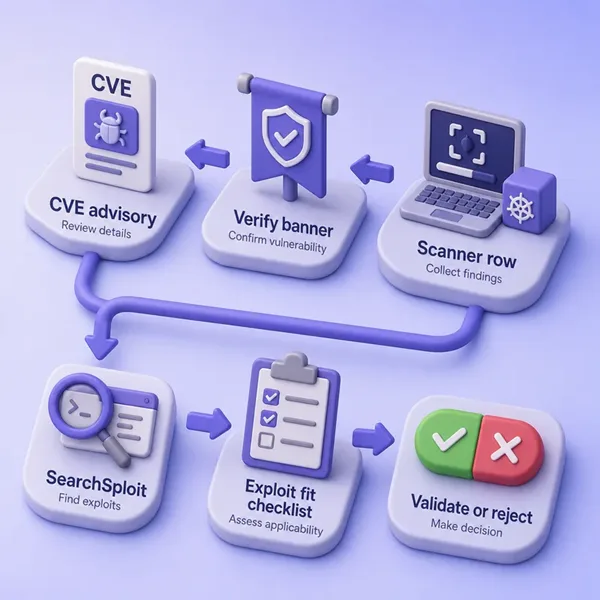
Before diving into each step, here is the full decision sequence at a glance:
┌─────────────────────────────────────┐
│         Scanner finding row         │
└──────────────────┬──────────────────┘
                   │
┌──────────────────▼──────────────────┐
│  Confirm host + port + product +    │
│  version (Nmap -sV, package build)  │
└──────────────────┬──────────────────┘
                   │
┌──────────────────▼──────────────────┐
│  Read CVE record + vendor advisory  │
│  (affected range, config, backport) │
└──────────────────┬──────────────────┘
                   │
┌──────────────────▼──────────────────┐
│  Search CVE in SearchSploit &       │
│  Metasploit; read exploit headers   │
└──────────────────┬──────────────────┘
                   │
┌──────────────────▼──────────────────┐
│  Apply exploit-fit checklist        │
│  (version / platform / config / RCE │
│   vs PoC / network position)        │
└──────────────────┬──────────────────┘
                   │
       ┌───────────┴────────────┐
       │                        │
┌──────▼──────┐       ┌─────────▼────────┐
│  Validate / │       │  Defer / Reject  │
│  Exploit    │       │  false positive  │
└─────────────┘       └──────────────────┘
The sections below walk each step in detail.
Review the vulnerability scanner finding
Copy scanner output into a consistent record so you are not searching exploits from a vague product name alone.
| Field | Example (OpenSSH row) |
|---|---|
| Host | scanme.nmap.org (45.33.32.156) |
| Port / protocol | TCP/22 |
| Service | SSH |
| Product | OpenSSH |
| Version / build | 6.6.1p1 Ubuntu-2ubuntu2.13 |
| Operating system | Ubuntu Linux |
| CVE | CVE-2018-15473 |
| CWE | CWE-200 (information exposure) |
| CVSS | 5.3 (NVD v3.1 Base) |
| Scanner / plugin | Example: “OpenSSH < 7.7 User Enumeration” |
| Detection evidence | Version-range match on banner |
| Authentication used | Unauthenticated remote |
| Source | Nessus / OpenVAS / manual Nmap follow-up |
Fill every row you can from the scanner export. Missing port, build, or auth context is how teams pick the wrong Exploit-DB entry.
Verify the product, version, and exposure
Confirm what is actually running before you trust the CVE mapping.
Set an authorized target for the lab examples below:
TARGET=scanme.nmap.orgscanme.nmap.org is an Nmap project host that permits scanning; replace TARGET with an address in your RoE.
Ask Nmap for a service version on the port the scanner flagged:
nmap -Pn -sV -p 22 "$TARGET"PORT STATE SERVICE VERSION
22/tcp open ssh OpenSSH 6.6.1p1 Ubuntu 2ubuntu2.13 (Ubuntu Linux; protocol 2.0)OpenSSH 6.6.1p1 falls below 7.7, so CVE-2018-15473 remains in scope for manual review. That does not prove exploitation works from your network position—it only confirms the version range.
Other safe checks when authorized:
- Package or patch inventory on credentialed scans
- Application footer or
/server-statusstyle version leaks - Configuration file or feature flags the advisory requires
- Protocol response that proves the vulnerable code path exists
Watch for vendor backports. “Version looks old” does not always mean vulnerable if the distribution backported the fix while keeping an upstream-looking version string. Debian and Ubuntu security teams do this routinely—read the vendor advisory for the exact package build, not only the banner.
Check whether the CVE actually affects your version
Open the CVE entry and the vendor bulletin next. Confirm:
- Affected and fixed version ranges
- Required configuration or component
- Whether authentication is required
- Known exploit conditions and references
Pull the English description and Base score from NVD when you need a quick sanity check:
CVE=2018-15473
curl -s "https://services.nvd.nist.gov/rest/json/cves/2.0?cveId=CVE-${CVE}"
Trimmed fields from this lookup:
OpenSSH through 7.7 is prone to a user enumeration vulnerability due to not delaying
bailout for an invalid authenticating user until after the packet containing the request
has been fully parsed...
CVSS v3.1 Base score: 5.3
CVE names the flaw; CWE classifies the weakness type. Exploit-DB is not an advisory database—it archives public exploit code and PoCs. A matching CVE ID in an exploit title does not replace reading NVD and the vendor bulletin.
Once applicability is confirmed, use EPSS and CISA KEV to help prioritize validated findings across your engagement; see the dedicated vulnerability prioritization guide.
Find an exploit for a CVE with SearchSploit and Metasploit
Search in this order:
- CVE identifier
- Exact product name
- Exact version or build
- SearchSploit / Exploit-DB
- Metasploit module search
- Vendor or researcher PoC links from the CVE references
SearchSploit by CVE first:
searchsploit --cve 2018-15473---------------------------------------------- ---------------------------------
Exploit Title | Path
---------------------------------------------- ---------------------------------
OpenSSH 2.3 < 7.7 - Username Enumeration | linux/remote/45233.py
OpenSSH 2.3 < 7.7 - Username Enumeration (PoC | linux/remote/45210.py
OpenSSH < 7.7 - User Enumeration (2) | linux/remote/45939.py
---------------------------------------------- ---------------------------------
Shellcodes: No ResultsNarrow by product and version when CVE search returns multiple entries:
searchsploit openssh 6.6Read the exploit header and metadata without executing it:
searchsploit -x 45210 Exploit: OpenSSH 2.3 < 7.7 - Username Enumeration (PoC)
URL: https://www.exploit-db.com/exploits/45210
Path: /usr/share/exploitdb/exploits/linux/remote/45210.py
Codes: CVE-2018-15473
Verified: True
File Type: Python script, ASCII text executable
#!/usr/bin/env python
...
import paramikoThe header shows affected version text, CVE mapping, and dependencies (paramiko here). That is the minimum review before you run third-party code.
List Metasploit modules tied to the same CVE:
msfconsole -q -x "search cve:2018-15473; exit"Matching Modules
================
# Name Disclosure Date Rank Check Description
- ---- --------------- ---- ----- -----------
0 auxiliary/scanner/ssh/ssh_enumusers . normal No SSH Username Enumeration
1 \_ action: Malformed Packet . . . Use a malformed packetThis module family aligns with username enumeration rather than shell access—read info before you run it. When no module exists for a CVE, fall back to Exploit-DB or a manual PoC.
For a second pattern—a trojanized version match rather than a logic flaw—search a classic vsFTPd backdoor row:
searchsploit --cve 2011-2523vsftpd 2.3.4 - Backdoor Command Execution | unix/remote/49757.py
vsftpd 2.3.4 - Backdoor Command Execution (Me | unix/remote/17491.rbFull SearchSploit syntax belongs in a dedicated cheat sheet; this lesson stops at the queries you use during validation.
Check whether a public exploit applies to your target
An exploit title containing your CVE is not enough. Walk this checklist before you treat public code as applicable:
| Check | Question |
|---|---|
| Product | Same software family as the target service? |
| Version | Vulnerable build, not merely “nearby” in the title? |
| Operating system | Matches Linux vs BSD vs Windows paths in the exploit? |
| Architecture | x86, x64, ARM constraints satisfied? |
| Remote vs local | Exploit type fits your network position? |
| Authentication | Valid user, session, or anonymous access required? |
| Configuration | Vulnerable feature or setting enabled on the target? |
| Dependency | Required library versions present? |
| Network position | Reachable port; not blocked by segmentation or NAT? |
| Port assumptions | Default vs non-default service port? |
| Payload | Shell type, encoding, or trigger the target supports? |
| Reliability | Crash risk, denial of service, or data loss? |
| Modification | Does the PoC need edits for your environment? |
| PoC vs weaponization | Does the file prove the bug without granting execution? |
Example: CVE-2018-15473 PoCs perform username enumeration—a low-impact validation method—not remote code execution. A vsFTPd 2.3.4 backdoor exploit targets a specific trojanized build, not every FTP server on port 21.
Inspect the Metasploit module when one exists:
msfconsole -q -x "info exploit/unix/ftp/vsftpd_234_backdoor; exit" Module: exploit/unix/ftp/vsftpd_234_backdoor
Platform: Unix, Linux
Rank: Excellent
Disclosed: 2011-07-03
Check supported: Yes
Available targets:
0 Linux/Unix CommandCheck supported: Yes means Metasploit can test preconditions—it still does not replace your version and banner verification. Read info for platform, rank, and required options before you use a module in the Metasploit tutorial.
Prefer the lowest-impact validation method
Good methodology escalates proof only as far as scope requires:
- Confirm version, package build, or configuration from advisories and safe inspection.
- Use scanner or plugin evidence as a secondary signal.
- Use vendor or community check functionality when available.
- Use benign proof (username enumeration, safe read-only behavior) when sufficient.
- Perform full exploitation only when the objective and RoE require it.
CVE-2018-15473 is a useful example: username enumeration may be enough to prove applicability during discovery. You do not need a shell to show the version range and advisory align. Reserve noisy exploits for findings that unlock the engagement goal.
How to identify vulnerability scanner false positives
Nessus, OpenVAS/Greenbone, and other scanners can report findings that require manual validation before you treat them as exploitable. Common causes:
- Inaccurate version detection from banners or stale fingerprints
- Vendor backports that fix the flaw without changing the banner
- Stale plugin signatures or feed data
- Service or banner masking (reverse proxy, honeypot header)
- Plugin assumes default configuration that is disabled
- Configuration-specific flaw absent on the target
- Superseded patch logic (partial fix not reflected in plugin)
- Incomplete authenticated inventory (plugin never saw the patched package)
Example: a network scanner flags CVE-2021-44228 (Log4j) at critical severity because a Java-related service fingerprint matched. Manual validation shows no Log4j JAR on the classpath and no JNDI lookup path—the finding is a fingerprint false positive. The prioritization lesson walks that pattern on Metasploitable 2; the fix is the same here: reject when version, component, and configuration do not align.
Also check for false negatives
A clean scanner report does not prove a host is safe. Issues are missed when:
- Ports were not scanned (common with large UDP gaps)
- Host marked down by ICMP assumptions (
-Pnmatters) - Credentials failed silently on authenticated checks
- Wrong virtual host, URL, or application path tested
- Web crawl depth or scope too shallow
- WAF, rate limit, or IPS throttled probes
- Scan job terminated early or hit a time limit
- Plugin family disabled in the scan policy
- Network segmentation blocked scanner path while the service is reachable elsewhere
- Feed lacks coverage for the technology stack
- Unsupported or custom application not in the plugin set
Before you trust “zero critical,” review scan job settings: port list, auth success, policy template, and completion status. Follow up gaps with targeted Nmap or manual checks on services already in scope.
Document the validation decision
Record reasoning for every significant row—validated, exploited, deferred, or rejected:
| Field | Example (OpenSSH enumeration) |
|---|---|
| Finding | OpenSSH user enumeration |
| CVE | CVE-2018-15473 |
| Verified? | Yes — version confirmed |
| Evidence | nmap -sV → OpenSSH 6.6.1p1; NVD range < 7.7 |
| Exploit source | SearchSploit 45210.py |
| Exploit match | Partial — PoC matches product and version; impact is enumeration only |
| Prerequisites | TCP/22 reachable; valid username list helpful |
| Potential impact | Account name disclosure; no RCE from this PoC |
| Test decision | Validate with low-impact enumeration if RoE allows |
| Reason | Scanner hypothesis confirmed; escalate only if usernames unlock next step |
Possible decisions:
- Validate — safe check planned
- Exploit — full PoC or module run authorized and needed
- Defer — plausible but missing creds, path, or time
- Reject false positive — version, config, or component mismatch documented
- Needs additional evidence — more recon or authenticated scan required
Copy the table into your engagement notes or report draft so audit and retest trails stay clear.
Troubleshooting
| Symptom | Likely cause | Fix |
|---|---|---|
| Exploit-DB hit but module fails | Version, config, or platform mismatch | Re-read advisory; compare exploit header to nmap -sV and package build |
| Scanner and Nmap disagree on version | Banner masking or partial detection | Trust manual enumeration; check credentialed inventory |
| Many SearchSploit results for one CVE | Several PoCs for same flaw | Filter by version and impact; read -x headers |
Metasploit search empty |
No module for that CVE | Use Exploit-DB or manual PoC; do not assume “no exploit” |
| Patched server still flagged | Backport not in plugin logic | Document vendor package version; mark false positive |
| Clean VA scan, manual check finds issue | Scan completeness gap | Review ports, auth, policy, and job status; rescan narrowly |
| PoC runs but no impact | Wrong exploit class (DoS vs RCE) | Re-read CVE; pick lower-impact validation if sufficient |
Summary
Vulnerability scanner output is a starting point. Review each finding, verify the service and version (including backports), read the CVE and vendor advisory, then use SearchSploit and Metasploit to locate public code. The exploit title is not proof of fit—walk the checklist for product, version, platform, configuration, and impact before you run anything.
False positives waste engagement time; false negatives hide in incomplete scans. When a finding survives validation: capture minimum evidence (command, timestamp, version proof, safe PoC output), update priority using applicability and attack-path value, map it to the next step in the attack chain, and retest after remediation with the same method. Document validate, exploit, defer, and reject decisions with evidence so your report reflects what you proved—not what a plugin guessed. When scope requires it, hand off to controlled exploitation in your framework lesson; otherwise stop at the lowest-impact validation that satisfies the objective.
References
- NVD CVE API
- FIRST EPSS API
- CISA Known Exploited Vulnerabilities Catalog
- Exploit-DB SearchSploit manual
- Metasploit documentation
- Nmap service and version detection
- OpenSSH security advisories
Frequently Asked Questions
How do I verify a vulnerability scanner finding?
Normalize the plugin output (host, port, product, version, CVE, evidence), confirm the service with manual enumeration such as nmap -sV, read the CVE and vendor advisory for affected versions and prerequisites, then decide whether a safe validation test or public PoC applies.
How do I know if a Nessus or OpenVAS finding is a false positive?
Compare scanner evidence to confirmed version, package build, and configuration. Common false positives come from banner-only version guesses, missing backport awareness, and plugins that assume default insecure settings that are disabled on the target.
How do I find an exploit for a CVE?
Search in order: CVE ID in SearchSploit (searchsploit --cve YYYY-NNNN), exact product and version, Metasploit (search cve:…), then reference links in the NVD entry. Read exploit headers before execution.
Does an Exploit-DB entry mean the target is vulnerable?
No. It means public code or a PoC exists for some configuration of that flaw. You still must verify version, platform, configuration, and network reachability on your target.
Re-check version strings, architecture, authentication requirements, and whether the PoC targets denial of service rather than code execution. Many public scripts are stale or lab-specific.
