
| Tested on | Kali GNU/Linux Rolling 2026.2 (kali-rolling) |
|---|---|
| Package | docker.io 28.5.2+dfsg4docker-bench-security (CIS Docker Benchmark v1.6.0 checks)alpine:3.22 |
| Lab environment | Pentest lab |
| Cert prep | CompTIA PenTest+ PT0-003 — Domain 4e (cloud and container) and Domain 3 (configuration assessment) |
| Privilege | [sudo](/sudo-command-in-linux/) for Docker daemon access on typical installs; docker group membership is treated as sensitive (see body) |
| Scope | Detect and assess Docker configurations that weaken container isolation (privileged mode, docker.sock, mounts, capabilities, host namespaces), prove host-impact conditions with safe checks, run Docker Bench, and harden. Does not cover kernel/runc exploit recipes, cgroup release_agent breakouts, Kubernetes pod escapes, or image CVE hunting as the primary topic. |
A process running as root inside a normal Docker container is not automatically host root. Docker usually wraps the process with namespaces, cgroups, a reduced capability set, seccomp, and (where the host enables them) AppArmor or SELinux. The risk jumps when someone hands the container privileged mode, Docker daemon access, sensitive host mounts, extra capabilities or devices, host namespaces, or when a real kernel or runtime CVE exists.
Many pages titled “Docker container escape” jump straight to breakout one-liners. This one keeps the keyword but answers a more durable question: which configurations already give a compromised container a path to affect the host, and how do you detect those conditions before you talk about exploits?
What Docker container escape means
A container escape happens when code that should stay inside the container crosses the intended isolation boundary and gains unintended control or access on the host (or other resources outside that container).
Write-ups often mix two different situations:
| Situation | What actually happened | Example signals |
|---|---|---|
| Misconfiguration-assisted host access | Operators gave the container host power on purpose or by mistake | --privileged, docker.sock mount, host root bind mount, docker group shell |
| Runtime or kernel vulnerability | A bug in the kernel, runc, containerd, or Docker Engine breaks isolation | Version-specific CVE after patch research |
Both can end with host impact. Only the second is a classic isolation-breaking vulnerability. The first is often a case where there was never a meaningful isolation boundary for that privilege path. Your report should say which one you found. Most SERP “escape” recipes for docker.sock or --privileged are really documenting the first row.
How Docker normally isolates containers
Docker Engine does not put each container in a second hypervisor by default. Containers share the host kernel and rely on several layers to keep workloads apart:
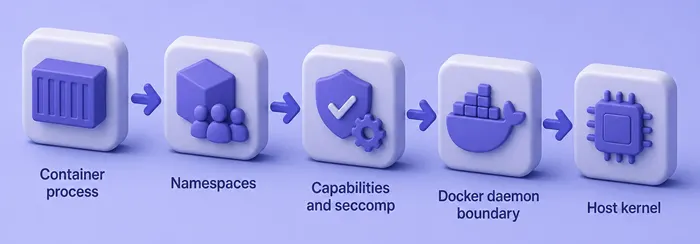
- Namespaces limit what the process can see (PID, mount, network, UTS, IPC, and optionally user)
- Cgroups limit CPU, memory, and other resource use
- Capabilities drop most of the old “root can do anything” model
- Seccomp filters dangerous syscalls
- AppArmor or SELinux, when enabled on the host, add mandatory access control
- The Docker daemon remains the privileged control plane that creates and configures containers
When any of those controls is removed or bypassed, root inside the container starts to look more like host power.
Root inside a container vs root on the host
Normally, container UID 0 is powerful inside that mount and PID namespace, but Docker drops many capabilities and applies a default seccomp profile. A default Alpine container can edit files in its own filesystem and still fail operations that need host-level privilege.
Risk grows quickly when you add:
--privileged- Access to the Docker socket or remote Docker API
- Sensitive host bind mounts (
/,/etc,/var/run/docker.sock, and similar) - Broad capabilities such as
CAP_SYS_ADMIN - Host PID or network namespaces, or raw device exposure
User namespaces and rootless Docker change the mapping again (covered under hardening). For host-user privilege escalation unrelated to containers, use the Linux privilege escalation guide instead of this page.
Build and inspect the Docker escape lab
On my Kali lab I used Docker Engine 28.5.2 and alpine:3.22 to compare intentional shapes: normal, CAP_SYS_ADMIN, privileged, docker.sock mount, and a host-root bind mount. Create them on an authorized Engine host, then inspect before you claim host impact.
Pull the base image once:
docker pull alpine:3.22Sample output:
3.22: Pulling from library/alpine
Digest: sha256:14358309a308569c32bdc37e2e0e9694be33a9d99e68afb0f5ff33cc1f695dce
Status: Image is up to date for alpine:3.22
docker.io/library/alpine:3.22
Your digest may differ by mirror; what matters is that alpine:3.22 resolves cleanly.
Start a normal container (A). It runs as root inside the container and is not privileged:
docker run -d --name glc-escape-a alpine:3.22 sleep 3600Docker prints a long container ID on success.
Add only CAP_SYS_ADMIN (C). That is broader than the default set but not the same as --privileged:
docker run -d --name glc-escape-c --cap-add SYS_ADMIN alpine:3.22 sleep 3600Start a privileged container (D). Docker’s docs warn that privileged mode is not a secure sandbox:
docker run -d --name glc-escape-d --privileged alpine:3.22 sleep 3600Mount the Docker socket (E):
docker run -d --name glc-escape-e -v /var/run/docker.sock:/var/run/docker.sock alpine:3.22 sleep 3600Bind-mount the host root read-only under /host so you can contrast mount risk with privileged mode:
docker run -d --name glc-escape-mount -v /:/host:ro alpine:3.22 sleep 3600Confirm the set is running:
docker ps --format 'table {{.Names}}\t{{.Status}}\t{{.Image}}'Sample output:
NAMES              STATUS         IMAGE
glc-escape-mount   Up 5 minutes   alpine:3.22
glc-escape-e       Up 5 minutes   alpine:3.22
glc-escape-d       Up 5 minutes   alpine:3.22
glc-escape-c       Up 5 minutes   alpine:3.22
glc-escape-a       Up 5 minutes   alpine:3.22
All five names should show Up before you inspect.
Inspect from the host and from inside
Ask one question first: what host privileges has this container already been given?
Compare the privileged flag on A and D:
docker inspect -f '{{.Name}} Privileged={{.HostConfig.Privileged}}' glc-escape-a glc-escape-dSample output:
/glc-escape-a Privileged=false
/glc-escape-d Privileged=true
Only D reports Privileged=true. Container A is still root-capable inside its namespace, but it is not privileged in Docker’s sense.
Check effective capabilities from inside A:
docker exec glc-escape-a sh -c 'id; grep CapEff /proc/1/status'Sample output:
uid=0(root) gid=0(root) groups=0(root),0(root),1(bin),2(daemon),3(sys),4(adm),6(disk),10(wheel),11(floppy),20(dialout),26(tape),27(video)
CapEff:	00000000a80425fb
UID 0 confirms container root. CapEff is the default set on this Engine build, not “all capabilities.”
Repeat in the privileged container:
docker exec glc-escape-d sh -c 'id; grep CapEff /proc/1/status'Sample output:
uid=0(root) gid=0(root) groups=0(root),0(root),1(bin),2(daemon),3(sys),4(adm),6(disk),10(wheel),11(floppy),20(dialout),26(tape),27(video)
CapEff:	000001ffffffffff
Same UID 0, much wider CapEff. Privileged mode is not “run as root”; it is a different isolation profile.
Inspect added capabilities on C:
docker inspect -f '{{.Name}} CapAdd={{json .HostConfig.CapAdd}}' glc-escape-cSample output:
/glc-escape-c CapAdd=["CAP_SYS_ADMIN"]List mounts on the socket and host-root containers:
docker inspect -f '{{range .Mounts}}{{.Source}} -> {{.Destination}} RW={{.RW}}{{"\n"}}{{end}}' glc-escape-eSample output:
/var/run/docker.sock -> /var/run/docker.sock RW=trueThe socket is bind-mounted read-write into E. Next, inspect the host-root mount container the same way:
docker inspect -f '{{range .Mounts}}{{.Source}} -> {{.Destination}} RW={{.RW}}{{"\n"}}{{end}}' glc-escape-mountSample output:
/ -> /host RW=falseAlso record PidMode, NetworkMode, Devices, and SecurityOpt when they appear. Those fields answer the same methodology question: what did the operator leave open?
Common Docker configurations that weaken isolation
Privileged containers
--privileged is Docker’s blunt instrument. Current Docker documentation warns that it grants all capabilities, exposes host devices, and weakens normal security profiles so the container is not securely sandboxed and may gain host control.
Do not confuse it with “the process UID is 0.” On this lab both A and D run as UID 0; only D has Privileged=true and the near-full CapEff mask.
Inspect security options on D:
docker inspect -f 'Privileged={{.HostConfig.Privileged}} SecurityOpt={{json .HostConfig.SecurityOpt}}' glc-escape-dSample output:
Privileged=true SecurityOpt=["label=disable"]label=disable is one security-option change Docker recorded for this privileged container (commonly related to SELinux-style labeling). Separately, Docker documents that privileged mode relaxes normal device, capability, and security-profile restrictions. Do not treat that single SecurityOpt value as proof that every LSM or seccomp control on every host is gone.
Demonstration goal here is comparison, not a destructive host takeover. In an authorized engagement, stop once you can prove the isolation profile is effectively host-grade, then move to remediation.
Docker socket and docker group access
The Docker CLI and many containers talk to the daemon over /var/run/docker.sock. The danger is not magical bytes in the socket file. The danger is that an authorized client can instruct a root-owned daemon to create containers, mount host paths, and otherwise manage the host.
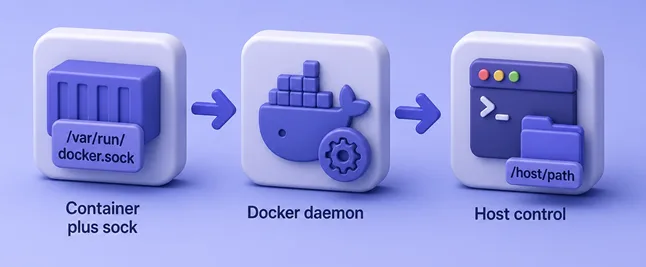
On a normal rootful Docker Engine without an authorization plugin or socket proxy restricting API operations, write access to the Docker socket is effectively root-equivalent. OWASP and Docker’s own daemon-access guidance treat that exposure as host-level risk for the same reason. Rootless daemons, Desktop Enhanced Container Isolation, and authz layers change residual impact, so say which of those apply before you rate the finding.
Membership in the docker group is a host identity issue, not “container root.” On a typical rootful install, /var/run/docker.sock is owned by root:docker, so group members can drive the daemon without sudo.
Check socket ownership on the host:
ls -l /var/run/docker.sockSample output:
srw-rw---- 1 root docker 0 Sep 4 12:40 /var/run/docker.sockroot:docker with mode 660 is the usual pattern.
Socket presence inside a container is not enough by itself. Confirm whether the current process can use it. First check identity inside E:
docker exec glc-escape-e idSample output:
uid=0(root) gid=0(root) groups=0(root),0(root),1(bin),2(daemon),3(sys),4(adm),6(disk),10(wheel),11(floppy),20(dialout),26(tape),27(video)This Alpine container runs as UID 0, so Unix permissions on root:docker 660 allow access even though GID 966 (docker on this Kali host) is not listed in the container’s groups. A UID 1000 process without that group would see a different result.
Confirm the socket file is mounted:
docker exec glc-escape-e ls -l /var/run/docker.sockSample output:
srw-rw---- 1 root 966 0 Sep 4 16:40 /var/run/docker.sockInstall curl in the disposable Alpine container so you can call the Docker API without spawning another privileged container:
docker exec glc-escape-e apk add --no-cache curlAlpine prints package install lines and exits 0 when curl is ready.
Send a read-only Version request through the Unix socket. This proves the process reached the host Docker daemon control plane:
docker exec glc-escape-e curl -s --unix-socket /var/run/docker.sock http://localhost/versionTrimmed sample output:
{
  "Version": "28.5.2+dfsg4",
  "ApiVersion": "1.51",
  "Os": "linux",
  "Arch": "amd64",
  "KernelVersion": "6.19.14+kali-amd64"
}
The Version, ApiVersion, and host KernelVersion fields match the Engine on the Kali host. That is enough authorized proof of daemon access. You do not need to create a privileged sibling container or modify the host to make the finding stick.
For contrast, run the same Version request inside glc-escape-e as UID 1000. Curl is already installed, so only the process identity changes:
docker exec --user 1000:1000 glc-escape-e curl -sS --unix-socket /var/run/docker.sock http://localhost/versionOn this lab the non-root process cannot open the socket, so curl fails before any useful API response:
curl: (7) Failed to connect to localhost port 80 after 0 ms: Could not connect to serverVerbose curl output also showed Immediate connect fail for /var/run/docker.sock: Permission denied. Report three facts separately: socket mounted, current UID/GID can open it, and a harmless API call succeeded (or failed). On E, Privileged stayed false and CapAdd stayed empty; the finding is still critical on a rootful Engine because a process that can open the socket reaches the control plane.
Sensitive host bind mounts
Mounting an application data directory is not the same as mounting host /, /etc, /proc, /sys, /dev, or the Docker socket. Risk depends on which host path is mounted, read-only versus read-write, the container user, and host file permissions on that tree.
A bind mount can expose host data without any runtime CVE. From the host-mount container, read a host file through /host:
docker exec glc-escape-mount cat /host/etc/hostnameSample output:
kaliThe hostname string is the lab host’s, not Alpine’s default. Treat that as evidence of host filesystem reachability. Writable mounts of sensitive paths raise impact further. Always include Source, Destination, and RW from docker inspect plus one concrete path you could reach.
Dangerous capabilities
Docker drops many capabilities by default so container-root is not classic Unix root. Adding capabilities back should be deliberate and narrow.
CAP_SYS_ADMIN deserves special mention because it is unusually broad, and Docker omits it from the default set. It does not automatically guarantee a universal escape on every kernel and every mount layout. Impact still depends on namespaces, mounts, devices, seccomp, and LSM controls. Treat CAP_SYS_ADMIN as a high-risk configuration that needs investigation, then assign severity after you show what it enables in that container. Do not auto-label every CapAdd as a confirmed escape.
On C, CapAdd listed CAP_SYS_ADMIN and CapEff gained bits compared with A (a80425fb vs a82425fb on this lab). That delta justifies investigation even before you chase a specific breakout technique.
Host namespaces and devices
| Condition | Why it weakens isolation | What to inspect |
|---|---|---|
Host PID namespace (--pid=host) |
Sees and may signal host processes | PidMode |
Host network (--network=host) |
Shares host network stack and local services | NetworkMode |
| Extra devices | Raw disk or hardware access | Devices, DeviceCgroupRules |
Writable /sys or sensitive /proc paths |
Kernel and device control surfaces | mounts + SecurityOpt |
Document the condition, why it matters, and the inspect evidence. You do not need a full exploit narrative when the configuration alone already grants host-level reach.
Lab comparison matrix
Use this matrix after you understand each condition. Configuration first, Bench signal second, host-risk explanation third.
| Configuration | Normal isolation | Docker Bench signal (lab) | Host-risk explanation |
|---|---|---|---|
| A normal | Privileged=false, default CapEff | Root-user WARN (4.1) common for Alpine | Default sandbox; container root ≠ host root |
C --cap-add SYS_ADMIN |
Extra capability bit(s) | WARN 5.4 names glc-escape-c |
High-risk CapAdd; investigate before claiming escape |
D --privileged |
Privileged=true, wide CapEff, SecurityOpt change | WARN 5.5 names glc-escape-d |
Not securely sandboxed per Docker docs |
| E docker.sock mount | Privileged=false; Version API works as root | WARN 5.32 names glc-escape-e |
Daemon control plane ≈ host root on rootful Engine |
Host / → /host:ro |
Non-privileged, host FS readable | May still PASS 5.6 (path naming) | Host data exposure even when Bench stays quiet |
That last row is intentional. On this lab, control 5.6 still PASSed while / was mounted at /host. Automated checks look for specific sensitive mount patterns; they do not replace manual mount review. Scanner finding then manual validation is the methodology to keep.
Runtime and kernel container escapes
Even a carefully configured container can be affected by a Linux kernel bug or a flaw in runc, containerd, or Docker Engine. Those cases are CVE-specific. Do not paste old Dirty COW, Dirty Pipe, cgroup release_agent, or runc exploit code into a lab notebook and call it methodology for this page.
Record host kernel and Engine versions, then check vendor advisories and your prioritization process. For ranking and validation habits, use vulnerability prioritization for pentesting.
On this lab host:
uname -rSample output:
6.19.14+kali-amd64Pair that with docker version (or your distro package version) whenever you discuss runtime CVEs.
Docker Desktop vs Linux Engine
Docker Desktop on Windows or macOS typically runs Linux containers inside a Linux VM. Escaping a container into that VM is not automatically the same as controlling the Windows or macOS host. Enhanced Container Isolation and related Desktop features can further change what privileged containers can do.
This article’s commands and Bench results apply to Linux Docker Engine on the Kali lab. When the client uses Desktop, state which boundary you tested (container → Linux VM vs container → workstation OS) so the finding is not overstated.
Assess Docker container security with Docker Bench
Docker Bench for Security automates many host, daemon, image, and container configuration checks based on the CIS Docker Benchmark. It is supporting evidence for this article, not the main topic. The workflow you want is: automated signal → inspect that object → decide real exposure.
It is not primarily an image package CVE scanner. That answers a frequent mix-up with Trivy and Grype.
docker-bench-security README states that its tests are based on CIS Docker Benchmark v1.6.0. CIS has since published Docker Benchmark v1.8.0 (including Docker Server v28 coverage). Do not claim Bench verifies the latest CIS Docker Benchmark. Say that it automates many checks based on CIS v1.6.0, and consult the current CIS document for newer controls.
Clone the official repository on an authorized Docker host:
git clone https://github.com/docker/docker-bench-security.gitSample output (trimmed):
Cloning into 'docker-bench-security'...Enter the clone and run the helper script as root so it can read daemon and container state:
cd docker-bench-security && sudo ./docker-bench-security.shOn this lab the run finished with 117 checks and a low score because the intentional bad containers were present. Trimmed status lines:
[WARN] 4.1 - Ensure that a user for the container has been created (Automated)
[WARN] 5.4 - Ensure that Linux kernel capabilities are restricted within containers (Automated)
[WARN]      * Capabilities added: CapAdd=[CAP_SYS_ADMIN] to glc-escape-c
[WARN] 5.5 - Ensure that privileged containers are not used (Automated)
[WARN]      * Container running in Privileged mode: glc-escape-d
[WARN] 5.32 - Ensure that the Docker socket is not mounted inside any containers (Automated)
[WARN]       * Docker socket shared: glc-escape-e
[INFO] Checks: 117
[INFO] Score: 4
Bench named the exact lab containers for 5.4, 5.5, and 5.32. A WARN is a configuration signal, not automatic proof of a live escape:
| Status | Meaning in practice |
|---|---|
| PASS | Check’s condition looked healthy |
| WARN | Configuration differs from the benchmark recommendation |
| INFO / NOTE | Context or manual review item |
For 5.5, confirm Privileged and CapEff. For 5.32, confirm the socket mount and whether a process can call the API. For 4.1, decide whether a root application user is acceptable for that image. Remember false comfort: a PASS on one control (such as 5.6 while / is under /host) does not clear unrelated mounts or Desktop/VM boundaries.
Docker Bench vs Trivy and Grype
| Tool | Primary question |
|---|---|
| Docker Bench | Is Docker host/daemon/container configuration aligned with CIS-oriented checks (here: v1.6.0 automation)? |
| Trivy / Grype | Which known CVEs exist in image packages or filesystems? |
| Trivy (also) | IaC and broader misconfiguration scanning |
Use Bench for privileged mode, socket mounts, and daemon hardening signals. Use Trivy and Grype container scanning for vulnerable libraries inside the image. For Kubernetes attack-surface probing, use kube-hunter instead of stretching Docker Bench into cluster hunting.
Reduce Docker container escape risk
Mitigate by the condition you found:
- Avoid
--privilegedunless you have a rare, documented exception - Do not mount
docker.sockinto application containers; prefer tightly scoped APIs or out-of-band automation - Restrict
dockergroup membership like root-equivalent access on rootful Engine - Drop unnecessary capabilities; avoid broad adds such as
SYS_ADMINunless justified and reviewed - Avoid sensitive host mounts; prefer narrow data directories with least privilege
- Expose only required devices
- Keep Docker Engine, runc/containerd, and the host kernel patched
- Keep seccomp enabled; keep AppArmor or SELinux enforcing where the platform supports them
- Run the application as a non-root USER when practical
- Consider user namespaces or rootless mode for stronger UID mapping
- Do not expose the remote Docker API without TLS, auth, and network controls
Rootless Docker and user namespaces
| Mode | Daemon privilege | Container UIDs |
|---|---|---|
| Rootless Docker | Daemon and containers run without host root inside a user namespace | Mapped; designed so a breakout is far less useful as host UID 0 |
userns-remap |
Daemon often still privileged | Container UIDs remapped on the host |
Access to a rootless daemon’s socket can still give control over everything that rootless Docker daemon and user own, but it does not automatically grant host UID 0 the way a classic rootful Docker socket often does. Rootless mode does not remove the need to avoid sensitive mounts inside the user namespace, and not every workload fits rootless constraints. Say which mode the client runs before you rate residual risk.
Practical assessment and reporting checklist
If you only have a shell
Penetration-test searchers often land in an unknown environment. Before you talk about escape, establish whether you are inside a container.
Check for Docker’s empty marker file:
ls -la /.dockerenvInside glc-escape-a on this lab:
-rwxr-xr-x 1 root root 0 Sep 4 16:53 /.dockerenvA present /.dockerenv is a strong Docker hint. It is not proof by itself on every runtime, so also look at process and cgroup clues (/proc/1/cgroup, unusual PID 1, mount layout). If you also have host docker access, prefer docker inspect for authoritative Privileged, CapAdd, and Mounts. If you only have the shell, still record identity, capabilities, mounts, socket presence, and whether a harmless Docker API call works.
Full checklist
When you gain a shell in an authorized test container (or inspect from the host), record:
- Am I in a container? (
/.dockerenv, cgroup/process clues) - Identity:
id, USER in the image - Capabilities: CapEff / CapAdd / CapDrop
- Privileged flag:
HostConfig.Privileged - Socket: mounted? current UID/GID can open it? Version API succeeds?
- Sensitive mounts: host
/,/etc,/var/lib/docker, and friends - Host namespaces: PID, network, IPC
- Devices: extra device nodes
- Security profile: seccomp, AppArmor/SELinux,
SecurityOpt - Runtime version: Docker / containerd / runc
- Kernel version:
uname -r - Rootless or userns: is the daemon rootless? Is remap enabled?
Then decide whether a real host-impact path exists before you talk about “escape.”
Report template
Container:
Current user:
Privilege configuration (Privileged / CapAdd / CapDrop):
Host mount / socket / device:
Socket usable by this process? (id + API proof):
Expected isolation:
Observed access:
Potential host impact:
Evidence (inspect + commands):
Remediation:
Rate misconfiguration-assisted host access as a configuration finding with clear impact. Rate CVE-based escapes only when versions and advisories support that claim. Keep exploit steps out of the customer report when configuration evidence already proves the risk.
Troubleshooting
| Symptom | Likely cause | Fix |
|---|---|---|
permission denied talking to docker.sock on the host |
User not in docker group and not root |
Use an approved account; do not widen group membership just for convenience |
| Socket mounted but Version API fails inside container | Current UID not root and not in the socket’s group | Record mount + id + Permission denied; still a risky mount if another process can use it |
| Bench WARNs on every Alpine app container for 4.1 | Image runs as UID 0 | Confirm whether non-root is feasible; do not treat 4.1 alone as an escape |
Bench PASS on mounts but /host shows host files |
Control looks for specific sensitive destinations | Always review Mounts manually |
Socket mounted but no curl/docker client in the image |
Client tooling missing | Install a client only in an authorized lab, or prove usability another way |
| Desktop engagement shows “escape” into Linux only | Containers run in a VM | Scope the finding to the VM boundary unless you also prove host OS impact |
| Low Bench score on a lab full of intentional bad containers | Expected for this exercise | Remove lab containers before judging a real host’s baseline |
Summary
Most practical “Docker container escape” findings on Linux Engine are configuration conditions: privileged mode, a usable docker.sock, sensitive mounts, extra capabilities, host namespaces, or docker group access. Kernel and runtime CVEs matter, but they are a separate evidence path that needs versions and advisories, not a pile of old exploit pastes.
On this lab, normal and privileged containers both ran as UID 0, yet only the privileged one showed Privileged=true and a near-full CapEff mask. The socket-mounted container stayed non-privileged in inspect; as root it could call the Docker Version API and return the host Engine and kernel versions, which is enough to prove control-plane reach without creating another privileged container. Docker Bench automated several of those signals against CIS Docker Benchmark v1.6.0 checks; CIS already publishes v1.8.0, so treat Bench as a strong helper, not as “latest CIS compliance.” Control 5.6 can still PASS while a host root mount under /host exposes real data, which is why manual validation stays mandatory.
When you finish an engagement, clean up disposable containers, keep Bench findings tied to inspect and safe API proofs, and send image CVE work to Trivy or Grype. Next, harden the daemon and images you actually ship, or move to Kubernetes-specific surface checks if the client’s runtime is a cluster rather than a single Docker host.
References
- Docker Engine security — official isolation and privilege guidance
- Run a container with Docker run reference (
--privileged, capabilities, mounts) - Protect the Docker daemon socket — socket and API exposure
- Docker Bench for Security — automated checks based on CIS Docker Benchmark v1.6.0
- CIS Docker Benchmark — current CIS publications (including v1.8.0)
- Rootless mode — rootless Docker documentation
- OWASP Docker Security Cheat Sheet — socket and privilege guidance
Frequently Asked Questions
Is root inside a Docker container the same as root on the host?
No. Inside a default container, UID 0 is powerful in that namespace, but Docker drops many capabilities and applies other controls. Host-equivalent risk appears when privileged mode, a usable Docker socket, sensitive mounts, dangerous capabilities, or host namespaces are added, or when a real kernel or runtime vulnerability applies.
Is a privileged Docker container effectively host root?
Docker documents privileged mode as not securely sandboxed. It grants all capabilities, host device access, and weaker security profiles. Treat it as host-impact capable on Linux Engine until proven otherwise. It is still a different setting from merely running the process as UID 0.
Why is mounting docker.sock dangerous?
Because clients of the socket can instruct the Docker daemon to perform privileged host operations such as creating containers and mounting host paths. On a normal rootful Engine without an authorization layer restricting API operations, write access is usually rated like host root even when the calling container is not marked privileged.
How do I prove docker.sock access without escaping to a host shell?
Confirm the socket is mounted, check whether your current UID and groups can open it, then send a harmless read-only API call such as Version over the Unix socket. A JSON response with the host Engine version proves control-plane reach. You do not need to create another privileged container for that evidence.
Is membership in the docker group the same as sudo?
It is not identical to sudo, but on a typical rootful install it is often root-equivalent in practice. The daemon runs with host privileges and accepts commands from users who can access the socket.
Does CAP_SYS_ADMIN always allow a container escape?
No. CAP_SYS_ADMIN is unusually broad and should be treated as a high-risk configuration that needs investigation, but a universal escape depends on mounts, namespaces, devices, seccomp, LSM controls, and kernel behavior. Assign severity after demonstrated impact.
Is Docker Bench a vulnerability scanner like Trivy?
No. Docker Bench checks Docker host, daemon, and container configuration against CIS-oriented recommendations. Trivy and Grype focus on software package and related CVE findings (Trivy also covers broader misconfiguration and IaC scanning).
Which CIS Docker Benchmark version does Docker Bench implement?
The official docker-bench-security project states its tests are based on CIS Docker Benchmark v1.6.0. CIS has published newer Docker Benchmark versions, including v1.8.0. Use Bench for automation, then consult the current CIS document for controls the script does not yet cover.
Can a non-root container still affect the host?
Yes. A non-root process can still abuse a mounted Docker socket if it can open the socket, some capability grants, writable sensitive mounts, or certain vulnerabilities. Non-root reduces risk; it does not erase every host-impact path. A socket mount that the current user cannot open is still a serious misconfiguration if another process in the same container can.
Does rootless Docker fix docker.sock risk?
Access to a rootless daemon socket can still control that rootless Docker environment, but it does not automatically grant host UID 0 the way a classic rootful socket often does. Confirm whether the client runs rootless or classic rootful Engine before you rate residual risk.
Is Docker Desktop escape the same as Linux Engine escape?
Not necessarily. Desktop usually runs Linux containers inside a VM, so container control of that Linux environment is not automatically control of the Windows or macOS host. State which boundary you demonstrated.
How do I know I am inside a Docker container?
Look for clues such as a /.dockerenv file, unusual PID 1, cgroup paths, and mount layout. Then inspect identity, capabilities, mounts, and socket usability. Prefer host-side docker inspect when you have authorized Engine access.
