
| Tested on | Kali GNU/Linux Rolling 2026.2 (kali-rolling) |
|---|---|
| Package | awscli 2.36.17-1 |
| Cert prep | CompTIA PenTest+ PT0-003 — Domain 4 cloud attack surface |
| Privilege | Valid AWS credentials; additional IAM/EC2 read permissions are only needed for the optional enumeration and metadata-options examples |
| Scope | AWS cloud pentesting fundamentals: cloud vs traditional testing, pentest vs posture audit, shared responsibility and AWS testing policy, engagement workflow, IAM/STS identity, IMDS/IMDSv2, SSRF→metadata→role credentials, attack surfaces, and attack-path documentation. Not a full AWS playbook, Pacu/Prowler walkthrough, CloudGoat build, or SSRF exploit lab. |
| Related guides | kube-hunter Kubernetes attack surface |
AWS cloud penetration testing evaluates the applications running in an AWS account and the customer-controlled configuration behind them.
Unlike a traditional network pentest, many important AWS attack paths involve:
- Identities and roles
- API permissions
- Temporary credentials
- Resource policies
- Metadata services
- Trust relationships
- Public cloud resources
Hosts and apps still matter. The cloud control plane—the APIs and identity/configuration layer used to manage cloud resources—is an extra attack surface, not a different universe.
One path shows the difference clearly:
- SSRF in an EC2-hosted web app
- A server-side request reaches the Instance Metadata Service (IMDS)
- Temporary credentials for the instance IAM role appear
- Those credentials call AWS APIs the role allows
SSRF alone is an application flaw. Cloud impact depends on metadata reachability, whether a role is attached, and what that role can do. SSRF is not automatic account compromise.
How cloud penetration testing differs from traditional pentesting
Traditional engagements often move host → port → service → vulnerability → exploit. Cloud work still includes that path for EC2 guest OS and applications. It also spends serious time on identity, APIs, and configuration.
| Traditional focus | Cloud focus (additional) |
|---|---|
| Host / IP | Identity (user, role, federated principal) |
| Port / service | API actions and service endpoints |
| CVE / missing patch | Resource policy and public exposure |
| Network foothold | Trust relationships and role assumption |
| Local privilege | Temporary credentials and cloud privilege escalation |
| App logic bugs | Service misconfiguration (buckets, roles, metadata) |
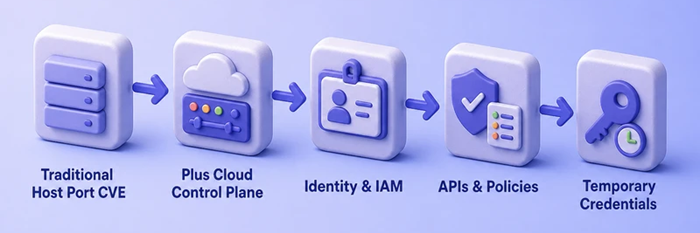
Cloud does not replace host testing. It adds a control plane where a stolen role session can matter more than a single OS shell.
Cloud pentest vs cloud security audit
A configuration audit and a penetration test answer different questions.
| Activity | Typical question |
|---|---|
| Configuration / posture audit | Is this S3 bucket public? Does this role allow * on *? |
| Automated CSPM / scanner | Which checks fail against a baseline? |
| Penetration test | From my current foothold, can I reach that role, assume it, and use it to access sensitive data? |
Posture tools list disconnected settings. A pentest validates and chains them into a path you can prove. Both are useful. This page teaches the pentest mental model. Automated AWS auditing with Prowler and ScoutSuite is a separate lesson.
Scope, shared responsibility, and provider rules
Shared responsibility
AWS states that it is responsible for security of the cloud (facilities, hardware, hypervisor, managed-service underpinnings). You and the customer are responsible for security in the cloud: identities, data, guest OS, application code, network controls you configure, and most resource policies.
For a pentester, that split decides what belongs in scope:
- In scope when the customer owns it:
- IAM configuration
- EC2 OS and apps
- S3 permissions
- Lambda code and execution roles
- Security groups
- Data stores you can reach with customer credentials
- Application logic
- Out of scope: attacking AWS-owned infrastructure or AWS services as products
If you find an issue in an AWS service itself during authorized customer testing, report it to AWS Security rather than treating it as a customer finding to exploit further.
AWS penetration testing policy
AWS publishes a customer support policy for penetration testing. As of the live policy page, customers may assess many of their own resources on a defined list of permitted services without prior approval. Testing that includes Command and Control (C2) needs prior AWS approval. Customers must not assess AWS infrastructure or AWS services themselves.
The AWS permitted-services list applies to penetration testing of those customer resources; ordinary use of your own IAM/STS APIs for identity and configuration review is different from attempting to security-test the IAM service itself. Do not assume every AWS service is automatically approved for penetration testing just because you can call its API.
Do not paste a giant permitted/prohibited table into your report template and freeze it for years. Link the live AWS penetration testing page in the RoE, and re-check it before each real engagement. Azure, GCP, and other providers publish their own rules when you leave AWS.
Customer authorization
Provider policy is not a substitute for written customer authorization. You still need scope, emergency contacts, and out-of-bounds rules from the client before any engagement.
Cloud penetration testing workflow
Use this as a checklist, not a tool dump:
- Confirm authorization and provider testing rules.
- Identify current identity and foothold.
- Map public and cloud-native attack surfaces.
- Enumerate IAM permissions for that identity.
- Identify exposed resources and trust relationships.
- Test relevant application-to-cloud pivots (for example SSRF toward metadata) only in scope.
- Validate access with minimal proof.
- Determine attack-path impact.
- Document evidence in an attack-path record.
- Remediate and retest (require IMDSv2, tighten roles, fix the app bug).
The rest of this page builds the identity and IMDS literacy that steps 2 through 8 assume.
Understand cloud identity and IAM
Most AWS pivots start with “who am I, and what can this principal do?” Learn a small vocabulary before tools:
| Piece | What it is |
|---|---|
| IAM user | Long-lived principal in the account (often with access keys) |
| IAM role | Identity meant to be assumed; no long-lived password of its own |
| Identity policy | What the principal is allowed to do |
| Trust policy | Who may assume a role |
| Resource policy | Permissions attached to a resource (for example an S3 bucket policy) |
| Temporary STS credentials | Short-lived AccessKeyId, SecretAccessKey, and session token |
Simple request path:
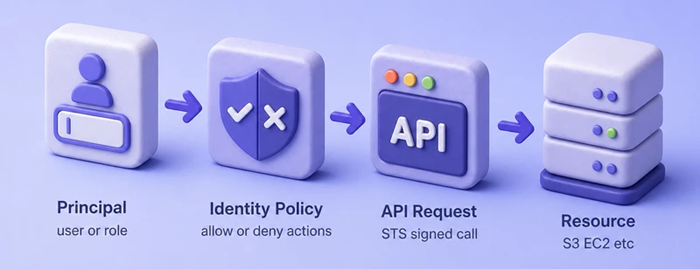
The diagram shows identity policy evaluation before AWS returns a resource response.
Role assumption adds a step: a principal calls STS, receives temporary role credentials, then uses those credentials against AWS APIs. This lesson does not cover full IAM policy evaluation edge cases. It only needs enough identity literacy to read GetCallerIdentity and reason about instance roles.
In the Console, an EC2 instance role looks like a normal IAM role plus an instance profile ARN. This lab role trusts ec2.amazonaws.com and carries a small inline policy:
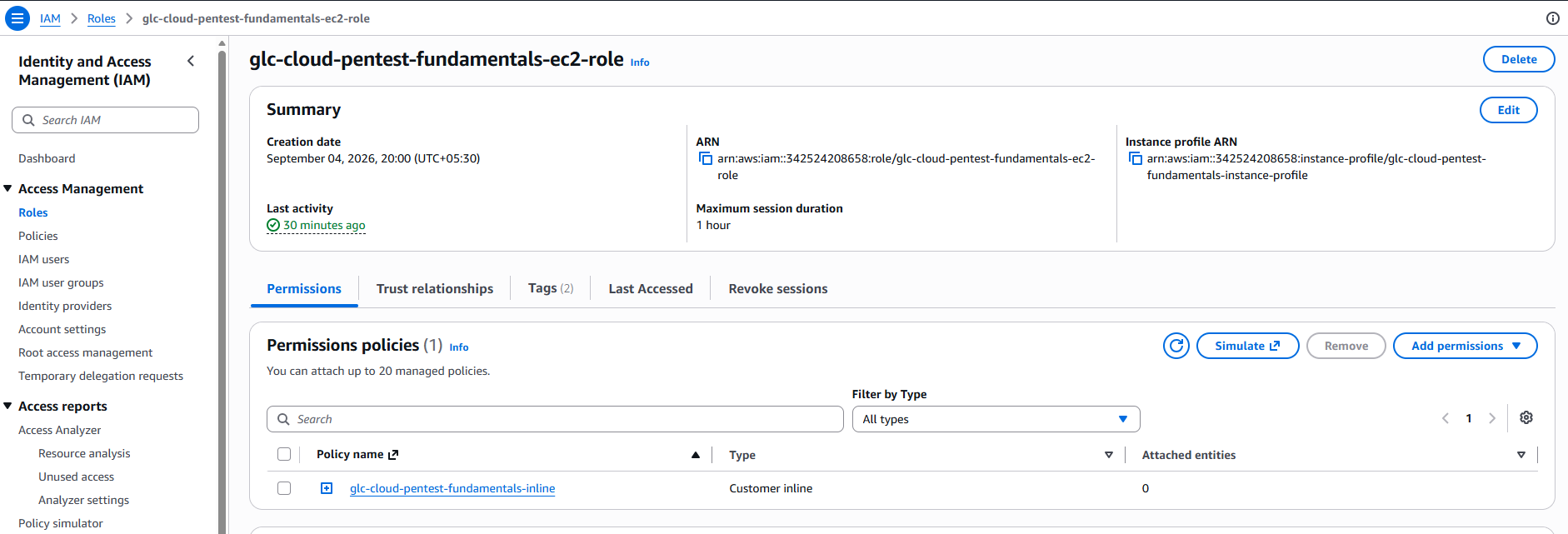
The instance profile ARN is what EC2 attaches to the guest. IMDS later issues temporary credentials for the role behind that profile.
Identify the AWS identity you currently have
After any foothold that yields AWS credentials (keys, SSO session, role session, or instance-role material), ask STS who you are. On the Kali lab host, confirm the CLI version first:
aws --versionaws-cli/2.36.17 Python/3.13.12 Linux/6.19.14+kali-amd64 source/x86_64.kali.2026Then call GetCallerIdentity. This is the fundamental first cloud question: account, principal ARN, and user or role session id. GetCallerIdentity is useful because AWS does not require an explicit permission grant for this call.
aws sts get-caller-identityAccount id values below are redacted for publishing. The ARN shape is what you care about in the field:
{
    "UserId": "111122223333",
    "Account": "111122223333",
    "Arn": "arn:aws:iam::111122223333:root"
}
Read three fields every time:
Account: which AWS account the credentials belong toArn: user versus assumed-role (the string shape changes what you enumerate next)UserId: unique id for the principal or role session
This lab call returned a root ARN. Real engagements should use a scoped non-root identity, typically an assumed role, federated identity, or other temporary credential source. An IAM user ARN and an assumed-role ARN still point you at different follow-up questions: users often have long-lived keys and group policies; assumed roles point at trust policies, session duration, and which identity assumed them. Offensive AWS tooling builds on this same first call.
Understand EC2 IMDS and instance roles
IMDS runs at the link-local address 169.254.169.254 on EC2 instances (IPv6 form exists on supported Nitro setups). Applications and the guest OS can query instance facts: AMI id, hostname, network info, and more.
If an IAM role is attached through an instance profile, IMDS can also hand out temporary credentials for that role. Those credentials are not a human’s manually pasted access key sitting in a file by default. They are short-lived STS credentials for the instance role, typically including:
AccessKeyIdSecretAccessKey- Session token
- Expiration timestamp
Anything that can reach IMDS from the instance (a local process, a misconfigured proxy, or some SSRF cases) may be able to request those credentials when the instance role exists and metadata access is allowed.
For this lesson the authorized lab guest is a single t3.micro in ap-south-1 named glc-cloud-pentest-fundamentals-imds:

The instance should show Running with the expected Name tag before you open it. Open the instance Details tab to confirm it is a normal Linux guest (Amazon Linux 2023 here). The guest OS is where IMDS listens; the role attachment is what makes temporary credentials available through that service:
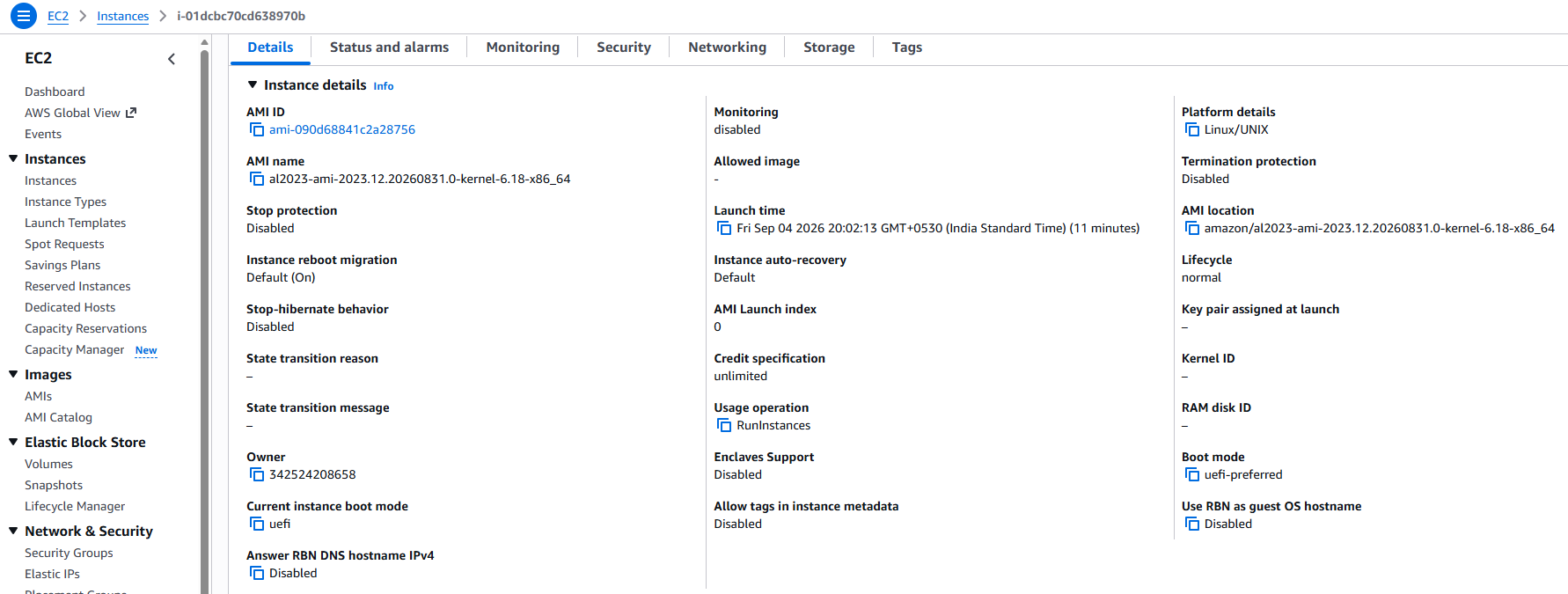
IMDSv1 vs IMDSv2
AWS supports two metadata access styles. Many older write-ups only show IMDSv1.
| IMDSv1 | IMDSv2 | |
|---|---|---|
| Model | Request/response | Session-oriented |
| Extra step | None | PUT to obtain a temporary metadata token |
| Later requests | Plain GET |
GET with the token in a header |
| Common SSRF/proxy cases | Easier for many open-proxy and basic SSRF patterns | Stronger against the vast majority of those cases |
IMDSv2 flow in short:
PUT http://169.254.169.254/latest/api/token
  (header: X-aws-ec2-metadata-token-ttl-seconds)

GET http://169.254.169.254/latest/meta-data/...
  (header: X-aws-ec2-metadata-token: <token>)
Do not claim IMDSv2 makes SSRF impossible. AWS describes IMDSv2 as defense in depth that protects against the vast majority of common SSRF and open-proxy scenarios. Edge cases still deserve review, especially around hop limits and workloads that intentionally proxy traffic.
These requests only work from the instance (or a path that can reach the link-local IMDS). They are not something you run from your laptop against a public IP.
Understand IMDS metadata options
Per-instance (and account-level) metadata options control how IMDS behaves. The ones that matter most for this lesson:
| Option | Meaning |
|---|---|
HttpEndpoint |
Whether IMDS is enabled on the instance |
HttpTokens |
optional allows v1 and v2; required means IMDSv2 only |
HttpPutResponseHopLimit |
Hop limit (TTL) on the IMDSv2 PUT response |
HttpTokens=required is the setting people mean when they say “IMDSv2 required.” optional keeps IMDSv1 available, which weakens the SSRF defense story.
AWS also supports account-level IMDS defaults and stronger enforcement so new instances inherit safer settings. Prefer requiring tokens for new fleets, then fix applications that still expect IMDSv1.
After an authorized lab instance exists with metadata options set, you can confirm them from the CLI without logging into the guest OS. This lab used instance i-01dcbc70cd638970b in ap-south-1:
aws ec2 describe-instances --instance-ids i-01dcbc70cd638970b --query 'Reservations[0].Instances[0].MetadataOptions' --output jsonSample output with IMDSv2 required and hop limit 2:
{
    "State": "applied",
    "HttpTokens": "required",
    "HttpPutResponseHopLimit": 2,
    "HttpEndpoint": "enabled",
    "HttpProtocolIpv6": "disabled",
    "InstanceMetadataTags": "disabled"
}
HttpTokens set to required means IMDSv2-only access. HttpPutResponseHopLimit of 2 matches the container-friendly recommendation discussed next.
Container hop-limit considerations
Older advice often said “always set the IMDS hop limit to 1.” That is incomplete.
The hop limit caps how far the IMDSv2 PUT response may travel at the IP layer. Default 1 is fine for many bare guests. In container environments, reaching IMDS from inside a container can count as an extra hop. With IMDSv2 required and hop limit 1, SDKs inside containers may fail or fall back slowly.
Current AWS guidance recommends setting the hop limit to 2 when EC2 instances host containers and IMDSv2 is required. That is not “2 means insecure.” The correct value depends on architecture and on whether workloads genuinely need metadata access at all. Prefer workload-specific credential mechanisms and pass non-secret settings such as Region directly to containers when possible. If containers intentionally need IMDSv2, AWS recommends a hop limit of 2.
Do not treat hop limit as a simple secure/insecure toggle. Record the value next to HttpTokens when you document instance hardening.
Understand the SSRF → IMDS → IAM attack path
Server-Side Request Forgery lets an attacker influence a server-side HTTP request. On an EC2 web tier, that request might be pointed at IMDS.
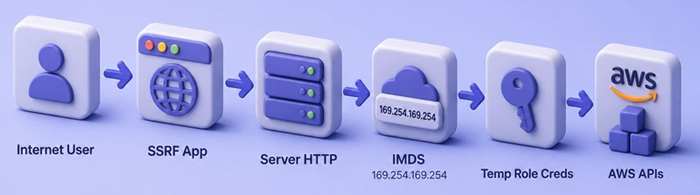
Break the path into separate facts:
- SSRF is still an application vulnerability
- Cloud impact needs a reachable metadata endpoint
- Impact needs an attached role (or other credentials exposed through metadata)
- Blast radius equals what that role can call
Therefore SSRF ≠ AWS account compromise. A role that can only describe its own instance is a very different finding from a role that can read production secrets or assume admin roles.
Once temporary or long-lived credentials are in hand, stay conceptual and ask:
- Who am I (
GetCallerIdentity)? - Which account?
- User or role session?
- When do credentials expire?
- Which actions are allowed?
- Which resources are visible?
- Can another role be assumed?
- What data or control-plane impact follows?
Validate access carefully under the RoE. Do not run privilege-escalation chains on this page. Later offensive AWS lessons cover module-driven enumeration after this mental model is clear.
Common cloud penetration testing attack surfaces
Keep the vocabulary compact. Each row is a later article’s job to deep-dive.
| Surface | What you look for |
|---|---|
| IAM | Over-permission, risky trust, privilege paths |
| S3 | Public or cross-account data exposure |
| EC2 | App + guest OS + instance role + metadata options |
| Lambda | Code, config, execution role |
| ECS / EKS | Workload identity and cluster relationships |
| Secrets | Credentials reachable through permissions |
| CI/CD / OIDC | Federated trust into cloud roles |
| Networking | Public exposure and reachability |
| Logging / detection | CloudTrail coverage, sensitive event visibility, alerting gaps |
Kubernetes-focused attack surface scanning is a separate lab track from this AWS identity lesson.
Document cloud attack paths
Findings land better when you write an attack path, not only a CVE row. Use a short template (adjust fields to your report format):
Initial foothold:
Identity:
Credential source:
Permissions:
Accessible resources:
Trust relationships:
Potential pivot:
Evidence:
Impact:
Required validation:
Example (illustrative, not a live exploit):
Initial foothold: SSRF in EC2 web app parameter
Identity: arn:aws:sts::111122223333:assumed-role/glc-cloud-pentest-fundamentals-ec2-role/i-01dcbc70cd638970b
Credential source: IMDS instance-role credentials
Permissions: ec2:Describe* (GetCallerIdentity needs no explicit grant)
Accessible resources: describe instances in account
Trust relationships: ec2.amazonaws.com may assume role
Potential pivot: none beyond describe (intentionally tight role)
Evidence: GetCallerIdentity ARN + metadata options screenshot
Impact: low (confirms path, limited blast radius)
Required validation: confirm IMDSv2 required; review app SSRF fix
Tie severity to business impact and exploitability the same way you would for other findings in vulnerability prioritization.
Troubleshooting
| Symptom | Likely cause | Fix |
|---|---|---|
Unable to locate credentials |
No profile, SSO session, or env keys | Run aws login / configure the authorized profile; retry get-caller-identity |
AccessDenied on describe calls |
Identity lacks EC2/IAM read | Use a role that can read the lab resources, or skip to identity-only checks |
Metadata curl fails from Kali |
IMDS is link-local to the instance | Run metadata checks on the EC2 guest (or via authorized session), not against the public IP |
| Containers cannot reach IMDSv2 | Hop limit still 1 with required tokens |
Set HttpPutResponseHopLimit=2 when containers need IMDS, or inject credentials another way |
| Engagement blocked by AWS abuse report | Testing looked like abuse / C2 without approval | Pause; reply with approved language and contacts per AWS policy; obtain C2 approval when required |
Summary
AWS cloud penetration testing still includes hosts and applications, but the durable difference is the control plane: identities, APIs, temporary credentials, resource policies, and services like IMDS. A posture audit lists settings; a pentest proves whether those settings chain into impact from a foothold. Shared responsibility and the AWS testing policy decide what you may touch. Always pair that with written customer authorization.
The worked example on this page is one coherent path: web SSRF → IMDS → instance-role credentials → API access permitted by that role. IMDSv2 with HttpTokens=required blocks many common SSRF/proxy patterns without claiming magic immunity, and container fleets often need hop limit 2 when metadata access from containers is intentional.
Next, keep this mental model and move into AWS auditing with Prowler and ScoutSuite, offensive AWS enumeration tooling, or intentionally vulnerable cloud labs in separate lessons.
References
- AWS Customer Support Policy for Penetration Testing
- Shared Responsibility Model
- IAM roles
- STS GetCallerIdentity
- Configure the Instance Metadata Service options
- Configure instance metadata options for new instances
- Access instance metadata for an EC2 instance
- Add defense in depth against open firewalls, reverse proxies, and SSRF vulnerabilities with enhancements to the EC2 Instance Metadata Service
Frequently Asked Questions
What is cloud penetration testing?
Cloud penetration testing assesses applications hosted in a cloud account and the customer-controlled configuration around them: identities, APIs, resource policies, temporary credentials, and services such as instance metadata. It includes traditional host and app testing when those targets sit in the cloud, plus control-plane paths that do not exist in a simple on-prem network scan.
How is cloud pentesting different from a normal network pentest?
You still care about hosts, ports, and application bugs. Cloud work adds identity-centric paths: who the principal is, which APIs it can call, which resources trust it, and whether temporary credentials can be obtained from places like IMDS. A single over-privileged role can outrank a guest OS shell in business impact.
How is a cloud pentest different from a CSPM or configuration audit?
An audit or posture scanner asks whether settings match a baseline. A pentest asks whether a foothold can chain those settings into real access. Both matter; they answer different questions.
Do I need AWS permission for penetration testing?
You need written authorization from the account owner (or their authorized agent). Separately, AWS publishes rules for what customers may test on their own infrastructure. Many listed services do not need prior AWS approval, but Command and Control style testing does, and you must not test AWS infrastructure or AWS services themselves. Re-check the live AWS policy before each engagement.
What is IMDS in AWS?
The Instance Metadata Service answers instance and role-related queries from inside an EC2 guest at a link-local address (commonly 169.254.169.254). When an instance profile attaches a role, IMDS can issue temporary credentials for that role to software running on the instance.
Does IMDSv2 prevent SSRF?
No. IMDSv2 is defense in depth that stops the vast majority of common SSRF and open-proxy patterns that abused IMDSv1’s simple request model. Treat it as a strong control, not a guarantee that every SSRF scenario is impossible.
Why is 169.254.169.254 important?
That address is the usual IPv4 endpoint for IMDS on the instance. Reachability to it from an application process is what turns some SSRF bugs into cloud-credential issues when a role is attached.
What is an EC2 instance role?
An IAM role associated with the instance through an instance profile. Software on the instance can obtain temporary STS credentials for that role via IMDS (subject to metadata options) and call AWS APIs the role allows.
