
| Tested on | Kali GNU/Linux Rolling 2026.2 (kali-rolling) |
|---|---|
| Package | prowler 5.41.0 (pipx)ScoutSuite 5.14.0 (venv) |
| Cert prep | CompTIA PenTest+ PT0-003, Domain 4 cloud security posture |
| Privilege | Valid AWS credentials for an auditor IAM user with SecurityAudit, ViewOnlyAccess, and ReadOnlyAccess (root cannot assume roles for this workflow) |
| Scope | Same-account Prowler and ScoutSuite comparison for IAM, S3, and EC2 misconfigurations, finding interpretation, permission pitfalls, and validation before reporting. Not Pacu exploitation, SSRF→IMDS walkthroughs, or a full CIS remediations playbook. |
Both Prowler and ScoutSuite inspect AWS configuration through AWS APIs rather than attacking hosts.
Prowler is currently the stronger choice for an actively maintained, broad AWS security and compliance assessment. ScoutSuite remains useful as a different point-in-time view of account configuration. Running both can expose different coverage, different assumptions, permission gaps, and different finding logic. Two tools reporting something still does not automatically prove the finding.
Prowler vs ScoutSuite: key differences
Start with a plain comparison. Do not invent an “accuracy score.”
| Prowler | ScoutSuite | |
|---|---|---|
| Purpose | Broad AWS (and multi-cloud) security / compliance checks | Multi-cloud configuration auditor with HTML exploration |
| AWS support | Deep, actively expanded check set | Solid AWS inventory and rules |
| Multi-cloud | AWS, Azure, GCP, and more providers | AWS, Azure, GCP, and additional providers |
| Maintenance (this lab) | 5.41.0 (released September 2026; frequent releases) |
5.14.0 (still latest stable; published May 2024) |
| Output | CSV, HTML, OCSF JSON, ASFF, and more | Navigable HTML report + JS/JSON results |
| Compliance mapping | Many frameworks (cis_*_aws, PCI, NIST, …) |
Ruleset-driven findings (less “compliance pack” oriented) |
| HTML / UI | HTML report; separate App products exist | Strong point-in-time HTML dashboard |
| CLI | prowler aws … |
scout aws … |
| Automation | Friendly to CI and scheduled scans | Useful for point-in-time snapshots |
| Best use | Current broad audit and compliance mapping | Independent second view / HTML walkthrough |
On this page Prowler is the primary workflow. ScoutSuite is the independent second view you compare against the same identity and credentials.
ScoutSuite 5.14.0 is still the latest stable PyPI/GitHub release, published in May 2024. That is a much slower release cadence than Prowler, so treat ScoutSuite as a useful second viewpoint rather than the fresher primary AWS auditor.
Prepare the AWS audit identity
If one tool can call more APIs than the other, comparing findings becomes meaningless. The projects also document slightly different recommended read-only policy sets, so a “Prowler-only” identity is not a fair ScoutSuite baseline.
Required permissions
Create a dedicated auditor IAM user (or a role you can assume from a non-root principal). For this comparison, attach the union of the documented managed policies:
arn:aws:iam::aws:policy/SecurityAudit(both tools)arn:aws:iam::aws:policy/job-function/ViewOnlyAccess(Prowler baseline)arn:aws:iam::aws:policy/ReadOnlyAccess(ScoutSuite baseline)
Prowler documents SecurityAudit + ViewOnlyAccess, plus an optional additions policy for full check coverage. ScoutSuite documents SecurityAudit + ReadOnlyAccess. This lab used the three-policy union so both scanners get the read visibility their own docs expect. I intentionally omitted Prowler’s optional additions policy, so some Prowler checks can still be incomplete. Do not attach AdministratorAccess just to make a demo easier.
This lab used IAM user glc-prowler-scoutsuite-auditor with those three managed policies, stored under AWS CLI profile glc-audit. Root access keys cannot assume roles (Roles may not be assumed by root accounts), so a non-root auditor identity is required for role-based designs too.
Verify caller identity
Wrong profile and wrong account are common. Confirm STS before either tool runs:
aws sts get-caller-identity --profile glc-auditAccount id values below are redacted for publishing:
{
    "UserId": "AIDAEXAMPLEAUDITOR",
    "Account": "111122223333",
    "Arn": "arn:aws:iam::111122223333:user/glc-prowler-scoutsuite-auditor"
}
Confirm three things:
Accountmatches the engagement scopeArnis the auditor user (or assumed-role ARN shape), not an unexpected admin- The profile name you will pass to both tools is the same (
glc-audithere)
GetCallerIdentity does not require an explicit IAM permission grant, which makes it a safe first call even on tight identities.
Run Prowler on AWS
Install Prowler
Install Prowler in an isolated environment. On this Kali host, pipx worked with Python 3.13:
pipx install prowlerConfirm the version you will cite in the report:
prowler -vProwler 5.41.0 (You are running the latest version, yay!)This article uses the CLI only. It does not deploy Prowler App or a self-hosted UI stack.
Targeted IAM/S3/EC2 scan
For a fair, fast comparison, limit region and services to the lab scope: IAM, S3, and EC2 in ap-south-1, and keep only FAIL rows in the summary view:
prowler aws --profile glc-audit --region ap-south-1 --service iam s3 ec2 \
  --status FAIL --output-directory ~/prowler-scoutsuite-aws-audit/prowler-out \
  --output-filename prowler-iam-s3-ec2 --ignore-exit-code-3 --no-banner
You rarely need every check while investigating one control family. The same flags scale down to --service iam, --service s3, or --service ec2. You can also pass --check / -c for a single check id once you know which rule matters.
Sample overview from the union-permission lab run (151 checks executed; filtered overview shows fails only):
Overview Results:
100.0% (47) Failed | 0.0% (0) Passed | 0.0% (0) Muted

Account … Scan Results (severity columns are for fails only):
Provider   Service   Status     Critical   High   Medium   Low
aws        ec2       FAIL (6)          0      2        2     2
aws        iam       FAIL (30)         4      6       12     8
aws        s3        FAIL (11)         0      2        5     4
Read findings as: status, severity, service, resource, region, and the extended status text. Do not paste hundreds of rows into a client report without triage.
The HTML report records version, parameters, caller identity, and the fail table in one place:
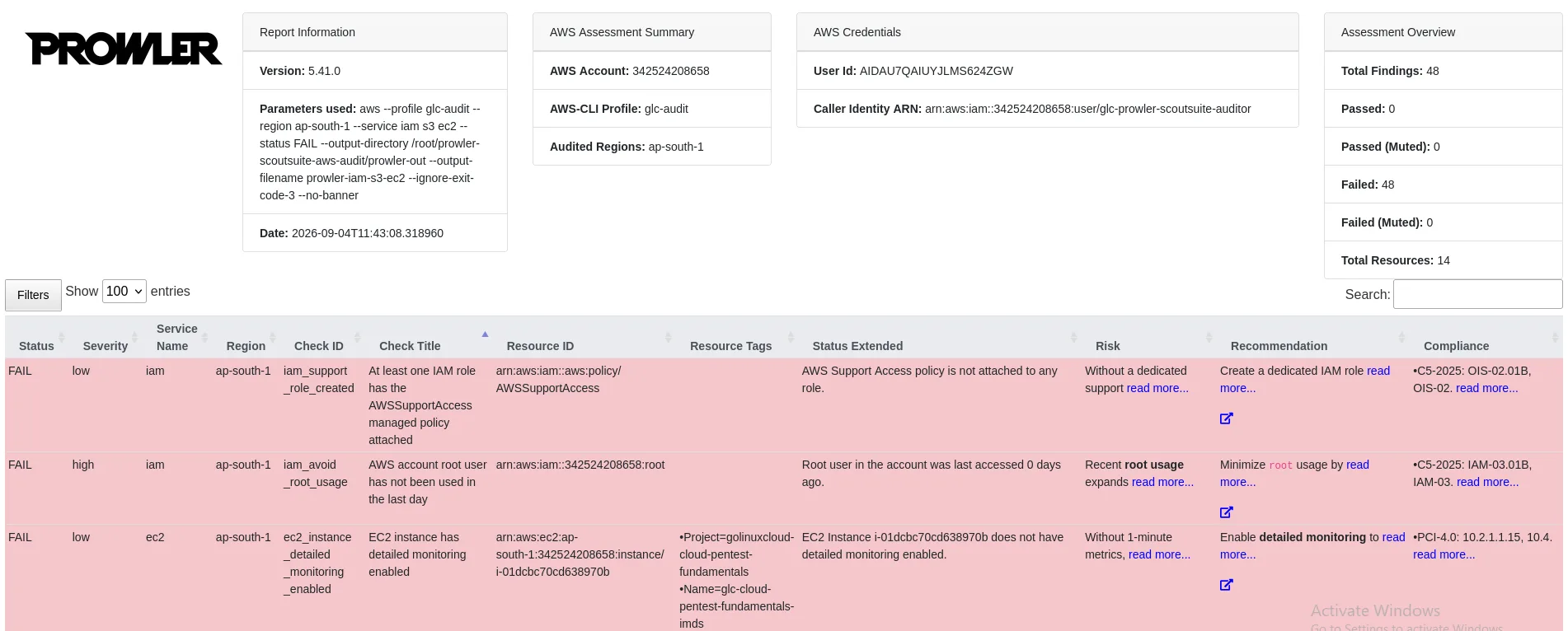
Crop account ids before you publish screenshots from your own runs.
Validate an IAM finding
This lab created user glc-prowler-scoutsuite-overbroad-user with an inline policy that allows Action: "*" on Resource: "*".
Prowler returned a critical fail:
| Field | Lab value |
|---|---|
| Check | iam_inline_policy_no_administrative_privileges |
| Resource | arn:aws:iam::…:user/glc-prowler-scoutsuite-overbroad-user |
| Status | FAIL |
| Severity | critical |
| Observed | Inline policy LabOverbroadInline allows *:* administrative privileges |
Manually inspect the same object:
aws iam get-user-policy --user-name glc-prowler-scoutsuite-overbroad-user \
--policy-name LabOverbroadInline --profile glc-audit{
"UserName": "glc-prowler-scoutsuite-overbroad-user",
"PolicyName": "LabOverbroadInline",
"PolicyDocument": {
"Version": "2012-10-17",
"Statement": [{
"Sid": "LabOverbroad",
"Effect": "Allow",
"Action": "*",
"Resource": "*"
}]
}
}The CLI confirms the scanner: this is a true positive for an administrative inline policy on a user. Related Prowler rows (iam_inline_policy_allows_privilege_escalation, CloudTrail/KMS full-access style checks) are derivatives of the same *:* document, not separate root causes.
Validate an S3 finding
The lab bucket glc-prowler-scoutsuite-02920 intentionally disabled Block Public Access:
| Field | Lab value |
|---|---|
| Check | s3_bucket_level_public_access_block |
| Status | FAIL |
| Severity | high |
| Observed | Block Public Access is not configured for the bucket |
Verify with the API:
aws s3api get-public-access-block --bucket glc-prowler-scoutsuite-02920 --profile glc-audit{
"PublicAccessBlockConfiguration": {
"BlockPublicAcls": false,
"IgnorePublicAcls": false,
"BlockPublicPolicy": false,
"RestrictPublicBuckets": false
}
}All four settings are false. That matches Prowler. The bucket held no production data; it existed only to create a controlled finding.
Run ScoutSuite on the same AWS account
Install ScoutSuite
ScoutSuite 5.14.0 is still the latest stable PyPI/GitHub release (May 2024). Install it in a dedicated venv:
python3 -m venv ~/prowler-scoutsuite-aws-audit/venv-scoutActivate the venv, then install the pinned release:
pip install 'scoutsuite==5.14.0'Confirm the ScoutSuite version before you scan:
scout --versionScout Suite 5.14.0Same services and scope
Run against the same profile, region, and services:
scout aws -p glc-audit -r ap-south-1 --services iam s3 ec2 \
  --report-dir ~/prowler-scoutsuite-aws-audit/scout-out \
--report-name scout-glc-audit --no-browser -fINFO Launching Scout
INFO Authenticating to cloud provider
INFO Gathering data from APIs
INFO Fetching resources for the EC2 service
INFO Fetching resources for the IAM service
INFO Fetching resources for the S3 service
INFO Running rule engine
INFO Creating …/scout-glc-audit.htmlOpen the HTML file locally in a browser. ScoutSuite’s strength is navigating services and flagged rules from that dashboard.
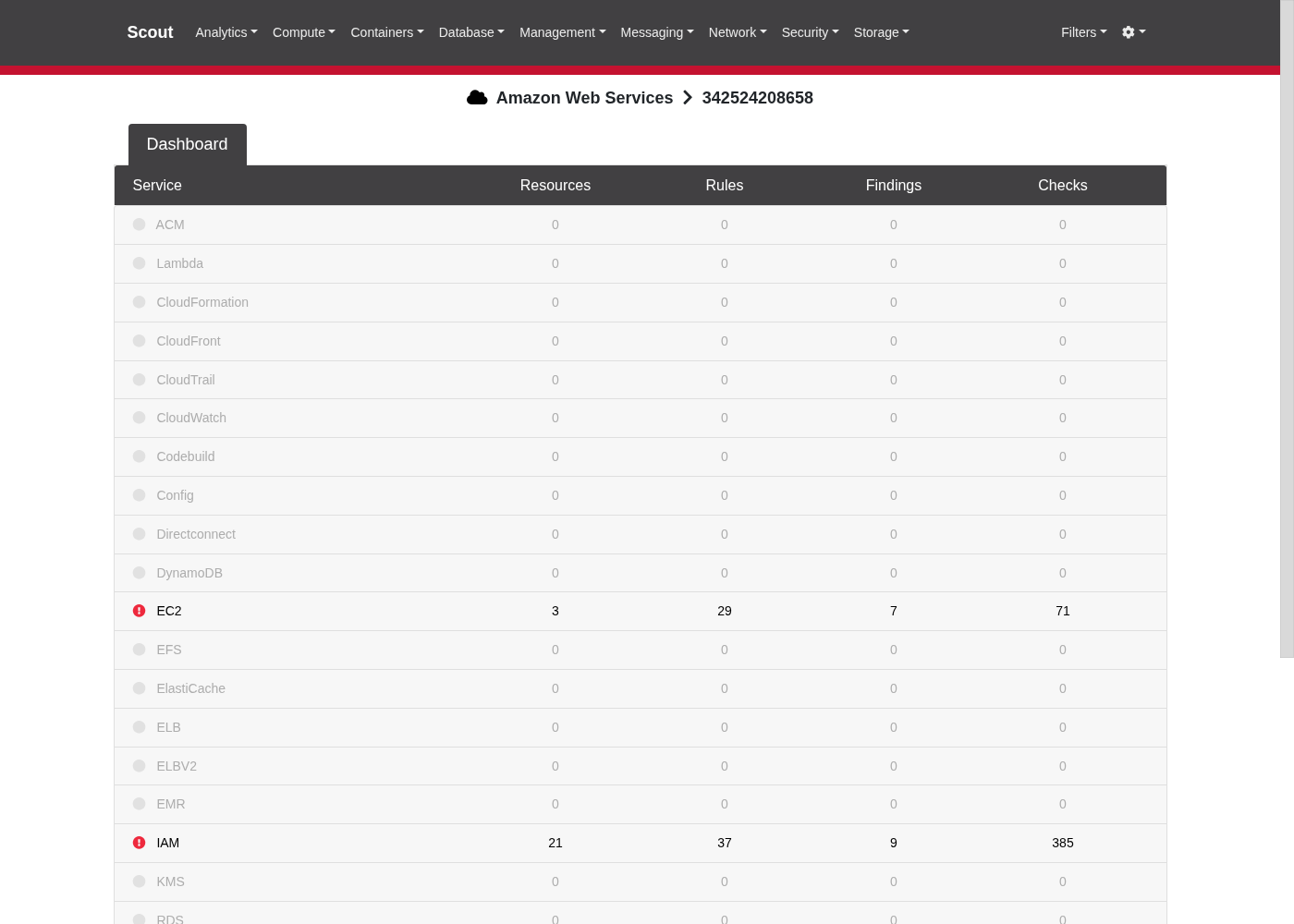
If the page shows a loading modal, wait for the embedded results JavaScript to finish, then expand EC2, IAM, and S3.
Compare Prowler and ScoutSuite findings
Same identity (glc-audit), same three-policy read-only union, same region (ap-south-1), same three services. Ground truth from AWS CLI, not from finding counts. After adding ScoutSuite’s documented ReadOnlyAccess alongside Prowler’s baseline, the three controlled disagreements below still tracked rule logic rather than missing API visibility.
| Finding / resource | Prowler | ScoutSuite | AWS CLI / Console truth | Explanation |
|---|---|---|---|---|
User inline *:* (LabOverbroadInline) |
Critical iam_inline_policy_no_administrative_privileges (plus related privilege-escalation / full-access checks) |
Warning iam-user-with-inline-policies (flags that an inline policy exists; does not elevate it to a dedicated “admin :” danger rule in this run) |
get-user-policy shows Action: "*", Resource: "*" |
Both see the user; Prowler’s check logic names administrative *:* explicitly |
| S3 Block Public Access all false | High s3_bucket_level_public_access_block |
Config collected on the bucket object; no dedicated “public access block disabled” finding among flagged S3 rules (other warnings: cleartext HTTP, logging, MFA delete, versioning) | get-public-access-block returns all false |
Same raw config; different rule coverage |
SG glc-prowler-scoutsuite-open-ssh TCP/22 to 0.0.0.0/0 |
Low ec2_securitygroup_not_used only (did not emit an “SSH open to world” fail for this unused SG in the filtered run) |
Danger ec2-security-group-opens-SSH-port-to-all and warning ec2-unused-security-group |
describe-security-groups shows ingress 22 from 0.0.0.0/0 |
ScoutSuite prioritizes the open port; Prowler emphasized unusedness here |
Do not treat “47 Prowler fails vs a handful of ScoutSuite flagged rules” as a quality score. Check scope and rule logic differ on purpose.
Why the tools disagree
Common reasons:
- Different checks and rule libraries
- Different severity mappings
- Different assumptions about unused resources
- Region / service filters you passed on the CLI
- Scanner version (Prowler 5.41 vs ScoutSuite 5.14 here)
- Detection logic for policy documents and condition keys
- Missing or incomplete API responses
- AWS service behavior changing faster than older rulesets
Disagreement is a signal to verify, not a reason to average severities.
How missing permissions affect results
Before you trust PASS or FAIL, inspect:
- Scanner errors and stderr
- AccessDenied / unauthorized API calls
- Skipped checks
- Empty services that should contain resources you know exist
ScoutSuite has a long history of incomplete reads producing odd defaults when permissions are missing. Prowler also has check-specific false positives and open issues. A green PASS with half the APIs denied is not evidence of safety.
If one tool “sees” a bucket property and the other does not, compare IAM allow lists and CloudTrail for AccessDenied before arguing about tool quality. That is why this lab used a common read-only union instead of only one project’s recommended pair.
Validate findings before reporting
Use the same discipline you would for host vulnerability scanners (validate scan results):
- Identify the resource.
- Read the scanner evidence and check id.
- Verify the AWS setting with CLI or Console.
- Read the tool’s check description / reference URL.
- Read AWS documentation for the control.
- Decide true positive, false positive, or incomplete evidence.
- Record proof (CLI output, policy document, screenshot crop).
Prioritize validated findings with business impact next (vulnerability prioritization).
A CIS or other compliance fail means configuration does not meet that benchmark. It does not automatically mean an attacker can own the account today. A PASS means that check’s logic did not fail under the permissions and scope you used. It does not mean the account is secure. Keep compliance rows and exploitable attack paths in separate mental buckets when you write the report.
After you validate a misconfiguration, remediate configuration first. Only then consider authorized offensive validation (for example Pacu or manual IAM abuse testing) where the RoE allows it. This page stops at posture evidence.
Which should you use: Prowler or ScoutSuite?
Use Prowler when you need:
- A current broad AWS audit
- Compliance mappings
- Automation / frequent rescans
- An actively updated check ecosystem
Use ScoutSuite when you want:
- An independent configuration view
- HTML exploration of services and rules
- A second perspective on the same account
Use both when you plan to investigate differences, not when you only want a larger finding count.
Troubleshooting
| Symptom | Likely cause | Fix |
|---|---|---|
Roles may not be assumed by root accounts |
Using root credentials with role_arn profiles |
Create a non-root auditor user or use direct user keys for the scan profile |
InvalidClientTokenId right after creating keys |
IAM eventual consistency | Wait a minute and retry get-caller-identity |
| Empty S3/EC2 sections | Wrong region filter or unused services skipped | Pass the region where resources live; for Prowler consider --scan-unused-services when appropriate |
| Tools disagree on the same resource | Different checks / unused-resource logic | Verify with CLI; document both tool outputs and ground truth |
| ScoutSuite HTML shows a long loading modal | Browser still parsing embedded results | Wait, or re-open the local HTML file after the JS finishes |
| One tool looks “blind” vs the other | Auditor identity matches only one project’s recommended policies | Use a common read-only union, then inspect AccessDenied / skipped checks |
References
- Prowler CLI installation
- Prowler AWS authentication and required permissions
- Prowler on PyPI
- ScoutSuite GitHub (NCC Group)
- ScoutSuite Setup wiki
- ScoutSuite Amazon Web Services wiki
- AWS SecurityAudit managed policy
- AWS ReadOnlyAccess managed policy
- AWS Customer Support Policy for Penetration Testing
Frequently Asked Questions
Which is better, Prowler or ScoutSuite?
For a current, broad AWS security and compliance assessment, Prowler is usually the stronger primary tool because of its release cadence and check coverage. ScoutSuite remains useful as an independent HTML-oriented second view. “Better” depends on whether you need compliance mappings and automation or a navigable configuration snapshot.
Why do Prowler and ScoutSuite show different findings?
They implement different checks, severities, and assumptions. One tool may flag administrative *:* policies explicitly while another only notes that an inline policy exists. Unused security groups may trigger “unused” in one engine and “SSH open to the world” in another. Always verify with the AWS APIs.
Do I need AdministratorAccess to run these tools?
No. Use a dedicated read-only auditor identity with the permissions required by the scanners. Prowler documents SecurityAudit + ViewOnlyAccess; ScoutSuite documents SecurityAudit + ReadOnlyAccess. For a direct comparison, use a common read-only permission set that satisfies both and inspect AccessDenied/skipped checks before comparing findings.
Is a Prowler CIS fail a pentest finding?
Not by itself. A compliance fail means the configuration does not meet that benchmark. Convert it into a pentest finding only after you validate the setting and explain realistic impact under the engagement rules.
Can missing permissions create false confidence?
Yes. AccessDenied responses, skipped checks, and incomplete inventories can look like a clean account. Inspect scanner errors before you trust PASS results.
