
| Tested on | Kali GNU/Linux Rolling 2026.2 (kali-rolling) |
|---|---|
| Package | kube-hunter 0.6.8kubectl (via k3s) |
| Lab environment | Pentest lab |
| Cert prep | CompTIA PenTest+ PT0-003 — Domain 3 (Vulnerability Discovery) and Domain 4e (cloud and container) |
| Privilege | Normal user for remote and interface scans; Kubernetes credentials with permission to create a Job and read pod logs for the in-cluster scan |
| Scope | Install kube-hunter, list hunters, run passive remote and interface scans, interpret and manually validate findings, run an in-pod Job, understand active hunting risks, export JSON, and compare with kube-bench and Trivy. Does not cover building a cluster from scratch, CIS full remediation, image scanning, or treating kube-hunter as a complete security program. |
| Related guides | Container scanning with Trivy and Grype OpenVAS / Greenbone tutorial Vulnerability scanning concepts Install Kubernetes with kubeadm |
kube-hunter answers a different question than most Kubernetes scanners: from this network location, what Kubernetes services and weaknesses could an attacker discover? On PenTest+, that vantage-point mindset shows up in Domain 3 scanner selection and again when Domain 4e covers container and Kubernetes attack surfaces.
What kube-hunter scans in a Kubernetes cluster
| Tool | Purpose |
|---|---|
| kube-hunter | Attacker-view attack-surface probing |
| kube-bench | CIS configuration audit |
| Trivy | CVEs and configuration / misconfiguration scanning |
Use kube-hunter when you need an attacker-eye view from a chosen network location. Save image scanning, CIS node audits, and ongoing posture checks for the comparison section later.
Choose the kube-hunter vantage point
Official docs describe several places to run the tool. Results change with each place:
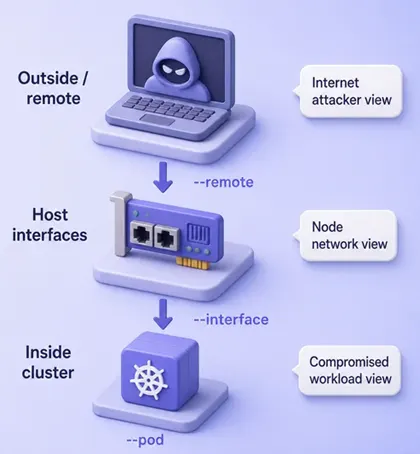
| Vantage | Flag | Meaning |
|---|---|---|
| Remote target | --remote |
Probe one or more target hosts by IP or DNS name |
| Local interfaces | --interface |
Discover across networks visible to this host |
| Network range | --cidr |
Scan a specified subnet |
| Inside a pod | --pod |
Model a compromised workload with a service account token |
Remember two points before you compare reports:
- A clean remote scan does not prove a compromised pod would see the same surface
- Always record where you ran kube-hunter next to the findings
Install kube-hunter
kube-hunter is an older Python project. A virtual environment avoids modifying the system Python, and this guide pins the tested 0.6.8 release.
On this Kali lab I installed that release from PyPI:
python3 -m venv ~/kube-hunter-venvThe command exits with no output when the environment is created. Install the pinned package next:
~/kube-hunter-venv/bin/pip install 'kube-hunter==0.6.8'pip prints package progress as it installs. When it finishes, confirm the CLI is available:
~/kube-hunter-venv/bin/kube-hunter --help | head -20usage: kube-hunter [-h] [--list] [--interface] [--pod] [--quick]
[--include-patched-versions] [--cidr CIDR] [--mapping]
[--remote HOST [HOST ...]] [-c HUNTERS [HUNTERS ...]]
[--raw-hunter-names] [--k8s-auto-discover-nodes]
[--service-account-token JWT_TOKEN]
[--kubeconfig KUBECONFIG] [--active] [--enable-cve-hunting]
[--log LOGLEVEL] [--log-file LOG_FILE] [--report REPORT]
[--dispatch DISPATCH] [--statistics]
[--network-timeout NETWORK_TIMEOUT]
[--num-worker-threads NUM_WORKER_THREADS]The help text lists remote, interface, pod, active, and report options used later. Put the binary on your PATH with a symlink, or keep calling the full venv path. Container and Job forms also exist (aquasec/kube-hunter:0.6.8). This article uses pip for the remote and interface steps and the official Job for --pod.
List available hunters before running them
A hunter is one discovery or check (API discovery, kubelet ports, etcd, and so on). The list changes over time, so do not memorize it from a blog. Ask kube-hunter:
kube-hunter --listPassive Hunters:
----------------
* API Service Discovery
Checks for the existence of K8s API Services
* K8s Dashboard Discovery
Checks for the existence of a Dashboard
* Etcd service
check for the existence of etcd service
* Kubelet Discovery
Checks for the existence of a Kubelet service, and its open ports
* Port Scanning
Scans Kubernetes known ports to determine open endpoints for discovery
…On 0.6.8 the passive list is tens of hunters. To include active hunters in the listing (review only — do not enable them yet):
kube-hunter --list --activeThe combined list adds hunters that can change cluster state. Read that list before you ever add --active to a real scan. Upstream keeps the current exhaustive set in the kube-hunter repository; the active-hunting section below covers the risk rules.
Run a passive remote kube-hunter scan
Start outside the cluster. Pick one API or node address you are allowed to probe and store it in a variable:
API_HOST=10.0.2.15Shell assignment prints nothing. On this lab that address is the Kubernetes node IP. Your value may be a load balancer, control-plane IP, or DNS name.
Run a passive remote hunt (default hunters, no --active):
kube-hunter --remote "$API_HOST" --report plain --log WARNINGNodes
+-------------+-----------+
| TYPE | LOCATION |
+-------------+-----------+
| Node/Master | 10.0.2.15 |
+-------------+-----------+
Detected Services
+----------------------+-----------------+----------------------+
| SERVICE | LOCATION | DESCRIPTION |
+----------------------+-----------------+----------------------+
| Unrecognized K8s API | 10.0.2.15:6443 | A Kubernetes API |
| | | service |
+----------------------+-----------------+----------------------+
| Kubelet API | 10.0.2.15:10250 | The Kubelet is the |
| | | main component in |
| | | every Node, all pod |
| | | operations goes |
| | | through the kubelet |
+----------------------+-----------------+----------------------+
No vulnerabilities were foundWhat the remote report means:
- kube-hunter found the API on
6443and the kubelet on10250 - it did not open a vulnerability row from this remote vantage point
- “No vulnerabilities were found” means no hunter raised a finding from here, not that the cluster is safe
Next, compare with a host-network view on the same machine.
Interpret kube-hunter findings
Run an interface scan so kube-hunter probes addresses visible on local interfaces (pod CIDR, node IP, and so on):
kube-hunter --interface --report plain --log WARNINGTrimmed findings from this lab (duplicate rows for the same location removed):
Vulnerabilities
For further information about a vulnerability, search its ID in:
https://avd.aquasec.com/
+--------+------------------+----------------------+----------------------+----------------------+------------+
| ID     | LOCATION         | MITRE CATEGORY       | VULNERABILITY        | DESCRIPTION          | EVIDENCE   |
+--------+------------------+----------------------+----------------------+----------------------+------------+
| KHV043 | 10.42.0.16:10250 | Initial Access //    | Cluster Health       | open /healthz        | status: ok |
|        |                  | General Sensitive    | Disclosure           | without auth         |            |
|        |                  | Information          |                      |                      |            |
| KHV036 | 10.42.0.16:10250 | Initial Access //    | Anonymous            | kubelet may allow    |            |
|        |                  | Exposed sensitive    | Authentication       | unauthenticated      |            |
|        |                  | interfaces           |                      | secure-port access   |            |
+--------+------------------+----------------------+----------------------+----------------------+------------+
Same cluster as the remote scan. Different vantage. New findings.
For each row, walk this checklist:
| Question | Why it matters |
|---|---|
| What was discovered? | Port, handler (/healthz), anonymous kubelet, and so on |
| Where was it reachable from? | Remote IP, pod network, or local-to-pod |
| Why does it matter? | Information leak vs possible control of pods |
| Was authentication required? | Evidence such as status: ok without credentials |
| What should I verify manually? | Read-only HTTP checks, kubelet flags, who can reach the port |
| What control remediates it? | Authn settings, bind addresses, host firewall / trusted networks |
| How do I retest? | Same kube-hunter command and vantage after the fix |
Do not treat a NetworkPolicy as a guaranteed control for node-local kubelet port 10250. Policy behavior for node and host-network traffic varies by CNI; verify with host firewall and kubelet bind settings as well.
Example: KHV043 Cluster Health Disclosure
- Discovery: kubelet
/healthzanswered without authentication - Reachable from: addresses on the host/pod network (
10.42.0.16:10250here) - Why it matters: attackers learn component health without logging in
- Verify: confirm which interfaces listen on
10250and whether that network path is intentional - Remediate: review whether the kubelet health endpoint needs to be reachable from that network; restrict access to kubelet port
10250to trusted sources and verify kubelet authentication / authorization configuration - Retest: rerun
--interface(or--pod) and confirm the finding is gone
Example: KHV036 Anonymous Authentication
- Discovery: kube-hunter reports that kubelet may accept anonymous access on the secure port
- Why it matters: if anonymous access is real, worse cases can lead toward pod exec and host impact (active hunters try to prove that)
- Do not jump straight to
--activeon a production cluster to “confirm”
10250 endpoint or a kube-hunter row alone is not proof that anonymous API requests are authorized.
On this lab, a read-only unauthenticated request to /healthz returned 200, while /pods returned 403:
curl -sk -o /dev/null -w "%{http_code}\n" "https://10.42.0.16:10250/healthz"200200 confirms /healthz answered without credentials. Next, ask whether anonymous clients can list pods on the same kubelet:
curl -sk -o /dev/null -w "%{http_code}\n" "https://10.42.0.16:10250/pods"403How to read those codes:
200on a sensitive handler means the endpoint really answered without credentials401or403means the anonymous request is not authorized; treat KHV036 as unverified until you confirm a real unauthorized success- Here
/healthzsupports the KHV043 disclosure finding, while/podsshows anonymous listing is forbidden — so do not report KHV036 as confirmed from the kube-hunter row alone
Look up VID details in the Aqua vulnerability knowledge base using the KHV… ID, and see upstream issue #548 for the KHV036 false-positive report.
Run kube-hunter from inside the cluster
An external clean result still leaves an open question: what if one application pod is compromised? The --pod mode answers that.
Download the upstream Job manifest with curl and pin the same 0.6.8 image tag:
curl -sfL https://raw.githubusercontent.com/aquasecurity/kube-hunter/main/job.yaml -o kube-hunter-job.yamlConfirm the Job args use --pod:
grep -A6 'containers:' kube-hunter-job.yaml containers:
- name: kube-hunter
image: aquasec/kube-hunter:0.6.8
command: ["kube-hunter"]
args: ["--pod"]
restartPolicy: NeverThe image and --pod argument match an in-cluster hunt. Create the Job with kubectl apply:
kubectl apply -f kube-hunter-job.yamljob.batch/kube-hunter createdKubernetes accepted the Job. When the pod finishes (kubectl get job kube-hunter shows a completion), read its report:
kubectl logs job/kube-hunterTrimmed vulnerability section from this lab’s Job (kubectl logs job/kube-hunter):
Vulnerabilities
For further information about a vulnerability, search its ID in:
https://avd.aquasec.com/
+--------+------------------+----------------------+----------------------+----------------------+------------+
| ID     | LOCATION         | MITRE CATEGORY       | VULNERABILITY        | DESCRIPTION          | EVIDENCE   |
+--------+------------------+----------------------+----------------------+----------------------+------------+
| None   | Local to Pod     | Lateral Movement //  | CAP_NET_RAW Enabled  | CAP_NET_RAW is       |            |
|        |                  | ARP poisoning and IP |                      | enabled by default   |            |
|        |                  | spoofing             |                      | for pods             |            |
| KHV043 | 10.42.0.16:10250 | Initial Access //    | Cluster Health       | open /healthz        | status: ok |
|        |                  | General Sensitive    | Disclosure           | without auth         |            |
|        |                  | Information          |                      |                      |            |
| KHV036 | 10.42.0.16:10250 | Initial Access //    | Anonymous            | kubelet may allow    |            |
|        |                  | Exposed sensitive    | Authentication       | unauthenticated      |            |
|        |                  | interfaces           |                      | secure-port access   |            |
| KHV002 | 10.43.0.1:443    | Initial Access //    | K8s Version          | /version returned    | v1.36.4+   |
|        |                  | Exposed sensitive    | Disclosure           | the cluster version  | k3s1       |
|        |                  | interfaces           |                      |                      |            |
| KHV005 | 10.43.0.1:443    | Discovery // Access  | Access to API using  | API reachable with   | APIVersio… |
|        |                  | the K8S API Server   | service account      | the pod service      |            |
|        |                  |                      | token                | account token        |            |
| None   | Local to Pod     | Credential Access // | Access to pod's      | Service-account      | …/service  |
|        |                  | Access container     | secrets              | files readable under | account/…  |
|        |                  | service account      |                      | /var/run/secrets/…   |            |
| KHV050 | Local to Pod     | Credential Access // | Read access to pod's | Token file contents  | eyJhbGci…  |
|        |                  | Access container     | service account      | readable in the pod  |            |
|        |                  | service account      | token                |                      |            |
+--------+------------------+----------------------+----------------------+----------------------+------------+
Compared with the remote scan, the pod vantage adds several rows:
| ID / title | What the pod vantage adds |
|---|---|
| CAP_NET_RAW enabled | Raw-socket capability that can increase network attack options if a pod is compromised; actual impact depends on the CNI and network isolation |
| KHV043 / KHV036 | Same kubelet health and anonymous-auth candidates seen from the interface scan (still validate KHV036 manually) |
| KHV002 K8s Version Disclosure | /version returned v1.36.4+k3s1 via the in-cluster API service |
| KHV005 Access to API using service account token | API reachability with a mounted token is normal for many pods; the real question is what RBAC permissions that token has |
| Access to pod secrets / KHV050 | Token files under /var/run/secrets/kubernetes.io/… are readable; presence alone is not proof of a vulnerability |
The presence of a service-account token is not by itself a Kubernetes vulnerability. Modern clusters often mount a projected token unless automountServiceAccountToken is disabled. The risk depends on whether the workload needs API access and on the service account’s RBAC permissions.
Compare the three vantage points on the same cluster:
- Remote scan: saw API and kubelet ports, raised no vulnerability rows
- Interface scan: raised kubelet health and anonymous-auth findings on
10.42.0.16:10250(validate KHV036 manually) - Pod Job: repeated those kubelet findings and added service-account token reachability, version disclosure, and default capabilities
Delete the completed Job when you no longer need its logs: kubectl delete job kube-hunter.
Understand active hunting before enabling it
Passive hunting (default) discovers and probes without intending to change cluster state.
Active hunting (--active) may:
- exec into containers via the kubelet
- read container or host logs
- attempt etcd writes
- prove host-path abuse such as
/var/log
Official docs warn that active hunting can be harmful. Rules for this guide:
- Always list active hunters first:
kube-hunter --list --active - Run passive remote / interface / pod scans first
- Enable
--activeonly with written authorization - Prefer a disposable lab cluster for active mode
- Never make
--activethe first command in a tutorial copy-paste
This article does not run active hunting against the lab. The risk section is intentional.
Export and save results
Machine-readable output helps evidence and retests:
kube-hunter --remote "$API_HOST" --report json --log none > kube-hunter-remote.jsonThe redirect writes the file and prints nothing when logging is off. Open the JSON in your editor or feed it to your report tooling. Useful for:
- storing evidence next to the vantage point and tool version
- comparing before/after remediation
- feeding automation without scraping ASCII tables
Other report types include plain and yaml. Dispatch defaults to stdout; HTTP dispatch exists for custom collectors.
Remediate and retest
Use categories rather than memorizing every VID:
| Finding type | What to review | Retest |
|---|---|---|
| Externally exposed management endpoint | Firewall, LB rules, bind address | Same --remote target |
| Unauthenticated / anonymous kubelet behavior | Kubelet auth flags, who can reach 10250 (manual HTTP check) |
--interface or --pod |
| Overly reachable in-cluster service | Service type, NetworkPolicy, RBAC | --pod Job |
| Default capabilities / token exposure | Pod security standards, automount token, RBAC, seccomp | --pod after the PodSpec change |
| Version or health information leaks | Whether the endpoint must be reachable from that network at all | Matching vantage after change |
After each fix, rerun the same kube-hunter command from the same vantage. Changing both the fix and the vantage makes results hard to compare.
kube-hunter vs kube-bench vs Trivy
| Need | Prefer |
|---|---|
| Attack-surface probing from a chosen location | kube-hunter |
| CIS Benchmark on nodes / control plane | kube-bench |
| Image CVE scanning | Trivy or Grype |
| Manifest / IaC misconfig | Trivy config or a dedicated manifest scanner |
| Ongoing Kubernetes posture / KBOM | Trivy (current Aqua recommendation) |
For PenTest+ study order: learn when each scanner type fits under vulnerability scanning concepts, practice container SCA with Trivy/Grype, then use kube-hunter when the engagement includes a Kubernetes attack surface. Follow Domain 3 and 4e on the CompTIA PenTest+ course hub.
For CKS-oriented study, kube-hunter can help demonstrate attacker vantage and exposed Kubernetes services, while kube-bench and Trivy cover more current audit and scanning workflows.
Troubleshooting
| Symptom | Likely cause | Fix |
|---|---|---|
| kube-hunter finds nothing | Vantage cannot reach weak services, or hunters have no match | Try --interface or --pod; do not assume “safe” |
| Remote vs internal results disagree | Expected: different network paths and credentials | Record vantage with every report |
| Job image pull fails | Registry or tag unavailable | Pin aquasec/kube-hunter:0.6.8 or build from source |
| Active hunting scares the team | Correct instinct | Stay passive until authorized; use a lab for --active |
| Coverage appears outdated / no recent updates | Project is not under active development | Keep using it for vantage teaching; prefer Trivy for ongoing scanning |
| KHV036 without a confirmed anonymous success | Known possible false positive | Manually verify with unauthenticated curl before reporting |
Summary
kube-hunter shows Kubernetes attack surface from a chosen place on the network. On this lab, a passive remote scan only listed the API and kubelet services, while --interface and an in-cluster Job raised kubelet health disclosure on 10.42.0.16:10250, anonymous-auth candidates, in-cluster API reachability with a service account token, and default pod capability notes.
Treat empty remote reports as incomplete evidence, not a clean bill of health. Manually verify findings such as KHV036 before you write them up. Keep active hunting off by default. Export JSON when you need a before-and-after trail.
Pair kube-hunter with kube-bench and Trivy so attack-surface probing, CIS audits, and image or config scanning each own their job. For PenTest+ prep, practice reading findings by vantage point first, then document remediation recommendations the same way you would for any Domain 3 finding.
References
- kube-hunter documentation
- kube-hunter GitHub repository
- kube-hunter issue #548: KHV036 false positive
- kube-hunter knowledge base / AVD
- Aqua: kube-hunter introduction
- Trivy documentation
- kube-bench GitHub repository
Frequently Asked Questions
kube-hunter finds nothing — is the cluster safe?
No. An empty report only means no hunter raised a finding from that vantage with those options. Change vantage (--interface, --pod), confirm the target IP, and still run CIS and image scans.
What is the difference between remote and internal kube-hunter scans?
Remote mimics an outsider who knows an address. Interface, CIDR, and pod modes see host-visible networks, a subnet, or cluster-internal paths and, in pod mode, a service account token. Internal scans often find more.
Is active hunting destructive?
It can change cluster state. Official docs warn that active hunts may exec into containers or write to etcd. Use only with authorization, preferably on a disposable lab.
kube-hunter vs kube-bench — which should I run?
Use kube-hunter for attack-surface discovery from a vantage point. Use kube-bench for CIS Benchmark configuration checks on nodes and the control plane. They answer different questions.
Does kube-hunter scan container images?
No. It probes Kubernetes services and related weaknesses. Use Trivy or another image scanner for CVE inventory in images.
Can I run kube-hunter as a pod?
Yes. The upstream Job runs kube-hunter --pod inside the cluster to mimic a compromised workload. Delete the completed Job when you no longer need its logs.
Does kube-hunter need Kubernetes credentials?
Remote passive hunting is designed to work without admin credentials. Pod mode uses the mounted service account token. You can also pass --service-account-token when you want to impersonate a specific account.
Is every KHV036 finding a confirmed vulnerability?
No. kube-hunter 0.6.8 has a known possible false positive for KHV036. Confirm with an unauthenticated request to a sensitive kubelet path; 401 or 403 means anonymous access is not authorized.
