
| Tested on | Kali GNU/Linux Rolling 2026.2 (kali-rolling) |
|---|---|
| Package | openssh-client 1:10.3p1-4sshuttle 1.3.2-1proxychains4 4.17-3.1metasploit-framework 6.4.135-0kali1 |
| Lab environment | Pivot practice lab on Kali — 10.10.10.0/24 outer + 10.20.20.0/24 internal (build with namespaces below); run on your pentest lab Kali VM |
| Privilege | Normal user for SSH tunnels; sudo for namespace lab setup, sshuttle firewall rules, and package installs |
| Cert prep | CompTIA PenTest+ PT0-003 — pivoting / tunneling concepts |
| Scope | Build a two-segment pivot practice lab on Kali, then SSH -L/-R/-D, ProxyChains over SOCKS, sshuttle subnet tunnels, and a short Metasploit route overview. Fundamentals page for the course cluster. Not Ligolo-ng, Chisel, multi-hop, or Windows pivoting deep dives, and not unauthorized third-party pivots. |
You can SSH to a jump host. The jump can reach an internal web app you cannot hit from Kali directly. That reachability gap is what pivoting solves.
This lesson uses a small practice lab with addresses 10.10.10.x and 10.20.20.x. That is not the same flat 192.168.56.0/24 layout from pentest lab setup where Kali and Metasploitable share one host-only network. You still work on your existing Kali VM — the next section shows how to simulate the extra network on one machine.
In this lab you will:
- Build the two-segment topology on Kali with network namespaces
- Prove Kali cannot open the internal URL until a tunnel exists
- Reach one internal port with SSH local forwarding (
-L) - Expose a Kali listener back through the jump with remote forwarding (
-R) - Open a SOCKS path (
-D), then wrap tools with ProxyChains - Route a whole subnet with sshuttle, and note Metasploit
routewhen the foothold is already a session
ssh command below assumes login pivot@10.10.10.2 with the lab key at ~/.ssh/pivot_lab.
Pivoting vs port forwarding vs tunneling
People mix these three terms. Keep them separate and the rest of the page gets easier.
| Term | What it means here |
|---|---|
| Port forwarding | Map a listening socket on one side of a connection to a destination reachable from the other side |
| Tunneling | Carry traffic inside another connection or protocol; here, application connections ride the established encrypted SSH session |
| Pivoting | Use an intermediate host’s network reachability to access systems your workstation cannot reach directly |
Port forwarding is a technique. Tunneling is the transport. Pivoting is the goal: work from your keyboard as if you sat on the far side of the jump.
Lab topology for network pivoting
Every command below assumes the three-role layout in the diagram. The IP plan is fixed on purpose so you can tell outer from internal at a glance.
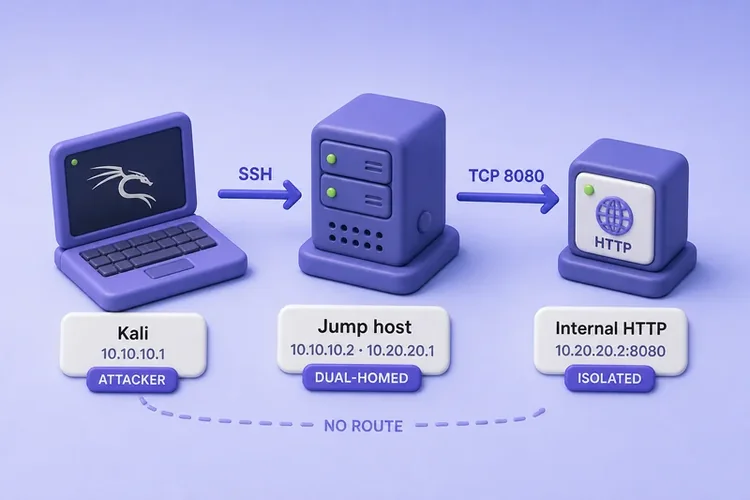
| Role | Address | What it can reach |
|---|---|---|
| Kali (attacker) | 10.10.10.1 on the outer segment |
Jump SSH only — not the internal service |
| Jump (dual-homed) | 10.10.10.2 and 10.20.20.1 |
Outer segment and internal segment |
| Internal service | 10.20.20.2:8080 |
HTTP body internal-service-ok |
Read the diagram left to right:
- Kali (
10.10.10.1) talks to the jump over SSH on the outer segment - Jump bridges outer (
10.10.10.2) and internal (10.20.20.1) - Internal HTTP (
10.20.20.2:8080) sits on the internal segment only - The dashed NO ROUTE line means a direct curl from Kali to
10.20.20.2should fail until you open a tunnel
How this differs from the Group 1 pentest lab
If you built pentest lab setup, you already have Kali at 192.168.56.120 and Metasploitable at 192.168.56.127 on one host-only network. Both VMs can ping each other — there is no isolated internal segment and no jump host.
| Group 1 pentest lab | This pivot practice lab | |
|---|---|---|
| Networks | One flat 192.168.56.0/24 |
Two segments: 10.10.10.0/24 + 10.20.20.0/24 |
| Kali address | 192.168.56.120 (typical) |
10.10.10.1 (simulated outer NIC) |
| Jump host | None | Dual-homed pivot@10.10.10.2 |
| Internal target | N/A (Metasploitable is on the same LAN) | 10.20.20.2:8080 on a separate segment |
The 10.10.10.x range looks like the Proxmox GOAD lab subnet, but this lesson uses .1 / .2 and adds 10.20.20.0/24 so the two hops are obvious. You do not need GOAD or a second physical VM for this page — namespaces on Kali are enough.
Build the pivot practice lab on Kali
You need one Kali VM (pentest lab setup is fine). sudo builds two network namespaces — jump and internal — plus virtual Ethernet pairs so traffic flows the same way as the diagram.
Install the SSH server package if Kali does not already have it:
sudo apt update && sudo apt install -y openssh-serverCreate a dedicated key pair for the lab jump login. A separate key keeps this practice lab off your personal SSH keys:
test -f ~/.ssh/pivot_lab || ssh-keygen -t ed25519 -f ~/.ssh/pivot_lab -N ""Create the pivot account and install your lab public key before you bring up the namespaces:
sudo useradd -m -s /bin/bash pivot 2>/dev/null || true
sudo install -d -o pivot -g pivot -m 700 /home/pivot/.ssh
sudo install -o pivot -g pivot -m 600 ~/.ssh/pivot_lab.pub /home/pivot/.ssh/authorized_keys
Run the setup script below once. It creates namespaces, assigns the 10.10.10.x and 10.20.20.x addresses, starts a tiny HTTP server in internal, and runs sshd inside jump:
sudo bash -s <<'SETUP'
set -euo pipefail
cleanup() {
  pkill -f 'ip netns exec internal.*http.server' 2>/dev/null || true
  pkill -f 'sshd.*10.10.10.2' 2>/dev/null || true
  ip netns del jump 2>/dev/null || true
  ip netns del internal 2>/dev/null || true
  ip link del veth-outer 2>/dev/null || true
}
cleanup
ip netns add jump
ip netns add internal
ip link add veth-outer type veth peer name veth-jump-outer
ip link set veth-jump-outer netns jump
ip link add veth-jump-inner type veth peer name veth-internal
ip link set veth-jump-inner netns jump
ip link set veth-internal netns internal
ip addr add 10.10.10.1/24 dev veth-outer
ip link set veth-outer up
ip netns exec jump ip addr add 10.10.10.2/24 dev veth-jump-outer
ip netns exec jump ip link set veth-jump-outer up
ip netns exec jump ip link set lo up
ip netns exec jump ip addr add 10.20.20.1/24 dev veth-jump-inner
ip netns exec jump ip link set veth-jump-inner up
ip netns exec internal ip addr add 10.20.20.2/24 dev veth-internal
ip netns exec internal ip link set veth-internal up
ip netns exec internal ip link set lo up
ip netns exec internal bash -c 'mkdir -p /tmp/pivot-http && printf internal-service-ok > /tmp/pivot-http/index.html && exec python3 -m http.server 8080 --bind 10.20.20.2 --directory /tmp/pivot-http' &
ip netns exec jump /usr/sbin/sshd -D -p 22 -o ListenAddress=10.10.10.2 -o AllowTcpForwarding=yes -o GatewayPorts=no &
SETUP
The HTTP server and sshd run in the background inside their namespaces. Wait two or three seconds before you test SSH.
Confirm SSH to the jump works before you try forwarding:
ssh -o StrictHostKeyChecking=accept-new -i ~/.ssh/pivot_lab pivot@10.10.10.2 exitA silent exit means authentication succeeded. If you see Connection refused, wait a few seconds and retry — sshd inside jump may still be starting.
Verify the reachability gap
Direct curl from Kali (your main shell) to the internal IP should fail. The curl command cheat sheet covers -m and -w if you want different status formats:
curl -s -m 2 -o /dev/null -w '%{http_code}\n' http://10.20.20.2:8080/000000 means curl never got an HTTP status. The internal address is not reachable from Kali without a pivot — that is expected.
From the jump namespace, the same URL should succeed. That proves the internal service is up and only the jump has a path to it:
sudo ip netns exec jump curl -s http://10.20.20.2:8080/internal-service-okThat contrast is the whole point of the article. The jump can already talk to the target. You need a tunnel so tools on Kali can borrow that path.
Add -i ~/.ssh/pivot_lab to every ssh command in the sections below unless you copied the key into your default agent.
Optional packet-path check while you test later techniques: on the jump, run sudo ip netns exec jump tcpdump -ni veth-jump-inner port 8080 and curl from Kali through a forward. You should see the jump talking to 10.20.20.2, not Kali speaking on that interface. Also watch for a misleading ip route get 10.20.20.2 on Kali that points at hypervisor NAT — that is broken lab isolation, not a pivot.
Decide which pivoting technique to use
Pick the smallest tool that matches the job, then jump to that section:
| Need | Prefer |
|---|---|
| One internal host:port | SSH -L local forward |
| Bring a Kali listener to the jump | SSH -R remote forward |
| Many arbitrary TCP targets | SSH -D SOCKS |
| Tool lacks SOCKS support | ProxyChains over that SOCKS listener |
| Whole CIDR, transparent TCP | sshuttle |
| Foothold is already Meterpreter | Metasploit route / socks_proxy |
Ligolo-ng, Chisel, multi-hop chains, and Windows-native forwarding belong in dedicated pages. This article stays on SSH-first fundamentals that every PenTest+ lab still needs.
A single -L forward is easier to explain in a report than a standing SOCKS proxy with half your desktop pointed at it.
Local port forwarding with SSH -L
Use local forwarding when you know one destination port and you want a listener on Kali. Think of it as: “make 127.0.0.1:18080 on my machine secretly mean 10.20.20.2:8080 via the jump.”
Traffic flow:
- Your client connects to
127.0.0.1:18080on Kali. - SSH carries the bytes to the jump.
- The jump opens
10.20.20.2:8080and relays the reply.
Flag meanings in the command below:
-f— background the SSH client after auth-N— do not open a remote shell; only forward ports-o ExitOnForwardFailure=yes— exit if the requested forward cannot bind (default OpenSSH leaves the session up even when a forward fails)-L 127.0.0.1:18080:10.20.20.2:8080— listen on Kali loopback18080, send that traffic to10.20.20.2:8080from the jump
The SSH command cheat sheet covers other client flags if you need a refresher beyond forwarding:
ssh -f -N -o ExitOnForwardFailure=yes -i ~/.ssh/pivot_lab -L 127.0.0.1:18080:10.20.20.2:8080 pivot@10.10.10.2If SSH returns successfully, the requested listener was established. Verify it with ss or the application test below. Hit the local port, not the internal IP:
curl -s http://127.0.0.1:18080/internal-service-okSuccess looks like the same body the jump saw earlier. Kali still has no route to 10.20.20.2; curl only talked to 127.0.0.1, and SSH did the rest. Stop this forward with kill on the SSH PID before you pile on another technique, or use a fresh terminal after cleanup.
Remote port forwarding with SSH -R
Remote forwarding reverses the direction. Instead of “bring the internal port to Kali,” you “publish something on Kali so the jump can fetch it.”
Typical lab use:
- A callback or local tool that must listen on Kali
- A host deeper in the lab that can only talk to the jump, not to Kali directly
Start a tiny HTTP directory listing on Kali loopback so there is something to fetch:
python3 -m http.server 9191 --bind 127.0.0.1Leave that running in one terminal. In another, create a remote forward so the jump’s 127.0.0.1:9191 points at Kali’s 127.0.0.1:9191:
ssh -f -N -o ExitOnForwardFailure=yes -i ~/.ssh/pivot_lab -R 127.0.0.1:9191:127.0.0.1:9191 pivot@10.10.10.2In this -R command, the first 127.0.0.1:9191 belongs to the jump host. The destination 127.0.0.1:9191 is resolved from Kali, where the Python server is listening. Those are two different loopbacks.
If SSH returns successfully, the remote listener was set up. From the jump, curl it:
sudo ip netns exec jump curl -s -m 3 http://127.0.0.1:9191/ | head -n 5<!DOCTYPE HTML>
<html lang="en">
<head>
<meta charset="utf-8">
<title>Directory listing for /Seeing the Python directory HTML means the jump reached Kali’s loopback through the SSH session. That is the opposite direction of -L.
Direction checklist:
-L= listener on your side; destination is beyond the jump-R= listener on the jump; destination is on your side
If GatewayPorts is off (the default on many hosts), remote binds stay on the jump’s loopback only. That is what you usually want in a lab.
Dynamic SOCKS forwarding with SSH -D
Dynamic forwarding turns the jump into a SOCKS proxy. SOCKS is a simple rule: your client asks the proxy to open a TCP connection for it. The proxy (here, the SSH jump) opens that connection from its own network view.
Compared with -L:
-L= one fixed destination you chose when you started SSH-D= many destinations, chosen later by each SOCKS-aware client
Start a SOCKS5 listener on Kali loopback:
ssh -f -N -o ExitOnForwardFailure=yes -i ~/.ssh/pivot_lab -D 127.0.0.1:1080 pivot@10.10.10.2If SSH returns successfully, the SOCKS listener is up. Ask curl to connect through that proxy. Prefer --socks5-hostname so the name or IP is sent to the proxy (important later for DNS):
curl -s --socks5-hostname 127.0.0.1:1080 http://10.20.20.2:8080/internal-service-okGetting the service body without a local -L port means SOCKS is working. You now have a general-purpose TCP path. The next section wraps everyday tools that do not speak SOCKS themselves into that same listener.
ProxyChains over a SOCKS proxy
ProxyChains (proxychains4 on Kali) forces many TCP clients through a SOCKS or HTTP proxy. It is the bridge when the tool does not have a built-in SOCKS option.
What it can and cannot do:
- Works for many TCP CLI tools when you prefix them with
proxychains4 - Does not proxy UDP, ICMP, or raw SYN scans
- Works by hooking socket-related calls in dynamically linked programs; static binaries and some programs that bypass or complicate those libc hooks may not proxy correctly
Create a small config that points at the SOCKS listener from the previous section:
cat > /tmp/proxychains-pivot.conf <<'EOF'
strict_chain
proxy_dns
tcp_read_time_out 15000
tcp_connect_time_out 8000
[ProxyList]
socks5 127.0.0.1 1080
EOF
Config lines that matter here:
strict_chain— fail if the proxy is down (safer than silently going direct)proxy_dns— resolve names through the proxy instead of leaking DNS on Kalisocks5 127.0.0.1 1080— yourssh -Dlistener
Wrap curl with that file:
proxychains4 -f /tmp/proxychains-pivot.conf -q curl -s http://10.20.20.2:8080/internal-service-okSame body as before means the wrapper reached the internal host through SOCKS. The same path works for TCP connect scans. Use -sT so Nmap opens real TCP sockets ProxyChains can intercept:
proxychains4 -f /tmp/proxychains-pivot.conf nmap -sT -Pn -n -p 8080 10.20.20.2[proxychains] DLL init: proxychains-ng 4.17
[proxychains] DLL init: proxychains-ng 4.17
[proxychains] DLL init: proxychains-ng 4.17
Starting Nmap 7.99 ( https://nmap.org ) at 2026-09-05 10:13 -0400
[proxychains] Strict chain ... 127.0.0.1:1080 ... 10.20.20.2:8080 ... OK
Nmap scan report for 10.20.20.2
Host is up (0.00s latency).
PORT STATE SERVICE
8080/tcp open http-proxy
Nmap done: 1 IP address (1 host up) scanned in 0.10 secondsRead the outcome like this:
Strict chain ... OK— the probe went through SOCKS, not Kali’s direct interface8080/tcp open— the internal service accepted the connect through the jump
For broader Nmap recon habits, remember ProxyChains only helps connect-oriented paths. Raw SYN scans bypass the preload.
sshuttle for subnet-style routing over SSH
sshuttle feels closer to a VPN than to a single port forward. You give it a CIDR; it installs local firewall rules and forwards matching TCP through SSH.
What you get:
- Transparent TCP to the listed subnet (no
proxychains4prefix on every command) - Still needs a working SSH login to the jump
- Needs sudo (or root) on Kali for the firewall helper
- Still TCP-focused; prove IPs first, then optional
--dns(see below and the DNS section)
With the internal HTTP service still up, tunnel the whole 10.20.20.0/24 range through the jump. Set PIVOT_KEY so sudo can pass the correct path to ssh. Verbose mode prints the method and the connect line; leave the process running after it connects:
PIVOT_KEY="$HOME/.ssh/pivot_lab"
sudo sshuttle -r pivot@10.10.10.2 --ssh-cmd "ssh -i $PIVOT_KEY" 10.20.20.0/24 -vc : Starting firewall manager with command: ['/usr/bin/sshuttle', '-v', '--method', 'auto', '--firewall']
c : Method: nat
c : Connected to server.What those lines mean:
Method: nat— sshuttle chose NAT firewall rules on this hostConnected to server.— the SSH side of the tunnel is up; keep this process running
In another terminal, curl the internal IP without SOCKS or ProxyChains:
curl -s -m 5 http://10.20.20.2:8080/internal-service-okSuccess here is the important contrast with ProxyChains: a normal curl to the real internal IP works because the host firewall sent that TCP into sshuttle.
When you intentionally want matching DNS requests resolved on the remote side, add --dns. Prove IP connectivity first, then enable DNS:
PIVOT_KEY="$HOME/.ssh/pivot_lab"
sudo sshuttle --dns -r pivot@10.10.10.2 --ssh-cmd "ssh -i $PIVOT_KEY" 10.20.20.0/24
Use --dns only after the plain CIDR tunnel already returns internal-service-ok. Stopping the earlier sshuttle process first avoids overlapping firewall rules.
Compared with ProxyChains:
| ProxyChains + SOCKS | sshuttle | |
|---|---|---|
| Reach | Apps you wrap (or that speak SOCKS) | Most local TCP clients, transparently |
| Scope | Whatever you dial through the proxy | CIDR list you pass on the command line |
| Privilege | Usually none beyond SSH | Local root/sudo for firewall rules |
| DNS | proxy_dns / --socks5-hostname |
Optional --dns; prove IPs first |
If auto fails on a host with a busy nftables stack, try --method nft or --method tproxy and retest with a short curl. Stop sshuttle with Ctrl+C in its terminal (or kill the daemon PID if you used --daemon).
Metasploit routing through a session
Use this path when your foothold is already a Meterpreter (or compatible) session, not an SSH login. Metasploit can send module traffic through that session the way SSH sent traffic through the jump. Full session work lives in the Metasploit tutorial.
From msfconsole, route documents the idea: add a subnet that should exit via a session ID:
msfconsole -q -x 'help route; exit'Route traffic destined to a given subnet through a supplied session.
Usage:
route [add/remove] subnet netmask [comm/sid]
route [add/remove] cidr [comm/sid]
route [get] <host or network>
route [flush]
route [print]
Examples:
Add a route for all hosts from 192.168.0.0 to 192.168.0.255 through session 1
route add 192.168.0.0 255.255.255.0 1
route add 192.168.0.0/24 1After you have a live session that can reach the internal net, the practical steps look like this:
route add 10.20.20.0/24 1— send that CIDR through session1route print— confirm which CIDRs actually go through the sessionuse auxiliary/server/socks_proxy— open a SOCKS listener inside Metasploit, then point ProxyChains at it the same way you did forssh -D
The current post/multi/manage/autoroute module can discover and add routes from a session. Always verify the result with route print.
DNS through tunnels and common leaks
TCP to an IP can work while name-based tools still fail. DNS often leaves the tunnel.
| Pattern | What happens |
|---|---|
curl http://internal.lab/ without SOCKS DNS |
Kali resolves internal.lab on its own resolver — often NXDOMAIN or the wrong network |
curl --socks5-hostname |
Destination name is sent to the SOCKS proxy; resolution happens where the jump can see internal DNS |
ProxyChains proxy_dns |
Forces DNS through the proxy chain for hooked apps |
| sshuttle | TCP to the CIDR by default; add --dns when you want matching DNS resolved remotely |
Practical habit for labs:
- Prove the pivot with IP literals first
- Add internal hostnames only after SOCKS DNS or sshuttle DNS is confirmed
- If a browser works for an IP bookmark but fails for a hostname, suspect DNS leak before you rebuild the tunnel
Troubleshooting pivoting and tunnels
| Symptom | Likely cause | Fix |
|---|---|---|
bind: Address already in use on -L/-D |
Old SSH forward still listening | ss -ltnp | grep 1080 (or your port), kill the SSH PID; ExitOnForwardFailure=yes fails fast instead of backgrounding a broken forward |
| Local forward works, other hosts cannot use it | You bound 127.0.0.1 only |
Expected for labs; binding 0.0.0.0 needs a clear reason and firewall review |
Remote -R listener missing on jump LAN IP |
GatewayPorts disabled |
Keep loopback binds, or enable only if RoE allows exposing the port |
channel setup failure / administratively prohibited |
AllowTcpForwarding no on sshd |
Use a jump where forwarding is allowed, or another tunnel tool in scope |
| ProxyChains “connection refused” to the real IP | App bypassed the preload, or SOCKS is down | Confirm ss -ltnp shows 127.0.0.1:1080; use -sT for Nmap |
| SOCKS works in curl, fails in tool | Wrong SOCKS version or hostname resolve | Match socks5 in config; try --socks5-hostname |
| sshuttle connects, curl empty/timeout | Firewall method clash on busy hosts | Retry --method nft or tproxy; stop leftover sshuttle PIDs |
| UDP / ping “still broken” through ProxyChains | Tool only proxies TCP | Use a different approach or accept the limit |
| Hostname fails, IP works | DNS leak | Enable proxy_dns / --socks5-hostname; test with IPs first |
Cleanup forwards, routes, and listeners
Leave the lab quieter than you found it. Tear down in this order:
- Stop application listeners you started (
python3 -m http.serveron Kali loopback, not the namespace HTTP server yet). - Kill SSH forwards (
-L,-R,-D). Each is its ownsshprocess. - Stop sshuttle (Ctrl+C or daemon PID) so firewall rules disappear.
- In Metasploit,
route flushand stopsocks_proxyif you used them. - Remove temporary ProxyChains config files you created under
/tmp. - Tear down the namespace practice lab when you are finished with the whole lesson:
sudo pkill -f 'ip netns exec internal.*http.server' 2>/dev/null || true
sudo pkill -f 'sshd.*10.10.10.2' 2>/dev/null || true
sudo ip netns del jump 2>/dev/null || true
sudo ip netns del internal 2>/dev/null || true
sudo ip link del veth-outer 2>/dev/null || true
Confirm nothing is still listening on the lab ports:
ss -ltnp | grep -E '1080|18080|9191' || trueNo matching lines means the common lab listeners are gone. Re-check direct curl to 10.20.20.2 still returns 000 from your main Kali shell if you left the namespace lab up — that confirms isolation is still correct.
Summary
SSH pivoting means borrowing a dual-homed host’s reachability through an encrypted session. On this practice lab, Kali at 10.10.10.1 could not open 10.20.20.2:8080 until a forward or tunnel carried the traffic — even though both addresses live on the same physical Kali VM.
Match the tool to the job: -L for one local listener, -R when the jump needs a path back to Kali (including reverse-shell callbacks), -D plus ProxyChains for many TCP clients, and sshuttle when you want transparent TCP to a whole CIDR. Metasploit route and socks_proxy cover the case where the foothold is already a framework session instead of an SSH login. Ligolo-ng and Chisel stay out of this fundamentals page on purpose.
The usual failure is not the syntax. It is skipping the namespace lab build, verifying the wrong address, leaking DNS off-tunnel, or leaving an old forward bound. Use ExitOnForwardFailure=yes, prove before/after reachability, prefer the smallest technique that matches the task, and clean up listeners and namespaces before you write the finding.
References
- OpenSSH SSH client manual (
ssh) —-L,-R,-Dforwarding - sshuttle project documentation — transparent TCP over SSH
- proxychains-ng — TCP proxy wrapper
- Metasploit Framework documentation — sessions, routing, and modules
Frequently Asked Questions
What is the difference between pivoting and tunneling?
Tunneling is the transport (SSH carrying bytes). Pivoting is the outcome: using a reachable host as a bridge into a network your attacker host cannot reach directly. You often pivot by tunneling.
When should I use SSH local forwarding instead of SOCKS?
Use local -L when you need one destination port and a simple localhost URL or listener. Use dynamic -D when several tools or many destinations need the jump’s reachability.
Why does ProxyChains Nmap show filtered or miss ports?
SYN scans and some raw probes never go through the socket hooks ProxyChains uses. Use TCP connect scans (-sT) and confirm the SOCKS listener is up. UDP discovery still will not ride classic ProxyChains.
Does sshuttle replace a VPN?
For many authorized lab pivots, sshuttle is enough for TCP to a listed CIDR without standing up a full VPN server. It is not a drop-in for every protocol, and DNS still needs explicit testing.
Can I pivot without SSH?
Yes. Metasploit routing through a session, dedicated pivot tools, or application-layer proxies all exist. This article focuses on SSH-based paths because they are common on Linux jump hosts in PenTest+ labs.
Why does this lesson use 10.10.10.x instead of 192.168.56.x?
The Group 1 pentest lab uses one flat 192.168.56.0/24 network. Pivoting needs two segments and a dual-homed jump so Kali cannot reach the internal target directly. This lesson simulates that with 10.10.10.0/24 (outer) and 10.20.20.0/24 (internal) on namespaces — the technique is the same on real engagements, only the addresses change.
