
| Tested on | Proxmox lab — Proxmox VE 9.2 on node proxmox-lab; Metasploitable 2.0.0 (Linux) VMDK import |
|---|---|
| Package | Metasploitable 2.0.0Proxmox VE 9.2 |
| Privilege | Root on the Proxmox host for qm and disk import; sudo on Kali for nmap |
| Scope | Download the Metasploitable 2 ZIP, extract the VMDK, create a Proxmox VM, import the disk with qm disk import, attach the unused volume, use lab-tested LSI SCSI and rtl8139 networking, assign static 10.10.10.30 on vmbr1, verify open services, and take an ms2-clean snapshot. Does not cover exploitation walkthroughs or Metasploitable 3. |
| Related guides | Deploy GOAD-Light on Proxmox |
Metasploitable 2 is the deliberately vulnerable Linux target most beginners scan before they touch Active Directory labs. On Proxmox you import the upstream VMware disk, attach it to your isolated lab bridge, and give it a fixed address because that bridge does not run DHCP.
If you still need a Proxmox host, vmbr1, storage pools, or Kali on 10.10.10.10, start with install Proxmox VE on Debian or the ISO path in Proxmox pentest lab setup, then Install Kali Linux on Proxmox. Everything below assumes those pieces exist.
Lab plan and IP addressing
This build follows the shared 10.10.10.0/24 layout from Proxmox pentest lab setup:
| VM | VMID | Bridge | IP on vmbr1 |
Role |
|---|---|---|---|---|
| Kali | 100 |
vmbr1 (eth1) |
10.10.10.10 |
attacker |
| GOAD-Light nodes | 102–104 |
vmbr1 |
.20–.22 |
Windows AD lab |
| Metasploitable 2 | 105 |
vmbr1 |
10.10.10.30 |
Linux target |
Manual IP or DHCP?
On vmbr1 in this course, addresses are manual. The bridge has no physical port and no DHCP server, so a VM that still says iface eth0 inet dhcp in /etc/network/interfaces will wait, fail, and never pick up 10.10.10.30 on its own.
You have three realistic choices:
- Static IP in
/etc/network/interfaces(this guide) — predictable, matches every lesson command, works offline. - Console edit after first boot — log in as
msfadmin, runsudo ifconfig eth0 10.10.10.30 netmask 255.255.255.0, then make the file change permanent. Fine for a quick test; the offline edit lets you set the permanent address before the first boot. - Optional DHCP with
dnsmasqon the Proxmox host — bind a small lease range tovmbr1if you prefer automatic addresses. Nothing in the PenTest+ track requires it, and static IPs are easier to reason about when Kali, GOAD, and Metasploitable share one table.
Metasploitable 2 ships with eth0 configured for DHCP. On VMware or VirtualBox lab networks, a DHCP service commonly supplies the address; an isolated Proxmox bridge does not provide DHCP by itself unless you add one.
Download Metasploitable 2 to Proxmox
Grab the Linux ZIP from the Metasploitable 2 download page (SourceForge mirror). The file is about 826 MiB.
On a Proxmox host with outbound HTTP, place it in your ISO directory:
cd /opt/isos
wget https://sourceforge.net/projects/metasploitable/files/Metasploitable2/metasploitable-linux-2.0.0.zip/download -O metasploitable-linux-2.0.0.zip
Confirm the archive landed:
ls -lh /opt/isos/metasploitable-linux-2.0.0.zip-rw-r--r-- 1 root root 826M Aug 27 15:44 /opt/isos/metasploitable-linux-2.0.0.zipNo outbound HTTP from the host? Download the ZIP on another machine and copy it into /opt/isos with scp through your jump host, the same way you staged other lab ISOs.
Extract the VMDK
The ZIP contains Metasploitable2-Linux/Metasploitable.vmdk. Extract it once under /opt/metasploitable2:
mkdir -p /opt/metasploitable2
python3 -c "import zipfile; zipfile.ZipFile('/opt/isos/metasploitable-linux-2.0.0.zip').extractall('/opt/metasploitable2')"
List the extracted disk:
ls -lh /opt/metasploitable2/Metasploitable2-Linux/total 1.8G
-rw-r--r-- 1 root root 8.5K Metasploitable.nvram
-rw-r--r-- 1 root root 1.8G Metasploitable.vmdk
-rw-r--r-- 1 root root 0 Metasploitable.vmsd
-rw-r--r-- 1 root root 2.8K Metasploitable.vmx
-rw-r--r-- 1 root root 269 Metasploitable.vmxfThe 1.8G VMDK is the only file qm disk import needs. The older qm importdisk alias still works on many hosts.
Create the VM and import the disk
Pick a free VMID. This lab uses 105 because 100 is Kali and 102–104 are GOAD-Light nodes.
Create an empty VM with one NIC on the lab bridge:
qm create 105 \
  --name metasploitable2 \
  --memory 1024 \
  --cores 1 \
  --net0 rtl8139,bridge=vmbr1 \
  --ostype l26 \
  --scsihw lsi \
  --agent enabled=0 \
  --onboot 0
Import the VMDK into local-lvm. Proxmox expands the thin volume to 8 GiB during import and leaves it as an unused disk until you attach it:
qm disk import 105 /opt/metasploitable2/Metasploitable2-Linux/Metasploitable.vmdk local-lvmRead the unused-disk line Proxmox created — do not assume the volume name:
qm config 105 | grep unusedunused0: local-lvm:vm-105-disk-0Attach that volume as the boot disk and set the boot order (adjust the path if your unused0 line differs):
qm set 105 --scsi0 local-lvm:vm-105-disk-0qm set 105 --boot order=scsi0A serial socket helps if you ever need console troubleshooting without the graphical viewer:
qm set 105 --serial0 socketReview the final config:
qm config 105agent: enabled=0
boot: order=scsi0
cores: 1
memory: 1024
name: metasploitable2
net0: rtl8139=BC:24:11:F5:96:82,bridge=vmbr1
onboot: 0
ostype: l26
scsi0: local-lvm:vm-105-disk-0,size=8G
scsihw: lsi
serial0: socketThe rtl8139 and lsi lines are what this lab used after import. This guide uses rtl8139 networking and the LSI SCSI controller because that combination worked reliably with the imported Metasploitable 2 image here. Other emulated or VirtIO devices may also work depending on the guest and kernel configuration.
Assign static IP 10.10.10.30 offline
Make sure VM 105 is stopped before you mount its disk from the Proxmox host:
qm status 105status: stoppedAttach the disk with qemu-nbd and confirm partitions are visible before you touch LVM:
modprobe nbd max_part=8
qemu-nbd -c /dev/nbd0 /dev/pve/vm-105-disk-0
sleep 2
partprobe /dev/nbd0
lsblk /dev/nbd0NAME MAJ:MIN RM SIZE RO TYPE MOUNTPOINTS
nbd0 43:0 0 8G 0 disk
├─nbd0p1
│ 43:1 0 243M 0 part
├─nbd0p2
│ 43:2 0 1K 0 part
└─nbd0p5
43:5 0 7.7G 0 partThe nbd0p5 extended partition is where the Metasploitable LVM lives. List physical volumes next:
pvs PV VG Fmt Attr PSize PFree
/dev/nbd0p5 metasploitable lvm2 a-- 7.69g 0Check the volume group name matches the standard image:
vgs VG #PV #LV #SN Attr VSize VFree
metasploitable 1 2 0 wz--n- 7.69g 0List logical volumes — you should see root and swap_1 under metasploitable:
lvs LV VG Attr LSize Pool Origin Data% Meta% Move Log Cpy%Sync Convert
root metasploitable -wi------- 7.19g
swap_1 metasploitable -wi------- 512.00mIf your output shows a different VG or LV name, you imported a different image — stop here and re-check the VMDK path. When the names match, activate the group and mount root:
vgchange -ay metasploitable
mkdir -p /mnt/ms2
mount /dev/metasploitable/root /mnt/ms2
Replace the DHCP stanza in /etc/network/interfaces with a static address:
cat > /mnt/ms2/etc/network/interfaces <<'EOF'
auto lo
iface lo inet loopback

auto eth0
iface eth0 inet static
address 10.10.10.30
netmask 255.255.255.0
EOF
Unmount cleanly and release the NBD device:
sync
umount /mnt/ms2
vgchange -an metasploitable
qemu-nbd -d /dev/nbd0
Prefer the live console instead? Boot the VM, log in as msfadmin / msfadmin, and edit the same file with sudo nano /etc/network/interfaces, then run sudo /etc/init.d/networking restart.
Start Metasploitable and verify services
Power the VM on:
qm start 105In the Proxmox web UI, open VM 105 (metasploitable2) → Console and confirm the guest boots from the imported disk. SeaBIOS and GRUB messages are normal during startup; wait for the login prompt before you ping or scan.
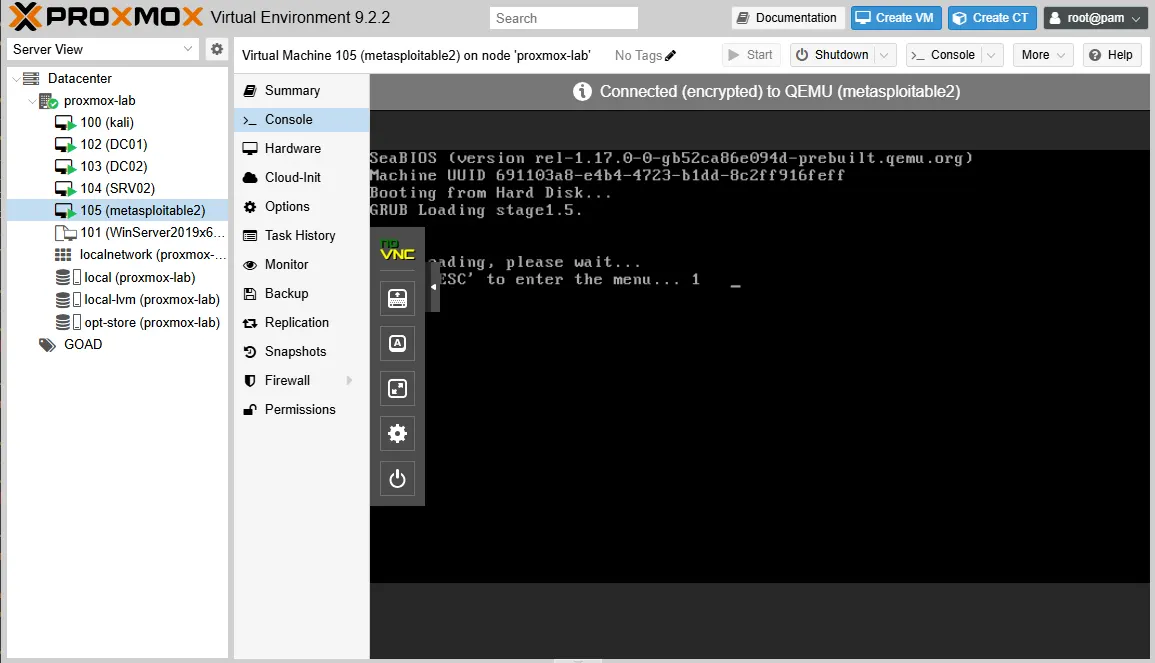
The Connected (encrypted) to QEMU banner means the console session is live. If the screen stays blank, check that scsi0 is attached and boot: order=scsi0 appears in qm config 105.
Give the old Ubuntu 8.04 userspace about thirty seconds to bring eth0 up, then ping from the Proxmox host:
ping -c 3 10.10.10.30PING 10.10.10.30 (10.10.10.30) 56(84) bytes of data.
64 bytes from 10.10.10.30: icmp_seq=1 ttl=64 time=0.527 ms
64 bytes from 10.10.10.30: icmp_seq=2 ttl=64 time=0.232 ms
64 bytes from 10.10.10.30: icmp_seq=3 ttl=64 time=0.280 ms
--- 10.10.10.30 ping statistics ---
3 packets transmitted, 3 received, 0% packet loss, time 2053msScan a handful of textbook Metasploitable ports:
nmap -sV -p 21,22,80,445,3306,5900 10.10.10.30PORT STATE SERVICE VERSION
21/tcp open ftp vsftpd 2.3.4
22/tcp open ssh OpenSSH 4.7p1 Debian 8ubuntu1 (protocol 2.0)
80/tcp open http Apache httpd 2.2.8 ((Ubuntu) DAV/2)
445/tcp open netbios-ssn Samba smbd 3.X - 4.X (workgroup: WORKGROUP)
3306/tcp open mysql MySQL 5.0.51a-3ubuntu5
5900/tcp open vnc VNC (protocol 3.3)That fingerprint matches what Hacking Metasploitable 2 expects on the lab side of Kali.
Snapshot ms2-clean
Take a snapshot before your first exploit so you can roll back service state:
qm snapshot 105 ms2-clean --description 'Clean Metasploitable 2 before exploitation'Confirm the snapshot exists:
qm listsnapshot 105`-> ms2-clean Clean Metasploitable 2 before exploitation
`-> currentRestore later with qm rollback 105 ms2-clean when an exercise leaves extra users, shells, or crashed daemons behind.
Verify from Kali on vmbr1
On Kali (10.10.10.10), point scans at the static target address. A quick reachability check:
ping -c 2 10.10.10.30Run a service scan the way you will in later lessons:
nmap -sV -p 21,22,80,445 10.10.10.30You should see the same vsFTPd, OpenSSH, Apache, and Samba versions the Proxmox host reported. If Kali cannot reach .30, confirm Kali's eth1 is on vmbr1 at 10.10.10.10/24 and that Metasploitable still shows net0: rtl8139,bridge=vmbr1 in qm config 105.
Troubleshooting
| Symptom | Likely cause | Fix |
|---|---|---|
VM runs but no ARP entry for 10.10.10.30 |
NIC type, interface configuration, or wrong bridge | Confirm net0 uses bridge=vmbr1; verify /etc/network/interfaces has the static stanza; try rtl8139 or another emulated NIC if the guest never brings eth0 up |
ping works from Proxmox but not from Kali |
Kali lab NIC down or wrong subnet | Check nmcli con show on Kali; eth1 should be 10.10.10.10/24 on vmbr1 |
| Long boot hang before any IP | DHCP timeout on a bridge with no server | Switch /etc/network/interfaces to static as shown above |
qm disk import leaves unused0 |
Disk imported but not attached | Run qm config 105 | grep unused, then qm set 105 --scsi0 <volume-from-unused0> and qm set 105 --boot order=scsi0 |
vgchange warns about old PV header |
Metasploitable LVM metadata from 2008 | Safe to ignore for import; deactivate with vgchange -an metasploitable after editing |
References
- Metasploitable 2 (Rapid7 documentation)
- Proxmox VE qm manual
- Proxmox disk import wiki
Summary
Metasploitable 2 on Proxmox is an import job, not an installer. You download the ZIP, extract Metasploitable.vmdk, create a small VM, run qm disk import, read the unused0 line, and attach the volume with LSI SCSI plus an rtl8139 NIC — the combination that worked reliably in this lab.
IP assignment is manual on the isolated vmbr1 bridge this course uses. Metasploitable ships with eth0 on DHCP; VMware and VirtualBox lab networks often have a DHCP server, but an isolated Proxmox bridge does not unless you add one. Static 10.10.10.30 keeps Kali, GOAD, and Metasploitable in one predictable table.
After nmap shows vsFTPd, Samba, and the other textbook services, snapshot ms2-clean and move on to Hacking Metasploitable 2 for exploitation walkthroughs, Linux privilege escalation for local misconfiguration practice on Kali, or Establish persistence once you hold shells on MS2 and GOAD.
Frequently Asked Questions
Does Metasploitable 2 get an IP automatically on Proxmox?
Only if something on the lab bridge runs DHCP. The isolated vmbr1 bridge in this course has no DHCP server, so the VM sits without a routable address until you set a static IP. You can add dnsmasq on the Proxmox host later if you prefer leases, but static addresses keep lesson commands stable.
Why use rtl8139 and LSI SCSI instead of virtio?
This guide uses rtl8139 networking and the LSI SCSI controller because that combination worked reliably with the imported Metasploitable 2 image on this lab. Other emulated or VirtIO devices may also work depending on the guest and kernel configuration; if the VM boots but has no network, try a different NIC or disk bus type before you assume the import failed.
What IP should Metasploitable 2 use in this lab?
This course assigns 10.10.10.30 on vmbr1 so it never collides with Kali at .10 or GOAD-Light at .20 through .22. Any free address on your isolated subnet works if you stay consistent across every target article.
What are the default Metasploitable 2 login credentials?
msfadmin / msfadmin on the console or SSH. You use these to confirm the static IP after import, not for exploitation walkthroughs.
Can I import the OVA instead of the ZIP?
Yes. The ZIP from Rapid7 contains Metasploitable.vmdk, which is what Proxmox imports with qm disk import. An OVA is just the same disk wrapped with metadata; extracting the VMDK is the path this guide documents.
