
| Tested on | Kali GNU/Linux Rolling 2026.2 (kali-rolling) |
|---|---|
| Package | python3-scapy 2.7.0+dfsg1-1 (runtime scapy.__version__ 2.7.01) |
| Applies to | Kali Linux; other Linux hosts with Scapy 2.7.x and raw-socket permission |
| Lab environment | Pentest lab |
| Cert prep | CompTIA PenTest+ PT0-003 — specialized systems / scripting (packet crafting) |
| Privilege | Root/elevated packet-capture privileges are normally required for raw send/sniff on Linux; packet construction and offline PCAP analysis do not require root. This article was tested from a root shell. |
| Scope | Build, inspect, send/receive, sniff, and PCAP workflows with Scapy on an owned lab host. Local ICMP, TCP against a lab HTTP listener, and UDP probes that elicit ICMP port-unreachable. Not OT protocol replay/fuzzing, not spoofing or DDoS recipes, not a Wireshark GUI course. |
In this article we will use Scapy to build and dissect packets one protocol layer at a time on Kali.
Scapy lets Python code construct IP, TCP, UDP, and ICMP packets, send them only to localhost services, inspect replies, capture traffic, and read or write PCAP files. On the pentest lab Kali VM (192.168.56.120), the examples stay on 127.0.0.1, so you can reproduce packet behavior without scanning or altering another system.
What makes Scapy different
Most tools hide the packet behind a fixed scenario (port scan, ping sweep). Scapy exposes the packet as Python objects you stack with /. You decide the fields; Scapy fills sensible defaults and computes checksums when you build or send.
A common stack looks like Ethernet, then IP, then TCP, then an optional payload:
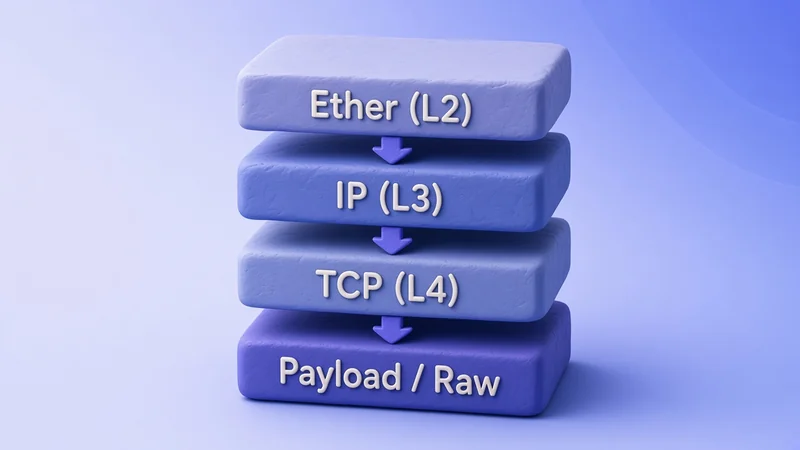
Confirm the package import and version on Kali:
python3 -c 'import scapy; print(scapy.__version__)'2.7.01The Kali package version is 2.7.0+dfsg1-1, while this installed build reports 2.7.01 through Scapy’s runtime version constant. Record both when reproducing package-specific behavior. Kali’s packaged Scapy is from the 2.7.0 line; upstream Scapy has since moved to 2.7.1. The APIs demonstrated here remain applicable, but use your local scapy.__version__ output when troubleshooting. A short Scapy import also appears in Python for pentesters; this lesson is the dedicated crafting walkthrough.
Inspect packet layers before sending
Create a layered packet and print a one-line summary, then a field dump with show() and show2():
python3 <<'PY'
from scapy.all import Ether, IP, TCP, Raw

pkt = (
    Ether()
    / IP(dst="127.0.0.1")
    / TCP(dport=80)
    / Raw(load=b"GET / HTTP/1.0\r\n\r\n")
)
print(pkt.summary())
pkt.show()
pkt.show2()
print(pkt.layers())
PYEther / IP / TCP 127.0.0.1:ftp_data > 127.0.0.1:http S / Raw
###[ Ethernet ]###
dst = None
src = 00:00:00:00:00:00
type = IPv4
###[ IP ]###
version = 4
ihl = None
tos = 0x0
len = None
id = 1
flags =
frag = 0
ttl = 64
proto = tcp
chksum = None
src = 127.0.0.1
dst = 127.0.0.1
\options \
###[ TCP ]###
sport = ftp_data
dport = http
seq = 0
ack = 0
dataofs = None
reserved = 0
flags = S
window = 8192
chksum = None
urgptr = 0
options = []
###[ Raw ]###
load = b'GET / HTTP/1.0\r\n\r\n'
###[ Ethernet ]###
dst = ff:ff:ff:ff:ff:ff
src = 00:00:00:00:00:00
type = IPv4
###[ IP ]###
version = 4
ihl = 5
tos = 0x0
len = 58
id = 1
flags =
frag = 0
ttl = 64
proto = tcp
chksum = 0x7cbb
src = 127.0.0.1
dst = 127.0.0.1
\options \
###[ TCP ]###
sport = ftp_data
dport = http
seq = 0
ack = 0
dataofs = 5
reserved = 0
flags = S
window = 8192
chksum = 0xb2ca
urgptr = 0
options = []
###[ Raw ]###
load = b'GET / HTTP/1.0\r\n\r\n'
[<class 'scapy.layers.l2.Ether'>, <class 'scapy.layers.inet.IP'>, <class 'scapy.layers.inet.TCP'>, <class 'scapy.packet.Raw'>]Ether() is included here only to show how Scapy stacks Layer 2 and Layer 3 objects. The packet is not sent in this section. The localhost examples below use Layer 3 IP(...) packets because Linux loopback is not an ordinary Ethernet path.
show() displays the packet before automatic fields are finalized. None on length and checksum means those values are still pending. show2() first assembles a copy, so lengths and checksums appear with calculated values (ihl=5, len=58, filled chksum fields).
Default TCP source port shows as ftp_data (20) and destination http (80) when you only set dport=80. For deliberate tests, set sport explicitly instead of relying on Scapy’s TCP default. A fixed source port also makes captures and matching easier to understand.
Build an ICMP packet
ICMP echo on loopback is a safe first send/receive. Craft the request and inspect it:
python3 <<'PY'
from scapy.all import IP, ICMP

req = IP(dst="127.0.0.1") / ICMP()
req.show()
PY###[ IP ]###
version = 4
ihl = None
tos = 0x0
len = None
id = 1
flags =
frag = 0
ttl = 64
proto = icmp
chksum = None
src = 127.0.0.1
dst = 127.0.0.1
\options \
###[ ICMP ]###
type = echo-request
code = 0
chksum = None
id = 0x0
seq = 0x0
unused = b''Default ICMP type is echo-request. Next you put it on the wire and wait for a reply.
Send and receive a response
Scapy’s send helpers differ by layer and whether they wait for a reply:
| Function | Layer | Waits for reply? |
|---|---|---|
send() |
L3 | No |
sendp() |
L2 | No |
sr() |
L3 | Yes, multiple |
sr1() |
L3 | Yes, first answer |
srp() |
L2 | Yes, multiple |
srp1() |
L2 | Yes, first answer |
Use sr1 for this ICMP check on Layer 3:
python3 <<'PY'
from scapy.all import IP, ICMP, sr1, conf

conf.verb = 0
ans = sr1(IP(dst="127.0.0.1") / ICMP(), timeout=2)
print(ans.summary() if ans else "no reply")
if ans:
    ans.show()
PYIP / ICMP 127.0.0.1 > 127.0.0.1 echo-reply 0
###[ IP ]###
version = 4
ihl = 5
tos = 0x0
len = 28
id = 22352
flags =
frag = 0
ttl = 64
proto = icmp
chksum = 0x258f
src = 127.0.0.1
dst = 127.0.0.1
\options \
###[ ICMP ]###
type = echo-reply
code = 0
chksum = 0x0
id = 0x0
seq = 0x0
unused = b''Your id and checksum values will differ per run. The important signal is echo-reply from 127.0.0.1. conf.verb = 0 quiets Scapy’s send counters so the transcript stays readable.
Build TCP and UDP packets
Start a local HTTP listener you own, then send a TCP SYN to it. Keep this terminal open while you run the next commands, or background it:
python3 -m http.server 8765 --bind 127.0.0.1 >/tmp/scapy-http8765.log 2>&1 &The shell returns immediately when the server starts in the background. Confirm something is listening before the SYN:
ss -ltn | grep 8765LISTEN 0 5 127.0.0.1:8765 0.0.0.0:*Send a SYN to that port with an explicit source port, then print the reply flags:
python3 <<'PY'
from scapy.all import IP, TCP, sr1, conf

conf.verb = 0
syn = IP(dst="127.0.0.1") / TCP(sport=44444, dport=8765, flags="S")
print(syn.summary())
ans = sr1(syn, timeout=2)
print(ans.summary() if ans else "no reply")
if ans and ans.haslayer(TCP):
    print("flags", ans[TCP].flags)
PYIP / TCP 127.0.0.1:44444 > 127.0.0.1:8765 S
IP / TCP 127.0.0.1:8765 > 127.0.0.1:44444 SA
flags SASA is SYN-ACK from your lab HTTP server. This is packet-level probing, not a completed TCP connection. Because the SYN did not originate from a normal kernel socket, the local TCP stack may subsequently send a reset after the SYN-ACK. For this example, the only result you need is the returned SA flag.
UDP to a closed high port on localhost usually returns ICMP port-unreachable, which is still a useful decode exercise:
python3 <<'PY'
from scapy.all import IP, UDP, Raw, sr1, conf

conf.verb = 0
pkt = IP(dst="127.0.0.1") / UDP(sport=12345, dport=39999) / Raw(load=b"lab-probe")
print(pkt.summary())
ans = sr1(pkt, timeout=2)
print(ans.summary() if ans else "timeout")
if ans:
    ans.show()
PYIP / UDP 127.0.0.1:12345 > 127.0.0.1:39999 / Raw
IP / ICMP 127.0.0.1 > 127.0.0.1 dest-unreach port-unreachable / IPerror / UDPerror / Raw
###[ IP ]###
version = 4
ihl = 5
tos = 0xc0
len = 65
id = 22790
flags =
frag = 0
ttl = 64
proto = icmp
chksum = 0x22f4
src = 127.0.0.1
dst = 127.0.0.1
\options \
###[ ICMP ]###
type = dest-unreach
code = port-unreachable
chksum = 0xfb21
reserved = 0
length = 0
nexthopmtu= 0
unused = b''
extpad = b''
ext = None
###[ IP in ICMP ]###
version = 4
ihl = 5
tos = 0x0
len = 37
id = 1
flags =
frag = 0
ttl = 64
proto = udp
chksum = 0x7cc5
src = 127.0.0.1
dst = 127.0.0.1
\options \
###[ UDP in ICMP ]###
sport = 12345
dport = 39999
len = 17
chksum = 0x21ed
###[ Raw ]###
load = b'lab-probe'Scapy nests the original UDP header under the ICMP error. That is decoding, not “UDP worked.”
Stop the lab HTTP listener when you are done with TCP:
pkill -f 'http.server 8765' || truepkill prints nothing when it finds no matching process after a clean stop.
Customize packet fields
Override TTL, ports, and flags yourself. Leave checksum fields as None so Scapy fills them when the packet is built:
python3 <<'PY'
from scapy.all import IP, TCP

pkt = IP(dst="127.0.0.1", ttl=32) / TCP(sport=4444, dport=8765, flags="S")
print("before build:", pkt[IP].chksum, pkt[TCP].chksum)
built = IP(bytes(pkt))
print(f"ttl={built.ttl}")
print(f"IP.chksum=0x{built[IP].chksum:04x}")
print(f"TCP.chksum=0x{built[TCP].chksum:04x}")
print(f"sport={built[TCP].sport} dport={built[TCP].dport} flags={built[TCP].flags}")
PYbefore build: None None
ttl=32
IP.chksum=0x9ccd
TCP.chksum=0x5e47
sport=4444 dport=8765 flags=Sbytes(pkt) forces a build so length and checksum appear for programmatic access (alongside show2() for interactive inspection). If you set a wrong checksum by hand, the peer may drop the packet; prefer Scapy’s auto values unless you are deliberately testing invalid frames in a lab you own.
Sniff packets
Capture your own ICMP on lo while sr1 runs, using AsyncSniffer so send and sniff overlap:
python3 <<'PY'
from scapy.all import IP, ICMP, sr1, AsyncSniffer, conf
import time

conf.verb = 0
t = AsyncSniffer(iface="lo", filter="icmp and host 127.0.0.1", store=True)
t.start()
time.sleep(0.4)
ans = sr1(IP(dst="127.0.0.1") / ICMP(), timeout=2)
time.sleep(0.4)
pkts = t.stop()
print("sr1:", ans.summary() if ans else None)
print("sniffed", len(pkts))
for p in pkts:
    print(p.summary())
    if p.haslayer(ICMP):
        print("  icmp.type=", int(p[ICMP].type))
PYsr1: IP / ICMP 127.0.0.1 > 127.0.0.1 echo-reply 0
sniffed 4
Ether / IP / ICMP 127.0.0.1 > 127.0.0.1 echo-request 0
icmp.type= 8
Ether / IP / ICMP 127.0.0.1 > 127.0.0.1 echo-request 0
icmp.type= 8
Ether / IP / ICMP 127.0.0.1 > 127.0.0.1 echo-reply 0
icmp.type= 0
Ether / IP / ICMP 127.0.0.1 > 127.0.0.1 echo-reply 0
icmp.type= 0On this Kali capture, each ICMP request and reply appeared twice on lo. Loopback capture behavior can vary with the kernel and Scapy/libpcap backend, so do not rely on an exact packet count; identify the request and reply by protocol fields instead. Type 8 is echo-request; type 0 is echo-reply.
filter= is BPF syntax applied before packets reach Scapy. Use filter= when the condition can be expressed as BPF so the capture backend discards unrelated traffic early. Use lfilter= for Python predicates that need Scapy packet objects (for example lfilter=lambda p: p.haslayer(ICMP)). For shell-oriented capture filters, the tcpdump command cheat sheet covers BPF syntax that matches Scapy’s filter= string.
Read, write, and filter PCAP files
Write a tiny PCAP, then select layers in Python. Create three ICMP echo requests and save them:
python3 <<'PY'
from scapy.all import IP, ICMP, wrpcap, conf

conf.verb = 0
pkts = [IP(dst="127.0.0.1") / ICMP(seq=i) for i in range(3)]
wrpcap("lab-icmp.pcap", pkts)
print("wrote", len(pkts), "packets")
PYwrote 3 packetsLoad the file, confirm the count and size, and keep only echo-requests (ICMP type 8):
python3 <<'PY'
from scapy.all import rdpcap, ICMP
import os

pkts = rdpcap("lab-icmp.pcap")
print("read", len(pkts))
print("file_bytes", os.path.getsize("lab-icmp.pcap"))
echo_req = [p for p in pkts if p.haslayer(ICMP) and p[ICMP].type == 8]
print("echo_requests", len(echo_req))
print(echo_req[0].summary())
print("seq", echo_req[0][ICMP].seq)
PYread 3
file_bytes 156
echo_requests 3
IP / ICMP 127.0.0.1 > 127.0.0.1 echo-request 0
seq 0Field access uses p[ICMP].type and p[ICMP].seq after haslayer checks. That pattern scales to TCP ports and custom lab markers.
rdpcap() is convenient for small captures because it loads packets into memory. For large PCAP files, iterate with PcapReader instead of loading the entire capture at once:
from scapy.all import PcapReader

with PcapReader("capture.pcap") as pcap:
    for pkt in pcap:
        # inspect one packet at a time
passOpen lab-icmp.pcap in Wireshark when you want a clickable timeline; Scapy stays better for scripted creation. If you need a GUI install path on Ubuntu, see Install Wireshark on Ubuntu.
Build a small packet-analysis script
A small protocol counter demonstrates how the same PCAP APIs fit into reusable Python analysis scripts. Write the script beside the capture:
cat > count_lab_packets.py <<'EOF'
#!/usr/bin/env python3
"""Count IP protocols in a lab PCAP (Scapy)."""
from collections import Counter
from scapy.all import rdpcap, IP, TCP, UDP, ICMP

pkts = rdpcap("lab-icmp.pcap")
counts = Counter()
for p in pkts:
    if p.haslayer(ICMP):
        counts["ICMP"] += 1
    elif p.haslayer(TCP):
        counts["TCP"] += 1
    elif p.haslayer(UDP):
        counts["UDP"] += 1
    elif p.haslayer(IP):
        counts["IP-other"] += 1

print(f"total_packets={len(pkts)}")
for name, n in sorted(counts.items()):
    print(f"{name}={n}")
EOF
cat is silent on success. Run it:
python3 count_lab_packets.pytotal_packets=3
ICMP=3Extend the same loop for destination ports or a fixed lab banner string when your capture includes TCP or UDP.
Scapy vs Wireshark
| Tool | Strength | Weak fit |
|---|---|---|
| Scapy | Programmable craft, send/receive, automation, custom layers | Long interactive deep-dives with dozens of panes |
| Wireshark | Interactive decode, timelines, expert info, display filters | Building custom stimuli from a one-liner |
Use Scapy to create and automate. Use Wireshark to explore a capture you already trust. Many workflows write a PCAP in Scapy, then open it in Wireshark.
Scapy in security testing
On an authorized engagement, Scapy usually supports protocol validation, reproducing a single malformed or edge-case frame against a lab service, and scripted inspection of captures. Keep Modbus, CAN, and other industrial protocol work in the OT/ICS security testing guide when that is the engagement focus.
Troubleshooting
| Symptom | Likely cause | Fix |
|---|---|---|
Operation not permitted / no send |
Missing raw-socket or capture rights | Run the send/sniff example with elevated packet-capture privileges. Do not add capabilities to a shared system Python interpreter merely to make a lab script work. |
sr1 returns None |
Wrong target, firewall, or timeout | Confirm the service with ss; raise timeout=; stay on 127.0.0.1 for this lab |
| Empty sniff | Wrong iface or BPF | Use iface="lo" for localhost; test the filter with tcpdump first |
Checksums always None in show() |
Packet not assembled yet | Call show2(), bytes(pkt), or send; then inspect the assembled copy |
| IPv6 surprises | Default layers are IPv4-focused here | Use IPv6 explicitly when the lab is v6-only |
Duplicate-looking packets on lo |
Loopback/capture-backend behavior | Do not assume an exact count; distinguish traffic using ICMP type, TCP flags, ports, and other fields |
Summary
Scapy treats packets as stacked Python objects. You inspected layers with show() and show2(), exchanged ICMP echo on loopback with sr1, received a TCP SYN-ACK from a local HTTP listener, and decoded a UDP probe that returned ICMP port-unreachable. Field overrides such as TTL and ports stay under your control while Scapy fills checksums at build time.
Sniffing on lo with AsyncSniffer captured your own ICMP traffic, and writing or reading lab-icmp.pcap (plus a short protocol counter) closes the loop between craft and analysis. Wireshark remains the better interactive viewer; Scapy remains the better builder.
From here, the same layer, field, and capture workflow can be applied to other protocols in an owned test environment, while specialized industrial or wireless protocols are better handled in their dedicated guides. Refresh package notes when Kali’s Scapy release line moves.
References
- Scapy documentation — official usage and API docs
- Scapy introduction — design goals and layer model
- Scapy sending and receiving —
send/sendp/sr/sr1and related helpers - Scapy GitHub repository — upstream project and releases
Frequently Asked Questions
Do I need root to use Scapy?
For sending and sniffing raw packets on Linux, elevated privileges are normally required. Crafting and dissecting packets in memory, and offline PCAP analysis, often work as a normal user. This lab used a root shell on Kali for the send and sniff steps.
What is the difference between send and sr1?
send transmits at Layer 3 and does not wait for a reply. sr1 transmits one Layer 3 packet and returns the first matching answer, or None if nothing arrives before the timeout. Use sendp / srp1 when you need Layer 2 Ethernet framing.
Why are checksum fields None in show()?
show() displays the packet before automatic fields are finalized. Use show2() to assemble a copy and display calculated lengths and checksums, or build with bytes(pkt) when you need those values in code.
Can I open a Scapy PCAP in Wireshark?
Yes. wrpcap writes a standard capture file. Open it in Wireshark for interactive analysis, then return to Scapy when you need scripted crafts or filters.
Is this the same as OT packet fuzzing?
No. This lesson covers general IP/TCP/UDP/ICMP crafting and capture on a local lab. OT and industrial protocol replay or fuzzing belong in a separate OT-focused guide.
