
| Package | aws-cli/2.37.3, openssh-clients (RHEL 10.2 private EC2 in a custom VPC, no public IPv4 on the target) |
|---|---|
| AWS Region | ap-south-1 (Mumbai) for the examples; EC2 Instance Connect Endpoints are Regional |
| Lab environment | Workstation with AWS CLI v2 and configured credentials — AWS CLI tutorial Install AWS CLI on Ubuntu · Install AWS CLI on Debian |
| Privilege | IAM permission to open a tunnel (ec2-instance-connect:OpenTunnel) and to describe the target instance and endpoint for the tested open-tunnel workflow; add ec2-instance-connect:SendSSHPublicKey if operators use aws ec2-instance-connect ssh; administrators who create endpoints need additional EC2 permissions (ec2:CreateInstanceConnectEndpoint, ec2:CreateNetworkInterface, ec2:CreateTags, ec2:ModifyInstanceConnectEndpoint, iam:CreateServiceLinkedRole, and related describe/delete actions); [sudo](/sudo-command-in-linux/) is not required on the private instance for the connection path shown |
| Scope | How EC2 Instance Connect Endpoint changes the network path for SSH to a private Linux instance, which subnet and security group rules the endpoint and target need, IAM actions for the open-tunnel and aws ec2-instance-connect ssh workflows, CLI commands to open a tunnel and verify login without a public IPv4, how to diagnose security group and IAM mistakes, and when to choose Session Manager or a bastion instead. Does not cover EC2 Instance Connect over the public internet without EICE or full VPC design for every workload. |
| Related guides | EC2 SSH connection timed out EC2 permission denied publickey Recover lost EC2 key pair AWS CLI Tutorial AWS Tutorial |
You can SSH to a private EC2 instance without assigning it a public IP and without running a bastion host by using an EC2 Instance Connect Endpoint (EICE). Your AWS credentials authorize the tunnel, while VPC routing and security groups allow the endpoint to reach port 22 on the private instance.
The EC2 instance itself does not need an Internet Gateway or NAT Gateway for this inbound SSH path. In this example, I create an EICE endpoint, configure the two security groups, and connect to a RHEL instance that has no public IPv4 address.
EC2 Instance Connect Endpoint is an identity-aware TCP proxy inside the VPC. Instance IDs, endpoint IDs, and IP addresses in screenshots and command output are sanitized; the workflow was tested in ap-south-1.
EC2 Instance Connect Endpoint vs EC2 Instance Connect
EC2 Instance Connect Endpoint provides the network path; EC2 Instance Connect provides temporary SSH-key delivery. In this lab, the primary RHEL workflow uses EICE only for the tunnel and OpenSSH with the launch key already stored in
authorized_keys. The alternativeaws ec2-instance-connect sshworkflow also uses EC2 Instance Connect to make an SSH public key temporarily available to the instance.
            Your workstation
        AWS CLI + IAM credentials
                    ↓
    WebSocket / authenticated tunnel
                    ↓
AWS EC2 Instance Connect Endpoint service
                    ↓
             enters your VPC
                    ↓
 EICE endpoint ENI (10.0.1.0/24 subnet)
                    ↓
                 TCP 22
                    ↓
     controlled by SG + VPC routing
                    ↓
          Private EC2 instance
                10.0.2.50
             No public IPv4
IAM controls who may open the tunnel. Security groups and routing control where the endpoint can connect inside the VPC. SSH authentication still controls login to the Linux instance.
SSH to private EC2 without public IP or bastion?
- Confirm the target has no public IPv4 and sits in a subnet reachable from the endpoint subnet.
- Create one EC2 Instance Connect Endpoint in the VPC (only one per VPC is allowed).
- Allow the endpoint security group outbound TCP 22 to the target security group.
- Allow the target security group inbound TCP 22 from the endpoint security group.
- Grant the operator
ec2-instance-connect:OpenTunnelon the endpoint ARN. - Use
open-tunnelwith OpenSSH and the launch key already installed on the instance. If EC2 Instance Connect is installed and configured, you can alternatively useaws ec2-instance-connect ssh --connection-type eice.
One EICE endpoint supports up to 20 concurrent connections, and an established tunnel can last for a maximum of 3,600 seconds (1 hour).
How EC2 Instance Connect Endpoint Works
Classic SSH to a public instance flows from the client to the instance public IPv4 on port 22. Security groups on the instance must allow the client egress IP, and the subnet route table usually sends 0.0.0.0/0 to an internet gateway.
With EC2 Instance Connect Endpoint, the client never opens a TCP connection to the instance public address. The AWS CLI authenticates the caller, opens a websocket tunnel to the endpoint service, and the endpoint ENI forwards traffic to the instance private IP. OpenTunnel connection attempts are recorded as CloudTrail management events and can be audited from CloudTrail Event History.
| Path | Instance public IPv4 | Bastion | NAT on target subnet |
|---|---|---|---|
| Public SSH | Required | No | Optional (for outbound updates) |
| Bastion jump | No on target | Yes | Optional on target |
| EC2 Instance Connect Endpoint | No | No | Not required for SSH via EICE |
| Systems Manager Session Manager | No | No | Not required (uses SSM endpoints or outbound HTTPS) |
By default, client IP preservation is disabled, so the target sees the endpoint ENI address as the network source. In this lab, the target security group references the endpoint security group directly; AWS supports this SG-to-SG rule whether client IP preservation is enabled or disabled. Client IP preservation mainly matters when the target ingress rule uses an IP/CIDR source.
Prerequisites
Before creating an endpoint, gather the following:
- A VPC containing the target EC2 instance and a subnet where you can create the EC2 Instance Connect Endpoint. The endpoint and instance can be in the same or different subnets. If they are in different subnets, routing between them must allow the traffic. Keeping the endpoint and target in the same Availability Zone avoids cross-AZ data transfer charges, but it is not a connectivity requirement.
- A private EC2 Linux instance with
sshdlistening on port 22 and a key pair whose private key the operator holds. - Route tables that let the endpoint subnet reach the instance subnet (same-VPC local routes are enough when both subnets live in the same VPC).
- AWS CLI v2 and an OpenSSH client on your workstation.
- IAM permissions for the operator to open a tunnel and, if they create resources in this guide, to manage the endpoint.
The lab uses RHEL 10.2 with the standard launch key in authorized_keys. The tested open-tunnel plus OpenSSH workflow authenticates with that existing key and does not require EC2 Instance Connect software on the instance. The aws ec2-instance-connect ssh command is a separate workflow that relies on EC2 Instance Connect to push a temporary public key.
The endpoint subnet does not need a route to an Internet Gateway. Public versus private subnet status does not determine whether EICE works; the important path is routing from the endpoint ENI to the target instance.
Verify the EC2 Instance Has No Public IP
The lab places the endpoint ENI in subnet 10.0.1.0/24 and the target instance in subnet 10.0.2.0/24 inside VPC 10.0.0.0/16. Both subnets use local VPC routes only; no Internet Gateway is required for the EICE path.
Copy the target instance ID from the EC2 console instance summary (highlighted in the panel below) or from describe-instances:
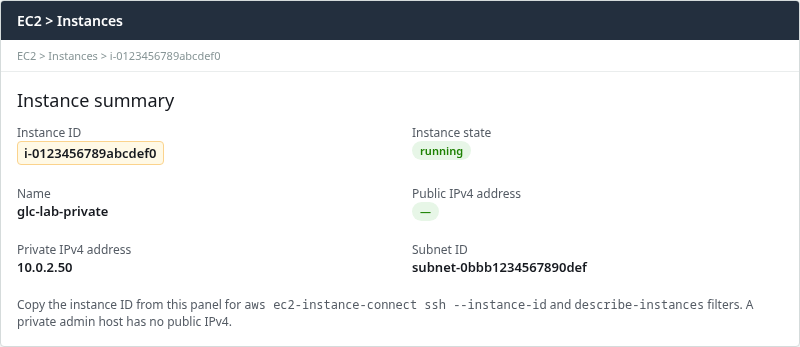
The Public IPv4 field shows - when the instance has no public address. Note the private IPv4 (10.0.2.50) and target subnet ID for later commands.
Confirm the instance has no public address from the CLI:
aws ec2 describe-instances \
  --region ap-south-1 \
  --instance-ids i-0123456789abcdef0 \
  --query 'Reservations[0].Instances[0].{InstanceId:InstanceId,PublicIp:PublicIpAddress,PrivateIp:PrivateIpAddress,SubnetId:SubnetId}' \
--output table-------------------------------------------------------------------------------
| DescribeInstances |
+----------------------+-------------+-----------+----------------------------+
| InstanceId | PrivateIp | PublicIp | SubnetId |
+----------------------+-------------+-----------+----------------------------+
| i-0123456789abcdef0 | 10.0.2.50 | None | subnet-0bbb1234567890def |
+----------------------+-------------+-----------+----------------------------+PublicIp is None: the instance is reachable only on its private address inside the VPC.
Create the EC2 Instance Connect Endpoint
Create the endpoint in a subnet that can reach the private instance. Replace subnet and security group IDs with your values:
aws ec2 create-instance-connect-endpoint \
  --region ap-south-1 \
  --subnet-id subnet-0aaa1234567890abc \
  --security-group-ids sg-0aaa1234567890abc \
--tag-specifications 'ResourceType=instance-connect-endpoint,Tags=[{Key=Name,Value=glc-lab-eice-endpoint}]'{
"InstanceConnectEndpoint": {
"OwnerId": "123456789012",
"InstanceConnectEndpointId": "eice-0abc1234567890def",
"State": "create-in-progress",
"SubnetId": "subnet-0aaa1234567890abc",
"VpcId": "vpc-0abc1234567890def",
"PreserveClientIp": false,
"SecurityGroupIds": [
"sg-0aaa1234567890abc"
],
"IpAddressType": "ipv4"
}
}Wait until State is create-complete before connecting. AWS currently allows only one EC2 Instance Connect Endpoint per VPC, and therefore also no more than one per subnet. One endpoint can reach instances in other subnets when routing allows it, so you normally do not create one endpoint for every private subnet.
Describe the endpoint and copy InstanceConnectEndpointId and DnsName for tunnel commands:
aws ec2 describe-instance-connect-endpoints \
  --region ap-south-1 \
  --instance-connect-endpoint-ids eice-0abc1234567890def \
  --query 'InstanceConnectEndpoints[0].{Id:InstanceConnectEndpointId,State:State,DnsName:DnsName,SubnetId:SubnetId,PreserveClientIp:PreserveClientIp}' \
--output table-------------------------------------------------------------------------------------------------
| DescribeInstanceConnectEndpoints |
+---------------+-------------------------------------------------------------------------------+
| DnsName | eice-0abc1234567890def.2842e51e.ec2-instance-connect-endpoint.ap-south-1.amazonaws.com |
| Id | eice-0abc1234567890def |
| PreserveClientIp | False |
| State | create-complete |
| SubnetId | subnet-0aaa1234567890abc |
+---------------+-------------------------------------------------------------------------------+The console endpoint details panel shows the same ID and DNS name when you prefer the UI:
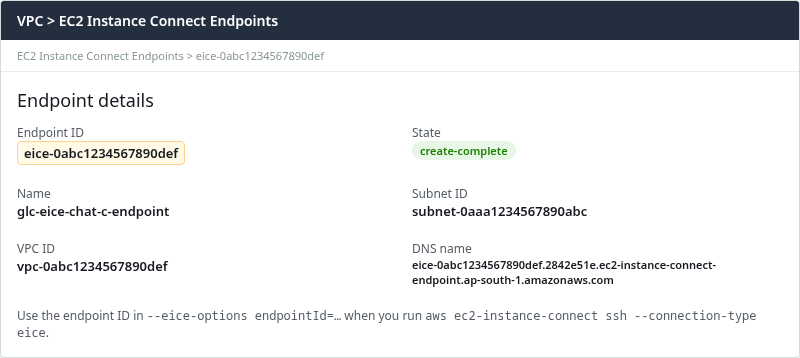
Use the endpoint ID in --instance-connect-endpoint-id when you pin a specific endpoint in open-tunnel, or in --eice-options endpointId=… with aws ec2-instance-connect ssh.
Configure Endpoint and Instance Security Groups
You need two security-group rules: the endpoint must be allowed to send SSH traffic, and the EC2 instance must allow that traffic in.
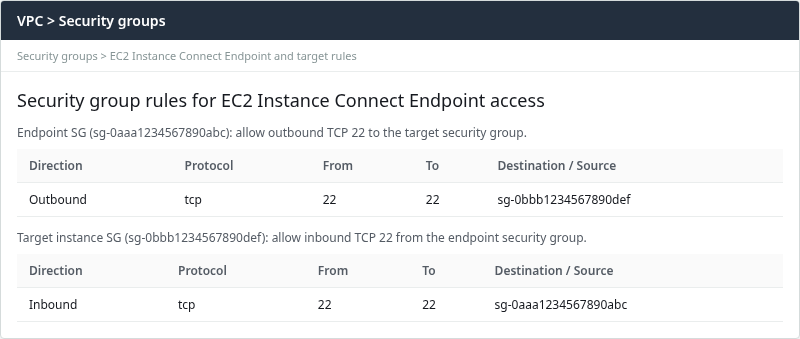
With PreserveClientIp off (the default in the lab), configure reference rules between security groups:
- Endpoint SG egress: TCP port 22 to the target instance security group.
- Target SG ingress: TCP port 22 from the endpoint security group.
This is what those two rules look like in the AWS console:
Apply the same rules with the CLI (replace security group IDs):
aws ec2 authorize-security-group-egress \
  --region ap-south-1 \
  --group-id sg-0aaa1234567890abc \
  --ip-permissions 'IpProtocol=tcp,FromPort=22,ToPort=22,UserIdGroupPairs=[{GroupId=sg-0bbb1234567890def}]'
Add inbound SSH on the target from the endpoint security group:
aws ec2 authorize-security-group-ingress \
  --region ap-south-1 \
  --group-id sg-0bbb1234567890def \
  --ip-permissions 'IpProtocol=tcp,FromPort=22,ToPort=22,UserIdGroupPairs=[{GroupId=sg-0aaa1234567890abc}]'
If you use security-group referencing as shown above, the target can continue allowing TCP 22 from the endpoint security group whether client IP preservation is enabled or disabled. Client IP preservation mainly changes IP/CIDR-based rules: when enabled, the target sees the original client IPv4 address, so an IP-based ingress rule must allow that client address. Client IP preservation is supported only for IPv4 EICE endpoints.
Configure IAM Permission for EICE
Using an existing endpoint: grant describe permissions the CLI uses (ec2:DescribeInstances, ec2:DescribeInstanceConnectEndpoints) plus the actions required for your connection workflow.
Creating an endpoint: administrators need additional EC2 permissions because AWS creates an endpoint ENI and may create the EICE service-linked role. AWS documents ec2:CreateInstanceConnectEndpoint, ec2:CreateNetworkInterface, ec2:CreateTags, ec2:ModifyInstanceConnectEndpoint, and iam:CreateServiceLinkedRole, along with separate describe and delete actions.
Existing launch key through open-tunnel (tested RHEL workflow):
{
  "Version": "2012-10-17",
  "Statement": [
    {
      "Effect": "Allow",
      "Action": [
        "ec2:DescribeInstances",
        "ec2:DescribeInstanceConnectEndpoints"
      ],
      "Resource": "*"
    },
    {
      "Effect": "Allow",
      "Action": "ec2-instance-connect:OpenTunnel",
      "Resource": "arn:aws:ec2:ap-south-1:123456789012:instance-connect-endpoint/eice-0abc1234567890def"
    }
  ]
}
aws ec2-instance-connect ssh with EC2 Instance Connect key push: add ec2-instance-connect:SendSSHPublicKey on the target instance ARN:
{
  "Version": "2012-10-17",
  "Statement": [
    {
      "Effect": "Allow",
      "Action": [
        "ec2:DescribeInstances",
        "ec2:DescribeInstanceConnectEndpoints"
      ],
      "Resource": "*"
    },
    {
      "Effect": "Allow",
      "Action": "ec2-instance-connect:OpenTunnel",
      "Resource": "arn:aws:ec2:ap-south-1:123456789012:instance-connect-endpoint/eice-0abc1234567890def"
    },
    {
      "Effect": "Allow",
      "Action": "ec2-instance-connect:SendSSHPublicKey",
      "Resource": "arn:aws:ec2:ap-south-1:123456789012:instance/i-0123456789abcdef0"
    }
  ]
}
To restrict which private IP address or port an operator can reach through the tunnel, use IAM condition keys on OpenTunnel rather than adding the instance ARN to the OpenTunnel resource:
ec2-instance-connect:privateIpAddressec2-instance-connect:remotePortec2-instance-connect:maxTunnelDuration
OpenTunnel connection attempts are recorded as CloudTrail management events and can be audited from CloudTrail Event History.
SSH to the Private EC2 Instance
Option 1: Use Your Existing EC2 Key Pair Through EICE
This lab uses the launch key already stored in the RHEL instance's authorized_keys. EC2 Instance Connect Endpoint provides only the network tunnel; OpenSSH performs normal key-based authentication. This method does not depend on EC2 Instance Connect pushing a temporary public key.
Interactive login:
ssh -i /path/to/glc-lab-key.pem \
  -o ProxyCommand='aws ec2-instance-connect open-tunnel --region ap-south-1 --instance-id i-0123456789abcdef0' \
  ec2-user@10.0.2.50
Accept the host key on first connect.
For a non-interactive check, pass a remote command:
ssh -i /path/to/glc-lab-key.pem \
  -o StrictHostKeyChecking=no \
  -o UserKnownHostsFile=/dev/null \
  -o BatchMode=yes \
  -o ProxyCommand='aws ec2-instance-connect open-tunnel --region ap-south-1 --instance-id i-0123456789abcdef0' \
ec2-user@10.0.2.50 hostnameip-10-0-2-50.ap-south-1.compute.internalGetting the instance hostname back confirms that the SSH command reached the private EC2 instance through EICE. Direct SSH to 10.0.2.50 from the public internet still fails because the address is RFC1918 space inside the VPC.
If you want to explicitly pin the EICE endpoint rather than let the CLI discover it, add --instance-connect-endpoint-id and --instance-connect-endpoint-dns-name to open-tunnel:
ssh -i /path/to/glc-lab-key.pem \
  -o ProxyCommand="aws ec2-instance-connect open-tunnel --region ap-south-1 --instance-id i-0123456789abcdef0 --private-ip-address 10.0.2.50 --remote-port 22 --instance-connect-endpoint-id eice-0abc1234567890def --instance-connect-endpoint-dns-name eice-0abc1234567890def.2842e51e.ec2-instance-connect-endpoint.ap-south-1.amazonaws.com" \
  ec2-user@10.0.2.50 hostname
Option 2: Use aws ec2-instance-connect ssh
aws ec2-instance-connect ssh integrates both parts of the connection: it uses EICE for the private network path and EC2 Instance Connect to make an SSH public key temporarily available to the instance. AWS documents that the CLI workflow pushes a public key to instance metadata for 60 seconds, including when you pass --private-key-file.
aws ec2-instance-connect ssh \
  --region ap-south-1 \
  --instance-id i-0123456789abcdef0 \
  --os-user ec2-user \
  --connection-type eice
That command opens an interactive shell when run from a terminal. The target instance must support EC2 Instance Connect key delivery. Do not assume that workflow on RHEL unless you have installed and configured it yourself.
AWS also documents --private-key-file for this command. That parameter selects which local key the CLI uses, but the command still relies on EC2 Instance Connect to push a temporary public key rather than authenticating only against an existing authorized_keys entry:
aws ec2-instance-connect ssh \
  --region ap-south-1 \
  --instance-id i-0123456789abcdef0 \
  --instance-ip 10.0.2.50 \
  --os-user ec2-user \
  --private-key-file /path/to/glc-lab-key.pem \
  --connection-type eice \
  --eice-options endpointId=eice-0abc1234567890def
If you want to explicitly pin the EICE endpoint rather than let the CLI discover it, add --eice-options endpointId=… as shown above.
Troubleshoot EC2 Instance Connect Endpoint
When security group rules are wrong, the tunnel opens but the target refuses the flow. After the lab removed inbound SSH from the target security group, the same ssh command returned Unable to connect to target and Connection closed by UNKNOWN port 65535 from the CLI.
Restore the inbound rule from the endpoint security group on the target, then retest with the same ssh command. A successful run again prints the instance hostname (ip-10-0-2-50.ap-south-1.compute.internal).
Unable to connect to target
| Symptom | Likely cause | Fix |
|---|---|---|
Unable to connect to target after tunnel starts |
Target SG missing inbound TCP 22 from endpoint SG | Add ingress referencing endpoint SG |
Endpoint stuck in create-failed |
Existing EICE in the VPC, endpoint quota, or subnet/configuration problem | Check StateMessage and existing endpoints with describe-instance-connect-endpoints |
| Works from one subnet only | Route table isolates subnets | Confirm route tables allow traffic between endpoint and target subnets |
AccessDeniedException
| Symptom | Likely cause | Fix |
|---|---|---|
AccessDeniedException |
OpenTunnel isn't allowed, or IAM limits port/IP/tunnel duration |
Check the endpoint ARN and remotePort, privateIpAddress, and maxTunnelDuration conditions |
| Tunnel fails immediately | Operator missing ec2-instance-connect:OpenTunnel on the endpoint ARN |
Update IAM policy for the instance-connect-endpoint resource |
AccessDeniedException using aws ec2-instance-connect ssh |
Missing ec2-instance-connect:SendSSHPublicKey on the instance ARN |
Add SendSSHPublicKey to the operator policy |
One specific cause is a mismatch between the IAM maxTunnelDuration condition and the command's requested or default tunnel duration.
Permission denied (publickey)
| Symptom | Likely cause | Fix |
|---|---|---|
Permission denied (publickey) |
Wrong key or user | Match OS user and PEM to launch key; see EC2 permission denied publickey |
Verify both security groups after changes:
aws ec2 describe-security-groups \
  --region ap-south-1 \
  --group-ids sg-0aaa1234567890abc sg-0bbb1234567890def \
  --query 'SecurityGroups[].{GroupId:GroupId,Ingress:IpPermissions,Egress:IpPermissionsEgress}' \
  --output json
Inspect UserIdGroupPairs on port 22 before retrying SSH.
EICE vs Session Manager vs Bastion Host
| Method | Best when | Needs public IPv4 on target | Typical port |
|---|---|---|---|
| EC2 Instance Connect Endpoint | SSH tooling, SCP-style workflows, key-based login | No | 22 via tunnel |
| Systems Manager Session Manager | Shell without SSH keys, no port 22 open | No | HTTPS to SSM |
| Bastion host | Legacy jump boxes, third-party tools on a jump host | No on target; yes on bastion if internet-facing | 22 to bastion, then 22 to target |
EC2 Instance Connect Endpoint adds no hourly charge for the endpoint itself; cross-AZ traffic between endpoint and instance may incur data transfer fees. Session Manager requires the SSM agent and IAM instance profile but avoids opening SSH entirely. A bastion adds another instance to patch and harden.
For key and username mistakes after the tunnel works, continue with Recover lost EC2 key pair or the permission-denied guide linked above. For network path issues before SSH starts, see EC2 SSH connection timed out.
Summary
EC2 Instance Connect Endpoint lets operators reach private Linux instances over SSH without assigning a public IPv4 and without maintaining a bastion. AWS authenticates the IAM principal and establishes a private tunnel to the EC2 Instance Connect Endpoint. From the endpoint ENI, the connection is forwarded to the instance's private address subject to VPC routing and security-group rules.
The lab verified a RHEL 10.2 target with PublicIp: None, an endpoint in a separate private subnet, and security group references in both directions on port 22. The tested RHEL workflow uses open-tunnel as an OpenSSH ProxyCommand, while the existing launch key authenticates the SSH session. The aws ec2-instance-connect ssh command is an alternative when EC2 Instance Connect key delivery is configured on the target. When inbound rules were removed, the CLI reported Unable to connect to target until the target security group again allowed SSH from the endpoint security group.
The target subnet does not need NAT for this access path. Choose Session Manager when SSH keys and port 22 should stay closed, or a bastion when existing jump-host patterns must stay in place.
References
- Connect to your instances using EC2 Instance Connect Endpoint
- Security groups for EC2 Instance Connect Endpoint
- Permissions to use EC2 Instance Connect Endpoint
- Quotas for EC2 Instance Connect Endpoint
- Log connections established over EC2 Instance Connect Endpoint
- create-instance-connect-endpoint
- open-tunnel
Frequently Asked Questions
Does EC2 Instance Connect Endpoint need a NAT Gateway?
The private EC2 subnet does not need a NAT Gateway or Internet Gateway for EICE access. Your workstation needs connectivity to the AWS EC2 Instance Connect service, while the EICE endpoint forwards the tunneled connection to the target over the VPC network. The instance still needs a route to the endpoint subnet, which same-VPC local routing provides when both subnets belong to one VPC.
Does the instance need a public IP?
No. The tested layout connects to an instance with PublicIp: None. The endpoint replaces a public IPv4 for inbound SSH-style access. Outbound internet from the instance (package updates, external APIs) is a separate design question and may still need NAT or VPC endpoints.
Can I create multiple EC2 Instance Connect Endpoints in one VPC?
No. AWS currently allows one EC2 Instance Connect Endpoint per VPC. That endpoint can reach instances in other subnets of the VPC when the route tables permit the traffic. If you need to move the endpoint to another subnet or Availability Zone, you must remove the existing endpoint before creating another one in that VPC.
