
| Package | aws-cli/2.37.3 |
|---|---|
| AWS Region | ap-south-1 (Mumbai) for the examples; IAM and STS are global services, although the role ARN and API endpoint Region still appear in CLI output |
| Lab environment | Workstation with AWS CLI v2 and configured credentials — AWS CLI tutorial Install AWS CLI on Ubuntu · Install AWS CLI on Debian |
| Privilege | IAM permissions to read and update identity policies and role trust policies on the caller and target role, or account administrator access for the lab steps |
| Scope | Why sts:AssumeRole returns AccessDenied, how caller-side sts:AssumeRole permission and the target role trust policy work together (including same-account named principal vs account-root trust and cross-account rules), how to read the CLI error, check ExternalId and other trust conditions, and verify assumed-role credentials. Mentions permissions boundaries and organization SCPs only as extra deny layers. Does not cover credential provider selection — see Which credentials AWS CLI uses. |
| Related guides | IAM AccessDenied despite AdministratorAccess Which credentials AWS CLI uses AWS CLI multiple profiles Fix AWS CLI ExpiredToken AWS Tutorial |
sts:AssumeRole authorization involves the caller and the target role's trust policy:
- Cross-account: the caller needs
sts:AssumeRoleand the target role must trust that caller - Same account, named principal in trust: direct trust can authorize the call without a separate identity-policy Allow
- Any scenario: conditions such as
ExternalIdor MFA must also match
Because several different policy problems can produce a similar AccessDenied message, first identify the caller, then check the caller permission and role trust policy.
The walkthrough uses a caller IAM user and a target IAM role in one account. It covers:
- Caller-side
AccessDeniedwhen the role trusts the account root but the user lacks identity permission - Trust-policy principal mismatch
ExternalIdcondition mismatch- Successful assume and
get-caller-identityon temporary credentials
Quick diagnosis
Run these two commands before diving into policy JSON:
aws sts get-caller-identityRecord the Arn — that is the principal STS evaluates on the request.
aws iam get-role \
  --role-name glc-assumerole-lab-target \
  --query Role.AssumeRolePolicyDocument
After those commands:
- Confirm the ARN actually making the request
- Inspect the trust policy for that principal or its source account
- For cross-account access, confirm the caller has an identity policy allowing
sts:AssumeRoleon the target role ARN
How AssumeRole authorization works
AssumeRole authorization checks whether the caller may assume the role and whether the trust policy allows that principal with any required conditions.
          Caller authorized to assume role?
          (identity policy or same-account
             direct trust permission)
                       ↓
              STS AssumeRole request
                       ↓
        Role trust policy allows caller
           and required conditions?
                       ↓
              ┌────────────┴────────────┐
             yes                       no
              │                         │
              ▼                         ▼
      Temporary role              AccessDenied
        credentials
Two policy layers apply on every call:
- Caller authorization: an identity-based policy on the IAM user or role that runs the CLI must allow
sts:AssumeRoleon the target role ARN unless same-account direct trust applies (see the table in the next section) - Role trust: the trust policy names who may assume the role;
Conditionkeys such assts:ExternalIdoraws:MultiFactorAuthPresentcan block the call even when the principal matches - Cross-account: both sides are always required — trust in the target account plus caller identity policy on the role ARN
Confirm the caller identity
Before reading trust policies, confirm which principal is calling STS. A named profile or environment override can make the CLI use a different user than the one named in the trust policy.
Run get-caller-identity in the same shell where assume-role failed:
aws sts get-caller-identity{
"UserId": "AIDAU7QAIUYJK66DKJOIP",
"Account": "123456789012",
"Arn": "arn:aws:iam::123456789012:user/glc-assumerole-lab-caller"
}The Arn value is the principal STS evaluates. Compare it character by character to the Principal entry in the role trust policy. For cross-account access, the target role must trust the source account or a specific principal from that account. Trusting only principals from the target account does not authorize a caller from another account.
Check caller sts:AssumeRole permission
Same-account trust shapes matter
In the same AWS account, how the trust policy names the caller changes whether an identity policy is required:
Trust policy Principal |
Caller needs sts:AssumeRole in an identity policy? |
|---|---|
| Specific IAM user or role ARN in this account | No — the trust policy alone can authorize the call |
arn:aws:iam::ACCOUNT_ID:root (account principal) |
Yes — the caller needs an Allow for sts:AssumeRole on the role ARN |
| Cross-account user, role, or account | Yes — always, in addition to trust |
Many teams use account-root trust so only identities with an explicit sts:AssumeRole grant can switch roles. If the trust policy lists the caller by ARN instead, detaching the caller policy will not reproduce an AccessDenied from missing identity permission — check the trust policy shape first.
Reproduce caller-side AccessDenied
The example role trusts the account root. The caller user has no attached policy that allows sts:AssumeRole:
aws sts assume-role \
  --role-arn arn:aws:iam::123456789012:role/glc-assumerole-lab-target \
--role-session-name glc-assumerole-labaws: [ERROR]: An error occurred (AccessDenied) when calling the AssumeRole operation: User: arn:aws:iam::123456789012:user/glc-assumerole-lab-caller is not authorized to perform: sts:AssumeRole on resource: arn:aws:iam::123456789012:role/glc-assumerole-lab-targetConfirm the caller has no identity policy granting the action:
aws iam list-attached-user-policies --user-name glc-assumerole-lab-caller--------------------------
|ListAttachedUserPolicies|
+------------------------+The empty table matches the denial: no identity-based Allow for sts:AssumeRole.
Fix caller-side permission
Attach a policy that allows sts:AssumeRole on the role ARN (scoped to that ARN in production):
{
  "Version": "2012-10-17",
  "Statement": [
    {
      "Effect": "Allow",
      "Action": "sts:AssumeRole",
      "Resource": "arn:aws:iam::123456789012:role/glc-assumerole-lab-target"
    }
  ]
}
When the CLI error is unclear, simulate-principal-policy shows whether the caller has an implicit deny before you edit the trust policy:
aws iam simulate-principal-policy \
  --policy-source-arn arn:aws:iam::123456789012:user/glc-assumerole-lab-caller \
  --action-names sts:AssumeRole \
  --resource-arns arn:aws:iam::123456789012:role/glc-assumerole-lab-target \
--query 'EvaluationResults[0].{Action:EvalActionName,Decision:EvalDecision}'{
"Action": "sts:AssumeRole",
"Decision": "implicitDeny"
}In this example, the role trusts the account principal, so implicitDeny means the caller has no identity-policy Allow for sts:AssumeRole. Fix that caller permission before changing the trust policy.
Check the target trust policy
When the caller already has sts:AssumeRole, the next place to look is the role trust policy. STS returns the same AccessDenied text when the trust policy lists a different principal.
With caller permission restored, the trust policy allows only a different IAM user:
aws sts assume-role \
  --role-arn arn:aws:iam::123456789012:role/glc-assumerole-lab-target \
--role-session-name glc-assumerole-labaws: [ERROR]: An error occurred (AccessDenied) when calling the AssumeRole operation: User: arn:aws:iam::123456789012:user/glc-assumerole-lab-caller is not authorized to perform: sts:AssumeRole on resource: arn:aws:iam::123456789012:role/glc-assumerole-lab-targetRead the trust policy document:
aws iam get-role --role-name glc-assumerole-lab-target --query Role.AssumeRolePolicyDocument{
"Version": "2012-10-17",
"Statement": [
{
"Effect": "Allow",
"Principal": {
"AWS": "arn:aws:iam::123456789012:user/glc-assumerole-lab-wrong"
},
"Action": "sts:AssumeRole"
}
]
}The caller ARN is glc-assumerole-lab-caller, but the trust policy names glc-assumerole-lab-wrong. To fix the principal:
- Update
Principalto the exact caller ARN - To trust an entire account, use the account principal and narrow access with appropriate conditions
- Wildcards cannot match part of an IAM user or role ARN inside
Principal - Do not widen trust to
Principal: *unless a documented requirement explicitly calls for it
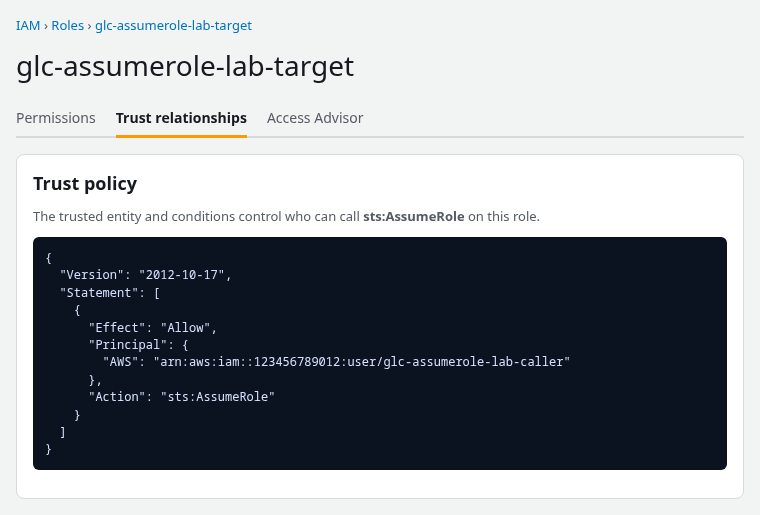
The IAM console trust relationship editor shows the same Principal and Action fields:
Check conditions, MFA, and External ID
Trust policy Condition blocks are a third common cause. They apply even when the Principal ARN matches.
ExternalId mismatch
Some cross-account roles — especially roles used by third parties — require an external ID. This happens when the role's trust policy contains a sts:ExternalId condition. In that case, the AssumeRole request must provide the matching value with --external-id. The example trust policy requires a specific external ID:
aws sts assume-role \
  --role-arn arn:aws:iam::123456789012:role/glc-assumerole-lab-target \
--role-session-name glc-assumerole-labaws: [ERROR]: An error occurred (AccessDenied) when calling the AssumeRole operation: User: arn:aws:iam::123456789012:user/glc-assumerole-lab-caller is not authorized to perform: sts:AssumeRole on resource: arn:aws:iam::123456789012:role/glc-assumerole-lab-targetOmitting --external-id fails the condition. A wrong value fails the same way:
aws sts assume-role \
  --role-arn arn:aws:iam::123456789012:role/glc-assumerole-lab-target \
  --role-session-name glc-assumerole-lab \
--external-id wrong-valueaws: [ERROR]: An error occurred (AccessDenied) when calling the AssumeRole operation: User: arn:aws:iam::123456789012:user/glc-assumerole-lab-caller is not authorized to perform: sts:AssumeRole on resource: arn:aws:iam::123456789012:role/glc-assumerole-lab-targetPass the value that matches the trust policy StringEquals condition on sts:ExternalId.
MFA and other trust conditions
Common trust-policy conditions beyond sts:ExternalId:
aws:MultiFactorAuthPresent— caller must authenticate with MFA before assuming the roleaws:PrincipalArn— limits which principal ARN may assume the role
Those failures also surface as AccessDenied on AssumeRole. Read the full trust policy Condition block and match every key in the CLI call or session context.
Check boundary and SCP denies
These guardrails can deny sts:AssumeRole even when identity and trust policies look correct:
- Permissions boundaries
- Session policies
- Organization SCPs
An identity with AdministratorAccess can still be blocked by a boundary or SCP — the same pattern as other API calls.
When identity and trust policies both Allow the operation but AssumeRole still fails, check those guardrail layers next. The walkthrough for explicit and implicit denies on administrator identities is in IAM AccessDenied despite AdministratorAccess.
Test AssumeRole again
After fixing caller permission and aligning the trust policy (principal plus conditions), call assume-role with every required flag:
aws sts assume-role \
  --role-arn arn:aws:iam::123456789012:role/glc-assumerole-lab-target \
  --role-session-name glc-assumerole-lab \
--external-id glc-assumerole-lab-external-id{
"Credentials": {
"AccessKeyId": "ASIAIOSFODNN7EXAMPLE",
"SecretAccessKey": "EXAMPLE_SECRET_ACCESS_KEY",
"SessionToken": "EXAMPLE_SESSION_TOKEN",
"Expiration": "2026-09-28T05:18:29+00:00"
},
"AssumedRoleUser": {
"AssumedRoleId": "AROAU7QAIUYJFKNJTB5MX:glc-assumerole-lab",
"Arn": "arn:aws:sts::123456789012:assumed-role/glc-assumerole-lab-target/glc-assumerole-lab"
},
"PackedPolicySize": 18,
"SessionTokenUtilization": 18,
"SessionTokenSize": 740
}A successful response includes:
Credentialswith temporary access key, secret key, and session tokenAssumedRoleUserwith theassumed-role/ARN for the session name
Both fields present means the authorization checks passed.
For repeated role use from the CLI, a profile with role_arn and source_profile can chain assume-role automatically once the underlying policies are correct.
Verify the assumed identity
Copy all three values from the Credentials block into the environment:
AWS_ACCESS_KEY_IDAWS_SECRET_ACCESS_KEYAWS_SESSION_TOKEN(required — the access key and secret alone are not enough for temporary credentials)
export AWS_ACCESS_KEY_ID='ASIAIOSFODNN7EXAMPLE'
export AWS_SECRET_ACCESS_KEY='EXAMPLE_SECRET_ACCESS_KEY'
export AWS_SESSION_TOKEN='EXAMPLE_SESSION_TOKEN'
With those variables set, confirm the active principal changed:
aws sts get-caller-identity{
"UserId": "AROAU7QAIUYJFKNJTB5MX:glc-assumerole-lab",
"Account": "123456789012",
"Arn": "arn:aws:sts::123456789012:assumed-role/glc-assumerole-lab-target/glc-assumerole-lab"
}The Arn prefix assumed-role/ and the role name in the path confirm the session is using the target role, not the original IAM user.
Temporary credentials expire. If later API calls return ExpiredToken, refresh the session — see Fix AWS CLI ExpiredToken.
Troubleshooting
| Symptom | Likely cause | Fix |
|---|---|---|
Same AccessDenied after attaching caller policy |
Trust policy lists wrong principal or account | Update Principal in the role trust policy to the caller ARN |
AccessDenied with correct principal |
Missing or wrong ExternalId, MFA, or other Condition |
Match trust policy conditions in the CLI call or caller session |
| Caller policy attached but still denied | Trust uses account root; identity policy missing or wrong role ARN | Add sts:AssumeRole on the exact role ARN to the caller identity |
| Named principal in trust; identity policy removed; call still works | Same-account named-principal trust is sufficient alone | Expected behavior — adjust trust to account root if identity policy should be required |
| Policies look correct; still denied | Permissions boundary, SCP, or session policy deny | Find the denying layer; see administrator AccessDenied guide |
| Wrong user in error message | CLI using a different profile or env credentials | Run get-caller-identity; fix profile or env vars |
Summary
sts:AssumeRole fails when the caller is not allowed to call the API on the role ARN, when the role trust policy does not allow that principal, or when a trust condition such as ExternalId does not match. STS often uses the same AccessDenied text for all of these cases, so get-caller-identity, the caller identity policies, and get-role trust document must be read together.
In the same account, a trust policy that names a specific user or role ARN can authorize AssumeRole by itself. When the trust policy uses the account root principal, the caller still needs an identity policy with sts:AssumeRole on the role. Cross-account access always requires both sides.
After both gates allow the request, assume-role returns temporary credentials and get-caller-identity shows an assumed-role/ ARN. If API calls fail later with ExpiredToken, renew the session before debugging permissions again.
References
- AssumeRole API reference
- IAM role trust policies
- Grant a user permissions to switch roles
- Identity-based policies and resource-based policies
Frequently Asked Questions
Do both sides need permission for AssumeRole?
For cross-account access, yes — the caller needs sts:AssumeRole on the role ARN and the role trust policy must allow that principal. In the same account, a trust policy that names a specific IAM user or role ARN can be enough by itself. When the trust policy uses the account root principal, the caller still needs an identity policy that allows sts:AssumeRole.
What is the role trust policy?
The trust policy is the resource-based policy on an IAM role. It defines which principals may call sts:AssumeRole on that role and can add conditions such as sts:ExternalId or MFA requirements. It is separate from the permissions policy that defines what the role can do after it is assumed.
Why does AdministratorAccess not bypass trust?
AdministratorAccess is a broad Allow on the identity. It does not let a principal assume a role whose trust policy does not list them. Trust is evaluated on the role resource. An administrator can edit the trust policy, but AssumeRole still fails until the trust relationship allows the caller.
