
| Package | AWS Management Console (Amazon DynamoDB) and aws-cli/2.37.3 |
|---|---|
| AWS Region | ap-south-1 (Mumbai) for the examples; DynamoDB tables are Regional resources |
| Lab environment | Workstation with AWS CLI v2 and configured credentials — AWS CLI tutorial Install AWS CLI on Ubuntu · Install AWS CLI on Debian |
| Privilege | IAM permissions to create and delete DynamoDB tables and read/write items (dynamodb:CreateTable, dynamodb:PutItem, dynamodb:GetItem, dynamodb:Scan, dynamodb:DeleteTable, and dynamodb:DescribeTable) |
| Scope | What DynamoDB tables, items, and partition keys are; how to create a table with on-demand capacity, add items in the console, and verify reads with the AWS CLI. Includes a short comparison of on-demand and provisioned capacity. Does not cover global tables, DynamoDB Streams with AWS Lambda, or full GSI design. |
| Related guides | AWS Tutorial AWS RDS tutorial Amazon Cognito tutorial AWS S3 bucket tutorial |
Amazon DynamoDB is a managed key-value and document database that scales read and write traffic without running database servers. Each table needs a primary key (partition key, or partition key plus sort key). DynamoDB does not require every item to have the same non-key attributes; that flexible structure is often described as schemaless.
The walkthrough creates a demo-users table with partition key user_id, adds two sample items in the console, then confirms the data with describe-table, get-item, and scan in the AWS CLI. Capacity mode is on-demand (PAY_PER_REQUEST), which is convenient for a small tutorial and for workloads where traffic is difficult to predict.
Key takeaways
- A table holds items; each item is a set of attributes. Only the primary key attributes are required on every item.
- When a table uses only a partition key (
user_idhere), that value uniquely identifies each item. With a sort key as well, multiple items can share the same partition-key value as long as the partition-key plus sort-key combination is unique. - On-demand capacity bills for read and write request units consumed. Provisioned capacity lets you configure RCUs and WCUs for steady, predictable load.
- GetItem looks up one item when the complete primary key is known. Query reads items for a specific partition-key value and can narrow results with a sort-key condition. Scan examines items across the table instead of looking up a specific key (acceptable on tiny tables only).
- DynamoDB Streams can trigger Lambda on item changes; that pattern is out of scope for this first table.
Tables, items, and keys
| Term | Role in this guide |
|---|---|
| Table | Named container (demo-users) |
| Item | One record, like a row with flexible columns |
| Attribute | Name/value pair on an item (name, email) |
| Partition key | Primary key attribute that identifies the item (user_id, type String) |
              Application or AWS CLI
                         ↓
              DynamoDB table (demo-users)
                         ↓
     Items keyed by user_id (u-1001, u-1002, …)
                         ↓
   Optional attributes per item (name, email, …)
What you need
| Requirement | Notes |
|---|---|
| AWS account | Sign in at the AWS Management Console |
| Region | Create the table and run CLI commands in the same Region |
| Table name | demo-users in the examples (names must be unique per Region per account) |
| AWS CLI v2 | For verification steps |
DynamoDB encrypts tables at rest by default. For a tutorial table, the default AWS-owned key is enough. Check Amazon DynamoDB pricing before leaving test tables in place.
Step 1: Create a DynamoDB table
Open DynamoDB in the console, choose Create table, and match the settings below. On-demand capacity avoids provisioning read/write units while learning.
| Setting | Value |
|---|---|
| Table name | demo-users |
| Partition key | user_id (String) |
| Sort key | None |
| Capacity mode | On-demand |
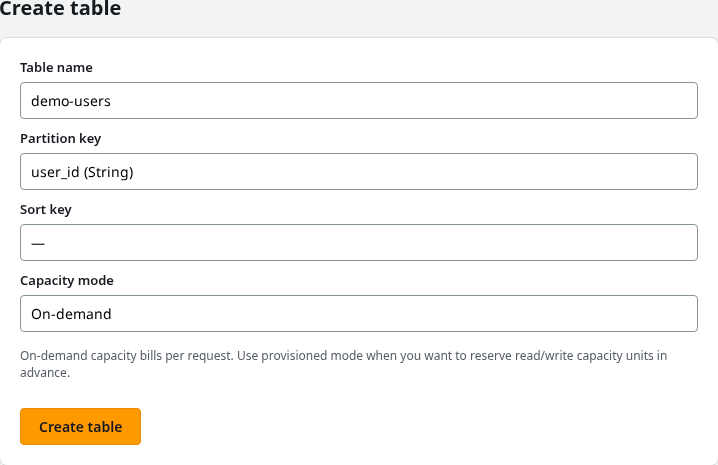
After the table status is Active, note the Region. CLI commands must use the same Region as the table.
To confirm the table from a workstation, set the Region and table name once:
export AWS_DEFAULT_REGION=ap-south-1
export TABLE_NAME=demo-users
Ask DynamoDB for table metadata:
aws dynamodb describe-table --table-name "${TABLE_NAME}" \
  --query 'Table.{Name:TableName,Status:TableStatus,Billing:BillingModeSummary.BillingMode,Key:KeySchema}' \
  --output json
Sample output:
{
    "Name": "demo-users",
    "Status": "ACTIVE",
    "Billing": "PAY_PER_REQUEST",
    "Key": [
        {
            "AttributeName": "user_id",
            "KeyType": "HASH"
        }
    ]
}
PAY_PER_REQUEST is on-demand billing. In the DynamoDB API, HASH means partition key. The console label is partition key, but CLI output still uses the older HASH term.
Step 2: Create items in the console
Open the table, choose Explore table items, then Create item. Use the form (or JSON) to add attributes.
First item:
| Attribute | Type | Value |
|---|---|---|
user_id |
String | u-1001 |
name |
String | Ada Lovelace |
email |
String | ada@example.com |
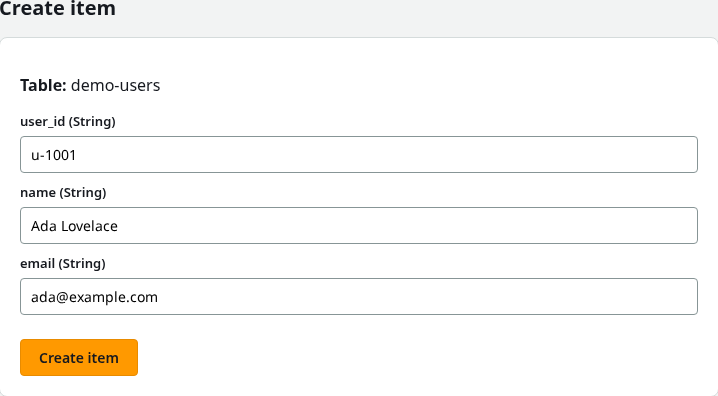
Add a second item with only user_id u-1002 and name Grace Hopper. Non-key attributes can differ between items.
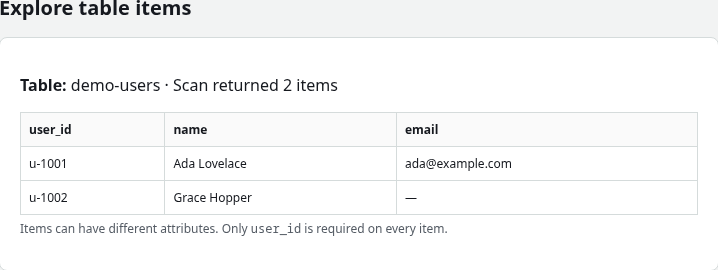
Because user_id is the complete primary key in this table, only one item can exist with a given user_id. However, PutItem does not reject a duplicate key — it replaces the existing item with the new item. To make a write fail when the key already exists, add a condition such as attribute_not_exists(user_id) on put-item.
The console scan matches what the CLI returns after both items exist.
Step 3: Read items with the AWS CLI
Use get-item when the partition key is known. Replace the JSON key with your item’s user_id value:
aws dynamodb get-item --table-name "${TABLE_NAME}" \
  --key '{"user_id":{"S":"u-1001"}}' --output json
Sample output:
{
    "Item": {
        "email": {
            "S": "ada@example.com"
        },
        "name": {
            "S": "Ada Lovelace"
        },
        "user_id": {
            "S": "u-1001"
        }
    }
}
Type markers (S for String) are how the low-level DynamoDB API represents attribute types.
To list items across the whole table (rather than a single key lookup), run a scan. Results are paginated, so larger tables may need repeated requests:
aws dynamodb scan --table-name "${TABLE_NAME}" --output jsonSample output (trimmed):
{
    "Items": [
        {
            "name": { "S": "Grace Hopper" },
            "user_id": { "S": "u-1002" }
        },
        {
            "email": { "S": "ada@example.com" },
            "name": { "S": "Ada Lovelace" },
            "user_id": { "S": "u-1001" }
        }
    ],
    "Count": 2,
    "ScannedCount": 2
}
Count is the number of items returned. Item order is not guaranteed. On this table, GetItem is the natural read when user_id is known; avoid relying on Scan as the main read path on large tables.
You can add another item from the CLI with put-item:
aws dynamodb put-item --table-name "${TABLE_NAME}" \
  --item '{"user_id":{"S":"u-1003"},"name":{"S":"Katherine Johnson"},"email":{"S":"katherine@example.com"}}'
put-item returns no output on success. Confirm the new row with get-item and key u-1003. If you put-item again with the same user_id as an existing item, DynamoDB overwrites that item rather than creating a second one.
Step 4: On-demand vs provisioned capacity
| Mode | When it fits | Billing |
|---|---|---|
On-demand (PAY_PER_REQUEST) |
New apps, unknown or spiky traffic | Pay for read and write request units consumed |
| Provisioned | Steady, predictable traffic | Pay for the read/write capacity you provision |
On-demand keeps this first example simple: no RCU or WCU tuning while items are added. Provisioned mode lets you configure read/write capacity units and optional Application Auto Scaling when load is predictable.
You can change capacity mode later from the table Additional settings tab. AWS limits how often you can switch from provisioned to on-demand, so check the current capacity mode documentation before changing modes repeatedly.
Troubleshooting
| Symptom | Likely cause | Fix |
|---|---|---|
ResourceNotFoundException on CLI calls |
Wrong Region or table name | Set AWS_DEFAULT_REGION to the table Region; run aws dynamodb list-tables |
ValidationException on put-item |
Missing or invalid primary key attribute | Include user_id with a valid DynamoDB type (for example {"S":"u-1001"}) |
Existing item was replaced by put-item |
The same complete primary key was written again | Use a different user_id, or add --condition-expression "attribute_not_exists(user_id)" when the write must create a new item only |
AccessDeniedException |
IAM policy missing DynamoDB actions | Grant the actions listed in the intro table (CreateTable, DescribeTable, PutItem, GetItem, Scan, DeleteTable) on the appropriate table or resource scope |
| Scan slow or costly on large tables | Scan examines the table instead of a single key | Use GetItem for a known complete key; use Query when many items share a partition-key value |
Step 5: Delete the table
Remove tutorial tables so on-demand storage and request charges do not linger.
In the console, select the table, choose Delete, and confirm.
From the CLI:
aws dynamodb delete-table --table-name "${TABLE_NAME}"Wait until the table disappears:
aws dynamodb describe-table --table-name "${TABLE_NAME}"Sample output when deletion finished:
An error occurred (ResourceNotFoundException) when calling the DescribeTable operation: Requested resource not found: Table: demo-users not foundResourceNotFoundException here means the table is gone.
Summary
DynamoDB stores flexible items in a table keyed by a partition key (user_id in demo-users). Creating the table with on-demand capacity keeps this first example simple: no RCU or WCU tuning while items are added in the console.
The AWS CLI confirms what the console shows: describe-table reports ACTIVE and PAY_PER_REQUEST, get-item fetches one item by its complete key, and scan lists items across a small table. In a real application, design the table around the keys the app needs to read. Use GetItem for a known complete key and Query for items that share a partition-key value; avoid using Scan as the main read strategy on large tables.
When the tutorial table is no longer needed, delete it in the console or with delete-table. For relational data and SQL, compare AWS RDS; for mobile or web apps that need AWS credentials after sign-in, see how Amazon Cognito identity pools issue temporary credentials for services such as DynamoDB.
References
Frequently Asked Questions
Can two items share the same user_id?
Not at the same time when user_id is the only primary key attribute: one item exists per user_id value. A second PutItem with the same user_id replaces the first item instead of returning an error. Add a sort key if multiple items under the same partition key are required, or use attribute_not_exists(user_id) when a write must fail if the key is already present.
Why does get-item use {"S":"value"} in the key?
The AWS CLI speaks the DynamoDB API format. S means String. Higher-level tools and SDKs map native types to these descriptors for you.
Is scan free on on-demand tables?
On-demand tables still bill per read request units consumed. Scanning a large table can read every item and cost more than a targeted Query.
When should provisioned capacity be used instead of on-demand?
Use provisioned RCUs and WCUs when traffic is stable and you can forecast load, often with auto scaling. On-demand suits spiky or unknown traffic and short tutorials.
