
| Package | aws-cli/2.37.3 |
|---|---|
| AWS Region | ap-south-1 (Mumbai) for the Lambda examples; IAM is global within an AWS account |
| Lab environment | Workstation with AWS CLI v2 and configured credentials — AWS CLI tutorial Install AWS CLI on Ubuntu · Install AWS CLI on Debian |
| Privilege | Permission to update the IAM policy of the caller, or access to an administrator who can grant the caller iam:PassRole on the required execution role |
| Scope | Fix AccessDenied when AWS reports not authorized to perform: iam:PassRole during service operations such as Lambda CreateFunction, ECS task definition updates, or EC2 instance profile changes. Covers missing PassRole, wrong role ARN in Resource, and iam:PassedToService condition mismatches. Does not cover sts:AssumeRole trust policy errors — those failures name sts:AssumeRole, not iam:PassRole. |
| Related guides | AWS CLI Tutorial AccessDenied despite AdministratorAccess Configure AWS CLI multiple profiles Fix Terraform AWS credentials error AWS Tutorial |
When you create or update an AWS resource that runs with a service role, the API call can fail before the service ever starts. The error names iam:PassRole and the execution role ARN, even though your caller may already have permission to call the service API itself.
That combination is common when you supply a role for AWS to assume on your behalf:
- Lambda
CreateFunction - ECS task registration
- EventBridge rule targets
- Other create/update APIs that accept a service or execution role ARN
Avoid solving the error by granting broad administrative permissions. The least-privilege fix is to allow the caller to pass only the required role to the intended AWS service.
Quick Fix: Not Authorized to Perform iam:PassRole
PassRole AccessDenied?
- Confirm which IAM user or role made the request.
- Copy the execution role ARN from the error or from your command.
- Confirm the caller and that role belong to the same AWS account.
- Add
iam:PassRoleto the caller's policy, scoped to that role ARN rather than*. - Optionally restrict with
iam:PassedToServicefor the target service (for Lambda,lambda.amazonaws.com). - Retry the original service operation — not
sts assume-role.
| Goal | Action |
|---|---|
| Find the caller | Read the error or run aws sts get-caller-identity with the same profile |
| Find the role ARN | Copy the ARN after on resource: in the error |
| Apply the fix | Attach PassRole to the caller, not to the execution role |
| Confirm | Rerun the service API that failed (for example aws lambda create-function) |
The sections below explain what PassRole means, how to attach the policy, and what to check when the error persists.
What iam:PassRole Means
iam:PassRole is a separate permission from sts:AssumeRole.
- PassRole: allows a caller to tell an AWS service, "use this IAM role when you run this workload or perform this operation."
- AssumeRole: allows an AWS identity, such as an IAM user or role, to obtain temporary credentials and operate as another role.
In short:
PassRole:     You ──give role──> AWS service
AssumeRole:   You ──assume role──> temporary credentials
Passing a role does not let the caller act as that role. It authorizes AWS to associate that role with a service resource such as a Lambda function during CreateFunction.
Before troubleshooting policies, confirm the same-account rule:
- The caller and the role being passed must belong to the same AWS account
iam:PassRolecannot directly pass a role from another account- In a cross-account workflow, the caller normally first uses
sts:AssumeRoleto become a role in the target account. That assumed role can then useiam:PassRoleon a service role that belongs to the same target account.
NOT supported:

Account A caller
        |
        | PassRole
        v
Role in Account B          (cannot pass cross-account)

Typical cross-account flow:

Account A identity
        |
        | sts:AssumeRole
        v
Deployment role in Account B
        |
        | iam:PassRole
        v
Service role in Account B
Three permission relationships in the Lambda example
A Lambda execution role is the IAM role Lambda assumes when your function runs — for example, to write logs to CloudWatch or access other AWS services. When you call CreateFunction, three separate permissions are involved:
| Question | Permission |
|---|---|
| Can the caller create the Lambda function? | lambda:CreateFunction |
| Can the caller give this execution role to Lambda? | iam:PassRole on the caller |
| Can Lambda assume the execution role? | Role trust policy with lambda.amazonaws.com |
Deployer user/role
       |
       | lambda:CreateFunction
       | + iam:PassRole on execution role
       v
     Lambda
       |
       | sts:AssumeRole
       | allowed by role trust policy
       v
Lambda execution role
       |
       v
Permissions used by function
Do not add iam:PassRole to the Lambda execution role just because that role appears in the error. The permission belongs to the IAM user or role making the service API request.
You / CI deployment role
        |
        | calls lambda:CreateFunction
        | and supplies an execution role
        |
        | MUST HAVE
        | iam:PassRole
        v
Lambda execution role
        |
        | DOES NOT need PassRole
        |
        v
Lambda service assumes this role
PassRole and trust policy both matter for the complete workflow, but they fail at different stages:
- Missing
iam:PassRole: the create/update API that associates the role is normally blocked (for exampleCreateFunctionreturns AccessDenied) - PassRole allowed but service missing from trust policy: the resource may be created, but the service cannot assume or use the role correctly afterward
The complete service-role workflow works when all of the following are true:
- The caller has
iam:PassRoleon the role. - The caller and the role being passed are in the same account.
- The service can use the role through its trust policy.
- No higher-level policy blocks the request.
Identify the Caller and Role ARN
First, read the error carefully. It normally identifies both the caller that lacks permission and the role ARN it tried to pass.
In the lab, a deployer IAM user had lambda:CreateFunction but no PassRole. Creating a function returned:
aws lambda create-function \
  --function-name glc-passrole-lab-demo \
  --runtime python3.12 \
  --role arn:aws:iam::123456789012:role/glc-passrole-lab-lambda-exec \
  --handler index.handler \
  --zip-file fileb://function.zip \
--region ap-south-1An error occurred (AccessDeniedException) when calling the CreateFunction operation: User: arn:aws:iam::123456789012:user/glc-passrole-lab-deployer is not authorized to perform: iam:PassRole on resource: arn:aws:iam::123456789012:role/glc-passrole-lab-lambda-exec because no identity-based policy allows the iam:PassRole actionThe message gives you three facts:
- Caller:
arn:aws:iam::123456789012:user/glc-passrole-lab-deployer - Missing action:
iam:PassRole - Role ARN in Resource:
arn:aws:iam::123456789012:role/glc-passrole-lab-lambda-exec
Confirm the caller identity matches what you expect before changing policies:
aws sts get-caller-identity{
"UserId": "AIDAXXXXXXXXXXXXXXXXX",
"Account": "123456789012",
"Arn": "arn:aws:iam::123456789012:user/glc-passrole-lab-deployer"
}If you use named profiles, pass the same profile on both the identity check and the failing command — see Configure AWS CLI multiple profiles.
Add iam:PassRole to the Caller
Add an Allow for iam:PassRole to the caller's identity policy — the principal named in the error — not to the Lambda execution role. Scope Resource to the execution role ARN from the error.
For Lambda in ap-south-1, a minimal fix looks like this:
{
  "Version": "2012-10-17",
  "Statement": [
    {
      "Effect": "Allow",
      "Action": "iam:PassRole",
      "Resource": "arn:aws:iam::123456789012:role/glc-passrole-lab-lambda-exec",
      "Condition": {
        "StringEquals": {
          "iam:PassedToService": "lambda.amazonaws.com"
        }
      }
    }
  ]
}
The policy belongs on the caller that runs CreateFunction, not on the Lambda execution role named in Resource:
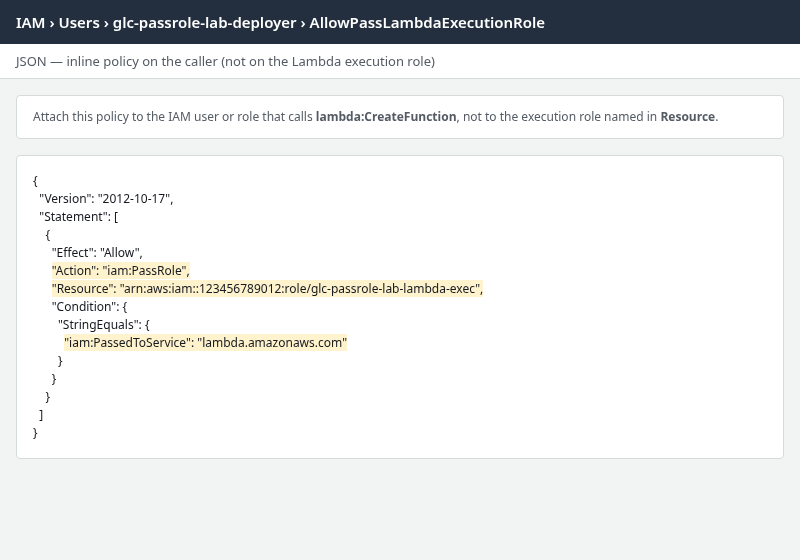
Highlight these fields when you create the policy in the console or save it to a file:
iam:PassRoleinAction- The execution role ARN in
Resource iam:PassedToServicewhen you use that condition
Save the document as passrole-policy.json, then attach it to the caller — not to the execution role.
For the deployer IAM user from the lab error:
aws iam put-user-policy \
  --user-name glc-passrole-lab-deployer \
  --policy-name AllowPassLambdaExecutionRole \
  --policy-document file://passrole-policy.json
If the caller in your error is an IAM role instead of a user, add the permission to that caller role (for example with aws iam put-role-policy) rather than to the Lambda execution role.
Rerun the same create call:
aws lambda create-function \
  --function-name glc-passrole-lab-demo \
  --runtime python3.12 \
  --role arn:aws:iam::123456789012:role/glc-passrole-lab-lambda-exec \
  --handler index.handler \
  --zip-file fileb://function.zip \
--region ap-south-1{
"FunctionName": "glc-passrole-lab-demo",
"FunctionArn": "arn:aws:lambda:ap-south-1:123456789012:function:glc-passrole-lab-demo",
"Runtime": "python3.12",
"Role": "arn:aws:iam::123456789012:role/glc-passrole-lab-lambda-exec",
"State": "Pending"
}Verify the function picked up the intended role:
aws lambda get-function \
  --function-name glc-passrole-lab-demo \
--query 'Configuration.{FunctionName:FunctionName,Role:Role,Runtime:Runtime,State:State}'{
"FunctionName": "glc-passrole-lab-demo",
"Role": "arn:aws:iam::123456789012:role/glc-passrole-lab-lambda-exec",
"Runtime": "python3.12",
"State": "Active"
}If you have just changed the policy and have verified the caller, role ARN, and conditions, a brief retry may be necessary while the IAM change propagates.
Restrict PassRole to the Correct Role ARN
Do not replace a missing PassRole with "Resource": "*". List the execution roles your team is allowed to hand to services.
When the deployer had PassRole only on a decoy role ARN, the create call still targeted the Lambda execution role:
aws lambda create-function \
  --function-name glc-passrole-lab-demo \
  --runtime python3.12 \
  --role arn:aws:iam::123456789012:role/glc-passrole-lab-lambda-exec \
  --handler index.handler \
  --zip-file fileb://function.zip \
--region ap-south-1An error occurred (AccessDeniedException) when calling the CreateFunction operation: User: arn:aws:iam::123456789012:user/glc-passrole-lab-deployer is not authorized to perform: iam:PassRole on resource: arn:aws:iam::123456789012:role/glc-passrole-lab-lambda-exec because no identity-based policy allows the iam:PassRole actionThe attached policy allowed PassRole on a different role:
{
  "Effect": "Allow",
  "Action": "iam:PassRole",
  "Resource": "arn:aws:iam::123456789012:role/glc-passrole-lab-decoy-role",
  "Condition": {
    "StringEquals": {
      "iam:PassedToService": "lambda.amazonaws.com"
    }
  }
}
The Resource element must match the role ARN in your --role argument (or console role selector), character for character including account ID and role name.
| Mistake | Symptom |
|---|---|
| PassRole on wrong role name | Same error; Resource in policy does not match execution role ARN |
| PassRole on role path typo | Denied even when role names look similar |
| Role ARN belongs to another AWS account | iam:PassRole cannot directly pass a cross-account role; the caller and role being passed must be in the same account |
Use the exact role ARN from the error whenever possible. When your organization manages a group of roles:
- Prefer a controlled IAM role path or ARN pattern instead of
"Resource": "*" - Example:
"Resource": "arn:aws:iam::123456789012:role/application-roles/*" - Do not use
iam:ResourceTagoraws:ResourceTag— AWS documents that these condition keys are not supported reliably for PassRole
Restrict PassRole to the Intended AWS Service
iam:PassedToService is optional, but it lets you further restrict which AWS service may receive the role:
- If you include this condition, its value must match the service principal that ultimately receives the role
- For services that pass roles onward, the condition reflects the final service that assumes the role, not necessarily an intermediate service
- It is a least-privilege add-on — PassRole can work without it when
Resourceand caller permissions are correct
Even when Resource points at the correct execution role, PassRole can fail if the iam:PassedToService condition does not match the service receiving the role. The lab attached PassRole on the Lambda execution role but with the ECS service value:
{
  "Effect": "Allow",
  "Action": "iam:PassRole",
  "Resource": "arn:aws:iam::123456789012:role/glc-passrole-lab-lambda-exec",
  "Condition": {
    "StringEquals": {
      "iam:PassedToService": "ecs-tasks.amazonaws.com"
    }
  }
}
Because the condition allows the role to be passed only to ECS, it does not authorize passing this role to Lambda. The lab CreateFunction call still returned the same PassRole denial. Updating the condition to lambda.amazonaws.com fixed it.
Common iam:PassedToService values when you choose to use this condition:
| Service operation | Typical iam:PassedToService value |
|---|---|
| Lambda create/update function | lambda.amazonaws.com |
| ECS task definition / RunTask | ecs-tasks.amazonaws.com |
| EC2 instance profile | ec2.amazonaws.com |
| EventBridge rule target | events.amazonaws.com |
Use the service principal for the AWS service receiving the role. For example, a condition allowing ecs-tasks.amazonaws.com does not authorize the role to be passed to Lambda.
PassRole Still Denied After Adding the Policy
If the caller already has the correct iam:PassRole Allow but the request is still denied, another policy layer may be restricting that permission.
Check these in order:
- Permissions boundary on the caller user or role
- AWS Organizations service control policy (SCP)
- Session policy on temporary credentials
- VPC endpoint policy, if the request reaches AWS through a configured VPC endpoint
These layers can block iam:PassRole even when an inline or managed policy on the user looks correct. The AccessDenied despite AdministratorAccess guide explains how explicit and implicit denies from boundaries and SCPs surface in error messages.
For Terraform or CI pipelines, confirm the job role — not an administrator user — is the principal named in the PassRole error.
Retry the Original AWS Operation
After PassRole is fixed, rerun the same service API that failed. Do not test with aws sts assume-role unless the original problem was role assumption.
For Lambda:
aws lambda create-function \
  --function-name glc-passrole-lab-demo \
  --runtime python3.12 \
  --role arn:aws:iam::123456789012:role/glc-passrole-lab-lambda-exec \
  --handler index.handler \
  --zip-file fileb://function.zip \
  --region ap-south-1
Success on retry means:
- The create or update API completes without PassRole AccessDenied
- The resource references the execution role you passed (confirm with a follow-up describe/get call)
- If the resource is created but fails at runtime, check the execution role trust policy and permissions policies — that is a separate path from PassRole on create
In Terraform and CI pipelines:
- The job role named in the error needs PassRole on the execution role ARN
- Pair it with the correct
iam:PassedToServicevalue when you use that condition - Credential or profile mistakes before IAM evaluation are a separate class of error — see Fix Terraform AWS credentials error
Summary
iam:PassRole failures appear during service operations that accept an execution role ARN. To fix them:
- Read the error for the caller, the role ARN, and the missing action
- Add a least-privilege Allow to the caller's policy on that role ARN
- Optionally restrict with the correct
iam:PassedToServicevalue - Retry the original create or update call — not
sts assume-role
References
- AWS IAM User Guide — Grant a user permissions to pass a role to an AWS service
- AWS IAM User Guide — Actions, resources, and condition keys for AWS Identity and Access Management
- AWS Security Blog — How to use the PassRole permission with IAM roles
- AWS re:Post — How do I resolve the "not authorized to perform: iam:PassRole" error?
- AWS Lambda Developer Guide — Lambda execution role
- AWS CLI Command Reference — create-function
Frequently Asked Questions
Does PassRole let me assume the role?
No. PassRole authorizes you to tell an AWS service to use a role. The service assumes the role using its trust policy. To obtain role credentials yourself, you need sts:AssumeRole (or federation) on a role whose trust policy allows your caller.
Why is PassRole needed if the service trusts the role?
Trust policy and PassRole answer different questions:
- Trust policy: may the service (Lambda, ECS, EC2, etc.) assume the role?
- PassRole: may you hand that role to the service during
CreateFunctionor an equivalent API?
Missing PassRole normally blocks the create/update API itself. AWS checks both.
Should PassRole use Resource: "*"?
Avoid it in production. Scope Resource to the execution roles your deployer is allowed to register, and pair it with iam:PassedToService so the same role cannot be passed to unrelated services.
Can I pass a role in another AWS account?
No. The caller and the role being passed must be in the same account. Cross-account workflows use sts:AssumeRole into the target account first, then PassRole on a role that also belongs to that account.
