
| Package | AWS Management Console (Amazon ElastiCache, VPC security groups, EC2) and valkey-cli on a Linux EC2 client (Redis-compatible CLI on RHEL 10). Examples tested with Redis OSS 7.1 in ap-south-1. |
|---|---|
| AWS Region | ap-south-1 (Mumbai) for the examples; ElastiCache clusters and subnet groups are Regional resources that run inside a VPC |
| Test environment | AWS account with console access in your chosen Region (same Region for ElastiCache, VPC, and EC2) |
| Privilege | Console and IAM permissions to create and delete ElastiCache clusters, cache subnet groups, EC2 instances, and security groups |
| Scope | What Amazon ElastiCache for Redis is, how to place a single-shard Redis cache in a VPC with a cache subnet group and security group, how to read the primary endpoint in the console, and how to test connectivity from EC2 with valkey-cli. Does not cover Memcached, cluster mode enabled, Global Datastore, or in-transit encryption with Redis ACL users. |
| Related guides | AWS Tutorial Install Redis on Ubuntu Amazon DynamoDB tutorial AWS RDS tutorial AWS S3 bucket tutorial |
Amazon ElastiCache for Redis is a managed in-memory data store that runs inside your VPC. Applications connect to a DNS primary endpoint on port 6379 (unless you change it) instead of installing and patching Redis on EC2.
AWS now offers both Redis OSS and Valkey in ElastiCache. This tutorial uses Redis OSS because the search intent is specifically Redis, but the basic VPC and security-group connection pattern is similar for Valkey.
In this guide, we'll use the AWS Management Console to create a cache subnet group, security groups, and a small Redis OSS cache named demo-redis. A Linux EC2 instance in the same VPC then runs valkey-cli to confirm PING, SET, and GET. At the protocol level, applications still use a Redis-compatible client when you move from a self-hosted cache such as install Redis on Ubuntu; the hostname, TLS and auth settings, and cluster behavior depend on your ElastiCache configuration.
Key takeaways
- ElastiCache node-based caches are reached through VPC networking, not by exposing the cache on the public internet. Create a cache subnet group with subnets in multiple Availability Zones so ElastiCache has placement options; that layout is the normal setup if you add replicas or Multi-AZ later.
- The console shows a primary endpoint hostname on the cache details page. Use that value in application Redis clients.
- In ElastiCache, AWS may label the resource a cache or cluster even when this tutorial uses only one primary node with cluster mode disabled and zero replicas. That single-node layout has no replica and no automatic failover—do not treat it as a production high-availability design.
- Production designs often add replicas, Multi-AZ, or cluster mode enabled for scale and resilience.
- ElastiCache also supports Memcached and Valkey; this page focuses on Redis OSS.
- Billing includes cache node hours and optional backup storage. Delete tutorial resources when finished.
ElastiCache engines at a glance
| Engine | Typical use |
|---|---|
| Redis OSS | Session cache, leaderboards, rate limiting, pub/sub, structures beyond plain key-value |
| Memcached | Simple horizontal cache shards, no persistence features Redis provides |
| Valkey | Redis-compatible open-source engine option on ElastiCache |
Redis clients that talk to a local Redis server usually work with ElastiCache when networking and security groups are correct.
           EC2 client (same VPC)
                     ↓
              TCP port 6379
                     ↓
           EC2 client security group
                     ↓
      allowed as inbound source on
                     ↓
           Redis cache security group
                     ↓
        ElastiCache primary endpoint
                     ↓
           In-memory keys (demo:key)
What you need
| Requirement | Notes |
|---|---|
| AWS account | Sign in to the console in the target Region |
| VPC | The default VPC is sufficient for this tutorial if it still has subnets in multiple AZs; production uses dedicated app subnets |
| Subnets | Pick subnets in different AZs for the cache subnet group |
| EC2 client | Linux instance in the same VPC for valkey-cli or another Redis client |
Provisioning can take several minutes. Charges apply for cache nodes and the EC2 client until you delete them.
Step 1: Create a cache subnet group
In the AWS console, open ElastiCache → Subnet groups → Create subnet group. Point the group at your VPC and select subnets in multiple Availability Zones (for example one subnet in ap-south-1a and one in ap-south-1b).
| Setting | Example value |
|---|---|
| Name | demo-redis-subnets |
| VPC | Your application VPC |
| Subnets | One subnet per AZ in the VPC |
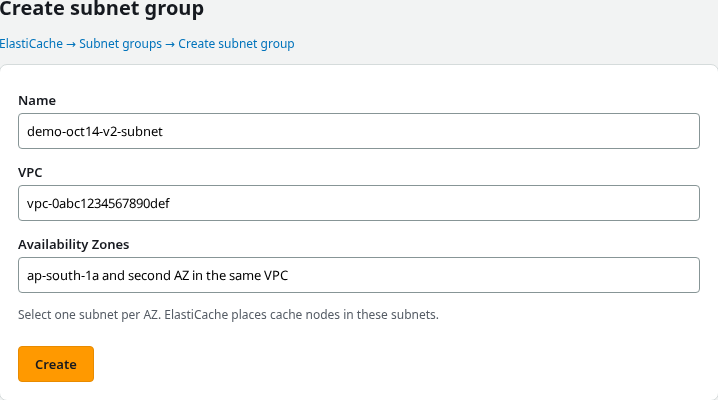
Choose Create and confirm the new group appears under Subnet groups.
Step 2: Restrict Redis with security groups
Open VPC → Security groups in the same Region. Create two groups in the cache VPC (names below are examples):
- EC2 client security group (
demo-redis-ec2-sg) — allow SSH (port 22) from your admin IP if you use SSH, or rely on EC2 Instance Connect / Session Manager without opening SSH to the world. - Redis security group (
demo-redis-sg) — allow TCP 6379 with source type Security group and select the EC2 client group—not0.0.0.0/0.
Using the EC2 security group as the source means any instance with that client security group can reach Redis, even if its private IP changes. You do not have to hard-code an EC2 IP address.
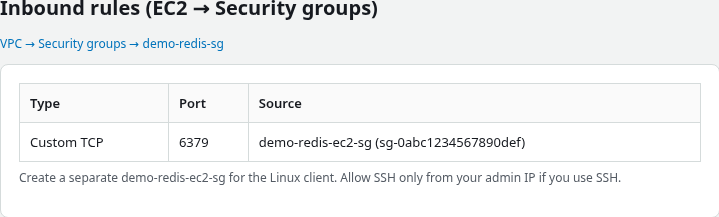
ElastiCache is designed to be reached through VPC networking. For this tutorial, the EC2 client and cache are in the same VPC, and the cache security group allows port 6379 only from the EC2 client's security group. Other valid patterns include an EC2 client in a peered VPC or on-premises hosts connected with VPN or Direct Connect, as long as routing and security groups permit the connection.
Step 3: Create the Redis cache
Open ElastiCache → Redis caches → Create Redis cache. For this first example, choose Design your own cache with Cluster mode disabled, then match the settings in the table.
| Setting | Value |
|---|---|
| Name | demo-redis |
| Engine version | Current Redis OSS version in your Region (tested with 7.1 in ap-south-1) |
| Node type | Small node available in your Region (example: cache.t4g.micro) |
| Number of replicas | 0 |
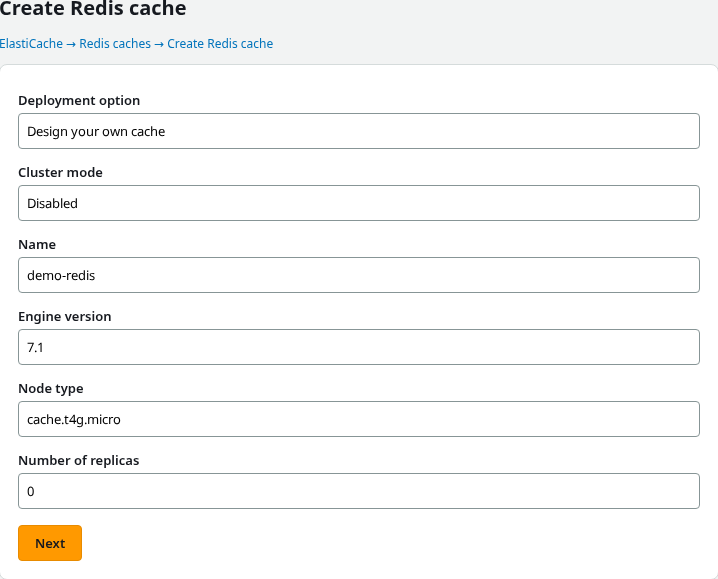
On Network settings (or the connectivity step in the wizard), attach the subnet group and Redis security group from the earlier steps. This tutorial disables in-transit encryption only to keep the first connectivity test simple. For production workloads, evaluate TLS and authentication based on your security requirements.
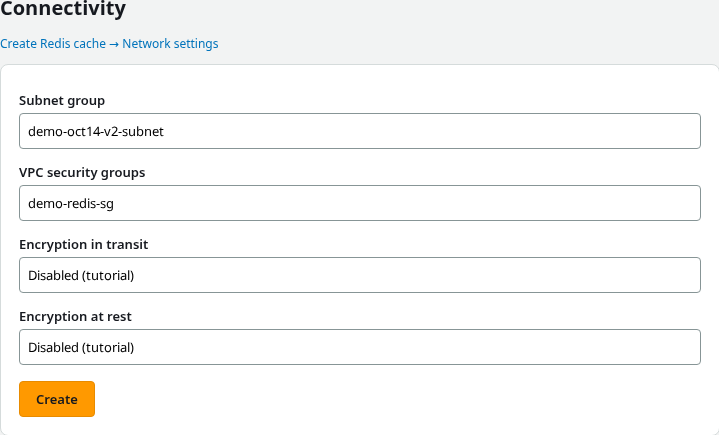
Choose Create. The Redis caches list shows Creating while AWS provisions nodes. Refresh until the status is Available. Provisioning can take several minutes.
Step 4: Copy the primary endpoint
Open the cache name to view details. Under Connectivity, copy the Primary endpoint hostname and note port 6379.
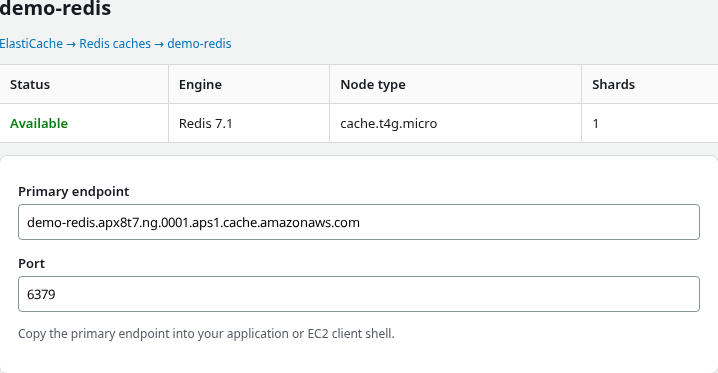
Paste the hostname into a notepad or your application configuration. The Region code appears inside the DNS name (for example aps1 for ap-south-1).
Step 5: Launch a Linux EC2 client in the same VPC
Open EC2 → Instances → Launch instances. Use the same VPC as the cache subnet group and attach the EC2 client security group from Step 2.
| Setting | Example value |
|---|---|
| Name | demo-redis-client |
| AMI | Linux (for example RHEL or Amazon Linux) |
| Instance type | t3.micro |
| VPC / subnet | Same VPC as ElastiCache; any subnet that routes within the VPC |
| Security group | demo-redis-ec2-sg |
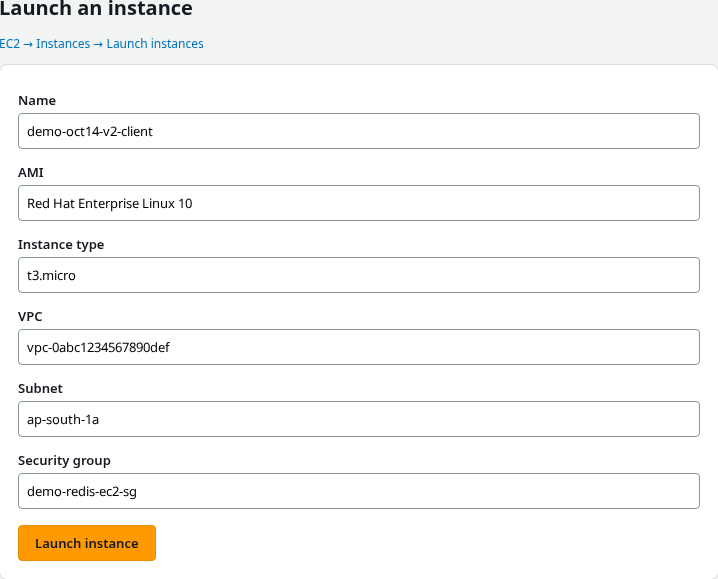
After the instance is Running, connect with EC2 Instance Connect, Session Manager, or SSH.
Step 6: Test Redis with valkey-cli
On the EC2 instance, install a Redis-compatible client. On RHEL 10, valkey-cli speaks the Redis protocol:
sudo dnf install -y valkeySet the endpoint from Step 4 (replace with your primary endpoint hostname):
export REDIS_HOST=demo-redis.abc123.ng.0001.aps1.cache.amazonaws.com
export REDIS_PORT=6379
Send a PING to confirm connectivity:
valkey-cli -h "${REDIS_HOST}" -p "${REDIS_PORT}" PINGSample output:
PONGWrite and read a test key:
valkey-cli -h "${REDIS_HOST}" -p "${REDIS_PORT}" SET demo:key "hello-from-elasticache"SET returns OK when the command succeeds.
Read the value back:
valkey-cli -h "${REDIS_HOST}" -p "${REDIS_PORT}" GET demo:keySample output:
hello-from-elasticacheIf PING times out, return to the console and confirm the Redis security group allows port 6379 from the client instance security group and that both resources share the VPC.
Clean up
In the console, delete resources in this order to avoid dependency errors:
- ElastiCache → Redis caches — select
demo-redisand delete the cache. - EC2 → Instances — terminate the client instance.
- ElastiCache → Subnet groups — delete
demo-redis-subnetsafter the cache is gone. - VPC → Security groups — delete
demo-redis-sganddemo-redis-ec2-sgwhen nothing references them.
Troubleshooting
| Symptom | Likely cause | Fix |
|---|---|---|
| Cluster stays in Creating unusually long | Provisioning delay, subnet IP limits, quotas, or configuration | Wait a few minutes, then check cache events, subnet IP availability, service quotas, and AWS service health |
Connection timed out from EC2 |
Port 6379 blocked or wrong VPC | In VPC → Security groups, allow 6379 from the client SG; confirm EC2 and ElastiCache are in the expected VPC |
NOAUTH Authentication required |
Cache authentication is enabled | Connect with the configured Redis or Valkey user credentials or auth token |
| Connection fails after enabling in-transit encryption | Client still uses plain TCP | Use TLS, for example valkey-cli --tls -h … -p 6379, and supply auth if configured |
valkey-cli: command not found |
Client package not installed | On RHEL 10, run sudo dnf install -y valkey, or install the Redis-compatible CLI package for your distro |
| Cannot delete subnet group | Cache still exists | Delete the Redis cache first in ElastiCache → Redis caches |
Summary
Amazon ElastiCache for Redis hosts Redis-compatible engines in your VPC so applications get a managed primary endpoint instead of self-managed cache servers. The console steps built a cache subnet group, restricted port 6379 to the EC2 client security group, created demo-redis on a small node type, and copied the primary endpoint before testing from EC2 with valkey-cli.
Most first-connection failures come from VPC or security group mismatch, not from Redis itself. For production, plan replicas, backups, and encryption before you depend on a single-node cache.
For a managed relational store in the same AWS portfolio, compare with the AWS RDS tutorial.
References
- What is Amazon ElastiCache?
- Creating a Redis cluster
- ElastiCache subnet groups
- Amazon ElastiCache pricing
Frequently Asked Questions
What is the difference between ElastiCache and Redis on EC2?
ElastiCache runs the engine for you: patching, failover options, backups, and subnet placement are managed. Redis on EC2 gives full control of the OS and configuration but you operate the fleet yourself.
Does ElastiCache for Redis support cluster mode?
Yes. You can enable cluster mode for horizontal shard scaling. This tutorial uses cluster mode disabled with a single primary node and no replicas to keep the first example small.
Can I connect to ElastiCache from my laptop?
Not directly in a typical VPC design. Connect from an application or bastion host inside the VPC (for example EC2), or over VPN or Direct Connect into the network that can reach the cache security group.
Is Memcached covered in this article?
No. The steps target Redis OSS. Memcached uses different APIs and console workflows.
