
| Package | aws-cli/2.37.3 |
|---|---|
| AWS Region | ap-south-1 (Mumbai) is used for the service-call examples. IAM is a global service, although authorization is evaluated for each request using its principal, action, resource, and request context |
| Lab environment | Workstation with AWS CLI v2 and configured credentials — AWS CLI tutorial Install AWS CLI on Ubuntu · Install AWS CLI on Debian |
| Privilege | Account administrator or IAM permissions to create users, policies, and access keys for the lab principals |
| Scope | How AWS IAM explicit deny and implicit deny differ, what each AccessDenied message can reveal, and how to inspect identity-policy evaluation with aws iam simulate-principal-policy. Covers identity-based policies on IAM users. Does not cover every AccessDenied layer — see AccessDenied despite AdministratorAccess for permissions boundaries, SCPs, session policies, and resource policies. |
| Related guides | AWS CLI Tutorial AccessDenied despite AdministratorAccess Which credentials AWS CLI is using AWS S3 Bucket Setup AWS Tutorial |
AWS starts from a default deny. A request is allowed only when the required permissions are granted by the applicable policy layers and no applicable explicit Deny blocks it. The two outcomes beginners see most often in AccessDenied errors are:
- Implicit deny — no applicable policy grants the required
Allow; errors may saybecause no identity-based policy allows the action - Explicit deny — a
Denystatement overrides a matchingAllow; enhanced errors usually name the policy type and may include the policy ARN
The examples use two IAM users and s3:ListAllMyBuckets so service error text and simulate-principal-policy output show implicitDeny and explicitDeny side by side.
Default deny in AWS IAM
Two terms used throughout this page:
- Principal — the AWS identity making the request, such as an IAM user or role
- Identity-based policy — a permissions policy attached to a user, group, or role that defines which AWS actions that identity can perform
IAM policy evaluation is deny-by-default. For the identity-based policy examples in this article, you can use the following simplified model. In real requests, additional policy layers such as permissions boundaries and SCPs may also need to permit the action.
| Rule | Effect |
|---|---|
No matching Allow |
Request is denied (implicit deny) |
At least one matching Allow and no matching Deny |
Request is allowed |
Any matching Deny |
Request is denied (explicit deny), even if an Allow also matches |
        AWS API request
              |
              v
Evaluate applicable policy layers
              |
              v
    Any explicit Deny applies?
        /            \
      yes             no
        |               |
        v               v
explicitDeny    Any Allow matches?
                      /        \
                    yes         no
                    |           |
                    v           v
                  allowed   implicitDeny
Neither outcome is a standalone policy document:
- Implicit deny — evaluation found no applicable
Allow - Explicit deny — a
Denystatement matched; AWS can point to it in the error or simulator output when enhanced context is available
Implicit deny example
The first lab user has no applicable identity-based Allow for s3:ListAllMyBuckets — neither directly on the user nor through an IAM group. Because no applicable policy allows the action, AWS denies it implicitly. The lab uses access keys for lab-implicit-user with AWS_PROFILE set to that profile.
Confirm the caller first:
aws sts get-caller-identity{
"UserId": "AIDAU7QAIUYJEXAMPLE",
"Account": "123456789012",
"Arn": "arn:aws:iam::123456789012:user/lab-implicit-user"
}Run the S3 call that should fail while no Allow policy applies:
aws s3api list-bucketsaws: [ERROR]: An error occurred (AccessDenied) when calling the ListBuckets operation: User: arn:aws:iam::123456789012:user/lab-implicit-user is not authorized to perform: s3:ListAllMyBuckets because no identity-based policy allows the s3:ListAllMyBuckets actionThe phrase because no identity-based policy allows signals implicit deny: AWS evaluated identity-based policies on the user and its groups and found no applicable Allow.
Simulate the same action without running the API call:
aws iam simulate-principal-policy \
  --policy-source-arn arn:aws:iam::123456789012:user/lab-implicit-user \
  --action-names s3:ListAllMyBuckets \
--resource-arns "*""EvalDecision": "implicitDeny",
"MatchedStatements": []MatchedStatements is empty because the simulation did not find a statement that produced an explicit allow or explicit deny for this request.
Fix implicit deny
Attach a policy that grants the missing action. A minimal Allow for listing buckets:
{
  "Version": "2012-10-17",
  "Statement": [
    {
      "Sid": "AllowListBuckets",
      "Effect": "Allow",
      "Action": "s3:ListAllMyBuckets",
      "Resource": "*"
    }
  ]
}
After IAM propagates the attachment, simulation returns allowed and list-buckets succeeds (possibly with an empty bucket list).
Explicit deny example
A second user (lab-explicit-user) carries a customer-managed policy with both Allow and Deny on s3:ListAllMyBuckets. Switch to that user's profile before the commands below. The explicit Deny wins even though an Allow exists for the same action.
List the attached policy:
aws iam list-attached-user-policies --user-name lab-explicit-user{
"AttachedPolicies": [
{
"PolicyName": "lab-explicit-deny-policy",
"PolicyArn": "arn:aws:iam::123456789012:policy/lab-explicit-deny-policy"
}
]
}The policy JSON contains overlapping Allow and Deny statements:
{
  "Sid": "AllowListBuckets",
  "Effect": "Allow",
  "Action": "s3:ListAllMyBuckets",
  "Resource": "*"
},
{
  "Sid": "DenyListBuckets",
  "Effect": "Deny",
  "Action": "s3:ListAllMyBuckets",
  "Resource": "*"
}
Call list-buckets as the explicit-deny user:
aws s3api list-bucketsaws: [ERROR]: An error occurred (AccessDenied) when calling the ListBuckets operation: User: arn:aws:iam::123456789012:user/lab-explicit-user is not authorized to perform: s3:ListAllMyBuckets with an explicit deny in an identity-based policy: arn:aws:iam::123456789012:policy/lab-explicit-deny-policyThe error text tells you:
- Deny type —
explicit deny - Policy layer —
identity-based policy - Policy ARN — included here; open that policy JSON and find the
Denystatement (not another broadAllowwhen the ARN is present)
Simulation confirms explicitDeny and names the denying statement inside MatchedStatements:
aws iam simulate-principal-policy \
  --policy-source-arn arn:aws:iam::123456789012:user/lab-explicit-user \
  --action-names s3:ListAllMyBuckets \
--resource-arns "*"{
"EvalDecision": "explicitDeny",
"MatchedStatements": [
{
"SourcePolicyId": "lab-explicit-deny-policy",
"SourcePolicyType": "user-managed"
}
]
}Fix explicit deny
When an explicit Deny matched:
- Deny is unintended — edit the customer-managed policy and remove the
DenyListBucketsstatement, or detach the denying policy; after propagation, simulation should returnallowedandlist-bucketsshould succeed - Deny is intentional — correct the request context so the
Denycondition no longer matches (wrong Region, missing session tag, unexpected network path, MFA requirement, and similar) instead of removing the guardrail
Why explicit deny wins
AWS policy logic treats Deny as final. When both Allow and Deny match the same request, Deny determines the outcome.
| Situation | EvalDecision | Typical error clue |
|---|---|---|
No applicable Allow |
implicitDeny |
because no identity-based policy allows |
Allow matches, no Deny |
allowed |
API call succeeds |
Deny matches (with or without Allow) |
explicitDeny |
with an explicit deny in plus policy type (ARN when provided) |
Adding another Allow does not override an applicable explicit Deny:
- Unintended deny — remove or narrow the
Denystatement - Intentional guardrail — fix request context so the
Denycondition no longer matches
Policy types that can deny
Identity-based policies are the simplest place to learn explicit versus implicit deny. Other AWS policy layers can also contribute a Deny or fail to provide a required Allow, but their evaluation rules differ. The AccessDenied message can help identify which layer to investigate.
| Policy type | Implicit deny wording (examples) | Explicit deny wording (examples) |
|---|---|---|
| Identity-based | no identity-based policy allows |
explicit deny in an identity-based policy |
| Permissions boundary | no permissions boundary allows |
explicit deny in a permissions boundary |
| Organization SCP | no service control policy allows |
explicit deny in a service control policy |
| Session policy | (implicit when session lacks Allow) | explicit deny in a session policy |
| Resource-based | varies by service | explicit deny in a resource-based policy |
| Resource control policy (RCP) | depends on evaluation context | explicit deny in a resource control policy |
| VPC endpoint policy | no VPC endpoint policy allows |
explicit deny in a VPC endpoint policy |
sts:AssumeRole failures can also report no role trust policy allows or explicit deny in the role trust policy when the role trust policy blocks the caller.
When AdministratorAccess is attached but the call still fails with explicit deny from a boundary or SCP, see AccessDenied despite AdministratorAccess for the layer-by-layer walkthrough.
Read AWS AccessDenied messages
Enhanced AccessDenied context comes from the AWS service response, not from the CLI classifying the failure:
- Services may distinguish implicit deny from explicit deny and name the policy layer involved
- The AWS CLI prints that service response text; it does not decide explicit versus implicit deny on its own
- Not every service or request returns this enhanced format — a generic
AccessDenieddoes not prove which case applied
| Error fragment | Meaning | Next step |
|---|---|---|
because no identity-based policy allows |
Implicit deny on identity policies | Add or widen an Allow on the principal |
because no permissions boundary allows |
Implicit deny inside the boundary cap | Add Allow to the boundary or adjust design |
because no service control policy allows |
SCP allow-list gap | Update SCP at organization level |
with an explicit deny in |
Explicit Deny statement matched |
Check the policy type shown in the error; if AWS includes a policy ARN, inspect that policy first |
Generic AccessDenied only |
Context missing | Use simulator or Access Troubleshooter |
Some errors include an EncodedAuthorizationFailureMessage blob. A principal with sts:DecodeAuthorizationMessage can decode it when the service returns that field.
Use IAM Policy Simulator and Access Troubleshooter
aws iam simulate-principal-policy lets you test how the selected IAM principal's policies evaluate an action and resource without making the real API request. Its result can be allowed, implicitDeny, or explicitDeny:
allowed— an applicableAllowmatched and no explicitDenywonimplicitDeny— the simulated permissions did not produce the requiredAllowexplicitDeny— an applicableDenystatement matched
Treat simulation as a diagnostic tool, not proof of the final live authorization result. Documented gaps include:
- Resource control policies (RCPs)
- Some VPC endpoint policy cases
- Role chaining, resource policies, and other advanced request context
For the two lab users on s3:ListAllMyBuckets, simulation returned:
lab-implicit-user—implicitDenywith emptyMatchedStatementslab-explicit-user—explicitDenywith theDenyListBucketssid- Both users —
allowedafter each respective fix
In the AWS Management Console
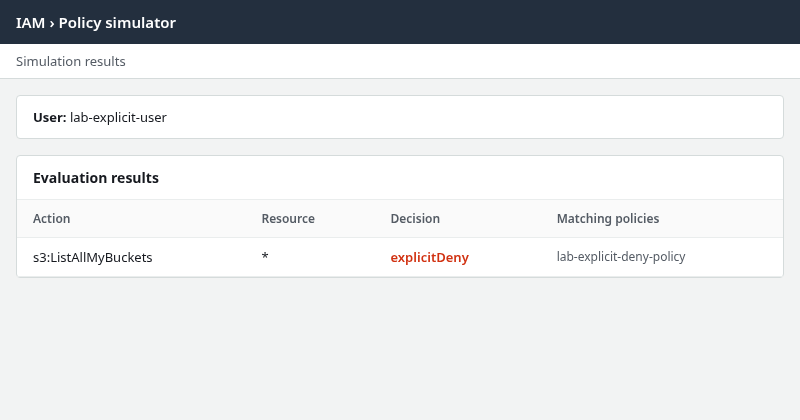
Open IAM → Policy simulator, select one principal such as lab-explicit-user, add s3:ListAllMyBuckets, and read the decision for that action. The panel below matches the explicit-deny outcome from the lab (styled from live simulator output, not a multi-principal composite):
IAM Access Troubleshooter (public preview) can show evaluation for a failed request when AWS returns an authorization ID. Limitations to expect:
- Feature is in public preview with gradual rollout
- Authorization IDs are not returned for every service, API, or denied request
- Use the same Region as the failed API call when the feature is available
Troubleshooting
| Symptom | What it means | What to check |
|---|---|---|
no identity-based policy allows |
Implicit deny | User and group policies; add missing Allow |
with an explicit deny in an identity-based policy |
Deny on identity |
Policy JSON for Effect: Deny on that action |
explicit deny in a permissions boundary |
Boundary Deny |
Boundary JSON; permissions boundary row in IAM console |
explicit deny in a service control policy |
Organization SCP | SCP on account or parent OU |
Simulator shows allowed, API still fails |
Layers or context the simulator omits | Resource policy, endpoint policy, or caller profile |
Allow added but still denied |
Explicit Deny elsewhere |
Search all applicable policies for Deny |
| Explicit deny but guardrail is intentional | Request matched a Deny condition |
Region, tags, network path, MFA, or other request context |
Summary
AWS IAM denies by default. An implicit deny occurs when there is no applicable explicit Deny, but the authorization evaluation still does not have the required Allow. In the identity-policy example in this article, that happens because no identity-based policy allows s3:ListAllMyBuckets. Service errors may state because no identity-based policy allows the action, and simulate-principal-policy returns implicitDeny with empty MatchedStatements.
Explicit deny means a Deny statement matched. It overrides any conflicting Allow, may appear in the error as with an explicit deny in plus policy type (and sometimes a policy ARN), and returns explicitDeny in simulation with the denying policy named in MatchedStatements.
The lab walked through both cases on s3:ListAllMyBuckets: attach an Allow to clear implicit deny, and remove or narrow a Deny statement — or fix request context when the deny is intentional. For denials from boundaries, SCPs, or resource policies, use the error policy type to pick the right layer rather than attaching another blanket administrator policy.
References
- IAM policy evaluation logic
- Policy evaluation for requests within a single account
- IAM policy simulator
- Troubleshoot access denied errors
- Troubleshoot access denied with authorization ID (Preview)
Frequently Asked Questions
Can Allow override explicit Deny?
No. When a Deny statement matches the request, AWS returns explicit deny even if one or more Allow statements also match. Options depend on intent:
- Remove or narrow the
Denywhen the block is unintended - Correct request context when the
Denyguardrail is intentional - Detach or replace the denying policy when it should not apply to the principal
What is default deny in AWS IAM?
Default deny means AWS rejects a request unless an applicable policy explicitly grants Allow and no applicable policy explicitly denies it. If no Allow matches, the outcome is implicit deny.
Why does AWS say no policy allows the action?
That phrase indicates implicit deny. IAM evaluated the relevant identity-based policies (on the user and its groups) and did not find an Allow for the action and resource. Attach or update a policy to grant the action, or confirm the call uses the intended principal.
