
| Package | AWS Management Console (Amazon Cognito) and AWS CLI v2 for credential verification |
|---|---|
| AWS Region | ap-south-1 (Mumbai) for the examples; Cognito user pools and identity pools are Regional resources |
| Privilege | Permission to create Cognito user pools and identity pools, plus permission to create or pass the IAM role the identity pool uses for authenticated users |
| Scope | How user pools and identity pools fit together: create a user pool with Cognito Managed login, configure a public app client (authorization code + PKCE), sign in and receive an OAuth authorization code at a callback URL, link an identity pool without guest access, and verify GetId / GetCredentialsForIdentity temporary AWS credentials from a user pool ID token. Console-first with figures from an example deployment in ap-south-1. Does not cover social or SAML IdP setup, advanced threat protection, or the full Keycloak IAM course. |
| Related guides | AWS Tutorial AWS AppSync tutorial AWS CLI tutorial Install AWS CLI on Ubuntu Keycloak tutorial |
Amazon Cognito gives web and mobile apps a managed directory for sign-up and sign-in, plus optional federated access to AWS APIs. A user pool stores users and issues OpenID Connect tokens after authentication. An identity pool maps a signed-in identity to an IAM role so the app can call AWS with short-lived credentials from STS.
This guide uses Managed login — Cognito’s newer hosted authentication and branding experience on supported feature plans. Older Cognito tutorials commonly use Hosted UI (classic); AWS documents Managed login and Hosted UI (classic) as separate branding versions. The walkthrough creates a user pool, tests Managed login and an authorization-code redirect to http://localhost:8000/callback.html, links an identity pool (authenticated users only), then verifies the identity-pool credential exchange with the AWS CLI.
Key takeaways
- A user pool is the user directory and token issuer for sign-in and OpenID Connect.
- Managed login is AWS’s newer hosted sign-in experience; Hosted UI (classic) remains available as the older branding option.
- An identity pool maps a user pool ID token to an IAM role and returns temporary AWS credentials — not permanent access keys.
- A public app client should use the authorization code grant; production SPAs and mobile apps should add PKCE in application code. The return URL must match exactly, including scheme, host, port, and path.
- Leave unauthenticated (guest) access disabled unless the app truly needs guest users.
User pools vs identity pools
| Component | Primary job | Typical output |
|---|---|---|
| User pool | Register and authenticate users | ID token, access token, refresh token (JWT) |
| Identity pool | Map an identity to an IAM role | Temporary AWS access key, secret key, and session token |
Many apps use only a user pool when they need login but call their own API with JWT validation. Add an identity pool when the client must call AWS APIs directly (for example S3, DynamoDB, or AWS AppSync) with credentials scoped by IAM.
                    ┌───────────────► Your API / AppSync
                    │   JWT
                    │
User → User Pool ───┤
                    │   ID token
                    ▼
              Identity Pool
                    │
                    ▼
           IAM role (authenticated)
                    │
                    ▼
    Temporary AWS credentials (STS-style)
                    │
                    ▼
              AWS services
What you need
| Requirement | Notes |
|---|---|
| AWS account | Sign in at the AWS Management Console |
| Region | Use one Region for the user pool, domain, app client, and identity pool |
| Feature plan | Managed login is available on Cognito feature plans that support it, including Essentials and Plus at the time of testing. Lite pools may use Hosted UI (classic) instead — the user-pool and identity-pool relationship is the same. |
| Local callback page | This guide uses http://localhost:8000/callback.html so the browser lands on a page you control after sign-in |
| AWS CLI v2 | For Step 4 verification — AWS CLI tutorial |
For a small test, Cognito’s built-in email delivery is enough. For production email volume and sender control, configure Amazon SES. Check the Amazon Cognito pricing page before you leave test pools running.
How the complete Cognito flow works
Authenticated Cognito user
          ↓
      Managed login
          ↓
   Authorization code
          ↓
 Application exchanges code with PKCE
          ↓
         ID token
          ↓
      Identity Pool
          ↓
   Authenticated IAM role
          ↓
Temporary AWS credentials- The user signs in on Managed login; the browser returns an authorization code to your return URL (Step 2 tests this redirect; PKCE happens when your app starts the authorization request and exchanges the code).
- Your application exchanges the code with PKCE for tokens, including an ID token.
- The app passes that ID token to the identity pool (
GetId, thenGetCredentialsForIdentity). - The identity pool uses the authenticated IAM role to return temporary AWS credentials (access key, secret key, session token, and expiration) scoped by that role’s policy.
Step 1: Create a user pool
Open Amazon Cognito → Create user pool.
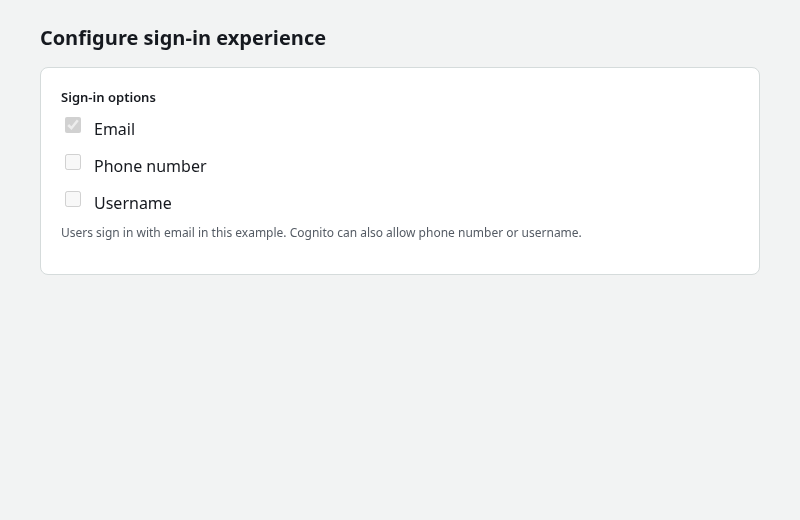
Choose email sign-in
On Configure sign-in experience, enable Email so users sign in with an email address.
Configure password and authentication options
On Configure security requirements, keep Cognito defaults for the password policy unless your application needs stricter rules. For this tutorial, leave MFA off so the first sign-in flow stays simple. For a real application, choose MFA and passwordless options based on your security requirements.
On Configure sign-up experience, you can keep Cognito-assisted email verification for self-registration.
On Configure message delivery, use Cognito’s built-in email for a quick test.
Configure Managed login, domain, and app client
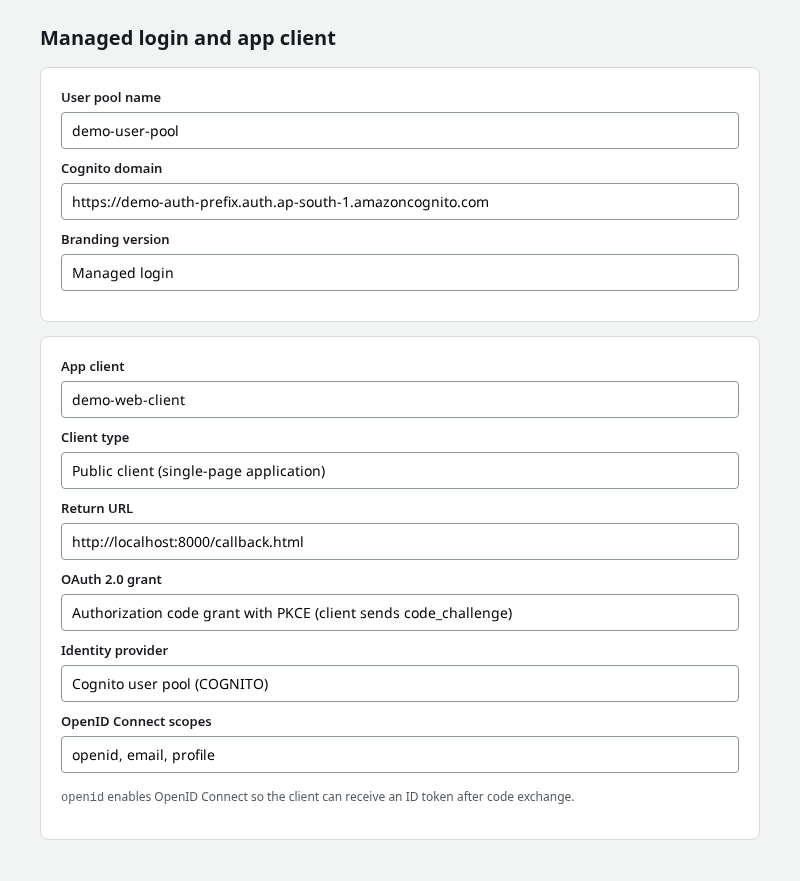
On Integrate your app (wording may vary slightly in the console):
- Set a user pool name.
- Add a Cognito domain prefix (must be unique in the Region; avoid reserved substrings such as
cognitoin the prefix). - Set Branding version to Managed login (not Hosted UI classic).
- Create a public app client (single-page application / no client secret).
- Set Return URL to
http://localhost:8000/callback.html. - Enable Authorization code grant. For a public SPA or mobile client, use PKCE: the app generates a
code_verifier, sends a SHA-256code_challengein the authorization request, then sends the original verifier when exchanging the authorization code for tokens. - Enable scopes openid, email, and profile —
openidmakes the flow OpenID Connect so the client can receive an ID token after code exchange. - Ensure the Cognito user pool is enabled as a supported identity provider on the app client (
COGNITO) so local users can sign in through Managed login. - After creating the pool, confirm a Managed login style is assigned to the app client under Managed login in the console. Without an assigned style, the login page can show Login pages unavailable. If you automate setup later, the equivalent API is
CreateManagedLoginBranding.
Choose Create user pool and note the User pool ID on the overview page.
Step 2: Sign in through Managed login
Prepare the callback page
Serve a simple callback page on port 8000. Save the following as callback.html in an empty folder:
<!DOCTYPE html>
<html lang="en">
<head><meta charset="utf-8"><title>Cognito callback</title></head>
<body>
  <h1>Sign-in callback</h1>
  <p id="msg"></p>
  <script>
    const p = new URLSearchParams(location.search);
    document.getElementById('msg').textContent = p.get('code')
      ? 'Authorization code received — exchange it for tokens with PKCE in your app.'
      : (p.get('error') || 'Waiting for redirect from Cognito…');
  </script>
</body>
</html>
Start a local server from that folder:
python3 -m http.server 8000Open the login page and sign in
In the user pool, open App integration → your app client → View login page (or View Hosted UI on older console labels). Cognito opens Managed login when the domain, app client, OAuth settings, and branding are configured. AWS documents this console link as a quick way to test Managed login; the generated URL may not include every parameter your production SPA sends (for example a PKCE code_challenge).
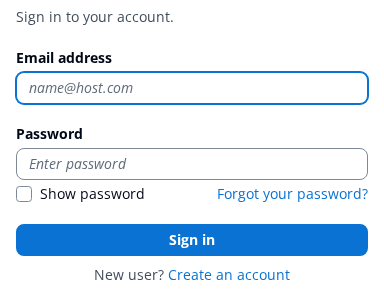
This browser test proves that Managed login can authenticate a user and redirect an authorization code to your callback URL. It does not by itself prove PKCE — a real public SPA must start the authorization request with a code_challenge and later exchange the code with the matching code_verifier. Step 4 uses the AWS CLI to obtain an ID token and verify the identity pool separately.
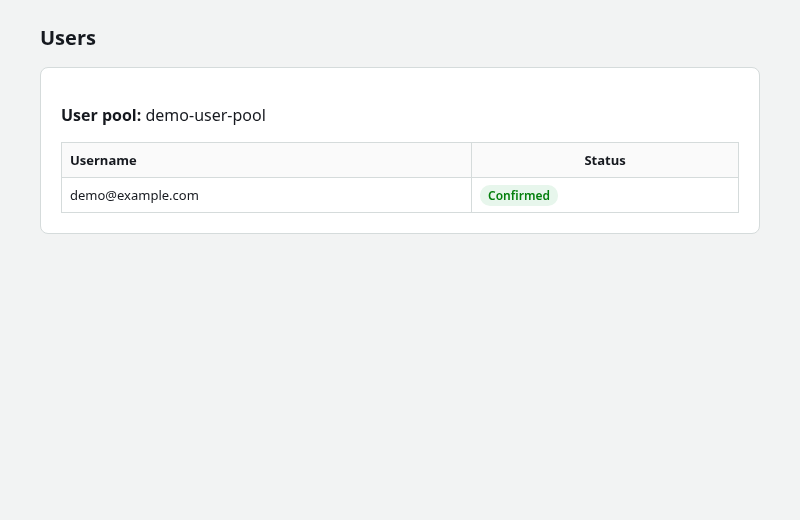
Create a test user under Users → Create user (or use Sign up on the login page). Set a password and confirm the user so the Users tab shows Confirmed.
Sign in on Managed login. After success, the browser redirects to your return URL with ?code=… in the query string.
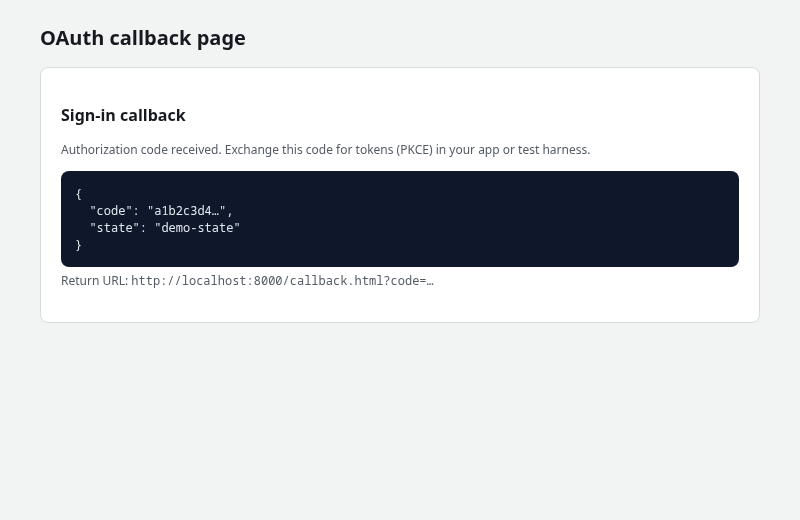
The homepage of a public site is a poor return URL because it does not exchange the code for tokens. A local callback.html page (or your own SPA route) lets you read the code query parameter and complete token exchange in application code.
Step 3: Create an identity pool
Open Amazon Cognito → Identity pools → Create identity pool.
- Enter a name (for example
demo-identity-pool). - Do not enable unauthenticated identities — this tutorial targets signed-in user pool users only.
- Under Authentication providers, choose Amazon Cognito user pool and paste the User pool ID and App client ID from Step 1.
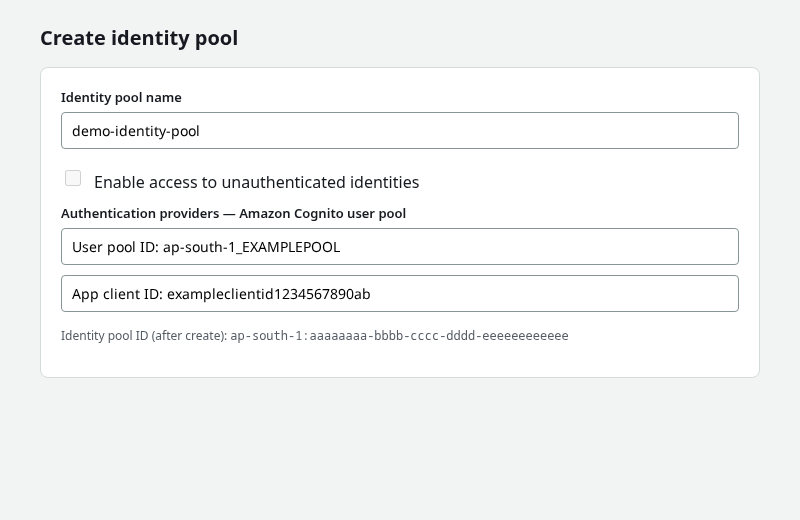
Choose Create pool. Cognito prompts for an authenticated IAM role. That role controls which AWS APIs signed-in application users may call. Cognito does not give the application permanent access keys; the identity pool lets the user assume this role and receive temporary AWS credentials (STS-style access key, secret key, and session token).
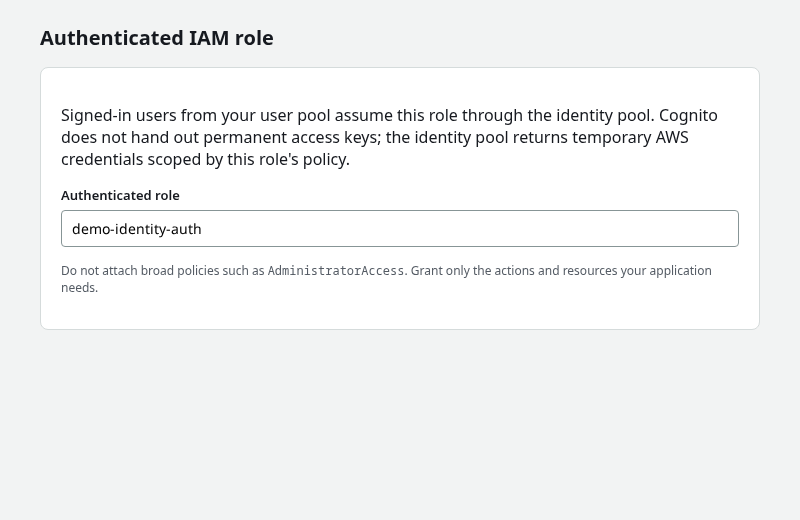
Do not attach broad policies such as AdministratorAccess. Grant only the actions and resources the application needs (for example s3:GetObject on one prefix). Choose Allow to finish role creation and note the Identity pool ID.
Step 4: Exchange the user pool identity for temporary AWS credentials
Replace the placeholders with your Region, user pool ID, app client ID, identity pool ID, and test user email.
Enable password authentication for this CLI verification
Step 4 uses USER_PASSWORD_AUTH only to obtain an ID token for testing the identity-pool flow. In the app client settings, enable Sign in with username and password (ALLOW_USER_PASSWORD_AUTH) before running the command below, then disable that flow afterward if the application only uses Managed login and authorization code + PKCE.
Keep the browser application on authorization code + PKCE; do not use username/password API sign-in in production SPAs.
The ID token from this CLI step plays the same role as the ID token you receive after PKCE code exchange in a browser app.
Set the provider key Cognito expects in Logins (Region and user pool ID must match your pool):
export AWS_DEFAULT_REGION=ap-south-1
export POOL_ID='ap-south-1_EXAMPLEPOOL'
export CLIENT_ID='exampleclientid1234567890ab'
export IDENTITY_POOL_ID='ap-south-1:aaaaaaaa-bbbb-cccc-dddd-eeeeeeeeeeee'
export PROVIDER="cognito-idp.${AWS_DEFAULT_REGION}.amazonaws.com/${POOL_ID}"
Prompt for the test user password so it is not stored in shell history:
read -r -s -p "Cognito password: " COGNITO_PASSWORD
echo
Request an ID token for the confirmed test user:
ID_TOKEN=$(aws cognito-idp initiate-auth \
  --client-id "${CLIENT_ID}" \
  --auth-flow USER_PASSWORD_AUTH \
  --auth-parameters "USERNAME=demo@example.com,PASSWORD=${COGNITO_PASSWORD}" \
  --query 'AuthenticationResult.IdToken' --output text)
The command returns a long JWT string when the user name, password, and client settings are correct.
Map the ID token to an identity pool IdentityId and store it in a shell variable:
IDENTITY_ID=$(aws cognito-identity get-id \
  --identity-pool-id "${IDENTITY_POOL_ID}" \
  --logins "${PROVIDER}=${ID_TOKEN}" \
  --query 'IdentityId' \
  --output text)
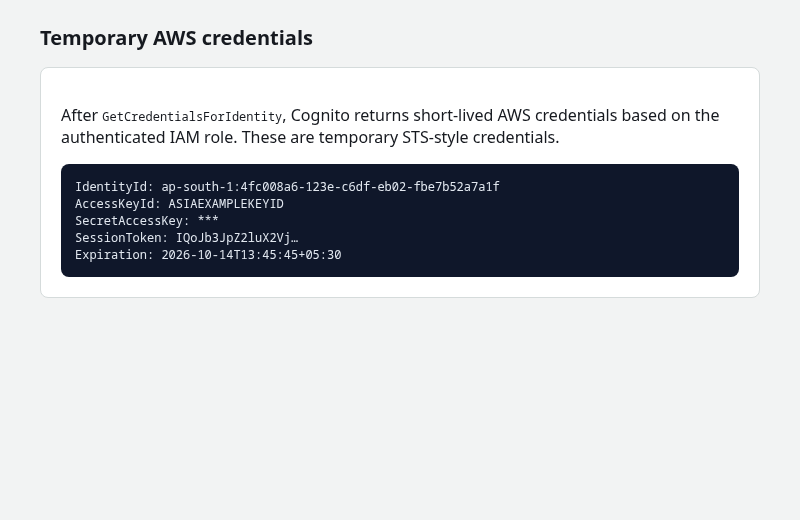
The command prints a Regional identity identifier such as ap-south-1:4fc008a6-123e-c6df-eb02-fbe7b52a7a1f.
Request temporary AWS credentials for that identity (still passing the same ID token in Logins):
aws cognito-identity get-credentials-for-identity \
  --identity-id "${IDENTITY_ID}" \
  --logins "${PROVIDER}=${ID_TOKEN}"
Sample output:
{
    "Credentials": {
        "AccessKeyId": "ASIAEXAMPLEKEYID",
        "SecretAccessKey": "********************************",
        "SessionToken": "IQoJb3JpZ2luX2VjEMj...",
        "Expiration": "2026-10-14T13:45:45+05:30"
    },
    "IdentityId": "ap-south-1:4fc008a6-123e-c6df-eb02-fbe7b52a7a1f"
}
The response contains AccessKeyId, SecretAccessKey, and SessionToken — short-lived credentials scoped by the authenticated IAM role. AWS SDKs can use these temporary credentials until they expire; after that, the application must obtain a new set. Do not persist them like long-lived access keys.
Step 5: Clean up
Delete only the resources you created for this tutorial:
- Delete the identity pool.
- Remove the Cognito domain, then delete the user pool.
- Delete the authenticated IAM role Cognito created if it is no longer used.
Troubleshooting
| Symptom | Likely cause | Fix |
|---|---|---|
| redirect_uri mismatch | Return URL differs from the app client setting | Match scheme, host, port, path, and trailing slash exactly |
| Managed login opens but no usable token | Authorization code must be exchanged | Use PKCE in the SPA or SDK; the callback page only receives the code query parameter |
| NotAuthorizedException from identity pool | Wrong provider string, user pool ID, or client ID | Confirm Region, pool ID, app client ID, and that the ID token belongs to that pool |
| AccessDenied calling AWS with temp keys | Authenticated role lacks permission | Add only required actions/resources to that role — not AdministratorAccess |
| Invalid domain when saving prefix | Prefix taken or reserved | Choose another domain prefix |
| Managed login not available | Pool on Lite or legacy branding | Use Hosted UI (classic) for that plan, or move to a plan that supports Managed login |
| No verification email | Built-in email limits or SES not configured | Check spam; configure SES for production |
| Login pages unavailable on View login page | Managed login branding not assigned to the app client | Assign Managed login branding (console editor or default branding via API); confirm domain is Active |
| USER_PASSWORD_AUTH not enabled | App client does not allow username/password API sign-in | Enable Sign in with username and password (ALLOW_USER_PASSWORD_AUTH) on the app client before Step 4 |
Summary
Amazon Cognito separates authentication (user pool, Managed login, OAuth/OIDC tokens) from AWS authorization (identity pool, IAM role, STS credentials). A user pool alone is enough when your API validates JWTs. Add an identity pool when the client must call AWS services with IAM-scoped temporary keys.
This walkthrough configured Managed login with a public app client, return URL, authorization code grant, and OpenID scopes; captured an OAuth authorization code on a local callback page; created an identity pool without guest access; and verified get-id and get-credentials-for-identity with a user pool ID token. That is the full path from a signed-in user to temporary AccessKeyId, SecretAccessKey, and SessionToken credentials — the reason identity pools exist.
For GraphQL APIs with built-in JWT auth, compare AWS AppSync. For self-hosted OIDC, see the Keycloak tutorial.
References
- What is Amazon Cognito?
- User pool managed login
- Amazon Cognito user pools
- Amazon Cognito identity pools
- Authorization code grant and PKCE
- Temporary security credentials in IAM
Frequently Asked Questions
When should I use only a user pool?
Use a user pool alone when the app authenticates users and your backend or API Gateway validates JWTs. Add an identity pool when browser or mobile clients must call AWS services directly with IAM-scoped temporary credentials.
What is the difference between Managed login and Hosted UI (classic)?
Managed login is the current Cognito branding and sign-in experience on supported feature plans. Hosted UI (classic) is the earlier UI branding; AWS documents both as branding versions on the user pool domain.
What is the difference between a public and confidential app client?
A public client has no client secret and is meant for SPAs and mobile apps (authorization code + PKCE). A confidential client has a secret and suits server-side applications that can store the secret safely.
Can Managed login use social or enterprise IdPs?
Yes. You can add social, OpenID Connect, or SAML providers to the user pool and enable them on the app client. This guide uses native Cognito users only.
Are identity pools the same as IAM users?
No. Identity pool users are application end users. Cognito exchanges their identity for an STS session tied to an IAM role, not an IAM user in your account.
