
| Package | amazon-ssm-agent/3.3.5226.0, aws-cli/2.37.3 (RHEL 10.2 on EC2) |
|---|---|
| AWS Region | ap-south-1 (Mumbai) for the examples; SSM managed-node inventory and Session Manager calls are Regional |
| Lab environment | Workstation with AWS CLI v2 and configured credentials — AWS CLI tutorial Install AWS CLI on Ubuntu · Install AWS CLI on Debian |
| Privilege | EC2 and IAM read permissions to describe instances, roles, and security groups; ssm:StartSession and ssm:SendCommand on the target instance from the workstation |
| Scope | Why Session Manager and aws ssm start-session return TargetNotConnected, how to confirm the AWS account and Region, read Fleet Manager ping status, verify the SSM agent and EC2 instance profile, check outbound HTTPS or private VPC endpoints, and confirm the managed node accepts Run Command again. Does not cover a full Session Manager greenfield install from scratch. |
| Related guides | AWS CLI Tutorial EC2 disk full cannot SSH CloudWatch agent not sending logs EC2 Instance Connect Endpoint AWS Tutorial |
TargetNotConnected means Session Manager cannot establish a usable SSM connection to the target managed node—in this article, that simply means the EC2 instance after it has successfully registered with Systems Manager through SSM Agent. The most common causes are a stopped or unregistered SSM Agent, a missing instance-profile permission, blocked outbound HTTPS, missing private endpoints, or using the wrong AWS Region or account.
Start with the Region and Fleet Manager status before changing security-group or VPC networking rules. The same error can appear even when the EC2 instance itself is running normally.
The walkthrough below uses a RHEL 10.2 EC2 instance in ap-south-1 with SSM Agent 3.3.5226.0. I reproduced the Region, agent, IAM, and network failures separately so you can see which check identifies each problem and what changes when it is fixed.
  Your workstation                    AWS (same Region as EC2)
+----------------------+              +---------------------------+
| AWS CLI              |  StartSession| AWS Systems Manager       |
| Session Manager      |------------->| Session Manager service   |
| plugin               |              +-------------^-------------+
+----------------------+                            |
                                                    | outbound HTTPS 443
                                                    | (ssm / ssmmessages)
                                          +---------+-------------+
                                          | amazon-ssm-agent      |
                                          | on EC2 instance       |
                                          +---------+-------------+
                                                    |
                                                    v
                                          EC2 instance profile
                                          (IAM credentials)
There are two separate connections here. Your workstation asks the regional Systems Manager service to start a session. Separately, amazon-ssm-agent on the EC2 instance maintains an outbound HTTPS connection to AWS. AWS joins those two sides to create the Session Manager session. Your laptop never opens a direct connection to the EC2 instance, which is why Session Manager does not need inbound SSH or port 22.
The Session Manager plugin is required for aws ssm start-session from the CLI, but not when opening a session from the AWS console.
TargetNotConnected Quick Diagnosis
| Symptom | Likely layer | First check |
|---|---|---|
TargetNotConnected when starting a session to an otherwise healthy instance |
Wrong Region or account | aws configure get region and aws sts get-caller-identity |
| Fleet Manager ConnectionLost or Offline | Agent, IAM, or network | Ping status → instance profile → egress or VPC endpoints |
Fleet Manager Online but TargetNotConnected |
Recently stopped agent, stale ping, or Session Manager configuration on the instance | systemctl is-active amazon-ssm-agent; agent logs |
| Managed node never appears | Agent not installed or never registered | Install/start agent; verify instance-profile or DHMC permissions; wait for first ping |
| Private subnet, no NAT, no endpoints | Missing SSM VPC endpoints | ssm and ssmmessages interface endpoints (see below) |
Work top to bottom. Region and account mismatches produce the same CLI error as a dead agent, so check these first before changing security-group or VPC networking rules.
Confirm AWS Account and Region
SSM managed-node data is Regional. An instance in ap-south-1 does not appear in us-east-1, and start-session in the wrong Region returns TargetNotConnected even when the instance is healthy at home.
Confirm the default Region on the workstation:
aws configure get regionap-south-1Confirm the caller account matches the account that owns the EC2 instance:
aws sts get-caller-identity{
"UserId": "AIDAXXXXXXXXXXXXXXXXX",
"Account": "123456789012",
"Arn": "arn:aws:iam::123456789012:user/lab-admin"
}When the instance is Online in ap-south-1, calling start-session in another Region fails:
aws ssm start-session --region us-east-1 --target i-0123456789abcdef0An error occurred (TargetNotConnected) when calling the StartSession operation: i-0123456789abcdef0 is not connected.Repeat the same command with --region ap-south-1 (or omit --region when the profile default is already correct). Also confirm the EC2 Account ID on the instance detail page matches get-caller-identity.
Check Fleet Manager Managed Node Status
Open Systems Manager → Fleet Manager (or Node Management → Fleet Manager) in the same Region as the EC2 instance. A healthy registration shows the instance ID with Ping status: Online.
Ping status is the last known communication state between SSM Agent and Systems Manager. Online means AWS has recently heard from the agent; ConnectionLost means AWS previously knew the node but the agent is no longer maintaining communication.
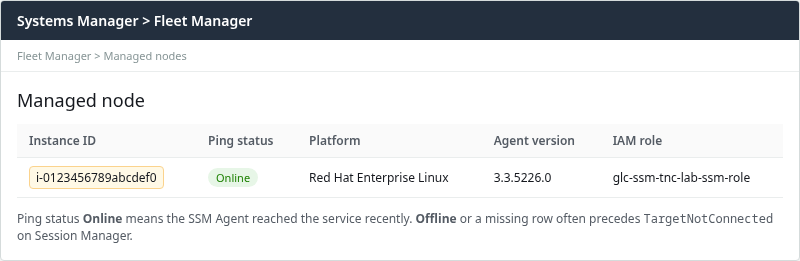
From the CLI:
aws ssm describe-instance-information \
  --filters "Key=InstanceIds,Values=i-0123456789abcdef0" \
  --query 'InstanceInformationList[0].{InstanceId:InstanceId,PingStatus:PingStatus,AgentVersion:AgentVersion,LastPing:LastPingDateTime}' \
--output table----------------------------------------------------------
| DescribeInstanceInformation |
+-------------------+------------------------------------+
| AgentVersion | 3.3.5226.0 |
| InstanceId | i-0123456789abcdef0 |
| LastPing | 2026-09-27T10:24:48.960000+05:30 |
| PingStatus | Online |
+-------------------+------------------------------------+If the instance is missing from Fleet Manager entirely, install and start the agent and attach an instance profile with SSM permissions before continuing. If Ping status is ConnectionLost, the agent cannot maintain its channel to SSM; the sections below cover IAM and network causes.
Check SSM Agent
On the instance, the agent service must be running. When SSH or another path is available:
sudo systemctl is-active amazon-ssm-agentactiveWhen the agent is installed but the node stays offline, run AWS-supported diagnostics:
sudo ssm-cli get-diagnostics --output tablessm-cli checks common managed-node prerequisites such as agent connectivity, credentials, Region, and network access. Run this before checking IAM, DNS, and networking one by one; the diagnostic output can often point you directly to the failing layer.
If Session Manager was your only administrative path to the instance, you cannot run these on-instance commands until you regain another access method. In that case, start with Fleet Manager, IAM, and network checks from the AWS side.
When the agent is stopped, Session Manager returns TargetNotConnected:
sudo systemctl stop amazon-ssm-agent
systemctl is-active amazon-ssm-agent || echo inactiveinactive
inactiveRetry Session Manager while the agent is stopped:
aws ssm start-session --target i-0123456789abcdef0An error occurred (TargetNotConnected) when calling the StartSession operation: i-0123456789abcdef0 is not connected.Fleet Manager may continue to show Online for a few minutes after the agent stops because the console is showing the last reported agent status rather than checking the service in real time. Treat TargetNotConnected plus inactive on the instance as a stopped agent even when the console still shows Online.
Restart the agent before rebooting the whole instance:
sudo systemctl restart amazon-ssm-agentAfter reboot on RHEL when the agent did not recover from a simple restart, ping status returned Online:
aws ssm describe-instance-information \
  --filters "Key=InstanceIds,Values=i-0123456789abcdef0" \
  --query 'InstanceInformationList[0].PingStatus' \
--output textOnlineRead agent logs on the instance when the service is active but registration fails:
sudo tail -n 30 /var/log/amazon/ssm/amazon-ssm-agent.logLook for credential, DNS, or TLS errors pointing to IAM or network fixes below.
Check EC2 Instance Profile and IAM Role
This lab gives the EC2 instance its Systems Manager permissions through an IAM role attached with an instance profile. This is a common setup and is the configuration tested below. AWS can also provide managed-node permissions through Default Host Management Configuration, so an instance profile is not the only possible configuration.
An IAM role defines what the EC2 instance is allowed to do in AWS. An instance profile is the container AWS uses to attach that IAM role to an EC2 instance. In the EC2 console you normally select the IAM role, while AWS handles the corresponding instance profile behind the scenes.
Session Manager registration uses that role. Without AmazonSSMManagedInstanceCore (or an equivalent custom policy), the agent loses its channel and ping status moves to ConnectionLost.
AmazonSSMManagedInstanceCore gives SSM Agent the AWS API permissions it needs to register the instance, report status, receive commands, and communicate through the Systems Manager messaging service. It is permission for the instance/agent, not permission for your workstation user to run StartSession.
Your IAM user/role
    └── ssm:StartSession
             |
             v
      Systems Manager
             ^
             |
EC2 instance role
    └── AmazonSSMManagedInstanceCore
             |
             v
      amazon-ssm-agent
In the EC2 console, open Security → IAM role and confirm a role is attached:
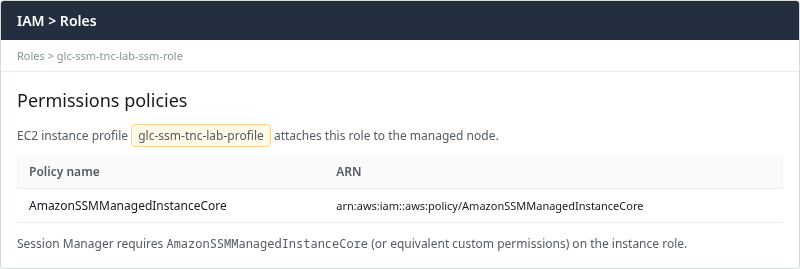
Detaching the managed policy reproduces the failure. Ping status changed to ConnectionLost:
aws ssm describe-instance-information \
  --filters "Key=InstanceIds,Values=i-0123456789abcdef0" \
  --query 'InstanceInformationList[0].PingStatus' \
--output textConnectionLostSession Manager then returns the same CLI error:
aws ssm start-session --target i-0123456789abcdef0An error occurred (TargetNotConnected) when calling the StartSession operation: i-0123456789abcdef0 is not connected.Reattach the AWS managed policy to the role:
aws iam attach-role-policy \
  --role-name glc-ssm-tnc-lab-ssm-role \
  --policy-arn arn:aws:iam::aws:policy/AmazonSSMManagedInstanceCore
After IAM propagation, restart the agent so it refreshes credentials:
sudo systemctl restart amazon-ssm-agentPing status returned to Online after the policy was restored and the agent restarted. Reboot the EC2 instance only if the agent still fails to refresh credentials after a restart.
Check Outbound HTTPS and DNS
If the agent is running and the IAM role is correct, the next question is whether it can actually reach AWS. The SSM agent needs outbound TCP 443 to Regional AWS endpoints (or to private VPC endpoints in isolated subnets). Block egress from the instance security group and the agent cannot ping; Fleet Manager shows ConnectionLost and sessions fail with TargetNotConnected.
Lab test only: the next command intentionally breaks outbound connectivity from the test instance so we can reproduce TargetNotConnected. Do not run it on a production security group.
Remove all egress rules from the instance security group to reproduce the break:
aws ec2 revoke-security-group-egress \
  --group-id sg-0123456789abcdef0 \
  --ip-permissions 'IpProtocol=-1,IpRanges=[{CidrIp=0.0.0.0/0}]'
After one to two minutes, ping status reflected the loss:
aws ssm describe-instance-information \
  --filters "Key=InstanceIds,Values=i-0123456789abcdef0" \
  --query 'InstanceInformationList[0].PingStatus' \
--output textConnectionLostStart Session Manager again to capture the same error after egress is blocked:
aws ssm start-session --target i-0123456789abcdef0An error occurred (TargetNotConnected) when calling the StartSession operation: i-0123456789abcdef0 is not connected.Restore only the outbound traffic Session Manager needs. For a public endpoint or NAT path, allow TCP 443 rather than unrestricted all-traffic egress:
aws ec2 authorize-security-group-egress \
  --group-id sg-0123456789abcdef0 \
  --ip-permissions 'IpProtocol=tcp,FromPort=443,ToPort=443,IpRanges=[{CidrIp=0.0.0.0/0}]'
For VPC interface endpoints, restrict instance egress to TCP 443 toward the endpoint security group instead of 0.0.0.0/0.
When the instance sits in a private subnet without a NAT gateway, outbound 443 to public SSM endpoints still fails. Use VPC interface endpoints instead.
On the instance, quick connectivity checks when the agent is running:
curl -sI --connect-timeout 5 "https://ssm.ap-south-1.amazonaws.com" | head -1HTTP/1.1 404 Not FoundA 404 here is acceptable because curl is not calling a valid SSM API operation; it only checks whether DNS, TCP 443, and TLS can reach the AWS endpoint.
With SSM Agent 3.3.40.0 and later, the message channel to ssmmessages matters at least as much as the ssm API hostname:
curl -sI --connect-timeout 5 "https://ssmmessages.ap-south-1.amazonaws.com" | head -1HTTP/1.1 404 Not FoundAny HTTP or TLS response confirms basic DNS resolution and HTTPS reachability to that hostname. A timeout usually points to a security-group, route-table, NACL, endpoint, or proxy problem. A successful curl does not prove that SSM Agent can complete its authenticated messaging channel; it only confirms the underlying network path.
Check SSM VPC Endpoints
For the current SSM Agent used in this lab, an isolated subnet with no NAT or other internet path needs private connectivity to the Systems Manager service and the ssmmessages service. The usual PrivateLink design creates Interface VPC endpoints for:
com.amazonaws.<region>.ssmcom.amazonaws.<region>.ssmmessages
Older SSM Agent versions and older compatibility configurations may also use com.amazonaws.<region>.ec2messages. Starting with SSM Agent 3.3.40.0, the agent prefers ssmmessages when it is available. ec2messages remains supported only in Regions launched before 2024; AWS now recommends ssmmessages for Session Manager's data channel.
This lab uses SSM Agent 3.3.5226.0, so ssm and ssmmessages are the important endpoints for the tested Session Manager path. Create the interface endpoints in subnets reachable from the managed instances. The endpoints do not have to be in the same subnet as each EC2 instance, but their security group must allow inbound TCP 443 from the instances (or their security group).
Also verify that Private DNS is enabled on the ssm and ssmmessages interface endpoints. The VPC must have DNS support enabled so names such as ssm.ap-south-1.amazonaws.com and ssmmessages.ap-south-1.amazonaws.com resolve through the private endpoints instead of requiring an internet path.
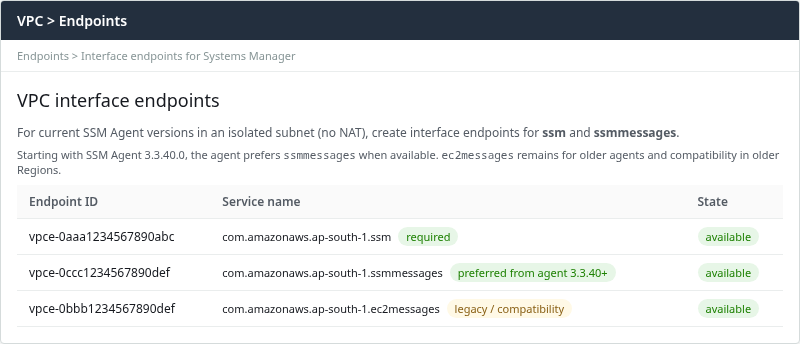
The lab VPC includes ssm, ssmmessages, and legacy-compatible ec2messages. With SSM Agent 3.3.40.0 and later, ssmmessages is preferred over ec2messages.
List endpoints in the VPC:
aws ec2 describe-vpc-endpoints \
  --filters "Name=vpc-id,Values=vpc-0123456789abcdef0" \
  --query 'VpcEndpoints[].{Service:ServiceName,State:State,Type:VpcEndpointType}' \
--output table--------------------------------------------------------------------
| DescribeVpcEndpoints |
+----------------------------------+------------+------------------+
| Service | State | Type |
+----------------------------------+------------+------------------+
| com.amazonaws.ap-south-1.ssm | available | Interface |
| com.amazonaws.ap-south-1.ssmmessages | available | Interface |
| com.amazonaws.ap-south-1.ec2messages | available | Interface |
+----------------------------------+------------+------------------+Missing ssm or ssmmessages in an isolated subnet produces the same TargetNotConnected symptom as a full egress block. Gateway endpoints for S3 help agent updates but do not replace these interface endpoints for Session Manager.
Check Proxy, SCP, and Permission Restrictions
Organization Service Control Policies (SCPs) or permission boundaries can block the actions required by AmazonSSMManagedInstanceCore, even when the role appears to have the managed policy attached. If on-instance fixes look correct but API calls fail with AccessDenied (not TargetNotConnected), compare effective permissions against AmazonSSMManagedInstanceCore.
Corporate HTTPS proxies must allow the Regional ssm and ssmmessages endpoints (and ec2messages only when an older agent still requires it). Configure proxy settings in the agent config when direct outbound 443 is not available:
/etc/amazon/ssm/amazon-ssm-agent.jsonAfter proxy or SCP changes, restart the agent and re-check Fleet Manager ping status.
Verify the Fix with Run Command and Session Manager
Once Fleet Manager shows Online and the failure mode is fixed, use Run Command to confirm that the SSM Agent and managed-node communication channel are healthy. A successful Run Command shows the instance is registered, the agent is communicating, the instance role works for that path, and the messaging/network path is functional. It does not by itself verify the caller's ssm:StartSession permission, Session Manager document settings, or the workstation Session Manager plugin.
CMD_ID=$(aws ssm send-command \
  --instance-ids i-0123456789abcdef0 \
  --document-name AWS-RunShellScript \
  --parameters 'commands=["hostname","systemctl is-active amazon-ssm-agent"]' \
  --query 'Command.CommandId' --output text)
Read the command result when status settles:
aws ssm get-command-invocation \
  --command-id "$CMD_ID" \
  --instance-id i-0123456789abcdef0 \
  --query '{Status:Status,Stdout:StandardOutputContent}' \
--output yamlStatus: Success
Stdout: 'ip-172-31-24-245.ap-south-1.compute.internal
active
'When Status is Success and the agent reports active, start an interactive session from the console (Connect → Session Manager) or install the Session Manager plugin and run:
aws ssm start-session --target i-0123456789abcdef0If Run Command succeeds but start-session fails with SessionManagerPlugin is not found, install the plugin on the workstation. That error is local to the CLI and is not TargetNotConnected.
References
- AWS Systems Manager Session Manager prerequisites
- Install the Session Manager plugin for the AWS CLI
- Use AWS Systems Manager endpoints in interface VPC endpoints
- AmazonSSMManagedInstanceCore managed policy
Frequently Asked Questions
Does Systems Manager Session Manager require inbound port 22?
No. The SSM agent uses outbound HTTPS (443) to AWS endpoints. Session Manager does not open SSH on the instance.
Which VPC endpoints does Session Manager need?
For current SSM Agent versions in a private subnet without NAT, create Interface endpoints for ssm and ssmmessages in the same Region. ec2messages remains for older agents and compatibility in older Regions; starting with agent 3.3.40.0, ssmmessages is preferred when available.
Why is the managed node Offline or ConnectionLost?
Common causes are a stopped SSM agent, missing AmazonSSMManagedInstanceCore on the instance role, blocked outbound 443, missing ssm or ssmmessages VPC endpoints in private subnets, or calling APIs in the wrong Region. Fleet Manager Online with TargetNotConnected can also mean the agent stopped recently while the console still shows the last reported status.
Why do I see TargetNotConnected when Ping status is still Online?
Fleet Manager may continue to show Online for a few minutes after the agent stops because the console is showing the last reported agent status rather than checking the service in real time. Confirm agent state on the instance with systemctl is-active amazon-ssm-agent.
