
| Package | aws-cli/2.37.3, curl (RHEL 10.2 on EC2 with HttpTokens=required) |
|---|---|
| AWS Region | ap-south-1 (Mumbai) for the examples; metadata options shown here are configured on the EC2 instance |
| Lab environment | Workstation with AWS CLI v2 and configured credentials — AWS CLI tutorial Install AWS CLI on Ubuntu · Install AWS CLI on Debian |
| Privilege | EC2 read access to describe instances; ec2:ModifyInstanceMetadataOptions when changing IMDS settings; [sudo](/sudo-command-in-linux/) on the instance only when a local script or unit needs elevation |
| Scope | Why curl to 169.254.169.254 returns HTTP 401 when IMDSv2 session tokens are required, the immediate token PUT and authenticated metadata GET fix, how to read MetadataOptions in the console and CLI, token TTL and hop limits for containers, common curl mistakes, and how to confirm IMDSv1 stays disabled. Does not catalog every metadata path or IAM role credential chain. |
| Related guides | AWS CLI Tutorial EC2 SSH connection timed out EC2 permission denied publickey Deploy a website with AWS EC2 AWS Tutorial |
EC2 Instance Metadata Service (IMDS) is a service available from inside an EC2 instance that lets software retrieve information about that instance, such as its instance ID, hostname, IAM role credentials, and other metadata. EC2 exposes IMDS through 169.254.169.254, a link-local address used locally by software on the instance to reach the metadata service rather than as a normal internet-facing address.
IMDSv2 is the newer version of this service. Unlike IMDSv1, it requires a temporary session token when the instance is configured with token usage set to required. In AWS, HttpTokens=required means the instance accepts metadata requests only through IMDSv2, so a metadata GET without a valid token returns 401 Unauthorized.
From inside the instance you can normally query /latest/meta-data/ to discover available metadata categories, or /latest/meta-data/instance-id to retrieve the ID of the current instance. The examples below use instance-id throughout so the same path fails, then succeeds after you add a token.
If an EC2 instance is configured to require IMDSv2, a direct curl request to 169.254.169.254 without a token returns 401 Unauthorized. This means the request reached the EC2 metadata service, but IMDS rejected it because the request did not include the required IMDSv2 token. Security groups and routing are not the problem.
On a lab instance with HttpTokens=required, this request reproduces the failure:
curl -sS -i --connect-timeout 2 http://169.254.169.254/latest/meta-data/instance-idHTTP/1.1 401 Unauthorized
Content-Length: 0
Date: Sun, 27 Sep 2026 02:58:48 GMT
Server: EC2ws
Connection: close
Content-Type: text/plain401 Unauthorized confirms that IMDS answered the request. The call used IMDSv1-style access on an instance that requires a token.
The examples use RHEL 10.2 with HttpTokens=required and hop limit 1. Instance IDs, hostnames, and token values in screenshots and command output are sanitized; the workflow was tested in ap-south-1.
Quick Fix: Use an IMDSv2 Token
If this command returns 401 Unauthorized:
curl http://169.254.169.254/latest/meta-data/instance-idThe IMDSv2 token is a temporary session value used only to authenticate requests to the metadata service on that EC2 instance. It is not an AWS access key or IAM credential.
Request a token first:
TOKEN=$(curl -fsS -X PUT \
  "http://169.254.169.254/latest/api/token" \
  -H "X-aws-ec2-metadata-token-ttl-seconds: 21600") || {
    echo "Failed to obtain IMDSv2 token"
    exit 1
}
In this command:
-X PUTtells IMDS that you are requesting an IMDSv2 session token.-Hadds the required HTTP header.21600requests a token lifetime of 21,600 seconds, or six hours.TOKEN=$(...)stores the returned token in the shell variableTOKEN.-fmakescurlreturn a failure status for HTTP errors instead of allowing the response to be treated as a valid token.
Then send the token on the same metadata request:
curl -sS \
  -H "X-aws-ec2-metadata-token: ${TOKEN}" \
http://169.254.169.254/latest/meta-data/instance-idi-0123456789abcdef0If the direct request returned 401 but the same metadata request succeeds after adding an IMDSv2 token, the instance is enforcing token-based IMDSv2 access. The sections below explain how to verify that setting and what to check when the token request itself fails.
Think of the token as a temporary pass for the metadata service: first obtain it, then present it with each metadata request until it expires.
Why 169.254.169.254 Returns 401
169.254.169.254 is the link-local IPv4 endpoint that workloads on the EC2 instance use to access IMDS. If IMDS returns HTTP 401, the request reached the metadata service, but it did not provide a valid token when one was required.
With IMDSv1, metadata could be retrieved with a direct GET. IMDSv2 adds a token request first. If the instance is configured to require IMDSv2 and you send the old IMDSv1-style GET, IMDS returns 401 Unauthorized.
             IMDSv1
           Application
                ↓
GET /latest/meta-data/instance-id
                ↓
              IMDS
                ↓
           instance ID

                 IMDSv2
               Application
                    ↓
          PUT /latest/api/token
                    ↓
                  IMDS
                    ↓
                  token
                    ↓
               Application
                    ↓
    GET /latest/meta-data/instance-id
Header: X-aws-ec2-metadata-token: <token>
                    ↓
                  IMDS
                    ↓
               instance ID
One reason AWS introduced IMDSv2 was to reduce the risk from server-side request forgery (SSRF). In an SSRF attack, a vulnerable application can be tricked into sending a request to another address on behalf of an attacker. Because EC2 metadata can expose sensitive information such as IAM role credentials, protecting access to IMDS is important. IMDSv2 adds an extra step: the caller must first make a PUT request to obtain a temporary token and then include that token in later metadata requests.
With HttpTokens=required, AWS expects:
- A
PUTto/latest/api/tokenwithX-aws-ec2-metadata-token-ttl-seconds - Follow-up requests that include
X-aws-ec2-metadata-token: <token>
Legacy scripts that call curl http://169.254.169.254/latest/meta-data/instance-id without the token step still reach IMDS but receive 401 Unauthorized.
| HTTP result | Typical cause |
|---|---|
401 Unauthorized |
Missing, invalid, or expired IMDSv2 token when token usage is required |
400 Bad Request |
Malformed token PUT (for example missing or invalid TTL header) |
405 Not Allowed |
Wrong HTTP method on /latest/api/token (for example GET instead of PUT) |
| Connection timeout | Not a token-auth problem; check network path, firewall, or HttpEndpoint=disabled |
200 with metadata body |
Valid token attached to the request |
Check Whether IMDSv2 Is Required
Before changing application code, confirm how the instance is configured. The console shows whether tokens are required and the hop limit for nested callers.
Where to run these commands: metadata curl commands must run from the EC2 instance because 169.254.169.254 is the instance metadata endpoint. The aws ec2 describe-instances command can run from your workstation or another system with AWS CLI credentials and permission to describe the instance.
Open the instance in the EC2 console and copy the Instance ID for CLI commands that use --instance-id:
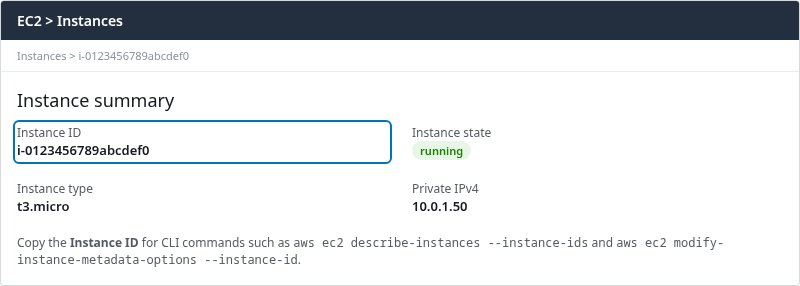
The highlighted Instance ID is the value for --instance-ids and --instance-id in the AWS CLI.
Under Actions → Instance settings → Modify instance metadata options, check Metadata version. When it reads V2 only (token required), bare metadata GET requests without a token return HTTP 401:
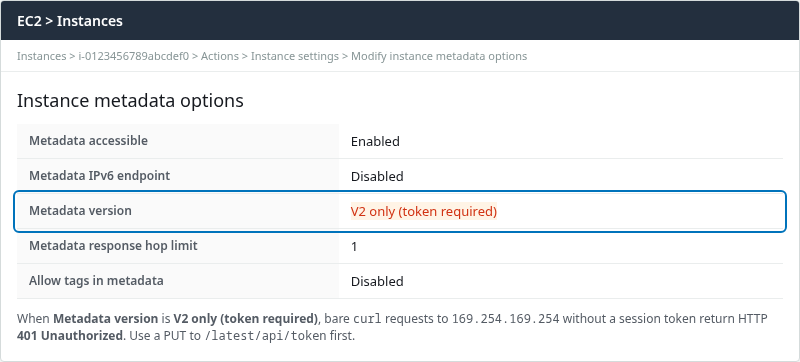
Metadata version V2 only (token required) maps to HttpTokens: required in the CLI. This does not mean IMDS is disabled. Metadata is still available, but clients must use the IMDSv2 token workflow. Metadata response hop limit is the number of network hops the token PUT response may traverse (relevant for containers).
From your workstation, read the same fields under MetadataOptions:
aws ec2 describe-instances \
  --region ap-south-1 \
  --instance-ids i-0123456789abcdef0 \
  --query 'Reservations[0].Instances[0].MetadataOptions' \
--output yamlHttpEndpoint: enabled
HttpProtocolIpv6: disabled
HttpPutResponseHopLimit: 1
HttpTokens: required
InstanceMetadataTags: disabled
State: appliedHttpTokens: required matches V2 only (token required) in the console. State: applied means the running instance already enforces the setting.
Use and Reuse the IMDSv2 Token
Attach the token to every metadata GET (and to other IMDSv2 operations AWS documents). The header name is case-insensitive; AWS documents X-aws-ec2-metadata-token.
Fetch the instance ID with the curl command -H flag:
curl -sS -H "X-aws-ec2-metadata-token: ${TOKEN}" \
http://169.254.169.254/latest/meta-data/instance-idi-0123456789abcdef0You can reuse the same token for other metadata paths until it expires:
curl -sS -H "X-aws-ec2-metadata-token: ${TOKEN}" \
http://169.254.169.254/latest/meta-data/local-hostnameip-10-0-1-50.ap-south-1.compute.internalIAM role credentials under /latest/meta-data/iam/security-credentials/ follow the same rule: obtain a token first, then pass the header on each request. A script does not need a new token for every metadata path. Request one token, reuse it until its TTL expires, and then request a new one.
To inspect the full token handshake, run the PUT with headers visible:
curl -sS -i -X PUT "http://169.254.169.254/latest/api/token" \
-H "X-aws-ec2-metadata-token-ttl-seconds: 21600"HTTP/1.1 200 OK
X-Aws-Ec2-Metadata-Token-Ttl-Seconds: 21600
Content-Length: 56
Date: Sun, 27 Sep 2026 02:58:53 GMT
Server: EC2ws
Connection: close
Content-Type: text/plain
AQAEAExampleSanitizedTokenValueForArticlePublishingOnly1234567890==The response body is the session token. X-Aws-Ec2-Metadata-Token-Ttl-Seconds echoes the TTL AWS applied.
Token TTL and Expiration
The TTL header sets how long AWS honors a token. AWS examples commonly use 21600, the maximum six-hour TTL. You can choose any value from 1 to 21600 seconds depending on how long the process needs the token.
| Setting | Behavior |
|---|---|
X-aws-ec2-metadata-token-ttl-seconds: 1 to 21600 |
Token remains usable for the configured TTL on the instance where it was created |
| Reuse within TTL | Same token works on repeated GET calls; no need to PUT before every path |
| After expiry | On a token-required instance, metadata GET returns 401 until you request a new token |
The token remains usable for its configured TTL and only on the EC2 instance on which it was created. After it expires, request a new token.
Long-running processes should request a new token before the current one expires or retry token creation when a metadata request indicates the token is no longer valid. If a script works initially but starts receiving 401 later, check whether it is still using an expired token.
Common curl Mistakes
If you still receive 401 after switching to IMDSv2, check these common mistakes:
| Mistake | What happens | Fix |
|---|---|---|
Bare GET to /latest/meta-data/... |
401 Unauthorized |
PUT token first; add X-aws-ec2-metadata-token |
GET on /latest/api/token |
405 Not Allowed; Allow: OPTIONS, PUT |
Use curl -X PUT |
Malformed token PUT |
400 Bad Request |
Send valid X-aws-ec2-metadata-token-ttl-seconds (1–21600) |
Empty header -H "X-aws-ec2-metadata-token:" |
401 on metadata paths |
Set header to the full token string |
| Token in query string or URL path | Ignored; still 401 |
Token belongs in the header only |
| Stale token after sleep or long job | 401 mid-run |
Request a new token with PUT |
Missing -f on token PUT |
curl may treat an HTTP error as a successful command and capture its response |
Use curl -fsS and check exit status |
Missing -H on subprocess |
Child shell drops variable | Export TOKEN or pass header explicitly |
If you send a normal GET request to the token endpoint instead of PUT, IMDS returns a different error:
curl -sS -i --connect-timeout 2 http://169.254.169.254/latest/api/tokenHTTP/1.1 405 Not Allowed
Allow: OPTIONS, PUT
Content-Length: 0
Date: Sun, 27 Sep 2026 02:58:54 GMT
Server: EC2ws
Connection: close
Content-Type: text/plain405 confirms the endpoint is reachable but the verb was wrong. Switch to PUT with the TTL header.
Container Hop-Limit Problems
If you are running the curl command directly on the EC2 host, you can skip this section. This issue mainly affects applications running inside containers on the instance.
Containers normally use their own virtual network environment. Reaching IMDS from inside that environment can add another network hop between the application and 169.254.169.254.
HttpPutResponseHopLimit defines how many network hops the HTTP PUT response to the token endpoint may traverse. AWS allows values from 1 to 64. With hop limit 1, a container can reach the IMDS address but the response to the IMDSv2 token PUT may not make it back through the additional network hop. The token request can time out or fail even though the same command works directly on the EC2 host. A later metadata GET may then return 401 if the script sends an empty or invalid token.
| Hop limit | Typical interpretation |
|---|---|
1 |
Usually suitable for processes running directly on the EC2 host |
2 |
AWS-recommended setting when containers need direct IMDSv2 access |
3–64 |
Only when the workload network topology genuinely requires additional hops |
Do not increase the value simply to make a failing request work. First confirm how many network hops exist between the workload and IMDS.
Inspect the current hop limit from your workstation:
aws ec2 describe-instances \
  --region ap-south-1 \
  --instance-ids i-0123456789abcdef0 \
  --query 'Reservations[0].Instances[0].MetadataOptions.HttpPutResponseHopLimit' \
--output text1Only change this setting if the application inside the container actually needs to call IMDS:
aws ec2 modify-instance-metadata-options \
  --region ap-south-1 \
  --instance-id i-0123456789abcdef0 \
  --http-put-response-hop-limit 2
Verify IMDSv1 Is Disabled
As a final check, confirm that a request without a token still returns 401, while the same request with an IMDSv2 token returns 200.
From the instance, a bare GET should remain 401:
curl -sS -o /dev/null -w "http_code=%{http_code}\n" \
http://169.254.169.254/latest/meta-data/instance-idhttp_code=401Then confirm IMDSv2 still succeeds with a fresh token:
TOKEN=$(curl -fsS -X PUT "http://169.254.169.254/latest/api/token" \
  -H "X-aws-ec2-metadata-token-ttl-seconds: 60") || exit 1
curl -sS -o /dev/null -w "http_code=%{http_code}\n" \
  -H "X-aws-ec2-metadata-token: ${TOKEN}" \
http://169.254.169.254/latest/meta-data/instance-idhttp_code=200Account and organization policies can require IMDSv2 on new instances. Update bootstrap scripts, Ansible tasks, and systemd units that still assume IMDSv1.
To disable metadata entirely, set Metadata accessible to disabled (HttpEndpoint=disabled) in the console or with modify-instance-metadata-options. That breaks any workload that still expects metadata, including many IAM role credential helpers.
Troubleshooting
| Symptom | Likely cause | Fix |
|---|---|---|
401 on first metadata GET |
Token required; no valid token on the request | Use Quick Fix token PUT; send header on GET |
401 after the script ran for a while |
Expired token | Request a new token before TTL expires |
400 on token PUT |
Invalid TTL or malformed request | Use TTL between 1 and 21600 |
405 on /latest/api/token |
Used GET or POST |
curl -X PUT with TTL header |
Host token PUT works; container token PUT times out or fails |
PUT response hop limit may be too low | Confirm hops; consider HttpPutResponseHopLimit=2 when containers need IMDS |
401 with header set |
Typo, truncated token, empty TOKEN, or expired token |
Use curl -fsS; check ${#TOKEN}; refresh token |
Connection timeout to 169.254.169.254 |
Not token-related | Check HttpEndpoint, local firewall, or whether code runs off-instance |
| Need to turn off IMDS | Security policy | HttpEndpoint=disabled (breaks metadata consumers) |
Optional: Require IMDSv2 on another instance
This is not the fix for 401 on an instance that already requires tokens. Use it when you want to harden a different instance that still accepts IMDSv1:
aws ec2 modify-instance-metadata-options \
  --region ap-south-1 \
  --instance-id i-0123456789abcdef0 \
  --http-tokens required \
  --http-endpoint enabled \
  --http-put-response-hop-limit 1
New instances can set the same options at launch with --metadata-options HttpTokens=required,HttpEndpoint=enabled,HttpPutResponseHopLimit=1.
Summary
HTTP 401 from 169.254.169.254 means IMDS is reachable but the request did not include a valid IMDSv2 session token. The immediate fix is a PUT to /latest/api/token, then metadata GET requests with X-aws-ec2-metadata-token.
When Metadata version is V2 only (token required), HttpTokens is required and unauthenticated GET calls return 401 by design. Metadata is still available; clients must use the token workflow. Reuse the token until its TTL expires; request a new one when metadata calls start failing again. Common mistakes are bare IMDSv1 GETs, wrong HTTP methods on the token URL, storing HTTP error text in TOKEN, and container token failures caused by a hop limit that is too low for the extra network namespace.
As a final check, confirm that a request without a token still returns 401 while the same request with an IMDSv2 token returns 200. Only change hop limits when an application inside a container actually needs to call IMDS.
References
- Use the Instance Metadata Service to access instance metadata
- Troubleshoot instance metadata issues on my EC2 instance (AWS re:Post)
- Configure the Instance Metadata Service options
- Instance metadata and user data
- Transition to IMDSv2
- AWS CLI modify-instance-metadata-options
Frequently Asked Questions
Why does 169.254.169.254 return 401?
The metadata address is reachable from the EC2 instance, but the request did not include a valid IMDSv2 session token while token usage is required. IMDS rejects unauthenticated metadata GET calls with HTTP 401 Unauthorized and an empty body. Request a token with PUT to /latest/api/token, then send X-aws-ec2-metadata-token on metadata paths.
How long is an IMDSv2 token valid?
Validity is set by X-aws-ec2-metadata-token-ttl-seconds on the token PUT, from 1 second up to 21600 seconds (six hours). AWS returns the applied TTL in X-Aws-Ec2-Metadata-Token-Ttl-Seconds. The token remains usable for that TTL on the instance where it was created. After expiry, metadata calls return 401 until a new token is issued.
Can I disable IMDS?
Yes. Set Metadata accessible to disabled (HttpEndpoint=disabled) in the console or with aws ec2 modify-instance-metadata-options --http-endpoint disabled. No process on the instance can reach 169.254.169.254 afterward, including IAM role credential fetchers. Use that only when workloads no longer depend on instance metadata.
