
| Package | xfsprogs, fio, nvme-cli, aws-cli/2.37.3 (RHEL 10.2 on EC2, Nitro NVMe) |
|---|---|
| AWS Region | ap-south-1 (Mumbai) for these examples; the EBS volume remains in its Availability Zone while its type and performance settings are modified in place |
| Lab environment | Workstation with AWS CLI v2 and configured credentials — AWS CLI tutorial Install AWS CLI on Ubuntu · Install AWS CLI on Debian |
| Privilege | EC2 ModifyVolume, DescribeVolumes, and DescribeVolumesModifications permissions; [sudo](/sudo-command-in-linux/) on the instance for block-device and mount checks |
| Scope | How to convert an attached EBS gp2 volume to gp3 online without unmounting or reformatting, record baseline IOPS and throughput, choose gp3 performance settings, monitor modification state with the AWS CLI, and verify that the filesystem UUID and data remain unchanged. Covers gp3 performance AWS preserves during type conversion and an optional follow-up IOPS/throughput tune. Does not cover growing an EBS volume after resize or mapping /dev/sdf to NVMe device names on Nitro instances. |
| Related guides | EBS volume resized but df not changed EC2 /dev/sdf vs NVMe device names Amazon Elastic Block Store AWS CLI Tutorial AWS Tutorial |
An EBS gp2 volume can be converted to gp3 while it stays attached and mounted. AWS changes the volume type in place while the instance keeps using the same attached volume; Linux keeps the same block device, partition layout, and filesystem UUID.
The walkthrough uses a RHEL 10.2 Nitro instance in ap-south-1 with a 20 GiB gp2 data volume attached at /dev/sdf (guest path /dev/nvme1n1) and an XFS filesystem on /mnt/bench. The volume moves to gp3 with AWS-chosen performance for this size, then to 4000 IOPS and 250 MiB/s throughput in a second step. The marker file and filesystem UUID are identical before and after both modifications.
  gp2 volume (attached, mounted)          gp3 volume (same attachment)
  ┌─────────────────────────┐             ┌─────────────────────────┐
  │ Type: gp2               │  modify-    │ Type: gp3               │
  │ IOPS: 100 (baseline)    │  volume     │ IOPS: 3000 → 4000       │
  │ Throughput: burst model │  ────────►  │ Throughput: 125 → 250   │
  │ XFS UUID unchanged      │  (online)   │ XFS UUID unchanged      │
  └─────────────────────────┘             └─────────────────────────┘
Where to run the commands
aws ec2 …commands run from a workstation with the AWS CLI configured.lsblk,df,blkid, and optionalfioruns execute on the EC2 instance where the volume is mounted.
gp2 vs gp3: What Changes
Both volume types store data on durable EBS block storage. The main difference is how performance is allocated and billed.
| Setting | gp2 | gp3 |
|---|---|---|
| Baseline IOPS model | 3 IOPS per GiB, minimum 100 IOPS, burst credits for short spikes | 3000 IOPS included at any size (below the gp3 maximum) |
| Throughput | Scales with volume size and IOPS characteristics; can reach 128–250 MiB/s depending on size; you cannot provision throughput separately | 125 MiB/s included; configurable up to the gp3 maximum for the volume size |
| Size change | Separate modify-volume for size |
Same API; type, size, IOPS, and throughput can be modified independently on gp3 |
| Downtime for type change | None when Elastic Volumes online modification is supported for the attached instance | None when Elastic Volumes online modification is supported for the attached instance |
On a 20 GiB gp2 volume, baseline IOPS is 100 (the gp2 minimum applies because 20 × 3 = 60). For this size, converting to gp3 without specifying performance results in 3000 IOPS and 125 MiB/s. More generally, AWS provisions the higher of the source gp2-equivalent performance and the gp3 baseline, so larger gp2 volumes can retain higher throughput or IOPS automatically. For example, a 500 GiB gp2 volume can become gp3 with 3000 IOPS and 250 MiB/s because AWS preserves the higher source throughput rather than dropping to the 125 MiB/s baseline.
gp3 is often cheaper per GiB than gp2 in many Regions, but list prices change. Check the EBS pricing page for the Region before quoting savings to stakeholders.
Record Current Volume Settings
Before changing anything, capture the volume ID, type, IOPS, attachment, and the filesystem state on the instance. Record these values so you can confirm you modified the right volume and verify the filesystem afterward.
From a workstation, describe the volume:
aws ec2 describe-volumes --volume-ids vol-0abc1234567890def \
  --query 'Volumes[0].{Type:VolumeType,Size:Size,Iops:Iops,State:State,Attachments:Attachments}' \
--output table---------------------------------------------------------
| DescribeVolumes |
+------+-------+---------+-----------+----------------+
| Iops | Size | State | Type | Attachments |
+------+-------+---------+-----------+----------------+
| 100 | 20 | in-use | gp2 | .../dev/sdf |
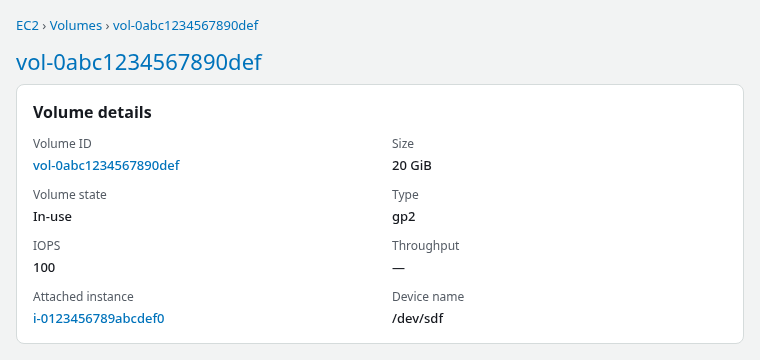
+------+-------+---------+-----------+----------------+In the EC2 console, the same baseline shows 20 GiB, gp2, 100 IOPS, and In-use on /dev/sdf:
On the instance, confirm the mount, filesystem type, and a test file. On Nitro, map the volume with lsblk SERIAL (see EC2 device names vs NVMe):
sudo lsblk -o NAME,SIZE,TYPE,FSTYPE,MOUNTPOINTS,SERIAL
sudo df -hT /mnt/bench
sudo blkid $(findmnt -no SOURCE /mnt/bench)
cat /mnt/bench/marker.txtNAME SIZE TYPE FSTYPE MOUNTPOINTS SERIAL
nvme1n1 20G disk xfs /mnt/bench vol0abc1234567890def
Filesystem Type Size Used Avail Use% Mounted on
/dev/nvme1n1 xfs 20G 425M 20G 3% /mnt/bench
/dev/nvme1n1: UUID="6e48bf05-c3b5-476b-bd06-47f02ea0525f" BLOCK_SIZE="512" TYPE="xfs"
gp2-to-gp3-markerSave the filesystem UUID and a checksum or marker file path. Those values should match after gp3 conversion.
Choose gp3 IOPS and Throughput
gp3 splits capacity, IOPS, and throughput into separate settings. If you only want to migrate the type, change gp2 to gp3 first and let AWS preserve the required source performance. If monitoring later shows a bottleneck, increase gp3 IOPS or throughput with another modify-volume call.
Guidelines for the second step:
- IOPS: the gp3 baseline of 3000 suits many general workloads on smaller volumes. Raise IOPS when sustained random I/O latency matters and monitoring shows gp2 burst credits or IOPS ceilings were a bottleneck.
- Throughput: the 125 MiB/s baseline covers many sequential workloads on small volumes. Increase throughput for large streaming reads or writes when IOPS alone is not the limit.
- Maximums: gp3 supports performance above the 3000 IOPS / 125 MiB/s baseline, but valid values depend on gp3 size and IOPS-to-throughput limits. Check the current AWS gp3 limits before choosing high custom values.
In this lab, the first call converts gp2 → gp3 without specifying IOPS or throughput. The second call sets 4000 IOPS and 250 MiB/s on the already-gp3 volume.
Modify the Volume Online
Start the type conversion from a workstation. The volume stays attached; the instance keeps running.
For important production data, take a recent EBS snapshot or confirm your backup before starting the modification. The type change is in-place, but the snapshot gives you a recovery point if an unrelated storage or application issue appears during the change window.
aws ec2 modify-volume \
  --volume-id vol-0abc1234567890def \
--volume-type gp3{
"VolumeModification": {
"VolumeId": "vol-0abc1234567890def",
"ModificationState": "modifying",
"TargetSize": 20,
"TargetIops": 3000,
"TargetVolumeType": "gp3",
"TargetThroughput": 125,
"OriginalSize": 20,
"OriginalIops": 100,
"OriginalVolumeType": "gp2",
"Progress": 0,
"StartTime": "2026-09-27T15:00:43+00:00"
}
}AWS returns immediately with ModificationState: modifying. For this 20 GiB volume, the API response shows targets of gp3, 3000 IOPS, and 125 MiB/s from the original gp2 volume at 100 IOPS. On a larger gp2 volume, TargetIops or TargetThroughput can be higher when AWS preserves source-equivalent performance.
No reboot is required on the Nitro instance in this test. The XFS mount on /mnt/bench stayed active through the modification.
After the type change completes, tune performance with a second call:
aws ec2 modify-volume \
  --volume-id vol-0abc1234567890def \
  --iops 4000 \
--throughput 250{
"VolumeModification": {
"VolumeId": "vol-0abc1234567890def",
"ModificationState": "modifying",
"TargetIops": 4000,
"TargetVolumeType": "gp3",
"TargetThroughput": 250,
"OriginalIops": 3000,
"OriginalVolumeType": "gp3",
"OriginalThroughput": 125,
"Progress": 0,
"StartTime": "2026-09-27T15:06:14+00:00"
}
}You can make both changes while the volume remains attached and mounted. Do not run mkfs or change /etc/fstab for a type conversion alone.
Monitor Modification State
Track progress with describe-volumes-modifications. The state moves from modifying to optimizing, then completed.
aws ec2 describe-volumes-modifications --volume-ids vol-0abc1234567890def \
  --query 'VolumesModifications[0].{State:ModificationState,Progress:Progress,TargetType:TargetVolumeType,TargetIops:TargetIops,TargetThroughput:TargetThroughput}' \
  --output table
During the gp2 → gp3 step, the lab reported optimizing at 6% progress, then completed at 100%. The IOPS/throughput tune finished faster: optimizing at 2%, then completed.
You can use the volume while AWS optimizes performance in the background. For performance testing, wait until the modification reaches completed before treating new IOPS or throughput numbers as fully in effect for benchmarking.
In the EC2 console, open Elastic Block Store → Volumes, select the volume, and confirm Type, IOPS, and Throughput after both steps:
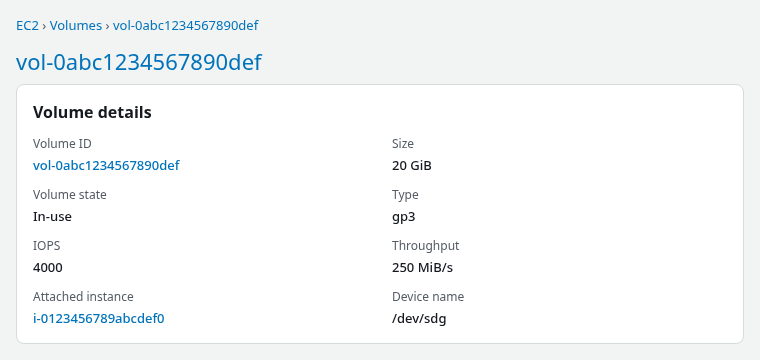
The console attachment name remains /dev/sdf. Inside Linux on Nitro, the same volume appeared as /dev/nvme1n1 before modification and as /dev/nvme2n1 after a detach-and-reattach during lab cleanup. NVMe index numbers can change; use volume ID or filesystem UUID for persistent identification.
Confirm the final AWS-side settings:
aws ec2 describe-volumes --volume-ids vol-0abc1234567890def \
  --query 'Volumes[0].{Type:VolumeType,Iops:Iops,Throughput:Throughput,Size:Size,State:State}' \
--output table-------------------------------------------------
| DescribeVolumes |
+------+-------+---------+-------+--------------+
| Iops | Size | State | Type | Throughput |
+------+-------+---------+-------+--------------+
| 4000 | 20 | in-use | gp3 | 250 |
+------+-------+---------+-------+--------------+Verify Performance and Filesystem
A volume type change does not replace the filesystem. Confirm the same UUID, mount point, and application data after AWS reports completed.
sudo lsblk -o NAME,SIZE,TYPE,FSTYPE,MOUNTPOINTS,SERIAL
sudo df -hT /mnt/bench
sudo blkid $(findmnt -no SOURCE /mnt/bench)
cat /mnt/bench/marker.txt
findmnt /mnt/benchnvme2n1 20G disk xfs /mnt/bench vol0abc1234567890def
Filesystem Type Size Used Avail Use% Mounted on
/dev/nvme2n1 xfs 20G 681M 20G 4% /mnt/bench
/dev/nvme2n1: UUID="6e48bf05-c3b5-476b-bd06-47f02ea0525f" BLOCK_SIZE="512" TYPE="xfs"
gp2-to-gp3-marker
TARGET SOURCE FSTYPE OPTIONS
/mnt/bench /dev/nvme2n1 xfs rw,relatime,...The UUID 6e48bf05-c3b5-476b-bd06-47f02ea0525f and marker file gp2-to-gp3-marker matched the gp2 baseline. No xfs_growfs, resize2fs, or remount was required for the type conversion.
Optional benchmarking helps compare latency before and after tuning. A short random read on gp2 in this lab reported about 6568 KiB/s average bandwidth over 30 seconds with fio. Repeat the same test after completed if performance validation is part of the change window; workload and instance size strongly affect the numbers. The EC2 instance's EBS bandwidth and IOPS limits can be lower than the volume's provisioned settings, so verify the instance type's EBS limits before interpreting fio results.
Cost and Performance Considerations
gp3 decouples capacity, IOPS, and throughput billing. Converting gp2 to gp3 often lowers storage cost per GiB in many Regions while raising or preserving effective baseline IOPS. Custom IOPS and throughput above the gp3 baseline add their own line items.
Before choosing custom gp3 performance:
- Pull current gp2, gp3, IOPS, and throughput rates for the Region from AWS pricing before promising savings.
- Convert the type first without forcing low IOPS or throughput values, measure workload latency and throughput, then raise IOPS or throughput only when monitoring shows a need.
- Keep gp2 burst-heavy volumes on gp2 only when sustained IOPS requirements are low and burst credits consistently cover spikes; otherwise gp3 baselines are usually simpler to reason about.
Root volumes can be converted the same way when the instance type supports online modification. Take a snapshot or AMI backup before changing production root disks.
Summary
| Step | Command or check | Expected result |
|---|---|---|
| Baseline | describe-volumes + lsblk / blkid on instance |
gp2, baseline IOPS, filesystem UUID recorded |
| Convert type | modify-volume --volume-type gp3 |
gp3; AWS-chosen IOPS/throughput (3000/125 for this 20 GiB lab) |
| Monitor | describe-volumes-modifications |
optimizing → completed |
| Tune (optional) | modify-volume --iops … --throughput … |
Higher gp3 settings on same volume |
| Verify | describe-volumes, df, marker file |
gp3 settings active; UUID and data unchanged |
Converting gp2 to gp3 is an online EBS modification: record the current volume and filesystem state, run modify-volume, wait for completed, optionally tune IOPS and throughput, and confirm the mount and data on the instance.
References
- Migrate Amazon EBS volumes from gp2 to gp3
- Amazon EBS volume types
- Modify an EBS volume
- Monitor the progress of volume modifications
- Amazon EBS pricing
Frequently Asked Questions
Does gp2 to gp3 require a reboot?
Not on supported Nitro instances when the volume stays attached. This RHEL 10.2 test kept /mnt/bench mounted through both modifications. If an older instance family or OS stack does not expose the new performance immediately, check AWS documentation for that combination before scheduling maintenance.
Will data be lost during conversion?
No. AWS changes the volume type and performance settings in place. The block contents, partition table, and filesystem superblock stay on the volume. The lab verified the same XFS UUID and marker file after conversion.
What gp3 IOPS should I choose?
If you only want to migrate the volume type, omit --iops and --throughput and let AWS preserve at least the source gp2-equivalent performance or the gp3 baseline. After migration, use CloudWatch workload data such as VolumeReadOps, VolumeWriteOps, VolumeReadBytes, VolumeWriteBytes, and latency/queue behavior to decide whether additional gp3 IOPS or throughput is justified.
