
| Package | aws-cli/2.37.3 |
|---|---|
| AWS Region | ap-south-1 (Mumbai) for the examples. IAM is global; S3 and STS calls in the walkthrough use Regional endpoints. |
| Lab environment | Workstation with AWS CLI v2 and configured credentials — AWS CLI tutorial Install AWS CLI on Ubuntu · Install AWS CLI on Debian |
| Privilege | No special AWS permission is needed to inspect local credential sources. IAM permissions such as iam:ListAccessKeys, iam:CreateAccessKey, iam:UpdateAccessKey, or iam:DeleteAccessKey are required only for the corresponding IAM checks and rotation steps. |
| Scope | Why AWS returns InvalidAccessKeyId when the CLI, SDK, or automation sends credentials AWS will not accept, how the credential provider chain picks that key from environment variables or profiles, and how to confirm key status in IAM before rotating. Does not cover AccessDenied after authentication succeeds — see IAM AccessDenied despite AdministratorAccess. For InvalidClientTokenId on STS alone, see Fix AWS CLI InvalidClientTokenId. |
| Related guides | AWS CLI Tutorial Fix AWS CLI InvalidClientTokenId Fix AWS CLI Unable to Locate Credentials Fix Terraform AWS credentials error AWS Tutorial |
InvalidAccessKeyId usually appears as The AWS Access Key Id you provided does not exist in our records. It means AWS could not recognize the access key ID used for the request — commonly because the key was deleted or deactivated, the wrong ID is configured, or another credential source is overriding the one you expected.
Before creating another key, run aws configure list. It shows whether the AWS CLI obtained the credential from environment variables, a profile, or another provider, which usually reveals where the stale key is coming from.
Quick check
Run these three commands in the shell or CI step that failed:
aws configure listNext, ask STS to identify the current credentials. If the key is invalid, this command may fail with InvalidClientTokenId; that is still useful because it confirms the credential set itself is not working:
aws sts get-caller-identityFinally, check which AWS environment variables are set. This lists the variable names without printing secret values:
env | grep '^AWS_' | cut -d= -f1If aws configure list shows env in the LOCATION column for access_key, inspect exported AWS_ACCESS_KEY_ID and related variables first. If it shows shared-credentials-file, check the selected profile in ~/.aws/credentials for the stale access key. If the configured ID no longer appears under the IAM user's access keys, replace the stale credential before rotating again.
What InvalidAccessKeyId means
InvalidAccessKeyId means AWS rejected the access key ID used to sign the request. In practice, the CLI or application is usually using an old, deleted, inactive, mistyped, or otherwise incorrect access key — often because environment variables or a stale AWS profile override the credentials you expected it to use.
Start with aws configure list to identify where the CLI obtained its credentials before creating or replacing any keys.
Typical message on data-plane services such as S3:
aws s3 lsaws: [ERROR]: An error occurred (InvalidAccessKeyId) when calling the ListBuckets operation: The AWS Access Key Id you provided does not exist in our records.The same deleted long-term key against STS often returns a different code:
aws sts get-caller-identityaws: [ERROR]: An error occurred (InvalidClientTokenId) when calling the GetCallerIdentity operation: The security token included in the request is invalid.Both errors usually mean the CLI is using credentials that AWS cannot accept. The next step is to identify where those credentials came from — an environment variable, AWS profile, CI secret, or temporary credential provider.
The access key ID and secret access key are a pair. If AWS cannot recognize the ID, you commonly see InvalidAccessKeyId; if the ID exists but the request was signed with the wrong corresponding secret, signature validation can fail instead.
| Error code | Meaning | Typical next step |
|---|---|---|
InvalidAccessKeyId |
AWS rejected the access key ID | Read aws configure list; search profiles and env for that ID |
InvalidClientTokenId |
AWS rejected the credentials or temporary security token | Check the credential source the same way — see Fix AWS CLI InvalidClientTokenId |
SignatureDoesNotMatch |
ID exists but secret does not match | Confirm the secret belongs to the listed access key ID |
AccessDenied |
Identity authenticated; action denied | Inspect IAM policies — not a missing key |
Unable to locate credentials |
No credential chain resolved | Configure a profile — see Unable to locate credentials |
                 InvalidAccessKeyId
                         │
                         ▼
                aws configure list
                         │
              Where did the key come from?
                         │
         ┌───────────────┼────────────────┐
         ▼               ▼                ▼
   Environment        AWS profile       App / CI
   variables          credentials       secret
         │               │                │
         └───────────────┼────────────────┘
                         ▼
                Which access key ID?
                         │
              ┌──────────┴──────────┐
              ▼                     ▼
          AKIA...                 ASIA...
      long-term key          temporary STS key
              │                     │
              ▼                     ▼
       IAM user key list       check STS/session
              │                credential source
       ┌──────┴──────┐
       ▼             ▼
     Exists        Missing
       │             │
 Active/Inactive   stale/deleted/
       │           wrong key
       ▼             ▼
 fix source or     replace
 replace key       credential
       └──────┬──────┘
              ▼
    aws sts get-caller-identity
              ▼
       retry original API
Current AWS access key IDs beginning with AKIA represent long-term credentials. Temporary STS access key IDs begin with ASIA and must be used with their corresponding session token — see Fix AWS CLI InvalidClientTokenId when STS rejects the credential set.
Find which credentials AWS CLI is using
Before rotating keys, confirm which provider the CLI actually used. A credential provider is simply a place the AWS CLI or SDK can obtain credentials from, such as environment variables, ~/.aws/credentials, an EC2 instance role, or a container role. AWS checks these sources in a defined order, commonly called the credential provider chain.
Environment variables override named profiles, and AWS_PROFILE alone does not clear a stale AWS_ACCESS_KEY_ID export.
Run aws configure list in the same shell (or CI job step) that failed:
aws configure listSample output when a deleted key is exported while a valid profile is also set:
NAME       : VALUE                    : TYPE             : LOCATION
profile    : glc-invkey-lab-works     : env              : ['AWS_PROFILE', 'AWS_DEFAULT_PROFILE']
access_key : ****************MRZM     : env              :
secret_key : ****************W+AK     : env              :
region     : ap-south-1               : env              : ['AWS_REGION', 'AWS_DEFAULT_REGION']
The AWS CLI masks most of the access key in this output. The important information here is the TYPE and LOCATION columns, which tell you where the CLI obtained the credential.
The LOCATION column shows env for the access key even though AWS_PROFILE names a profile. Credential environment variables win over ~/.aws/credentials for that shell.
Run the command again without changing the environment so you can confirm that the same credentials still reproduce the error. S3 returns the searchable InvalidAccessKeyId text:
aws s3 lsaws: [ERROR]: An error occurred (InvalidAccessKeyId) when calling the ListBuckets operation: The AWS Access Key Id you provided does not exist in our records.Compare with an explicit profile after clearing exports — if this succeeds while the bare command fails, the default chain or environment was the problem:
unset AWS_ACCESS_KEY_ID AWS_SECRET_ACCESS_KEY AWS_SESSION_TOKEN
aws sts get-caller-identity --profile glc-invkey-lab-works{
"UserId": "AIDAXXXXXXXXXXXXXXXXX",
"Account": "123456789012",
"Arn": "arn:aws:iam::123456789012:user/glc-invkey-lab-user"
}Check whether the access key still exists
First check what type of access key you are troubleshooting. A long-term IAM user key normally starts with AKIA; you can compare that key with iam list-access-keys. A temporary key beginning with ASIA comes from an STS session and will not appear in an IAM user's access-key list. For an ASIA credential, check the source of the temporary session and make sure the matching session token is also present.
The steps below use a long-term IAM user key (AKIA…).
If the failing credential is a long-term IAM user access key, list the keys belonging to that IAM user. Deleted keys disappear from this table; inactive keys remain with Inactive status.
If the IAM user that originally owned the key was deleted, its access keys disappear with it, so an application that still holds the old key can produce the same error.
aws iam list-access-keys --user-name glc-invkey-lab-user --output table------------------------------------------------
| ListAccessKeys |
+----------------------------------------------+
|| AccessKeyMetadata ||
|+--------------+-----------------------------+|
|| AccessKeyId | AKIAIOSFODNN7EXAMPLE ||
|| CreateDate | 2026-09-28T02:14:49+00:00 ||
|| Status | Active ||
|| UserName | glc-invkey-lab-user ||
|+--------------+-----------------------------+|Only the remaining active key appears in this lab run. The deleted key ID AKIADELETEDKEY01 from the stale profile is absent — IAM removed it when the key was deleted.
The IAM console Security credentials tab shows the same list: deleted keys do not appear, while Inactive keys remain listed with their status.
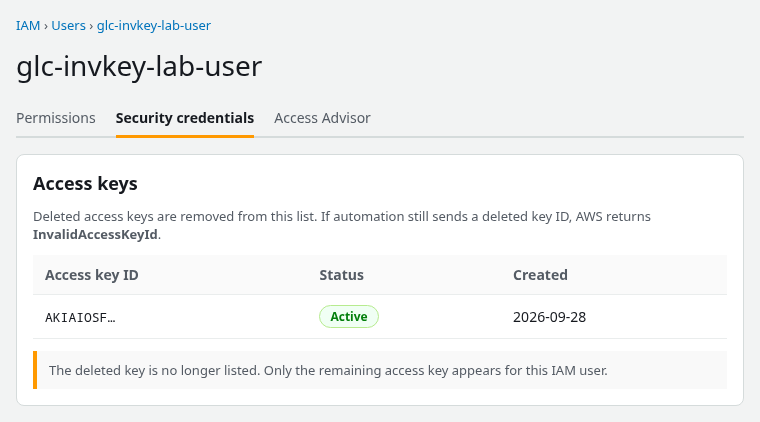
The deleted key is no longer listed; only the remaining access key appears for this IAM user. An Inactive key would still show on this screen — compare the ID from aws configure list against every row, not only Active keys.
Match the access key ID from aws configure list (or the error context) against the rows above. If the ID is missing entirely, automation is still sending a retired key. If the ID exists but its status is Inactive, determine why it was deactivated before re-enabling it. If the key was intentionally retired, replace the stale credential in the application or profile instead.
Remove stale environment credentials
Shell exports, Docker -e flags, systemd Environment= lines, and CI variables persist across commands. They override profiles without changing files under ~/.aws/.
List which AWS environment variables are set — no secret handling is required:
env | grep '^AWS_' | cut -d= -f1Sample output:
AWS_PROFILE
AWS_ACCESS_KEY_ID
AWS_SECRET_ACCESS_KEY
AWS_DEFAULT_REGION
AWS_REGION
When you need the access key ID specifically:
echo "$AWS_ACCESS_KEY_ID"Or list only the credential-related variables:
env | grep -E '^AWS_(PROFILE|ACCESS_KEY_ID|SHARED_CREDENTIALS_FILE|CONFIG_FILE)='Clear the override so the profile or instance role can supply credentials:
unset AWS_ACCESS_KEY_ID AWS_SECRET_ACCESS_KEY AWS_SESSION_TOKEN
export AWS_PROFILE=glc-invkey-lab-works
Confirm the CLI now reads from the shared credentials file:
aws configure listNAME : VALUE : TYPE : LOCATION
profile : glc-invkey-lab-works : env : ['AWS_PROFILE', 'AWS_DEFAULT_PROFILE']
access_key : ****************HCOZ : shared-credentials-file :
secret_key : ****************Ei+I : shared-credentials-file :
region : ap-south-1 : env : ['AWS_REGION', 'AWS_DEFAULT_REGION']Verify authentication:
aws sts get-caller-identity{
"UserId": "AIDAXXXXXXXXXXXXXXXXX",
"Account": "123456789012",
"Arn": "arn:aws:iam::123456789012:user/glc-invkey-lab-user"
}For CI, update the secret store instead of exporting keys in job YAML when possible. Prefer AWS_PROFILE with OIDC or instance roles over long-term keys in environment variables.
Fix a stale AWS profile or CI secret
A named profile can store a deleted key ID in ~/.aws/credentials (or a custom file pointed to by AWS_SHARED_CREDENTIALS_FILE). The CLI loads it whenever that profile is selected and no credential environment variables override it.
Switch to the failing profile and inspect the chain:
unset AWS_ACCESS_KEY_ID AWS_SECRET_ACCESS_KEY AWS_SESSION_TOKEN
export AWS_PROFILE=glc-invkey-lab-stale
aws configure listNAME : VALUE : TYPE : LOCATION
profile : glc-invkey-lab-stale : env : ['AWS_PROFILE', 'AWS_DEFAULT_PROFILE']
access_key : ****************MRZM : shared-credentials-file :
secret_key : ****************W+AK : shared-credentials-file :
region : ap-south-1 : env : ['AWS_REGION', 'AWS_DEFAULT_REGION']The S3 call fails with the same InvalidAccessKeyId message as the environment-variable case:
aws s3 lsaws: [ERROR]: An error occurred (InvalidAccessKeyId) when calling the ListBuckets operation: The AWS Access Key Id you provided does not exist in our records.aws configure list masks most of the key. If you know the complete stale ID, search for it:
grep -n 'AKIADELETEDKEY01' ~/.aws/credentials ~/.aws/config 2>/dev/nullIf you only see the masked suffix, inspect profile names and aws_access_key_id entries instead:
grep -nE '^\[|aws_access_key_id' ~/.aws/credentialsUpdate the stanza with a current key pair, or point automation at a working profile:
aws configure set aws_access_key_id AKIAIOSFODNN7EXAMPLE --profile glc-invkey-lab-stale
aws configure set aws_secret_access_key '***' --profile glc-invkey-lab-stale
Replace the placeholder secret with the value from aws iam create-access-key or your secret manager. Then test:
aws sts get-caller-identity --profile glc-invkey-lab-stale{
"UserId": "AIDAXXXXXXXXXXXXXXXXX",
"Account": "123456789012",
"Arn": "arn:aws:iam::123456789012:user/glc-invkey-lab-user"
}Check non-default credential paths when several tools share a host:
echo "${AWS_SHARED_CREDENTIALS_FILE:-~/.aws/credentials}"
echo "${AWS_CONFIG_FILE:-~/.aws/config}"
If InvalidAccessKeyId comes from an application or SDK
The same troubleshooting principle applies outside the AWS CLI: first determine where the application obtained its credentials. SDKs can load credentials from environment variables, shared AWS credential files, container or instance roles, and other credential providers.
If the application is using a long-term AKIA… IAM user key, compare it with that user's current access keys. If it is using a temporary ASIA… credential, troubleshoot the role or STS credential source instead. If the application works in one environment but fails in another, compare their credential sources before creating another access key.
| Where it runs | First place to check |
|---|---|
| Local shell | AWS_ACCESS_KEY_ID, AWS_PROFILE |
| AWS profile | ~/.aws/credentials, AWS_SHARED_CREDENTIALS_FILE |
| Docker / container | Container environment, task role, mounted secrets |
| CI/CD | Pipeline secret variables, OIDC role configuration |
| Application | SDK default credential provider chain |
Rotate the access key safely
An IAM user can have a maximum of two access keys, including inactive keys. If two already exist, remove an obsolete key before creating another one.
AWS recommends deactivating the old key before deleting it so you can roll back if something still depends on it:
        Old key: Active
               ↓
      Create second key
               ↓
Update applications / CI / profiles
               ↓
        Test new key
               ↓
    Deactivate old key
               ↓
   Verify nothing breaks
               ↓
      Delete old key
Create the replacement key:
aws iam create-access-key --user-name glc-invkey-lab-userThe create-access-key response contains the new access key ID and secret access key. Save the secret securely when it is returned; AWS does not let you retrieve the same secret again later.
Update every profile, secret store, and CI variable that referenced the old ID. Test the new material:
export AWS_ACCESS_KEY_ID=AKIAU7QA…
export AWS_SECRET_ACCESS_KEY='***'
aws sts get-caller-identity{
"UserId": "AIDAXXXXXXXXXXXXXXXXX",
"Account": "123456789012",
"Arn": "arn:aws:iam::123456789012:user/glc-invkey-lab-user"
}Deactivate the old key before deleting it. If an unexpected dependency still uses the old ID, you can reactivate it temporarily:
aws iam update-access-key \
  --user-name glc-invkey-lab-user \
  --access-key-id AKIAIOSFODNN7EXAMPLE \
  --status Inactive
Re-run the applications and jobs that use this IAM user. When nothing still calls the old key, delete it:
aws iam delete-access-key --user-name glc-invkey-lab-user --access-key-id AKIAIOSFODNN7EXAMPLEAny system still configured with the deleted ID immediately begins returning InvalidAccessKeyId on S3 and similar services — which is why grep across profiles and CI secrets belongs in the same change window as the IAM delete call.
Verify the fix
Run these checks from the same environment that originally failed — local shell, CI container, or cron user — not only from an administrator workstation with different exports.
Confirm the provider chain:
aws configure listConfirm identity:
aws sts get-caller-identityConfirm the original API that raised InvalidAccessKeyId (for example aws s3 ls or your application's first AWS call).
If verification succeeds in one terminal but fails in another, compare env | grep '^AWS_' | cut -d= -f1 between them. Stale exports in .bashrc, direnv, or a CI matrix job are a frequent cause of “works on my machine.”
Troubleshooting
| Symptom | Likely cause | Fix |
|---|---|---|
S3 returns InvalidAccessKeyId; STS returns InvalidClientTokenId while using the same long-term key |
Deleted, inactive, or incorrect IAM user access key | Follow the provider chain; same root fix for both codes |
aws configure list shows env but AWS_PROFILE is set |
AWS_ACCESS_KEY_ID / AWS_SECRET_ACCESS_KEY exported |
unset credential env vars or update them to active keys |
Profile works with --profile but default command fails |
Wrong default profile or env override | Set AWS_PROFILE or fix [default] in credentials |
Key ID missing from list-access-keys |
Key or owning IAM user deleted | Create a new key; update all consumers |
| Key ID listed as Inactive | Key deactivated during rotation or retirement | Replace stale credential in app/profile; reactivate only if intentional |
create-access-key fails with a limit error |
Two access keys already exist, including inactive keys | Delete an obsolete key before creating another one; deactivating it does not free the slot |
| grep finds the ID only in CI, not locally | Stale pipeline secret | Update the secret store; re-run the pipeline |
Summary
InvalidAccessKeyId usually means the CLI or application is using an access key that AWS will not accept because it is deleted, inactive, incorrect, or being loaded from an unexpected credential source. Run aws configure list first, then check environment variables, profiles, CI secrets, and the IAM user's current access keys. After replacing the stale credential, verify the identity with aws sts get-caller-identity and retry the API that originally failed.
References
- AWS CLI configuration and credential precedence — official provider chain order
- Managing access keys for IAM users — create, deactivate, rotate, and delete keys
- IAM
list-access-keys— CLI reference for key status - AWS STS
GetCallerIdentity— identity check after fixing credentials - Troubleshooting IAM — authentication and authorization errors
Frequently Asked Questions
Is InvalidAccessKeyId the same as AccessDenied?
No. InvalidAccessKeyId means AWS could not match the access key ID to an identity — authentication failed. AccessDenied means the caller authenticated successfully but IAM denied the specific API action. Fixing policies does not help InvalidAccessKeyId; replace or remove the unknown key ID instead.
Can AWS recover a deleted secret access key?
No. When an access key is deleted, both the access key ID and secret access key are gone permanently. Create a new access key pair, distribute the new secret through your secret manager, and update every profile or CI variable that still referenced the old ID.
How do I find which profile has the key?
Run aws configure list to see the active provider. Search credential files with grep -nE '^\[|aws_access_key_id' ~/.aws/credentials when the masked key suffix is all you know. Also check AWS_SHARED_CREDENTIALS_FILE, AWS_CONFIG_FILE, and CI secret stores — automation often keeps a deleted ID outside the default ~/.aws/ paths.
