
| Package | aws-cli/2.37.3 |
|---|---|
| AWS Region | ap-south-1 (Mumbai) for the examples. IAM is global; AWS STS supports both global and Regional endpoints, and AWS recommends Regional STS endpoints. |
| Lab environment | Workstation with AWS CLI v2 and configured credentials — AWS CLI tutorial Install AWS CLI on Ubuntu · Install AWS CLI on Debian |
| Privilege | Account administrator or IAM permissions to list and update access keys on the affected principal |
| Scope | Why AWS returns InvalidClientTokenId when the CLI already resolved credentials, how credential precedence picks the source that actually reaches the API, and how to fix stale environment variables, inactive or deleted keys, incomplete temporary credential triplets, and profile confusion. Does not cover AccessDenied after AWS accepts the identity — that is an authorization failure on a valid principal. |
| Related guides | AWS CLI Tutorial IAM AccessDenied Despite AdministratorAccess Fix Terraform AWS credentials error Install AWS CLI on Ubuntu AWS Tutorial |
InvalidClientTokenId means AWS rejected the credentials sent by the CLI. Start by running aws configure list to see where the CLI obtained its access key, because stale environment variables, an inactive or deleted key, or an incomplete temporary credential set are common causes.
A profile can be valid while the CLI still sends different credentials because environment variables override credentials stored in that profile. The examples deliberately break one credential source at a time, then use aws configure list and aws sts get-caller-identity to show what the CLI is using and whether the fix worked.
What InvalidClientTokenId means
InvalidClientTokenId means AWS rejected the security credentials sent with the request. Common causes are an inactive or deleted access key, stale credentials coming from an unexpected source, or an incomplete or invalid temporary credential set. It is an authentication problem, so changing IAM permissions will not fix it.
HTTP status is 403 Forbidden, but the error code is not AccessDenied. AWS could not validate the credential set or security token sent with the request.
Common messages:
An error occurred (InvalidClientTokenId) when calling the GetCallerIdentity operation: The security token included in the request is invalid.The security token included in the request is invalid(same root cause, shorter form)
That wording refers to the whole credential bundle AWS received, not only a missing AWS_SESSION_TOKEN. A deleted or inactive long-term key, or an incomplete temporary credential set, commonly produces this code. A wrong secret key for a valid access key ID more often surfaces as SignatureDoesNotMatch instead.
| Error code | Meaning | Typical next step |
|---|---|---|
InvalidClientTokenId |
The credential or token itself is not accepted | Run aws configure list; fix or replace the material the CLI is sending |
SignatureDoesNotMatch |
AWS received a signed request but the signature does not match | Confirm the secret key matches the access key ID; check clock skew |
ExpiredToken |
Temporary credentials have expired | Refresh SSO, role, or session credentials |
AccessDenied |
The identity authenticated but the action is not authorized | Read the denial message; inspect IAM policies (see IAM AccessDenied despite AdministratorAccess) |
Unable to locate credentials |
The CLI found no credential chain | Configure a profile or export keys — different diagnostic path |
              InvalidClientTokenId
                       ↓
              aws configure list
                       ↓
         ┌─────────────┼─────────────┬─────────────────┐
         │             │             │                 │
   credentials      long-term    ASIA temporary   profile / SSO /
     from env?         key?            key?            role?
         │             │             │                 │
         ↓             ↓             ↓                 ↓
   clear/fix      Active or     matching          refresh
   AWS_* vars     deleted?      session token?    credentials
         │             │             │                 │
         └─────────────┴─────────────┴─────────────────┘
                       ↓
         aws sts get-caller-identity
Long-term AWS access key IDs commonly use the AKIA prefix. Temporary AWS STS access key IDs use ASIA and are valid only together with the matching secret key and session token.
Identify the credential source actually used
Before rotating keys or editing IAM policies, confirm which credentials the CLI is actually sending. The AWS CLI can obtain credentials from several providers. For this error, the most important rule is that credential environment variables such as AWS_ACCESS_KEY_ID, AWS_SECRET_ACCESS_KEY, and AWS_SESSION_TOKEN override credentials from the default profile or a profile selected through AWS_PROFILE. An explicit --profile <name> is useful for testing a named profile directly because it tells the CLI to use that profile for the command.
Run aws configure list in the same shell where the failing command runs:
aws configure listSample output when stale environment variables override a valid profile:
NAME       : VALUE                    : TYPE             : LOCATION
profile    : glc-invtoken-lab-works   : env              : ['AWS_PROFILE', 'AWS_DEFAULT_PROFILE']
access_key : ****************XXXX     : env              :
secret_key : ****************XXXX     : env              :
region     : ap-south-1               : env              : ['AWS_REGION', 'AWS_DEFAULT_REGION']
The access_key row shows env in the LOCATION column even though AWS_PROFILE points at a named profile. When AWS_PROFILE selects a profile, exported credential environment variables still override the keys stored in that profile’s credentials file. That pattern explains many “my profile is ignored” reports.
Compare the default chain with an explicit profile on the same command:
aws sts get-caller-identity
aws sts get-caller-identity --profile glc-invtoken-lab-works
If the bare command fails but the explicit --profile command succeeds, the default credential chain or environment is the problem—not the named profile itself.
When the source is correct but AWS still rejects the call, the problem is the key material itself — not a missing profile.
Check environment variable overrides
Shell exports persist across commands and often hide in CI job definitions, Docker -e flags, or .bashrc. They override a working profile without changing ~/.aws/credentials.
List only AWS-related variables with values redacted before pasting into tickets:
env | grep '^AWS_' | sed -E \
  's/(AWS_SECRET_ACCESS_KEY=).*/\1***/; s/(AWS_SESSION_TOKEN=).*/\1***/; s/(AWS_ACCESS_KEY_ID=AKIA[0-9A-Z]{4}).*/\1****/; s/(AWS_ACCESS_KEY_ID=ASIA[0-9A-Z]{4}).*/\1****/'
Sample transcript after exporting a deleted key while a valid profile remains configured:
AWS_PROFILE=glc-invtoken-lab-works
AWS_ACCESS_KEY_ID=AKIADELETEDKEY01
AWS_SECRET_ACCESS_KEY=***
AWS_DEFAULT_REGION=ap-south-1
AWS_REGION=ap-south-1
The deleted key ID still in AWS_ACCESS_KEY_ID is what STS rejects. Clearing the override returns control to the profile:
unset AWS_ACCESS_KEY_ID AWS_SECRET_ACCESS_KEY AWS_SESSION_TOKEN
export AWS_PROFILE=glc-invtoken-lab-works
Re-run the identity check:
aws sts get-caller-identity{
"UserId": "AIDAXXXXXXXXXXXXXXXXX",
"Account": "123456789012",
"Arn": "arn:aws:iam::123456789012:user/glc-invtoken-lab-user"
}For automation, prefer AWS_PROFILE (or --profile) without embedding long-term keys in the environment. If CI must use environment variables, rotate them when keys are deleted and avoid copying partial exports from old job logs.
Check access key status
An AKIA key that was deactivated or deleted in IAM still produces InvalidClientTokenId when scripts keep using it. Authentication fails before any permission evaluation runs.
Reproduce the failure with an inactive key:
aws sts get-caller-identityaws: [ERROR]: An error occurred (InvalidClientTokenId) when calling the GetCallerIdentity operation: The security token included in the request is invalid.With administrator credentials, list keys for the IAM user and read the Status column:
aws iam list-access-keys --user-name glc-invtoken-lab-user --output table-------------------------------------------------------------------------------------------------
| ListAccessKeys |
+-----------------------------------------------------------------------------------------------+
|| AccessKeyMetadata ||
|+----------------------+-----------------------------+-----------+----------------------------+|
|| AccessKeyId | CreateDate | Status | UserName ||
|+----------------------+-----------------------------+-----------+----------------------------+|
|| AKIAIOSFODNN7EXAMPLE| 2026-09-27T15:44:47+00:00 | Active | glc-invtoken-lab-user ||
|| AKIAINACTIVEKEY01 | 2026-09-27T15:45:23+00:00 | Inactive | glc-invtoken-lab-user ||
|+----------------------+-----------------------------+-----------+----------------------------+|The IAM console Security credentials tab shows the same Inactive state on the access key row when the terminal cannot be shared with a teammate.
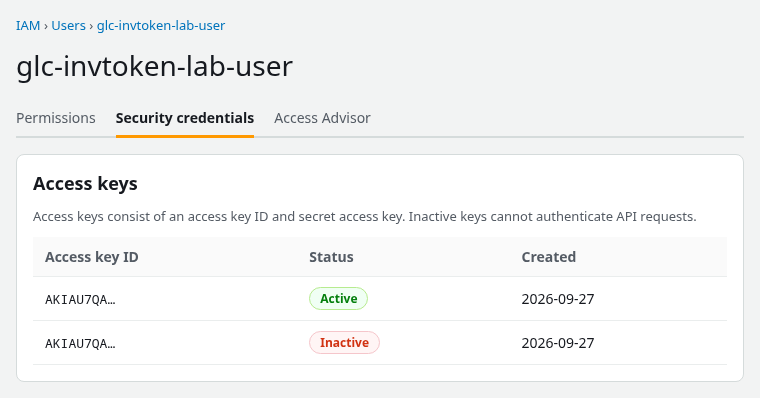
In the real IAM console, compare the affected access key ID with the key shown by aws configure list or your profile configuration before changing its status. The figure above confirms Active versus Inactive; truncated IDs in a screenshot may not match the CLI’s masked suffix.
Fix options:
- Activate the key if it was disabled by mistake:
aws iam update-access-key --user-name <user> --access-key-id <key-id> --status Active - Prefer creating a new key, updating the profile, then deleting the old key — rotation avoids reuse of stale material in backups
After activating or replacing a key, rerun aws sts get-caller-identity. If it still fails immediately, allow a short period for the IAM change to become visible and retry.
Check the temporary credential triplet
STS temporary credentials use three fields together:
AWS_ACCESS_KEY_ID(ASIA…)AWS_SECRET_ACCESS_KEYAWS_SESSION_TOKEN
Exporting only the access key and secret from a role session or get-session-token output — without the session token — triggers InvalidClientTokenId.
To demonstrate the three-part temporary credential set, this lab calls get-session-token from a profile that contains long-term IAM-user credentials:
aws sts get-session-token --duration-seconds 900 --profile glc-invtoken-lab-worksIf authentication normally runs through IAM Identity Center or an assume-role profile, use that provider's normal refresh mechanism instead of get-session-token.
Copy all three values from Credentials in the JSON response. Then simulate a broken export:
export AWS_ACCESS_KEY_ID=ASIAIOSFODNN7EXAMPLE
export AWS_SECRET_ACCESS_KEY='***'
unset AWS_SESSION_TOKEN
Confirm the CLI still sees keys from the environment:
aws configure listNAME : VALUE : TYPE : LOCATION
profile : <not set> : None : None
access_key : ****************XXXX : env :
secret_key : ****************XXXX : env :
region : ap-south-1 : env : ['AWS_REGION', 'AWS_DEFAULT_REGION']The failing call:
aws sts get-caller-identityaws: [ERROR]: An error occurred (InvalidClientTokenId) when calling the GetCallerIdentity operation: The security token included in the request is invalid.Restore the triplet — including AWS_SESSION_TOKEN — or stop exporting temporary keys manually and use a profile with role_arn / source_profile so the CLI refreshes them:
export AWS_SESSION_TOKEN='***'
aws sts get-caller-identity
When the response returns Account and Arn again, the session token matches the ASIA access key.
If temporary credentials work in one Region but fail only in an opt-in Region, check that the Region is enabled for the account and obtain credentials from the appropriate Regional STS endpoint. That pattern is different from the usual stale-environment-variable problem.
Check profile context
Profile confusion is usually a precedence or naming issue, not a separate AWS error code.
Verify which profile the shell targets:
echo "${AWS_PROFILE:-<not set>}"
aws configure list
Common mismatches:
AWS_PROFILEset todefaultwhile keys live under a named profileAWS_DEFAULT_PROFILEandAWS_PROFILEdisagree —AWS_PROFILEwinsAWS_CONFIG_FILEorAWS_SHARED_CREDENTIALS_FILEpoints at a non-standard file (useful in labs; easy to forget on a shared workstation)AWS_PROFILE=prodis set, but staleAWS_ACCESS_KEY_ID/AWS_SECRET_ACCESS_KEYare also exported — the credential environment variables win
Compare identity with an explicit profile after clearing credential exports:
unset AWS_ACCESS_KEY_ID AWS_SECRET_ACCESS_KEY AWS_SESSION_TOKEN
aws sts get-caller-identity --profile glc-invtoken-lab-works
If that succeeds while bare aws sts get-caller-identity still fails, stale credential environment variables or the default chain were overriding the profile selected through AWS_PROFILE. The AWS CLI tutorial covers profile layout; Terraform users hitting provider errors before API calls should also read Fix Terraform AWS credentials error.
Refresh role and SSO credentials
Assume-role profiles use temporary AWS credentials, which the CLI caches under ~/.aws/cli/cache. IAM Identity Center uses an SSO authentication token cached under ~/.aws/sso/cache; the CLI uses that session to obtain AWS role credentials for service calls. If they expire, AWS commonly returns ExpiredToken; however, stale or mismatched cached temporary credentials can also lead to authentication failures such as InvalidClientTokenId.
Refresh paths:
| Source | Refresh command |
|---|---|
| SSO profile | aws sso login --profile <profile> |
| Assume role in profile | Re-run aws sts assume-role … or invoke any CLI command so the provider refreshes from source_profile |
| Exported role credentials in env | Obtain a new triplet; do not reuse access key + secret without a new session token |
After refreshing SSO or role credentials, use aws configure list to confirm which provider supplied the credentials, then run aws sts get-caller-identity to verify they authenticate successfully. If manually inspecting an exported AWS_ACCESS_KEY_ID, an ASIA prefix indicates temporary STS credentials and those credentials also require the matching session token.
Verify with STS
aws sts get-caller-identity is a convenient authentication check because it returns the account and principal associated with the credentials the CLI is actually using. Run it from the same shell, environment, and profile context as the command that fails.
aws sts get-caller-identitySuccess returns Account, UserId, and Arn — the principal AWS will use for downstream calls. Failure with InvalidClientTokenId means fix credentials first; no amount of IAM policy attachment resolves this error.
After fixes, run the original command again (for example aws s3 ls or terraform plan). If the error changes to AccessDenied, authentication succeeded and the task moved to authorization — a different guide.
Troubleshooting
| Symptom | Likely cause | Fix |
|---|---|---|
Profile name set but aws configure list shows env for access key |
AWS_ACCESS_KEY_ID / AWS_SECRET_ACCESS_KEY override the profile |
unset those variables or update them to valid material |
ASIA key in use, session token unset |
Incomplete temporary credential triplet | Export AWS_SESSION_TOKEN or use profile-based role/SSO refresh |
| Key worked yesterday; IAM shows Inactive or key missing | Deactivated or deleted access key | Activate (if appropriate) or create new key and update profile |
Works with --profile foo, fails without it |
Wrong default profile or env override on default chain | unset env vars; set AWS_PROFILE or fix [default] in credentials file |
| Newly activated or replaced key still fails immediately | IAM change not yet visible to the API | Retry after a short delay; confirm the CLI is using the new key with aws configure list |
| Temporary credentials work in one Region but fail in an opt-in Region | Region or STS endpoint token compatibility | Confirm the Region is enabled; obtain credentials from the appropriate Regional STS endpoint |
Error changed to AccessDenied after fix |
Authentication now succeeds | Inspect IAM policies — not an InvalidClientTokenId case |
Summary
InvalidClientTokenId means AWS rejected the security credentials the CLI sent — not that the caller lacks permission for a specific API action. The first diagnostic step is aws configure list, because it shows whether environment variables or a profile supplied the access key the CLI actually uses.
Stale AWS_* exports, inactive or deleted AKIA keys, and ASIA keys missing AWS_SESSION_TOKEN are the most common root causes in practice. Wrong secret keys for a valid access key ID more often produce SignatureDoesNotMatch; expired temporary credentials more often produce ExpiredToken. Sanitized env | grep ^AWS_ output and aws iam list-access-keys narrow the fix quickly; aws sts get-caller-identity confirms authentication before retrying the original command.
When the error flips to AccessDenied, the identity is valid and IAM authorization deserves attention instead — overlapping symptoms, different fixes. Keep authentication troubleshooting on this page and policy denial work on the authorization guides.
References
- AWS CLI — Environment variables — credential environment variables override profile credentials
- AWS CLI — Using an IAM role in the AWS CLI — assume-role profiles and refresh
- AWS STS endpoints and quotas — global and Regional STS endpoints
- AWS Security Token Service API Reference — GetCallerIdentity
- AWS IAM User Guide — Managing access keys for IAM users — active, inactive, and deleted key behavior
Frequently Asked Questions
Is InvalidClientTokenId a permissions error?
No. It is an authentication failure: AWS could not validate the credential set or security token. AccessDenied means AWS recognized the principal but rejected the action. Fix credentials first when the code is InvalidClientTokenId.
Why is my profile ignored?
Credential environment variables override credentials from a profile selected through AWS_PROFILE. If AWS_ACCESS_KEY_ID and AWS_SECRET_ACCESS_KEY are set, aws configure list shows env in the LOCATION column for those rows even when AWS_PROFILE is set. Unset the variables or update them to valid keys to return control to the profile. An explicit --profile on the command line is a separate test—use it to confirm the named profile itself works.
Do temporary credentials require AWS_SESSION_TOKEN?
Yes. Credentials whose access key ID starts with ASIA come from STS and must be sent with the matching session token. Long-term AKIA keys do not use a session token. Export all three fields or use a profile that manages refresh automatically.
