
| Package | aws-cli/2.37.3 |
|---|---|
| AWS Region | ap-south-1 (Mumbai) for the examples; IAM is a global service, although the resources and API requests being authorized can be Regional |
| Lab environment | Workstation with AWS CLI v2 and configured credentials — AWS CLI tutorial Install AWS CLI on Ubuntu · Install AWS CLI on Debian |
| Privilege | Account administrator or IAM permissions to read and update the policies on the denied principal |
| Scope | Why AccessDenied can occur when AdministratorAccess is attached, how to read the AWS error to find the restricting policy, and how to fix an explicit or implicit deny. Covers permissions boundaries, identity policies, organization SCPs, session policies, and resource policies only as reasons administrator access can still fail. Does not cover application-level authorization or Cognito user-pool policies. |
| Related guides | AWS CLI Tutorial Fix Terraform AWS credentials error AWS S3 Bucket Setup Configure S3 bucket as Terraform backend AWS Tutorial |
If an IAM user or role already has AdministratorAccess, it is reasonable to expect every AWS API call to work. AdministratorAccess is an AWS managed policy that broadly allows AWS actions for that identity, but AWS can still evaluate other policies and controls that restrict the request.
Attaching AdministratorAccess does not always remove an AccessDenied error. These guardrails can still block the request:
- Permissions boundary
- Organization policy (SCP)
- Temporary session restriction
- Resource policy
The important part is not to add more permissions immediately. First, read the AccessDenied message and identify which policy blocked the request.
AccessDenied even with AdministratorAccess?
- Confirm which IAM user or role made the request.
- Read the complete
AccessDeniedmessage. - Look for wording such as
explicit deny,no permissions boundary allows, orno service control policy allows. AWS may name another policy type as well. - Check the policy named in the error first.
- Do not try to fix the problem by attaching additional Allow policies.
Why AdministratorAccess can still return AccessDenied
AdministratorAccess is an Allow, not a bypass
AdministratorAccess is an AWS-managed IAM policy whose main statement allows all AWS actions on all resources (Action: "*" and Resource: "*"). That is a very broad permission, but it does not bypass other controls. These guardrails can still restrict the request:
- Permissions boundary
- Organizations SCP
- Session policy
- Resource policy
- Another applicable guardrail
The failure may be an explicit deny or an implicit deny because a required Allow is missing.
In this guide, policy layer means one of the different places AWS can get permission rules from. It is a teaching term, not a separate AWS resource type. Examples include:
- A policy attached to the IAM user
- A permissions boundary
- An Organizations SCP
- An S3 bucket policy
Principal means the AWS identity making the request. Depending on the situation, that may be:
- An IAM user
- An IAM role
- A role session
- A federated identity
- An AWS account
Explicit deny vs implicit deny
AWS permissions work from a default-deny model:
- An action must be allowed by the policies that apply to the request.
- If an applicable policy explicitly says
Deny, that deny wins over an Allow. - Some policy types can also restrict permissions because they do not include the required Allow.
    AWS receives the request
              ↓
Do all required policy types allow it?
              ↓
        ┌────┴────┐
       yes       no
        │         │
        ▼         ▼
      Allow   AccessDenied
An explicit Deny anywhere applicable always results in AccessDenied.
- Explicit deny: AWS found a policy statement that directly says
Deny. - Implicit deny: AWS did not find the required
Allowin a policy that must permit the operation.
Simplified IAM authorization model
The diagram below is a learning model. Real AWS evaluation can be more nuanced for resource-based policies and different principal types, but this view helps explain why AdministratorAccess alone is not always enough.
        AWS API request
                    ↓
┌───────────────────────┐
│ Applicable policies   │
│                       │
│ Identity policies     │
│ Permissions boundary  │
│ Session policies      │
│ SCP / RCP             │
│ Resource policies     │
│ Endpoint policies     │
└───────────────────────┘
                    ↓
   Authorization decision
Allow / AccessDenied- Explicit
Denyin an applicable policy →AccessDenied - Required
Allowmissing in a limiting policy →AccessDenied
When you call an AWS API, AWS checks the policies that apply to that request before deciding whether to allow it. The user gets only the permissions allowed by both the identity policy and any permissions boundary attached to that identity.
Read the AccessDenied message before changing policies
AWS AccessDenied messages often include enough context to tell you which type of policy blocked the request. Look particularly at the text after because or with an explicit deny.
| Error contains | Check first |
|---|---|
explicit deny in a permissions boundary |
Permissions boundary |
no permissions boundary allows the action or no permissions boundary allows... |
Permissions boundary missing an applicable Allow |
explicit deny in a service control policy |
SCP |
no service control policy allows the action or no service control policy allows... |
SCP allow strategy |
explicit deny in a session policy |
STS session policy |
explicit deny in a resource-based policy |
Bucket, key, or resource policy |
explicit deny in a VPC endpoint policy |
VPC endpoint policy |
explicit deny in an identity-based policy |
User, group, or role policies |
no role trust policy allows sts:AssumeRole or explicit deny in the role trust policy |
Role trust policy |
Generic AccessDenied only |
Access Troubleshooter or policy simulation |
A failed API call with a boundary deny might look like this:
aws s3api delete-bucket --bucket <bucket-name>aws: [ERROR]: An error occurred (AccessDenied) when calling the DeleteBucket operation: User: arn:aws:iam::123456789012:user/ops-admin is not authorized to perform: s3:DeleteBucket on resource: "arn:aws:s3:::my-app-logs" with an explicit deny in a permissions boundary: arn:aws:iam::123456789012:policy/corp-admin-boundaryThe message names what to inspect first:
- Principal
- Action
- Resource
- Policy type
- Policy ARN
Some AWS services return additional authorization details as an encoded string instead of displaying them directly. If the error contains EncodedAuthorizationFailureMessage, decode that string with a principal that has sts:DecodeAuthorizationMessage:
aws sts decode-authorization-message --encoded-message '<paste-encoded-string>'After locating the relevant policy statement, check whether it has a Condition. Conditions make a permission apply only in certain situations, for example:
- Only from a particular IP address
- Only in specific AWS Regions
- Only when MFA is used
- Only for requests through a particular VPC endpoint
Common condition keys include aws:SourceIp, aws:RequestedRegion, and aws:PrincipalArn. Even if the action looks allowed, check whether a Condition prevents it from matching your request.
If AWS gives only a generic AccessDenied message, CloudTrail can help confirm which identity made the request and which API operation failed.
Confirm which IAM identity AWS is evaluating
Wrong credentials, the wrong CLI profile, or an unexpected assumed role are common sources of IAM confusion. Before changing policies, confirm which identity AWS saw on the failed request:
aws sts get-caller-identity{
"UserId": "AIDAXXXXXXXXXXXXXXXXX",
"Account": "123456789012",
"Arn": "arn:aws:iam::123456789012:user/ops-admin"
}- Account is the AWS account ID.
- Arn is the full identity ARN (user, role, or assumed-role session).
- UserId is the unique ID for that principal.
If the ARN is not the user or role you expected, fix the profile, role assumption, or credentials first.
Check identity-based policies
An identity-based policy is a policy attached to an IAM identity. For a user, that can be:
- An inline policy
- A managed policy attached directly to the user
- A policy inherited through an IAM group
Roles can have managed or inline policies attached to them.
A user or role can have AdministratorAccess plus another policy that contains an explicit Deny. Deny wins over Allow in identity policies too.
List policies on a user:
aws iam list-attached-user-policies --user-name <user-name>
aws iam list-user-policies --user-name <user-name>
aws iam list-groups-for-user --user-name <user-name>
For each group returned, list attached and inline group policies. For roles, use list-attached-role-policies and list-role-policies.
When the error names explicit deny in an identity-based policy, open the cited policy document and locate the matching Deny statement before checking boundaries or SCPs.
In the AWS Management Console
- Open IAM → Users → select the denied user.
- Open the Permissions tab.
- In Permissions policies, confirm whether
AdministratorAccess(or another admin policy) is attached. - Review both Permissions policies and Inline policies. Open each relevant policy and inspect its JSON for a
Denystatement matching the failed API action.
If the user inherits policies through a group, open IAM → User groups → select the group → Permissions and repeat the same JSON check.
Check permissions boundaries
A permissions boundary sets the maximum permissions that identity-based policies can effectively grant to an IAM user or role. The boundary does not grant permissions by itself.
Think of AdministratorAccess as saying, “Allow this user to perform all AWS actions.” The boundary then defines how much of that permission can actually take effect. For example, it can allow everything except s3:DeleteBucket.
- The user gets only the permissions allowed by both the identity policy and the permissions boundary.
AdministratorAccessdoes not override the boundary.
A boundary can allow most administrator actions but still block specific operations. A common pattern allows a broad maximum set, then denies one action:
{
  "Version": "2012-10-17",
  "Statement": [
    {
      "Sid": "AllowAll",
      "Effect": "Allow",
      "Action": "*",
      "Resource": "*"
    },
    {
      "Sid": "DenyS3DeleteBucket",
      "Effect": "Deny",
      "Action": "s3:DeleteBucket",
      "Resource": "*"
    }
  ]
}
In that example:
- The first statement allows all actions through the boundary.
- The second adds one exception by explicitly denying
s3:DeleteBucket.
Because an explicit Deny wins over an Allow, the user can have AdministratorAccess and still be unable to delete a bucket.
Show the boundary on the denied principal:
aws iam get-user --user-name <user-name> --query 'User.PermissionsBoundary' --output textFetch the default policy version when the error mentions implicit boundary denial (no permissions boundary allows...) or when verifying an explicit deny:
aws iam get-policy-version \
  --policy-arn <boundary-policy-arn> \
  --version-id $(aws iam get-policy --policy-arn <boundary-policy-arn> --query 'Policy.DefaultVersionId' --output text)
In the AWS Management Console
- Open IAM → Users → select the denied user → Permissions tab.
- On the Permissions tab, first confirm
AdministratorAccessis attached. - Scroll to Permissions boundary (not applicable to service-linked roles) and confirm that a boundary is also set.
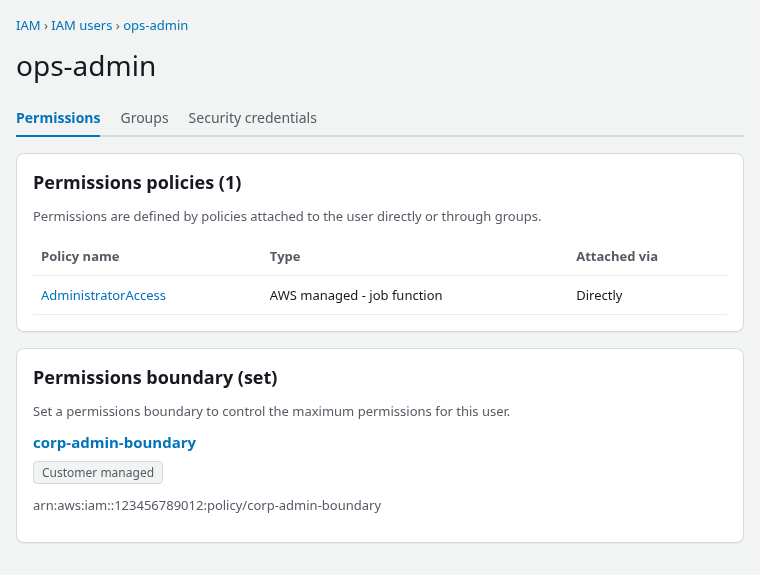
The boundary row should read Permissions boundary (set) with the policy name from the error message.
- Click the boundary policy name to open the policy details page.
- Open the JSON tab and locate the
Denystatement for the API action in the error (for examples3:DeleteBucket).
On the policy Permissions tab, switch from Summary to JSON and find the Deny statement for the blocked API action.
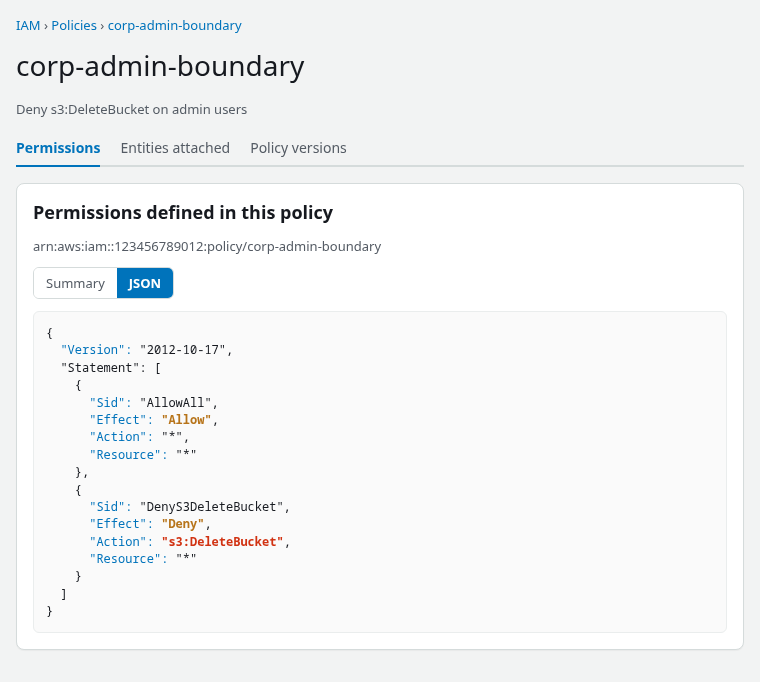
Here the boundary first allows all actions, but the DenyS3DeleteBucket statement explicitly blocks s3:DeleteBucket. That explicit deny wins even though the same boundary contains Allow * and the user has AdministratorAccess.
AdministratorAccess and a permissions boundary can exist on the same IAM identity. The boundary still limits the maximum permissions available to the user, so an explicit Deny in the boundary blocks the call even when the admin policy is attached.
Check AWS Organizations SCPs
Service control policies (SCPs) are organization-level guardrails. An AWS Organizations administrator can use them to limit what accounts inside the organization are allowed to do.
For example, an IAM user might have AdministratorAccess, but an SCP attached to the account can still say Deny ec2:TerminateInstances. In that case, the administrator Allow on the identity cannot override the organization-level restriction.
SCP scope to keep in mind:
- SCPs can restrict the root user in a member account.
- SCPs do not apply to the AWS Organizations management account.
- On a standalone account with no organization, SCPs do not apply.
If Organizations is enabled:
aws organizations describe-organization --query 'Organization.{Id:Id,FeatureSet:FeatureSet}' --output tableList SCPs attached to the account, its parent OUs, and the organization root. You may need to repeat the command for each target in the hierarchy:
aws organizations list-policies-for-target --target-id <account-or-ou-id> --filter SERVICE_CONTROL_POLICYLook for explicit Deny statements or SCPs that do not allow the failing action. If an SCP is causing the denial, someone who manages AWS Organizations usually needs to change it:
- Explicit SCP deny: remove or narrow the applicable
Denystatement in the SCP that the error names. - Implicit SCP deny: if your organization uses an allow-list SCP strategy, the required action must be allowed at every applicable level in the SCP hierarchy—from the organization root through each OU to the account.
In the AWS Management Console
SCPs can apply through the entire organization hierarchy:
Organization root
        ↓
    Parent OU
        ↓
    Child OU
        ↓
AWS account- Open AWS Organizations → Policies → Service control policies.
- Check SCPs attached directly to the account and SCPs inherited from its parent OUs and organization root. Review the JSON tab for
Denystatements or missingAllowcoverage on the failing API action.
AWS Organizations can also apply resource control policies (RCPs) to supported resources. RCPs are organization-level guardrails that limit access to supported resources in member accounts. If the error specifically mentions an RCP, inspect that policy as well.
Check session policies
A session policy is an additional permissions policy that can be applied when temporary AWS credentials are created — for example, when a role is assumed using AWS STS.
The role itself may have AdministratorAccess, but the temporary session can be given a smaller permission set:
- The temporary session gets only the permissions allowed by both the role and the applicable session policy.
- A session policy can explicitly deny an action.
- A session policy can cause an implicit deny because the action is not included in the session's allowed permissions.
If the error mentions a session policy, review the Policy or PolicyArns supplied when the role session was created. Even if the role itself has broader permissions, the temporary session cannot use permissions that its session policy excludes.
To fix a session-policy denial:
- If the session policy omits the required action, include that action the next time the session is created.
- If it contains an explicit
Deny, remove or narrow thatDenybefore creating the next session. - You cannot expand the permissions of an already-issued temporary session. Create a new session after changing the session policy.
If the failure happens while calling sts:AssumeRole, the issue may be the target role's trust policy rather than the permissions attached to your current identity. AdministratorAccess on the caller does not help when the role trust policy does not allow that principal to assume the role.
Check resource and VPC endpoint policies
Unlike an identity policy, which is attached to the user or role, a resource-based policy is attached to the AWS resource itself. For example, an S3 bucket can have its own bucket policy. That policy can block access even when the IAM user has broad permissions.
These resource policies can deny requests even when the caller has administrator rights in the same account:
- S3 bucket policies
- KMS key policies
- Secrets Manager resource policies
For S3, fetch the bucket policy:
aws s3api get-bucket-policy --bucket <bucket-name>If the CLI error mentions explicit deny in a resource-based policy, inspect that JSON for Effect: Deny on the principal or Principal: "*".
To fix a resource-policy denial:
- If the resource policy explicitly denies your principal, remove or narrow that
Deny. - If the error says no resource-based policy allows the action, add the required principal and action to that resource policy where the service's authorization model requires it.
If the request reaches an AWS service through a VPC endpoint, the endpoint can also have a policy that restricts which actions are allowed. Only investigate endpoint policies when the workload uses a VPC endpoint or when the error indicates an endpoint policy.
To fix a VPC endpoint policy denial:
- If the endpoint policy denies the action, remove or narrow that
Deny. - If it simply does not allow the action, add the required action, resource, or principal to the endpoint policy.
If the resource belongs to another AWS account
AdministratorAccess in your AWS account does not automatically give you access to resources owned by another account. For cross-account access, AWS generally needs permission from both:
- The calling identity
- The account that owns the resource
Use Access Troubleshooter or IAM Policy Simulator
Troubleshoot an actual denied request with an authorization ID
For supported API denials, AWS can include an authorization ID in the error. IAM Access Troubleshooter can inspect the authorization decision as it existed at the time of failure. This is useful because you are troubleshooting the real failed request, rather than trying to recreate the same conditions manually in a simulator.
Keep in mind:
- Authorization details are retained for 24 hours.
- Not every denial includes an authorization ID.
- The identity retrieving these details needs
iam:GetRequestAuthorizationDetails. - The command must use the same AWS Region where the denied request occurred.
When the error contains an authorization ID, retrieve the decision details:
aws iam-toolbox get-request-authorization-details \
  --region ap-south-1 \
  --authorization-id <authorization-id-from-error>
Prefer this path over simulation when AWS returns an authorization ID for the failed request.
In the AWS Management Console
When AWS includes an authorization ID, the error can also contain a link to the Access Troubleshooter Console. Open that link to view the authorization evaluation for the failed request.
The page shows each action/resource pair as Allow, Explicit deny, or Implicit deny, along with the policies AWS evaluated. Access Troubleshooter is currently in public preview and is not available for every AWS API.
Simulate a principal, action, and resource
The IAM Policy Simulator lets you ask AWS a hypothetical question: “If this IAM user tries this action on this resource, what would the policy evaluation return?” It does not perform the actual API operation. It evaluates the policies and controls that the simulator supports for the selected identity and returns a decision such as allowed, implicitDeny, or explicitDeny.
When only the principal ARN, action, and resource are known:
aws iam simulate-principal-policy \
  --policy-source-arn arn:aws:iam::<account-id>:user/<user-name> \
  --action-names <api-action> \
  --resource-arns <resource-arn>
Policy simulation is useful for testing IAM policy evaluation, but keep these limits in mind:
- It may not match every service-specific or request-context condition.
- The console simulator does not simulate resource-based policies for IAM roles.
- If AWS returns an authorization ID, prefer Access Troubleshooter for that actual failed request.
- Use the same API action and resource ARN shown in the original error so the simulation tests the closest possible match.
In the AWS Management Console
- Open IAM and choose Policy simulator from the navigation pane.
- Select the IAM user or role that received the denial.
- Add the failed AWS action and, where supported, the resource ARN from the error.
- Run the simulation and read whether the decision is
allowed,implicitDeny, orexplicitDeny, and which policy type produced the result.
Fix the policy that blocked the request
If AdministratorAccess already allows the action, attaching another Allow policy usually will not help. Fix the policy that is restricting the request.
| Error points to | What you actually need to fix |
|---|---|
| Identity-based policy | Remove or narrow the matching Deny from the user's, group's, or role's policy |
| Permissions boundary — explicit deny | Remove or narrow the matching Deny in the boundary |
| Permissions boundary — implicit deny | Add the required action to the boundary's allowed permissions |
| SCP — explicit deny | Remove or narrow the matching Deny in the applicable SCP |
| SCP — implicit deny | For allow-list SCP strategies, ensure the required action is permitted at every applicable level from the organization root through each OU to the account |
| Session policy | Change the Policy or PolicyArns used when the temporary session is created |
| Resource-based policy | Update the bucket, KMS key, secret, or other resource policy that blocks the principal |
| VPC endpoint policy | Update the endpoint policy to allow the required action |
| Role trust policy | Update the target role's trust policy so your principal is allowed to call sts:AssumeRole |
| Wrong caller | Fix the AWS CLI profile, assumed role, or credentials instead of editing IAM |
There are two common cases:
- Explicit deny: a policy contains
"Effect": "Deny"for the action. - Implicit deny: a policy that must allow the request does not contain a matching
Allow.
Fix an explicit deny
If the error says explicit deny, open the policy named in the error and locate the matching Deny statement.
For example, this permissions boundary blocks bucket deletion for every S3 bucket:
{
  "Effect": "Deny",
  "Action": "s3:DeleteBucket",
  "Resource": "*"
}
Remove the statement if the restriction is no longer required. If only one protected bucket must remain undeletable, narrow the Deny to that bucket instead:
{
  "Effect": "Deny",
  "Action": "s3:DeleteBucket",
  "Resource": "arn:aws:s3:::production-backups"
}
The deny still protects production-backups, but it no longer blocks DeleteBucket for every S3 bucket.
Using the AWS Management Console
If the denying policy is a customer-managed IAM policy:
- Open IAM → Policies.
- Select the policy named in the error.
- Choose Edit and open the JSON editor.
- Remove or narrow the matching
Denystatement. - Choose Next → Save changes.
For a permissions boundary, return to IAM → Users → select the user → Permissions and confirm that the intended boundary is still attached.
AWS-managed policies cannot be edited. If the restriction comes from an SCP, resource policy, or another policy type, update it from the AWS service or AWS Organizations location where that policy is managed.
Using the AWS CLI
Customer-managed IAM policies use policy versions. To publish an updated version of a permissions boundary and make it the default:
aws iam create-policy-version \
  --policy-arn <boundary-policy-arn> \
  --policy-document file://updated-boundary.json \
  --set-as-default
For example, if the only restriction being removed is the s3:DeleteBucket deny, the updated boundary could be:
{
  "Version": "2012-10-17",
  "Statement": [
    {
      "Sid": "AllowAllWithinBoundary",
      "Effect": "Allow",
      "Action": "*",
      "Resource": "*"
    }
  ]
}
Fix an implicit deny
An implicit deny means AWS did not find an applicable Allow in a policy that must permit the request.
For example, if AWS returns:
no permissions boundary allows s3:DeleteBucketopen the boundary named in the error. Suppose it currently allows only read access:
{
  "Effect": "Allow",
  "Action": [
    "s3:GetObject",
    "s3:ListBucket"
  ],
  "Resource": "*"
}
If s3:DeleteBucket is supposed to be within this user's maximum permissions, add it to an applicable Allow statement in the boundary:
{
  "Effect": "Allow",
  "Action": [
    "s3:GetObject",
    "s3:ListBucket",
    "s3:DeleteBucket"
  ],
  "Resource": "*"
}
If the error says no service control policy allows ..., the organization is using SCPs in a way that requires an applicable Allow. Check the SCP hierarchy from the organization root through each parent OU to the account and make sure the required action is permitted at every applicable level. If you do not manage AWS Organizations, ask the administrator who does.
Do not add another identity-based Allow policy and expect it to override the missing permission in the boundary or SCP.
Verify the fix
After changing the policy:
- Wait briefly for the IAM change to propagate.
- Re-run Access Troubleshooter or IAM Policy Simulator.
- Confirm the decision changes to
allowed. - Retry the original AWS API call.
If the permissions boundary or organization policy is an intentional security guardrail, use an approved exception or maintenance role rather than bypassing the control with another principal.
Summary
When AccessDenied appears despite AdministratorAccess:
- Confirm the caller with
aws sts get-caller-identity. - Read the full
AccessDeniedmessage (explicit deny vs implicit “does not allow” phrasing). - Use the diagnostic table to find the blocking policy type, then use the fix table to decide what to change.
- Inspect
Conditionblocks on the matching statement. - Prefer Access Troubleshooter when AWS returns an authorization ID; otherwise use policy simulation with the same action and resource from the error.
- Fix the restricting policy: remove or narrow an explicit
Deny, or fix the limiting policy so that the required action is allowed, or ask the administrator who manages that guardrail to make the appropriate change. Do not try to fix the problem by attaching additional Allow policies.
For credential errors before IAM evaluation starts, see the AWS CLI tutorial or Terraform AWS credentials troubleshooting.
References
- IAM policy evaluation logic
- Permissions boundaries for IAM entities
- Service control policies
- SCPs and the management account
- IAM policy simulator
- Troubleshoot access denied errors
- Troubleshoot access denied error messages with authorization ID (Preview)
Frequently Asked Questions
Why does AdministratorAccess still get AccessDenied?
Because AdministratorAccess is only a broad Allow on the identity. A permissions boundary, organization SCP, session policy, resource policy, or another guardrail can still block the request through an explicit Deny or an implicit deny when a required Allow is missing.
Does explicit Deny override AdministratorAccess?
Yes. An explicit Deny in an identity policy, permissions boundary, SCP, session policy, or resource policy overrides any Allow, including AdministratorAccess.
Can a permissions boundary override AdministratorAccess?
Yes. Effective permissions are limited by both the identity policy and the boundary. A boundary can allow most admin actions and still explicitly deny one API, or fail to include an Allow the action needs.
Does adding another Allow policy fix AccessDenied?
Usually no. If the failure is an explicit deny, remove or narrow that deny statement. If the failure is implicit (no permissions boundary allows... or similar), the limiting policy needs an applicable Allow. Extra Allow policies on the identity do not override Deny and do not fix a missing Allow on a boundary or SCP.
Can an AWS root user be blocked by an SCP?
Yes, in an AWS Organizations member account, an SCP can restrict the root user. SCPs do not apply to the Organizations management account.
