
| Tested on | Rocky Linux 10.2 (Red Quartz) workstation |
|---|---|
| Package | kubectl 1.36.3 |
| Applies to | Any host with kubectl configured; any Kubernetes cluster |
| Cert prep | CKA · CKAD · CKS |
| Lab environment | Multi-node kubeadm cluster with containerd — install Kubernetes with kubeadm |
| Privilege | Normal user (no sudo required on the workstation) |
| Optional dependency | curl is required only for the raw HTTP 401 and anonymous-access examples |
| Scope | API request flow from client to persistence, authentication identity, authorization attributes, admission stages, HTTP 401 versus 403, and kubectl auth can-i checks. Does not cover Role or ClusterRole YAML, certificate generation, OIDC setup, webhook development, Pod Security Standards, SecurityContext, or NetworkPolicy. |
When kubectl apply fails, the error might be bad credentials, missing RBAC permission, or a policy that rejected the manifest. Those are three different stages. This walkthrough follows one write request from your workstation through the API server so you can tell authentication, authorization, and admission apart. Raw API checks use the curl command with -k, bearer tokens, and -w for HTTP status codes.
Follow a Kubernetes API Request
A typical write path flows through the API server gates in this order:
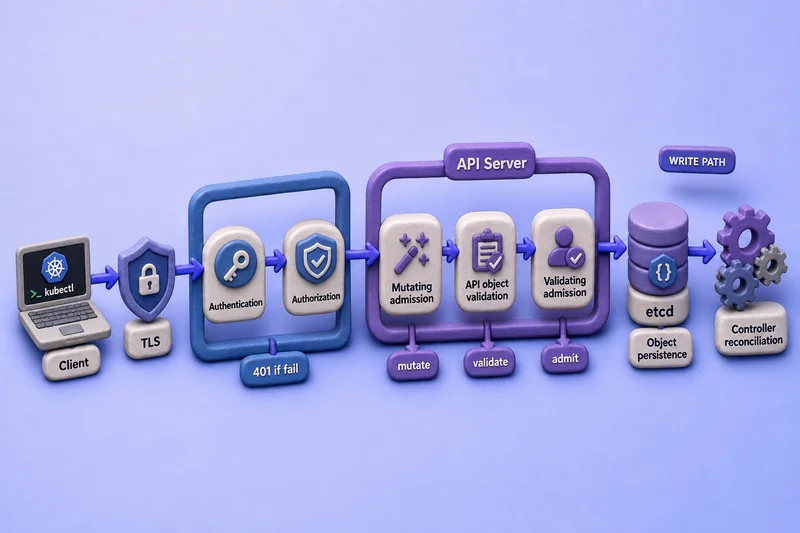
Read the figure left to right: the client reaches the API server over TLS, then passes authentication and authorization before mutating admission reshapes the object. API object validation runs on the mutated object, validating admission accepts or rejects it, and only then is the object stored in etcd for controller reconciliation. Individual authenticators, authorizers, and admission mechanisms vary by cluster configuration, but authentication precedes authorization, mutation completes before API object validation, and validating admission evaluates the resulting object before storage.
Read operations such as get, list, and watch still pass through authentication and authorization. They generally skip admission.
Authentication
Identities and Credentials
Authentication answers who is calling. The API server validates credentials from your kubeconfig, a bearer token, or another configured method, then maps the caller to:
- Username
- UID when the method supplies one
- Groups
- Additional identity attributes
For CKAD, CKA, and CKS you mainly work with two caller categories:
- Normal users — identities managed outside the Kubernetes API (certificates, OIDC, proxies)
- ServiceAccounts — identities represented by API objects and used by Pods and in-cluster clients
Kubernetes does not expose a User API object for creating ordinary human accounts. You provision users through your organization's identity system and grant them cluster access with RBAC. For token mounting, projection, and Pod identity, see Kubernetes ServiceAccounts.
The API server can be configured with several authentication methods. You do not configure them in this lesson; you only need to recognize what your client presents:
- Client certificates (common in kubeconfig for
kubectl) - Bearer tokens (static, bootstrap, or ServiceAccount tokens)
- OpenID Connect tokens
- Authentication proxies that pass identity headers
- ServiceAccount tokens signed by the API server
kubectl reads a context from kubeconfig that ties together a cluster URL, a user credential, and a default namespace. The users[].name field in kubeconfig is only a local AuthInfo reference name—it is not necessarily the authenticated Kubernetes username.
Confirm the Authenticated Identity
Ask the API server which identity your current credentials map to:
kubectl auth whoamiSample output:
ATTRIBUTE   VALUE
Username    kubernetes-admin
Groups      [kubeadm:cluster-admins system:authenticated]
kubectl auth whoami asks the API server for the subject attributes associated with the current credentials. The result shows the username and groups that authorization evaluates. The user name stored in kubeconfig is only the local AuthInfo reference and may differ from the authenticated username. With client-certificate authentication, Kubernetes normally derives the authenticated username from the certificate subject CN; OIDC, proxies, and token authenticators derive it differently.
kubectl auth whoami is available in kubectl 1.36, although its command reference still labels it experimental.
Diagnose HTTP 401
When credentials are missing or invalid, the API server returns 401 Unauthorized. Authentication only establishes identity—it does not grant any permission.
Resolve the current cluster endpoint from kubeconfig and call the API with a deliberately invalid bearer token:
APISERVER=$(kubectl config view --minify -o jsonpath='{.clusters[0].cluster.server}')curl -sk -H 'Authorization: Bearer invalid-token' -o /tmp/status.json -w '%{http_code}\n' "$APISERVER/api/v1/namespaces"Sample output:
401Display the response body:
cat /tmp/status.jsonFormatted response body:
{
  "kind": "Status",
  "apiVersion": "v1",
  "status": "Failure",
  "message": "Unauthorized",
  "reason": "Unauthorized",
  "code": 401
}
The actual cat output may be compact JSON.
An invalid bearer token is rejected with 401. A request that supplies no credential may instead become system:anonymous when anonymous authentication is enabled; authorization can then reject that known anonymous identity with 403. Kubernetes explicitly distinguishes an invalid token from an absent credential when anonymous authentication is enabled.
Because -k disables API-server certificate verification, this command isolates the client-authentication result rather than testing the TLS trust stage.
A successfully authenticated caller can still be denied later. Never treat 401 as an RBAC problem until you confirm the client credential is valid.
Authorization
Request Attributes
Authorization runs after authentication. The API server evaluates request attributes such as:
- User and groups
- API group
- Resource and subresource
- Namespace
- Resource name
- Verb (
get,list,create,update,patch,delete, …) - Non-resource URL paths such as
/healthz
RBAC is the authorization mode you will see on most clusters, but Kubernetes also supports other authorizers (Node, webhook, and legacy modes on some installs). This article does not include Role or ClusterRole YAML—that belongs in Kubernetes RBAC.
Test Access with kubectl auth can-i
kubectl auth can-i asks the API server whether the current identity may perform an action. It exercises authorization only; your credentials must already be valid.
Check permission on a namespaced resource:
kubectl auth can-i create deployments.apps -n defaultSample output from the kubeadm administrator used in this lab:
yesFor a genuinely cluster-scoped check:
kubectl auth can-i get nodesSample output:
yesList the permissions reported for the current user in one namespace:
kubectl auth can-i --list -n defaultSample output (trimmed):
Resources                                       Non-Resource URLs   Resource Names   Verbs
*.*                                             []                  []               [*]
                                                [*]                 []               [*]
selfsubjectaccessreviews.authorization.k8s.io   []                  []               [create]
                                                [/api/*]            []               [get]
                                                [/healthz]          []               [get]
The table reports namespaced resource permissions for default along with any non-resource URL permissions. Non-resource URLs such as /healthz are cluster-scoped and are not limited by the namespace flag. A no answer means authorization would block that verb before admission runs.
If your user may impersonate ServiceAccounts, you can test another identity. The caller must have impersonation permission to use --as:
kubectl auth can-i create pods --as=system:serviceaccount:default:defaultSample output:
noOn this unmodified kubeadm lab, the default ServiceAccount in default cannot create Pods. The result can differ when that ServiceAccount has additional bindings. Impersonation is useful for debugging RBAC without switching kubeconfig files.
Diagnose HTTP 403
Read the status code together with the message. They are not interchangeable.
| Response | Typical interpretation |
|---|---|
401 Unauthorized |
Request was not successfully authenticated |
403 Forbidden |
Identity is known, but authorization denied the operation, or admission rejected the request with forbidden |
On this kubeadm lab, anonymous authentication is enabled, but system:anonymous is not authorized to access /apis, so the request returns 403. Other clusters may return 401 when anonymous authentication is disabled or may return a different result when anonymous access is explicitly authorized.
curl -sk -o /tmp/anon.json -w '%{http_code}\n' "$APISERVER/apis"Sample output from this lab:
403cat /tmp/anon.jsonFormatted response body:
{
  "message": "forbidden: User \"system:anonymous\" cannot get path \"/apis\"",
  "reason": "Forbidden",
  "code": 403
}
Admission controllers can also return 403 with messages such as exceeded quota or Pod Security violations. Always read the full error string to see whether RBAC or admission stopped the request. Kubernetes supports multiple authorization modes, and a denied authorization decision returns HTTP 403.
Admission Control
Mutating and Validating Phases
Admission runs after authentication and authorization on write operations. It answers whether the object itself is acceptable and may modify it before storage.
Admission mainly handles:
createupdatedelete- Certain
connectsubresources
Admission plugins and webhooks split into two phases:
| Stage | Behaviour |
|---|---|
| Mutating admission | Can add or change fields on the object |
| Validating admission | Accepts or rejects the resulting request |
Authorization always precedes admission for an allowed API request, including control-plane requests made through the API server.
Built-in Plugins, CEL Policies, and Webhooks
| Admission mechanism | Examples |
|---|---|
| Built-in admission plugins | LimitRanger, ResourceQuota, PodSecurity, ServiceAccount |
| Declarative CEL policies | MutatingAdmissionPolicy, ValidatingAdmissionPolicy |
| Dynamic admission webhooks | MutatingAdmissionWebhook, ValidatingAdmissionWebhook |
Kubernetes 1.36 makes MutatingAdmissionPolicy stable and enabled by default. It provides an in-process CEL-based alternative to a mutating webhook. ValidatingAdmissionPolicy provides declarative validation without an external webhook service.
Course examples you have already met:
- Default ServiceAccount assignment, projected API credentials, and ServiceAccount
imagePullSecretshandling for Pods - LimitRange default requests and limits — see ResourceQuota and LimitRange
- ResourceQuota totals checked at admission
- Pod Security Admission labels and enforcement
- Custom mutating and validating webhooks (configured by cluster admins, not in CKAD manifests)
This lesson does not configure any admission controller. You only need to recognize when a 403 or validation error comes from policy after RBAC already allowed the verb.
Read Requests and Admission
Normal reads bypass admission. A caller who can get a Secret still needed authentication and authorization; admission does not filter reads.
Walk Through Deployment and Pod Creation
Take one command:
kubectl apply -f deployment.yamlHere is what happens conceptually across separate API requests:
kubectlsends a create or patch request for the Deployment using the selected credentials.- Authentication identifies the caller.
- Authorization checks the Deployment verb in the target namespace.
- Admission policies and API validation process the Deployment request.
- The accepted Deployment is stored.
- The Deployment controller submits a new API request to create a ReplicaSet using the controller's identity.
- The ReplicaSet controller submits separate Pod creation requests.
- Pod admission then applies relevant mechanisms such as LimitRanger, ResourceQuota, Pod Security Admission, and matching admission policies or webhooks.
- Accepted Pods continue to scheduling and kubelet processing.
LimitRanger applies defaults and constraints to incoming Pod requests, while ResourceQuota can reject Pod creation after the Deployment itself has already been stored. This distinction is essential to explaining why a Deployment can exist while its ReplicaSet reports FailedCreate. See Deployment not creating Pods.
Workload hardening such as runAsNonRoot, dropped capabilities, and volume permissions lives in SecurityContext examples and SecurityContext capabilities—not in the API request path above.
Diagnose the Failed Stage
| Symptom | Likely stage |
|---|---|
Certificate or token rejected; Unauthorized in API response |
Authentication |
kubectl auth can-i returns no for the verb |
Authorization |
forbidden: User "..." cannot create resource "deployments" |
Authorization (RBAC) |
exceeded quota or must specify limits.cpu |
Admission (ResourceQuota / LimitRange) |
| Pod Security violation message | Admission |
unknown field or schema validation error |
API decoding or OpenAPI validation |
Deployment accepted, ReplicaSet has FailedCreate |
A later Pod creation request failed authorization or admission |
Pod object exists but remains Pending |
Scheduling, volume, or node setup |
| Pod starts and fails | Image, command, probe, runtime, or application troubleshooting |
A Deployment being admitted does not prove that the controller-generated Pod requests will also pass admission. When several stages could apply, start with kubectl auth can-i for the verb, then read the exact forbidden message for admission keywords such as quota, LimitRange, or pod-security.
What's Next
- Kubernetes Security Architecture and Attack Surface
- Kubernetes NetworkPolicy with Examples
- Audit Kubernetes Against the CIS Benchmark with kube-bench
References
- Authenticating — Kubernetes documentation
- Authorization — authorization modes and attributes
- Admission controllers — built-in admission plugins
- Dynamic admission control — mutating and validating webhooks overview
- Mutating Admission Policy — declarative CEL-based mutating policies
Summary
Every API write passes through authentication, authorization, and admission before etcd stores the object. Authentication maps credentials to a username and may also supply a UID, groups, and extra attributes; it answers who is calling. Authorization checks whether that identity may perform the verb on the resource; RBAC is the usual mechanism, tested quickly with kubectl auth can-i. Admission shapes or rejects the object itself through mutating and validating stages—LimitRanger, ResourceQuota, Pod Security Admission, MutatingAdmissionPolicy, and ValidatingAdmissionPolicy are common examples.
HTTP 401 means the server could not authenticate the request. HTTP 403 means the caller was identified but the request was denied by authorization—such as RBAC, Node, or webhook authorization—or an admission mechanism returned a forbidden response. Read the message to identify the stage. Controllers reconcile stored objects afterward, but every API write a controller makes is a separate authenticated, authorized, and admitted request.
For credentials inside the cluster, continue with ServiceAccounts and Role YAML in the RBAC guide. Namespace policy errors at admission are covered in the ResourceQuota lesson.
Frequently Asked Questions
What is the difference between authentication and authorization in Kubernetes?
Authentication identifies who is calling the API by validating credentials and mapping them to a username and may also supply a UID, groups, and extra attributes. Authorization decides whether that identity may perform the requested verb on the resource. Authentication runs first; authorization cannot succeed for an unknown caller.
Does Kubernetes have a User API object for human accounts?
No. Ordinary human users are managed outside the cluster through client certificates, OIDC, or an authentication proxy. ServiceAccounts are Kubernetes API objects used by Pods and automation inside the cluster.
When do I get HTTP 401 versus 403 from the API server?
401 Unauthorized means the server could not authenticate the request, often because credentials are missing or invalid. 403 Forbidden means the caller was identified but the request was denied by authorization—such as RBAC, Node, or webhook authorization—or an admission mechanism returned a forbidden response. Read the message to identify the stage.
Do get, list, and watch requests go through admission control?
No. Admission mainly processes create, update, delete, and certain connect operations. Read requests skip admission but still require successful authentication and authorization.
What is the difference between mutating and validating admission?
Mutating admission can add or change fields on the object before it is stored. Validating admission accepts or rejects the resulting request. Both run after authentication and authorization on write operations.
Are controllers part of authentication or admission?
Controllers do not participate in the original client request after it is stored. They reconcile accepted objects afterward. However, every API write made by a controller is a separate request using the controller identity and passes through authorization and admission. A Deployment can therefore be accepted while a later ReplicaSet or Pod creation request is rejected.
