
| Tested on | Rocky Linux 10.2 (Red Quartz) workstation |
|---|---|
| Package | kubectl 1.36.3 |
| Applies to | Any host with kubectl configured; any Kubernetes cluster |
| Cert prep | CKAD · CKA · CKS |
| Lab environment | Multi-node kubeadm cluster with containerd — install Kubernetes with kubeadm |
| Privilege | Normal user (no sudo required on the workstation) |
| Scope | Pod YAML, phases and container states, conditions, restartPolicy, lifecycle hooks, graceful termination, bare Pod versus controller-managed workloads, and first-line kubectl inspection. Does not cover probe YAML, init or sidecar patterns in depth, Job manifests, or dedicated failure-runbook workflows. |
| Related guides | Kubernetes labels and selectors Kubernetes init containers Kubernetes sidecar example Kubernetes namespaces Kubernetes Services |
A Pod is the layer where phase, container state, and conditions become visible — whether the object came from a bare manifest or from a Deployment template. This walkthrough:
- begins with an nginx Pod named
webinpod-lifecycle-demo - uses two short Pods to demonstrate restart policies
- includes a separate manifest for lifecycle hooks
Quick answer and Pod inspection commands
A Pod is the smallest deployable unit in Kubernetes. It wraps one or more closely related containers that run on the same node and share networking and optional storage.
At a high level, Pod phase often follows Pending → Running → Succeeded or Failed. Long-running Pods stay in Running until you delete them. Phase is only a summary — read these layers together in kubectl describe:
- Pod phase
- Container state
- Conditions and Events
| Task | Command |
|---|---|
| Create from YAML | kubectl apply -f web-pod.yaml |
| Short status | kubectl get pod web -n pod-lifecycle-demo |
| Watch status changes | kubectl get pod web -n pod-lifecycle-demo --watch |
| Node and Pod IP | kubectl get pod web -n pod-lifecycle-demo -o wide |
| Conditions and Events | kubectl describe pod web -n pod-lifecycle-demo |
| Full spec and status | kubectl get pod web -n pod-lifecycle-demo -o yaml |
| Application logs | kubectl logs web -n pod-lifecycle-demo |
| Delete with grace period | kubectl delete pod web -n pod-lifecycle-demo --grace-period=10 |
What is a Kubernetes Pod?
A Pod is the object Kubernetes schedules onto a node:
- You declare what should run in
spec - The control plane and kubelet report what happened in
status
Most Pods you see in production come from a controller template rather than a manifest you apply by hand. Most production workloads run under a controller rather than a bare Pod you create directly:
- Controllers reconcile the workload's desired state. Deployments, StatefulSets, and DaemonSets replace missing Pods; Jobs create or replace Pods until the required work completes
- Bare Pods stay gone after deletion unless something else recreates them
A Job works toward successful completions rather than maintaining long-running replicas.
The comparison table near the end of this article covers when each approach fits.
What containers share inside a Pod
Containers in the same Pod share:
- one network namespace and IP
- port space
- pod-level volumes
- IPC
A process namespace is shared only when spec.shareProcessNamespace: true is set.
One container per Pod is the common model. Multi-container Pods appear when processes must share localhost or volumes — init containers and sidecar patterns are covered in separate tutorials.
Create a Pod with YAML
Understand the Pod manifest
The walkthrough manifest names the object, declares containers, and sets restartPolicy. The full YAML appears in the next subsection before you apply it.
| Manifest area | Examples | Purpose |
|---|---|---|
metadata |
name, namespace, labels |
Identifies and groups the Pod |
spec |
containers, restartPolicy, lifecycle |
Declares the desired Pod configuration |
status |
phase, conditions, containerStatuses |
Reports the observed state; Kubernetes populates it |
Metadata fields
metadata.name— object name within the namespacemetadata.namespace— isolates objects; omit to usedefaultmetadata.labels— key/value pairs controllers and Services match against
Specification fields
spec.containers— runnable units:name,image,ports,lifecycle, probesspec.restartPolicy— kubelet behaviour when a container exits (Always,OnFailure,Never)spec.terminationGracePeriodSeconds— seconds to wait during graceful shutdown (default 30)spec.containers[].lifecycle—postStartandpreStophooks
This walkthrough does not cover command, args, env, or Downward API field refs — see Commands, args, env, and Downward API for those fields.
Status fields
status is read-only from your side. The API server stores what you submit under spec, then merges reports from the scheduler, kubelet, and other components into status. You never define status in a manifest you apply.
status.phase— high-level lifecycle:Pending,Running,Succeeded,Failed, orUnknownstatus.conditions— independent checkpoints such asPodScheduled,Initialized, andReadystatus.containerStatuses— per-containerWaiting,Running, orTerminatedstate, plus restart countstatus.podIPandstatus.hostIP— the Pod network address and the node that runs itstatus.startTime— when the Pod was acknowledged by the kubelet, before container images were pulled
kubectl get pod -o yaml dumps the full status block. kubectl describe presents the same data as:
- phase
- Conditions
- Events
The subsections below unpack phase, the STATUS column, container state, and conditions in detail.
Apply and inspect the Pod
Create an isolated namespace:
kubectl create namespace pod-lifecycle-demoSave the following manifest as web-pod.yaml, validate against the API server, then apply:
apiVersion: v1
kind: Pod
metadata:
  name: web
  namespace: pod-lifecycle-demo
  labels:
    app: web
spec:
  containers:
    - name: nginx
      image: nginx:1.27-alpine
      ports:
        - name: http
          containerPort: 80
restartPolicy: Alwayskubectl apply --dry-run=server -f web-pod.yamlSample output:
pod/web created (server dry run)kubectl apply -f web-pod.yamlSample output:
pod/web createdList the Pod:
kubectl get pod web -n pod-lifecycle-demoSample output:
NAME   READY   STATUS    RESTARTS   AGE
web    1/1     Running   0          2s
Add node and Pod IP:
kubectl get pod web -n pod-lifecycle-demo -o wideSample output:
NAME   READY   STATUS    RESTARTS   AGE   IP             NODE       NOMINATED NODE   READINESS GATES
web    1/1     Running   0          2s    192.168.5.10   worker01   <none>           <none>
READY shows how many containers are Ready versus the total count. Without a readiness probe, a running container is treated as Ready once it has started.
Inspect conditions, container state, and Events:
kubectl describe pod web -n pod-lifecycle-demoSample output (trimmed):
Name:             web
Namespace:        pod-lifecycle-demo
Node:             worker01/192.168.56.109
Status:           Running
IP:               192.168.5.10
Containers:
  nginx:
    Image:          nginx:1.27-alpine
    State:          Running
    Ready:          True
    Restart Count:  0
Conditions:
  Type                        Status
  PodReadyToStartContainers   True
  Initialized                 True
  Ready                       True
  ContainersReady             True
  PodScheduled                True
Events:
  Type    Reason     Age   From               Message
  ----    ------     ----  ----               -------
  Normal  Scheduled  12s   default-scheduler  Successfully assigned pod-lifecycle-demo/web to worker01
  Normal  Started    11s   kubelet            Started container nginx
Stream logs or run a one-off command:
kubectl logs web -n pod-lifecycle-demokubectl exec web -n pod-lifecycle-demo -- nginx -vSample output:
nginx version: nginx/1.27.5Understand the Pod lifecycle
From manifest submission to removal, a Pod passes through control-plane and node steps in order. The diagram shows the common path from creation to execution. Not every Pod reaches Running: it can remain Pending, be deleted before startup, or fail when its assigned node becomes unavailable. Kubernetes explicitly notes that a Pod may never start after being assigned to a node.
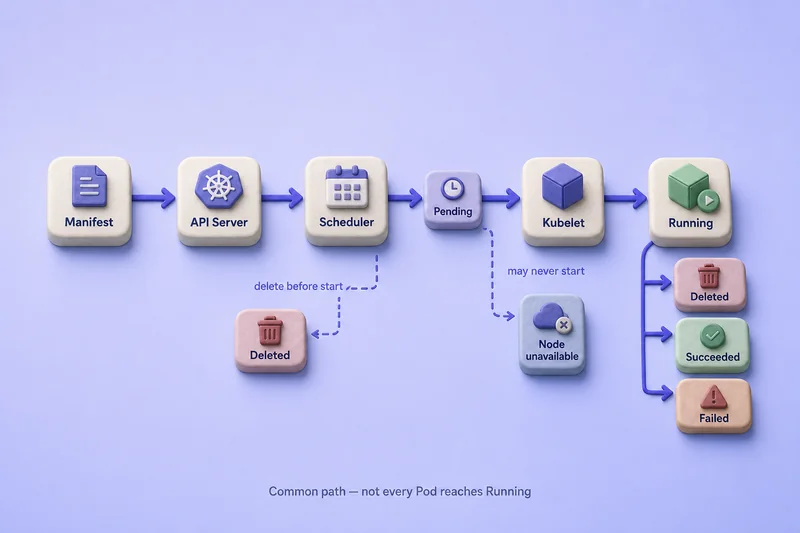
- The API server stores the Pod object and assigns a UID.
- The scheduler binds the Pod to a node.
- The kubelet prepares the sandbox and starts containers — init containers first when defined.
- Containers run or restart according to
restartPolicy. - The Pod terminates when containers finish, fail without restart, or you delete the object.
Kubernetes does not move an existing Pod to another node:
- A replacement — from a controller or a manual re-apply — is a new Pod with a new UID
- A kubelet container restart inside the same Pod keeps the same name and UID
Pod phases
.status.phase is the high-level lifecycle summary:
| Phase | Meaning |
|---|---|
Pending |
Accepted by the cluster, but one or more containers have not been set up and made ready to run; this includes time spent scheduling and downloading images |
Running |
Bound to a node, all containers have been created, and at least one container is running, starting, or restarting |
Succeeded |
All containers terminated successfully and will not restart |
Failed |
All containers terminated, at least one failed, and no container will restart |
Unknown |
Pod state could not be obtained, usually because communication with its node failed |
There is no mandatory path through every phase. Scheduling, volume, or image errors can leave a Pod Pending without setting phase to Failed.
Read phase directly:
kubectl get pod web -n pod-lifecycle-demo -o jsonpath='{.status.phase}{"\n"}'Sample output:
RunningPod phase versus kubectl STATUS
The STATUS column in kubectl get pods is a convenience view. Values such as CrashLoopBackOff, ContainerCreating, ImagePullBackOff, Completed, and Terminating are reasons or container states — not Pod phases. Use STATUS as a hint, then confirm in kubectl describe:
- Pod phase
- Container state
- Events
Dedicated troubleshooting articles cover failure-specific states such as CrashLoopBackOff, ImagePullBackOff, and Pods stuck in Pending.
| Value | Where it appears | Purpose |
|---|---|---|
| Pod phase | .status.phase |
High-level Pod lifecycle summary |
kubectl STATUS |
kubectl get pods |
Human-readable summary or reason |
| Container state | .status.containerStatuses[].state |
Per-container Waiting, Running, or Terminated |
Container states
Each container is in exactly one of three states:
| State | Meaning | Common causes |
|---|---|---|
Waiting |
Not running yet | Image pull, sandbox setup, restart backoff |
Running |
Process executing | Normal operation |
Terminated |
Process stopped | Clean exit, error exit, or kubelet stop |
For Terminated, kubectl describe shows exit code, reason, and start/finish times. After a restart, the previous instance is in lastState; fetch its logs with kubectl logs <pod> --previous.
Inspect current state:
kubectl get pod web -n pod-lifecycle-demo -o jsonpath='{.status.containerStatuses[0].state}{"\n"}'Sample output:
{"running":{"startedAt":"2026-07-25T18:29:01Z"}}Pod conditions
Conditions track independent checkpoints. A Pod can be Running while Ready is false.
| Condition | Meaning |
|---|---|
PodScheduled |
A node has been selected |
PodReadyToStartContainers |
Pod sandbox and networking are ready |
Initialized |
All init containers completed successfully, or the Pod defines no init containers |
ContainersReady |
All containers are ready; readiness probes must pass when configured |
Ready |
The Pod can serve traffic; may depend on readiness gates |
List conditions:
kubectl get pod web -n pod-lifecycle-demo -o jsonpath='{range .status.conditions[*]}{.type}{"\t"}{.status}{"\n"}{end}'Sample output:
PodReadyToStartContainers	True
Initialized	True
Ready	True
ContainersReady	True
PodScheduled	True
Services with selectors normally send traffic only to Pods where Ready is true. Readiness probe YAML and failure behaviour are covered in Kubernetes health probes.
Configure Pod restartPolicy
The Pod-level restartPolicy applies to:
- app containers
- regular init containers
Native sidecar containers defined with their own container-level restartPolicy: Always do not follow the Pod-level setting. On Kubernetes versions with ContainerRestartRules enabled, app containers and regular init containers can define container-level restartPolicy and restartPolicyRules that override the Pod-level behavior for selected exit codes. Native sidecars still use container-level restartPolicy: Always. The default for Pods is Always.
| Value | Behaviour |
|---|---|
Always |
Restart a terminated container regardless of exit code |
OnFailure |
Restart only when the container exits unsuccessfully |
Never |
Do not restart the container |
restartPolicy tells the kubelet to restart containers inside the same Pod:
- A kubelet restart keeps the same Pod name and UID on the same node
- Deleting the Pod, node loss, or controller reconciliation creates a new Pod object instead
Restart backoff
When a container exits repeatedly under Always or OnFailure, the kubelet does not restart it immediately every time. It applies exponential backoff between attempts. By default, restart delays increase as 10, 20, 40 seconds and so on, up to 300 seconds (5 minutes). After the container runs successfully for 10 minutes, the kubelet resets its backoff timer. Current Kubernetes versions also allow the maximum delay to be configured per node. Kubernetes 1.36 documents a five-minute default maximum; the configurable maximum and reduced-delay feature gates can alter this behavior.
During backoff the container sits in the Waiting state with reason CrashLoopBackOff. kubectl get shows that reason in the STATUS column. It is not a Pod phase — phase can stay Running because the Pod is still bound to a node and at least one container is starting or restarting.
When STATUS shows CrashLoopBackOff, read these together:
RESTARTSinkubectl get— how many times the kubelet has restarted the container.status.containerStatuses[].lastState— exit code and termination reason from the previous run- Events in
kubectl describe— image pull errors, hook failures, or sandbox startup problems behind the crash kubectl logs <pod> --previous— stdout and stderr from the last terminated instance
The restart-demo Pod below exits with code 1 on every run under restartPolicy: Always. After a minute or two, STATUS often shows CrashLoopBackOff while phase remains Running.
Demonstrate restartPolicy Always
apiVersion: v1
kind: Pod
metadata:
  name: restart-demo
  namespace: pod-lifecycle-demo
spec:
  restartPolicy: Always
  containers:
    - name: demo
      image: busybox:1.36
command: ["sh", "-c", "echo Starting; sleep 5; exit 1"]kubectl apply -f restart-demo.yamlSample output:
pod/restart-demo createdAfter about half a minute:
kubectl get pod restart-demo -n pod-lifecycle-demo -o custom-columns='NAME:.metadata.name,PHASE:.status.phase,RESTARTS:.status.containerStatuses[0].restartCount,UID:.metadata.uid'Sample output:
NAME           PHASE     RESTARTS   UID
restart-demo   Running   1          9ecf096a-c9ca-4388-aeee-2806e5cb94fe
The UID stays fixed while RESTARTS increases.
After a minute or two, STATUS may show backoff:
kubectl get pod restart-demo -n pod-lifecycle-demoSample output:
NAME           READY   STATUS             RESTARTS   AGE
restart-demo   0/1     CrashLoopBackOff   3          2m
Phase is still Running — read the STATUS reason and restart count, not phase alone. Inspect the previous exit:
kubectl get pod restart-demo -n pod-lifecycle-demo -o jsonpath='{.status.containerStatuses[0].lastState.terminated.exitCode}{"\n"}'Sample output:
1kubectl logs restart-demo -n pod-lifecycle-demo --previousSample output:
StartingThe container printed Starting and exited with code 1 on the previous run — the pattern the demo command repeats.
Compare restartPolicy Never
apiVersion: v1
kind: Pod
metadata:
  name: fail-once
  namespace: pod-lifecycle-demo
spec:
  restartPolicy: Never
  containers:
    - name: demo
      image: busybox:1.36
command: ["sh", "-c", "echo done; exit 1"]kubectl apply -f fail-once.yamlOnce the container exits:
kubectl get pod fail-once -n pod-lifecycle-demo -o custom-columns='NAME:.metadata.name,PHASE:.status.phase,EXIT:.status.containerStatuses[0].state.terminated.exitCode'Sample output:
NAME        PHASE    EXIT
fail-once   Failed   1
For batch work with controller-managed retries, use a Kubernetes Job.
Use container lifecycle hooks
postStart applies at container creation. preStop applies during graceful termination — the sequence in the next section runs preStop before the runtime stop signal.
postStart and preStop
| Hook | When it runs |
|---|---|
postStart |
Called immediately after the container is created. There is no guarantee whether it runs before or after the container entrypoint starts. A long-running postStart hook can delay the container's transition to Running until the hook completes. |
preStop |
Called before the stop signal when Kubernetes terminates a running container because of deletion or another management event. It is not called if the container has already terminated or completed. |
Lifecycle hook handlers and failures
Handler types:
| Handler | Use |
|---|---|
exec |
Run a command inside the container |
httpGet |
HTTP GET against a Pod IP and port |
sleep |
Wait for a fixed duration (Kubernetes 1.29+) |
Example with exec hooks and a custom grace period:
apiVersion: v1
kind: Pod
metadata:
  name: web-hooks
  namespace: pod-lifecycle-demo
spec:
  terminationGracePeriodSeconds: 30
  containers:
    - name: nginx
      image: nginx:1.27-alpine
      lifecycle:
        postStart:
          exec:
            command: ["/bin/sh", "-c", "echo started > /tmp/poststart"]
        preStop:
          exec:
            command: ["/bin/sh", "-c", "sleep 5"]
  restartPolicy: Always
During termination, the grace-period countdown begins before preStop runs:
- the hook and normal process shutdown share the same time budget
- if
preStopis still running when the configured period expires, the kubelet requests a one-time two-second extension — configure a sufficiently long grace period rather than relying on that extension
Hook failures:
- a failing
postStartcan cause the container to terminate - failures appear as events such as
FailedPostStartHookorFailedPreStopHookinkubectl describe
Understand graceful Pod termination
When you delete a Pod, Kubernetes begins graceful shutdown before removing the object. Any preStop hook from the previous section runs in step 4 below; postStart does not participate in termination.
Termination sequence
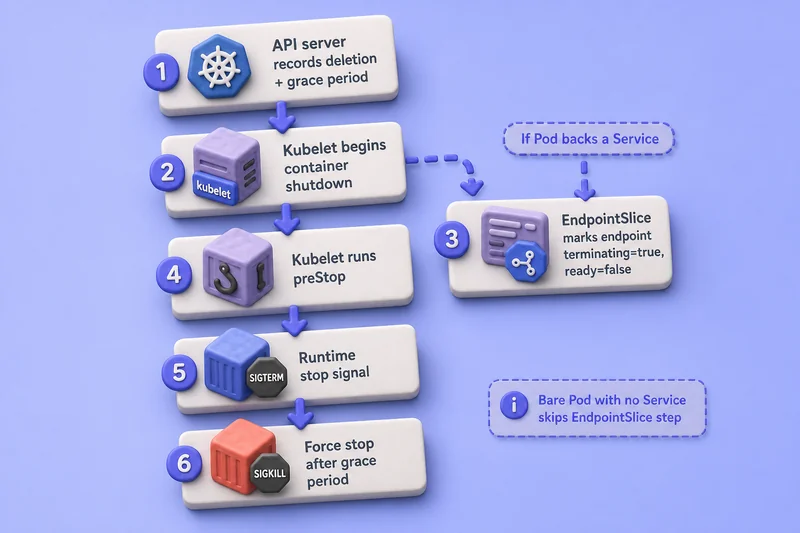
- The API server records the deletion timestamp and grace period.
- The kubelet begins local container shutdown.
- In parallel, if the Pod backs a Service, the EndpointSlice controller marks its corresponding endpoint
terminating=trueand normallyready=false. - The kubelet runs
preStop, when applicable. - The runtime sends the configured stop signal.
- Remaining processes are forcibly stopped after the grace period and any one-time extension.
When the kubelet stops a container, it asks the container runtime to stop the process. The runtime uses, in order:
- a configured lifecycle stop signal, when supported
- the image's
STOPSIGNAL - its runtime default —
SIGTERMfor containerd and CRI-O
A terminating endpoint can still have serving=true for connection-draining-aware consumers, although it has ready=false.
Delete the Pod gracefully
kubectl delete pod web -n pod-lifecycle-demo --grace-period=10Sample output:
pod "web" deletedSTATUS may briefly show Terminating while shutdown runs:
- force deletion (
--force --grace-period=0) is for broken objects, not routine rollouts - Pods stuck in
Terminatingdue to finalizers or volume detach need a dedicated troubleshooting workflow
Bare Pod versus controller-managed Pod
| Bare Pod | Controller-managed Pod |
|---|---|
Created directly with kubectl apply or YAML |
Created from a Pod template by a controller |
| Not automatically replaced after deletion | Controller recreates missing replicas |
| No rollout or revision history | Controller manages desired state and updates |
| Suitable for learning and short tests | Preferred for application workloads |
When a controller replaces a Pod:
- the new object gets a new UID and often a new name and IP
- StatefulSet can reuse the previous Pod name on the same ordinal
| Requirement | Typical controller |
|---|---|
| Stateless long-running application | Deployment |
| Stable identity and per-replica storage | StatefulSet |
| One Pod on each eligible node | DaemonSet |
| Task that runs to completion | Job |
Deleting a bare Pod leaves nothing to recreate it. A Deployment notices the missing replica and creates a replacement. Pod versus Deployment walks through the trade-offs with minimal YAML; choose a Kubernetes workload resource compares all controllers; Deployments and rolling updates covers production rollout paths.
Troubleshoot common Pod lifecycle states
| Symptom | First step |
|---|---|
Pending |
kubectl describe pod — read Events for scheduling or volume issues |
CrashLoopBackOff |
kubectl logs <pod> --previous and inspect restart count |
Running but 0/1 Ready |
Check conditions and readiness probe configuration |
Error with no restarts |
Exit code in describe — often restartPolicy: Never |
Terminating for too long |
Deletion timestamp, preStop, and finalizers in describe |
kubectl describe pod <name> -n <namespace>
kubectl logs <name> -n <namespace> --previous
kubectl get events -n <namespace> --sort-by=.lastTimestamp
Detailed failure-specific workflows are outside this Pod lifecycle guide.
What's Next
- Kubernetes Deployments, Rolling Updates and Rollbacks
- Kubernetes StatefulSet with Examples
- Kubernetes DaemonSet with Examples
References
Summary
A Kubernetes Pod is the smallest unit Kubernetes schedules: one or more containers that share a network namespace and optional volumes on a single node. You create Pods with YAML, validate with kubectl apply --dry-run=server, and inspect what the API reports through kubectl get, describe, and jsonpath on .status.phase, container state, and Pod conditions. Phase, per-container Waiting/Running/Terminated state, kubectl STATUS, and Ready versus ContainersReady answer different questions — read them together when a Pod looks stuck in Pending, CrashLoopBackOff, or Terminating.
restartPolicy controls kubelet restarts inside the same Pod name and UID; failed containers back off exponentially up to five minutes until the container stays up for ten minutes. postStart and preStop hooks shape startup and shutdown, but postStart timing relative to the entrypoint is not guaranteed, and a slow postStart can delay the transition to Running. Graceful deletion runs kubelet shutdown in parallel with EndpointSlice updates when the Pod backs a Service: preStop, the stop signal, then terminationGracePeriodSeconds before a hard kill.
Use bare Pods for learning, image smoke tests, and short debugging runs. Production workloads belong under a Deployment, StatefulSet, DaemonSet, or Job so missing Pods are recreated automatically — the bare Pod versus controller section above covers when to move on. When STATUS stalls, start with kubectl describe pod Events, then kubectl logs (including --previous after restarts).
Frequently Asked Questions
What is a Pod in Kubernetes?
A Pod is the smallest deployable workload unit in Kubernetes. It wraps one or more tightly related containers that are scheduled together on one node and share the same network namespace and optional volumes.
Can a Pod contain multiple containers?
Yes. Most Pods run one application container, but multi-container Pods are common when containers must share localhost networking and volumes. See the init containers and sidecar patterns guide for dedicated patterns.
What is the difference between Pod phase and container state?
Pod phase (.status.phase) is a high-level lifecycle summary for the whole Pod. Container state (.status.containerStatuses[].state) describes each container individually as Waiting, Running, or Terminated.
What does the STATUS column in kubectl get pods mean?
It is a human-readable summary derived from phase, container state, and reasons such as ContainerCreating, CrashLoopBackOff, ImagePullBackOff, Completed, or Terminating. It is not an additional official Pod phase.
What is the difference between Ready and ContainersReady?
ContainersReady becomes true when all containers are ready. Any configured readiness probes must pass. Ready can additionally depend on custom readiness gates on the Pod.
What does restartPolicy control?
restartPolicy tells the kubelet whether to restart exited containers in the same Pod: Always restarts regardless of exit code, OnFailure restarts only on failure, and Never leaves the container stopped.
Does Kubernetes restart a container or create a new Pod?
A kubelet container restart keeps the same Pod name and UID on the same node. A workload controller replacement creates a new Pod object with a new UID. StatefulSet can reuse the previous Pod name on replacement.
What are postStart and preStop lifecycle hooks?
postStart is called immediately after the container is created. There is no guarantee whether it runs before or after the entrypoint starts. A long-running postStart hook can delay the container transition to Running until the hook completes. preStop is called before the stop signal when Kubernetes terminates a running container because of deletion or another management event. It is not called if the container has already terminated or completed. preStop is commonly used to delay shutdown while connections drain.
What happens when a Pod is deleted?
Kubernetes records the deletion timestamp and grace period. The kubelet begins local container shutdown while, in parallel, if the Pod backs a Service, the EndpointSlice controller marks its corresponding endpoint terminating=true and normally ready=false. The kubelet runs any preStop hook, the runtime sends the configured stop signal, waits for the grace period (30 seconds by default) and any one-time two-second extension if preStop is still running, then force-stops remaining processes.
When should you create a Pod directly?
Use a bare Pod for learning, short debugging, one-off image tests, or demos. Production applications should run under a Deployment, StatefulSet, DaemonSet, or Job so failed Pods are recreated automatically.
