
| Tested on | Rocky Linux 10.2 (Red Quartz) workstation |
|---|---|
| Package | kubectl 1.36.3 |
| Applies to | Any host with kubectl configured; any Kubernetes cluster |
| Cert prep | CKAD · CKA |
| Lab environment | Multi-node kubeadm cluster with containerd — install Kubernetes with kubeadm |
| Privilege | Normal user (no sudo required on the workstation) |
| Kubernetes permissions | For the inspection commands: get and list Nodes; get and list Pods and Events; get and list Leases in kube-node-lease; and get the non-resource URL /readyz. Managed clusters may restrict control-plane Pod visibility. |
| Scope | Control plane and worker node components, API objects versus running processes, Deployment request flow, self-healing behavior, and kubectl inspection on a kubeadm cluster. Does not cover cluster installation, etcd administration, HA setup, CNI installation, or control-plane troubleshooting. |
Kubernetes is a distributed system for running containerized applications. The control loop works like this:
- You declare desired state through the API
- Controllers reconcile that state
- The scheduler places Pods on suitable nodes
- Each node's kubelet starts containers through a CRI-compatible runtime
This guide maps those roles so the rest of the CKAD and CKA courses have a shared mental model.
If you need background on images and registries first, read Kubernetes container images. The sections on Deployment request flow, Services, and EndpointSlices are especially useful for application developers.
What is Kubernetes architecture?
A Kubernetes cluster splits into two primary areas:
Kubernetes cluster
├── Control plane
│   └── Manages desired and current cluster state
└── Worker nodes
    └── Run application Pods and their containers
The control plane exposes the declarative API, stores persistent state, schedules Pods, and runs reconciliation loops. Worker nodes provide compute: kubelet, container runtime, networking agents, and the Pods your applications run in.
A few layout facts matter early:
- A cluster can have one or multiple control plane nodes.
- Production clusters usually separate control plane and workload nodes.
- Small labs — including the kubeadm cluster used here — often run system Pods on the control plane node and may also schedule application workloads there.
- Managed Kubernetes services hide control-plane implementation details, but the same logical components still exist behind the provider API.
Older documentation may still say master or minion; current Kubernetes terminology is control plane and worker node.
Kubernetes architecture at a glance
The figure below shows how users and cluster processes relate. Solid boxes are running components or add-ons; Pods and Deployments are API objects; containers run inside Pods on worker nodes.
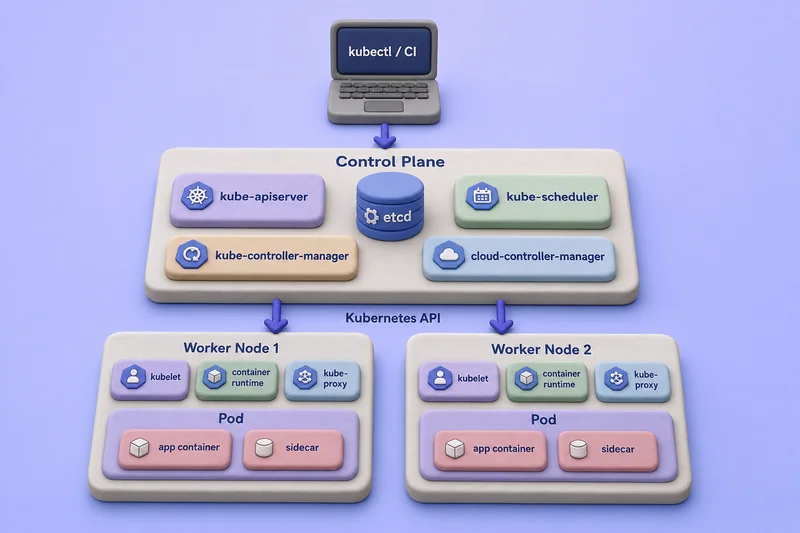
Read the diagram from top to bottom:
- kubectl, CI systems, and controllers all talk to kube-apiserver.
- The API server persists cluster state in etcd. The scheduler and controllers independently watch API objects and submit their decisions or changes back through the API server.
- cloud-controller-manager appears only when a cloud provider integration is installed.
- Each worker node runs kubelet, a container runtime, and usually kube-proxy or a replacement data plane.
- Application Pods hold one or more containers; most Pods run a single application container.
Optional add-ons such as CoreDNS and the CNI implementation sit alongside these core pieces rather than inside the control plane process set.
Kubernetes components vs Kubernetes objects
Kubernetes documentation mixes three different ideas. Keep them separate before you study individual components.
| Category | Examples |
|---|---|
| Cluster components | kube-apiserver, kube-scheduler, kube-controller-manager, kubelet |
| Kubernetes API objects | Node, Pod, Deployment, Service, ConfigMap |
| Runtime workloads | Containers running inside Pods |
| Cluster add-ons | CoreDNS, Metrics Server, CNI implementation |
Important distinctions:
- A Pod is an API object and the smallest deployable compute unit.
- A Node is represented in the API and also maps to a physical or virtual machine.
- A container is created by the node's container runtime, not by the API server directly.
- A Deployment stores desired replica count and Pod template in etcd; controllers create and update other objects to match.
- Controllers watch API objects and write new or updated objects — they do not run your application code themselves.
Control plane components
The control plane manages cluster desired state. It normally does not run your application containers unless the control plane node is also schedulable for workloads.
kube-apiserver
The API server is the front door to the cluster. It exposes the Kubernetes HTTP API, authenticates and authorizes each request, runs admission plugins, validates object schemas, and reads or writes state through etcd.
Simplified write-request path:
kubectl/client → TLS → authentication → authorization
               → mutating admission → API object validation
               → validating admission → persistence in etcd
Mutating admission completes before validating admission, and API object validation occurs after mutations before validating webhooks evaluate the final object.
Every other component uses this API:
- kubectl, controllers, and kubelets all talk to kube-apiserver
- The API server is their shared communication and persistence interface
- It does not directly orchestrate scheduler or controller reconciliation loops
For deeper coverage of authentication and authorization, see Kubernetes authentication and authorization. To discover object kinds and API groups, use Kubernetes API resources.
etcd
etcd is the consistent key-value store behind cluster state. The API server is the only component that should write Kubernetes API data to etcd under normal operation.
On a kubeadm cluster, etcd commonly runs as a static Pod on each control plane node. It does not run on every worker node, and it is not a general node-to-node messaging bus. Backup, restore, and etcd tuning belong in CKA-focused material rather than here.
kube-scheduler
The scheduler watches for Pods with empty spec.nodeName, filters nodes that cannot satisfy the Pod, scores the remaining candidates, and binds the Pod to the selected node.
Inputs include resource requests, node selectors, affinity and anti-affinity, taints and tolerations, volume topology, and other scheduling constraints. The scheduler selects a node; it does not start containers. The kubelet on the chosen node does that work.
For request and limit fields the scheduler reads, see Kubernetes requests, limits, and QoS. For Pods stuck before scheduling, see Pod Pending and ContainerCreating.
kube-controller-manager
Controllers implement control loops:
Desired state → observe current state → make changes → repeatThe kube-controller-manager runs many independent controllers in one process. Application-relevant examples include:
- Deployment controller
- ReplicaSet controller
- Job controller
- Node controller
- EndpointSlice controller
- ServiceAccount controller
Each controller reconciles one slice of desired state. Follow-up reading: Deployments and rolling updates, Kubernetes ReplicaSet, Kubernetes Jobs, and Kubernetes Services.
cloud-controller-manager
This component is optional. It connects Kubernetes to a cloud provider for node lifecycle, routes, and external load balancers. A local kubeadm lab normally does not run it; managed cloud clusters usually do. Provider-specific configuration is outside this article.
Worker node components
Worker nodes provide the runtime environment where application Pods execute.
kubelet
The kubelet is the node agent. It registers the node with the API server, watches Pods assigned to its node, creates Pod sandboxes and containers through the container runtime, mounts volumes and projected configuration, runs startup/readiness/liveness probes, and reports Pod and node status.
The kubelet does not choose which node receives a Pod. The scheduler assigns the Pod; the kubelet reconciles only Pods bound to its node (plus static Pods defined locally). Probe behavior is covered in Kubernetes health checks.
Container runtime and CRI
The container runtime pulls images and runs containers. The kubelet talks to it through the Container Runtime Interface (CRI):
kubelet → CRI → container runtime → containerCommon CRI-compatible runtimes include containerd and CRI-O. Images built with Docker can run on these runtimes because they use standard container image formats. Docker Engine does not implement CRI directly; using Docker Engine as the Kubernetes runtime requires an adapter such as cri-dockerd.
The kubeadm lab in Related guides uses containerd. Runtime installation steps live in install Kubernetes with kubeadm.
kube-proxy or a Service proxy alternative
kube-proxy watches Service and EndpointSlice objects and programs node-level forwarding rules that implement part of the Kubernetes Service model. It is not the component that creates the Pod network — that is the CNI implementation's job.
Some clusters replace kube-proxy with a CNI or dataplane that handles Service forwarding directly. kube-proxy also does not perform DNS lookups for Service names; clients resolve Services through CoreDNS or environment injection depending on configuration.
Service behavior, EndpointSlices, and client connectivity are covered in Kubernetes Services.
Cluster networking and add-ons
Add-ons extend a working cluster. They are not the same as control-plane binaries. Pod-to-Pod connectivity, Service forwarding, and policy enforcement are covered in depth in Kubernetes networking.
CNI networking implementation
The CNI plugin creates Pod network interfaces, assigns Pod IP addresses, and provides Pod-to-Pod connectivity. It may enforce NetworkPolicy and, on some platforms, replace kube-proxy. Calico, Cilium, and Flannel are common choices; installation for the lab CNI is documented in install Kubernetes with kubeadm.
CoreDNS
CoreDNS provides DNS-based discovery for Services and Pods. It normally runs as a Deployment in kube-system and is exposed through a Service often named kube-dns. See Kubernetes DNS troubleshooting when name resolution fails.
Metrics Server
Metrics Server collects resource usage metrics for kubectl top. It is an add-on, not a core control-plane component, and is not installed in every cluster by default. See monitor Pod and container resources.
| Add-on | Main purpose |
|---|---|
| CNI implementation | Pod networking |
| CoreDNS | Service and Pod name resolution |
| Metrics Server | CPU and memory metrics |
| Ingress or Gateway controller | External application routing |
How a Deployment becomes running Pods
kubectl apply, Pod scheduling, readiness, and Service endpoints.
Suppose you run:
kubectl apply -f deployment.yamlThe request path looks like this:
kubectlreads kubeconfig and sends the manifest to the API server.- The API server authenticates and authorizes the caller.
- Mutating admission, object validation, and validating admission process the Deployment.
- After the request is accepted, the API server persists the Deployment in etcd.
- The Deployment controller observes the new desired state.
- It creates or updates a ReplicaSet.
- The ReplicaSet controller creates Pod objects.
- The scheduler assigns each unscheduled Pod to a node.
- The kubelet on that node observes each Pod assigned to its node and prepares required volumes and resources.
- The kubelet asks the container runtime through CRI to create a Pod sandbox.
- The runtime configures networking for that sandbox through the CNI implementation and assigns the Pod IP.
- After the sandbox and networking are ready, the kubelet and runtime pull images and start init containers followed by application containers.
- The kubelet runs probes and reports container and Pod status to the API server.
- The EndpointSlice controller updates the readiness of matching Service backends.
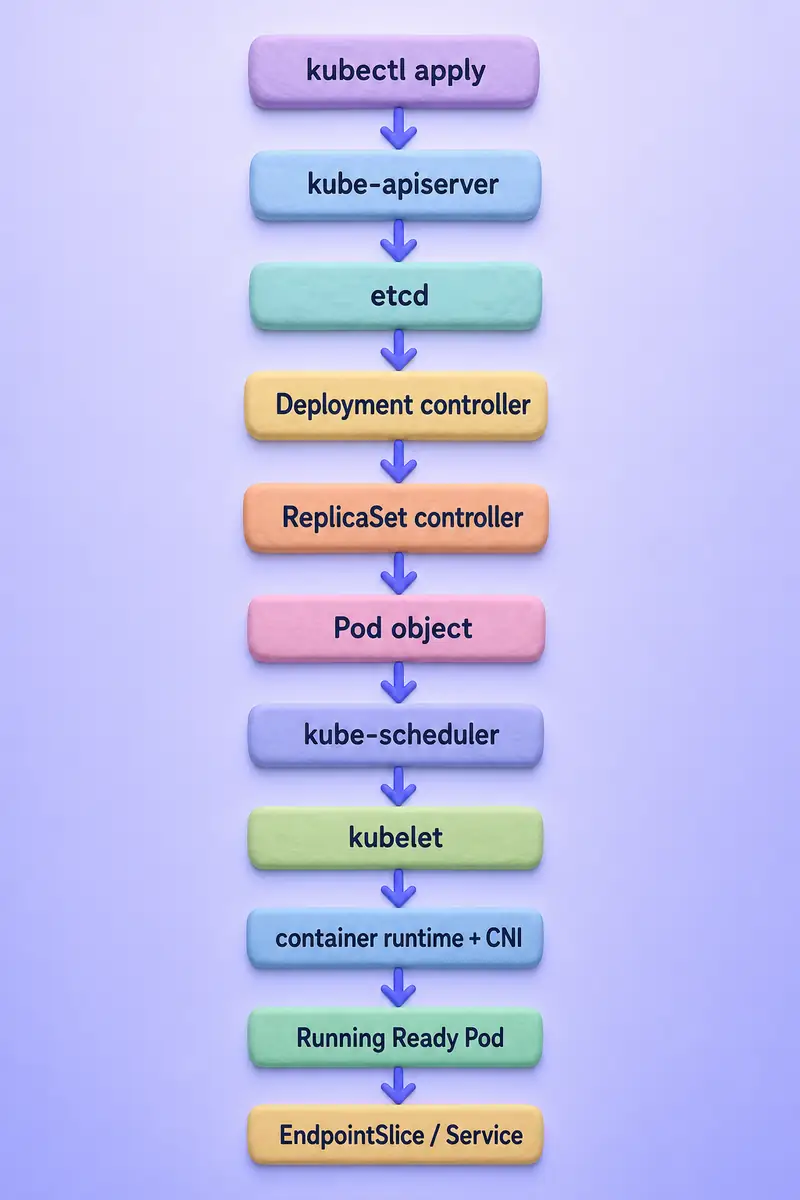
The flow diagram shows object creation and reconciliation, not a single long-lived Pod moving between nodes. Each new Pod gets its own UID. When you change a Deployment image, the Deployment controller creates a new ReplicaSet and performs a rollout — see Deployments and rolling updates.
Desired state, controllers, and self-healing
Controllers continuously compare desired and current state:
Desired state:
Deployment requests three replicas

Current state:
Only two healthy Pods exist

Controller action:
ReplicaSet controller creates another Pod
Self-healing does not mean Kubernetes moves the same Pod to another node. A Pod remains on one node for its lifetime. If a Pod under a Deployment is deleted or its node fails, a controller creates a replacement Pod with a new UID; the scheduler may place that replacement elsewhere.
| Failure | Component primarily involved | Typical result |
|---|---|---|
| Container process exits | kubelet | Container restart per restartPolicy |
| Liveness probe fails | kubelet | Container restart in the same Pod |
| Pod deleted under a Deployment | ReplicaSet controller | Replacement Pod created |
| Worker node unavailable | Node lifecycle controller, taint-eviction controller, and workload controller | Node is marked unhealthy and tainted; after applicable toleration and eviction delays, a controller-managed Pod may be deleted and replaced on another suitable node |
| Application NotReady | kubelet and EndpointSlice controller | Pod removed from ready Service endpoints |
| Deployment image changes | Deployment controller | New ReplicaSet and rolling rollout |
Replacement is not immediate and applies only when a controller manages the workload. A standalone Pod is not recreated merely because its node becomes unavailable.
Inspect Kubernetes architecture in a running cluster
The commands below use the kubeadm lab from Related guides. Connect with install kubectl and kubeconfig if you have not configured access yet.
List control plane and worker nodes
List nodes with addresses and runtime information:
kubectl get nodes -o wideSample output:
NAME       STATUS   ROLES           AGE     VERSION   INTERNAL-IP      EXTERNAL-IP   OS-IMAGE                        KERNEL-VERSION                              CONTAINER-RUNTIME
k8s-cp     Ready    control-plane   2d21h   v1.36.3   192.168.56.108   <none>        Rocky Linux 10.2 (Red Quartz)   6.12.0-211.16.1.el10_2.0.1.x86_64 (amd64)   containerd://2.2.5
worker01   Ready    <none>          2d20h   v1.36.3   192.168.56.109   <none>        Rocky Linux 10.2 (Red Quartz)   6.12.0-211.34.1.el10_2.x86_64 (amd64)       containerd://2.2.5
The ROLES column reflects labels such as node-role.kubernetes.io/control-plane. Labels describe scheduling and reporting; they do not by themselves start control-plane processes.
Inspect the labels directly:
kubectl get nodes --show-labelsSample output:
NAME       STATUS   ROLES           AGE     VERSION   LABELS
k8s-cp     Ready    control-plane   2d21h   v1.36.3   ...node-role.kubernetes.io/control-plane=...
worker01   Ready    <none>          2d20h   v1.36.3   ...kubernetes.io/hostname=worker01...
View system components
List Pods in kube-system:
kubectl get pods -n kube-system -o wideSample output:
NAME                              READY   STATUS    RESTARTS       AGE     IP               NODE
coredns-589f44dc88-7q8t5          1/1     Running   9 (35h ago)    2d21h   192.168.62.184   k8s-cp
etcd-k8s-cp                       1/1     Running   10 (35h ago)   2d21h   192.168.56.108   k8s-cp
kube-apiserver-k8s-cp             1/1     Running   11 (35h ago)   2d21h   192.168.56.108   k8s-cp
kube-controller-manager-k8s-cp    1/1     Running   26 (24m ago)   2d21h   192.168.56.108   k8s-cp
kube-proxy-gsk9s                  1/1     Running   0              17h     192.168.56.108   k8s-cp
kube-proxy-m2w8v                  1/1     Running   0              17h     192.168.56.109   worker01
kube-scheduler-k8s-cp             1/1     Running   25 (24m ago)   2d21h   192.168.56.108   k8s-cp
metrics-server-6c9576559c-tpts9 1/1 Running 0 18m 192.168.5.56 worker01| Pod name pattern | Role |
|---|---|
kube-apiserver-* |
API server |
etcd-* |
Cluster state store |
kube-scheduler-* |
Scheduler |
kube-controller-manager-* |
Built-in controllers |
kube-proxy-* |
Service proxy |
coredns-* |
DNS add-on |
| CNI-specific Pods | Pod networking |
kubeadm exposes control-plane static Pods as mirror Pods in kube-system. Managed Kubernetes services may not show control-plane Pods through the tenant API, and names vary by installation method.
Check API server readiness
Query aggregated readiness checks:
kubectl get --raw='/readyz?verbose'Sample output:
[+]ping ok
[+]log ok
[+]etcd ok
[+]etcd-readiness ok
[+]informer-sync ok
...
Each [+]... ok line reports one internal readiness check. The command requires API permissions sufficient to hit the readiness endpoint.
Inspect a worker node
Replace worker01 with a worker node from your cluster:
kubectl describe node worker01The command prints roles, labels, taints, conditions, capacity and allocatable resources, container runtime version, assigned Pods, and recent events. On the lab worker, Container Runtime Version: containerd://2.2.5 confirms the CRI runtime kubelet uses.
Inspect node heartbeats
Lease objects provide lightweight node heartbeat metadata:
kubectl get lease -n kube-node-leaseSample output:
NAME       HOLDER     AGE
k8s-cp     k8s-cp     2d21h
worker01   worker01   2d20h
Each Lease ties a node name to the kubelet identity currently renewing it. This is useful context, not a full node-failure runbook.
Control plane availability and cluster layouts
Single control plane
A single control-plane node suits labs, development, and CKAD practice. If the control plane fails, API changes stop even when existing Pods on worker nodes may continue running for a time.
Highly available control plane
Production clusters usually run multiple API server instances behind a load-balanced endpoint, replicate etcd, and run scheduler and controller-manager processes with leader election so only one active instance reconciles at a time. Setup commands are outside this article.
Managed Kubernetes
Cloud providers operate the control plane. You manage worker nodes (or node pools) and API objects. Component visibility differs by provider, but the same logical API, scheduler, and controller model still applies.
Control plane vs worker nodes
| Area | Control plane | Worker node |
|---|---|---|
| Main responsibility | Manage cluster state | Run application workloads |
| API server | Yes | No |
| etcd | Usually | No |
| Scheduler | Yes | No |
| Controller manager | Yes | No |
| kubelet | May run on host OS, not as a control-plane service | Yes |
| Container runtime | Required when components run as containers | Required |
| Application Pods | Usually restricted | Yes |
| kube-proxy or replacement | Depends on layout | Commonly |
| CNI node agent | Depends on CNI | Commonly |
Actual process placement depends on how the cluster was installed. Describe logical roles first; do not assume every cluster places identical binaries on identical nodes.
Common Kubernetes architecture misconceptions
| Misconception | Correct explanation |
|---|---|
| Every cluster has one master node | Clusters can have one or multiple control plane nodes |
| Every worker runs etcd | etcd belongs to the control-plane data store |
| Kubernetes requires Docker | Kubernetes requires a CRI-compatible runtime |
| A Pod moves to another node after failure | A controller creates a replacement Pod with a new UID |
| kube-proxy creates Pod networking | CNI handles Pod networking; kube-proxy handles Service forwarding |
| Every Pod contains several containers | Most Pods contain one application container |
| A Pod is the same as a container | A Pod is the runtime environment for one or more containers |
| The scheduler starts containers | Scheduler selects a node; kubelet and the runtime start containers |
| The controller manager runs applications | Controllers create or update API objects |
| Control plane nodes can never run workloads | They can when scheduling restrictions allow it |
What's Next
- Create, Switch, and Manage with kubectl
- Kubernetes Labels and Selectors with Examples
- Kubernetes Annotations with Examples
References
- Kubernetes cluster components — upstream architecture overview
- Kubernetes nodes — node responsibilities and heartbeats
- Container Runtime Interface (CRI) — kubelet to runtime interface
- kube-scheduler — scheduling overview
Summary
Kubernetes separates cluster management from workload execution. The control plane exposes the API through kube-apiserver, stores state in etcd, schedules Pods with kube-scheduler, and reconciles desired state through kube-controller-manager. Worker nodes run application Pods through kubelet and a CRI-compatible container runtime such as containerd.
When you kubectl apply a Deployment, controllers create ReplicaSets and Pods, the scheduler binds each Pod to a node, and the kubelet plus runtime start containers on that node. Readiness and EndpointSlice updates connect stable Service names to the Pods that are actually ready to receive traffic. Add-ons such as CoreDNS, Metrics Server, and your CNI implementation provide DNS, metrics, and Pod networking on top of that core model.
Self-healing means controllers create replacement Pods — not that the same Pod relocates. That distinction matters when you read Pod status, rollout events, and Service endpoint changes in later lessons. Build the lab cluster with install Kubernetes with kubeadm, then continue with Kubernetes Pods, workload types, and Services to see each component in action.
Frequently Asked Questions
What are the main parts of Kubernetes architecture?
A Kubernetes cluster has a control plane that exposes the API and reconciles desired state, and worker nodes that run application Pods through kubelet and a CRI-compatible container runtime. Add-ons such as CoreDNS and a CNI implementation provide DNS and Pod networking.
What is the difference between control plane and worker node?
The control plane manages cluster state through kube-apiserver, etcd, kube-scheduler, and kube-controller-manager. Worker nodes execute workloads: kubelet starts Pods, the container runtime runs containers, and kube-proxy or an alternative handles Service forwarding on the node.
Does Kubernetes require Docker?
No. Kubernetes requires a CRI-compatible container runtime such as containerd or CRI-O. Images built with Docker can run on these runtimes because they use standard container image formats. Docker Engine does not implement CRI directly; using Docker Engine as the Kubernetes runtime requires an adapter such as cri-dockerd.
Does Kubernetes move a failed Pod to another node?
No. A Pod has one UID and stays tied to one node for its lifetime. If a managed Pod is lost, a controller such as a ReplicaSet creates a replacement Pod, and the scheduler may place that new Pod on a different node.
What starts a container after the scheduler picks a node?
The kubelet on the assigned node watches for the Pod, asks the container runtime through CRI to pull images and start containers, mounts volumes, runs probes, and reports status back to the API server.
