
| Tested on | RHEL 10.2 (Coughlan) — client vm1.lab.example (192.168.56.116)Windows Server 2025 AD DC — WIN-8S0K67EP5EO.lab.example (192.168.56.128) |
|---|---|
| Package | adcli-0.9.3.1-3.el10sssd-2.12.0-3.el10_2.2sssd-ad-2.12.0-3.el10_2.2oddjob-mkhomedir-0.34.7-14.el10krb5-workstation-1.21.3-10.el10_2 |
| Applies to | RHEL 10, Rocky Linux 10, AlmaLinux 10, Oracle Linux 10, CentOS Stream 10 |
| Privilege | sudo or root on the Linux client; domain account that can join computers (for example Administrator) |
| Scope | Join Active Directory with adcli join (no realm join), verify the machine keytab, write and secure /etc/sssd/sssd.conf, enable SSSD through authselect, and manage the computer account with adcli update / testjoin. For the supported one-command path, use realmd and SSSD. Does not cover Samba Winbind (Winbind member guide). |
| Related guides | Join with realmd and SSSD Join with Samba Winbind Kerberos packet analysis Chrony time sync Analyze LDAP in Wireshark |
Use adcli when you want to enroll the Linux host in Active Directory yourself and keep full control of SSSD, authselect, and NSS. adcli join creates the computer account and writes /etc/krb5.keytab; nothing else is automatic until you configure it.
If you only need a standard Linux login integration path, join with realmd and SSSD is simpler. This guide is for operators who script joins, pin a domain controller with -S, or need adcli maintenance commands after enrollment.
Quick answer
adcli join enrolls the machine in Active Directory and stores Kerberos keys in /etc/krb5.keytab. It does not configure SSSD, PAM, or authselect.
Typical flow:
- Point DNS at the domain controller and confirm SRV records.
- Run
adcli infoandadcli join. - Create
/etc/sssd/sssd.conf, runauthselect select sssd with-mkhomedir, and startsssd. - Verify with
adcli testjoin,id user@domain, and optionalkinit.
For the easiest join on RHEL 10, use realm join in the realmd guide instead of hand-building the stack.
adcli vs realmd: what is the difference?
| Layer | adcli alone |
realm join |
|---|---|---|
| Discover domain | adcli info |
realm discover |
| Enroll computer + keytab | adcli join |
Calls adcli join |
| SSSD configuration | You write /etc/sssd/sssd.conf |
Automatic |
| NSS/PAM (authselect) | You run authselect |
Automatic |
| Services | You enable sssd / oddjobd |
Automatic |
| Login policy | SSSD / PAM settings | realm permit / realm deny |
adcli pings the domain, authenticates the join account, creates the computer object, and writes /etc/krb5.keytab. Everything after that is yours to configure (usually SSSD). realm join runs the same enrollment step, then wires the rest of the stack for you.
Test environment
| Role | Hostname | IP |
|---|---|---|
| Active Directory DC (Windows Server 2025) | WIN-8S0K67EP5EO.lab.example |
192.168.56.128 |
| RHEL 10.2 client | vm1.lab.example |
192.168.56.116 |
| DNS domain / Kerberos realm | lab.example / LAB.EXAMPLE |
— |
The walkthrough uses sample user jane@lab.example. Replace domain names and IPs with your environment. For a short explanation of the practice domain used in screenshots, see the lab overview in the realmd guide.
Prerequisites for adcli Active Directory enrollment
The client must resolve _ldap._tcp and _kerberos._tcp under your domain, use a matching FQDN, and keep time synchronized with the DC.
Point NetworkManager (or /etc/resolv.conf) at the DC, then query SRV records:
dig +short _ldap._tcp.lab.example SRV0 100 389 win-8s0k67ep5eo.lab.example.Kerberos service location should return a similar host:
dig +short _kerberos._tcp.lab.example SRV0 100 88 win-8s0k67ep5eo.lab.example.Empty answers mean fix DNS before any join attempt.
The computer account name is derived from the short hostname (VM1 when FQDN is vm1.lab.example):
hostname -fvm1.lab.exampleKerberos rejects tickets when clock skew is large. Confirm NTP is active:
timedatectl | grep -E 'synchronized|NTP'System clock synchronized: yes
NTP service: activeIf synchronization is off, fix Chrony or NTP before adcli join.
Install adcli and SSSD
Install enrollment and identity packages together on RHEL 10 or Rocky Linux 10. You do not need realmd for this path:
sudo dnf install -y adcli sssd sssd-ad sssd-krb5 oddjob oddjob-mkhomedir krb5-workstationConfirm versions match your distribution:
rpm -q adcli sssd sssd-ad oddjob-mkhomedir krb5-workstationadcli-0.9.3.1-3.el10.x86_64
sssd-2.12.0-3.el10_2.2.x86_64
sssd-ad-2.12.0-3.el10_2.2.x86_64
oddjob-mkhomedir-0.34.7-14.el10.x86_64
krb5-workstation-1.21.3-10.el10_2.x86_64Discover Active Directory with adcli
With AD DNS configured, let adcli pick the controller from SRV records:
adcli info lab.example[domain]
domain-name = lab.example
domain-short = LAB
domain-forest = lab.example
domain-controller = WIN-8S0K67EP5EO.lab.example
domain-controller-site = Default-First-Site-Name
domain-controller-usable = yes
domain-controllers = WIN-8S0K67EP5EO.lab.example
[computer]
computer-site = Default-First-Site-NameTo pin one controller when discovery is ambiguous, pass its FQDN (not the raw IP): adcli info lab.example -S win-8s0k67ep5eo.lab.example.
Fields you will reference later:
domain-name— DNS domain foradcli join -Dand SSSDad_domaindomain-short— NetBIOS name (LAB)domain-controller— target host for LDAP/Kerberos during joindomain-controller-site— AD site name (useful in multi-site forests)
Join Active Directory with adcli
Pass the join account with -U and enter the password when adcli prompts:
sudo adcli join lab.example -U Administrator -vVerbose output should end with keytab lines for VM1$@LAB.EXAMPLE and host/vm1.lab.example@LAB.EXAMPLE.
For automation only, --stdin-password reads the join password from standard input. Do not put the AD password on the shell command line.
Join to a specific OU by adding --computer-ou="OU=Linux,DC=lab,DC=example" when your design requires it.
The keytab holds the machine account secrets Winbind or SSSD will use:
sudo ls -l /etc/krb5.keytab-rw-------. 1 root root 802 Oct 13 20:35 /etc/krb5.keytabList principals and KVNO values:
sudo klist -kKeytab name: FILE:/etc/krb5.keytab
KVNO Principal
---- --------------------------------------------------------------------------
2 VM1$@LAB.EXAMPLE
2 host/VM1@LAB.EXAMPLE
2 host/vm1.lab.example@LAB.EXAMPLE
2 RestrictedKrbHost/VM1@LAB.EXAMPLE
2 RestrictedKrbHost/vm1.lab.example@LAB.EXAMPLEA non-zero KVNO after join means the directory stored a password for VM1$.
Confirm the machine password still works against the domain:
sudo adcli testjoin -D lab.example -vSuccessfully validated join to domain lab.exampleThe keytab listing from klist -k is the primary proof on the Linux side that enrollment succeeded:
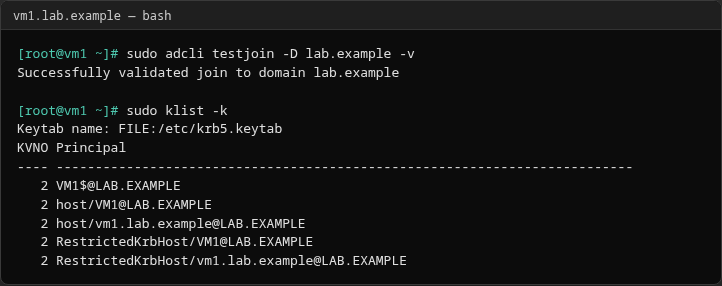
You can also confirm VM1 under Computers in Active Directory Users and Computers on the DC.
Configure SSSD after the adcli join
This section is what separates this guide from realm join: you author SSSD yourself.
Create /etc/sssd/sssd.conf with an [sssd] section and a [domain/lab.example] section:
[sssd]
domains = lab.example
config_file_version = 2
services = nss, pam

[domain/lab.example]
ad_domain = lab.example
krb5_realm = LAB.EXAMPLE
id_provider = ad
access_provider = ad
cache_credentials = True
default_shell = /bin/bash
ldap_id_mapping = True
use_fully_qualified_names = True
fallback_homedir = /home/%u@%d
Important keys:
id_provider = ad— Microsoft AD backendaccess_provider = ad— AD for identity and access checksuse_fully_qualified_names = True— logins likejane@lab.exampleldap_id_mapping = True— map AD SIDs to Linux UIDs without POSIX attributes in AD
Omit ad_server when the client already resolves AD SRV records. Add ad_server = dc01.example.com only when you must pin a specific host.
SSSD refuses to start when permissions are too open:
sudo chmod 600 /etc/sssd/sssd.conf
sudo chown root:root /etc/sssd/sssd.conf
Record the current profile before you change authentication. You will need it if you remove AD integration later:
authselect currentSelect the SSSD authselect profile and enable home directory creation:
sudo authselect select sssd with-mkhomedirIf authselect reports an unmanaged or custom stack, use --force only when you intend to replace the current PAM/NSS configuration.
Enable and start services:
sudo systemctl enable --now sssd oddjobdCheck domain connectivity:
sudo sssctl domain-status lab.exampleOnline status: Online
Active servers:
AD Domain Controller: win-8s0k67ep5eo.lab.exampleIf status stays Offline, check DNS SRV records, firewall paths to the DC, and journalctl -u sssd before you test user lookup.
On RHEL 10, authselect owns PAM and NSS wiring. After authselect select sssd with-mkhomedir, authselect current should show the sssd profile with with-mkhomedir. Do not use legacy authconfig. After you edit /etc/sssd/sssd.conf, run sudo systemctl restart sssd — you do not re-run authselect for every config change. The with-mkhomedir feature creates /home/user@domain on first login when oddjobd is active.
Verify Active Directory user lookup
NSS should resolve domain users through SSSD:
id jane@lab.exampleuid=758601105(jane@lab.example) gid=758600513(domain users@lab.example) groups=758600513(domain users@lab.example),758601103(network-admins@lab.example)The same identity should appear from getent:
getent passwd jane@lab.examplejane@lab.example:*:758601105:758600513:Jane Admin:/home/jane@lab.example:/bin/bashUser tickets prove the KDC accepts passwords independent of SSSD caching:
kinit jane@LAB.EXAMPLEEnter the user’s AD password when prompted, then list the ticket:
klistTicket cache: KCM:0
Default principal: jane@LAB.EXAMPLE
...SSH or local login with jane@lab.example should succeed when PAM allows that user. On a pure adcli host, restrict logins with SSSD access_provider = ad and ad_access_filter or similar allow lists.
Manage the AD computer account with adcli
These commands are unique to the adcli workflow and are not exposed through realm alone.
Show computer account information — administrative credentials are required to read directory attributes:
sudo adcli show-computer VM1 --domain=lab.example -U Administrator -vVerbose output should report the LDAP path CN=VM1,CN=Computers,DC=lab,DC=example and the current KVNO.
Update the machine account password — refresh when troubleshooting or when AD policy requires it:
sudo adcli update lab.example -vWhen the password is still valid, adcli reports that no change was needed.
With SSSD’s AD provider and adcli installed, RHEL normally renews the machine account password on a schedule (documented default interval is 30 days on current releases). Use adcli update for troubleshooting or to force a refresh; you generally do not need your own cron job.
Test the machine account — adcli testjoin validates keytab material without re-enrolling:
sudo adcli testjoin -D lab.example -vSuccessfully validated join to domain lab.exampleDelete the computer account — to leave the domain and remove the object, use administrative credentials:
sudo adcli delete-computer VM1 --domain=lab.example -U Administrator -vStop SSSD, remove /etc/sssd/sssd.conf, restore the authselect profile you recorded with authselect current before join (for example authselect select minimal on a clean lab VM), and delete /etc/krb5.keytab after a successful delete.
adcli vs realm join
| Task | adcli (this guide) |
realm join |
|---|---|---|
| Discover AD | adcli info |
realm discover |
| Create computer account | adcli join |
Calls adcli join |
| Create keytab | Yes | Yes |
| Configure SSSD | Manual /etc/sssd/sssd.conf |
Automatic |
| Configure system authentication | Manual authselect |
Automatic |
| Manage access policies | SSSD / PAM / ad_access_filter |
realm permit / realm deny |
| Ongoing computer account tools | adcli update, testjoin, show-computer |
realm + adcli |
When should you use adcli instead of realmd?
Reach for adcli directly when:
- Configuration management owns
sssd.confand you must not letrealm joinoverwrite it - You join once in kickstart and only need enrollment plus a known SSSD template
- You troubleshoot keytabs and machine account KVNO issues with
adcli testjoin/update - You must pass a specific
-Sdomain controller every time
Stay with realmd for normal server and workstation login integration unless you have a concrete reason to split the steps.
Troubleshooting adcli
| Symptom | Likely cause | Fix |
|---|---|---|
adcli info cannot discover the domain |
Missing SRV or A records, wrong resolver | Point DNS at the DC; confirm dig +short _ldap._tcp.domain SRV |
adcli join authentication fails |
Bad password, disabled account, clock skew | Retry credentials; check timedatectl; test kinit joinuser@REALM |
| Kerberos keytab is missing or invalid | Join did not finish, permissions on /etc/krb5.keytab |
Re-run adcli join or adcli update; ensure keytab is 0600 root-owned |
| SSSD cannot resolve the AD user after a successful join | sssd.conf typo, service down, access denied |
sssctl domain-status; systemctl restart sssd; check id_provider = ad and ad_domain |
Summary
adcli join handles Active Directory enrollment: computer account, machine password, and /etc/krb5.keytab. Everything that makes domain users visible on Linux—SSSD, authselect, oddjob homedirs—is separate work you control in this guide.
After join, a minimal production path is: write sssd.conf, chmod 600, authselect select sssd with-mkhomedir, start sssd, then prove identity with id user@domain and adcli testjoin. Let SSSD handle routine machine-password renewal; keep adcli update and adcli testjoin for troubleshooting.
When you do not need that control, realmd and SSSD remain the supported default on RHEL 10. For Samba file sharing and wbinfo, use the Winbind member guide instead of mixing stacks without a plan.
References
- Red Hat Enterprise Linux 10 — Configuring authentication and authorization
- SSSD ad provider documentation
- adcli man page
Frequently Asked Questions
Does adcli configure SSSD?
No. adcli join only enrolls the host and writes the keytab. You create /etc/sssd/sssd.conf and enable SSSD yourself, as in this guide.
Does realmd use adcli?
Yes. realm join invokes adcli join for the computer account. Run realm join --verbose to see the adcli line in the output.
Where does adcli store the machine credentials?
In /etc/krb5.keytab on the Linux host. Protect that file: root-owned mode 0600.
Can adcli join a computer to a specific OU?
Yes. Pass --computer-ou with the LDAP distinguished name of the target OU on adcli join.
Should I use adcli or realm?
Use realm join for the standard RHEL integration path. Use adcli directly when you must own SSSD configuration or automate enrollment without realmd changing files.
