
| Tested on | RHEL 10.2 (Coughlan) on vm1.lab.example |
|---|---|
| Package | samba-4.23.5-111.el10_2, samba-common-tools, samba-winbind (member server already joined) |
| Applies to | RHEL 10 and Rocky Linux 10 Samba member servers joined to AD with Winbind |
| Privilege | sudo for Samba, SELinux, and firewall changes |
| Scope | How to create and secure Samba file shares for Active Directory users and groups after the host is already an AD member with Winbind. Covers share authorization (valid users, write list), Unix permissions, POSIX ACLs, SELinux, firewall, and access tests. Does not repeat DNS, realm join, or Winbind installation — see the Winbind join guide. |
| Related guides | Join RHEL to AD with Samba Winbind Join RHEL to AD with realmd and SSSD Join with adcli and manual SSSD Setup Samba with Active Directory Configure vsftpd with AD (SSSD) |
For an AD user to access a Samba share, three things must be correct: the user must resolve from Active Directory, Samba must allow the user or group on the share, and the Linux directory permissions must allow the requested access.
This guide starts after the RHEL server has already been joined to AD with Winbind.
On RHEL 10, use Winbind when Samba is acting as an Active Directory member server. SSSD is better suited to normal Linux login and SSH, but Samba server features rely on Winbind. If getent passwd 'LAB\user' fails, fix domain membership in the Winbind join guide before you tune shares.
Quick answer
| Layer | What it controls |
|---|---|
| Active Directory | User and group membership |
| Winbind | Makes AD users and groups visible to Linux and maps their Windows SIDs to Linux UIDs/GIDs |
| Samba share options | Who may connect (valid users, write list, read only) |
| Linux permissions / ACLs | Whether smbd can read or write files on disk |
| SELinux | Whether the smbd process may touch the path at all |
           Windows user (SMB client)
                     ↓
              Samba (smbd)
                     ↓
         Winbind (NSS / idmap)
                     ↓
           Active Directory
Test environment
| Role | Value |
|---|---|
| Domain controller | Windows Server 2025, 192.168.56.128, realm LAB.EXAMPLE |
| Samba member server | RHEL 10.2, vm1.lab.example, 192.168.56.116 |
| Domain | lab.example |
| Sample user | jane (LAB\jane) |
| Sample group | Network-Admins (LAB\network-admins) |
| Share UNC | \\vm1.lab.example\projects |
Join the host with Samba Winbind on RHEL 10 before you follow the sections below.
Prerequisite: confirm Winbind domain membership
Do not run another domain join here. Confirm the member server is healthy and that Winbind is the client stack:
realm listlab.example
type: kerberos
realm-name: LAB.EXAMPLE
domain-name: lab.example
configured: kerberos-member
server-software: active-directory
client-software: winbind
login-formats: LAB\%UIf client-software shows winbind, this host is using the correct AD integration for the Samba setup in this article.
Next, make sure the computer account still has a valid trust relationship with AD:
sudo net ads testjoinJoin is OKYou can also ask Winbind to verify the machine account credentials it uses to talk to the domain:
wbinfo -tchecking the trust secret for domain LAB via RPC calls succeededA successful result means the local Samba member and AD agree on the machine-account secret.
If any of these fail, stop and repair membership using the Winbind join guide.
Verify the Active Directory user and group
Before using an AD user or group in smb.conf, make sure Linux can resolve it through Winbind:
getent passwd 'LAB\jane'LAB\jane:*:11105:1000513::/home/jane@LAB:/bin/bashNow check the AD group you plan to use in valid users:
getent group 'LAB\network-admins'LAB\network-admins:x:11103:If getent group returns the group, Linux can resolve it. The user list after the final colon may still be empty depending on Winbind settings, so use id 'LAB\jane' to check Jane’s actual group membership.
Check which AD groups Jane belongs to:
id 'LAB\jane'uid=11105(LAB\jane) gid=1000513(LAB\domain users) groups=1000513(LAB\domain users),11105(LAB\jane),11103(LAB\network-admins),10001(BUILTIN\users)Jane needs to appear in LAB\network-admins before a valid users = @"LAB\network-admins" rule can allow her into the share.
How Samba permissions work with Active Directory
valid users controls who Samba lets into the share. It does not override Linux permissions on the files and directories underneath.
That means a user can pass the Samba check and still get Access Denied when writing to the directory.
              AD user / group membership
                         ↓
           Winbind resolves name → UID / GID
                         ↓
              Samba valid users / write list
                         ↓
         Directory mode, owner, group, ACLs
                         ↓
                 Allow or deny I/O
So whenever you change access in smb.conf, also check the ownership, mode, or ACL on the share directory.
Create a Samba share for an Active Directory group
Create the share directory
Pick a path outside user home directories for team data:
sudo mkdir -p /srv/projectsAssign the directory to an Active Directory group
Make the AD group the Linux group owner of the directory:
sudo chgrp 'LAB\network-admins' /srv/projectsGive the owner and group full access, deny everyone else, and set the setgid bit so new files keep the same group:
sudo chmod 2770 /srv/projectsThe setgid bit (2 in 2770) keeps new files in the share on the LAB\network-admins group when users create content through Samba.
Confirm the mode and group:
ls -ld /srv/projectsdrwxrws---. 2 root LAB\network-admins 6 Oct 13 20:37 /srv/projectsAdd the share definition
Add this share section to /etc/samba/smb.conf:
[projects]
   path = /srv/projects
   browseable = yes
   read only = no
   valid users = @"LAB\network-admins"
valid userscontrols which AD users or groups may connect. The@prefix means the name is a group.read only = noallows writes when Unix permissions also allow them.
Validate syntax before you reload:
sudo testparm -s[projects]
path = /srv/projects
read only = No
valid users = @LAB\network-adminsReload smbd after testparm reports no errors:
sudo systemctl reload smbThe reload applies the new share without dropping unrelated connections.
Separate read-only and read-write Active Directory groups
For a share where two AD groups may browse but only one may write, combine read only, valid users, and write list:
[reports]
   path = /srv/reports
   browseable = yes
   read only = yes
   valid users = @"LAB\project-users" @"LAB\project-admins"
   write list = @"LAB\project-admins"
Both groups may open the share, but only members of project-admins can write because they are listed in write list.
write list does not change Linux filesystem permissions. The same group still needs write permission on /srv/reports.
Install tools for ACLs and SELinux labeling
A minimal install may not include setfacl, getfacl, or semanage. Install them before the ACL and SELinux sections:
sudo dnf install -y acl policycoreutils-python-utilsUse POSIX ACLs when one group is not enough
Group ownership on the directory is enough for many shares. When several AD groups need different rights on the same tree, add POSIX ACLs:
sudo setfacl -m 'g:LAB\network-admins:rwx' /srv/projectsA default ACL applies the rule to new files and directories created below this directory:
sudo setfacl -d -m 'g:LAB\network-admins:rwx' /srv/projectsInspect the result:
getfacl -p /srv/projects# file: /srv/projects
# group: LAB\\network-admins
user::rwx
group::rwx
group:LAB\\network-admins:rwx
mask::rwx
other::---
default:group:LAB\\network-admins:rwxThis guide stops at POSIX ACLs. Windows-style ACL management through Samba VFS modules is a separate topic.
Configure SELinux for the Samba share path
On RHEL, correct chmod values are not enough if the path still carries the wrong SELinux type. Tell SELinux that this directory is intended to be shared by Samba:
sudo semanage fcontext -a -t samba_share_t '/srv/projects(/.*)?'Apply the label:
sudo restorecon -Rv /srv/projectsVerify the context:
ls -Zd /srv/projectsunconfined_u:object_r:samba_share_t:s0 /srv/projectsOpen the firewall for Samba
Open the standard Samba ports in firewalld:
sudo firewall-cmd --permanent --add-service=sambaApply the permanent rule to the running firewall:
sudo firewall-cmd --reloadConfirm the service is active:
sudo firewall-cmd --list-services... samba ...Test Samba access with an Active Directory user
Test locally with smbclient
From the member server, connect as a domain user who belongs to the authorized group (you will be prompted for the user password):
smbclient //127.0.0.1/projects -U 'LAB\jane'At the smb: prompt, create a folder and list the share:
smb: \> mkdir jane-demo-folder
smb: \> ls
A listing that includes jane-demo-folder means Samba accepted the user and Linux permissions allowed the write.
Test from Windows
On a domain-joined Windows client, open \\vm1.lab.example\projects. Windows will usually try the account you are already signed in with. In this lab, that is LAB\jane.
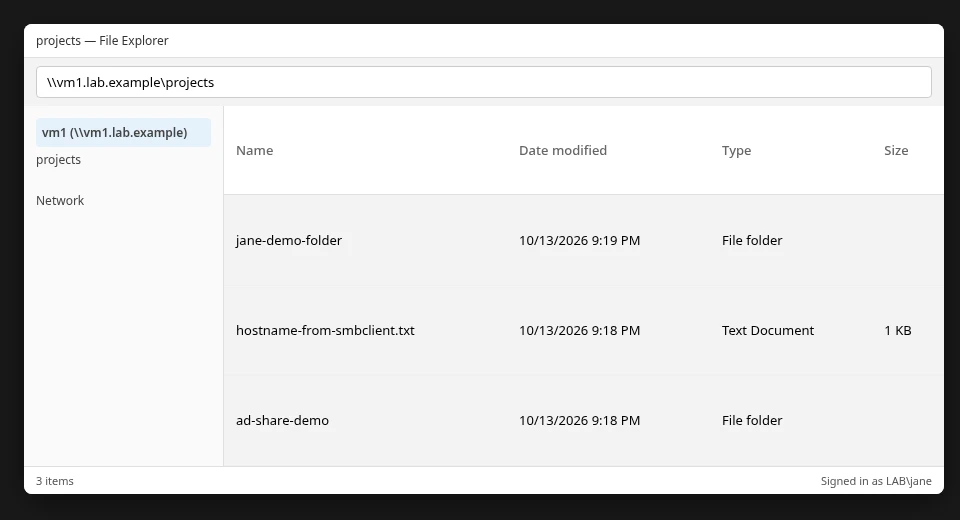
If the same files and folders appear from Windows, the AD login, Samba rule, and Linux directory permissions are all working together.
Allow a single Active Directory user instead of a group
For a personal share, you can allow one AD user directly:
valid users = "LAB\jane"Groups scale better for production: membership changes in AD propagate without editing smb.conf.
Samba ID mapping and file ownership
Winbind maps AD SIDs to Unix UIDs and GIDs according to the active idmap backend and ranges in smb.conf. Linux stores file ownership as numeric UIDs and GIDs. Commands such as ls translate those numbers back to names such as LAB\jane. Changing idmap configuration after data exists can change how ownership appears. See Winbind ID mapping for backend details.
Do not change idmap ranges after users have stored data.
Troubleshooting Samba access for Active Directory users
| Symptom | Likely cause | Fix |
|---|---|---|
wbinfo -u works but getent passwd does not |
NSS / authselect not using Winbind | authselect select winbind with-mkhomedir; check /etc/nsswitch.conf |
| User resolves but share connect fails | valid users or group membership |
id 'LAB\user'; align group in AD and Samba |
NT_STATUS_ACCESS_DENIED on read/write |
Unix mode, owner, ACL, or SELinux | ls -ld, getfacl, ls -Zd on the path |
| User reads but cannot write | read only, write list, or directory mode |
testparm -s; confirm group write bit or ACL |
| Windows shows wrong account | Cached SMB credentials | Disconnect mapped drives; sign in as the intended AD user |
If access fails, check the layers in this order before editing smb.conf again:
id 'LAB\jane'Confirm the authorized group still resolves:
getent group 'LAB\network-admins'Inspect directory mode and group:
ls -ld /srv/projectsRead POSIX ACLs when you use setfacl:
getfacl -p /srv/projectsConfirm SELinux type on the path:
ls -Zd /srv/projectsRe-read the effective Samba share options:
sudo testparm -sSummary
Once the RHEL server is joined to AD with Winbind, Samba can use AD users and groups directly in share rules. valid users and write list control who Samba accepts, while Linux permissions, ACLs, and SELinux still control access to the files themselves.
If a user can connect but cannot read or write, do not assume Samba is the problem. Check AD group membership, the share rule, directory permissions, ACLs, and the SELinux context in that order. Test with smbclient on the server, then from a domain Windows client.
For joining the domain, stay with the Samba Winbind join guide. For legacy FTP over AD, see vsftpd with SSSD. For new file transfer deployments, prefer SFTP with Active Directory.
References
Frequently Asked Questions
Can Samba use Active Directory users?
Yes, on a Samba server joined to AD with Winbind. Samba can use the same AD user and group names that Linux resolves through Winbind.
Do I need Winbind for Samba with Active Directory?
On RHEL 10, Red Hat documents Winbind as the supported identity provider for Samba acting as an AD member server.
Can Samba use SSSD instead of Winbind?
SSSD is appropriate for general Linux login, but Red Hat does not support SSSD as the identity backend for Samba server features that depend on Winbind semantics.
How do I allow an AD group to access a Samba share?
Set Unix group ownership or ACLs on the path, then restrict the share with valid users = @"DOMAIN\group".
What is the difference between valid users and Linux permissions?
valid users controls who may connect to the share. Linux permissions and ACLs still control read, write, and execute on files.
Why does Samba report Access Denied when id finds the AD user?
The session may be allowed while the directory mode, ACL, or SELinux context blocks the operation. Check all three.
Can different AD groups have read-only and read-write access?
Yes. Use read only = yes with valid users for readers and write list for writers.
