
| Tested on | RHEL 10.2 (Coughlan) — client vm1.lab.example (192.168.56.116)Windows Server 2025 AD DC — WIN-8S0K67EP5EO.lab.example (192.168.56.128) |
|---|---|
| Package | realmd-0.17.1-13.el10_1sssd-2.12.0-3.el10_2.2sssd-ad-2.12.0-3.el10_2.2adcli-0.9.3.1-3.el10oddjob-0.34.7-14.el10oddjob-mkhomedir-0.34.7-14.el10krb5-workstation-1.21.3-10.el10_2samba-common-tools-4.23.5-111.el10_2 |
| Applies to | RHEL 10, Rocky Linux 10, AlmaLinux 10, Oracle Linux 10, CentOS Stream 10 |
| Privilege | sudo or root on the Linux client; domain account that can join computers (for example Administrator) |
| Scope | Join a RHEL-family Linux host to on-premises Active Directory with realm discover and realm join, configure SSSD for AD users and groups, test Kerberos and login, and control who may log in. Does not cover Samba member-server file shares (Winbind path) or installing the domain controller. |
| Related guides | Join Linux with adcli and SSSD Join with Winbind Kerberos packet analysis Analyze LDAP in Wireshark Chrony time sync |
realmd discovers your Active Directory domain and wires the client for SSSD. realm join enrolls the computer account (through adcli under the hood). After enrollment, SSSD answers getent and PAM so AD users can sign in with their domain password.
The examples use a small practice domain named lab.example. In your company that name might be ad.contoso.com or corp.example.org; the mechanics are the same. You run the commands on a Linux server you want to add to the domain, and that server talks to a Windows machine that already runs Active Directory.
Quick answer
On a supported RHEL-family release, point DNS at the domain controller, install realmd and SSSD, discover the realm, and join:
realm discover lab.exampleWhen discovery reports Active Directory and client-software: sssd, enroll the host (you will be prompted for the join account password):
sudo realm join lab.example -U AdministratorConfirm the realm is configured as a Kerberos member:
realm listLook up a domain user through NSS:
id jane@lab.examplerealm discover checks LDAP and Kerberos SRV records and reports that the server is Active Directory. realm join creates or updates the computer object in AD, writes Kerberos settings, enables SSSD through authselect, and starts oddjobd for home directories. realm list should show client-software: sssd and configured: kerberos-member. id proves NSS can map an AD user.
How realmd, SSSD, adcli, and Active Directory work together
realmd is the high-level tool. It runs domain discovery, installs the packages your distribution expects, calls adcli for enrollment, and drops an SSSD domain section. It also exposes realm permit and realm deny for login policy.
adcli performs the actual enrollment when you run realm join. It locates a domain controller, authenticates the join account, creates or resets the computer account (VM1$ in this lab), and writes host key material into /etc/krb5.keytab. With --verbose, you will see the adcli join line in the output.
SSSD caches identity and authentication after join:
- NSS (
getent passwd,id) goes throughsssin/etc/nsswitch.conf - PAM (login,
su,sudo) usespam_sss - Kerberos tickets use the realm from
/etc/krb5.confand the keytab from the join
           Linux login (login, su, ssh)
                     ↓
                 PAM / NSS
                     ↓
                    SSSD
                     ↓
           Kerberos + LDAP to AD
                     ↓
      Windows Server 2025 (KDC + LDAP)
Lab overview
Active Directory (AD) is Microsoft’s directory service for Windows networks. It stores user accounts, groups, and computer accounts, and it handles Kerberos logons. A domain controller (DC) is the Windows server that runs AD for one domain.
In this guide, the domain’s DNS name is lab.example. That string is the suffix you see on hostnames and sign-in names:
vm1.lab.example— the RHEL machine you join (a computer account is created for it in AD, similar to a Windows PC joining the domain)WIN-8S0K67EP5EO.lab.example— the domain controllerjane@lab.example— a normal user account stored in AD (not a local Linux user in/etc/passwduntil after join and lookup)
Kerberos uses a related name, usually uppercase: LAB.EXAMPLE. Commands such as kinit jane@LAB.EXAMPLE use the realm; realm join lab.example uses the DNS-style domain name. Both refer to the same AD forest in this lab.
Traffic between the Linux client and the DC uses a private lab network (192.168.56.x). Replace those addresses with your DC and client IPs. Replace lab.example with your domain name everywhere it appears.
| Term in this article | What it means | In your environment |
|---|---|---|
lab.example |
AD DNS domain name | Your domain (for example corp.contoso.com) |
LAB.EXAMPLE |
Kerberos realm | Usually the domain name in uppercase |
| Domain controller | Windows Server with AD | Your DC hostname and IP |
| Linux client | Host you enroll with realm join |
Your RHEL or Rocky server |
Administrator |
Account allowed to join computers | Often a domain admin; name may differ |
jane |
Sample user for id / kinit tests |
Any AD user you create for testing |
| Role | Name | Address |
|---|---|---|
| Active Directory DC (Windows Server 2025) | WIN-8S0K67EP5EO.lab.example |
192.168.56.128 |
| Linux client (RHEL 10.2) | vm1.lab.example |
192.168.56.116 |
| DNS domain / Kerberos realm | lab.example / LAB.EXAMPLE |
— |
| Sample AD user | jane (jane@lab.example) |
Member of Network-Admins |
Rocky Linux 10 uses the same packages and commands; only the OS version line in hostnamectl changes.
Prerequisites before joining Linux to Active Directory
Clients must resolve AD DNS and SRV records, use a stable FQDN, and keep time in sync with the domain controller.
Point the client at the domain controller (or a DNS server that hosts the AD zone):
On this host, the lab NIC uses the DC as resolver:
sudo nmcli connection modify enp0s8 ipv4.dns "192.168.56.128" ipv4.dns-search "lab.example" ipv4.ignore-auto-dns yesApply the connection profile so resolver settings take effect:
sudo nmcli connection up enp0s8Confirm SRV records resolve before you join:
dig +short _ldap._tcp.lab.example SRV0 100 389 win-8s0k67ep5eo.lab.example.Kerberos uses its own SRV name; expect port 88 on the same host:
dig +short _kerberos._tcp.lab.example SRV0 100 88 win-8s0k67ep5eo.lab.example.If both commands return empty, fix DNS on the client or on the DC before realm discover. The same symptom and fixes are covered under realm: No such realm found in the troubleshooting section later on this page.
The computer account uses the FQDN. The hostname must match what you expect in AD (vm1.lab.example in this lab).
hostnamectl statusStatic hostname: vm1.lab.example
...
Operating System: Red Hat Enterprise Linux 10.2 (Coughlan)The DC hostname should resolve to the controller address you use in SRV records:
getent hosts win-8s0k67ep5eo.lab.example192.168.56.128 win-8s0k67ep5eo.lab.exampleKerberos rejects tickets when the client clock skew exceeds the domain policy (often five minutes). Check synchronization:
timedatectl status Local time: Tue 2026-10-13 19:12:13 IST
...
System clock synchronized: yes
NTP service: activeIf System clock synchronized is no, fix time sync before you join. Kerberos will fail until the client clock matches the domain within policy.
sudo chronyc -a makestepFor ongoing sync, configure Chrony toward the DC or another reliable source.
Install realmd, SSSD, and adcli
Install the enrollment stack in one transaction on RHEL 10 or Rocky Linux 10:
sudo dnf install -y realmd sssd sssd-ad sssd-tools adcli oddjob oddjob-mkhomedir krb5-workstation samba-common-toolsInstalled:
realmd-0.17.1-13.el10_1.x86_64
sssd-2.12.0-3.el10_2.2.x86_64
sssd-ad-2.12.0-3.el10_2.2.x86_64
adcli-0.9.3.1-3.el10.x86_64
...
Complete!| Package | Role |
|---|---|
realmd |
Discovery, join, login policy |
sssd / sssd-ad |
AD identity and authentication |
adcli |
Machine account enrollment |
oddjob-mkhomedir |
Create home directories on first login |
krb5-workstation |
kinit, klist |
samba-common-tools |
Dependencies for AD discovery |
Discover the Active Directory domain with realm
Ask realmd to locate the domain and print the enrollment packages it expects:
realm discover lab.examplelab.example
type: kerberos
realm-name: LAB.EXAMPLE
domain-name: lab.example
configured: no
server-software: active-directory
client-software: sssd
required-package: sssd-common
required-package: oddjob
required-package: oddjob-mkhomedir
required-package: sssd-ad
required-package: adcli
required-package: samba-common-toolsImportant fields:
server-software: active-directory— LDAP lookup matched ADclient-software: sssd— join will configure SSSD (not Winbind)configured: no— not joined yet
If discovery fails with No such realm found, check DNS SRV records, firewall paths to LDAP (389/636) and Kerberos (88), and clock sync. Step-by-step checks are under realm: No such realm found below.
Join RHEL / Rocky Linux to Active Directory
Join with an account that can create computer objects. realm prompts for the password (do not put it on the command line).
sudo realm join lab.example -U Administrator --client-software=sssd --verbose * Successfully discovered: lab.example
Password for Administrator@LAB.EXAMPLE:
* LANG=C /usr/sbin/adcli join --verbose --domain lab.example ...
* Found computer account for VM1$ at: CN=VM1,CN=Computers,DC=lab,DC=example
* Successfully enrolled machine in realmrealm join calls adcli join with the join user’s Kerberos credentials, resets the computer password, updates /etc/krb5.keytab, selects the sssd authselect profile, enables sssd and oddjobd, and writes /etc/sssd/sssd.conf.
Enable and start SSSD if it is not already active:
sudo systemctl enable --now sssd oddjobdBoth units should report active before you test user lookup:
systemctl is-active sssd oddjobdactive
activeTo land the computer outside the default Computers container, pass --computer-ou with the LDAP distinguished name of the target OU:
sudo realm join lab.example -U Administrator \
  --computer-ou="OU=Linux Servers,DC=lab,DC=example"
Create the OU in Active Directory Users and Computers (or with New-ADOrganizationalUnit) before you run the command.
Verify the Linux Active Directory domain join
Membership and login policy are visible in one command:
realm listlab.example
type: kerberos
realm-name: LAB.EXAMPLE
domain-name: lab.example
configured: kerberos-member
server-software: active-directory
client-software: sssd
login-formats: %U@lab.example
login-policy: allow-realm-loginsconfigured: kerberos-member and client-software: sssd confirm the join path you want for Linux login integration.
On the domain controller, open Active Directory Users and Computers, browse to Computers, and confirm the client hostname (VM1 / vm1.lab.example).
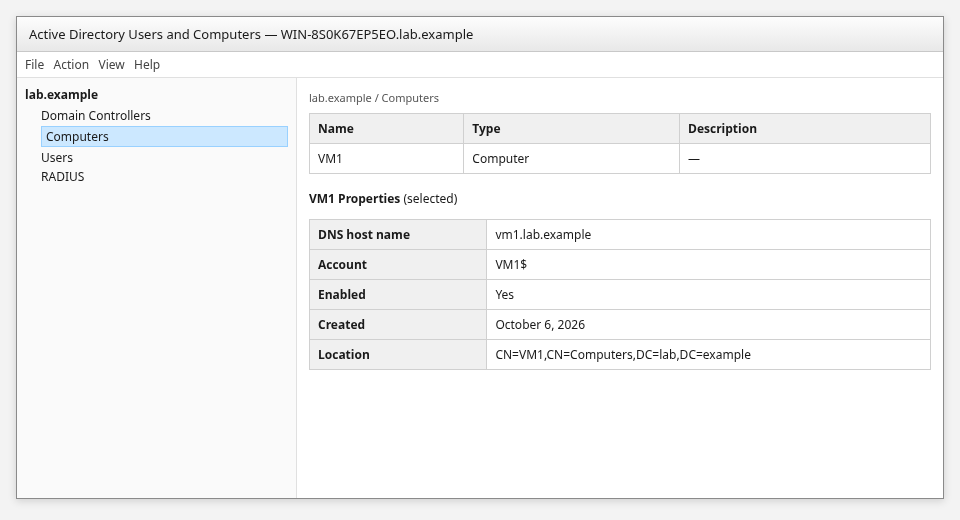
The account should be enabled and the DNS host name should match hostname -f on the Linux system.
Verify AD users with id, getent, and Kerberos
NSS should return uid, gid, and group memberships from AD:
id jane@lab.exampleuid=758601105(jane@lab.example) gid=758600513(domain users@lab.example) groups=758600513(domain users@lab.example),758601103(network-admins@lab.example)getent should show the same passwd entry:
getent passwd jane@lab.examplejane@lab.example:*:758601105:758600513:Jane Admin:/home/jane@lab.example:/bin/bashA successful kinit proves the user password works against the KDC and that the client realm configuration is correct:
kinit jane@LAB.EXAMPLEEnter the user’s AD password when prompted.
klistTicket cache: KCM:0
Default principal: jane@LAB.EXAMPLE
Valid starting Expires Service principal
10/14/2026 07:41:33 10/14/2026 17:41:33 krbtgt/LAB.EXAMPLE@LAB.EXAMPLEPAM must allow pam_sss (authselect sssd profile does this). Test from the console or with su first:
su - jane@lab.exampleAfter a successful login, confirm the home directory with pwd (expect /home/jane@lab.example). If you test AD password login over SSH, confirm your site policy allows PAM/password authentication for sshd. Do not enable password authentication globally just for this lab if your environment intentionally disables it. Ensure realm permit allows the user (see next section). OpenSSH authentication methods covers PAM and GSSAPI options.
Configure SSSD for Active Directory users
realm join creates /etc/sssd/sssd.conf. These keys matter day to day:
sudo grep -E '^(domains|id_provider|ad_domain|krb5_realm|cache_credentials|use_fully_qualified_names)' /etc/sssd/sssd.confdomains = lab.example
id_provider = ad
ad_domain = lab.example
krb5_realm = LAB.EXAMPLE
cache_credentials = True
use_fully_qualified_names = Trueid_provider = ad— Microsoft AD backendad_domain/krb5_realm— DNS name vs Kerberos realmcache_credentials = True— offline cache of credentials (within policy)use_fully_qualified_names = True—jane@lab.examplestyle logins
After edits, restart SSSD:
sudo systemctl restart sssdThe join enables oddjob-mkhomedir through authselect. On first login, PAM creates /home/jane@lab.example when absent. Confirm oddjobd is active:
systemctl is-active oddjobdactiveSetting use_fully_qualified_names = False lets users log in as jane instead of jane@lab.example. That can break when multiple domains or name collisions exist, so prefer fully qualified names unless your environment standardizes on short names.
Control which Active Directory users can log in
By default, realm join may allow broad login (allow-realm-logins). Restrict access with realm permit and realm deny.
Grant one user SSH and console access:
sudo realm permit jane@lab.examplePermit every member of a domain group:
sudo realm permit -g 'network-admins@lab.example'Lock out all domain principals until you add explicit permits:
sudo realm deny --allThen explicitly permit only the users or groups you need. Login policy matters on shared servers: domain users are not automatically entitled to every enrolled Linux host.
Check policy:
realm list login-policy: allow-permitted-logins
permitted-logins: jane@lab.exampleGive an Active Directory group sudo access
Map a domain group with a file in /etc/sudoers.d/:
sudo visudo -f /etc/sudoers.d/ad-network-adminsAdd:
%network-admins@lab.example ALL=(ALL) ALLValidate syntax:
sudo visudo -c/etc/sudoers: parsed OK
/etc/sudoers.d/ad-network-admins: parsed OKAs root, inspect effective rules for the AD user:
sudo sudo -l -U 'jane@lab.example'User jane@lab.example may run the following commands on vm1:
(ALL) ALLLeave the Active Directory domain
This removes local SSSD (or Winbind) configuration and disables domain logins on the host. It does not delete the computer account in Active Directory by default:
sudo realm leave lab.exampleWhen you also want the VM1 object removed from Computers in AD, pass --remove and authenticate as a user who may delete computer accounts:
sudo realm leave --remove lab.example -U AdministratorAfter realm leave without --remove, refresh Computers in ADUC and expect the object to remain until you delete it or run realm leave --remove.
Troubleshooting common realm/SSSD domain join problems
realm: No such realm found
Cause: DNS cannot resolve the domain or AD SRV records.
Fix:
dig +short _ldap._tcp.lab.example SRV @192.168.56.128The domain apex should also resolve to a DC address:
dig +short lab.example A @192.168.56.128Point the client resolver at the DC, fix the AD DNS zone on the server, then retry realm discover.
realm join fails although the domain is discovered
Collect logs:
sudo journalctl -u realmd -u sssd --since "10 minutes ago" --no-pagerRetry with verbosity:
sudo realm join lab.example -U Administrator --verboseCommon causes: wrong join password, clock skew, or blocked LDAP/Kerberos ports to 192.168.56.128.
KDC has no support for encryption type
Modern domains prefer AES (aes256-cts, aes128-cts). If you see encryption-type errors:
- Raise the client crypto policy only when you understand the impact (
update-crypto-policies) - Prefer fixing weak legacy settings on the domain rather than re-enabling RC4
Do not copy old RC4-only workarounds unless you still run legacy systems that require them.
AD user is not found after joining
Start with membership and SSSD domain health:
realm listCheck that SSSD sees the domain online and which DC it uses:
sudo sssctl domain-status lab.exampleRetry the lookup that failed:
id jane@lab.exampleIf id still fails, read recent SSSD logs:
sudo journalctl -u sssd --since "5 minutes ago" --no-pagerEnsure SSSD is active, the user is in the permitted login list, and you use the name format SSSD expects (user@lab.example when use_fully_qualified_names = True).
Domain join works but SSH login fails
Check:
realm listlogin policy (realm permit)systemctl status sssdsshdPAM stack (authselect current)- Username format (
jane@lab.examplevsjane) - SELinux and account lockout on the DC
SSSD’s AD provider can also evaluate applicable Active Directory Group Policy logon restrictions. If id and getent succeed but sign-in is denied, check effective AD policy as well as realm permit and PAM.
realmd vs adcli: which should you use?
| Tool | When to use it |
|---|---|
realmd (realm join) |
Default for enrollment; configures SSSD, PAM, NSS, and services |
| adcli alone | Manual or scripted join when you manage sssd.conf and authselect yourself |
For step-by-step adcli without realm, see Join Linux to Windows domain using adcli.
SSSD vs Winbind for Active Directory
| Stack | Best for |
|---|---|
| SSSD | Linux login, sudo, SSH with PAM, centralized getent |
| Winbind | Samba file shares, ntlm_auth, MS-CHAP paths that call Winbind |
FreeRADIUS and Samba-focused guides use Winbind (integrate FreeRADIUS with AD). For interactive Linux users, prefer the SSSD path on this page.
Frequently asked questions
Frequently Asked Questions
Does Linux need to use the Active Directory DNS server?
Yes for a smooth join. The client must resolve SRV records for _ldap._tcp and _kerberos._tcp under your domain. Point /etc/resolv.conf (or NetworkManager) at the DC or a DNS role that hosts the AD zone.
Does realm join use SSSD?
When you join with default options on RHEL, realm discover reports client-software: sssd and realm join configures SSSD and authselect.
Does realm join use adcli?
Yes. Verbose join output shows /usr/sbin/adcli join handling the machine account and keytab.
Can Linux users log in with their Active Directory password?
Yes. PAM calls pam_sss, which authenticates against AD with the same password policy as Windows, subject to realm permit / realm deny.
Can I join RHEL to AD without realmd?
You can run adcli join and hand-edit sssd.conf. Red Hat documents realm join as the standard direct-integration path on RHEL, and the same workflow applies on Rocky Linux because it configures authselect, services, and SSSD in one step.
Can Rocky Linux join a Windows domain?
Rocky Linux 10 uses the same realmd and SSSD packages as RHEL 10. The commands in this guide apply one-to-one.
Does this work with Windows Server 2025 Active Directory?
Yes. This lab used a Server 2025 domain controller at 192.168.56.128 with realm LAB.EXAMPLE and domain lab.example.
Summary
Joining RHEL 10 or Rocky Linux 10 to Active Directory is a DNS-first problem, then a one-time enrollment. Point the client at the DC, confirm _ldap._tcp and _kerberos._tcp SRV records, install realmd and SSSD, run realm discover, and enroll with realm join. The join delegates to adcli for the computer account and leaves SSSD as the long-term identity provider.
After join, verify with realm list, id user@lab.example, and kinit. Use realm permit to restrict who may log in, and map AD groups in /etc/sudoers.d/ when administrators need elevated access. Prefer AES-based Kerberos on modern domains; treat RC4-only fixes as a last resort for legacy compatibility.
For manual enrollment or Winbind-centric workloads, use the dedicated adcli and Winbind guides rather than mixing stacks on the same host without planning.
