
| Tested on | CentOS 7 |
|---|---|
| Package | mdadm (1.2 array metadata)e2fsprogs (mkfs.ext4)fdisk (partitioning) |
| Applies to | RHEL, Rocky Linux, AlmaLinux, Oracle Linux, CentOS Stream, Fedora, Debian, Ubuntu, and other Linux distributions with mdadm |
| Privilege | sudo or root for fdisk, mdadm, mkfs, and mount |
| Scope | Partition two disks with fdisk, create a linear RAID array with mdadm, format, mount, add an /etc/fstab entry, and verify after reboot. Does not cover hardware RAID, LVM-on-RAID, or recovery after disk failure. |
| Related guides | parted command |
Linear RAID in Linux concatenates member disks into one large volume. Data fills the first member, then spills to the next. There is no striping and no redundancy. This guide partitions two 4 GB disks with fdisk, creates a linear array with mdadm, formats it with ext4, and mounts it at /linear_raid.
Quick reference: linear RAID with mdadm
| Step | Command |
|---|---|
| Partition member disks | fdisk /dev/sdb (repeat for each disk) |
| Reload partition table | partprobe |
| Confirm partitions | lsblk |
| Create linear array | mdadm -Cv -llinear -n2 /dev/md0 /dev/sd{b,c}1 |
| Check array state | cat /proc/mdstat |
| Create ext4 filesystem | mkfs.ext4 /dev/md0 |
| Mount the volume | mount /dev/md0 /linear_raid |
Prepare two unused disks or partitions before running mdadm. A legacy MBR 0xFD partition type is not required for modern mdadm 1.x metadata. Arrays assemble from MD superblocks through mdadm and initramfs. The fdisk examples below still show 0xFD, but you do not need that flag on current systems.
Linear RAID vs RAID 0
RAID 0 stripes data across members in chunk-sized pieces. Most files span every disk, so one failed member typically destroys large parts of the array. Linear RAID appends member extents instead: the kernel writes to the first disk until it is full, then continues on the next.
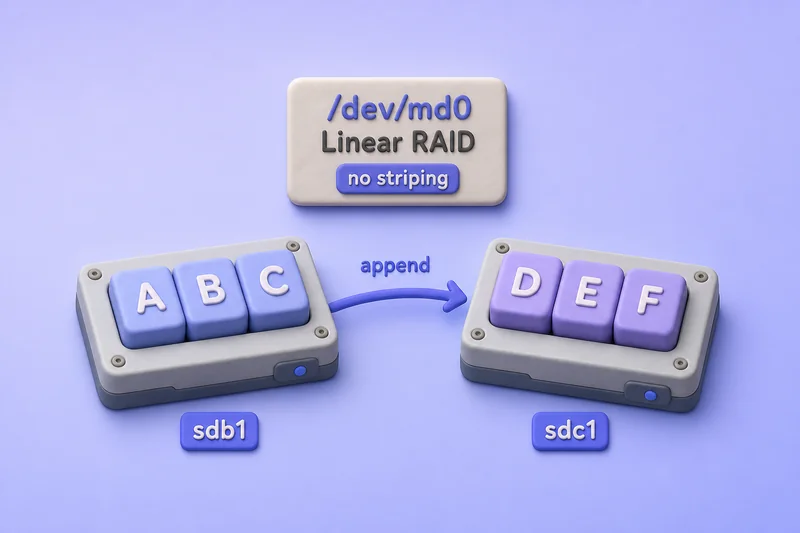
Linear RAID is not fault-tolerant, but files that lived entirely on a surviving disk may still be readable after another member fails — unlike RAID 0, where nearly every file is split across all disks. Neither layout protects against disk failure; use RAID 1 or RAID 5 when you need redundancy.
Linear RAID requires at least two members but does not require matched sizes. The chunk size on linear arrays acts as a rounding factor — each member is sized to a multiple of that value, with a practical minimum of 64 KiB because of superblock placement.
Step 1: Confirm the raw disks
The lab VM has two unused 4 GB virtual disks attached as /dev/sdb and /dev/sdc.
lsblk[root@node1 ~]# lsblk
NAME MAJ:MIN RM SIZE RO TYPE MOUNTPOINT
sda 8:0 0 30G 0 disk
├─sda1 8:1 0 512M 0 part /boot
└─sda2 8:2 0 27.5G 0 part
├─centos-root 253:0 0 25.5G 0 lvm /
└─centos-swap 253:1 0 2G 0 lvm [SWAP]
sdb 8:16 0 4G 0 disk
sdc 8:32 0 4G 0 disk
sr0 11:0 1 1024M 0 romNeither data disk has partitions yet. You can use whole disks as array members, but partitioning lets you share a physical disk between multiple arrays when needed.
Step 2: Partition /dev/sdb with fdisk
Create one primary partition spanning the full disk. The fdisk session below uses the legacy 0xFD partition type. Modern mdadm does not depend on that flag.
fdisk /dev/sdb[root@node1 ~]# fdisk /dev/sdb
Welcome to fdisk (util-linux 2.23.2).
Changes will remain in memory only, until you decide to write them.
Be careful before using the write command.
Device does not contain a recognized partition table
Building a new DOS disklabel with disk identifier 0xbea244e4.
Command (m for help): n
Partition type:
p primary (0 primary, 0 extended, 4 free)
e extended
Select (default p): p
Partition number (1-4, default 1): 1
First sector (2048-8388607, default 2048): ⇐ We pressed Enter leaving it to the default value
Using default value 2048
Last sector, +sectors or +size{K,M,G} (2048-8388607, default 8388607): ⇐ We pressed Enter leaving it to the default value
Using default value 8388607
Partition 1 of type Linux and of size 4 GiB is set
Command (m for help): t ⇐ Change the partition type
Selected partition 1
Hex code (type L to list all codes): l ⇐ List the available partition types
0 Empty 24 NEC DOS 81 Minix / old Lin bf Solaris
1 FAT12 27 Hidden NTFS Win 82 Linux swap / So c1 DRDOS/sec (FAT-
2 XENIX root 39 Plan 9 83 Linux c4 DRDOS/sec (FAT-
3 XENIX usr 3c PartitionMagic 84 OS/2 hidden C: c6 DRDOS/sec (FAT-
4 FAT16 <32M 40 Venix 80286 85 Linux extended c7 Syrinx
5 Extended 41 PPC PReP Boot 86 NTFS volume set da Non-FS data
6 FAT16 42 SFS 87 NTFS volume set db CP/M / CTOS / .
7 HPFS/NTFS/exFAT 4d QNX4.x 88 Linux plaintext de Dell Utility
8 AIX 4e QNX4.x 2nd part 8e Linux LVM df BootIt
9 AIX bootable 4f QNX4.x 3rd part 93 Amoeba e1 DOS access
a OS/2 Boot Manag 50 OnTrack DM 94 Amoeba BBT e3 DOS R/O
b W95 FAT32 51 OnTrack DM6 Aux 9f BSD/OS e4 SpeedStor
c W95 FAT32 (LBA) 52 CP/M a0 IBM Thinkpad hi eb BeOS fs
e W95 FAT16 (LBA) 53 OnTrack DM6 Aux a5 FreeBSD ee GPT
f W95 Ext'd (LBA) 54 OnTrackDM6 a6 OpenBSD ef EFI (FAT-12/16/
10 OPUS 55 EZ-Drive a7 NeXTSTEP f0 Linux/PA-RISC b
11 Hidden FAT12 56 Golden Bow a8 Darwin UFS f1 SpeedStor
12 Compaq diagnost 5c Priam Edisk a9 NetBSD f4 SpeedStor
14 Hidden FAT16 <3 61 SpeedStor ab Darwin boot f2 DOS secondary
16 Hidden FAT16 63 GNU HURD or Sys af HFS / HFS+ fb VMware VMFS
17 Hidden HPFS/NTF 64 Novell Netware b7 BSDI fs fc VMware VMKCORE
18 AST SmartSleep 65 Novell Netware b8 BSDI swap fd Linux raid auto
1b Hidden W95 FAT3 70 DiskSecure Mult bb Boot Wizard hid fe LANstep
1c Hidden W95 FAT3 75 PC/IX be Solaris boot ff BBT
1e Hidden W95 FAT1 80 Old Minix
Hex code (type L to list all codes): fd ⇐ Change the partition type of selected partition to fd
Changed type of partition 'Linux' to 'Linux raid autodetect'
Command (m for help): w ⇐ Save the changes
The partition table has been altered!
Calling ioctl() to re-read partition table.
Syncing disks./dev/sdb1 is ready. Repeat the same steps on /dev/sdc.
Step 3: Partition /dev/sdc with fdisk
Create a matching partition on the second disk:
fdisk /dev/sdc[root@node1 ~]# fdisk /dev/sdc
Welcome to fdisk (util-linux 2.23.2).
Changes will remain in memory only, until you decide to write them.
Be careful before using the write command.
Device does not contain a recognized partition table
Building a new DOS disklabel with disk identifier 0xe215a659.
Command (m for help): n
Partition type:
p primary (0 primary, 0 extended, 4 free)
e extended
Select (default p): p
Partition number (1-4, default 1):
First sector (2048-8388607, default 2048):
Using default value 2048
Last sector, +sectors or +size{K,M,G} (2048-8388607, default 8388607):
Using default value 8388607
Partition 1 of type Linux and of size 4 GiB is set
Command (m for help): t
Selected partition 1
Hex code (type L to list all codes): fd
Changed type of partition 'Linux' to 'Linux raid autodetect'
Command (m for help): p
Disk /dev/sdc: 4294 MB, 4294967296 bytes, 8388608 sectors
Units = sectors of 1 * 512 = 512 bytes
Sector size (logical/physical): 512 bytes / 512 bytes
I/O size (minimum/optimal): 512 bytes / 512 bytes
Disk label type: dos
Disk identifier: 0xe215a659
Device Boot Start End Blocks Id System
/dev/sdc1 2048 8388607 4193280 fd Linux raid autodetect
Command (m for help): w
The partition table has been altered!
Calling ioctl() to re-read partition table.
Syncing disks.The p print step on sdc confirms sdc1 is type fd in the output above.
Reload the kernel partition table so lsblk sees the new devices:
partprobeConfirm both member partitions exist:
lsblk[root@node1 ~]# lsblk
NAME MAJ:MIN RM SIZE RO TYPE MOUNTPOINT
sda 8:0 0 30G 0 disk
├─sda1 8:1 0 512M 0 part /boot
└─sda2 8:2 0 27.5G 0 part
├─centos-root 253:0 0 25.5G 0 lvm /
└─centos-swap 253:1 0 2G 0 lvm [SWAP]
sdb 8:16 0 4G 0 disk
└─sdb1 8:17 0 4G 0 part
sdc 8:32 0 4G 0 disk
└─sdc1 8:33 0 4G 0 part
sr0 11:0 1 1024M 0 romStep 4: Create the linear RAID array
Build /dev/md0 in linear (append) mode across sdb1 and sdc1:
mdadm -Cv -llinear -n2 /dev/md0 /dev/sd{b,c}1[root@node1 ~]# mdadm -Cv -llinear -n2 /dev/md0 /dev/sd{b,c}1
mdadm: Defaulting to version 1.2 metadata
mdadm: array /dev/md0 started.The long-form equivalent is mdadm --create --verbose --level=linear --raid-devices=2 /dev/md0 /dev/sdb1 /dev/sdc1.
The flags used above:
-C, --create     Create a new array.
-v, --verbose    More detail during creation.
-l, --level=     RAID level (linear = append mode).
-n, --raid-devices=   Number of active devices.
Check that the kernel registered a linear personality:
cat /proc/mdstat[root@node1 ~]# cat /proc/mdstat
Personalities : [linear]
md0 : active linear sdc1[1] sdb1[0]
8380416 blocks super 1.2 0k rounding
unused devices: <none>0k rounding is normal for linear arrays — there is no stripe chunk like RAID 0. The MD device is roughly the combined capacity of both members, minus the small amount of space used for MD metadata. The filesystem created later reports slightly less usable space because ext4 also consumes space for its own metadata.
Step 5: Create a filesystem and mount point
Format the linear volume with ext4 — see mke2fs command for other filesystem types:
mkfs.ext4 /dev/md0[root@node1 ~]# mkfs.ext4 /dev/md0
mke2fs 1.42.9 (28-Dec-2013)
Filesystem label=
OS type: Linux
Block size=4096 (log=2)
Fragment size=4096 (log=2)
Stride=0 blocks, Stripe width=0 blocks
524288 inodes, 2095104 blocks
104755 blocks (5.00%) reserved for the super user
First data block=0
Maximum filesystem blocks=2145386496
64 block groups
32768 blocks per group, 32768 fragments per group
8192 inodes per group
Superblock backups stored on blocks:
32768, 98304, 163840, 229376, 294912, 819200, 884736, 1605632
Allocating group tables: done
Writing inode tables: done
Creating journal (32768 blocks): done
Writing superblocks and filesystem accounting information: doneStride=0 and Stripe width=0 show that ext4 was created without stripe geometry. The actual MD layout is confirmed separately by /proc/mdstat or mdadm --detail, which reports the array as linear.
Create a mount point for the array:
mkdir /linear_raidMount /dev/md0 on the new directory:
mount /dev/md0 /linear_raid/Confirm usable space:
df -h /linear_raid/[root@node1 ~]# df -h /linear_raid/
Filesystem Size Used Avail Use% Mounted on
/dev/md0 7.8G 36M 7.3G 1% /linear_raidStep 6: Persist the mount across reboot
Add an /etc/fstab entry so the filesystem mounts at boot. Ensure mdadm configuration or initramfs assembly covers /dev/md0 before the mount is attempted.
The example below uses a device-name entry:
tail -n 1 /etc/fstab[root@node1 ~]# tail -n 1 /etc/fstab
/dev/md0 /linear_raid ext4 defaults 0 0For new deployments, prefer the filesystem UUID so the mount still works if the MD device name changes. Read the UUID after formatting:
blkid /dev/md0Sample output:
/dev/md0: UUID="a3f8c912-4b6e-4d2a-9c11-8e7f2d5a6b01" TYPE="ext4"Add a line like this to /etc/fstab (replace the UUID with your blkid value):
UUID=a3f8c912-4b6e-4d2a-9c11-8e7f2d5a6b01 /linear_raid ext4 defaults 0 2The final 2 includes the filesystem in boot-time fsck checks. 0 0, as in the fstab line above, skips that check.
/etc/fstab entry cannot be mounted. If the kernel does not assemble your array automatically, add ARRAY entries from mdadm --detail --scan to the appropriate mdadm.conf and rebuild initramfs where your distribution requires it — before relying on fstab alone.
After reboot, confirm the array is still active:
cat /proc/mdstat[root@node1 ~]# cat /proc/mdstat
Personalities : [linear]
md0 : active linear sdc1[1] sdb1[0]
8380416 blocks super 1.2 0k rounding
unused devices: <none>References
- Linux kernel RAID wiki — Linear RAID
- Linux
mdadm(8)manual — https://man7.org/linux/man-pages/man8/mdadm.8.html - Linux
md(4)manual — https://man7.org/linux/man-pages/man4/md.4.html
Summary
Linear RAID in Linux concatenates member disks into one volume without striping or redundancy. This guide partitioned sdb and sdc with fdisk, created /dev/md0 with mdadm -Cv -llinear -n2, formatted ext4, mounted at /linear_raid, and added an /etc/fstab entry. The array exposed about 8.0 GiB of MD device capacity from two 4 GiB members, with df reporting roughly 7.8 GiB of formatted ext4 space.
Linear RAID differs from RAID 0 in how data is laid out — append mode may leave recoverable files on surviving disks after a failure, but neither layout is fault-tolerant. For throughput with striping, use RAID 0; for redundancy, use RAID 1 or RAID 5. Day-to-day mdadm operations live in the mdadm command cheat sheet.
Frequently Asked Questions
What is the difference between RAID 0 and linear RAID?
RAID 0 stripes data across disks in fixed-size chunks for higher throughput. Linear RAID appends one disk after another with no striping. Both lack redundancy — any single disk failure loses data on the array, but linear layout may leave files that lived entirely on surviving disks recoverable.
How many disks do I need for linear RAID in Linux?
At least two unused disks or partitions. Members can differ in size; usable capacity is approximately the sum of their available member space, minus MD metadata. An optional linear-array rounding value can further reduce each member usable extent.
Does linear RAID provide redundancy?
No. Linear RAID concatenates member extents. One failed disk makes the array unreadable as a whole, though files stored entirely on surviving members may still be recoverable with forensic tools.
