
| Tested on | Ubuntu 25.04 (Plucky Puffin) |
|---|---|
| Package | onlyoffice |
| Applies to | Ubuntu |
| Privilege | sudo or root |
| Scope | Install OnlyOffice on Ubuntu, including import the GPG key, onlyoffice-desktopeditors 9.4, launch desktopeditors, and uninstall cleanly. |
| Related guides | Add Apt Repository Command Not Found Apt Install Specific Version Backup Brave Browser Session Ubuntu Configure Vnc Server Ubuntu |
OnlyOffice Desktop Editors is a free office suite for Ubuntu that edits local docx, xlsx, pptx, PDFs, and PDF forms without a browser tab. It is a common pick when you want Microsoft Office–friendly layout and formatting instead of—or alongside—LibreOffice on a Ubuntu Desktop machine.
This guide covers how to install OnlyOffice on Ubuntu from the official APT repository (the path Ascensio documents for Debian and Ubuntu), a direct .deb, Snap, and Flatpak. I ran the repository install on Ubuntu 25.04 and finished with 9.4.0-129 under /opt/onlyoffice. The install briefly stalled on ttf-mscorefonts-installer until dependencies were reconciled—you will see that fix below. This article is about Desktop Editors, not OnlyOffice Docs (the self-hosted collaboration server).
onlyoffice-documentserver target servers, not the desktop app. This page installs onlyoffice-desktopeditors for local editing.
Quick command summary
| Task | Command |
|---|---|
| Add official APT repo | See Step 1 below |
| Install from repo | sudo apt install -y onlyoffice-desktopeditors |
| Check version | desktopeditors --version |
Install direct .deb |
wget -O onlyoffice.deb https://download.onlyoffice.com/install/desktop/editors/linux/onlyoffice-desktopeditors_amd64.deb && sudo apt install -y ./onlyoffice.deb |
| Install via Snap | sudo snap install onlyoffice-desktopeditors |
| Install via Flatpak | flatpak install flathub org.onlyoffice.desktopeditors |
| Launch (terminal) | desktopeditors |
| Remove (keep config) | sudo apt remove onlyoffice-desktopeditors |
| Completely remove | sudo apt purge -y onlyoffice-desktopeditors |
Prerequisites
- sudo and outbound HTTPS to
download.onlyoffice.com. - A desktop session (GNOME, KDE, Xfce, etc.) if you want the GUI—Server images need a desktop stack first.
- Roughly 1.3 GB under
/opt/onlyofficeafter install, plus download cache duringapt install. - Optional: remove LibreOffice first when you only want one suite—the remove LibreOffice on Ubuntu guide covers purge and
autoremove.
OnlyOffice is not in the default Ubuntu archive; you add Ascensio’s vendor repo or use Snap/Flatpak. The must-have Ubuntu apps roundup lists Snap as a quick path when you are still choosing an office stack.
- For broader CLI reference beyond the
aptandsudosteps below, see the Linux commands.
See check Ubuntu version if you are unsure which release you are on.
Step 1: Add the official OnlyOffice APT repository
Ascensio publishes Desktop Editors in a Debian squeeze suite that also works on Ubuntu derivatives. Import the signing key and list file:
Ownership changes in this section use chown command syntax.
sudo apt-get install -y gnupg wget
mkdir -p -m 700 ~/.gnupg
gpg --no-default-keyring --keyring gnupg-ring:/tmp/onlyoffice.gpg \
  --keyserver hkp://keyserver.ubuntu.com:80 --recv-keys CB2DE8E5
chmod 644 /tmp/onlyoffice.gpg

sudo chown root:root /tmp/onlyoffice.gpg
sudo mv /tmp/onlyoffice.gpg /usr/share/keyrings/onlyoffice.gpg
echo 'deb [signed-by=/usr/share/keyrings/onlyoffice.gpg] https://download.onlyoffice.com/repo/debian squeeze main' \
  | sudo tee /etc/apt/sources.list.d/onlyoffice.list
sudo apt-get update
On Ubuntu 25.04 the key import and apt update for OnlyOffice completed without errors. The key owner line looked like this:
gpg: key 8320CA65CB2DE8E5: public key "Ascensio System Limited (ONLYOFFICE) <support@onlyoffice.com>" importedConfirm the candidate version before you install:
apt-cache policy onlyoffice-desktopeditorsonlyoffice-desktopeditors:
Installed: (none)
Candidate: 9.4.0-129
Version table:
9.4.0-129 500
500 https://download.onlyoffice.com/repo/debian squeeze/main amd64 PackagesStep 2: Install OnlyOffice from APT
sudo apt-get install -y onlyoffice-desktopeditorsThe package is large (about 348 MB in the apt cache on my host). Near the end of a successful run you should see:
Setting up gstreamer1.0-plugins-ugly:amd64 ...
Setting up gstreamer1.0-libav:amd64 ...
Setting up onlyoffice-desktopeditors (9.4.0-129) ...
Verify:
List files shipped by a package with dpkg -L; the dpkg command shows how to locate binaries and configuration paths.
dpkg -l onlyoffice-desktopeditors
desktopeditors --versionii onlyoffice-desktopeditors 9.4.0-129 amd64 Desktop editors for text ...
ONLYOFFICE ver. 9.4.0.129The main binary is /usr/bin/desktopeditors (symlink to onlyoffice-desktopeditors). Application files live under /opt/onlyoffice/desktopeditors/.
If install stalls on ttf-mscorefonts-installer
OnlyOffice recommends ttf-mscorefonts-installer for Arial and Times New Roman metrics. On my VM the postinst script spent several minutes downloading .exe font payloads from SourceForge mirrors. Some mirrors failed with:
ERROR: cannot verify excellmedia.dl.sourceforge.net's certificate ...
  Issued certificate not yet valid.
That showed up alongside System clock synchronized: no in timedatectl command—the same class of clock-skew issue that breaks other vendor repos until NTP catches up. If timedatectl shows the wrong region, fix the zone with set timezone on Ubuntu before you retry the install.
Workarounds:
- Sync time, then finish configuration:
sudo timedatectl set-ntp true
echo "ttf-mscorefonts-installer msttcorefonts/accepted-mscorefonts-eula boolean true" | sudo debconf-set-selections
sudo DEBIAN_FRONTEND=noninteractive apt-get install -f -y- Skip the font recommend if you do not need Microsoft core fonts immediately:
sudo apt-get install -y --no-install-recommends onlyoffice-desktopeditors- If
dpkgleft OnlyOffice half-configured (iUstatus), repair with:
sudo apt-get install -f -yThat command configured gstreamer1.0-libav and onlyoffice-desktopeditors on my host after the font installer was removed.
Step 3: Launch OnlyOffice Desktop Editors
Graphical: open the app menu → Office → ONLYOFFICE (or search “OnlyOffice”).
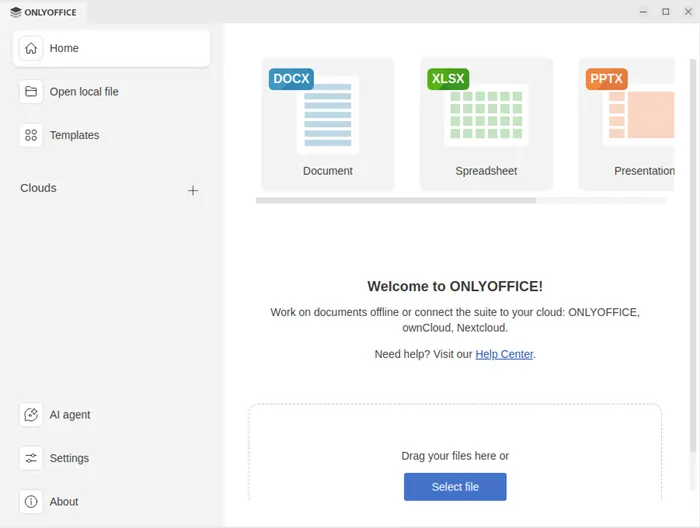
After a successful install on Ubuntu 25.04, opening ONLYOFFICE from the app menu lands on the home screen with Document, Spreadsheet, and Presentation tiles, sidebar links for local files and templates, and a Select file drop zone:
Terminal:
desktopeditorsOpen a specific file:
desktopeditors ~/Documents/report.docxThe .desktop entry registers dozens of MIME types—docx, xlsx, pptx, ODF, PDF, and more—so you can set OnlyOffice as the default handler in Settings → Apps → Default applications after install.
User settings and caches land under ~/.config/onlyoffice, ~/.local/share/onlyoffice, and ~/.cache/onlyoffice once you run the app.
Alternative: install the official .deb package
When you cannot add a repository (locked-down image, one-off VM, or policy that forbids extra sources.list entries), download the current amd64 package from Ascensio:
cd ~/Downloads
wget -O onlyoffice-desktopeditors_amd64.deb \
  https://download.onlyoffice.com/install/desktop/editors/linux/onlyoffice-desktopeditors_amd64.deb
sudo apt install -y ./onlyoffice-desktopeditors_amd64.deb
apt install ./file.deb resolves the same dependency chain as the repository package. The .deb URL returned HTTP 200 with content-length: 364644136 (~348 MB) when I checked headers—expect a long download on slow links.
You can still add the APT repo later for apt upgrade without reinstalling from scratch.
Alternative: Snap package
Canonical’s Snap store carries the same product name:
sudo snap install onlyoffice-desktopeditorssnap info onlyoffice-desktopeditors showed 9.4.0 on latest/stable (June 2026) at about 1.06 GB installed size. Snap confinement is convenient on Ubuntu Desktop when you do not want a vendor sources.list entry.
Remove later with:
sudo snap remove onlyoffice-desktopeditorsDo not install both the deb and Snap builds unless you intentionally want two copies—they register similar menu entries.
Alternative: Flatpak
Flatpak distributes OnlyOffice as org.onlyoffice.desktopeditors on Flathub. Enable Flathub once, then:
flatpak install flathub org.onlyoffice.desktopeditors
flatpak run org.onlyoffice.desktopeditors
Flatpak builds sometimes trail the .deb by a short window after major releases—fine for trials, but the APT repo is usually first for x86_64 Ubuntu.
Uninstall:
flatpak uninstall org.onlyoffice.desktopeditorsUninstall OnlyOffice
Ascensio’s docs distinguish remove (keep local config) from purge (delete package metadata).
Keep configuration files:
sudo apt-get remove onlyoffice-desktopeditorsRemove configuration too:
sudo apt-get purge -y onlyoffice-desktopeditors
sudo apt-get autoremove -y
A purge dry-run on my host reported:
The following packages will be REMOVED:
  onlyoffice-desktopeditors*
Purg onlyoffice-desktopeditors [9.4.0-129]
Drop the repository when you no longer need updates:
sudo rm -f /etc/apt/sources.list.d/onlyoffice.list /usr/share/keyrings/onlyoffice.gpgDelete personal data only when you are sure you do not need it:
rm -rf ~/.config/onlyoffice ~/.local/share/onlyoffice ~/.cache/onlyofficeIf anything remains under /opt/onlyoffice after a broken uninstall, Ascensio documents manual cleanup of that path and stale .desktop files—normally apt purge handles it.
For general uninstall patterns (purge vs remove, Snap, Flatpak), see remove software on Ubuntu.
Troubleshooting
| Symptom | Likely cause | Fix |
|---|---|---|
onlyoffice-desktopeditors stuck at iU / dpkg --configure hangs |
ttf-mscorefonts-installer downloading fonts |
Sync NTP; pre-accept EULA with debconf-set-selections; run sudo apt install -f -y |
| SSL certificate not yet valid on SourceForge mirrors | Clock behind real time or TLS inspection | sudo timedatectl set-ntp true; retry, or install with --no-install-recommends |
desktopeditors: command not found after install |
Package not fully configured | sudo apt install -f -y; check dpkg -l onlyoffice-desktopeditors shows ii |
| Two OnlyOffice icons in the app menu | Both Snap and .deb installed |
Remove one channel (snap remove or apt purge) |
| Wrong architecture / no amd64 package | ARM or 32-bit CPU | Use ARM build from OnlyOffice download page or AppImage where published |
Cannot open docx by double-click |
MIME default still LibreOffice | Settings → Default applications, or xdg-mime default |
References
- Installing ONLYOFFICE Desktop Editors on Debian/Ubuntu (official)
- ONLYOFFICE Desktop download page
- Install via Flatpak (official guide)
- OnlyOffice Desktop Editors on Snapcraft
- ONLYOFFICE Desktop Editors on Flathub
Summary
To install OnlyOffice on Ubuntu, add Ascensio’s signed download.onlyoffice.com repository, run sudo apt install onlyoffice-desktopeditors, and launch ONLYOFFICE from the Office menu or with desktopeditors. Version 9.4.0-129 landed under /opt/onlyoffice on Ubuntu 25.04. If apt pauses on Microsoft core fonts, sync time or use --no-install-recommends, then sudo apt install -f. For repo-less installs, use the official amd64 .deb; Snap and Flatpak suit sandboxed setups. This guide covers Desktop Editors only—pair it with the site’s LibreOffice removal walkthrough when you want a single local office suite.
Frequently Asked Questions
How do I install OnlyOffice on Ubuntu?
Add the official OnlyOffice APT repo at download.onlyoffice.com with the CB2DE8E5 GPG key in /usr/share/keyrings/onlyoffice.gpg, run sudo apt update, then sudo apt install onlyoffice-desktopeditors. Launch from the app menu or with desktopeditors.
Is OnlyOffice free on Ubuntu?
OnlyOffice Desktop Editors is free for personal and internal business use under the AGPL license. The APT, Snap, and Flatpak packages install the desktop suite—not the paid OnlyOffice Docs collaboration server.
What is the difference between OnlyOffice Desktop Editors and OnlyOffice Docs?
Desktop Editors is the local Word, Excel, and PowerPoint-style app for your PC. OnlyOffice Docs is a server product for browser editing and Nextcloud integration. This guide installs Desktop Editors only.
Can OnlyOffice replace LibreOffice on Ubuntu?
Yes. OnlyOffice opens docx, xlsx, and pptx with strong Microsoft Office compatibility. Purge LibreOffice first if you want one suite, then install OnlyOffice from apt or Snap. See the site guide on removing LibreOffice for a clean swap.
Which install method is best for OnlyOffice on Ubuntu?
The official APT repository is best for automatic updates and desktop integration. Use the direct .deb when you cannot add a repo. Snap and Flatpak are fine on immutable or sandboxed setups but can lag the .deb release slightly.
Why does apt hang on ttf-mscorefonts-installer during OnlyOffice install?
OnlyOffice recommends Microsoft core fonts. The ttf-mscorefonts-installer postinst downloads fonts from SourceForge and can stall on SSL errors or slow mirrors. Pre-accept the EULA with debconf-set-selections, sync NTP, or skip the recommend and run sudo apt install -f after fonts finish.
Does OnlyOffice support ARM Ubuntu?
Official Desktop Editors builds target amd64 in the Debian squeeze repo. Ascensio also publishes ARM packages and AppImage builds—check the OnlyOffice download page and release blog for aarch64 when you are not on x86_64.
How do I uninstall OnlyOffice from Ubuntu?
Run sudo apt purge onlyoffice-desktopeditors for the APT install. Remove /etc/apt/sources.list.d/onlyoffice.list and /usr/share/keyrings/onlyoffice.gpg if you no longer need updates. Delete ~/.config/onlyoffice only when you do not need local settings.
