
| Tested on | Ubuntu 26.04 LTS (GNOME / Wayland) APT flameshot 13.3.0+git20251204-1Flatpak Flameshot 14.0.0 (Flathub) |
|---|---|
| Applies to | Ubuntu 26.04 LTS and 24.04 LTS |
| Package | flameshot, flatpak, Flathub org.flameshot.Flameshot |
| Privilege | Normal user; sudo for APT and system-wide Flatpak installs |
| Scope | Why apt upgrade on Ubuntu 26.04 can leave Flameshot at 13.3 while upstream stable is 14.0, how to refresh the Ubuntu package safely, and how to move to Flameshot 14 with Flatpak or AppImage. Does not cover Snap installs, source builds, or adding another Ubuntu release repository to APT. |
| Related guides | Must-have Ubuntu apps |
Ubuntu 26.04 currently packages Flameshot 13.3, while upstream stable is Flameshot 14.0. Running apt upgrade refreshes the newest Flameshot build in Ubuntu’s repository for your release, not the upstream 14.x line.
You will check which copy you are running, refresh the Ubuntu repository package when that is enough, and move to Flameshot 14 with Flatpak or an AppImage when you need upstream behavior. For how Flameshot compares with Spectacle, GNOME Screenshot, and scrot, see the Linux screenshot tools roundup; the screenshot on Ubuntu guide covers the built-in capture workflow.
Quick Answer
Pick the path that matches how Flameshot is installed:
- APT package: refresh indexes, then
sudo apt install --only-upgrade flameshot. On Ubuntu 26.04 that stays on the Ubuntu-packaged 13.3.x line. - Flameshot 14: install or update Flathub
org.flameshot.Flameshot, or run the official AppImage from the upstream release page. - Never add another Ubuntu release repository just to bump one application.
APT refresh and upgrade:
sudo apt updateAfter indexes refresh, upgrade only the flameshot package:
sudo apt install --only-upgrade flameshotCheck Your Current Flameshot Version
Start with the binary on your PATH and its reported version:
flameshot --versionSample output on Ubuntu 26.04 after an APT install:
Flameshot v13.3.0 (Debian-13.3.0+git20251204-1)
Compiled with Qt 6.9.2
That Debian-style version string means the APT package is active. A Flatpak build reports v14.0.0 with a shorter build label when you launch it with flatpak run org.flameshot.Flameshot --version.
Check Whether Flameshot Came from APT or Flatpak
Update commands depend on how the app was installed. Run these checks before you change anything.
command -v reports the first flameshot on your PATH; the which command article contrasts that with type -a when several copies exist:
command -v flameshot/usr/bin/flameshotWhen that path is under /usr/bin, confirm the Debian package is registered:
apt list --installed flameshot 2>/dev/nullListing...
flameshot/resolute,now 13.3.0+git20251204-1 amd64 [installed]Check Flathub separately; grep hides the match when Flatpak is not used:
flatpak list | grep -i flameshotWhen only APT is in use, flatpak list prints nothing. After a Flathub install you also see a line such as Flameshot org.flameshot.Flameshot 14.0.0 stable.
         ┌──────────────────────────────────┐
         │  How did you install Flameshot?  │
         └────────────────┬─────────────────┘
                          │
        ┌─────────────────┼─────────────────┐
        ▼                 ▼                 ▼
 ┌──────────────┐  ┌───────────────┐  ┌──────────────┐
 │ APT package  │  │    Flatpak    │  │   AppImage   │
 │ (apt list)   │  │ (flatpak list)│  │ (*.AppImage) │
 └──────┬───────┘  └──────┬────────┘  └──────┬───────┘
        │                 │                 │
        ▼                 ▼                 ▼
 apt install         flatpak update     Download newer
 --only-upgrade      org.flameshot.     release; replace
 flameshot           Flameshot          the old binary
An AppImage does not register with apt or flatpak list. Look for an executable under ~/Applications or ~/bin, or a .desktop file that points at *.AppImage.
Flameshot Versions on Ubuntu 26.04 and 24.04
| Ubuntu / source | Flameshot version |
|---|---|
| Ubuntu 24.04 APT (noble) | 12.1.0 |
| Ubuntu 26.04 APT (resolute) | 13.3.0 |
| Upstream stable | 14.0.0 |
Flathub (org.flameshot.Flameshot) |
14.0.0 |
Each Ubuntu release ships the Flameshot version packaged for that release. That is expected: you get the archive build Ubuntu chose for noble or resolute, not every upstream tag on day one.
Why APT Does Not Always Install the Latest Flameshot
Ubuntu’s archive tracks the Flameshot build chosen for your release, not the latest GitHub tag.
sudo apt updaterefreshes package indexes for your Ubuntu version.sudo apt upgradeorsudo apt install --only-upgrade flameshotinstalls the newest Ubuntu-packaged Flameshot for that release.
On Ubuntu 26.04, the newest version available from that release is currently 13.3.x, even while upstream and Flathub ship 14.0.0. On Ubuntu 24.04 the archive stops at 12.1.0. That is why “Flameshot is already the newest version” from APT does not mean you are on Flameshot 14.
For day-to-day use on a single monitor with no Wayland quirks, staying on APT is reasonable. When you specifically need 14.x behavior, use Flatpak or AppImage instead of forcing a newer .deb from another Ubuntu release onto 26.04.
Update Flameshot from the Ubuntu Repository
Use this path when you want the newest Flameshot version packaged for your Ubuntu release and accept the version in the table above. Package installs and upgrades follow the usual apt command workflow on Ubuntu.
Update the APT Package
Refresh package lists, then upgrade only flameshot so unrelated packages are not pulled in:
sudo apt updateWhen the index refresh finishes, upgrade only flameshot:
sudo apt install --only-upgrade flameshotIf you are already on the newest archive build, APT reports that flameshot is already the newest version and makes no change.
Verify the Updated Version
Confirm the installed Debian package version and the CLI version string:
apt list --installed flameshotListing...
flameshot/resolute,now 13.3.0+git20251204-1 amd64 [installed]The CLI should report the same major version:
flameshot --versionFlameshot v13.3.0 (Debian-13.3.0+git20251204-1)
Compiled with Qt 6.9.2The resolute component name matches Ubuntu 26.04. On 24.04 you would see noble and version 12.1.0 when APT is current. If you are unsure which release you run, use check Ubuntu version before comparing package names.
Update to Flameshot 14 with Flatpak
Flathub currently publishes Flameshot 14.0.0. Flatpak is the straightforward way to run upstream stable beside the APT package.
Install flatpak and the Flathub remote if your desktop does not already have them (the Flathub remote steps match other distros; see install Flatpak on Debian for the full remote setup):
sudo apt install flatpakRegister Flathub once per system if flatpak remote-list does not already show it:
flatpak remote-add --if-not-exists flathub https://dl.flathub.org/repo/flathub.flatpakrepoInstall or Update Flameshot from Flathub
First install:
flatpak install flathub org.flameshot.FlameshotIf Flameshot is already on the system from Flathub, update it:
flatpak update org.flameshot.FlameshotWhen nothing newer is published, Flatpak prints Nothing to do.
Verify the Flatpak Version
Ask the Flatpak binary for its own build string (not /usr/bin/flameshot):
flatpak run org.flameshot.Flameshot --versionFlameshot v14.0.0 (e408812)
Compiled with Qt 6.10.3Open About in the Flameshot tray menu to double-check the UI version:
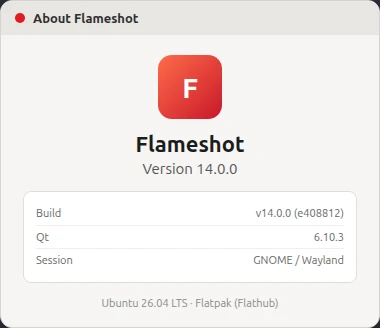
Launch a region capture from the tray or with flatpak run org.flameshot.Flameshot gui on Wayland. A working overlay confirms portal permissions, not just a successful install:
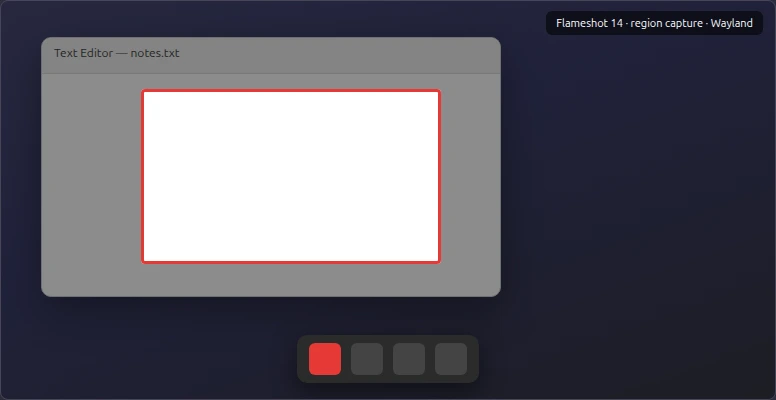
Pick one primary launcher for daily use. If both /usr/bin/flameshot and the Flatpak build are installed, keyboard shortcuts may start the older APT binary unless you point them at flatpak run org.flameshot.Flameshot.
Optional: Update to Flameshot 14 with AppImage
AppImage suits readers who want the current upstream build without replacing the APT package and without enabling Flatpak system-wide. Open the current Flameshot release page and download the x86_64 AppImage zip asset, or resolve the same URL from the GitHub API so the path stays valid when upstream ships 14.0.1 or later.
Create a folder under your home directory and fetch the latest AppImage zip:
mkdir -p ~/Applications/Flameshot && cd ~/Applications/FlameshotResolve the latest release’s appimage-x86_64.zip URL from the GitHub API (see the curl command if you need redirect or resume flags), then download it:
URL=$(curl -sL https://api.github.com/repos/flameshot-org/flameshot/releases/latest | python3 -c "import sys,json; d=json.load(sys.stdin); print(next(a['browser_download_url'] for a in d['assets'] if 'appimage-x86_64.zip' in a['name'] and not a['name'].endswith('.sha256sum')))")Fetch the zip into the current directory:
curl -fL -o flameshot-appimage.zip "$URL"Extract the zip:
unzip -q flameshot-appimage.zipThe AppImage path inside the archive can change between releases, so locate it with find:
APPIMAGE="$(find . -name 'Flameshot-*.x86_64.AppImage' -print -quit)"Make the AppImage executable:
chmod +x "$APPIMAGE"Run it to confirm the version string:
"$APPIMAGE" --versionFlameshot v14.0.0 (da6121bd)
Compiled with Qt 6.4.2To move to a newer upstream release later, repeat the download from releases/latest and retire the old binary. AppImage updates do not integrate with apt or flatpak update.
Should You Upgrade to Flameshot 14?
Stay on the Ubuntu repository package when:
- APT already reports 13.3 on 26.04 or 12.1 on 24.04 and captures work on your desktop
- You prefer a single system package with no Flatpak runtime
Consider Flameshot 14 when:
- GNOME on Wayland misbehaves on the older archive build and you want to try the portal-based capture workflow
- You use multiple monitors or fractional scaling and want upstream 14.x behavior (not a guaranteed fix for every mixed-DPI bug)
Flameshot 14 introduces a new portal-based capture workflow and substantial multi-monitor and fractional-scaling changes. It is worth trying when older Ubuntu builds have Wayland capture problems, but it does not guarantee that every mixed-DPI or fractional-scaling issue is resolved.
Security note: Flameshot 14.0 also addresses CVE-2026-62294, which affects upstream versions before 14.0.0. Ubuntu’s security tracker may list the 26.04 and 24.04 packages as Needs evaluation because distributions can backport fixes without bumping the upstream major version. Check the Ubuntu security notice rather than assuming vulnerability from flameshot --version alone.
Wayland Improvements
Flameshot 14 primarily uses xdg-desktop-portal for screenshot capture on Linux. On Wayland, the portal is required whether you run the Flatpak or AppImage build. Allow screenshot access when GNOME prompts you after the first capture attempt.
Multi-Monitor and Fractional Scaling Changes
Upstream 14.0 reworked multi-monitor and fractional scaling behavior compared with 13.x. Flameshot 14 also changes multi-monitor capture: on supported setups you select a monitor first, then select the region inside that monitor. That differs from older releases that could present one capture surface spanning multiple screens. If region capture still misaligns after the upgrade, treat it as an open upstream issue rather than a failed install.
Avoid Mixing Ubuntu Release Repositories
Never add another Ubuntu release’s repository to your system just to upgrade Flameshot.
Mixing release repositories causes problems that outlast one app upgrade:
- APT sees packages built for a different Ubuntu release on the same system
- Shared libraries can upgrade underneath unrelated applications
- Recovery often means removing the foreign
sources.listentry and repairing dependencies by hand
Use Flatpak, AppImage, or the APT package for your actual Ubuntu release instead. Upstream’s README also mentions a third-party PPA for Ubuntu, but this guide sticks to the Ubuntu archive, Flathub, and official release assets so you do not add another APT source solely for Flameshot.
Troubleshooting
| Symptom | Likely cause | Fix |
|---|---|---|
Unable to locate package flameshot |
Universe disabled on a minimal install, or stale indexes | sudo add-apt-repository universe if Universe is off, then sudo apt update and install again |
| APT says Flameshot is already the newest version | Newest archive build for your release (13.3 on 26.04, 12.1 on 24.04) | Expected for APT; use Flatpak or AppImage for 14.0 |
| Two different Flameshot versions installed | Both APT and Flatpak (or an AppImage) are present | Use one launcher; update the channel you chose; when switching channels, remove the old install per remove software on Ubuntu (apt remove flameshot or flatpak uninstall org.flameshot.Flameshot) |
| Flameshot 14 does not capture on Wayland | Portal permission denied or wrong binary started | Allow screenshot access in Settings; run the Flatpak build; log out and back in |
| Keyboard shortcut starts the wrong Flameshot | Shortcut still calls /usr/bin/flameshot |
Point the shortcut at flatpak run org.flameshot.Flameshot gui or your AppImage path |
If capture still fails after permissions, try the built-in GNOME screenshot shortcut on the same session. When that also fails, the problem is usually portal or session permissions rather than Flameshot alone.
Summary
Ubuntu 26.04 and 24.04 ship Flameshot through APT at 13.3 and 12.1 respectively, while upstream and Flathub provide 14.0.0. Checking apt list, flatpak list, and flameshot --version tells you which update path applies.
Use sudo apt install --only-upgrade flameshot when you want the newest Flameshot version packaged for your Ubuntu release. Use Flathub or the official AppImage when you need upstream 14.x, including the portal-based capture workflow and security fixes that ship with that major release.
Avoid cross-release APT repositories; they trade one version bump for system-wide dependency risk. When both APT and Flatpak are installed, align shortcuts and tray autostart with the build you intend to run.
References
- Flameshot — Installation on Linux
- Flameshot releases (GitHub)
- Flameshot on Flathub
- Ubuntu packages — flameshot (noble)
- Ubuntu packages — flameshot (resolute)
- Ubuntu security notice — CVE-2026-62294
Frequently Asked Questions
What Is the Latest Flameshot Version?
Upstream stable is 14.0.0 (released June 2026). Flathub tracks that release. Ubuntu 26.04 APT currently ships 13.3.0, and Ubuntu 24.04 APT ships 12.1.0.
Which Flameshot Version Does Ubuntu 26.04 Include?
The flameshot package in the Ubuntu 26.04 archive is 13.3.0+git20251204-1 until Ubuntu publishes a newer security or maintenance upload for that release.
Why Doesn't apt upgrade Install Flameshot 14?
apt upgrade only installs versions built for your Ubuntu release. Flameshot 14 is available from upstream and Flathub, but it is not the version currently packaged for Ubuntu 26.04 in the archive.
Should I Use APT, Flatpak, or AppImage?
Use APT for the Flameshot version packaged for your Ubuntu release. Use Flatpak when you want current stable 14.0 with sandboxed updates through Flathub. Use AppImage when you want a portable upstream binary without enabling Flatpak system-wide.
