
| Tested on | Ubuntu 26.04 LTS (Resolute Raccoon) |
|---|---|
| Package | terraform 1.15.8-1hashicorp/local 2.9.0 |
| Applies to | Any host with Terraform installed |
| Lab environment | Single Ubuntu VM with Terraform — Terraform lab environment on Ubuntu |
| Privilege | Normal user |
| Scope | Terraform architecture — configuration, Terraform Core, provider plugins, dependency graph, state versus real infrastructure, internal roles of init plan and apply, resource lifecycle, drift detection, and brief positioning for modules and HCP Terraform. Does not cover installation, HCL syntax, CLI flags, backends, or module or HCP tutorials. |
| Related guides | Terraform state explained Terraform Associate certification course |
If What is Terraform? answers what the tool is and why teams use it, this article answers how the pieces connect:
- How configuration flows through Terraform Core
- How provider plugins talk to APIs
- How state records what Terraform manages
- How plan reconciles three different views of the world
The examples below use a small lab under ~/terraform-labs/how-terraform-works/ on Ubuntu 26.04. They illustrate architecture — not a second copy of the beginner command walkthrough from the opening lesson.
Terraform architecture at a glance
Terraform configuration (.tf)
           │
           ▼
      Terraform Core
      ├── loads configuration
      ├── reads state
      ├── builds dependency graph
      └── calculates plan
           │
           ▼
     Provider plugins
           │
           ▼
   Infrastructure APIs
           │
           ▼
     Real resources

           ▲
           │
      Terraform state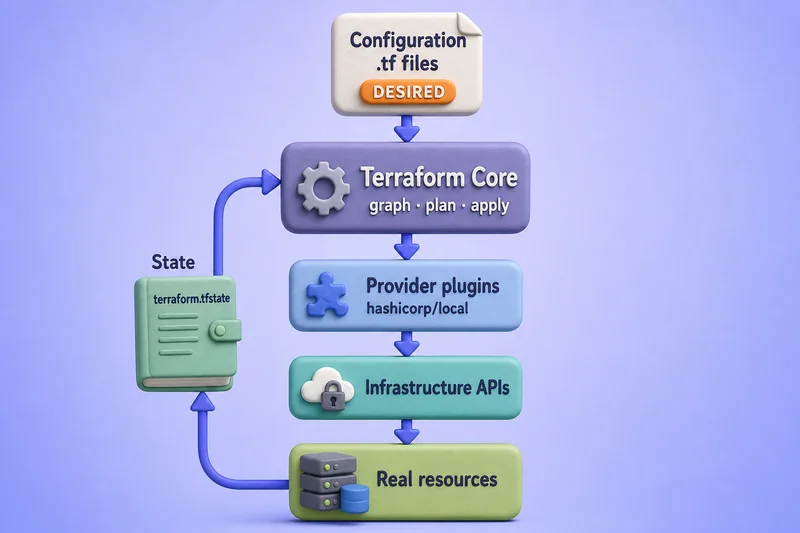
| Component | Role |
|---|---|
| Configuration | .tf files declaring resources, data sources, and their relationships |
| Terraform Core | Parses configuration, coordinates state, builds the graph, runs plan and apply |
| Provider plugins | Implement schemas and API calls for a platform or service |
| Infrastructure APIs | Cloud control planes, hypervisors, DNS, SaaS endpoints, or local OS APIs |
| Real resources | The VMs, files, records, or containers that exist outside Terraform |
| State | Terraform's mapping between configuration addresses and real object identities |
Core never embeds provider-specific resource logic:
- An
aws_instanceblock is understood because the AWS provider plugin supplies the schema and CRUD behavior - Core does not contain EC2 code
Terraform configuration and desired infrastructure
Configuration files describe what you want — resource types, names, arguments, and the references that tie objects together. A resource block follows this shape:
resource "<TYPE>" "<NAME>" {
  # arguments
}
You declare relationships, not step-by-step procedures. Terraform Core derives order from references:
- If resource B reads an attribute from resource A, Core knows B depends on A
The lab stack declares a chain and a standalone file:
resource "terraform_data" "foundation" {
  input = "layer-1"
}

resource "terraform_data" "application" {
  input = terraform_data.foundation.output
}

resource "local_file" "marker" {
  filename = "${path.module}/marker.txt"
  content  = "version-1"
}
application references foundation.output, so Core treats that as an implicit dependency.
marker has no reference to the terraform_data resources, so Core may manage it in parallel with the chain when dependencies allow.
Pin the local provider in versions.tf so terraform init downloads a real plugin — useful when you want to observe provider installation and file-based drift later:
terraform {
  required_providers {
    local = {
      source  = "hashicorp/local"
      version = "~> 2.5"
    }
  }
}
HCL syntax, variable blocks, and module calls belong in dedicated lessons. Here the point is that configuration is the declared desired end state, not a script of API calls.
Terraform Core and provider plugins
Terraform Core and provider plugins split responsibility cleanly.
| Terraform Core | Provider plugin |
|---|---|
| Load and merge configuration | Publish resource and data source schemas |
| Validate configuration against schemas | Translate plan actions into API calls |
| Build the dependency graph | Read live attributes during default in-memory refresh at plan time |
| Read and write state (through backends) | Return attributes Core stores in state |
| Calculate and execute plan/apply | Implement create, read, update, delete per schema |
Terraform Core does not itself contain AWS, Docker, or Kubernetes resource logic.The built-in terraform provider supplies resources such as terraform_data without a separate download. External providers such as hashicorp/local install into .terraform/providers/ during init.
Initialize the lab directory so Core can load the local provider schema:
cd ~/terraform-labs/how-terraform-works && terraform initSample output:
- Installing hashicorp/local v2.9.0...
- Installed hashicorp/local v2.9.0 (signed by HashiCorp)

Terraform has been successfully initialized!
Core registered the plugin and wrote .terraform.lock.hcl so future runs select the same provider version.
Provider configuration, aliases, and version constraints are covered in Terraform providers and the lock-file lesson — not here.
How Terraform builds dependencies
Core constructs a dependency graph from your configuration before it executes changes.
terraform_data.foundation
         ▲
         │  implicit reference (application.input → foundation.output)
         │
terraform_data.application

local_file.marker   (no edge to the chain — may run in parallel)
Export the graph as DOT text when you want to see edges explicitly:
terraform graph | grep -E 'foundation|application|marker'Sample output:
  "local_file.marker" [label="local_file.marker"];
  "terraform_data.application" [label="terraform_data.application"];
  "terraform_data.foundation" [label="terraform_data.foundation"];
  "terraform_data.application" -> "terraform_data.foundation";
The arrow from application to foundation means application depends on foundation — Core creates or updates foundation first.
Resources without an edge between them are independent:
- Core may run those branches in parallel during apply
You can also add depends_on when a dependency is real but not visible through attribute references. Graph mechanics, cycles, and depends_on depth live in Terraform resource dependencies and terraform graph.
Configuration, state, and real infrastructure
Planning reconciles three views. Do not confuse them.
Configuration          State                      Remote infrastructure
"What I want"          "What Terraform            "What actually exists
                        currently records"          in the API or on disk"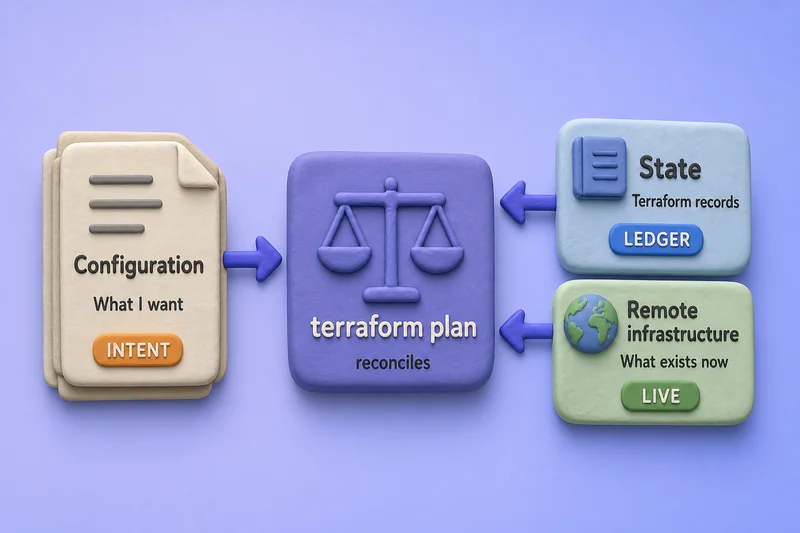
| View | Stored in | Answers |
|---|---|---|
| Configuration | .tf files in version control |
What should exist and how resources relate |
| State | terraform.tfstate or a remote backend |
Which real object belongs to each resource address |
| Real infrastructure | Cloud accounts, hypervisors, local filesystem | What APIs report right now |
State is not the desired state. State is Terraform's ledger:
- Bindings between configuration addresses and real object identities
- Last-known attributes recorded for each managed resource instance
Configuration carries intent. By default, providers read current attributes during an in-memory refresh at plan time, and Core compares configuration, state, and that provider view.
On a first terraform plan with empty state, Core sees configuration wants three resources and state has none:
terraform planSample output:
  # terraform_data.foundation will be created
  + resource "terraform_data" "foundation" {
      + input = "layer-1"
    }

  # terraform_data.application will be created
  + resource "terraform_data" "application" {
      + input = (known after apply)
    }

  # local_file.marker will be created
  + resource "local_file" "marker" {
      + content  = "version-1"
      + filename = "./marker.txt"
    }

Plan: 3 to add, 0 to change, 0 to destroy.
(known after apply) appears because application.input depends on foundation.output, which does not exist until apply creates foundation.
That is Core propagating unknown values through the graph — not a provider failure.
What happens during init, plan, and apply?
These commands are the public interface to Core's internal pipeline. This section describes roles, not every CLI flag.
init  →  prepare directory, backend, providers, modules
plan  →  default refresh + graph + diff → proposed actions
apply →  execute proposed actions + update state
init
terraform init prepares a working directory:
- Configures the state backend
- Downloads provider plugins and child modules referenced in configuration
- Writes
.terraform.lock.hclfor reproducible provider selection
Built-in providers require no download; external providers such as hashicorp/local appear in the init log as shown above.
plan
terraform plan calculates a proposed set of managed-resource changes without applying those changes. During planning, Terraform may still read provider APIs, data sources, and other plan-time integrations.
- Core loads configuration and the current state snapshot
- By default, Terraform performs an in-memory refresh during plan, asking providers to read the current attributes of managed objects before calculating proposed changes
- Core builds the dependency graph and computes differences
- Core prints proposed create, update, replace, and destroy actions
No planned managed-resource changes are applied during terraform plan alone. An ordinary plan does not immediately persist refreshed attributes to the state file — Core uses that refreshed view in memory for planning.
apply
terraform apply executes the planned changes:
- Core walks the graph in dependency order
- Each provider performs the API operations Core requests
- Core updates state after each successful change so the ledger matches reality
Apply the lab stack once to see ordering in the log — foundation before application because of the implicit edge:
terraform apply -auto-approveSample output:
terraform_data.foundation: Creating...
terraform_data.foundation: Creation complete after 0s [id=5bbe3a8b-deb3-6e98-7b91-bd13eb8b1b79]
terraform_data.application: Creating...
terraform_data.application: Creation complete after 0s [id=2ef59a74-ef51-9536-01e5-3e64d4944cda]
local_file.marker: Creating...
local_file.marker: Creation complete after 0s [id=f78741a8b791cb13a8a57cd36c9ee4dcd864371c]

Apply complete! Resources: 3 added, 0 changed, 0 destroyed.
Command-specific tutorials in Domain 3 cover saved plans, targeting, and auto-approve policies.
The architectural takeaway:
initprepares — backend, providers, modulesplanpreviews — refresh, graph, diffapplymutates through providers while updating state
Terraform resource lifecycle
Once resources exist, configuration changes drive different actions.
New resource block added        →  create proposed
Argument changed                →  update in-place or replace (provider schema decides)
Resource block removed          →  destroy proposed
Configuration matches reality   →  no changes
After the lab apply, an immediate plan shows idempotent behavior:
- Configuration, state, and the provider's current view align
- Core reports no changes when nothing has drifted
terraform planSample output:
No changes. Your infrastructure matches the configuration.Change foundation's input to "layer-2" and run plan again — Core propagates the difference down the reference chain:
terraform planSample output:
  # terraform_data.application will be updated in-place
  ~ resource "terraform_data" "application" {
      ~ input  = "layer-1" -> (known after apply)
    }

  # terraform_data.foundation will be updated in-place
  ~ resource "terraform_data" "foundation" {
      ~ input  = "layer-1" -> "layer-2"
    }

Plan: 0 to add, 2 to change, 0 to destroy.
Whether a change is an in-place update or a forced replacement depends on:
- The provider schema
- Which arguments changed
Lifecycle meta-arguments such as create_before_destroy are covered in Terraform lifecycle.
How Terraform detects changes and drift
Drift is when real infrastructure diverges from configuration — often because someone changed a managed object outside Terraform.
Manual or external change
        ↓
Provider reads live object during default in-memory refresh
        ↓
Core compares current attributes to configuration
        ↓
Next plan proposes corrective actions
Simulate drift on the lab local_file by editing the file on disk:
printf 'drifted-content\n' > ~/terraform-labs/how-terraform-works/marker.txtRun plan from the lab directory:
cd ~/terraform-labs/how-terraform-works && terraform planSample output:
  # local_file.marker will be created
  + resource "local_file" "marker" {
      + content  = "version-1"
      + filename = "./marker.txt"
    }

Plan: 1 to add, 0 to change, 0 to destroy.
The exact action symbol depends on provider behavior and what changed — here Terraform proposes recreating the file so disk content matches content = "version-1" again.
The architectural point is unchanged:
- Plan detected that live infrastructure no longer matches configuration
Refresh-only plans, import, and operational responses to drift are covered in Terraform drift and refresh-only.
How modules and HCP Terraform fit in
Two extensions sit on the same Core model without changing the fundamental flow.
Modules
→ package and reuse configuration
→ each module call is a subgraph Core plans as part of the root module

HCP Terraform
→ remote execution, remote state storage, workspace organization, and governance
→ still the same configuration + Core + providers + state idea
Modules are containers for .tf files you call from a module block:
- Core treats each module instance as a namespaced subgraph —
module.network,module.app, and so on - Module authoring and testing belong in Terraform modules and related lessons
HCP Terraform (formerly Terraform Cloud) runs Terraform in a managed environment:
- Stores state remotely
- Adds collaboration, variables, and policy gates
- The execution model is still plan-then-apply through providers — only where the CLI runs and where state lives changes
See HCP Terraform tutorial when you need that operational layer.
Lab cleanup
Destroy managed resources and remove the practice directory when you finish:
cd ~/terraform-labs/how-terraform-works && terraform destroy -auto-approveDelete the lab directory once destroy finishes:
rm -rf ~/terraform-labs/how-terraform-worksIf you edited marker.txt for the drift demo, destroy reconciles or removes stale objects before you delete the folder.
References
- Terraform Core overview — HashiCorp Developer
- How Terraform works — HashiCorp Developer
- Resource graph — HashiCorp Developer
- State — HashiCorp Developer
Summary
Terraform's architecture separates four concerns:
- Declared configuration — what you want in
.tffiles - Terraform Core — loads config, reads state, builds the graph, runs plan and apply
- Provider plugins — implement API logic for each platform
- State — records which real objects map to which resource addresses
Core loads .tf files, reads state, builds a dependency graph from references and depends_on, and by default asks providers to refresh managed objects in memory before calculating a plan. Providers implement API logic; Core orchestrates.
Three views planning reconciles:
- Configuration — intent
- State — which real objects map to which resource addresses
- Remote infrastructure — what APIs return today
Planning reconciles those views; apply executes provider operations and updates state in dependency order.
A local lab with terraform_data and local_file shows the model without cloud credentials:
- Init installs external providers
- Apply respects graph order
- A second plan reports no changes when nothing drifted
- Configuration edits propagate through references
- Manual file edits surface in the next plan
Modules package configuration; HCP Terraform adds remote operations and governance on top of the same Core workflow.
For the IaC introduction and first example, start with What is Terraform?. For command depth, follow the Core Workflow lessons in the Associate course.
Frequently Asked Questions
What is Terraform Core?
Terraform Core is the terraform CLI and engine that loads configuration, reads state, builds the dependency graph, calculates plans, and coordinates provider plugins. Core does not embed AWS, Docker, or Kubernetes resource logic — that lives in providers.
What is the difference between Terraform configuration and state?
Configuration is what you declare in .tf files — the desired end state. State is Terraform's record of which real objects map to which resource blocks and what attributes were last recorded. Planning reconciles configuration, state, and live data the provider reads from APIs.
How does Terraform decide resource order?
Terraform Core builds a dependency graph from attribute references between resources and from explicit depends_on blocks. Independent branches with no edge between them may run in parallel during apply. See terraform graph for a visual export of those edges.
What happens inside terraform plan?
Core loads configuration and state, and by default asks providers to read current managed-object attributes during an in-memory refresh. Core compares configuration, state, and that refreshed view, then produces a proposed action list without applying those changes. Run terraform apply to execute the plan.
Does Terraform detect changes made outside Terraform?
Normally, yes. By default, terraform plan refreshes Terraform's in-memory view of managed objects through their providers. If someone changed a managed object outside Terraform, the plan can detect the difference and propose a corrective action.
How is this article different from What is Terraform?
What is Terraform explains the IaC idea, benefits, and a first hands-on example. This article explains the components and execution flow — Core, providers, graph, state reconciliation, lifecycle, and drift — without repeating a beginner command tutorial.
