
| Tested on | Ubuntu 26.04 LTS (Resolute Raccoon) |
|---|---|
| Package | terraform 1.15.8-1 |
| Applies to | Any host with Terraform installed and an HCP Terraform organization |
| Lab environment | Single Ubuntu VM with Terraform and a free HCP Terraform account — Terraform lab environment on Ubuntu |
| Privilege | Normal user |
| Scope | Supplying values to HCP Terraform runs — Terraform variables versus environment variables, workspace variables, variable sets at workspace, project, and organization scope, priority sets, the full precedence order verified against a real organization, how tfvars files and -var flags behave in remote runs, and sensitive variables. Does not cover input variable syntax and validation, policy enforcement with Sentinel or OPA, dynamic provider credentials, or Stacks. |
| Related guides | Terraform Associate certification course |
Locally, a Terraform value comes from a .tfvars file, a -var flag, or your shell. In HCP Terraform the same value can arrive from four different places, and three of them are invisible from your working directory:
Terraform variable   → a value for var.something declared in your configuration
Environment variable → exported into the shell of the worker that runs Terraform
Workspace variable   → stored on one workspace, used by every run in it
Variable set         → a reusable group attached to workspaces, a project, or everything
Those four are not alternatives to each other:
- A workspace variable and a variable set are where a value is stored
- Terraform and environment are what kind of value it is
- Every variable in HCP Terraform is one of each — which is why the Variables page asks for a category as well as a key and a value
This lesson maps to objectives 8b and 8c of the Terraform Associate (004) exam. Everything below was run against a real organization from an Ubuntu VM in ~/terraform-labs/hcp-terraform-variables/, using three throwaway workspaces in a project called hcp-vars-lab.
If the CLI on your machine is not connected to HCP Terraform yet:
- The HCP Terraform tutorial covers
terraform loginand the first remote run - HCP Terraform workspaces and projects explains the containers the variables attach to
Terraform variables versus environment variables
Every variable you create in HCP Terraform carries a category, and the category decides what the worker does with it. Declaration syntax, types, and validation for the Terraform side live in Terraform input variables; what matters here is which category a value belongs in:
| Category | What the worker does with it | Use it for |
|---|---|---|
| Terraform | Supplies a value for the input variable of the same name, so region fills var.region |
Anything your configuration declares in a variable block |
| Environment | Runs export KEY=value in the shell before Terraform starts |
Provider credentials (AWS_ACCESS_KEY_ID), behaviour switches (TF_LOG), agent settings (TFE_PARALLELISM) |
The overlap that trips people up is TF_VAR_:
- Terraform reads environment variables with that prefix as input variables
- An environment-category variable named
TF_VAR_regionalso ends up invar.region— by the long route - A plain environment variable named
regiondoes not reachvar.regionunless you also use theTF_VAR_prefix
A second lab workspace makes the difference concrete with a required variable and no default anywhere:
terraform {
  cloud {
    organization = "golinuxcloud-lab"

    workspaces {
      project = "hcp-vars-lab"
      name    = "hcp-vars-lab-env"
    }
  }
}

variable "deploy_region" {
  type        = string
  description = "Region name, supplied by HCP Terraform"
}

output "selected_region" {
  value = var.deploy_region
}
Its Variables page holds three entries that look nearly the same, and the Category column is the only thing separating them:
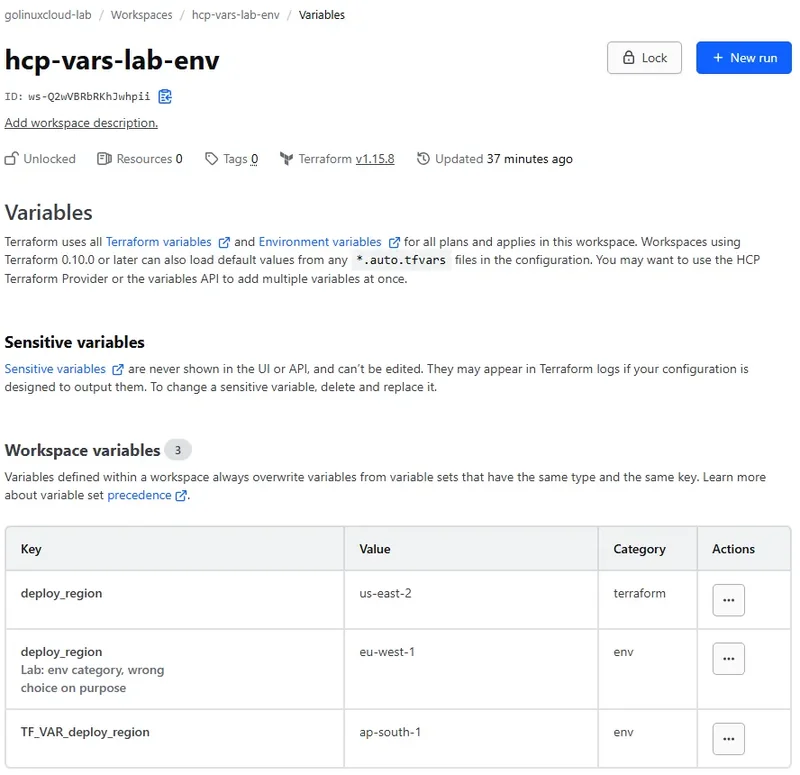
Two rows share the key deploy_region and HCP Terraform accepts both, because a key only has to be unique within a category. Nothing on this page warns you that one of them can never reach var.deploy_region. Start with all three in place and ask for a plan:
terraform planSample output:
Changes to Outputs:
  + selected_region = "us-east-2"
The Terraform-category variable won — the only one of the three that HCP Terraform hands to Terraform as an input variable directly.
Now delete that Terraform-category row in the UI, leaving the two environment variables, and run the same plan again:
terraform planSample output:
Changes to Outputs:
  + selected_region = "ap-south-1"
ap-south-1 is the value from TF_VAR_deploy_region — the environment variable reached the input variable through Terraform's own TF_VAR_ mechanism rather than through HCP Terraform.
Delete that row too, so the only remaining variable is deploy_region in the environment category, and run the plan a third time:
terraform planSample output:
│ Error: No value for required variable
│
│   on main.tf line 12:
│   12: variable "deploy_region" {
│
│ The root module input variable "deploy_region" is not set, and has no
│ default value. Use a -var or -var-file command line argument to provide a
│ value for this variable.
╵
Operation failed: failed running terraform plan (exit 1)
The run failed with deploy_region sitting right there in the workspace, spelled correctly, with a value. It was exported into the worker's shell as deploy_region=eu-west-1, which Terraform has no reason to look at.
Any time HCP Terraform says an input variable is not set while you are staring at the value in the UI:
- Check the category column before you check your spelling
- Terraform category → fills
var.namedirectly - Environment category with
TF_VAR_prefix → fillsvar.namethrough Terraform's own mechanism - Environment category without the prefix → never reaches an input variable
Set a Terraform variable on a workspace
Workspace variables are the simplest storage:
- One key, one value
- Used by every run in that workspace
- Not shared with any other workspace
The precedence lab uses a deliberately dull configuration whose only job is to report which source won, with a default that names itself:
terraform {
  cloud {
    organization = "golinuxcloud-lab"

    workspaces {
      project = "hcp-vars-lab"
      name    = "hcp-vars-lab-precedence"
    }
  }
}

variable "environment" {
  type    = string
  default = "from-variable-default"
}

output "selected_environment" {
  value = var.environment
}
Initialize the directory so Terraform creates the workspace and binds this directory to it:
terraform initSample output:
Initializing HCP Terraform...

Initializing provider plugins...


HCP Terraform has been successfully initialized!

You may now begin working with HCP Terraform. Try running "terraform plan" to
see any changes that are required for your infrastructure.
The workspace now exists and has no variables at all. Add one from the workspace Variables page with + Add variable, choosing the Terraform category, key environment, and value from-workspace-variable. The row that appears is the whole feature: a key, a value, a category, and a description.
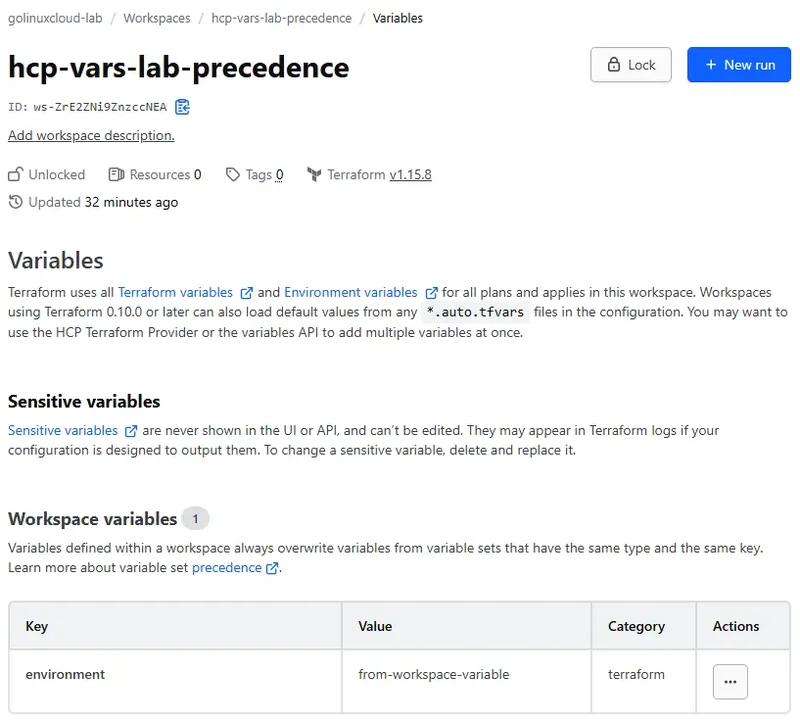
The small print above the table is worth reading before you leave the page. It states the rule the precedence lab confirms later on: variables defined within a workspace always overwrite variables from variable sets that share the same type and key. Now ask for a plan to see which value Terraform used, since the output-only configuration makes the answer the entire plan:
terraform planSample output:
Running plan in HCP Terraform. Output will stream here. Pressing Ctrl-C
will stop streaming the logs, but will not stop the plan running remotely.

Preparing the remote plan...

To view this run in a browser, visit:
https://app.terraform.io/app/golinuxcloud-lab/hcp-vars-lab-precedence/runs/run-HPcDRv1yYWrrvhhd

Waiting for the plan to start...

Terraform v1.15.8
on linux_amd64
Initializing plugins and modules...

Changes to Outputs:
  + selected_environment = "from-workspace-variable"

You can apply this plan to save these new output values to the Terraform
state, without changing any real infrastructure.
The stored value beat the default in the configuration. That is the point of a workspace variable:
- The configuration carries a sensible fallback
- The workspace carries the real value
Apply it so the result lands in state:
terraform apply -auto-approveSample output:
Apply complete! Resources: 0 added, 0 changed, 0 destroyed.

Outputs:
selected_environment = "from-workspace-variable"
From now on terraform output reads that value back out of remote state, which is a quick way to confirm what the last successful run resolved:
terraform outputSample output:
selected_environment = "from-workspace-variable"One workspace, one value, no ambiguity. Ambiguity starts when the same key is also stored somewhere shared.
Reuse values across workspaces with variable sets
A variable set is a named group of variables that you attach to things rather than type again. The classic case is credentials:
- One set holding
AWS_ACCESS_KEY_IDandAWS_SECRET_ACCESS_KEYas environment variables - Attached to the workspaces that deploy to that account
A set can hold Terraform and environment variables together, and a variable is created inside the set exactly as it is on a workspace.
Create one from Settings → Variable sets → Create variable set in the organization. Three decisions on that page matter more than the variables you put in it:
- Scope — apply to specific workspaces, to entire projects, or to every workspace in the organization
- Priority — whether these values override values set at narrower scopes
- Owner — the organization or a project, which decides who can manage the set and settles ties in precedence
The global-defaults set from the lab shows all of it on one page, with the variables it carries listed underneath:
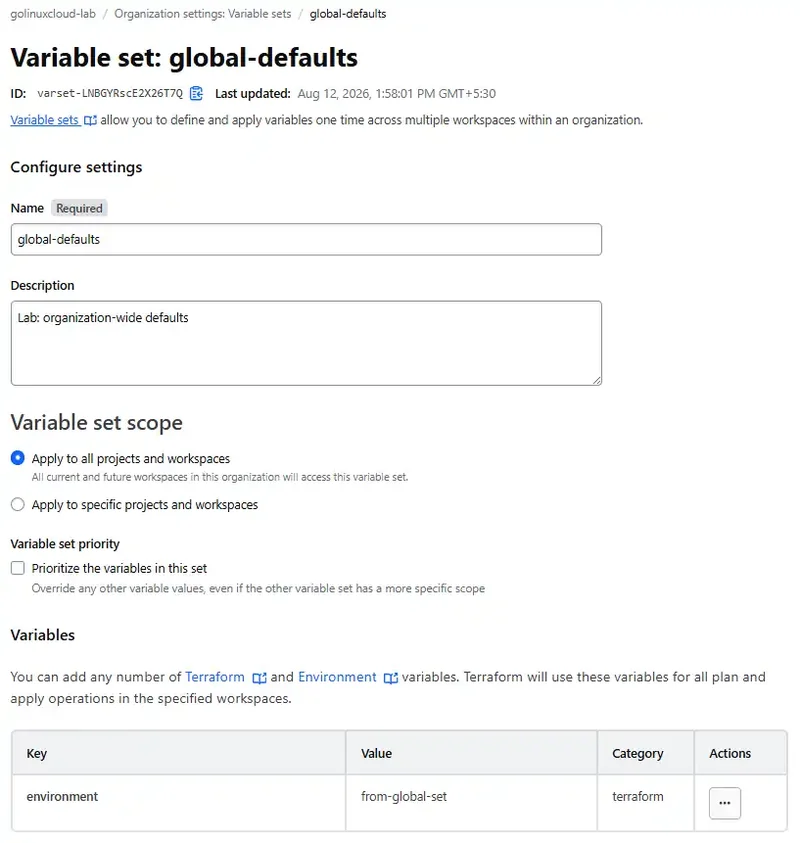
The scope option is set to Apply to all projects and workspaces, and the note under it says what that really means: all current and future workspaces in the organization can access the set.
- Choosing Apply to specific projects and workspaces instead is what produces the project-scoped and workspace-scoped sets used below
- The priority checkbox stays cleared for now
- Its subtitle is the clearest description of priority anywhere in the product: it overrides any other variable values, even when the other variable set has a more specific scope
The lab uses three sets, each holding the same key environment with a value naming its own scope, so any run tells you which one it read:
| Set name | Scope | Applies to |
|---|---|---|
global-defaults |
Global | Every workspace in the organization, present and future |
project-defaults |
Project | Every workspace in the hcp-vars-lab project, present and future |
workspace-defaults |
Workspace | Only hcp-vars-lab-precedence |
The words "present and future" are the part worth internalizing:
- A project-scoped set is not a bulk-apply action you take once
- It keeps applying — a workspace created in that project next month picks the values up on its first run
That happened by accident during this lab: the second workspace, hcp-vars-lab-env, inherited environment from project-defaults the moment it was created, and its configuration does not declare that variable. Plan in that workspace's directory and Terraform says so on every run:
terraform planSample output, trimmed to the warning above the plan:
│ Warning: Value for undeclared variable
│
│ The root module does not declare a variable named "environment" but a value
│ was found in file
│ "/home/tfc-agent/.tfc-agent/component/terraform/runs/run-cxASSBojBaXLEcws/terraform.tfvars".
│ If you meant to use this value, add a "variable" block to the
│ configuration.
That warning is harmless but informative twice over:
- A shared set is reaching a workspace that has no use for it
- HCP Terraform wrote the set's Terraform-category variables into a
terraform.tfvarsfile inside the run directory on the worker
The same Value for undeclared variable message on a laptop—extra tfvars keys, wrong -var names, module scope—is diagnosed in Terraform undeclared variable errors.
Scope credentials narrowly for the same reason. A global set of production keys is available to every workspace anyone creates, including the one someone made to test a null_resource.
HCP Terraform variable precedence, layer by layer
Now the question this whole lesson exists for: when several of those places define environment, which one does the run use?
Rather than trust a table, I built the sources up one at a time in the hcp-vars-lab-precedence workspace and ran a plan after each change:
- The configuration never changed
- Only where the value came from changed
To start from nothing I deleted the workspace variable created above and detached all three sets, leaving main.tf alone in the directory. Every value below names its own source, so each plan says which layer won.
Files in the working directory
With no variables in HCP Terraform at all, the default in the variable block is the only value Terraform has:
terraform planSample output:
Changes to Outputs:
  + selected_environment = "from-variable-default"
That is the bottom of the ladder. Add a terraform.tfvars file next to main.tf containing environment = "from-terraform-tfvars", remembering that a CLI-driven run uploads the whole directory to the worker:
terraform planSample output:
Changes to Outputs:
  + selected_environment = "from-terraform-tfvars"
The file travelled with the run and beat the default, exactly as it would locally. Now add a second file, zz.auto.tfvars, holding environment = "from-auto-tfvars", and run the plan again:
terraform planSample output:
Changes to Outputs:
  + selected_environment = "from-auto-tfvars"
Files ending in .auto.tfvars outrank terraform.tfvars, which is Terraform's own rule rather than an HCP Terraform one. Both files remain the weakest sources once anything is stored in the workspace.
Variable sets, widest scope first
Attach global-defaults to the organization and leave the files in place. Nothing about the working directory changes, so the plan is the only way to see the effect:
terraform planSample output:
Changes to Outputs:
  + selected_environment = "from-global-set"
A global set, the broadest thing in the system, still beat both files on disk. Attach project-defaults to the hcp-vars-lab project so two sets now define environment:
terraform planSample output:
Changes to Outputs:
  + selected_environment = "from-project-set"
The narrower scope won. Attach workspace-defaults to this one workspace to narrow it one more step:
terraform planSample output:
Changes to Outputs:
  + selected_environment = "from-workspace-scoped-set"
Three sets, and the most specific one is in charge:
- Workspace beats project beats global
- That ordering is the opposite of what "global" suggests to most people
- A stubborn wrong value is usually hiding in a set nobody remembers attaching
The workspace variable
Put the workspace variable back in the Terraform category, keyed environment with the value from-workspace-variable, leave all three sets attached, and plan again:
terraform planSample output:
Changes to Outputs:
  + selected_environment = "from-workspace-variable"
A variable stored on the workspace beats every non-priority set, however narrowly that set is scoped. HCP Terraform marks the losers in the UI as overwritten, which is worth looking for when a value is not what you expect.
Local TF_VAR_ on a CLI-driven run
HashiCorp's precedence table puts run-specific TF_VAR_ values above workspace variables when you start the run from the CLI, even though execution mode is remote and Terraform itself runs on a worker. With the workspace variable and all three sets still in place, prefix the plan command:
TF_VAR_environment=from-local-env-var terraform planSample output:
Changes to Outputs:
  + selected_environment = "from-local-env-var"
The local value reached the remote run because the CLI workflow passes run-specific TF_VAR_ variables to HCP Terraform when it queues the plan.
That is narrower than inheriting your whole shell:
- Ordinary environment variables such as provider credentials still need to live in the workspace or a variable set
- The worker does not copy everything from your laptop
Command line flags
Values you pass on the command line travel with the run and sit above workspace variables, variable sets, and any TF_VAR_ value on the same invocation. Ask for the same plan with an explicit -var:
terraform plan -var 'environment=from-cli-var'Sample output:
Changes to Outputs:
  + selected_environment = "from-cli-var"
The flag overrode the workspace variable, the local TF_VAR_ value, and all three sets for this run only — nothing in the workspace changed.
A -var-file behaves the same way, which is how you run a one-off plan against a different set of values. The lab keeps prod.tfvars around containing environment = "from-var-file-flag":
terraform plan -var-file=prod.tfvarsSample output:
Changes to Outputs:
  + selected_environment = "from-var-file-flag"
Note the asymmetry with the earlier file test:
prod.tfvarsis not read automatically- The same file wins when you name it on the command line and is ignored when you do not
Priority variable sets
The last layer inverts the whole ladder. Open global-defaults, tick the priority option, and run the plan with the -var flag still in place, which was the strongest source tested so far:
terraform plan -var 'environment=from-cli-var'Sample output:
Changes to Outputs:
  + selected_environment = "from-global-set"
A priority global set beat a command line flag, which is exactly what a platform team wants when a value must not be overridden locally.
Priority is not enforcement though:
- Nothing stops someone editing the configuration to ignore
var.environmentand hardcode the value - Treat priority sets as a strong default
- Use policy checks or run tasks when you need a guarantee
The whole ladder in one table
Each row below is one plan in the lab, in the order I ran them, with the value the run actually resolved:
| Sources present | Value the run used |
|---|---|
variable default only |
from-variable-default |
+ terraform.tfvars |
from-terraform-tfvars |
+ zz.auto.tfvars |
from-auto-tfvars |
| + global variable set | from-global-set |
| + project-scoped set | from-project-set |
| + workspace-scoped set | from-workspace-scoped-set |
| + workspace variable | from-workspace-variable |
+ local TF_VAR_environment on CLI invocation |
from-local-env-var |
+ -var flag |
from-cli-var |
| + priority on the global set | from-global-set |
HashiCorp's documented order has fifteen entries because it also separates priority sets by scope and by owner. Condensed, and read from strongest to weakest:
- Priority sets: global first; among scoped priority sets, organization-owned sets rank ahead of project-owned sets, following HCP Terraform's documented project and workspace ordering
-varand-var-fileflags on a CLI-driven run- Local
TF_VAR_values supplied to CLI-driven runs - Workspace-specific variables
- Non-priority sets: workspace scope before project scope before global, with project-owned sets ahead of organization-owned sets at the corresponding scoped levels
*.auto.tfvarsfiles, thenterraform.tfvarsvariabledeclaration default in the configuration
When two non-priority sets tie on scope, owner, and key, HCP Terraform picks by the lexical order of the set names in Unicode code points — so A_Variable_Set beats B_Variable_Set no matter which was edited last.
I confirmed that with two throwaway sets named aaa-conflict-set and zzz-conflict-set attached to the same workspace: aaa-conflict-set supplied the value both before and after editing zzz-conflict-set.
Naming sets defaults- and overrides- and expecting the overrides to win is a trap — alphabetically, defaults comes first.
What happens to tfvars files in a remote run
The lab proves tfvars files are read, so it is worth being precise about what that does and does not mean:
- Files in the working directory are uploaded with the configuration on every CLI-driven run, so they are read on the worker, not on your machine
- Their values are never stored as workspace variables, so the Variables page keeps showing whatever you put there and nothing else
- Anything stored in HCP Terraform with the same key wins, so a committed default is a fallback rather than a setting
- A value in a tfvars file for a variable the configuration does not declare produces the
Value for undeclared variablewarning rather than an error - Terraform Enterprise ignores
terraform.tfvarsentirely, so a configuration relying on it behaves differently there
That third point is the one that costs afternoons. A terraform.tfvars committed to the repository looks authoritative in a code review and is invisible to the run whenever the workspace holds the same key.
Sensitive variables and credentials
Tick Sensitive when you create a variable and HCP Terraform stores it write-only:
- The key, the category, and the badge stay visible
- Only the value is replaced by
Sensitive - write only - Reading the same variable through the API returns it as
null
HCP Terraform is blunt about the consequence in the page text: a sensitive variable cannot be shown again or edited, so changing one means deleting it and creating a replacement.
The third lab workspace holds a deliberately fake token so you can see what that means:
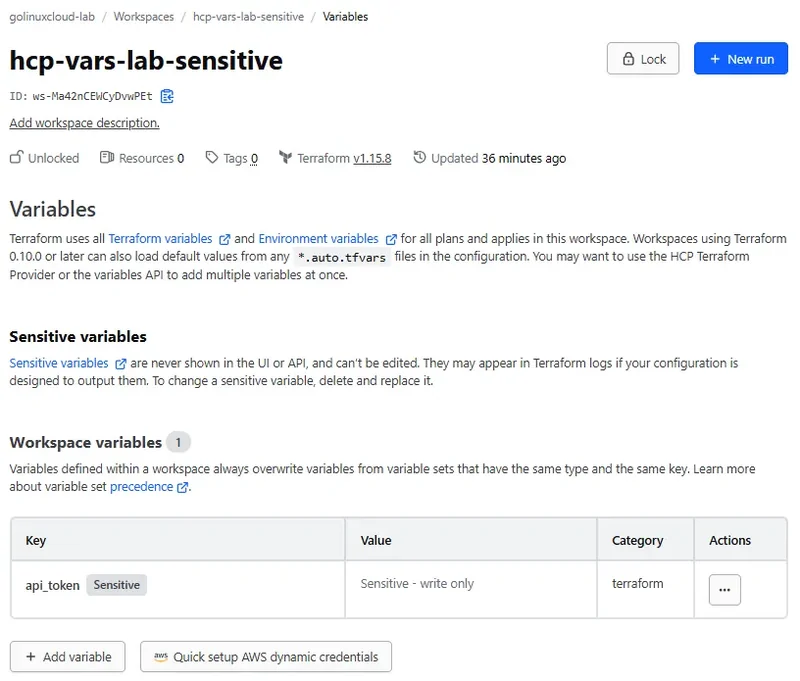
Sensitivity does not stop at storage though. HCP Terraform propagates it into Terraform, so the run treats the value the way it treats any sensitive input. This configuration exposes the token through a plain output on purpose:
variable "api_token" {
  type        = string
  description = "Fake token used only to show HCP sensitive behaviour"
}

output "token_echo" {
  value = var.api_token
}
Ask for a plan and Terraform refuses before anything runs:
terraform planSample output:
│ Error: Output refers to sensitive values
│
│   on main.tf line 17:
│   17: output "token_echo" {
│
│ To reduce the risk of accidentally exporting sensitive data that was
│ intended to be only internal, Terraform requires that any root module
│ output containing sensitive data be explicitly marked as sensitive, to
│ confirm your intent.
│
│ If you do intend to export this data, annotate the output value as
│ sensitive by adding the following argument:
│     sensitive = true
That error is Terraform's, not the platform's — the clearest proof that a checkbox in the UI changed how the language behaved. Add sensitive = true to the output and apply:
terraform apply -auto-approveSample output:
Apply complete! Resources: 0 added, 0 changed, 0 destroyed.

Outputs:
token_echo = (sensitive value)
The apply succeeded with the value redacted in the log, which is what the setting is for. Reading the output back afterwards behaves the same way:
terraform outputSample output:
token_echo = <sensitive>Redaction is not the same as absence though. Ask for the raw value and Terraform hands it over:
terraform output -raw token_echoSample output:
fake-token-not-a-real-secretThe value is still stored in remote state — sensitive does not omit it from state. Anyone with sufficient state access, or access to an operation that exposes the value such as terraform output -raw, must therefore be treated as having access to the secret.
Sensitive means:
- Not readable back from the variable store
- Redacted in logs
- Still present in state
Keep state access restricted, prefer dynamic provider credentials over long-lived keys where the provider supports them, and see Terraform sensitive data for the language side of the same problem.
Common variable problems
Most variable trouble in HCP Terraform is one of these eight, and the symptom rarely names the cause:
| Symptom | Likely cause | Fix |
|---|---|---|
Run fails with No value for required variable while the value is visible in the UI |
The variable is in the environment category, so it never becomes an input variable | Recreate it in the Terraform category, or rename it with a TF_VAR_ prefix |
| Provider authentication fails although credentials are set | Credentials created in the Terraform category, so they were never exported to the shell | Move them to the environment category on the workspace or a variable set |
| A value you never set keeps appearing | A project-scoped or global set is applying automatically, including to new workspaces | Check the Variables page for values contributed by sets, then narrow the set's scope |
| Editing a variable set changes nothing for one workspace | A workspace variable with the same key overrides every non-priority set | Delete the workspace variable, or mark the set as priority if the shared value must win |
| Two non-priority sets fight and the wrong one wins | Ties break on ownership, then on lexical order of set names, not on edit time | Rename so the intended set sorts first, or keep conflicting keys in one set |
Local TF_VAR_ has no effect |
The run was started from the UI or API, not the CLI, or a higher-precedence -var flag or priority set is active |
Supply TF_VAR_key=value on the same command line as terraform plan, or store the value in the workspace for non-CLI runs |
A committed terraform.tfvars value is ignored |
Stored workspace variables and sets outrank tfvars files | Remove the duplicate key from HCP Terraform, or accept the file as a fallback only |
Value for undeclared variable warnings on every run |
A shared set supplies a key this configuration does not declare | Narrow the set's scope, or declare the variable if the workspace should use it |
Whenever the value in a run surprises you, open the workspace Variables page first: HCP Terraform marks overridden variables there, which usually identifies the winner faster than reasoning about the precedence list.
Clean up the lab
The variable sets outlive the workspaces, so unwind state first. Destroy in each of the three lab directories, which only ever created output values:
for d in precedence env-vs-terraform sensitive; do (cd ~/terraform-labs/hcp-terraform-variables/$d && terraform destroy -auto-approve); doneEach directory reports Resources: 0 added, 0 changed, 0 destroyed and clears its outputs from state. Delete the three variable sets next, from Settings → Variable sets in the organization, because a set attached to a project blocks nothing but keeps applying to anything created there later. Then delete the three workspaces under each workspace's Destruction and Deletion settings, delete the hcp-vars-lab project from its own settings page, and remove the API token from the machine:
terraform logoutThat leaves an empty credentials file rather than an error, which is the expected result. The lab directories hold nothing but cloud blocks, a variable, and an output, so remove them whenever you are finished experimenting.
References
- Variables in HCP Terraform
- Manage variables in HCP Terraform
- Variable sets
- Workspace variables API
- Variable sets API
- Dynamic provider credentials
- Terraform input variable precedence
Summary
HCP Terraform variables answer two independent questions, and keeping them apart removes most of the confusion:
- Category — what a value is: a Terraform variable fills an input variable your configuration declares; an environment variable is exported into the worker's shell for provider credentials and switches such as
TF_LOG - Scope — where the value lives: on one workspace, or in a variable set attached to workspaces, to a project, or to the whole organization
The lab showed what happens when you get the first question wrong: a plan failed with No value for required variable while the value sat in the UI, spelled correctly, in the wrong category.
The precedence order is worth learning as a shape rather than a list of fifteen rules:
- Priority sets sit at the top and invert the rest of the ladder; among them, organization-owned scoped sets rank above project-owned sets at the same scope
-varand-var-fileon CLI-driven runs- Local
TF_VAR_values supplied to CLI-driven runs - Workspace variables
- Non-priority sets — narrow beats wide; project-owned beats organization-owned at the same scope
- Files on disk —
*.auto.tfvarsaboveterraform.tfvars; read on the worker but never stored, so a committedterraform.tfvarsis a fallback rather than a setting - When two non-priority sets tie, HCP Terraform sorts their names — so
defaults-quietly beatsoverrides-
Marking a variable sensitive did more than hide it in the UI:
- The value became unreadable through the API
- Terraform itself refused to plan until the output exposing it was also marked sensitive
terraform output -rawstill revealed the token because sensitive does not omit values from state
Treat sensitive as write-only storage plus log redaction, not as secrecy. Reach for dynamic provider credentials when the provider supports them.
For a real organization:
- Put shared credentials in narrowly scoped variable sets
- Put environment-specific values on the workspaces themselves
- Put nothing security-relevant in a global set that every future workspace inherits
When a value surprises you, open the workspace Variables page before reasoning about precedence — the overridden entries are marked there and the answer is usually one glance away.
Frequently Asked Questions
What is the difference between a Terraform variable and an environment variable in HCP Terraform?
A Terraform variable sets a value for an input variable declared with a variable block in your configuration, so a variable named deploy_region becomes var.deploy_region. An environment variable is exported into the shell of the disposable worker that runs Terraform, which is what provider credentials such as AWS_ACCESS_KEY_ID and behaviour switches such as TF_LOG need. The two categories live side by side on the same Variables page and a name in the wrong category is simply ignored by the other side, which is why a run can fail saying an input variable is not set while the value is clearly visible in the UI.
Do variable sets replace workspace variables?
No, they cover a different problem. A workspace variable belongs to one workspace and is the right place for a value that is specific to that collection of infrastructure. A variable set is a reusable group of variables that you attach to several workspaces, to a whole project, or to every workspace in the organization, so it is the right place for shared credentials, a default region, or a tagging convention. Most organizations use both, and a workspace variable always wins over a non-priority set with the same key.
Which value wins when a workspace variable and a variable set define the same key?
The workspace variable wins, unless the variable set is marked as a priority set. Priority is an option on the set itself, and it flips the relationship so the shared value overrides anything defined at a narrower scope, which is how a platform team pins a value that individual workspaces must not change. Priority is not a policy engine though, because a user can still edit the configuration to stop reading that variable and hardcode a value instead.
Does a local TF_VAR_ environment variable work with an HCP Terraform remote run?
Yes, when you initiate a CLI-driven run. HCP Terraform passes run-specific TF_VAR_ values from the local CLI environment to the remote run, and they take precedence over workspace-specific variables and non-priority variable sets. Ordinary environment variables such as provider credentials are different, because the remote worker does not inherit your complete local shell environment, so configure those in the workspace or a variable set instead.
Does HCP Terraform read terraform.tfvars and auto.tfvars files?
Yes for HCP Terraform, and those files are uploaded with the configuration on a CLI-driven run, so their values are used when nothing else defines the same key. They sit at the bottom of the precedence order, with auto.tfvars files ranking above terraform.tfvars, so any workspace variable or variable set with the same key silently overrides them. Terraform Enterprise currently ignores terraform.tfvars, and values from these files are never stored as workspace variables, so the Variables page will not show them.
What happens when two variable sets applied to the same workspace define the same variable key?
HCP Terraform compares the names of the two sets and uses the value from the set whose name comes first in lexical order of Unicode code points, so a set named A_Variable_Set beats one named B_Variable_Set. Recent edits do not matter, only the names, which makes conflicts predictable but rarely obvious to whoever is reading the plan. For non-priority sets, ownership and scope are compared before names, so a project-owned set outranks an organization-owned set at the same scope.
Can I read a sensitive variable value back out of HCP Terraform?
Not through the UI or the API, because a variable marked sensitive is write only and reads return the value as null while everything else about the variable stays visible. That protects the stored value, not the run, since the sensitivity also propagates into Terraform itself, so a plain output that exposes it fails until you mark the output sensitive too. The value does still get written into remote state, so treat state as a secret and rotate through your secret manager rather than trusting the checkbox alone.
