
| Tested on | RHEL 10.2 (Coughlan) — vm1.lab.example |
|---|---|
| Package | coreutils 9.5-8.el10_2bash 5.2.26-6.el10 |
| Applies to | Ubuntu, Debian, Kali Linux, Linux Mint, Pop!_OS, Raspberry Pi OS, elementary OS, Zorin OS, Parrot OS, MX Linux, RHEL, Rocky Linux, AlmaLinux, Oracle Linux, CentOS Stream, Fedora, Arch Linux |
| Privilege | Normal user for session umask and file creation; sudo for system-wide profile edits and systemd unit files |
| Scope | umask concept, typical requested modes 0666 and 0777, bitwise masking calculation, numeric and symbolic umask, session and persistent shell configuration, system-wide defaults on RHEL, systemd UMask=, comparison with chmod and ACLs, and common mistakes. Does not cover full ACL administration, SELinux contexts, or prescribing one umask for every environment. |
| Related guides | RHCSA tutorial |
When you touch notes.txt, Linux does not leave every permission bit set. The creating program passes a requested mode to the kernel; the process umask then clears selected bits from that request. Common utilities typically request up to 0666 for regular files and 0777 for directories. umask is a creation-time mask—it does not set final permissions directly, and it does not change files that already exist.
What Is umask?
umask is the file mode creation mask for a process. Every open(), mkdir(), and similar create call supplies a mode argument; the kernel normally computes requested_mode & ~umask.
- Programs choose the requested mode (a program can pass
0600,0640, or0700instead of0666). - Common utilities typically request up to
0666for regular files and0777for directories. - umask removes bits from that request; it does not force every create to start at
666or777. - The result becomes the new file or directory mode.
umask applies only when something is created. Running chmod on an existing path is a separate mechanism. See Linux file permissions for owner, group, and chmod workflows.
umask Quick Reference
| umask | New file (typical 0666 request) |
New directory (typical 0777 request) |
|---|---|---|
022 |
644 |
755 |
027 |
640 |
750 |
077 |
600 |
700 |
002 |
664 |
775 |
| Task | Command |
|---|---|
| Show numeric umask | umask |
| Show symbolic umask | umask -S |
| Set numeric umask (session) | umask 027 |
| Set symbolic umask (session) | umask u=rwx,g=rx,o= |
Understand Base File and Directory Permissions
For teaching calculations, use the modes most CLI tools request when they create paths:
| Type | Typical requested mode | Meaning when requested |
|---|---|---|
| Regular file | 666 (rw-rw-rw-) |
read/write for owner, group, and other |
| Directory | 777 (rwxrwxrwx) |
full access for all three classes |
Ordinary touch and many open() calls request no execute bits on files (0666, not 0777). umask clears bits from whatever mode was requested—it cannot add execute on a create that did not ask for it. That is why a restrictive umask alone never turns a data file into an executable program.
How umask Calculates Permissions
Permissions are removed with a bitwise AND against the complement of the mask—not ordinary decimal subtraction.
The figure shows the file create path: base mode, bits cleared by the mask, and the mode stored on the new inode.
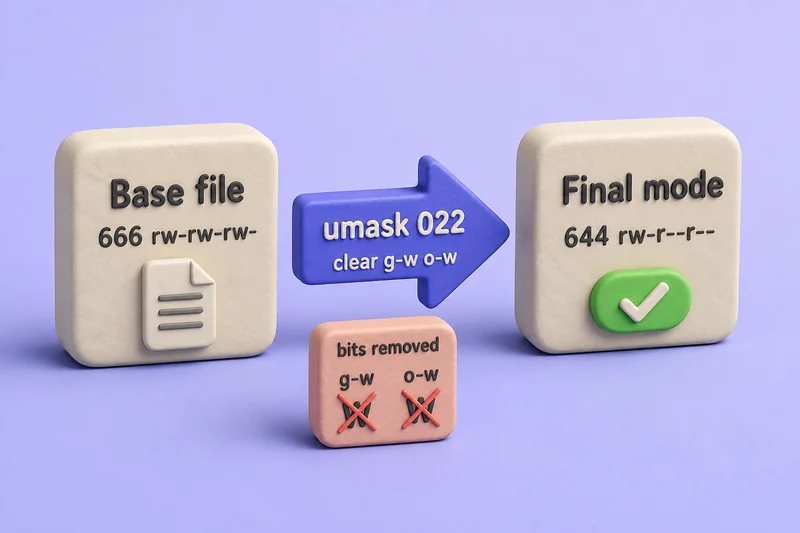
The diagram uses the common file example (666 requested, 022 mask, 644 result). Directories are usually created with a 777 request, so the same mask yields a different final octal mode even though umask clears the same permission classes.
base:  666   (rw-rw-rw-)
mask:  022   (clear group write and other write)
final: 644   (rw-r--r--)
Mask 022 does not clear other execute (001); the resulting file is still 644 because a typical file create never requests execute bits. Linux applies the mask by clearing bits present in the requested creation mode.
In notation: final = requested_mode & ~umask.
For many common masks such as 022, 027, and 077, the arithmetic shortcut “subtract the umask digits from the base” matches the bitmask result. That shortcut breaks for masks where cleared bits do not line up with simple digit subtraction, so learn the bitmask model first.
| umask clears | Effect on each class |
|---|---|
Owner execute (100) |
Removes owner x when the base requested it |
Group write (020) |
Removes group w |
Other read/write/execute (007) |
Removes other rwx as requested |
Calculate umask for Directories
Directories are usually created with a 777 request. With umask 027:
base:  777   (rwxrwxrwx)
mask:  027   (clear group write, other read, other write, other execute)
final: 750   (rwxr-x---)
Bit removed by 027 |
Directory impact |
|---|---|
020 (group write) |
Group can traverse and read, not write |
004 (other read) |
Other loses read |
002 (other write) |
Other loses write |
001 (other execute) |
Other loses traverse |
Check the Current umask
Read the mask for your current shell session:
umask0022Leading zeroes are optional in output; 0022 and 22 mean the same mask on typical shells.
Symbolic form shows which bits remain in the mask itself (not the resulting file mode):
umask -Su=rwx,g=rx,o=rxumask -S describes the mask: bits not cleared are shown. A numeric 022 mask often prints as u=rwx,g=rx,o=rx because those are the bits umask leaves untouched before ANDing with the base mode.
Change umask for the Current Shell
Set a more restrictive session mask and create test objects in a throwaway directory:
umask 027umask prints nothing on success, so create paths and read their modes:
mkdir -p /tmp/umasklab && cd /tmp/umasklabCreate a file under the new mask:
touch file027Create a directory the same way:
mkdir dir027Read octal modes for both paths:
stat -c '%a %n' file027 dir027640 file027
750 dir027640 and 750 match the quick-reference row for umask 027. The setting lasts until you exit the shell or run umask again.
Set umask with Symbolic Syntax
Bash and other POSIX shells accept symbolic umask, similar in spirit to chmod symbols but applied to the mask itself:
umask u=rwx,g=rx,o=Confirm the numeric value:
umask0027Create a file to verify the mode:
touch symfile && stat -c '%a %n' symfile640 symfileSymbolic syntax is useful in profile snippets when 027 is less readable than g-w,o-rwx for your team.
Configure a Persistent User umask
Shell startup files set umask for future interactive sessions. There is no single file on every distribution—login and non-login shells source different paths.
| Session type | Common locations (check your distro docs) |
|---|---|
| Login shell | ~/.bash_profile, ~/.profile, distribution /etc/profile |
| Interactive non-login | ~/.bashrc, /etc/bashrc |
On RHEL-family systems, /etc/bashrc often sets umask 022 when the current mask is 0 for non-login interactive bash. A line such as umask 027 in ~/.bashrc applies to new interactive shells that source that file.
Login versus non-login matters: an SSH session may read ~/.bash_profile first, while sudo bash might read only ~/.bashrc. After you edit a startup file, open a new login or interactive shell and run umask—existing sessions keep the old value.
Configure a System-Wide umask
System defaults vary by distribution and by whether PAM is involved.
On this RHEL 10 lab host, /etc/login.defs documents the default UMASK used by useradd and related tools:
grep ^UMASK /etc/login.defsUMASK 022/etc/bashrc guards non-login interactive shells:
grep -n umask /etc/bashrc69: # Set default umask for non-login shell only if it is set to 0
70: [ `umask` -eq 0 ] && umask 022PAM-enabled systems may also apply pam_umask (see comments in login.defs). Test the active mechanism on the host you administer before you copy one file path from a blog post.
Not every process reads shell profiles. Daemons, cron jobs, and systemd timers use their own unit settings or libc defaults unless you configure them explicitly.
Configure umask for a systemd Service
Shell profile umask does not control long-running services. Set UMask= in the service unit:
[Service]
UMask=0027
ExecStart=...
A one-shot test unit with UMask=0027 on this host created /tmp/umask-demo-file at mode 640 and /tmp/umask-demo-dir at 750.
systemd documents UMask= in systemd.exec with a default of 0022 for system services when unset. Compare with sshd, which reports UMask=0022 on this VM.
Some programs go a step further and set a mask internally, which is why editing a profile has no effect on them. OpenSSH SFTP is the usual example, because internal-sftp does not read the user's ~/.bashrc the way an interactive shell does, so a per-user mask belongs in ForceCommand internal-sftp -u instead. Set SFTP umask covers that configuration. When a service ignores the shell umask, fix the unit or the application rather than the user profile.
When to Use umask
umask, chmod, and ACLs answer three different questions, and reaching for the wrong one is why permissions seem to keep coming back wrong. Start from what you are actually trying to control:
| Your goal | Reach for | Why |
|---|---|---|
| Default mode for objects not created yet | umask |
The kernel applies it at create time, per process, and children inherit it |
| Correct a path that already exists | chmod |
umask never revisits existing files, and it cannot add a bit the create call never requested |
| Different access for specific users or groups | ACLs | Owner, group, and other bits cannot express per-user rules |
| Files written by a daemon or timer | unit UMask= |
Services do not read shell startup files |
umask is the right tool when the answer to "what permissions should new files here have?" is the same for everything in the session, whether that is your login shell, a build job, a backup script, or a service unit. It sets policy for the future, costs nothing at runtime, and is inherited by every child process, which is what you want for a default and exactly what you do not want for a one-off correction.
The difference from chmod is timing rather than syntax. umask removes bits from the mode a program requests while the object is being created, whereas chmod sets the owner, group, and other bits directly on something that already exists. That is why a restrictive umask cannot repair a tree that is already world-readable: set the mask so new objects come out right from here on, then fix what already exists in one pass with chmod -R.
ACLs are the case where the quick-reference table stops predicting the result. Normally the kernel computes the new mode from the application's requested permissions and the process umask. When the parent directory carries a default ACL, that inherited ACL is used instead of the usual umask calculation, and permissions the application never requested are still removed afterwards.
The symptom is specific: you set umask 027, yet new objects inside an ACL-managed directory refuse to come out 640 and 750. Run getfacl on the parent to check for a default ACL before you go hunting through profile files. Linux ACL examples covers that administration, while this article stays with umask and the standard permission bits.
Common umask Mistakes
| Mistake | Why it fails |
|---|---|
| Treating umask as decimal subtraction | Bit masking is exact; arithmetic shortcuts fail for some masks |
| Expecting umask to fix existing files | Only creation-time; use chmod on old paths |
Setting umask 777 without understanding impact |
Clears all standard permission bits from the requested mode—typically 000 files and 000 directories; far too restrictive and inconvenient |
| Assuming new files become executable | Tools such as touch request no execute bits; execute must be requested at create or added later with chmod |
Editing .bashrc for a systemd service |
Services use unit UMask= or their own defaults |
| Changing profile but not opening a new shell | Current session keeps the previous umask |
| Ignoring default ACLs on the parent directory | Default ACL inheritance replaces normal umask calculation; modes may not match umask-only tables |
Practical umask Examples
Three policies using typical 0666 / 0777 requests, tested in subshells on this host:
Personal private work (077) — owner only:
bash -c 'umask 077; d=/tmp/umasklab; mkdir -p "$d"; touch "$d/file077"; mkdir "$d/dir077"; stat -c "%a %n" "$d/file077" "$d/dir077"'600 /tmp/umasklab/file077
700 /tmp/umasklab/dir077Shared project directory (002) — group read/write on new objects:
bash -c 'umask 002; d=/tmp/umasklab; mkdir -p "$d"; touch "$d/file002"; mkdir "$d/dir002"; stat -c "%a %n" "$d/file002" "$d/dir002"'664 /tmp/umasklab/file002
775 /tmp/umasklab/dir002Admin account with tighter other access (027) — group read, no other access:
bash -c 'umask 027; d=/tmp/umasklab; mkdir -p "$d"; touch "$d/file027"; mkdir "$d/dir027"; stat -c "%a %n" "$d/file027" "$d/dir027"'640 /tmp/umasklab/file027
750 /tmp/umasklab/dir027Pick the mask that matches collaboration needs on your system—not a single global “correct” value for every server.
References
- umask(2) — Linux manual page
- bash(1) umask builtin — GNU manual
- systemd.exec — UMask=
- Red Hat Enterprise Linux 9 — Managing file system permissions and umask
Summary
Linux umask controls which permission bits are cleared when a process creates a file or directory. The kernel normally applies final = requested_mode & ~umask. Common utilities typically request up to 0666 for files and 0777 for directories, but the creating application chooses the mode argument—umask does not force every create to begin at those values.
On this lab host, umask 022 is the common default (644 files, 755 directories with those typical requests), while 027, 077, and 002 trade group and other access for tighter or more collaborative layouts. Session umask affects only the current shell; persistent values live in shell startup files that vary by login versus interactive sessions, and system-wide defaults on RHEL may appear in login.defs, bashrc, or PAM.
systemd services ignore ~/.bashrc—configure UMask= in the unit when a daemon needs a specific default. SFTP and other applications may set their own masks. When results still look wrong after umask checks, compare with chmod on existing files and check whether a parent directory default ACL replaced normal umask behavior.
Frequently Asked Questions
What is the default umask on most Linux systems?
Many distributions default to 0022, which yields 644 files and 755 directories when utilities request 0666 and 0777. Always run umask on the host you manage because PAM, shell startup files, and service units can override that default.
Is umask subtraction the same as chmod?
No. umask removes permission bits from the mode requested at creation time using a bitwise mask. chmod changes the mode of an existing file or directory. umask never retroactively fixes files that already exist.
Why does my new file stay 644 even when I need 755?
Ordinary tools such as touch request up to 0666 with no execute bits, and umask cannot add bits the create call never requested. Use chmod on the file, or create it with a tool that explicitly requests execute permission.
Why did changing .bashrc umask not affect my systemd service?
Shell profile umask applies to interactive or login shells that source those files. systemd services inherit UMask from their unit file or systemd defaults, not from a user bashrc.
Can umask and ACLs interact?
Normally the kernel applies requested_mode and umask together. If the parent directory has a default ACL, however, that inherited ACL is used instead of the normal umask calculation, and permissions not requested by the creating application are still removed. Results inside ACL-managed directories may not match umask-only tables.
