
JavaScript Math.atan(x) returns the arctangent of a single numeric ratio, while Math.atan2(y, x) returns the angle between the positive x-axis and the point (x, y)—handling quadrants correctly because it sees both coordinates. Prefer atan2 for screen or geometry code where you start from (x, y) pairs; use atan when you already collapsed the problem to y/x. Both return radians in the (-π/2, π/2] / (-π, π] ranges MDN documents; convert with radians and degrees when needed.
Environment: Node.js v20.18.2. Each snippet is plain JavaScript; the line after it states the expected console output.
Math.atan and Math.atan2 Syntax
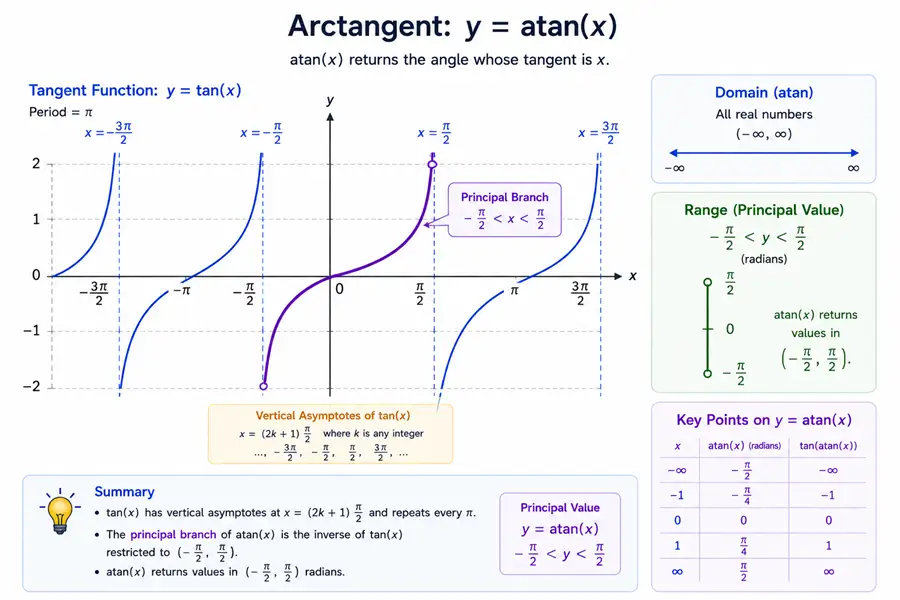
Math.atan(x)
Math.atan2(y, x)Math.atan(x) returns an angle in radians between -π / 2 and π / 2.
Math.atan2(y, x) returns an angle in radians between -π and π, measured from the positive x-axis to the point (x, y).
Method 1: Use Math.atan() for an Arctangent Ratio
const angle = Math.atan(1);

console.log(angle);You should see one line logging 0.7853981633974483.
The result is π / 4 radians because the tangent of π / 4 is 1.
Method 2: Convert Math.atan Result to Degrees
const radians = Math.atan(1);
const degrees = radians * (180 / Math.PI);

console.log(degrees);You should see one line logging 45.
JavaScript returns radians, so convert to degrees when the result needs to be displayed as a familiar angle.
Method 3: Find a Right Triangle Angle with Math.atan()
Use Math.atan(opposite / adjacent) when you know the two right-triangle sides.
const opposite = 4;
const adjacent = 3;

const theta = Math.atan(opposite / adjacent);

console.log(theta);You should see one line logging 0.9272952180016122.
This returns the angle in radians for a triangle with opposite side 4 and adjacent side 3.
Method 4: Use Math.atan2() for Coordinates
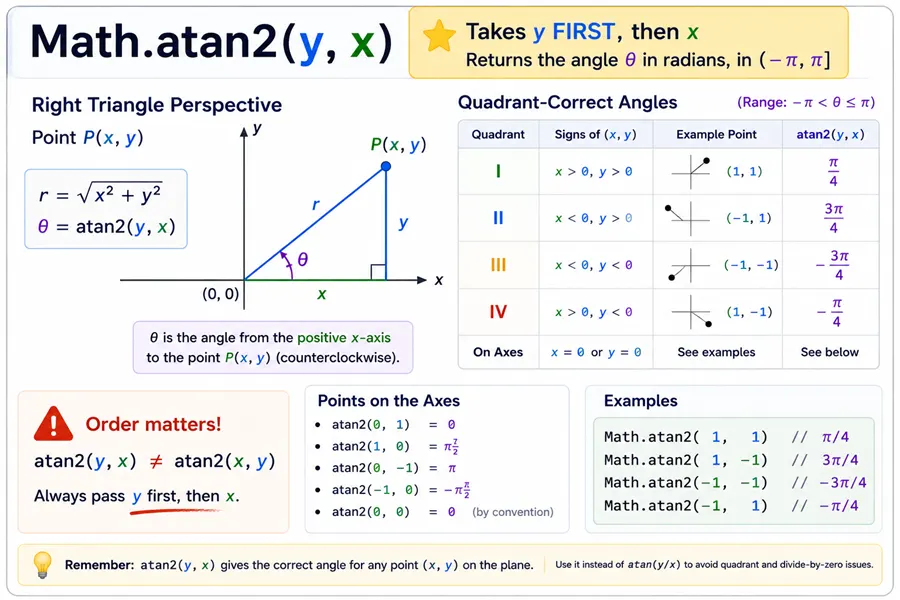
Math.atan2(y, x) is better than Math.atan(y / x) for coordinates because it handles quadrants and zero values correctly.
console.log(Math.atan2(1, -1));
console.log(Math.atan2(-1, 1));You should see 2 lines, in order: 2.356194490192345, -0.7853981633974483.
The first point is in quadrant II, so the angle is positive and greater than π / 2. The second point is in quadrant IV, so the angle is negative.
Convert Math.atan2 Result to Degrees
const degrees = Math.atan2(1, -1) * (180 / Math.PI);

console.log(degrees);You should see one line logging 135.
This matches the common MDN description: Math.atan2() returns the angle from the positive x-axis to the point, in the range -π to π.
Math.atan vs Math.atan2
Use this quick rule:
| Method | Input | Best for |
|---|---|---|
Math.atan(x) |
One ratio | Arctangent of a known slope or ratio |
Math.atan2(y, x) |
Two coordinates or deltas | Direction angle from x/y values with correct quadrant |
For points, prefer Math.atan2(deltaY, deltaX).
const p1 = { x: 2, y: 3 };
const p2 = { x: -1, y: 1 };

const angle = Math.atan2(p2.y - p1.y, p2.x - p1.x);

console.log(angle);You should see one line logging -2.5535900500422257.
Common Questions About Math.atan and Math.atan2
What does Math.atan return?
Math.atan() returns the arctangent of a number as an angle in radians.
What does Math.atan2 return?
Math.atan2(y, x) returns the angle in radians from the positive x-axis to the point (x, y), in the range -π to π.
Does JavaScript atan return degrees?
No. Math.atan() and Math.atan2() return radians. Convert with radians * 180 / Math.PI.
When should I use atan2 instead of atan?
Use Math.atan2(y, x) when you have x/y coordinates or deltas. It handles quadrants correctly and avoids dividing by zero manually.
Summary
Prefer Math.atan2(dy, dx) whenever you start from coordinates; reserve Math.atan for a single slope ratio where quadrants are already resolved.
JavaScript Math.atan() calculates arctangent from a single ratio and returns radians. JavaScript Math.atan2(y, x) calculates the direction angle from coordinates or deltas, measured from the positive x-axis, and returns a value between -π and π. Use Math.atan() for simple slope or tangent values, and use Math.atan2() for points, vectors, mouse direction, rotation, and any case where quadrant matters. Convert radians to degrees when needed with angle * 180 / Math.PI.
