
JavaScript Math.acos() returns the arccosine (inverse cosine) of a number: the angle in radians whose cosine equals the argument. The input must lie in [-1, 1]; outside that range the result is NaN. The output is always in [0, π] radians—convert to degrees when presenting to humans. For the inverse sine, see JavaScript Math.asin(); for angles from x/y pairs prefer JavaScript Math.atan2.
Environment: Node.js v20.18.2. Each snippet is plain JavaScript; the line after it states the expected console output.
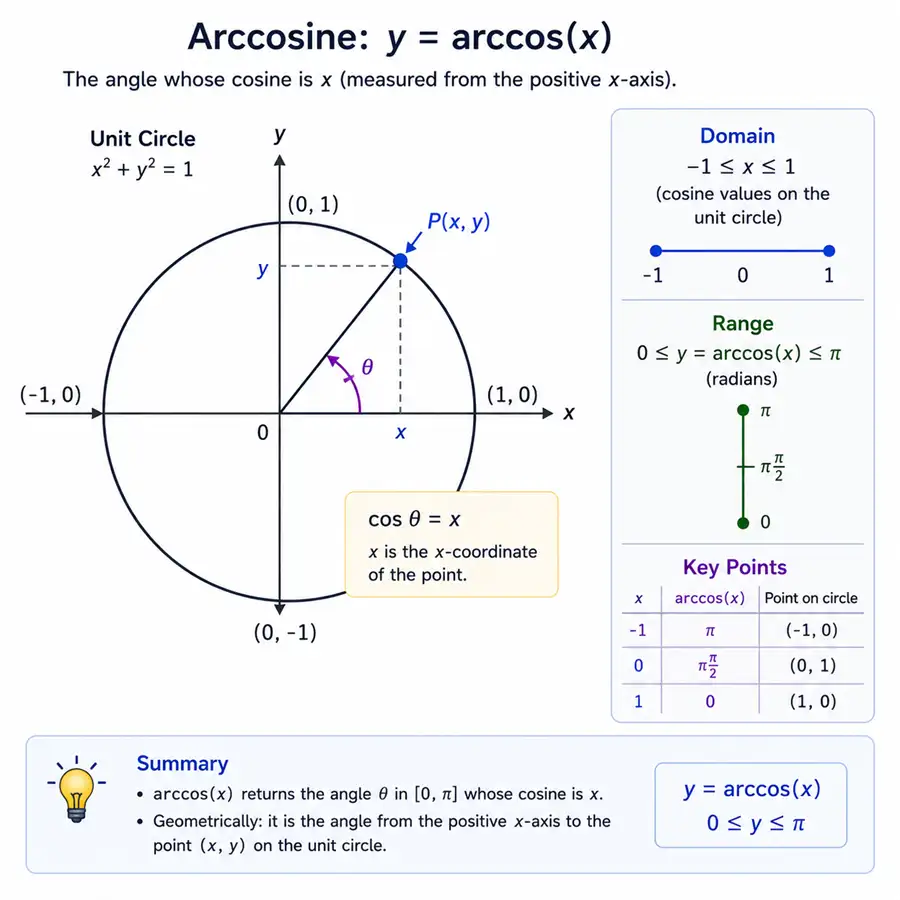
Math.acos Syntax
Math.acos(x)x must be between -1 and 1. The return value is in radians.
Method 1: Calculate arccosine with Math.acos()
const angle = Math.acos(0.5);

console.log(angle);You should see one line logging 1.0471975511965979.
The result is approximately π / 3 radians because JavaScript Math.cos() at π / 3 is 0.5—acos inverts that forward cosine.
Method 2: Convert Math.acos Result to Degrees
JavaScript trigonometric functions return radians. Convert radians to degrees by multiplying by 180 / Math.PI, or reuse the helpers in degrees to radians in JavaScript for the same Math.PI convention in both directions.
const radians = Math.acos(0.5);
const degrees = radians * (180 / Math.PI);

console.log(degrees);You should see one line logging 60.00000000000001.
The tiny decimal difference is normal floating-point behavior.
Method 3: Handle Values Outside -1 to 1
Math.acos() returns NaN when the input is outside the valid domain.
console.log(Math.acos(2));You should see one line logging NaN.
Validate or clamp input values when they come from user input or floating-point calculations.
Method 4: Find the Angle Between Two Vectors
You can use Math.acos() with the dot product formula to find the angle between vectors. Normalize each vector length with JavaScript Math.hypot() before dividing the dot product.
const a = [1, 0];
const b = [0, 1];

const dot = a[0] * b[0] + a[1] * b[1];
const magnitude = Math.hypot(...a) * Math.hypot(...b);
const degrees = Math.acos(dot / magnitude) * (180 / Math.PI);

console.log(degrees);You should see one line logging 90.
The vectors point along the x-axis and y-axis, so the angle between them is 90 degrees.
Common Questions About Math.acos
What is acos in math?
acos is arccosine, the inverse cosine function. It returns the angle whose cosine equals the input value.
Does Math.acos return degrees?
No. Math.acos() returns radians. Convert to degrees with radians * 180 / Math.PI.
Why does Math.acos return NaN?
It returns NaN when the input is less than -1 or greater than 1.
Summary
Math.acos() maps cosines in [-1, 1] to angles in [0, π] radians; outside that domain you get NaN—validate inputs from physics or UI before calling.
JavaScript Math.acos() calculates arccosine and returns an angle in radians. Use it for inverse cosine calculations, vector angles, and trigonometry problems where the cosine value is known. The input must be in the range -1 to 1; values outside that domain return NaN. For user-facing math output, convert the radians result to degrees.
