
Readers land on this topic through many short phrases: bubbling javascript, event bubbling in javascript, bubble in javascript, or simply event bubbling. They all describe the same default: after a target element handles an event, the same event object can travel outward through ancestor nodes unless something stops it. That outward phase is what people mean by javascript event bubbling or js event bubble.
Pairing a listener on a parent is how event delegation works—you listen once and inspect event.target for many children. For more listener basics, see addEventListener in JavaScript and the localStorage event handler example.
The snippets below are excerpts (they assume #container, #paragraph, #inner, #child, #wrap, #link, etc.). The public Run control has no DOM—use {run=false} and run in a browser or with happy-dom / jsdom after injecting the matching HTML.
Tested on: Node.js v20.18.2 with happy-dom for editorial QA where snippets are completed with markup. Notes describe expected log order.
Quick reference
Bubbling = target first, then ancestors; stopPropagation stops that walk; preventDefault affects default actions, not necessarily bubbling.
| Goal | Tool |
|---|---|
| Stop ancestors hearing the event | event.stopPropagation() |
| Cancel link navigation / form submit (if cancelable) | event.preventDefault() |
| Listen for many children cheaply | One listener on parent + check event.target |
| Run before target (intercept) | addEventListener(..., true) capture |
What is event bubbling in JavaScript?
When you call addEventListener without a third argument, the handler runs in the bubbling phase by default. After the event reaches its target, it walks up the tree toward document (and beyond in modern browsers), firing compatible listeners on each ancestor. That is why a click on a nested button can also satisfy a click listener registered on the surrounding card or layout region.
Bubbling order from an inner element
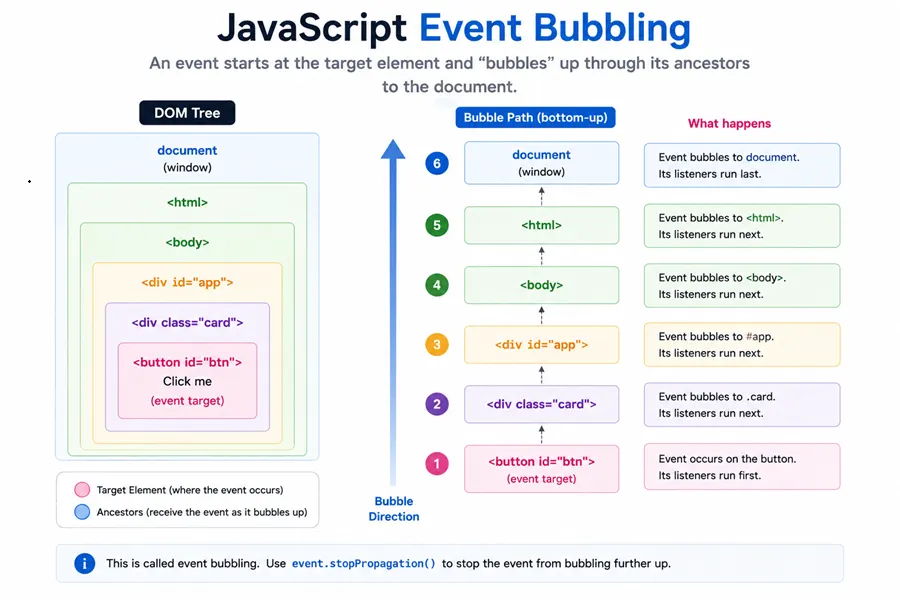
Assume markup with a paragraph inside a container. Register two bubble-phase listeners, then dispatch a bubbled click on the paragraph. The inner handler runs at the target, then the outer handler runs as the event propagates up.
document.getElementById("container").addEventListener("click", () => {
  console.log("container");
});
document.getElementById("paragraph").addEventListener("click", () => {
  console.log("paragraph");
});
// synthetic click on #paragraph with bubbles: true
You should see logs in order: paragraph, then container.
In a real page you would click with the mouse; automated tests use a synthetic MouseEvent so the log order stays stable.
Delegation: one listener, many descendants
Because bubbling is reliable for most DOM events, you can attach a single listener on #container and still react to clicks on children such as #inner. The event reaches the parent after bubbling up from the child.
document.getElementById("container").addEventListener("click", () => {
  console.log("delegated");
});
// synthetic click on #inner with bubbles: true
You should see one line: delegated.
This pattern scales when lists or tables render many rows and you do not want one listener per cell.
Stopping propagation with stopPropagation
event.stopPropagation() tells the engine to skip further propagation steps for this event object. It does not automatically cancel default actions (such as following a link); it only affects who else hears the event.
document.getElementById("child").addEventListener("click", (e) => {
  e.stopPropagation();
  console.log("child");
});
document.getElementById("wrap").addEventListener("click", () => {
  console.log("wrap");
});
// synthetic click on #child with bubbles: true
You should see one line: child.
The parent handler never runs because the child stopped bubbling.
preventDefault does not turn off bubbling
A common mix-up is to treat preventDefault() like a bubbling switch. It is not. preventDefault() cancels the browser’s default action for cancelable events (for example navigation on an <a href>), but the event can still bubble unless you also call stopPropagation() or stopImmediatePropagation().
const link = document.getElementById("link");
let bodyHeard = false;
document.body.addEventListener("click", () => {
  bodyHeard = true;
});
link.addEventListener("click", (e) => {
  e.preventDefault();
  console.log("link click");
});
// synthetic cancelable click on the anchor with bubbles: true
console.log("body bubble:", bodyHeard);
You should see two lines: link click, then body bubble: true.
So default may be suppressed while ancestors still observe the click—design your handlers with that in mind.
Capturing phase (optional contrast)
addEventListener(type, handler, true) registers a capturing listener that runs on the way down toward the target, before bubbling listeners on the same node. Most UI code relies on bubbling; capturing is useful for intercepting or instrumentation layers.
Summary
Bubbling is the default upward phase after the target; delegation leans on that path; stopPropagation and preventDefault solve different problems—combine them deliberately when you need both.
Bubbling in javascript is the default second phase of DOM event delivery: after the target handlers run, the event walks outward through ancestors unless propagation is stopped. Event delegation relies on that model—one listener on a parent can service many children—while stopPropagation answers the FAQ “how do I keep parent handlers from firing?” without touching default actions.
preventDefault is the answer to a different question (canceling defaults such as link navigation or form submit), so mixing it up with bubbling is a common debugging mistake. Use capture-phase listeners sparingly when you truly need to intercept events on the way down, and prefer platform observers when you only need visibility or geometry instead of hammering scroll with synchronous layout reads.
References
- Introduction to events — bubbling — MDN
Event.stopPropagation()— MDNEvent.preventDefault()— MDN
