
JavaScript map() can access the current array index through the second callback argument. If you are searching for javascript map index, javascript map with index, js map index, or map with index javascript, the syntax is array.map((element, index) => ...). The index starts at 0, and map() returns a new array without changing the original array.
Environment: Node.js v20.18.2. Each snippet is plain JavaScript; the line after it states the expected console output.
JavaScript map with Index Syntax
The map() callback receives three arguments:
array.map((element, index, array) => {
  return value;
});elementis the current item.indexis the current item's zero-based index.arrayis the original array being mapped.
Most js map with index examples use the first two arguments. Callbacks are often written as arrow functions when you only need element and index.
Method 1: Use the Second map() Argument as Index
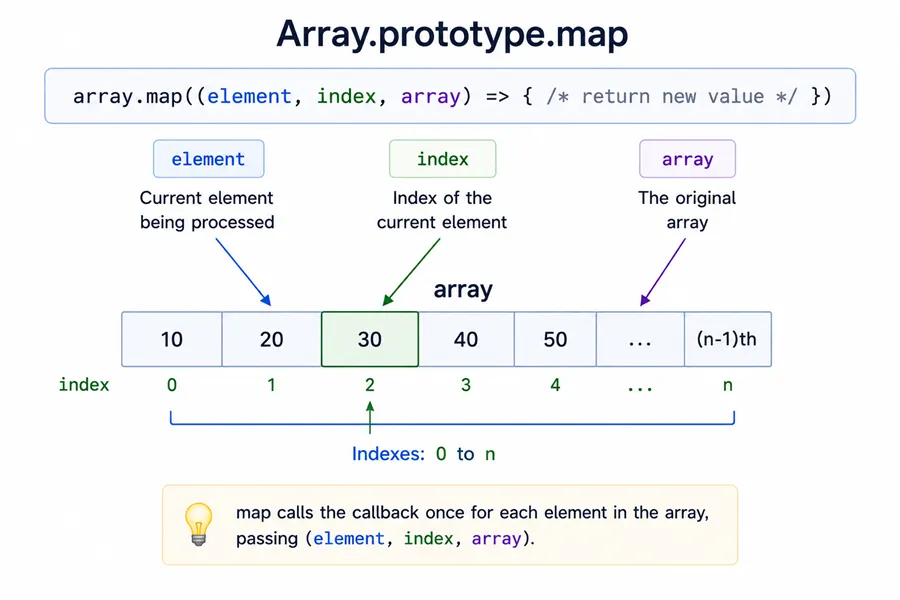
Use the second callback parameter when you need the index while transforming array values.
const names = ["Ana", "Bo", "Cy"];

const labels = names.map((name, index) => `${index + 1}. ${name}`);

console.log(labels);You should see one line logging [ '1. Ana', '2. Bo', '3. Cy' ].
The callback receives 0 for Ana, 1 for Bo, and 2 for Cy. Adding 1 creates user-friendly numbering.
Method 2: Return Objects with Value and Index
A common javascript map get index pattern is to keep both the original value and its index in the mapped result.
const names = ["Ana", "Bo", "Cy"];

const users = names.map((name, index) => ({ index, name }));

console.log(users);You should see 5 lines, in order: [, { index: 0, name: 'Ana' },, { index: 1, name: 'Bo' },, { index: 2, name: 'Cy' }, ].
This is useful when rendering lists, creating table rows, building labels, or preserving positions before sorting an array or filtering.
Method 3: Use the Third map() Argument for the Original Array
The third callback argument gives access to the array that map() is processing.
const numbers = [10, 20, 30];

const totals = numbers.map((value, index, array) => {
  return value + (array[index - 1] ?? 0);
});

console.log(totals);You should see one line logging [ 10, 30, 50 ].
Here, each value is added to the previous value. The first element has no previous value, so the fallback is 0.
Method 4: Remember that map() Skips Sparse Array Holes
map() does not call the callback for empty slots in sparse arrays.
const result = [1, , 3].map((value, index) => `${index}:${value}`);

console.log(result);You should see one line logging [ '0:1', <1 empty item>, '2:3' ].
The callback runs for indexes 0 and 2, but not for the empty slot at index 1. This matters when you rely on map index js behavior on generated arrays such as [...Array(n)].map((_, i) => ...) in a JavaScript numeric range.
Common Questions About JavaScript map Index
How do I get index in JavaScript map()?
Use the second callback argument: array.map((item, index) => ...).
Does map() change the original array?
No. map() returns a new array and leaves the original array unchanged—the same non-mutating idea as the shallow-copy patterns in copy an array in JavaScript.
Does JavaScript map index start at 0?
Yes. The first element has index 0, the second has index 1, and so on.
Can I access the original array inside map()?
Yes. Use the third callback argument: array.map((item, index, array) => ...).
Summary
JavaScript map() with index uses the second callback argument: array.map((element, index) => ...). This solves common searches such as javascript map index, js map with index, and javascript map get index. Use the index to create labels, return objects with positions, or compare the current value with nearby values through the third callback argument. Remember that map() returns a new array, starts indexes at 0, and skips empty slots in sparse arrays.
