
JavaScript lastIndexOf() returns the last index where a value appears. Use String.prototype.lastIndexOf() to search text and Array.prototype.lastIndexOf() to find the last matching array element. This covers common searches such as js last index of, javascript last index, lastindexof javascript, and get last index of array javascript: the built-in method scans backward and returns an integer index, or -1 when no match exists.
Environment: Node.js v20.18.2. Each snippet is plain JavaScript; the line after it states what you should see in the console.
JavaScript lastIndexOf Syntax
JavaScript has lastIndexOf() on both strings and arrays.
string.lastIndexOf(searchValue)
string.lastIndexOf(searchValue, position)

array.lastIndexOf(searchElement)
array.lastIndexOf(searchElement, fromIndex)The first argument is the value to search for. The optional second argument controls where the backward search starts.
Both methods return:
- The last matching index when a match exists.
-1when no match exists.
Method 1: Get Last Index of a String
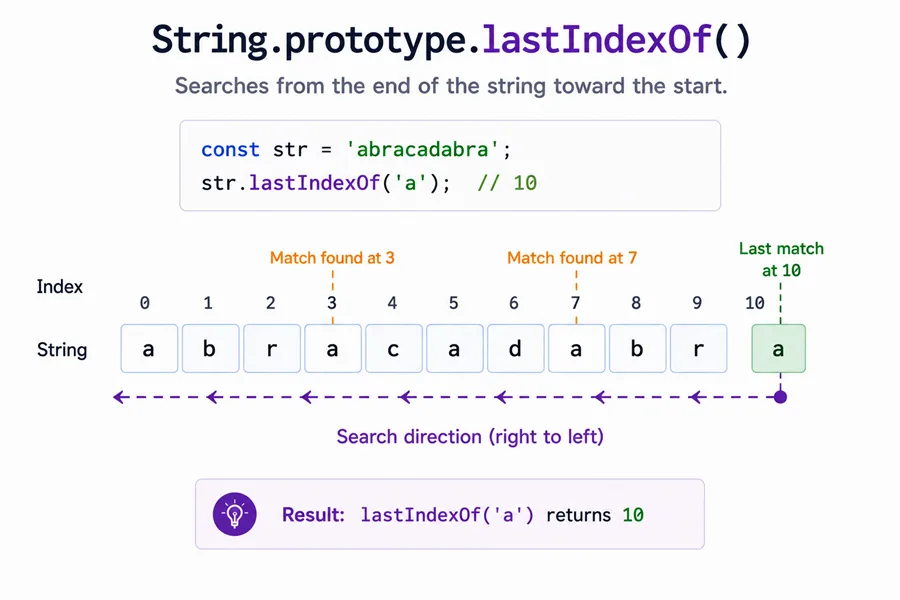
Use string lastIndexOf() when you need the last occurrence of a character or substring.
const str = "Hello, world!";

console.log(str.lastIndexOf("l"));You should see one line logging 10.
The string contains multiple l characters. The last one is at index 10.
You can also search for a substring:
const str = "Hello, world!";

console.log(str.lastIndexOf("world"));You should see one line logging 7.
The result is the starting index of the last matching substring.
String lastIndexOf Returns -1 When Not Found
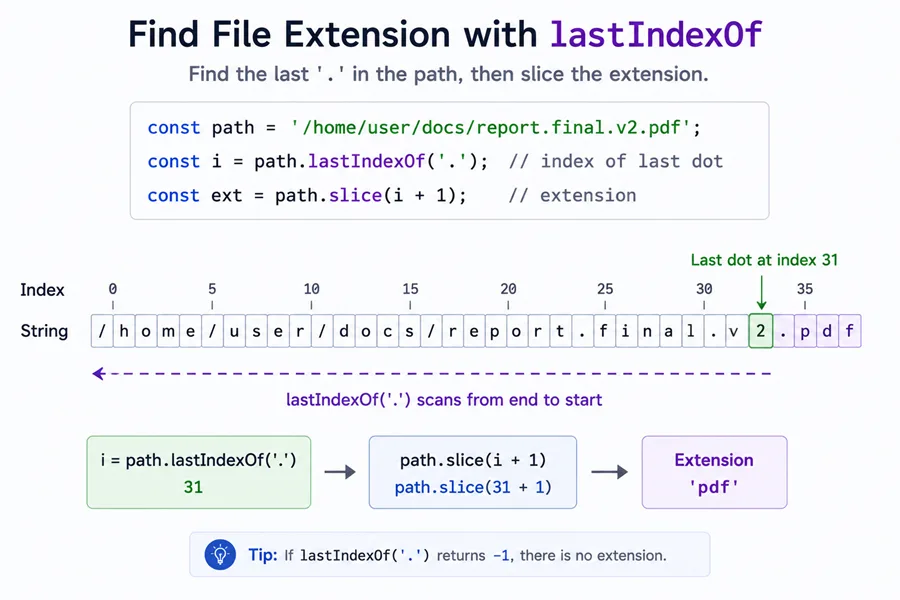
If the search value is missing, JavaScript returns -1.
const str = "Hello, world!";

console.log(str.lastIndexOf("z"));You should see one line logging -1.
Check for -1 before using the result as an index.
const index = str.lastIndexOf("z");

if (index === -1) {
  console.log("Not found");
}Method 2: Use fromIndex with String lastIndexOf
The second argument limits where the backward search starts. For strings, this argument is commonly called position.
const str = "Hello, world!";

console.log(str.lastIndexOf("l", 5));You should see one line logging 3.
The full string has another l at index 10, but position is 5, so JavaScript searches backward from index 5 and returns the l at index 3.
Empty String Search
Searching for an empty string has special behavior. It returns the smaller value between the string length and the provided position.
console.log("canal".lastIndexOf(""));
console.log("canal".lastIndexOf("", 2));You should see 2 lines, in order: 5, 2.
Most application code searches for real characters or substrings, but this edge case is useful to know when debugging unexpected empty search values.
Method 3: Get Last Index of an Array in JavaScript
Use array lastIndexOf() when you need the last matching element in an array.
const fruits = ["apple", "banana", "mango", "orange", "apple"];

console.log(fruits.lastIndexOf("apple"));You should see one line logging 4.
The first apple is at index 0, but the last apple is at index 4.
Use fromIndex with Array lastIndexOf
For arrays, fromIndex tells JavaScript where to start searching backward.
const fruits = ["apple", "banana", "mango", "orange", "apple"];

console.log(fruits.lastIndexOf("apple", 3));You should see one line logging 0.
Index 4 is ignored because the search starts at index 3 and moves toward index 0.
Negative fromIndex in Arrays
A negative fromIndex is counted from the end of the array.
const values = [2, 5, 9, 2];

console.log(values.lastIndexOf(2, -2));You should see one line logging 0.
Here -2 starts the backward search at index 2, so the 2 at index 3 is skipped and the match at index 0 is returned.
Method 4: Understand Strict Equality in Array lastIndexOf
Array lastIndexOf() compares values using strict equality, similar to ===. It does not convert strings to numbers or numbers to strings.
const values = [1, "2", 3, "4", 5];

console.log(values.lastIndexOf(2));You should see one line logging -1.
The array contains the string "2", not the number 2, so there is no strict match.
NaN Is Not Found with lastIndexOf
Because lastIndexOf() uses strict equality, NaN is not found, even when the array contains NaN.
console.log([NaN].lastIndexOf(NaN));You should see one line logging -1.
Use findLastIndex() with Number.isNaN when you need the last index of NaN.
console.log([NaN, 2, NaN].findLastIndex(Number.isNaN));You should see one line logging 2.
Sparse Array Slots Are Skipped
Array holes are not treated as undefined values by lastIndexOf().
console.log([1, , 3].lastIndexOf(undefined));You should see one line logging -1.
If your array may contain holes, normalize it first when missing values should be treated as real undefined entries.
indexOf vs lastIndexOf in JavaScript
Use indexOf() to find the first occurrence and lastIndexOf() to find the final occurrence.
const s = "abab";

console.log(s.indexOf("ab"));
console.log(s.lastIndexOf("ab"));You should see 2 lines, in order: 0, 2.
This is the common answer for searches like javascript indexof last: indexOf() scans forward, while lastIndexOf() scans backward. See JavaScript indexOf for the forward-search version.
When to Use findLastIndex Instead
Use lastIndexOf() when you already know the exact value to search for. Use findLastIndex() when the match depends on a condition.
const users = [
  { name: "Ana", active: false },
  { name: "Bo", active: true },
  { name: "Cy", active: true },
];

const index = users.findLastIndex((user) => user.active);

console.log(index);You should see one line logging 2.
lastIndexOf() cannot search object properties this way because it compares array elements by value identity, not by a custom condition.
Common Questions About JavaScript lastIndexOf
What does lastIndexOf return in JavaScript?
lastIndexOf() returns the last matching index. If no match is found, it returns -1.
How do I get the last index of an array in JavaScript?
Use array.lastIndexOf(value). For example, ["a", "b", "a"].lastIndexOf("a") returns 2.
Is JavaScript lastIndexOf case-sensitive?
Yes. String lastIndexOf() is case-sensitive, so "JavaScript".lastIndexOf("script") returns -1 because the string contains "Script" with an uppercase S.
Does array lastIndexOf use strict equality?
Yes. Array lastIndexOf() uses strict equality, so 2 and "2" are different values.
What is the difference between indexOf and lastIndexOf?
indexOf() returns the first matching index. lastIndexOf() returns the last matching index.
Summary
JavaScript lastIndexOf() is the built-in way to get the last index of a string match or array value. Use String.prototype.lastIndexOf() for characters and substrings, and use Array.prototype.lastIndexOf() for exact array values. Both return -1 when no match is found, and both accept a second argument to limit where the backward search starts. For arrays, remember that lastIndexOf() uses strict equality, does not match NaN, and is different from findLastIndex(), which is better when you need a predicate-based search. For first-versus-last searches, pair indexOf() with lastIndexOf() to get both positions naturally.
