
The JavaScript join() method converts array elements into a single string. It is commonly used when you need to display array values as comma-separated text, build CSV-like output, create URL or file path fragments, format lists, or combine characters after using split(). The method belongs to Array.prototype, so the usual syntax is array.join(separator).
Tested on: Node.js v20.18.2. A short note after each runnable snippet describes what you should see in the console.
JavaScript join() Syntax
The basic syntax of the JavaScript array join() method is:
array.join()
array.join(separator)The separator argument is optional. If you skip it, JavaScript uses a comma as the default separator.
const colors = ["red", "green", "blue"];

console.log(colors.join());You should see one line logging red,green,blue.
The return value is always a string. The original array is not modified.
Method 1: Join Array Elements with the Default Separator
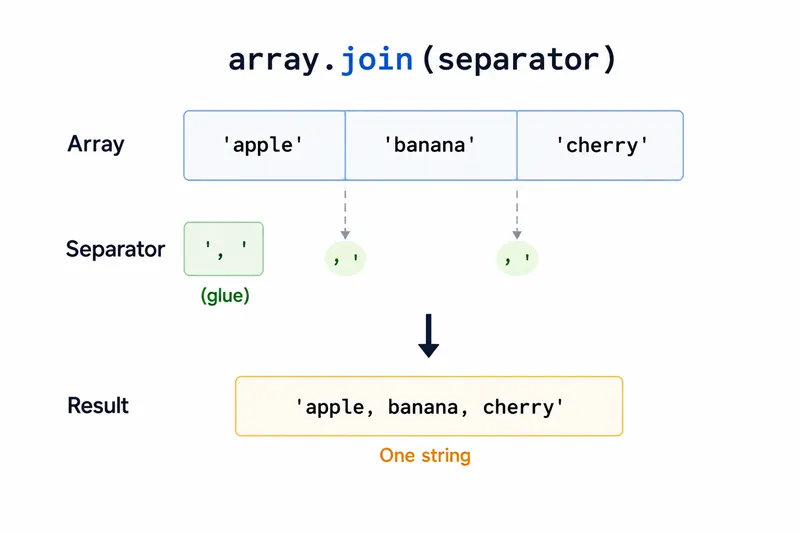
Use join() without an argument when you want a comma-separated string without spaces.
const colors = ["red", "green", "blue"];

console.log(colors.join());You should see one line logging red,green,blue.
This is the same separator used by array toString() for a normal flat array. For readable text, you may prefer a comma followed by a space, which is covered in the next method.
Method 2: Use a Custom Separator with join()
Pass a string to join() when you want control over how array elements are separated. This is useful for building readable lists, slugs, command output, labels, or simple delimited text.
const colors = ["red", "green", "blue"];

console.log(colors.join(", "));
console.log(colors.join(" | "));
console.log(colors.join("-"));You should see 3 lines, in order: red, green, blue, red | green | blue, red-green-blue.
The separator can contain one character, multiple characters, whitespace, or an empty string.
Join Array Elements with a Space
Use a single space as the separator when you want words from an array to become a normal sentence-like string.
const words = ["JavaScript", "join", "method"];

console.log(words.join(" "));You should see one line logging JavaScript join method.
Join Array Elements with an Empty String
Use an empty separator when you want to concatenate array elements directly.
const letters = ["J", "S"];

console.log(letters.join(""));You should see one line logging JS.
This pattern is common after splitting a string into characters, modifying the array, and joining the characters back into a string.
Method 3: Convert Numbers to a String with join()
The JavaScript join() method converts each array element to a string before joining it. This means numbers can be joined directly.
const dateParts = [2026, 6, 11];

console.log(dateParts.join("-"));You should see one line logging 2026-6-11.
If you need padded dates such as 2026-06-11, format the numbers first and then use join().
const year = 2026;
const month = String(6).padStart(2, "0");
const day = String(11).padStart(2, "0");

console.log([year, month, day].join("-"));You should see one line logging 2026-06-11.
Method 4: Use split() and join() Together
A common JavaScript pattern is to use split() to turn a string into an array, then use join() to convert the array back into a different string format.
const text = "red green blue";
const result = text.split(" ").join(", ");

console.log(result);You should see one line logging red, green, blue.
Here, split(" ") creates an array from words separated by spaces, and join(", ") creates a comma-separated string from that array.
Method 5: Handle null, undefined, and Empty Slots
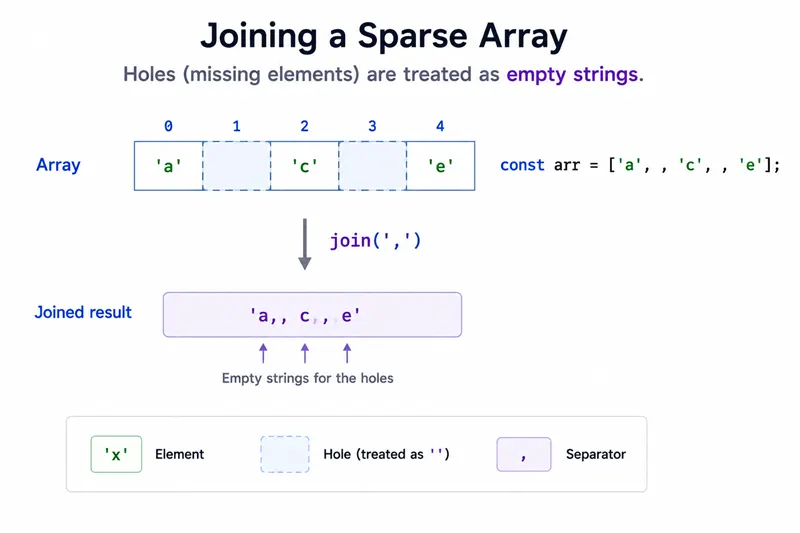
JavaScript join() has one behavior that often surprises beginners: null, undefined, and empty array slots are joined as empty strings.
const values = ["a", null, undefined, "d"];

console.log(values.join("|"));You should see one line logging a|||d.
The separators still appear because the array positions still exist. The values in the middle become empty strings.
Sparse arrays behave similarly:
const numbers = [1, , 3];

console.log(numbers.join("-"));You should see one line logging 1--3.
If you do not want empty output for missing values, filter or map the array before joining it.
const values = ["a", null, undefined, "d"];
const cleaned = values.filter((value) => value != null);

console.log(cleaned.join("|"));You should see one line logging a|d.
Method 6: Join Nested Arrays
When array elements are themselves arrays, JavaScript converts those inner arrays to strings before joining the outer array. Inner arrays use their own default comma behavior.
const matrix = [[1, 2], [3, 4]];

console.log(matrix.join(";"));You should see one line logging 1,2;3,4.
The semicolon separates the two inner arrays, while the values inside each inner array are still separated by commas. If you need full control over nested arrays, format each inner array first.
const matrix = [[1, 2], [3, 4]];
const rows = matrix.map((row) => row.join("-"));

console.log(rows.join(";"));You should see one line logging 1-2;3-4.
JavaScript join() vs toString()
For a normal flat array, array.toString() behaves like array.join() with no separator argument.
console.log([1, 2, 3].toString());
console.log([1, 2, 3].join());
console.log([1, 2, 3].toString() === [1, 2, 3].join());You should see 3 lines, in order: 1,2,3, 1,2,3, true.
Use join() when you want to choose the separator. Use toString() only when the default comma-separated format is enough.
Common Questions About JavaScript join()
What does join() do in JavaScript?
The join() method creates a new string by joining all elements of an array with a separator. If no separator is provided, JavaScript uses a comma.
Does join() change the original array?
No. join() returns a new string and leaves the original array unchanged.
What is the default separator in JavaScript join()?
The default separator is a comma with no space, so ["a", "b", "c"].join() returns a,b,c.
How do I join an array without commas in JavaScript?
Pass an empty string as the separator.
console.log(["J", "S"].join(""));You should see one line logging JS.
Why does join() show extra separators for null or undefined values?
null, undefined, and empty slots become empty strings during join(). The array positions still exist, so separators are still inserted between those positions.
Summary
join builds one string from array elements without mutating the array; null/undefined/holes become empty slots but still receive separators unless you filter first.
The JavaScript join() method is the standard way to convert an array to a string with a default comma separator or a custom separator. Use array.join(", ") for readable lists, array.join("") to combine characters without commas, and split().join() when you need to reformat strings. Remember that join() does not modify the original array, returns a string, treats null, undefined, and sparse array slots as empty strings, and converts nested arrays using their own string representation. These details make Array.prototype.join() useful for both beginner JavaScript examples and practical array-to-string formatting.
