
| Tested on | RHEL 10.2 (Coughlan) — vm1.lab.example (PXE server at 192.168.56.116), vm2.lab.example (netboot target) |
|---|---|
| Package | httpd 2.4.63-13.el10_2.5dnsmasq 2.90-7.el10_2tftp-server 5.2-50.el10_2syslinux-tftpboot 6.04-0.34.el10shim-x64 16.1-4.el10grub2-efi-x64 2.12-46.el10_2 |
| Applies to | RHEL, Rocky Linux, AlmaLinux, Oracle Linux, CentOS Stream, Fedora |
| Privilege | root on the PXE server; firmware boot access on install targets |
| Scope | Apache HTTP for kickstart and stage2, dnsmasq DHCP and TFTP, BIOS pxelinux and HTTP iPXE boot paths, NAT gateway for CDN installs, server-side netboot logs, and PXE troubleshooting on a two-VM VirtualBox lab. Does not cover kickstart file grammar or %pre/%post script catalogs. |
Before Anaconda reads your kickstart file, a PXE server must handle three jobs:
- DHCP — hand the client an IP address and a boot file name.
- Boot delivery — TFTP (
pxelinux.0) or HTTP (boot.ipxe) loads the installer kernel and initrd. - HTTP publish — serve
inst.stage2(install.img) and the kickstart URL (inst.ks).
This walkthrough builds that stack on RHEL 10 vm1 in a two-VM VirtualBox lab:
- dnsmasq on a host-only LAN (
192.168.56.0/24) for DHCP, TFTP, DNS forward, and NAT. - Apache for
inst.stage2andinst.ks. - BIOS pxelinux and HTTP iPXE boot paths tested against vm2.
Netboot flow (BIOS pxelinux path)
vm1 is a single server running dnsmasq and Apache. vm2 is the only install target. vm2 talks to vm1 several times, then pulls RPMs from the CDN directly (vm1 provides NAT and DNS only—not a package mirror).
vm2  (1) PXE boot on host-only NIC 192.168.56.x
  │
  ▼
vm1  (2) dnsmasq — DHCP: IP, router 192.168.56.116, DNS, bootfile pxelinux.0
  │  (3) dnsmasq — TFTP sends to vm2: pxelinux.0, pxelinux.cfg, vmlinuz, initrd
  │
vm2  (4) Kernel boots; Anaconda runs here (installer stays on the client)
  │
  ├──► vm1 Apache — HTTP GET install.img + .treeinfo     (inst.stage2)
  ├──► vm1 Apache — HTTP GET /ks/rhel10-pxe.cfg           (inst.ks)
  │
  ├──► vm1 dnsmasq — DNS lookup for cdn.redhat.com       (rhsm)
  └──► Red Hat CDN — HTTPS RPM download to vm2           (via vm1 NAT, not Apache)
  │
  ▼
vm2  (5) Reboot — installed RHEL on disk
| Phase | Where it runs | Protocol | What moves |
|---|---|---|---|
| Boot negotiation | vm1 dnsmasq | DHCP | Lease, router, DNS server, boot file name |
| Early boot files | vm1 dnsmasq → vm2 | TFTP | pxelinux.0, menu, vmlinuz, initrd.img |
| Installer runtime | vm2 (client RAM) | — | Anaconda starts after kernel load |
| Stage2 + kickstart | vm1 Apache → vm2 | HTTP | install.img, kickstart answer file |
| Packages | CDN → vm2 | HTTPS | RPMs after rhsm (vm1 NAT + DNS only) |
Apache on vm1 does not serve RPMs in this lab. TFTP does not serve install.img or the kickstart file. Those are separate phases, not vm2 → vm1 → TFTP → Apache as four different machines.
On the HTTP iPXE path, step 3 uses Apache instead of TFTP for vmlinuz and initrd. Steps 4–5 (stage2, kickstart, CDN) are the same.
Kickstart file content (ksvalidator, rhsm lines, %pre/%post) lives in Automate RHEL installation with Kickstart. The rest of this article covers what vm1 must serve and what the server logs should show when vm2 netboots.
Lab overview
The lab uses two VMs on a VirtualBox host-only network. The table below is the reference for the rest of the article unless physical hardware differs.
| Host | Role | Lab address | What it does |
|---|---|---|---|
| vm1 | PXE and kickstart server | 192.168.56.116 on enp0s8 |
Apache, dnsmasq DHCP and TFTP, NAT gateway for CDN package downloads |
| vm2 | Install target | 192.168.56.156 (fixed lease for the lab MAC) |
Netboots on the host-only NIC, loads rhel10-pxe.cfg from vm1, wiped on each run |
vm1 is a normal RHEL 10 system that acts as the server. vm2 is the reinstall target. Do not PXE boot a production host unless you intend to wipe its disk.
This article pairs with two kickstart files on vm1:
| File | URL | Use |
|---|---|---|
rhel10-pxe.cfg |
http://192.168.56.116/ks/rhel10-pxe.cfg |
This guide — minimal install for PXE walkthrough and screenshots below |
Before netbooting vm2, confirm these VirtualBox and sizing settings:
- Disable host-only DHCP on
192.168.56.1so only vm1 dnsmasq answers. - Set the dnsmasq router option to vm1 (
192.168.56.116), not the hypervisor default, when vm2 must reach the Red Hat CDN through vm1 NAT. - Assign 4 GiB+ RAM to vm2 for the minimal kickstart in this article (
@^minimal-environment). - For the separate full harness (
@^graphical-server-environment, bond, extra disks), use 6 GiB+ RAM and follow Automate RHEL installation with Kickstart. - Netboot on the NIC that gets
192.168.56.x, not NAT10.0.2.x.
Install server packages
On vm1, install HTTP, DHCP and TFTP, kickstart tooling, and boot loaders for pxelinux and UEFI shim:
sudo dnf install -y httpd dnsmasq tftp-server pykickstart syslinux-tftpboot shim-x64 grub2-efi-x64Confirm the expected packages are installed:
rpm -q httpd dnsmasq tftp-server pykickstart syslinux-tftpboothttpd-2.4.63-13.el10_2.5.x86_64
dnsmasq-2.90-7.el10_2.x86_64
tftp-server-5.2-50.el10.x86_64
pykickstart-3.52.12-1.el10.noarch
syslinux-tftpboot-6.04-0.34.el10.noarchMatching versions on your tree mean the package set aligns with this lab.
Publish kickstart over HTTP
During netboot, Anaconda fetches the kickstart file from a URL. This article uses the minimal lab file:
http://192.168.56.116/ks/rhel10-pxe.cfg
That file covers locale, one static network line, LVM on sda, rhsm, @^minimal-environment, rootpw, sshkey lines for passwordless SSH from vm1, and one short %post block that enables root SSH. It has no %pre section and no bond/GUI harness logic. Those live in rhel10-lab.cfg and the dedicated pre, post, and clearpart articles.
Copy the block below to /var/www/html/ks/rhel10-pxe.cfg and replace placeholders before netboot. Keep real credentials on vm1 only, not in git.
#version=RHEL10
# GoLinuxCloud PXE lab — minimal kickstart (netboot screenshots in this article)
# Full harness (GUI, bond, ignoredisk, %pre/%post): rhel10-lab.cfg — kickstart guide

lang en_US.UTF-8
eula --agreed
keyboard us
timezone Asia/Kolkata --utc
timesource --ntp-server 0.rhel.pool.ntp.org

network --bootproto=static --device=08:00:27:7b:9e:bd --ip=192.168.56.156 --netmask=255.255.255.0 --gateway=192.168.56.116 --nameserver=192.168.56.116,8.8.8.8 --activate
network --hostname=vm2.lab.example

authselect select sssd with-fingerprint --force

rootpw CHANGEME_ROOT --plaintext
user --name=admin --groups=wheel --password=CHANGEME --plaintext
sshkey --username=admin "ssh-ed25519 AAAA...admin-key-comment"
sshkey --username=admin "ssh-ed25519 AAAA...second-key-comment"
sshkey --username=root "ssh-ed25519 AAAA...admin-key-comment"
sshkey --username=root "ssh-ed25519 AAAA...second-key-comment"

zerombr
clearpart --all --initlabel --drives=sda
autopart --type=lvm --nohome

bootloader --location=mbr --append="crashkernel=auto"
firewall --enabled --ssh
selinux --enforcing
services --enabled=chronyd,sshd
firstboot --disable

rhsm --organization=ORG_ID --activation-key=ACTIVATION_KEY_NAME

reboot

%packages --ignoremissing
@^minimal-environment
openssh-server
chrony
%end

%post --log=/var/log/kickstart_post.log
#!/bin/bash
cat > /etc/ssh/sshd_config.d/01-lab-ssh.conf << 'SSHEOF'
# Lab only — rootpw plus sshkey for password and key login
PermitRootLogin yes
PasswordAuthentication yes
PubkeyAuthentication yes
SSHEOF
%end
Save the file on vm1 and restrict permissions:
sudo mkdir -p /var/www/html/ks
sudo install -m 0640 rhel10-pxe.cfg /var/www/html/ks/rhel10-pxe.cfg
sudo chown root:apache /var/www/html/ks/rhel10-pxe.cfg
Run ksvalidator on the file before netboot (see Validate with ksvalidator).
Verify Apache serves the kickstart URL locally:
curl -sI http://127.0.0.1/ks/rhel10-pxe.cfgHTTP/1.1 200 OK
Server: Apache/2.4.63 (Red Hat Enterprise Linux)A 200 OK response means vm2 should be able to fetch the same path during PXE. When the kickstart file contains rhsm credentials:
- Restrict permissions (
chmod 640, ownerroot, groupapache). - On a disposable lab LAN that is often enough.
- In production, prefer HTTPS, network ACLs, or short-lived activation keys.
Publish local stage2 (install.img) from RHEL 10 DVD
Network boot still needs a tree for the installer runtime. The PXE kernel line sets inst.stage2= to a path that contains:
.treeinfoand.discinfoimages/install.imgimages/pxeboot/(for TFTP or HTTP kernel delivery)
The lab copies only those pieces from a RHEL 10 DVD ISO onto vm1. Package RPMs still come from the CDN after rhsm registers the installer in the kickstart file. vm1 does not need a full local mirror for that workflow.
Download the full installation DVD (for example rhel-10.2-x86_64-dvd.iso), not the minimal boot ISO alone:
- Subscribed accounts: Red Hat Customer Portal RHEL downloads (How to download RHEL 10)
- No-cost developer subscription: Download RHEL on Red Hat Developer after activating the entitlement
Mount the ISO and copy stage2 plus PXE kernels:
ISO=/path/to/rhel-10.2-x86_64-dvd.iso
MNT=/mnt/rhel-dvd
DST=/var/www/html/rhel10/BaseOS/x86_64/os
sudo mkdir -p "$MNT" "$DST/images/pxeboot" /var/lib/tftpboot/images/pxeboot
sudo mount -o loop "$ISO" "$MNT"
sudo cp "$MNT/.treeinfo" "$MNT/.discinfo" "$DST/"
sudo cp "$MNT/images/install.img" "$DST/images/"
sudo cp -a "$MNT/images/pxeboot/"* /var/lib/tftpboot/images/pxeboot/
sudo umount "$MNT"
vmlinuz and initrd.img under /var/lib/tftpboot/images/pxeboot/ must match the RHEL 10 release you install. Do not mix Rocky or Alma boot media with a RHEL rhsm kickstart.
Configure vm1 for PXE netboot
dnsmasq, boot files, and service startup belong together on vm1. Complete all three before netbooting vm2.
Configure dnsmasq DHCP, DNS, and TFTP
On vm1, dnsmasq on the lab LAN (enp0s8) does three jobs for netboot clients:
- DHCP — lease, router option, boot file name (
pxelinux.0or HTTPboot.ipxe). - TFTP —
pxelinux.0, menu,vmlinuz, andinitrd.imgfor BIOS PXE. - DNS forward — install targets on
192.168.56.xquery vm1; dnsmasq forwards to upstream resolvers.
The router option (dhcp-option=option:router,192.168.56.116) points vm2 at vm1 as the default gateway so CDN traffic can leave through NAT after the install starts.
rhsm needs DNS during the install. vm2 only has a host-only link to vm1; VirtualBox does not provide useful DNS on that segment. Include dhcp-option=option:dns-server,192.168.56.116 and server= forwarders in dnsmasq, and add the dns firewalld service below. Without both, rhsm often fails with name resolution errors while HTTP and DHCP still look fine.
Create /etc/dnsmasq.d/pxe-kickstart.conf:
interface=enp0s8
bind-dynamic
except-interface=lo
log-dhcp
dhcp-authoritative

dhcp-range=192.168.56.150,192.168.56.160,255.255.255.0,2h
dhcp-option=option:router,192.168.56.116

dhcp-boot=http://192.168.56.116/pxe/boot.ipxe

dhcp-match=set:bios,option:client-arch,0
dhcp-boot=tag:bios,pxelinux.0,vm1.lab.example,192.168.56.116

enable-tftp
tftp-root=/var/lib/tftpboot

dhcp-option=option:dns-server,192.168.56.116
server=8.8.8.8
server=1.1.1.1
dhcp-host=08:00:27:7b:9e:bd,192.168.56.156,2h
Key lines in that file:
- Untagged
dhcp-boot— HTTPboot.ipxefor UEFI clients with built-in iPXE. dhcp-boot=tag:bios,...—pxelinux.0for legacy BIOS PXE.dhcp-option=option:dns-serverandserver=— DNS for clients; forwarders forrhsm/ CDN lookups.dhcp-host— optional fixed lease for vm2’s MAC (192.168.56.156), matching staticnetworklines in the lab kickstart file.
Enable forwarding, masquerade, and firewall services:
sudo sysctl -w net.ipv4.ip_forward=1
sudo firewall-cmd --permanent --add-masquerade
sudo firewall-cmd --permanent --add-service=http --add-service=dhcp --add-service=tftp --add-service=dns
sudo firewall-cmd --reload
Masquerade lets vm2 use vm1 as a gateway. The dns service allows dnsmasq to answer client DNS queries through firewalld.
Create PXE boot files
VirtualBox UEFI often fails after TFTP loads EFI/BOOT/BOOTX64.EFI or grubx64.efi with Exec format error, because built-in iPXE cannot chainload those binaries. Physical hardware usually handles shim and GRUB without that problem.
For this lab, use two boot paths:
- HTTP iPXE script — loads
vmlinuzandinitrddirectly over HTTP (works better on VirtualBox UEFI). - BIOS pxelinux —
pxelinux.0withIPAPPEND 2so kickstart%precan readBOOTIFand match the install NIC by MAC.
Symlink kernels into the Apache tree and create the iPXE script:
sudo mkdir -p /var/www/html/pxe /var/www/html/images/pxeboot
sudo ln -sf /var/lib/tftpboot/images/pxeboot/vmlinuz /var/www/html/images/pxeboot/vmlinuz
sudo ln -sf /var/lib/tftpboot/images/pxeboot/initrd.img /var/www/html/images/pxeboot/initrd.img
sudo tee /var/www/html/pxe/boot.ipxe >/dev/null <<'EOF'
#!ipxe
kernel http://192.168.56.116/images/pxeboot/vmlinuz inst.ks=http://192.168.56.116/ks/rhel10-pxe.cfg inst.text ip=dhcp net.ifnames=0 inst.stage2=http://192.168.56.116/rhel10/BaseOS/x86_64/os/ initrd=images/pxeboot/initrd.img
initrd http://192.168.56.116/images/pxeboot/initrd.img
boot
EOF
Verify Apache serves the script:
curl -sI http://127.0.0.1/pxe/boot.ipxeHTTP/1.1 200 OK
Server: Apache/2.4.63 (Red Hat Enterprise Linux)Configure BIOS pxelinux:
sudo cp /tftpboot/pxelinux.0 /tftpboot/ldlinux.c32 /var/lib/tftpboot/
sudo mkdir -p /var/lib/tftpboot/pxelinux.cfg
sudo tee /var/lib/tftpboot/pxelinux.cfg/default >/dev/null <<'EOF'
DEFAULT linux
LABEL linux
  KERNEL images/pxeboot/vmlinuz
  APPEND initrd=images/pxeboot/initrd.img inst.ks=http://192.168.56.116/ks/rhel10-pxe.cfg inst.text ip=dhcp net.ifnames=0 inst.stage2=http://192.168.56.116/rhel10/BaseOS/x86_64/os/
  IPAPPEND 2
EOF
On physical UEFI that chainloads shim cleanly, place BOOTX64.EFI under /var/lib/tftpboot/EFI/BOOT/ and point dhcp-boot there instead of HTTP iPXE.
Start services
Only one daemon should bind TFTP port 69. Disable standalone tftp.socket and let dnsmasq serve TFTP:
sudo systemctl disable --now tftp.socketOn RHEL, tftp-server uses socket activation:
tftp.socketlistens on UDP 69 and triggerstftp.service.tftp.servicehasRequires=tftp.socketin its unit file.
With the socket disabled and stopped, in.tftpd does not bind port 69. A separate disable on tftp.service is not required for the lab. Do not run systemctl start tftp.service while dnsmasq TFTP is enabled, or both daemons will compete for port 69.
Start Apache and dnsmasq:
sudo systemctl enable --now httpd dnsmasqConfirm both daemons are active:
systemctl is-active dnsmasq httpdactive
activeFix any inactive unit before netbooting vm2.
Netboot the install target (vm2)
On vm2, check the following before each lab run:
- Disk wipe is intentional — kickstart
clearpartdestroys data on the install disk. - Boot from Network on the host-only NIC — the adapter that gets
192.168.56.x, not NAT10.0.2.x. - Tail vm1 logs during boot — dnsmasq and Apache access log (see Monitor server logs during PXE netboot).
| Boot method | How inst.ks reaches Anaconda |
|---|---|
| PXE (this lab) | inst.ks= in boot.ipxe or pxelinux.cfg/default |
| Installer ISO | Tab at the boot menu, append inst.ks=http://... |
| Custom ISO | Embedded kickstart (see create custom ISO) |
When PXE troubleshooting blocks progress, boot an installer ISO and append the same kickstart URL on the kernel line. That still validates kickstart and repositories without TFTP:
inst.ks=http://192.168.56.116/ks/rhel10-pxe.cfg inst.text ip=dhcpMonitor server logs during PXE netboot
While vm2 netboots, watch vm1 in two terminals. The client IP and MAC in the examples below match a lab run (192.168.56.156, 08:00:27:7b:9e:bd). Your values will differ; the sequence should match.
Terminal 1 — dnsmasq DHCP and TFTP:
sudo journalctl -u dnsmasq -fTerminal 2 — HTTP requests to kickstart and stage2:
sudo tail -f /var/log/httpd/access_logTo reduce noise in the dnsmasq stream:
sudo journalctl -u dnsmasq -f | grep -iE 'DHCP|TFTP|sent|cannot|bootfile'Stage 1 — DHCP discover and boot file offer
Expect the client MAC, lease address, and boot file name. BIOS clients should see pxelinux.0. UEFI iPXE may show the HTTP boot.ipxe URL.
dnsmasq-dhcp[123616]: DHCPDISCOVER(enp0s8) 08:00:27:7b:9e:bd
dnsmasq-dhcp[123616]: tags: bios, enp0s8
dnsmasq-dhcp[123616]: DHCPOFFER(enp0s8) 192.168.56.156 08:00:27:7b:9e:bd
dnsmasq-dhcp[123616]: next server: 192.168.56.116
dnsmasq-dhcp[123616]: sent size: 11 option: 67 bootfile-name  pxelinux.0
dnsmasq-dhcp[123616]: sent size:  4 option:  3 router  192.168.56.116
A lease on 10.0.2.x means vm2 netbooted on NAT instead of the host-only adapter. Fix boot order or adapter choice before debugging kickstart.
Stage 2 — TFTP loads pxelinux and the boot menu
After DHCP, the client TFTPs the bootloader, ldlinux.c32, and pxelinux.cfg/default.
dnsmasq-tftp[123616]: sent /var/lib/tftpboot/pxelinux.0 to 192.168.56.156
dnsmasq-tftp[123616]: sent /var/lib/tftpboot/ldlinux.c32 to 192.168.56.156
dnsmasq-tftp[123616]: sent /var/lib/tftpboot/pxelinux.cfg/default to 192.168.56.156
dnsmasq may probe several pxelinux.cfg/... paths (MAC-based names) before falling back to default. That is normal.
Stage 3 — TFTP loads installer kernel and initrd
pxelinux reads KERNEL and APPEND from default, then TFTP pulls vmlinuz and initrd.img. The initrd transfer can take a minute.
dnsmasq-tftp[123616]: sent /var/lib/tftpboot/images/pxeboot/vmlinuz to 192.168.56.156
dnsmasq-tftp[123616]: sent /var/lib/tftpboot/images/pxeboot/initrd.img to 192.168.56.156
When TFTP fails here, the client often shows Loading images/pxeboot/vmlinuz... failed. A typical server-side line:
dnsmasq-tftp[123616]: cannot access /var/lib/tftpboot/images/pxeboot/vmlinuz: Permission deniedConfirm the files exist and SELinux context is correct (restorecon -Rv /var/lib/tftpboot).
Stage 4 — HTTP kickstart, stage2, and install.img
Once the kernel runs, traffic moves to HTTP. Look for .treeinfo, a large install.img download, and the kickstart file.
192.168.56.156 - - [09/Aug/2026:14:14:48 +0530] "GET /rhel10/BaseOS/x86_64/os/.treeinfo HTTP/1.1" 200 532
192.168.56.156 - - [09/Aug/2026:14:14:48 +0530] "GET /rhel10/BaseOS/x86_64/os/images/install.img HTTP/1.1" 200 780152832
192.168.56.156 - - [09/Aug/2026:14:15:04 +0530] "GET /ks/rhel10-pxe.cfg HTTP/1.1" 200 520
After rhsm registers the installer, RPMs download from cdn.redhat.com. Those requests do not appear in vm1’s Apache log. That is expected.
Stage 5 — UEFI HTTP iPXE path
On firmware with built-in iPXE, DHCP may offer the HTTP script instead of pxelinux.0:
dnsmasq-dhcp[123616]: bootfile name: http://192.168.56.116/pxe/boot.ipxeApache then serves the script and kernels. On VirtualBox UEFI, BIOS pxelinux (Stages 1–3) is often more reliable than shim chainload.
Lab netboot screenshots
Screenshots from the two-VM lab using rhel10-pxe.cfg (@^minimal-environment, single NIC, LVM on sda, text-mode Anaconda with inst.text). They match the minimal kickstart in this article, not the full rhel10-lab.cfg harness (GUI, bond, %pre/%post). You do not need new screenshots unless you change the PXE kickstart URL away from rhel10-pxe.cfg.
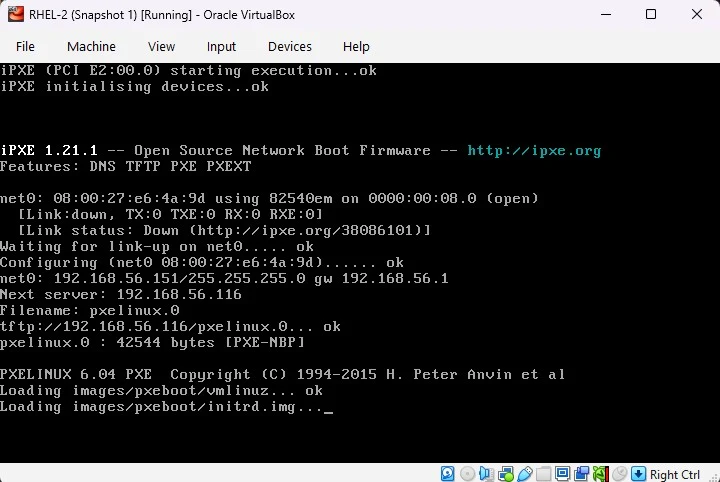
Phase 1 — PXE DHCP and pxelinux load the installer kernel. On the host-only NIC, expect 192.168.56.x, next server 192.168.56.116, then TFTP loading pxelinux.0, vmlinuz, and initrd.img.
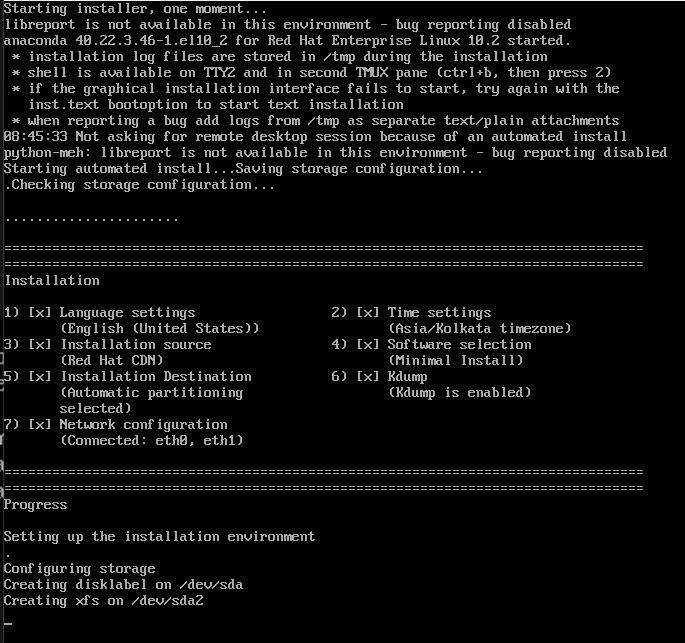
Phase 2 — Anaconda applies kickstart. Language, software selection, partitioning, and network checks should show complete before install starts.
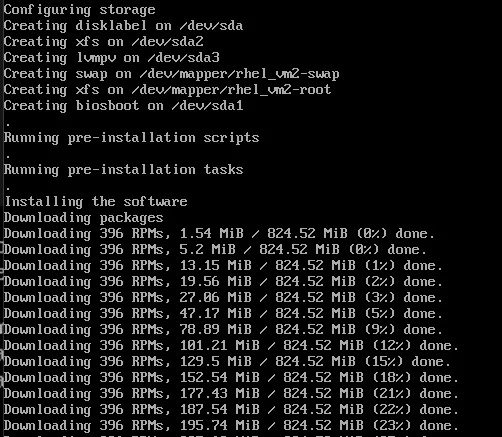
Phase 3 — Storage layout and package download. LVM on sda, then RPM download from the Red Hat CDN (through vm1 NAT in the lab).
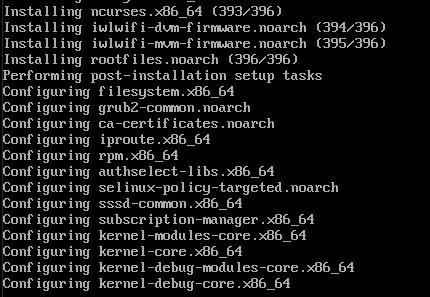
Phase 4 — Package installation. Anaconda finishes installing the minimal environment group and dependencies from the CDN after rhsm registers the installer.
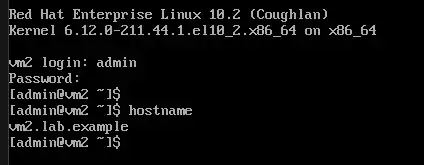
Phase 5 — Post-install login. After reboot, log in as the kickstart admin user on a text console (multi-user.target). Hostname vm2 and Red Hat Enterprise Linux 10 confirm a fresh install. A GUI login appears only when you install @^graphical-server-environment and set graphical.target (the full harness in the kickstart guide).
Verify the minimal install after reboot
From vm1 (or any host on 192.168.56.0/24), log in as the kickstart user (ssh admin@192.168.56.156 with the user password from your kickstart file). The checks below are from a lab run after netboot with rhel10-pxe.cfg.
Confirm the installed release:
cat /etc/redhat-releaseRed Hat Enterprise Linux release 10.2 (Coughlan)Check the FQDN from the kickstart network --hostname= line:
hostname -fvm2.lab.exampleThe default target should stay multi-user for the minimal environment (text console login in Phase 5):
systemctl get-defaultmulti-user.targetrootpw in kickstart should leave an active root password (P in the status field):
passwd -S rootroot P never 0 99999 7 -1List installed environment groups to confirm @^minimal-environment:
dnf grouplist --installed hidden | grep -A4 "Installed Environment"Installed Environment Groups:
Minimal Install
Installed Groups:
CoreInspect block devices and mount points:
lsblk -o NAME,SIZE,TYPE,FSTYPE,MOUNTPOINTNAME SIZE TYPE FSTYPE MOUNTPOINT
sda 10G disk
└─sda1 10G part LVM2_member
└─rhel_vm2-root 25G lvm xfs /
sdb 20G disk
├─sdb1 1M part
├─sdb2 2G part xfs /boot
└─sdb3 18G part LVM2_member
├─rhel_vm2-root 25G lvm xfs /
└─rhel_vm2-swap 3G lvm swap [SWAP]Confirm the lab NIC address from the static network line:
ip -br addrlo UNKNOWN 127.0.0.1/8 ::1/128
eth0 UP 192.168.56.156/24 fe80::a00:27ff:fe7b:9ebd/64
eth1 UP
eth2 UP
eth3 UPrhsm in the kickstart file should leave the system registered:
subscription-manager statusOverall Status: RegisteredThe short %post block should have dropped the lab sshd drop-in:
cat /etc/ssh/sshd_config.d/01-lab-ssh.conf# Lab only — rootpw plus sshkey for password and key login
PermitRootLogin yes
PasswordAuthentication yes
PubkeyAuthentication yesTogether, these checks confirm @^minimal-environment, static eth0 at 192.168.56.156, text-mode boot target, RHSM registration, and SSH settings from rhel10-pxe.cfg.
If lsblk shows LVM on both sda and sdb, the minimal kickstart only runs clearpart --drives=sda. An old layout on sdb from a prior lab reinstall can leave a second physical volume in the same rhel_vm2 volume group. Wipe or remove sdb partitions before netboot when you need a single-disk layout, or add ignoredisk / clearpart for sdb in a custom file.
If lsblk shows LVM on both sda and sdb, the minimal kickstart only runs clearpart --drives=sda. An old layout on sdb from a prior lab reinstall can leave a second physical volume in the same rhel_vm2 volume group. Wipe or remove sdb partitions before netboot when you need a single-disk layout, or add ignoredisk / clearpart for sdb in a custom file.
Troubleshoot PXE and network boot
Common failures from the VirtualBox lab: DHCP on the wrong NIC, TFTP port conflicts, missing inst.stage2, or DNS blocked when rhsm runs. The kickstart file can be correct while PXE still fails.
| Symptom | Likely cause | Fix |
|---|---|---|
| F12 boots the existing OS | PXE on NAT (10.0.2.x) instead of host-only LAN |
Boot from 192.168.56.x; confirm dnsmasq logs show the client MAC |
Exec format error after TFTP loads an EFI file |
VirtualBox iPXE cannot chainload shim or GRUB | Use HTTP boot.ipxe; or disable EFI and use BIOS pxelinux.0 |
nothing to boot: no such file or directory |
Empty boot filename in the DHCP ACK | Untagged dhcp-boot or HTTP boot.ipxe URL; confirm filename in dnsmasq logs |
| TFTP works from vm1 but not from the client | tftp.socket and dnsmasq both on port 69 |
systemctl disable --now tftp.socket; use dnsmasq enable-tftp only |
| Frozen after kernel lines | No internet on host-only LAN, missing inst.stage2, or low RAM |
vm1 as gateway with masquerade; publish local stage2; 4 GiB+ RAM on target |
| Initrd loaded but installer never starts | Bad inst.stage2 URL |
Serve .treeinfo, .discinfo, images/install.img on vm1 HTTP |
rhsm / CDN errors after PXE succeeds |
DNS blocked on firewalld, wrong gateway, or extra NIC stole default route | Add dns to firewalld; set router to vm1; for bond/VLAN in rhel10-lab.cfg, use --nodefroute on those interfaces |
| Intermittent DHCP or wrong gateway | VirtualBox host-only DHCP competes with dnsmasq | Disable DHCP on the host-only network in VirtualBox Host Network Manager |
| VirtualBox hang during kernel load | VirtIO NIC PXE quirks | Set NIC model to Intel PRO/1000 MT Desktop (e1000) |
When logs still look unclear, run these on the PXE server:
sudo journalctl -u dnsmasq --since '5 min ago' | grep -iE 'DHCP|TFTP|bootfile|192.168.56'Confirm the iPXE script still answers over HTTP:
curl -sI http://127.0.0.1/pxe/boot.ipxeCheck that the kernel symlinks under Apache point at real files:
ls -l /var/www/html/images/pxeboot/vmlinuz /var/www/html/images/pxeboot/initrd.imgIf TFTP and HTTP succeed on vm1 but the client stops after downloading an EFI binary, the firmware likely cannot chainload it. Switch to HTTP boot.ipxe or BIOS pxelinux before rewriting the kickstart file.
References
- Red Hat Enterprise Linux 10 — Performing a network installation
- Red Hat Enterprise Linux 10 — Automatically installing RHEL
- dnsmasq manual — DHCP and TFTP options
Summary
A Kickstart PXE server answers DHCP, serves a boot file over TFTP or HTTP, and publishes inst.stage2 and inst.ks over Apache. vm1 also forwards DNS and NAT so install targets can register with rhsm and pull packages from the CDN. The lab exercises both BIOS pxelinux and HTTP iPXE on a host-only LAN.
Wire the network boot path here, then pair it with a validated kickstart from Automate RHEL installation with Kickstart. If VirtualBox UEFI fails on shim chainload, try HTTP boot.ipxe or BIOS pxelinux before assuming the kickstart file is wrong.
Frequently Asked Questions
Can dnsmasq replace separate DHCP and TFTP servers for PXE?
Yes. dnsmasq can answer DHCP, advertise a boot file, and serve TFTP from one daemon when enable-tftp and tftp-root are set. Disable standalone tftp.socket so only one process binds port 69.
Why use HTTP iPXE instead of shim and GRUB for VirtualBox UEFI?
VirtualBox built-in iPXE often downloads shim or GRUB over TFTP but fails to chainload them with Exec format error. An HTTP boot.ipxe script loads vmlinuz and initrd directly and avoids broken EFI chainloading in the lab.
Do I need inst.repo on the PXE kernel line when kickstart uses rhsm?
No for CDN-only RHEL installs. Publish inst.stage2 locally for install.img and set inst.ks to your kickstart URL. Let rhsm in the kickstart file register the installer and pull RPMs from the Red Hat CDN.
Why does the PXE client get 10.0.2.x instead of the lab LAN?
The VM netbooted on NAT instead of the host-only adapter. Boot from the NIC on 192.168.56.x and confirm dnsmasq logs show the client MAC on the expected interface.
